door lock CADILLAC XTS 2013 1.G Service Manual
[x] Cancel search | Manufacturer: CADILLAC, Model Year: 2013, Model line: XTS, Model: CADILLAC XTS 2013 1.GPages: 438, PDF Size: 7.4 MB
Page 267 of 438
Black plate (39,1)Cadillac XTS Owner Manual - 2013 - 1st - 4/13/12
Driving and Operating 9-39
WARNING (CONTINUED)
when using ACC. Your complete
attention is always required while
driving and you should be ready
to take action and apply the
brakes.
ACC Automatically Disengages
ACC may automatically disengage
and the driver will need to manually
apply the brakes to slow the
vehicle when:
.The sensors are blocked.
.There is no traffic or other
objects to detect.
.There is a fault in the system.
The ACC active symbol will not be
displayed when ACC is no longer
active. Notification to Resume ACC
ACC will maintain a follow gap
behind a detected vehicle and slow
your vehicle to a stop behind that
vehicle.
If the vehicle ahead has driven
away and ACC has not resumed,
the vehicle ahead symbol will flash
as a reminder. In addition, the left
and right sides of the Safety Alert
Seat will pulse three times, or three
beeps will sound. See
”Alert Type”
and “Go Notifier” in“Collision/
Detection Systems” underVehicle
Personalization on page 5‑44.
When the vehicle ahead drives
away, press RES+ or the
accelerator pedal to resume cruise
control. If stopped for more than
two minutes or if the driver door is
opened and the driver safety belt is
unbuckled, the ACC automatically
applies the electric parking brake to
hold the vehicle. The electric
parking brake status light will turn
on. See Electric Parking Brake on
page 9‑26. To resume ACC and release the electric parking brake,
press the accelerator pedal and
then RES+.
{WARNING
If ACC has stopped the vehicle,
and if ACC is disengaged, turned
off, or canceled, the vehicle will
no longer be held at a stop. The
vehicle can move. When ACC is
holding the vehicle at a stop,
always be prepared to manually
apply the brakes.
{WARNING
Leaving the vehicle without
placing it in P (Park) can be
dangerous. Do not leave the
vehicle while it is being held at a
stop by ACC. Always place the
vehicle in P (Park) and turn off
the ignition before leaving the
vehicle.
Page 323 of 438
Black plate (29,1)Cadillac XTS Owner Manual - 2013 - 1st - 4/13/12
Vehicle Care 10-29
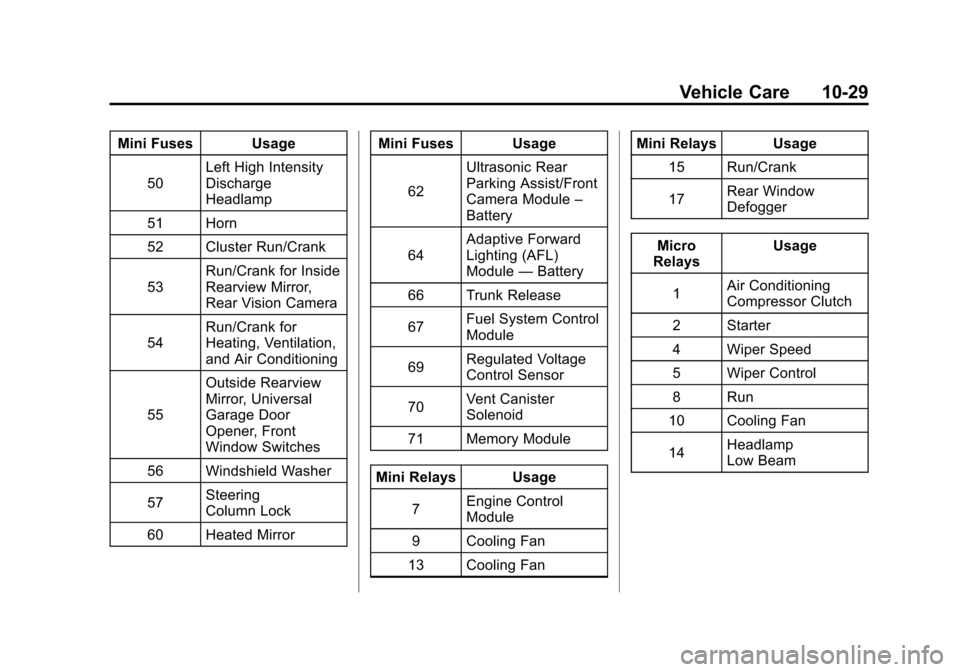
Mini Fuses Usage50 Left High Intensity
Discharge
Headlamp
51 Horn
52 Cluster Run/Crank
53 Run/Crank for Inside
Rearview Mirror,
Rear Vision Camera
54 Run/Crank for
Heating, Ventilation,
and Air Conditioning
55 Outside Rearview
Mirror, Universal
Garage Door
Opener, Front
Window Switches
56 Windshield Washer
57 Steering
Column Lock
60 Heated Mirror Mini Fuses Usage
62 Ultrasonic Rear
Parking Assist/Front
Camera Module
–
Battery
64 Adaptive Forward
Lighting (AFL)
Module
—Battery
66 Trunk Release
67 Fuel System Control
Module
69 Regulated Voltage
Control Sensor
70 Vent Canister
Solenoid
71 Memory Module
Mini Relays Usage 7 Engine Control
Module
9 Cooling Fan
13 Cooling Fan Mini Relays Usage
15 Run/Crank
17 Rear Window
Defogger
Micro
Relays Usage
1 Air Conditioning
Compressor Clutch
2 Starter
4 Wiper Speed
5 Wiper Control
8 Run
10 Cooling Fan
14 Headlamp
Low Beam
Page 324 of 438

Black plate (30,1)Cadillac XTS Owner Manual - 2013 - 1st - 4/13/12
10-30 Vehicle Care
Instrument Panel Fuse
Block
The instrument panel fuse block is
located in the instrument panel, on
the driver side of the vehicle. To
access the fuses, open the fuse
panel door by pulling down at
the top.
Press in on the sides of the door to
release it from the instrument panel.
Pull the door toward you to release
it from the hinge.
The vehicle may not be equipped
with all of the fuses, relays, and
features shown.Fuses Usage
1 OnStar
2 Body Control
Module 7
3 Body Control
Module 5
4 Radio Fuses
Usage
5 Infotainment and
Center Stack
Displays, Head-up
Display, Instrument
Cluster, Rear Seat
Entertainment
6 Power Outlet 1
7 Power Outlet 2
8 Body Control
Module 1
9 Body Control
Module 4
10 Body Control
Module 8
(J-Case Fuse)
11 Front Heater
Ventilation Air
Conditioning/Blower
(J-Case Fuse)
12 Passenger Seat
(Circuit Breaker)
13 Driver Seat (Circuit
Breaker)
Page 354 of 438

Black plate (60,1)Cadillac XTS Owner Manual - 2013 - 1st - 4/13/12
10-60 Vehicle Care
1. Remove the tire sealant andcompressor kit from its storage
location. See Storing the Tire
Sealant and Compressor Kit on
page 10‑65.
2. Unwrap the sealant/air hose (6) and the power plug (8).
3. Place the kit on the ground. Make sure the tire valve stem is
positioned close to the ground
so the hose will reach it.
4. Remove the valve stem cap from the flat tire by turning it
counterclockwise.
5. Attach the sealant/air hose (6) onto the tire valve stem. Turn it
clockwise until it is tight. 6. Plug the power plug (8) into the
accessory power outlet in the
vehicle. Unplug all items from
other accessory power outlets.
See Power Outlets on page 5‑6.
If the vehicle has an accessory
power outlet, do not use the
cigarette lighter.
If the vehicle only has a cigarette
lighter, use the cigarette lighter.
Do not pinch the power plug
cord in the door or window.
7. Start the vehicle. The vehicle must be running while using the
air compressor.
8. Press and turn the selector switch (1) counterclockwise to
the Sealant + Air position. 9. Press the on/off button (2) to
turn the tire sealant and
compressor kit on.
The compressor will inject
sealant and air into the tire.
The pressure gauge (3) will
initially show a high pressure
while the compressor pushes the
sealant into the tire. Once the
sealant is completely dispersed
into the tire, the pressure will
quickly drop and start to rise
again as the tire inflates with
air only.
10. Inflate the tire to the recommended inflation
pressure using the pressure
gauge (3). The recommended
inflation pressure can be found
on the Tire and Loading
Information label. See Tire
Pressure on page 10‑41.
Page 357 of 438
Black plate (63,1)Cadillac XTS Owner Manual - 2013 - 1st - 4/13/12
Vehicle Care 10-63
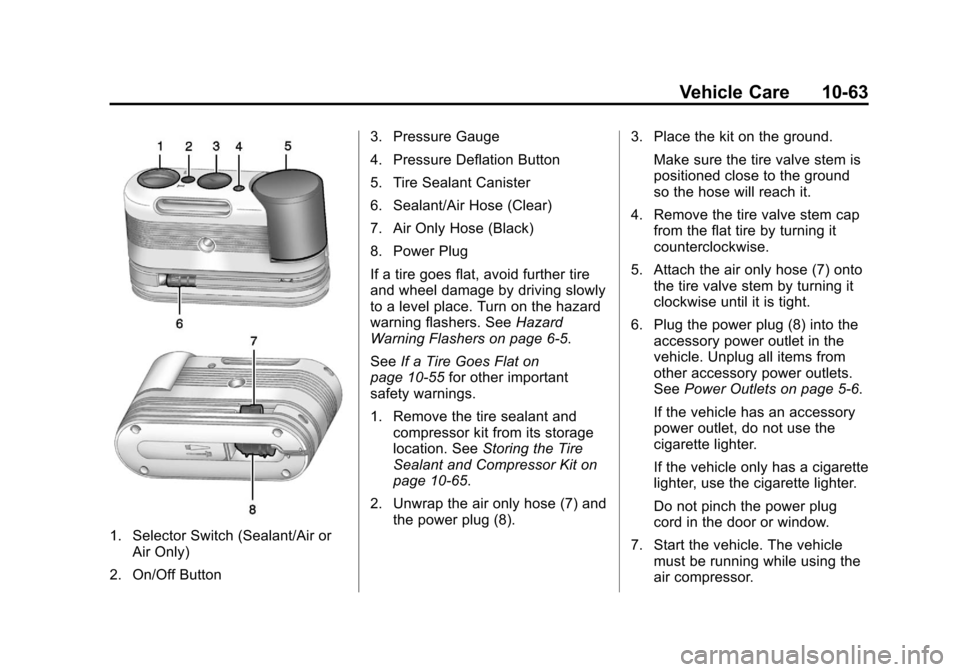
1. Selector Switch (Sealant/Air orAir Only)
2. On/Off Button 3. Pressure Gauge
4. Pressure Deflation Button
5. Tire Sealant Canister
6. Sealant/Air Hose (Clear)
7. Air Only Hose (Black)
8. Power Plug
If a tire goes flat, avoid further tire
and wheel damage by driving slowly
to a level place. Turn on the hazard
warning flashers. See
Hazard
Warning Flashers on page 6‑5.
See If a Tire Goes Flat on
page 10‑55 for other important
safety warnings.
1. Remove the tire sealant and compressor kit from its storage
location. See Storing the Tire
Sealant and Compressor Kit on
page 10‑65.
2. Unwrap the air only hose (7) and the power plug (8). 3. Place the kit on the ground.
Make sure the tire valve stem is
positioned close to the ground
so the hose will reach it.
4. Remove the tire valve stem cap from the flat tire by turning it
counterclockwise.
5. Attach the air only hose (7) onto the tire valve stem by turning it
clockwise until it is tight.
6. Plug the power plug (8) into the accessory power outlet in the
vehicle. Unplug all items from
other accessory power outlets.
See Power Outlets on page 5‑6.
If the vehicle has an accessory
power outlet, do not use the
cigarette lighter.
If the vehicle only has a cigarette
lighter, use the cigarette lighter.
Do not pinch the power plug
cord in the door or window.
7. Start the vehicle. The vehicle must be running while using the
air compressor.
Page 373 of 438
Black plate (79,1)Cadillac XTS Owner Manual - 2013 - 1st - 4/13/12
Vehicle Care 10-79
check constant velocity joints,
rubber boots, and axle seals for
leaks.
Body Component Lubrication
Lubricate all key lock cylinders,
hood hinges, liftgate hinges, and the
steel fuel door hinge unless the
components are plastic. Applying
silicone grease on weatherstrips
with a clean cloth will make them
last longer, seal better, and not stick
or squeak.
Underbody Maintenance
Use plain water to flush dirt and
debris from the vehicle's underbody.
Your dealer or an underbody car
washing system can do this. If not
removed, rust and corrosion can
develop.
Sheet Metal Damage
If the vehicle is damaged and
requires sheet metal repair or
replacement, make sure the body
repair shop applies anti-corrosionmaterial to parts repaired or
replaced to restore corrosion
protection.
Original manufacturer replacement
parts will provide the corrosion
protection while maintaining the
vehicle warranty.
Finish Damage
Quickly repair minor chips and
scratches with touch-up materials
available from your dealer to avoid
corrosion. Larger areas of finish
damage can be corrected in your
dealer's body and paint shop.
Chemical Paint Spotting
Airborne pollutants can fall upon
and attack painted vehicle surfaces
causing blotchy, ring-shaped
discolorations, and small, irregular
dark spots etched into the paint
surface.
Interior Care
To prevent dirt particle abrasions,
regularly clean the vehicle's interior.
Immediately remove any soils. Note
that newspapers or dark garments
that can transfer color to home
furnishings can also permanently
transfer color to the vehicle's
interior.
Use a soft bristle brush to remove
dust from knobs and crevices on the
instrument cluster. Using a mild
soap solution, immediately remove
hand lotions, sunscreen, and insect
repellent from all interior surfaces or
permanent damage may result.
Your dealer may have products for
cleaning the interior. Use cleaners
specifically designed for the
surfaces being cleaned to prevent
permanent damage. Apply all
cleaners directly to the cleaning
cloth. Do not spray cleaners directly
on any switches or controls.
Cleaners should be removed
quickly. Never allow cleaners to
Page 413 of 438
Black plate (15,1)Cadillac XTS Owner Manual - 2013 - 1st - 4/13/12
Customer Information 13-15
GM will not access this data or
share it with others except: with the
consent of the vehicle owner or,
if the vehicle is leased, with the
consent of the lessee; in response
to an official request by police or
similar government office; as part of
GM's defense of litigation through
the discovery process; or, as
required by law. Data that GM
collects or receives may also be
used for GM research needs or may
be made available to others for
research purposes, where a need is
shown and the data is not tied to a
specific vehicle or vehicle owner.
OnStar®
If the vehicle is equipped with
OnStar® and has an active
subscription, refer to the OnStar®
Terms and Conditions for
information on data collection and
use. SeeOnStar Overview on
page 14‑1.
Infotainment System
If the vehicle is equipped with a
navigation system as part of the
infotainment system, use of the
system may result in the storage of
destinations, addresses, telephone
numbers, and other trip information.
See the infotainment manual for
information on stored data and for
deletion instructions.
Radio Frequency
Identification (RFID)
RFID technology is used in some
vehicles for functions such as tire
pressure monitoring and ignition
system security, as well as in
connection with conveniences such
as Remote Keyless Entry (RKE)
transmitters for remote door locking/
unlocking and starting, and
in-vehicle transmitters for garage
door openers. RFID technology in
GM vehicles does not use or record
personal information or link with any
other GM system containing
personal information.
Radio Frequency
Statement
This vehicle has systems that
operate on a radio frequency that
comply with Part 15 of the Federal
Communications Commission (FCC)
rules and with Industry Canada
Standards RSS‐GEN/210/220/310.
Operation is subject to the following
two conditions:
1. The device may not cause harmful interference.
2. The device must accept any interference received, including
interference that may cause
undesired operation of the
device.
Changes or modifications to any of
these systems by other than an
authorized service facility could void
authorization to use this equipment.
Page 416 of 438
Black plate (2,1)Cadillac XTS Owner Manual - 2013 - 1st - 4/13/12
14-2 OnStar
Push the OnStar Emergency
button
>to get a priority connection
to an Emergency Advisor available
24/7 to:
.Get help for an emergency.
.Be a Good Samaritan or
respond to an AMBER Alert.
.Get crisis assistance and
evacuation routes.
OnStar Services
Emergency
With Automatic Crash Response,
the built-in system can automatically
connect to help in most crashes,
even if help cannot be requested.
Push
>to connect to an
Emergency Advisor. GPS
technology is used to identify the
vehicle location and can provide
critical information to emergency
personnel. The Advisor is also
trained to offer critical assistance in
emergency situations before first
responders arrive.
Security
OnStar provides services like Stolen
Vehicle Assistance, Remote Ignition
Block, and Roadside Assistance,
if the vehicle is equipped with these
services. OnStar can unlock the
vehicle doors remotely, if it is equipped with automatic door locks,
and can help police locate the
vehicle if it is stolen.
Navigation
OnStar navigation requires the
Directions and Connections
service plan.
Push
|to receive directions or
have them sent to the vehicle
navigation screen, if equipped.
Destinations can also be forwarded
to the vehicle from Google Maps™
or MapQuest.com. The OnStar
mapping database is continuously
updated. Visit www.onstar.com for
coverage maps.
Turn-by-Turn Navigation
1. Push|to connect to a live
Advisor.
2. Request directions.
3. Directions are downloaded to the vehicle.
4. Follow the voice-guided commands.
Page 419 of 438
Black plate (5,1)Cadillac XTS Owner Manual - 2013 - 1st - 4/13/12
OnStar 14-5
Diagnostics
OnStar Vehicle Diagnostics will
perform a vehicle check every
month. It will check the engine,
transmission, antilock brakes, and
major vehicle systems. It also
checks the tire pressures, if the
vehicle is equipped with the Tire
Pressure Monitoring System. If a
diagnostics check is needed
between e-mails, push
|, and an
Advisor can run a check.
OnStar Additional
Information
Transferring Service
Push|to request account transfer
eligibility information. The Advisor
can assist in canceling or removing
account information. If OnStar
receives information that vehicle
ownership has changed, OnStar
may send a voice message to the
vehicle, requesting updated account
information.
Reactivation for Subsequent
Owners
Push|and follow the prompts to
speak to an Advisor as soon as
possible after acquiring the vehicle.
The Advisor will update vehicle
records and will explain the OnStar
service offers and options available.
How OnStar Service Works
Automatic Crash Response,
Emergency Services, Crisis Assist,
Stolen Vehicle Assistance, Vehicle
Diagnostics, Remote Door Unlock,
Roadside Assistance, Turn-by-Turn
Navigation, and Hands-Free Calling
are available on most vehicles. Not
all OnStar services are available
everywhere or on all vehicles. For
more information, a full description
of OnStar services, system
limitations, and OnStar terms and
conditions, see www.onstar.com
(U.S.) or www.onstar.ca (Canada);
contact OnStar at 1-888-4ONSTAR
(1-888-466-7827) or TTY
1-877-248-2080; or push
|to
speak with an Advisor. OnStar
services require a vehicle electrical
system, wireless service, and GPS
satellite technologies to be available
and operating for features to
function properly. These systems
may not operate if the battery is
discharged or disconnected.
Page 420 of 438
Black plate (6,1)Cadillac XTS Owner Manual - 2013 - 1st - 4/13/12
14-6 OnStar
OnStar service cannot work unless
your vehicle is in a place where
OnStar has an agreement with a
wireless service provider for service
in that area, and the wireless
service provider has coverage,
network capacity, reception, and
technology compatible with OnStar
service. Service involving location
information about the vehicle cannot
work unless GPS signals are
available, unobstructed, and
compatible with the OnStar
hardware. OnStar service may not
work if the OnStar equipment is not
properly installed or it has not been
properly maintained. If equipment or
software is added, connected,
or modified, OnStar service may not
work. Other problems beyond the
control of OnStar may prevent
service such as hills, tall buildings,
tunnels, weather, electrical system
design and architecture of the
vehicle, damage to the vehicle in a
crash, or wireless phone network
congestion or jamming.See
Radio Frequency Statement on
page 13‑15 for information
regarding Part 15 of the Federal
Communications Commission (FCC)
rules and Industry Canada
Standards RSS-GEN/210/220/310.
Services for People with
Disabilities
Advisors provide services to help
subscribers with physical disabilities
and medical conditions.
Push
|for help with:
.Locating a gas station with an
attendant to pump gas.
.Finding a hotel, restaurant, etc.,
that meets accessibility needs.
.Providing directions to the
closest hospital or pharmacy in
urgent situations.
TTY Users
OnStar has the ability to
communicate to the deaf,
hard-of-hearing, or speech-impaired
customers while in the vehicle. The available dealer-installed TTY
system can provide in-vehicle
access to all of the OnStar services,
except Virtual Advisor and OnStar
Turn-by-Turn Navigation.
OnStar.com
The website provides access to
account information, manages the
OnStar subscription, and allows
viewing of videos of each service.
Get subscription plan pricing and
sign up for OnStar Vehicle
Diagnostics. Click on the
“My
Account” tab on the home page.
OnStar Personal Identification
Number (PIN)
A PIN is needed to access some of
the OnStar services, like Remote
Door Unlock and Stolen Vehicle
Assistance. You will be prompted to
change the PIN the first time when
speaking with an Advisor. To
change the OnStar PIN, call OnStar
and provide the Advisor with the
current number.