wheel CADILLAC XTS 2013 1.G Workshop Manual
[x] Cancel search | Manufacturer: CADILLAC, Model Year: 2013, Model line: XTS, Model: CADILLAC XTS 2013 1.GPages: 438, PDF Size: 7.4 MB
Page 261 of 438
Black plate (33,1)Cadillac XTS Owner Manual - 2013 - 1st - 4/13/12
Driving and Operating 9-33
Once the vehicle speed reaches
about 40 km/h (25 mph) or more,
press the +RES control to the first
detent briefly on the steering wheel.
The vehicle returns to the previous
set speed.
Increasing Speed While Cruise
Control is at a Set Speed
If the cruise control system is
already activated:
.Press and hold +RES up until
the desired speed is reached,
then release it.
.To increase vehicle speed in
small increments, press +RES
up to the first detent. For each
press, the vehicle goes about
1 km/h (1 mph) faster.
.To increase vehicle speed in
larger increments, press +RES
up to the second detent. For
each press, the vehicle goes
about 5 km/h (5 mph) faster.The speedometer reading can be
displayed in either English or metric
units. See
Instrument Cluster on
page 5‑9. The increment value used
depends on the units displayed.
Reducing Speed While Cruise
Control is at a Set Speed
If the cruise control system is
already activated:
.Press and hold SET− down until
the desired lower speed is
reached, then release it.
.To decrease the vehicle speed in
small increments, press SET−
down to the first detent. For
each press, the vehicle goes
about 1 km/h (1 mph) slower.
.To decrease the vehicle speed in
larger increments, press SET−
down to the second detent. For
each press, the vehicle goes
about 5 km/h (5 mph) slower.
The cruise control system may
automatically brake to slow the
vehicle down. The speedometer reading can be
displayed in either English or metric
units. See
Instrument Cluster on
page 5‑9. The increment value used
depends on the units displayed.
Passing Another Vehicle While
Using Cruise Control
Use the accelerator pedal to
increase the vehicle speed. When
you take your foot off the pedal, the
vehicle will slow down to the
previous set cruise speed.
Using Cruise Control on Hills
How well the cruise control will work
on hills depends upon the vehicle
speed, load, and the steepness of
the hills. When going up steep hills,
you might have to step on the
accelerator pedal to maintain the
vehicle speed. When going
downhill, you might have to brake or
shift to a lower gear to keep the
vehicle speed down. If the brake is
applied, the cruise control
disengages.
Page 263 of 438
Black plate (35,1)Cadillac XTS Owner Manual - 2013 - 1st - 4/13/12
Driving and Operating 9-35
WARNING (CONTINUED)
Do not use Adaptive Cruise
Control when:
.On winding and hilly roads or
when the sensors are
blocked by snow, ice, or dirt.
The system may not detect a
vehicle ahead. Keep the
entire front of the vehicle
clean.
.Visibility is low, such as in
fog, rain, or snow conditions.
Adaptive Cruise Control
performance is limited under
these conditions.
.On slippery roads where fast
changes in tire traction can
cause excessive wheel slip.
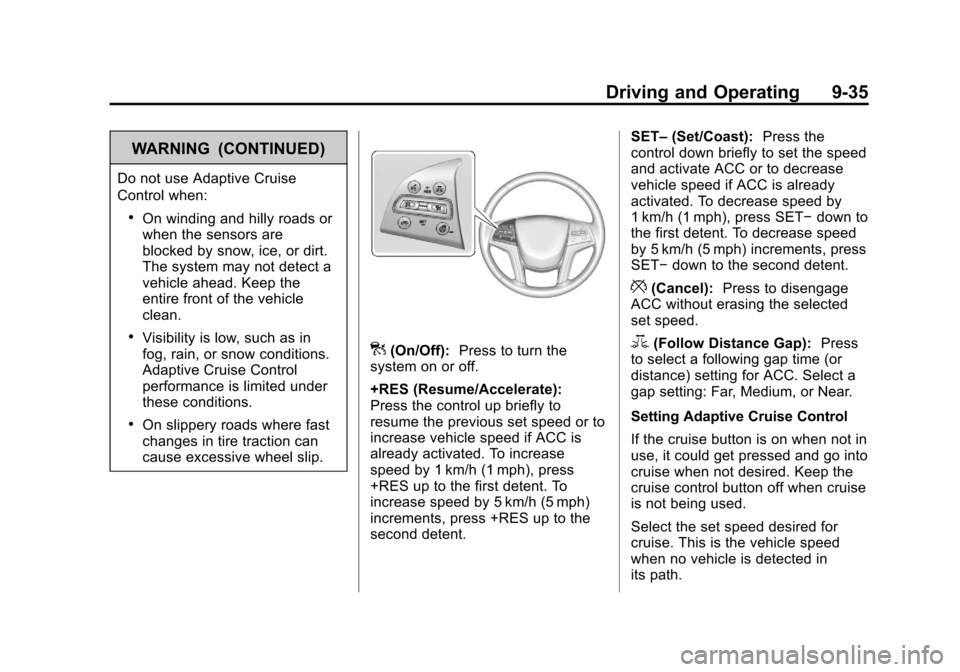
](On/Off):Press to turn the
system on or off.
+RES (Resume/Accelerate):
Press the control up briefly to
resume the previous set speed or to
increase vehicle speed if ACC is
already activated. To increase
speed by 1 km/h (1 mph), press
+RES up to the first detent. To
increase speed by 5 km/h (5 mph)
increments, press +RES up to the
second detent. SET–
(Set/Coast): Press the
control down briefly to set the speed
and activate ACC or to decrease
vehicle speed if ACC is already
activated. To decrease speed by
1 km/h (1 mph), press SET− down to
the first detent. To decrease speed
by 5 km/h (5 mph) increments, press
SET− down to the second detent.
*(Cancel): Press to disengage
ACC without erasing the selected
set speed.
3(Follow Distance Gap): Press
to select a following gap time (or
distance) setting for ACC. Select a
gap setting: Far, Medium, or Near.
Setting Adaptive Cruise Control
If the cruise button is on when not in
use, it could get pressed and go into
cruise when not desired. Keep the
cruise control button off when cruise
is not being used.
Select the set speed desired for
cruise. This is the vehicle speed
when no vehicle is detected in
its path.
Page 264 of 438
Black plate (36,1)Cadillac XTS Owner Manual - 2013 - 1st - 4/13/12
9-36 Driving and Operating
ACC will not set at a speed less
than 40 km/h (25 mph), although it
can be resumed when driving at
lower speeds.
To set ACC:
1. Press
].
2. Get up to the desired speed.
3. Press and release the SET– control on the steering wheel.
4. Remove foot from the accelerator.
After ACC is set, it may immediately
apply the brakes if a vehicle ahead
is closer than the selected
following gap.
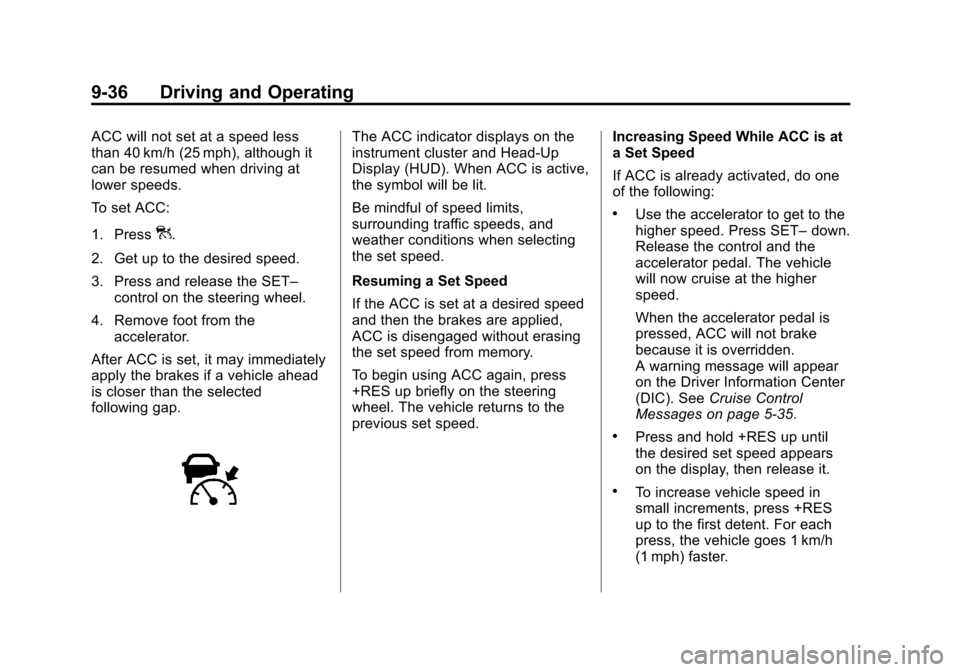
The ACC indicator displays on the
instrument cluster and Head-Up
Display (HUD). When ACC is active,
the symbol will be lit.
Be mindful of speed limits,
surrounding traffic speeds, and
weather conditions when selecting
the set speed.
Resuming a Set Speed
If the ACC is set at a desired speed
and then the brakes are applied,
ACC is disengaged without erasing
the set speed from memory.
To begin using ACC again, press
+RES up briefly on the steering
wheel. The vehicle returns to the
previous set speed. Increasing Speed While ACC is at
a Set Speed
If ACC is already activated, do one
of the following:
.Use the accelerator to get to the
higher speed. Press SET–
down.
Release the control and the
accelerator pedal. The vehicle
will now cruise at the higher
speed.
When the accelerator pedal is
pressed, ACC will not brake
because it is overridden.
A warning message will appear
on the Driver Information Center
(DIC). See Cruise Control
Messages on page 5‑35.
.Press and hold +RES up until
the desired set speed appears
on the display, then release it.
.To increase vehicle speed in
small increments, press +RES
up to the first detent. For each
press, the vehicle goes 1 km/h
(1 mph) faster.
Page 265 of 438
Black plate (37,1)Cadillac XTS Owner Manual - 2013 - 1st - 4/13/12
Driving and Operating 9-37
.To increase vehicle speed in
larger increments, press +RES
up to the second detent. For
each press, the vehicle goes
5 km/h (5 mph) faster.
When it is determined that there is
no vehicle in front of your vehicle,
then the vehicle speed will increase
to the set speed.
The speedometer reading can be
displayed in either English or metric
units. See Instrument Cluster on
page 5‑9. The increment value used
depends on the units displayed.
Reducing Speed While ACC is at a
Set Speed
If ACC is already activated, do one
of the following:
.Use the brake to get to the
desired lower speed. Press
SET– down and release the
accelerator pedal. The vehicle
will now cruise at the lower
speed.
.Press and hold SET– down until
the desired lower speed is
reached, then release it.
.To decrease the vehicle speed in
smaller increments, press SET−
down to the first detent. For
each press, the vehicle goes
about 1 km/h (1 mph) slower.
.To decrease the vehicle speed in
larger increments, press SET−
down to the second detent. For
each press, the vehicle goes
about 5 km/h (5 mph) slower.
The speedometer reading can be
displayed in either English or metric
units. See Instrument Cluster on
page 5‑9. The increment value used
depends on the units displayed.
Selecting the Follow Distance Gap
When a slower moving vehicle is
detected ahead, ACC will adjust the
vehicle's speed and attempt to
maintain the follow distance gap
selected. Press
3on the steering wheel to
adjust the following gap. Each press
cycles the gap button through three
settings: Far, Medium, or Near.
When pressed, the current gap
setting displays briefly on the
instrument cluster and HUD (if
equipped). The gap setting will be
maintained until it is changed.
Since each gap setting corresponds
to a following time (Far, Medium,
or Near), the following distance will
vary based on vehicle speed. The
faster the vehicle speed, the further
back your vehicle will follow a
vehicle detected ahead. Consider
traffic and weather conditions when
selecting the following gap. The
range of selectable gaps may not be
appropriate for all drivers and
driving conditions.
Changing the gap setting
automatically changes the alert
timing sensitivity (Far, Medium,
or Near) for the Forward Collision
Alert (FCA) feature.
Page 277 of 438
Black plate (49,1)Cadillac XTS Owner Manual - 2013 - 1st - 4/13/12
Driving and Operating 9-49
Selecting the Alert Timing
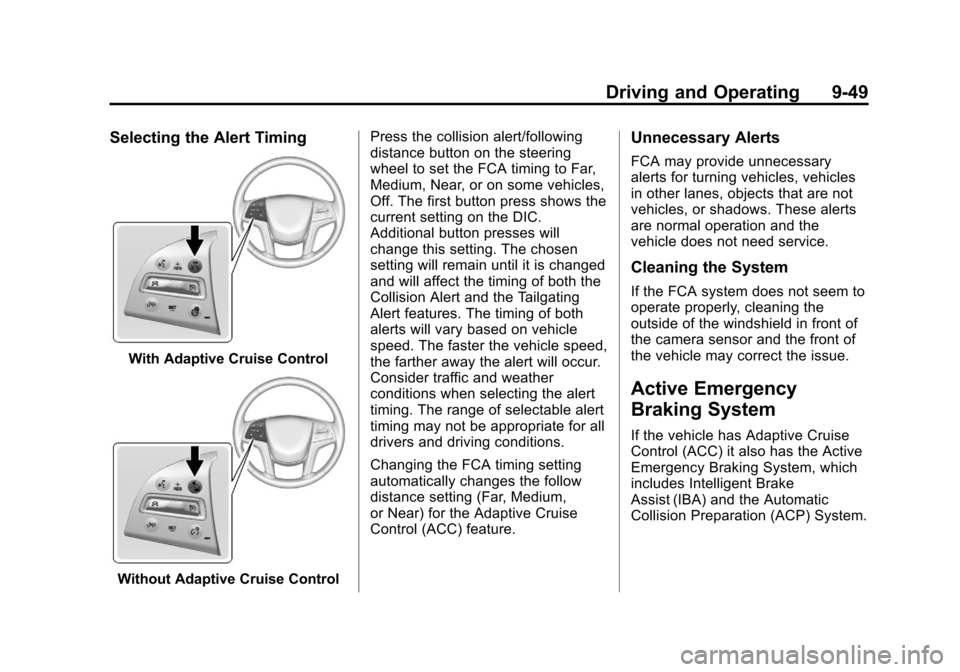
With Adaptive Cruise Control
Without Adaptive Cruise ControlPress the collision alert/following
distance button on the steering
wheel to set the FCA timing to Far,
Medium, Near, or on some vehicles,
Off. The first button press shows the
current setting on the DIC.
Additional button presses will
change this setting. The chosen
setting will remain until it is changed
and will affect the timing of both the
Collision Alert and the Tailgating
Alert features. The timing of both
alerts will vary based on vehicle
speed. The faster the vehicle speed,
the farther away the alert will occur.
Consider traffic and weather
conditions when selecting the alert
timing. The range of selectable alert
timing may not be appropriate for all
drivers and driving conditions.
Changing the FCA timing setting
automatically changes the follow
distance setting (Far, Medium,
or Near) for the Adaptive Cruise
Control (ACC) feature.
Unnecessary Alerts
FCA may provide unnecessary
alerts for turning vehicles, vehicles
in other lanes, objects that are not
vehicles, or shadows. These alerts
are normal operation and the
vehicle does not need service.
Cleaning the System
If the FCA system does not seem to
operate properly, cleaning the
outside of the windshield in front of
the camera sensor and the front of
the vehicle may correct the issue.
Active Emergency
Braking System
If the vehicle has Adaptive Cruise
Control (ACC) it also has the Active
Emergency Braking System, which
includes Intelligent Brake
Assist (IBA) and the Automatic
Collision Preparation (ACP) System.
Page 289 of 438
Black plate (61,1)Cadillac XTS Owner Manual - 2013 - 1st - 4/13/12
Driving and Operating 9-61
Before starting, check all trailer hitch
parts and attachments, safety
chains, electrical connectors, lamps,
tires and mirrors. If the trailer has
electric brakes, start the
combination moving and then apply
the trailer brake controller by hand
to be sure the brakes work.
During the trip, check occasionally
to be sure that the load is secure
and the lamps and any trailer
brakes still work.
Towing with a Stability Control
System
When towing, the sound of the
stability control system might be
heard. The system is reacting to the
vehicle movement caused by the
trailer, which mainly occurs during
cornering. This is normal when
towing heavier trailers.
Following Distance
Stay at least twice as far behind the
vehicle ahead as you would when
driving the vehicle without a trailer.This can help to avoid situations
that require heavy braking and
sudden turns.
Passing
More passing distance is needed
when towing a trailer. Because the
rig is longer, it is necessary to go
farther beyond the passed vehicle
before returning to the lane.
Backing Up
Hold the bottom of the steering
wheel with one hand. To move the
trailer to the left, move your hand to
the left. To move the trailer to the
right, move your hand to the right.
Always back up slowly and,
if possible, have someone
guide you.
Making Turns
Notice:
Making very sharp turns
while trailering could cause the
trailer to come in contact with the
vehicle. The vehicle could be
damaged. Avoid making very
sharp turns while trailering. When turning with a trailer, make
wider turns than normal so the
trailer will not strike soft shoulders,
curbs, road signs, trees or other
objects. Use the turn signal well in
advance and avoid jerky or sudden
maneuvers.
Turn Signals When Towing a
Trailer
The turn signal indicators on the
instrument cluster flash whenever
signaling a turn or lane change.
Properly hooked up, the trailer
lamps also flash, telling other
drivers the vehicle is turning,
changing lanes or stopping.
When towing a trailer, the arrows on
the instrument cluster flash for turns
even if the bulbs on the trailer are
burned out. Check occasionally to
be sure the trailer bulbs are still
working.
Page 290 of 438
Black plate (62,1)Cadillac XTS Owner Manual - 2013 - 1st - 4/13/12
9-62 Driving and Operating
Driving on Grades
Reduce speed and shift to a lower
gear before starting down a long or
steep downgrade. If the
transmission is not shifted down, the
brakes might have to be used so
much that they would get hot and no
longer work well.
The vehicle can tow in D (Drive).
Use a lower gear if the transmission
shifts too often.
When towing at high altitude on
steep uphill grades, engine coolant
boils at a lower temperature than at
normal altitudes. If the engine is
turned off immediately after towing
at high altitude on steep uphill
grades, the vehicle could show
signs similar to engine overheating.
To avoid this, let the engine run
while parked, preferably on level
ground, with the transmission in
P (Park) for a few minutes before
turning the engine off. If the
overheat warning comes on, see
Engine Overheating on page 10‑14.
Parking on Hills
{WARNING
Parking the vehicle on a hill with
the trailer attached can be
dangerous. If something goes
wrong, the rig could start to move.
People can be injured, and both
the vehicle and the trailer can be
damaged. When possible, always
park the rig on a flat surface.
If parking the rig on a hill:
1. Press the brake pedal, but do not shift into P (Park) yet. Turn
the wheels into the curb if facing
downhill or into traffic if facing
uphill.
2. Have someone place chocks under the trailer wheels.
3. When the wheel chocks are in place, release the brake pedal
until the chocks absorb the load. 4. Reapply the brake pedal. Then
apply the parking brake and shift
into P (Park).
5. Release the brake pedal.Leaving After Parking on a Hill
1. Apply and hold the brake pedal while you:
.Start the engine.
.Shift into a gear.
.Release the parking brake.
2. Let up on the brake pedal.
3. Drive slowly until the trailer is clear of the chocks.
4. Stop and have someone pick up and store the chocks.
Maintenance When Trailer
Towing
The vehicle needs service more
often when pulling a trailer. See the
Maintenance Schedule on
page 11‑3. Things that are
especially important in trailer
operation are automatic
Page 295 of 438
Black plate (1,1)Cadillac XTS Owner Manual - 2013 - 1st - 4/13/12
Vehicle Care 10-1
Vehicle Care
General Information
General Information . . . . . . . . . . 10-2
California Proposition65 Warning . . . . . . . . . . . . . . . . . 10-2
California Perchlorate Materials Requirements . . . . 10-3
Accessories and Modifications . . . . . . . . . . . . . . . 10-3
Vehicle Checks
Doing Your OwnService Work . . . . . . . . . . . . . . . 10-3
Hood . . . . . . . . . . . . . . . . . . . . . . . . 10-4
Engine Compartment Overview . . . . . . . . . . . . . . . . . . . 10-5
Engine Cover . . . . . . . . . . . . . . . . 10-6
Engine Oil . . . . . . . . . . . . . . . . . . . 10-6
Engine Oil Life System . . . . . . 10-9
Automatic Transmission Fluid . . . . . . . . . . . . . . . . . . . . . . 10-10
Engine Air Cleaner/Filter . . . . 10-10
Cooling System . . . . . . . . . . . . . 10-11
Engine Coolant . . . . . . . . . . . . . 10-12
Engine Overheating . . . . . . . . 10-14 Overheated Engine
Protection
Operating Mode . . . . . . . . . . . 10-16
Power Steering Fluid . . . . . . . 10-16
Washer Fluid . . . . . . . . . . . . . . . 10-17
Brakes . . . . . . . . . . . . . . . . . . . . . 10-18
Brake Fluid . . . . . . . . . . . . . . . . . 10-19
Battery . . . . . . . . . . . . . . . . . . . . . 10-20
All-Wheel Drive . . . . . . . . . . . . . 10-20
Starter Switch Check . . . . . . . 10-20
Automatic Transmission Shift Lock Control Function
Check . . . . . . . . . . . . . . . . . . . . . 10-21
Park Brake and P (Park) Mechanism Check . . . . . . . . 10-21
Wiper Blade Replacement . . . . . . . . . . . . . . 10-22
Windshield Replacement . . . 10-22
Headlamp Aiming
Headlamp Aiming . . . . . . . . . . 10-23
Bulb Replacement
Bulb Replacement . . . . . . . . . . 10-23
High Intensity Discharge (HID) Lighting . . . . . . . . . . . . . 10-23
LED Lighting . . . . . . . . . . . . . . . 10-23 Back-Up Lamps . . . . . . . . . . . . 10-23
License Plate Lamp . . . . . . . . 10-24
Replacement Bulbs . . . . . . . . . 10-25
Electrical System
Electrical System
Overload . . . . . . . . . . . . . . . . . . 10-25
Fuses and Circuit Breakers . . . . . . . . . . . . . . . . . . 10-26
Engine Compartment Fuse Block . . . . . . . . . . . . . . . . . . . . . 10-26
Instrument Panel Fuse Block . . . . . . . . . . . . . . . . . . . . . 10-30
Rear Compartment Fuse Block . . . . . . . . . . . . . . . . . . . . . 10-32
Wheels and Tires
Tires . . . . . . . . . . . . . . . . . . . . . . . . 10-34
All-Season Tires . . . . . . . . . . . . 10-35
Winter Tires . . . . . . . . . . . . . . . . 10-35
Summer Tires . . . . . . . . . . . . . . 10-35
Tire Sidewall Labeling . . . . . . 10-36
Tire Designations . . . . . . . . . . . 10-38
Tire Terminology andDefinitions . . . . . . . . . . . . . . . . 10-38
Tire Pressure . . . . . . . . . . . . . . . 10-41
Tire Pressure for High-Speed Operation . . . . . . . . . . . . . . . . . 10-43
Page 296 of 438
Black plate (2,1)Cadillac XTS Owner Manual - 2013 - 1st - 4/13/12
10-2 Vehicle Care
Tire Pressure MonitorSystem . . . . . . . . . . . . . . . . . . . 10-43
Tire Pressure Monitor Operation . . . . . . . . . . . . . . . . . 10-44
Tire Inspection . . . . . . . . . . . . . . 10-48
Tire Rotation . . . . . . . . . . . . . . . 10-48
When It Is Time for New
Tires . . . . . . . . . . . . . . . . . . . . . . 10-49
Buying New Tires . . . . . . . . . . . 10-50
Different Size Tires and Wheels . . . . . . . . . . . . . . . . . . . 10-52
Uniform Tire Quality Grading . . . . . . . . . . . . . . . . . . . 10-52
Wheel Alignment and Tire Balance . . . . . . . . . . . . . . . . . . . 10-54
Wheel Replacement . . . . . . . . 10-54
Tire Chains . . . . . . . . . . . . . . . . . 10-55
If a Tire Goes Flat . . . . . . . . . . 10-55
Tire Sealant and Compressor Kit . . . . . . . . . . . 10-57
Storing the Tire Sealant and Compressor Kit . . . . . . . . . . . 10-65
Tire Changing . . . . . . . . . . . . . . 10-65
Compact Spare Tire . . . . . . . . 10-70
Full-Size Spare Tire . . . . . . . . 10-71
Jump Starting
Jump Starting . . . . . . . . . . . . . . 10-71
Towing
Towing the Vehicle . . . . . . . . . 10-74
Recreational Vehicle Towing . . . . . . . . . . . . . . . . . . . . 10-74
Appearance Care
Exterior Care . . . . . . . . . . . . . . . 10-76
Interior Care . . . . . . . . . . . . . . . . 10-79
Floor Mats . . . . . . . . . . . . . . . . . . 10-82
General Information
For service and parts needs, visit
your dealer. You will receive
genuine GM parts and GM-trained
and supported service people.
Genuine GM parts have one of
these marks:
California Proposition
65 Warning
Most motor vehicles, including this
one, contain and/or emit chemicals
known to the State of California to
Page 303 of 438
Black plate (9,1)Cadillac XTS Owner Manual - 2013 - 1st - 4/13/12
Vehicle Care 10-9
Used oil can be a threat to the
environment. If you change your
own oil, be sure to drain all the oil
from the filter before disposal. Never
dispose of oil by putting it in the
trash or pouring it on the ground,
into sewers, or into streams or
bodies of water. Recycle it by taking
it to a place that collects used oil.
Engine Oil Life System
When to Change Engine Oil
This vehicle has a computer system
that indicates when to change the
engine oil and filter. This is based
on a combination of factors which
include engine revolutions, engine
temperature, and miles driven.
Based on driving conditions, the
mileage at which an oil change is
indicated can vary considerably. For
the oil life system to work properly,
the system must be reset every time
the oil is changed.
When the system has calculated
that oil life has been diminished, it
indicates that an oil change isnecessary. A CHANGE ENGINE
OIL SOON message comes on. See
Engine Oil Messages on page 5‑37.
Change the oil as soon as possible
within the next 1 000 km (600 mi).
It is possible that, if driving under
the best conditions, the oil life
system might indicate that an oil
change is not necessary for up to a
year. The engine oil and filter must
be changed at least once a year
and at this time the system must be
reset. Your dealer has trained
service people who will perform this
work and reset the system. It is also
important to check the oil regularly
over the course of an oil drain
interval and keep it at the proper
level.
If the system is ever reset
accidentally, the oil must be
changed at 5 000 km (3,000 mi)
since the last oil change.
Remember to reset the oil life
system whenever the oil is changed.
How to Reset the Engine Oil
Life System
Reset the system whenever the
engine oil is changed so that the
system can calculate the next
engine oil change. To reset the
system:
1. Using the DIC controls, located
on the right side of the steering
wheel, display REMAINING OIL
LIFE on the DIC. See Driver
Information Center (DIC) on
page 5‑27. When remaining oil
life is low, the CHANGE
ENGINE OIL SOON message
will appear on the display. See
Engine Oil Messages on
page 5‑37.
2. Press SEL on the DIC controls and hold SEL down for a few
seconds to clear the CHANGE
ENGINE OIL SOON message
and reset the oil life at 100%.