display CADILLAC XTS 2017 1.G Workshop Manual
[x] Cancel search | Manufacturer: CADILLAC, Model Year: 2017, Model line: XTS, Model: CADILLAC XTS 2017 1.GPages: 314, PDF Size: 3.71 MB
Page 148 of 314

Cadillac XTS Owner Manual (GMNA-Localizing-MidEast-10292881) - 2017 -
crc - 7/1/16
INSTRUMENTS AND CONTROLS 147
.Rain Sense Wipers
Auto Memory Recall
This feature automatically recalls the
current driver’s previously stored 1 or
2 button positions when entering the
vehicle. See Memory Seats 057.
Select Off, On - Driver Door Open,
or On - At ignition On.
Easy Exit Options
This feature automatically recalls the
current driver’s previously stored Exit
button position when exiting the
vehicle. See Memory Seats 057.
Select Off or On.
Chime Volume
This allows the selection of the chime
volume level.
Press + or −to adjust the volume.
Reverse Tilt Mirror
When on, both the driver and
passenger outside mirrors will tilt
downward when the vehicle is shifted
to R (Reverse) to improve visibility of
the ground near the rear wheels. They
will return to their previous driving position when the vehicle is shifted
out of R (Reverse) or the engine is
turned off.
Select Off, On, On - Driver and
Passenger, On - Driver, or On -
Passenger.
Auto Mirror Folding
When on, the outside rearview mirrors
will automatically fold or unfold when
the Remote Keyless Entry (RKE)
transmitter
QorKbutton is pressed
and held.
Select Off or On.
Rain Sense Wipers
This allows the Rain Sense Wipers
feature to be disabled or enabled.
Select Disabled or Enabled.
Lighting
Select and the following may display:
. Vehicle Locator Lights
. Exit Lighting Vehicle Locator Lights
This feature will flash the exterior
lamps and allows some of the exterior
lamps and most of the interior lamps
to turn on briefly at night when
Kon
the Remote Keyless Entry (RKE)
transmitter is pressed to locate the
vehicle.
Select Off or On.
Exit Lighting
This allows the selection of how long
the exterior lamps stay on when
leaving the vehicle when it is dark
outside.
Select Off, 30 Seconds, 60 Seconds,
or 120 Seconds.
Power Door Locks
Select and the following may display:
. Unlocked Door Anti-Lockout
. Auto Door Lock
. Auto Door Unlock
. Delayed Door Lock
Page 149 of 314

Cadillac XTS Owner Manual (GMNA-Localizing-MidEast-10292881) - 2017 -
crc - 7/1/16
148 INSTRUMENTS AND CONTROLS
Unlocked Door Anti-Lockout
When on, this feature will keep the
driver door from locking when the
door is open. If Off is selected, the
Delayed Door Lock menu will be
available.
Select Off or On.
Auto Door Lock
When this feature is turned on, all
doors will automatically lock when the
vehicle is shifted out of P (Park). The
doors will automatically unlock when
the vehicle is shifted into P (Park).
Select Off or On.
Auto Door Unlock
This allows selection of which of the
doors will automatically unlock when
the vehicle is shifted into P (Park).
Select Off, All Doors, or Driver Door.
Delayed Door Lock
When on, this feature will delay the
locking of the doors. To override the
delay, press the power door lock
switch on the door.
Select Off or On.Remote Lock, Unlock, Start
Select and the following may display:
.Remote Unlock Light Feedback
. Remote Lock Feedback
. Remote Door Unlock
. Remote Start Auto Cool Seats
. Remote Start Auto Heat Seats
. Remote Window Operation
. Passive Door Unlock
. Passive Door Lock
. Remote Left in Vehicle Alert
Remote Unlock Light Feedback
When on, the exterior lamps will flash
when unlocking the vehicle with the
RKE transmitter.
Select Off or Flash Lights.
Remote Lock Feedback
This allows selection of what type of
feedback is given when locking the
vehicle with the RKE transmitter.
Select Off, Lights and Horn, Lights
Only, or Horn Only. Remote Door Unlock
This allows selection of which doors
will unlock when pressing
Kon the
RKE transmitter.
Select All Doors or Driver Door.
Remote Start Auto Cool Seats
If equipped and turned on, this
feature will turn the ventilated seats
on when using remote start on
warm days.
Select Off or On.
Remote Start Auto Heat Seats
If equipped and turned on, this
feature will turn the heated seats on
when using remote start on cold days.
Select Off or On.
Remote Window Operation
This allows the window to be opened
when pressing
Kon the RKE
transmitter. See Remote Keyless Entry
(RKE) System Operation 027.
Select Off or On.
Page 150 of 314
Cadillac XTS Owner Manual (GMNA-Localizing-MidEast-10292881) - 2017 -
crc - 7/1/16
INSTRUMENTS AND CONTROLS 149
Passive Door Unlock
This allows the selection of what
doors will unlock when using the
button on the driver door to unlock
the vehicle.
Select All Doors or Driver Door.
Passive Door Lock
This feature can be turned on or off or
used to select feedback when using
the button on the driver door to lock
the vehicle. SeeRemote Keyless Entry
(RKE) System Operation 027.
Select On, On with Horn Chirp, or Off.
Remote Left in Vehicle Alert
This feature sounds an alert when the
RKE transmitter is left in the vehicle.
Select Off or On.
Bluetooth
Select and the following may display:
. Pair New Device
. Device Management
. Ringtones
. Voice Mail Numbers Pair New Device
Select to pair a new device. See
“Pairing”
in“Infotainment Controls ”
under “Bluetooth ”in the infotainment
manual.
Device Management
Select to connect to a different phone
source, disconnect a phone, or delete
a phone.
Ringtones
Press to change the ring tone for the
specific phone. The phone does not
need to be connected to change
the ring.
Voice Mail Numbers
This feature displays the voice mail
number for all connected phones. To
change the voice mail number, select
EDIT or press the EDIT button. Type a
new number, then select SAVE or
press the SAVE button.
Apple CarPlay™
Select and the following may display:
. Apple CarPlay
. Manage Apple CarPlay Devices Apple CarPlay
This feature allows Apple devices to
be connected to the infotainment
system through a USB port.
Select Off or On.
Manage Apple CarPlay Devices
Select to manage Apple devices. Apple
CarPlay must be on for this feature to
be accessed.
Android Auto
Select and the following may display:
.
Android Auto
. Manage Android Auto Devices
Android Auto
This feature allows Android devices to
be connected to the infotainment
system through a USB port.
Select Off or On.
Manage Android Auto Devices
Select to manage Android devices.
Android Auto must be on for this
feature to be accessed.
Page 151 of 314
Cadillac XTS Owner Manual (GMNA-Localizing-MidEast-10292881) - 2017 -
crc - 7/1/16
150 INSTRUMENTS AND CONTROLS
Voice
Select and the following may display:
.Confidence Threshold
. Prompt Length
. Audio Feedback Speed
Confidence Threshold
This feature allows the adjustment of
the sensitivity of the speech
recognition system.
Select Confirm More or Confirm Less.
Prompt Length
This feature adjusts the voice prompt
length.
Select Short or Long.
Audio Feedback Speed
This feature adjusts the audio
feedback speed.
Select Slow, Medium, or Fast.
Display
Select and the following may display:
. Mode
. Calibrate Touchscreen .
Turn Display Off
Mode
Select to change the display screen for
day or night driving.
Select Auto, Day, or Night.
Calibrate Touchscreen
Select to calibrate the touchscreen,
then follow the prompts.
Turn Display Off
Select to turn the display off. Press
anywhere on the display area or any
faceplate button to turn the
display on.
Rear Camera
This allows for Rear Park Assist
Symbols and Guidance Lines to be
turned off or on.
Select Off or On for the desired
feature.
See Assistance Systems for Parking or
Backing 0202.
Return to Factory Settings
Select and the following may display:
.
Restore Vehicle Settings .
Clear All Private Data
. Restore Radio Settings
Restore Vehicle Settings
This allows selection of restoring
vehicle settings.
Select Restore or Cancel.
Clear All Private Data
This allows selection to clear all
private information from the vehicle.
Select Delete or Cancel.
Restore Radio Settings
This allows selection to restore radio
settings.
Select Restore or Cancel.
Software Information
Press to view the version of the
infotainment system software.
Page 156 of 314
Cadillac XTS Owner Manual (GMNA-Localizing-MidEast-10292881) - 2017 -
crc - 7/1/16
LIGHTING 155
change is completed. If the lever is
briefly pressed and released, the turn
signal flashes three times.
The turn and lane-change signal can
be turned off manually by moving the
lever back to its original position.
If after signaling a turn or lane
change, the arrow flashes rapidly or
does not come on, a signal bulb may
be burned out.
Replace any burned out bulbs. If a
bulb is not burned out, check the fuse.
SeeFuses and Circuit Breakers 0248.Interior Lighting
Instrument Panel
Illumination Control
The brightness of the instrument
panel lighting and steering wheel
controls can be adjusted.
D:Move the thumbwheel up or
down to brighten or dim the lights.
The brightness of the displays
automatically adjusts based on
outdoor lighting. The instrument
panel illumination control will set the
lowest level to which the displays will
automatically be adjusted.
Courtesy Lamps
The courtesy lamps come on when
any door is opened and the dome
lamp is in the DOOR position.
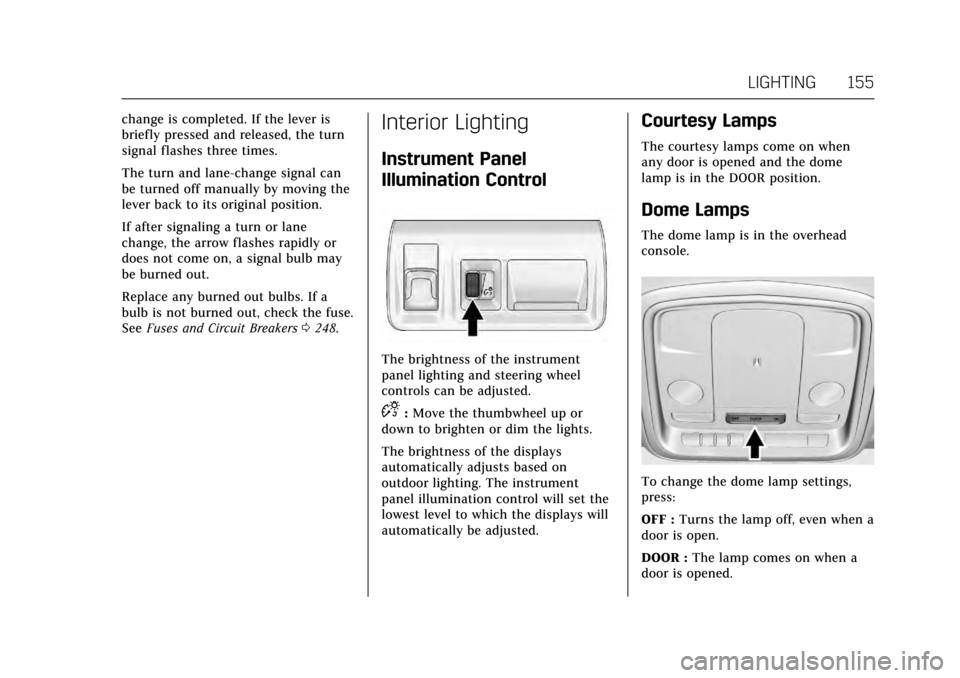
Dome Lamps
The dome lamp is in the overhead
console.
To change the dome lamp settings,
press:
OFF : Turns the lamp off, even when a
door is open.
DOOR : The lamp comes on when a
door is opened.
Page 161 of 314
Cadillac XTS Owner Manual (GMNA-Localizing-MidEast-10292881) - 2017 -
crc - 7/1/16
160 CLIMATE CONTROLS
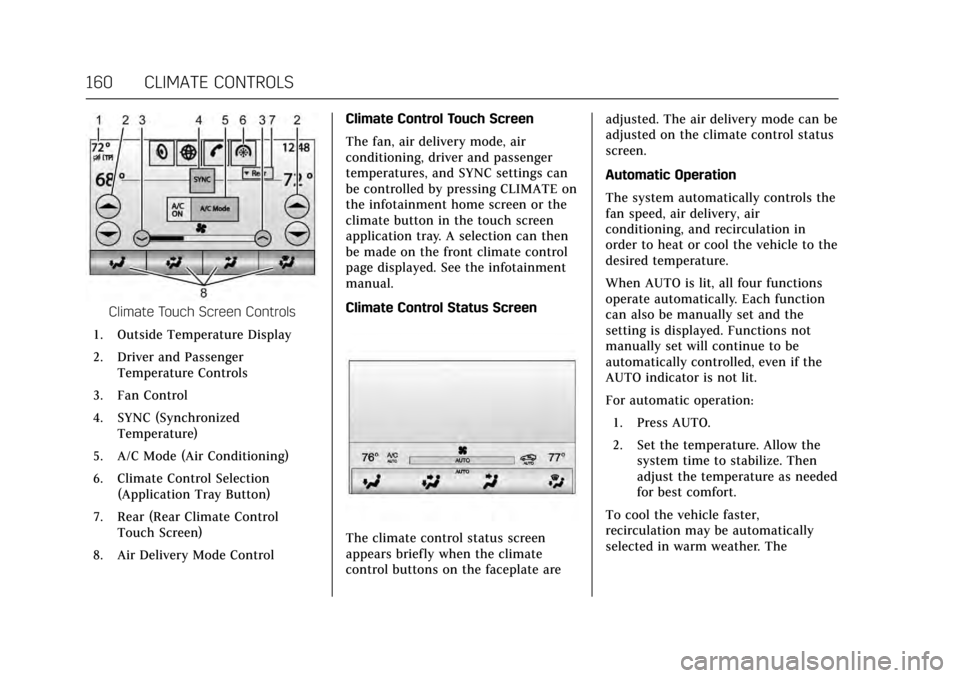
Climate Touch Screen Controls
1. Outside Temperature Display
2. Driver and Passenger Temperature Controls
3. Fan Control
4. SYNC (Synchronized Temperature)
5. A/C Mode (Air Conditioning)
6. Climate Control Selection (Application Tray Button)
7. Rear (Rear Climate Control Touch Screen)
8. Air Delivery Mode Control Climate Control Touch Screen
The fan, air delivery mode, air
conditioning, driver and passenger
temperatures, and SYNC settings can
be controlled by pressing CLIMATE on
the infotainment home screen or the
climate button in the touch screen
application tray. A selection can then
be made on the front climate control
page displayed. See the infotainment
manual.
Climate Control Status Screen
The climate control status screen
appears briefly when the climate
control buttons on the faceplate are adjusted. The air delivery mode can be
adjusted on the climate control status
screen.
Automatic Operation
The system automatically controls the
fan speed, air delivery, air
conditioning, and recirculation in
order to heat or cool the vehicle to the
desired temperature.
When AUTO is lit, all four functions
operate automatically. Each function
can also be manually set and the
setting is displayed. Functions not
manually set will continue to be
automatically controlled, even if the
AUTO indicator is not lit.
For automatic operation:
1. Press AUTO.
2. Set the temperature. Allow the system time to stabilize. Then
adjust the temperature as needed
for best comfort.
To cool the vehicle faster,
recirculation may be automatically
selected in warm weather. The
Page 162 of 314
Cadillac XTS Owner Manual (GMNA-Localizing-MidEast-10292881) - 2017 -
crc - 7/1/16
CLIMATE CONTROLS 161
recirculation light will not come on.
Press
@to select recirculation; press
it again to select outside air.
English units can be changed to
metric units through the instrument
cluster. See “Cluster Settings Menu ”
under Instrument Cluster 0112.
OFF : Press to turn the fan on or off.
The temperature control and air
delivery mode can still be adjusted.
w/x: The temperature can be
adjusted separately for the driver and
the passenger. Press to increase or
decrease the temperature. Press and
hold to rapidly increase or decrease
the temperature.
The driver and passenger
temperatures can also be adjusted by
pressing the controls on the touch
screen.
SYNC : Press SYNC on the touch
screen to link all climate zone settings
to the driver settings. Adjust the
driver side temperature control to
change the linked temperature. When
the passenger settings are adjusted,
the SYNC button is displayed when
the temperatures are unlinked. Rear :
If equipped, press this button
on the front climate control touch
screen to open the rear climate
control screen. The rear climate
control settings can now be adjusted
from the front passenger area.
Manual Operation
z 9 y: Press the fan control
buttons or the touch screen fan
control to increase or decrease the fan
speed. Press and hold the buttons or
the touch screen control to adjust the
speed more quickly. The fan speed
setting displays. Pressing either button
cancels automatic fan control and the
fan can be controlled manually. Press
AUTO to return to automatic
operation. To turn off the fan and
climate control system, press and hold
the fan down button or touch screen
fan control until it is off.
Air Delivery Mode Control : When
the climate information is displayed,
press the desired air delivery mode on
the touch screen to change the
direction of the airflow. The selected
air delivery mode button is lit.
Pressing any of the air delivery
buttons cancels automatic air delivery control and the direction of the
airf low can be controlled manually.
Press AUTO to return to automatic
operation.
To change the current mode, select
one of the following:
Y:
Air is directed to the instrument
panel outlets.
\: Air is divided between the
instrument panel outlets and the floor
outlets.
[: Air is directed to the floor
outlets.
-: Clears the windows of fog or
moisture. Air is directed to the
windshield and floor outlets.
0: Clears the windshield of fog or
frost more quickly. Air is directed to
the windshield. Press the
0button
to turn on or off. Changing the air
delivery mode also turns the
defrost off.
#: Press the A/C Mode touch screen
control to turn the automatic air
conditioning on or off. If the fan is
Page 165 of 314
Cadillac XTS Owner Manual (GMNA-Localizing-MidEast-10292881) - 2017 -
crc - 7/1/16
164 CLIMATE CONTROLS
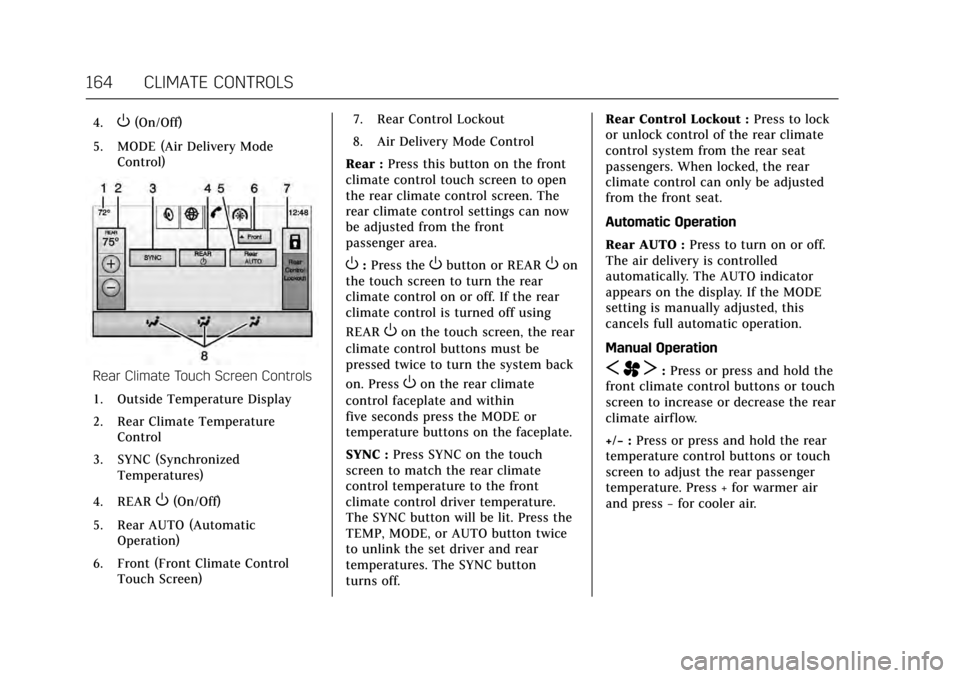
4.O(On/Off)
5. MODE (Air Delivery Mode Control)
Rear Climate Touch Screen Controls
1. Outside Temperature Display
2. Rear Climate Temperature Control
3. SYNC (Synchronized Temperatures)
4. REAR
O(On/Off)
5. Rear AUTO (Automatic Operation)
6. Front (Front Climate Control Touch Screen) 7. Rear Control Lockout
8. Air Delivery Mode Control
Rear : Press this button on the front
climate control touch screen to open
the rear climate control screen. The
rear climate control settings can now
be adjusted from the front
passenger area.
O: Press theObutton or REAROon
the touch screen to turn the rear
climate control on or off. If the rear
climate control is turned off using
REAR
Oon the touch screen, the rear
climate control buttons must be
pressed twice to turn the system back
on. Press
Oon the rear climate
control faceplate and within
five seconds press the MODE or
temperature buttons on the faceplate.
SYNC : Press SYNC on the touch
screen to match the rear climate
control temperature to the front
climate control driver temperature.
The SYNC button will be lit. Press the
TEMP, MODE, or AUTO button twice
to unlink the set driver and rear
temperatures. The SYNC button
turns off. Rear Control Lockout :
Press to lock
or unlock control of the rear climate
control system from the rear seat
passengers. When locked, the rear
climate control can only be adjusted
from the front seat.
Automatic Operation
Rear AUTO : Press to turn on or off.
The air delivery is controlled
automatically. The AUTO indicator
appears on the display. If the MODE
setting is manually adjusted, this
cancels full automatic operation.
Manual OperationS A T:Press or press and hold the
front climate control buttons or touch
screen to increase or decrease the rear
climate airflow.
+/− :Press or press and hold the rear
temperature control buttons or touch
screen to adjust the rear passenger
temperature. Press + for warmer air
and press −for cooler air.
Page 178 of 314
Cadillac XTS Owner Manual (GMNA-Localizing-MidEast-10292881) - 2017 -
crc - 7/1/16
DRIVING AND OPERATING 177
Starting and Operating
New Vehicle Break-In
Caution
The vehicle does not need an
elaborate break-in. But it will
perform better in the long run if
you follow these guidelines:. Do not drive at any one
constant speed, fast or slow,
for the first 805 km (500 mi).
Do not make full-throttle
starts. Avoid downshifting to
brake or slow the vehicle.
. Avoid making hard stops for
the first 322 km (200 mi) or
so. During this time the new
brake linings are not yet
broken in. Hard stops with
new linings can mean
premature wear and earlier
replacement. Follow this
breaking-in guideline every
time you get new brake
linings.
(Continued)
Caution (Continued)
Following break-in, engine speed
and load can be gradually
increased.
Ignition Positions
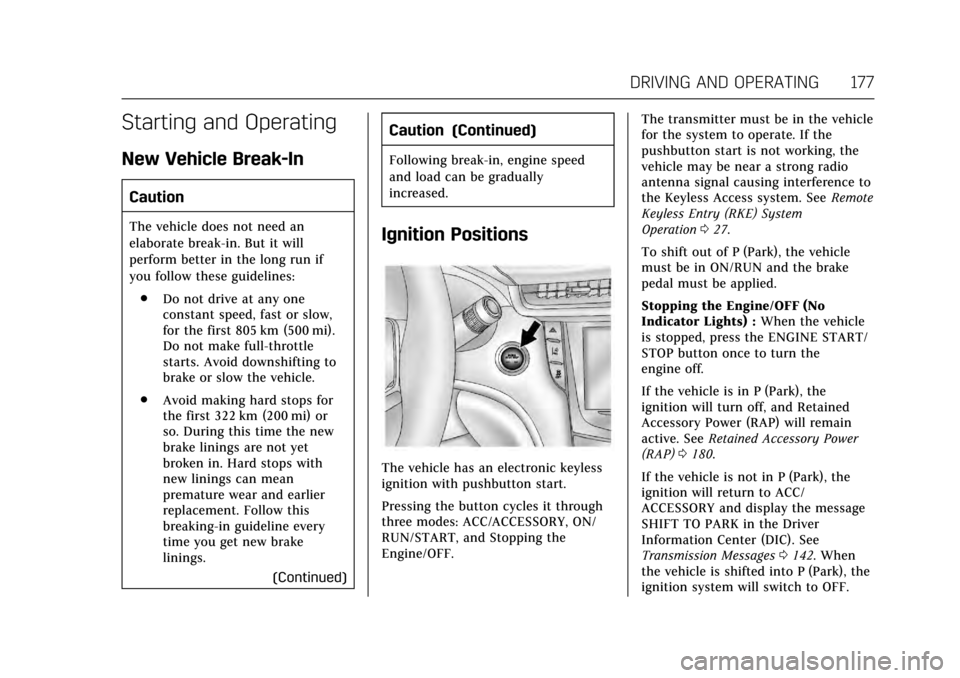
The vehicle has an electronic keyless
ignition with pushbutton start.
Pressing the button cycles it through
three modes: ACC/ACCESSORY, ON/
RUN/START, and Stopping the
Engine/OFF. The transmitter must be in the vehicle
for the system to operate. If the
pushbutton start is not working, the
vehicle may be near a strong radio
antenna signal causing interference to
the Keyless Access system. See
Remote
Keyless Entry (RKE) System
Operation 027.
To shift out of P (Park), the vehicle
must be in ON/RUN and the brake
pedal must be applied.
Stopping the Engine/OFF (No
Indicator Lights) : When the vehicle
is stopped, press the ENGINE START/
STOP button once to turn the
engine off.
If the vehicle is in P (Park), the
ignition will turn off, and Retained
Accessory Power (RAP) will remain
active. See Retained Accessory Power
(RAP) 0180.
If the vehicle is not in P (Park), the
ignition will return to ACC/
ACCESSORY and display the message
SHIFT TO PARK in the Driver
Information Center (DIC). See
Transmission Messages 0142. When
the vehicle is shifted into P (Park), the
ignition system will switch to OFF.
Page 180 of 314
Cadillac XTS Owner Manual (GMNA-Localizing-MidEast-10292881) - 2017 -
crc - 7/1/16
DRIVING AND OPERATING 179
Starting the Engine
Move the shift lever to P (Park) or
N (Neutral). To restart the engine
when the vehicle is already moving,
use N (Neutral) only.
Caution
Do not try to shift to P (Park) if the
vehicle is moving. If you do, you
could damage the transmission.
Shift to P (Park) only when the
vehicle is stopped.
Caution
If the steering wheel is turned until
it reaches the end of its travel, and
is held in that position while
starting the vehicle, damage may
occur to the hydraulic power
steering system and there may be
loss of power steering assist.
Caution
If you add electrical parts or
accessories, you could change the
way the engine operates. Any
resulting damage would not be
covered by the vehicle warranty. See
Add-On Electrical Equipment0220.
Starting Procedure 1. With the Keyless Access system, the RKE transmitter must be in
the vehicle. Press the ENGINE
START/STOP button with the
brake pedal applied. When the
engine begins cranking, let go of
the button.
The idle speed will go down as
the engine gets warm. Do not
race the engine immediately
after starting it.
If the RKE transmitter is not in
the vehicle, if there is
interference, or if the RKE
transmitter battery is low, the
Driver Information Center (DIC)
will display a message. See Key
and Lock Messages 0137.
Caution
Cranking the engine for long
periods of time, by pressing
ENGINE START/STOP immediately
after cranking has ended, can
overheat and damage the cranking
motor, and drain the battery. Wait
at least 15 seconds between each
try, to let the cranking motor
cool down.
2. If the engine does not start after five to 10 seconds, especially in
very cold weather (below −18 °C
or 0 °F), it could be flooded with
too much gasoline. Try pushing
the accelerator pedal all the way
to the floor and holding it there
as you press the ENGINE
START/STOP button, for up to a
maximum of 15 seconds. Wait at
least 15 seconds between each
try, to allow the cranking motor
to cool down. When the engine
starts, let go of the button and
the accelerator. If the vehicle
starts briefly but then stops
again, do the same thing. This