display CADILLAC XTS 2017 1.G User Guide
[x] Cancel search | Manufacturer: CADILLAC, Model Year: 2017, Model line: XTS, Model: CADILLAC XTS 2017 1.GPages: 314, PDF Size: 3.71 MB
Page 32 of 314
Cadillac XTS Owner Manual (GMNA-Localizing-MidEast-10292881) - 2017 -
crc - 7/1/16
KEYS, DOORS, AND WINDOWS 31
Battery ReplacementCaution
When replacing the battery, do not
touch any of the circuitry on the
transmitter. Static from your body
could damage the transmitter.
Replace the battery if the REPLACE
BATTERY IN REMOTE KEY message
displays in the DIC.
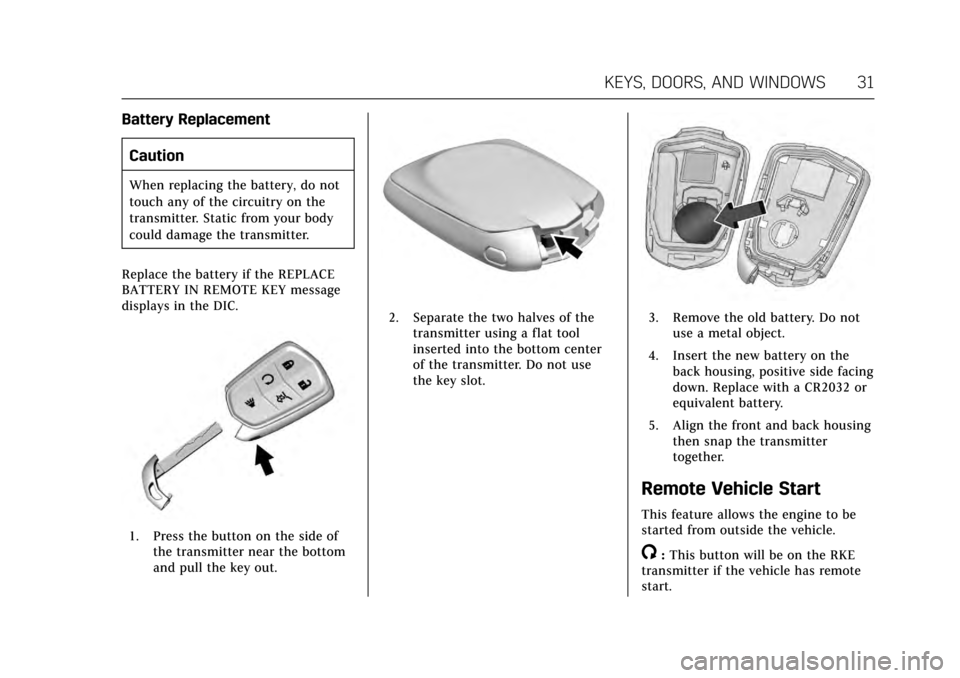
1. Press the button on the side of the transmitter near the bottom
and pull the key out.
2. Separate the two halves of thetransmitter using a flat tool
inserted into the bottom center
of the transmitter. Do not use
the key slot.3. Remove the old battery. Do notuse a metal object.
4. Insert the new battery on the back housing, positive side facing
down. Replace with a CR2032 or
equivalent battery.
5. Align the front and back housing then snap the transmitter
together.
Remote Vehicle Start
This feature allows the engine to be
started from outside the vehicle.
/:This button will be on the RKE
transmitter if the vehicle has remote
start.
Page 54 of 314
Cadillac XTS Owner Manual (GMNA-Localizing-MidEast-10292881) - 2017 -
crc - 7/1/16
SEATS AND RESTRAINTS 53
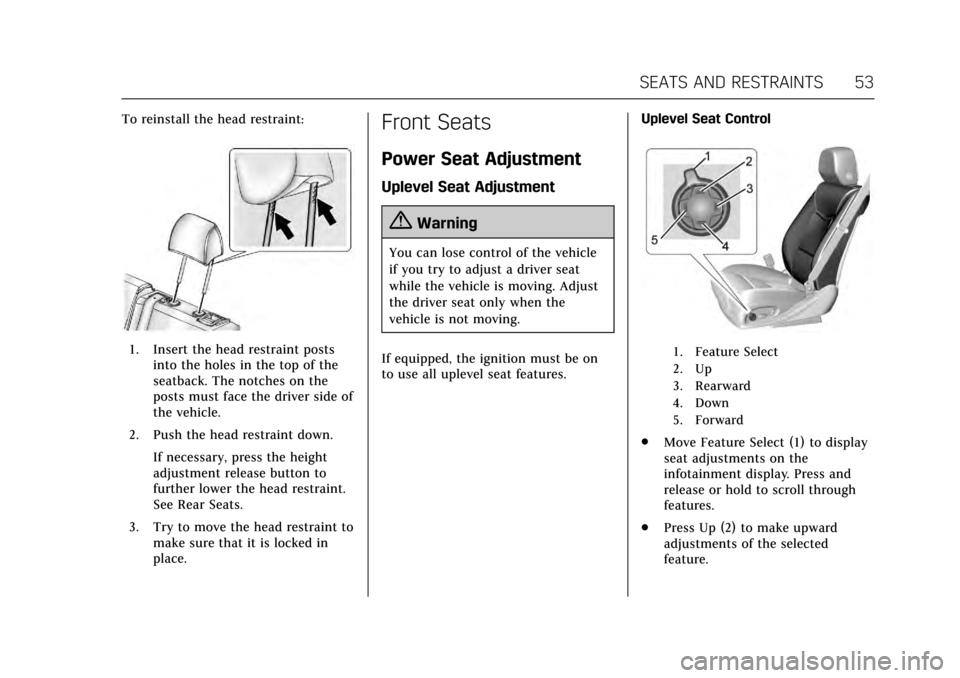
To reinstall the head restraint:
1. Insert the head restraint postsinto the holes in the top of the
seatback. The notches on the
posts must face the driver side of
the vehicle.
2. Push the head restraint down. If necessary, press the height
adjustment release button to
further lower the head restraint.
See Rear Seats.
3. Try to move the head restraint to make sure that it is locked in
place.
Front Seats
Power Seat Adjustment
Uplevel Seat Adjustment
{Warning
You can lose control of the vehicle
if you try to adjust a driver seat
while the vehicle is moving. Adjust
the driver seat only when the
vehicle is not moving.
If equipped, the ignition must be on
to use all uplevel seat features. Uplevel Seat Control
1. Feature Select
2. Up
3. Rearward
4. Down
5. Forward
.
Move Feature Select (1) to display
seat adjustments on the
infotainment display. Press and
release or hold to scroll through
features.
. Press Up (2) to make upward
adjustments of the selected
feature.
Page 55 of 314
Cadillac XTS Owner Manual (GMNA-Localizing-MidEast-10292881) - 2017 -
crc - 7/1/16
54 SEATS AND RESTRAINTS
.Press Rearward (3) to make
rearward adjustments of the
selected feature.
. Press Down (4) to make downward
adjustments of the selected
feature.
. Press Forward (5) to make forward
adjustments of the selected
feature.
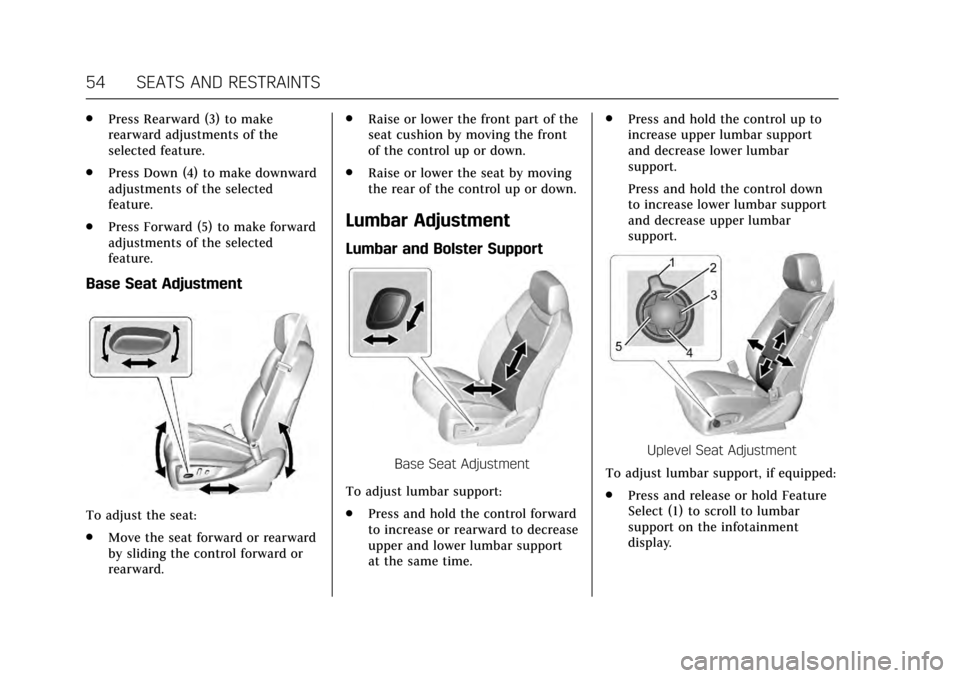
Base Seat Adjustment
To adjust the seat:
.Move the seat forward or rearward
by sliding the control forward or
rearward. .
Raise or lower the front part of the
seat cushion by moving the front
of the control up or down.
. Raise or lower the seat by moving
the rear of the control up or down.
Lumbar Adjustment
Lumbar and Bolster Support
Base Seat Adjustment
To adjust lumbar support:
. Press and hold the control forward
to increase or rearward to decrease
upper and lower lumbar support
at the same time. .
Press and hold the control up to
increase upper lumbar support
and decrease lower lumbar
support.
Press and hold the control down
to increase lower lumbar support
and decrease upper lumbar
support.Uplevel Seat Adjustment
To adjust lumbar support, if equipped:
. Press and release or hold Feature
Select (1) to scroll to lumbar
support on the infotainment
display.
Page 56 of 314
Cadillac XTS Owner Manual (GMNA-Localizing-MidEast-10292881) - 2017 -
crc - 7/1/16
SEATS AND RESTRAINTS 55
.Press Forward (5) or Rearward (3)
to adjust lumbar forward or
rearward.
. Press Up (2) or Down (4) to adjust
lumbar up or down.
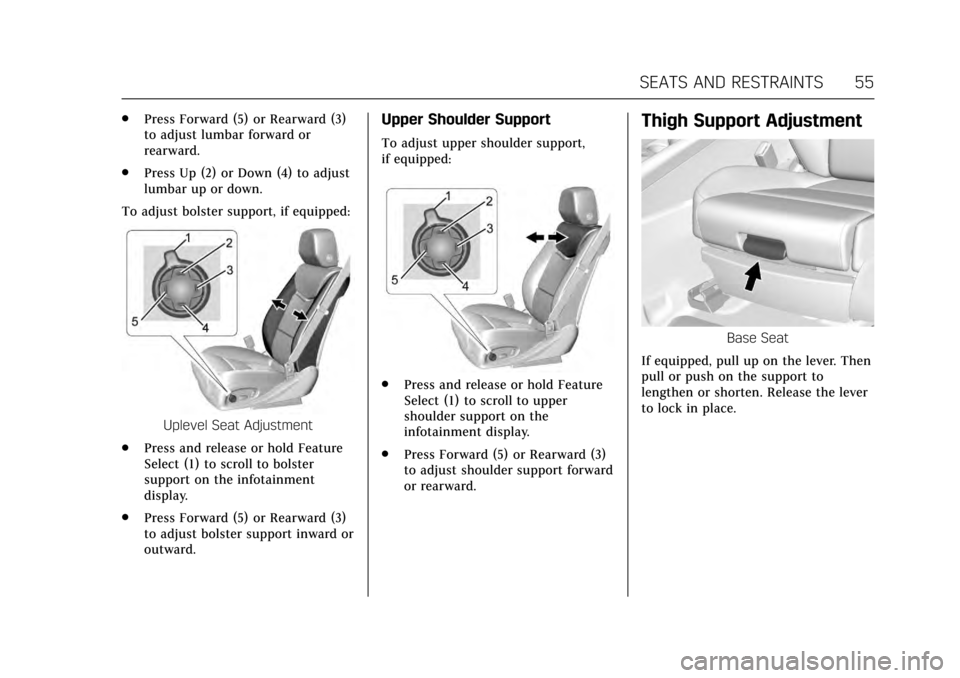
To adjust bolster support, if equipped:
Uplevel Seat Adjustment
. Press and release or hold Feature
Select (1) to scroll to bolster
support on the infotainment
display.
. Press Forward (5) or Rearward (3)
to adjust bolster support inward or
outward.
Upper Shoulder Support
To adjust upper shoulder support,
if equipped:
.
Press and release or hold Feature
Select (1) to scroll to upper
shoulder support on the
infotainment display.
. Press Forward (5) or Rearward (3)
to adjust shoulder support forward
or rearward.
Thigh Support Adjustment
Base Seat
If equipped, pull up on the lever. Then
pull or push on the support to
lengthen or shorten. Release the lever
to lock in place.
Page 59 of 314
Cadillac XTS Owner Manual (GMNA-Localizing-MidEast-10292881) - 2017 -
crc - 7/1/16
58 SEATS AND RESTRAINTS
To stop recall movement, press one of
the memory, power mirror, or power
seat controls; or press the power tilt
and telescoping steering column
control.
RKE transmitters are not labeled with
a number. If your memory seat
position is stored to 1 or 2 but this
position is not automatically recalling,
then store your positions to the other
button or switch RKE transmitters
with the other driver.
If the vehicle’s driver has changed, in
some vehicles the Driver ID may be
displayed for the first few ignition
cycles.
Easy Exit Recall (Driver Only)
If programmed on in the vehicle
personalization menu, the easy exit
feature automatically recalls the
previously stored exit positions when
leaving the vehicle. See“Storing
Memory Positions ”earlier in this
section. See also Vehicle
Personalization 0144. Easy exit recall automatically activates
when one of the following occurs:
.
The vehicle is turned off and the
driver door is opened within a
short time.
. The vehicle is turned off with the
driver door open.
Obstructions
If something has blocked the driver
seat while recalling a memory
position, the recall may stop. Remove
the obstruction. Then do one of the
following:
. If automatically or manually
recalling the stored memory
position, press and hold the
appropriate manual control for
two seconds. Try recalling again
by pressing the appropriate
memory button. If automatically
recalling the position, try recalling
again by opening the driver door
and pressing
Kon the RKE
transmitter. .
If recalling the exit position, press
and hold the appropriate manual
control for the exit feature not
recalling for two seconds. Then try
recalling the exit position again.
If the memory position is still not
recalling, see your dealer for service.
Heated and Ventilated
Front Seats
{Warning
If you cannot feel temperature
change or pain to the skin, the seat
heater may cause burns. To reduce
the risk of burns, people with such
a condition should use care when
using the seat heater, especially for
long periods of time. Do not place
anything on the seat that insulates
against heat, such as a blanket,
cushion, cover, or similar item. This
may cause the seat heater to
overheat. An overheated seat heater
may cause a burn or may damage
the seat.
Page 61 of 314
Cadillac XTS Owner Manual (GMNA-Localizing-MidEast-10292881) - 2017 -
crc - 7/1/16
60 SEATS AND RESTRAINTS
The heated or ventilated seats may be
enabled or disabled in the vehicle
personalization menu. SeeRemote
Vehicle Start 031 and Vehicle
Personalization 0144.
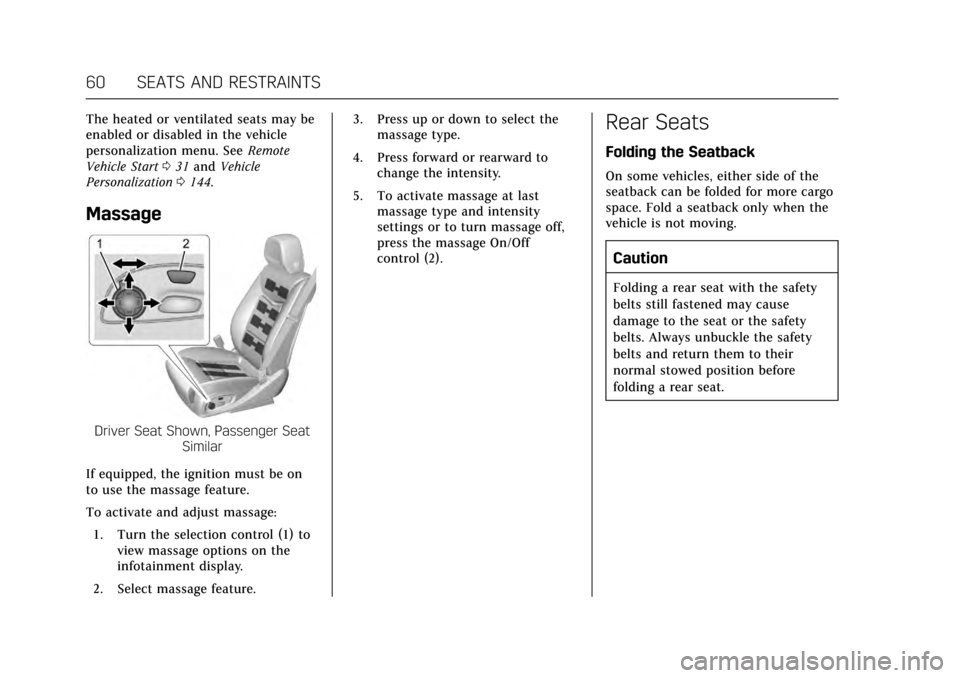
Massage
Driver Seat Shown, Passenger Seat
Similar
If equipped, the ignition must be on
to use the massage feature.
To activate and adjust massage: 1. Turn the selection control (1) to view massage options on the
infotainment display.
2. Select massage feature. 3. Press up or down to select the
massage type.
4. Press forward or rearward to change the intensity.
5. To activate massage at last massage type and intensity
settings or to turn massage off,
press the massage On/Off
control (2).
Rear Seats
Folding the Seatback
On some vehicles, either side of the
seatback can be folded for more cargo
space. Fold a seatback only when the
vehicle is not moving.
Caution
Folding a rear seat with the safety
belts still fastened may cause
damage to the seat or the safety
belts. Always unbuckle the safety
belts and return them to their
normal stowed position before
folding a rear seat.
Page 64 of 314
Cadillac XTS Owner Manual (GMNA-Localizing-MidEast-10292881) - 2017 -
crc - 7/1/16
SEATS AND RESTRAINTS 63
With the ignition in ON/RUN/START,
press
MorLto heat the left or right
outboard seat cushion and seatback.
On vehicles without rear climate
controls, an indicator light on the
button will turn on when the heated
seat is on. On vehicles with rear
climate controls, an indicator on the
climate control display appears when
this feature is on.
On vehicles without rear climate
controls, press the button again to
turn this feature off. The light on the
button will turn off. On vehicles with
rear climate controls, this feature
turns on at the highest setting. With
each press of the button, the heated
seat changes to the next lower setting,
and then the off setting. Three lights
indicate the highest setting, and one
light indicates the lowest. If the
heated seats are on high, the level
may automatically be lowered after
approximately 30 minutes.Rear Seat
Pass-Through Door
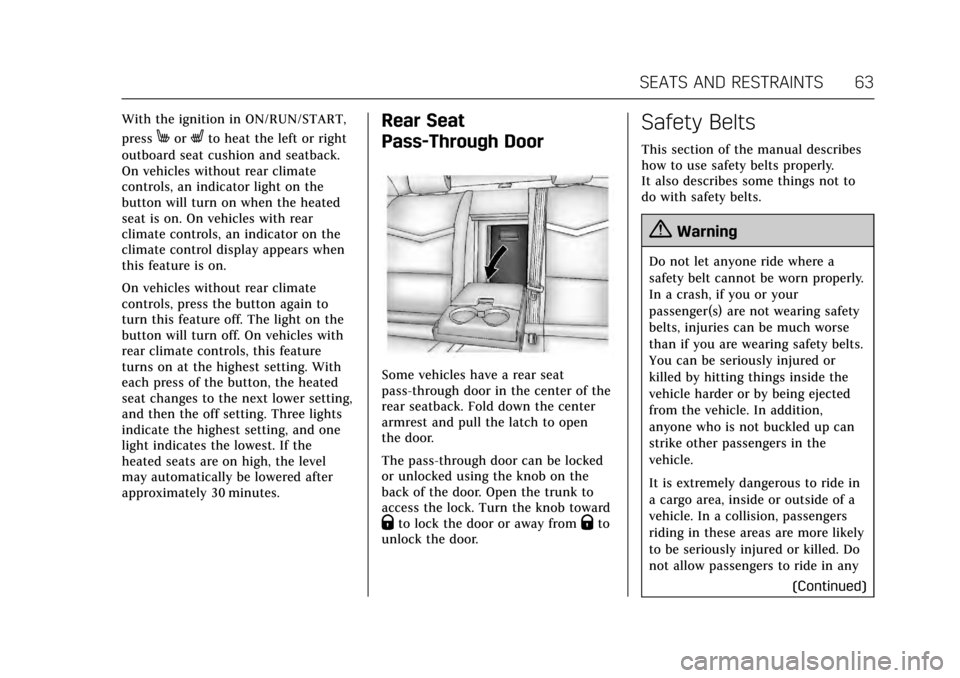
Some vehicles have a rear seat
pass-through door in the center of the
rear seatback. Fold down the center
armrest and pull the latch to open
the door.
The pass-through door can be locked
or unlocked using the knob on the
back of the door. Open the trunk to
access the lock. Turn the knob toward
Qto lock the door or away fromQto
unlock the door.
Safety Belts
This section of the manual describes
how to use safety belts properly.
It also describes some things not to
do with safety belts.
{Warning
Do not let anyone ride where a
safety belt cannot be worn properly.
In a crash, if you or your
passenger(s) are not wearing safety
belts, injuries can be much worse
than if you are wearing safety belts.
You can be seriously injured or
killed by hitting things inside the
vehicle harder or by being ejected
from the vehicle. In addition,
anyone who is not buckled up can
strike other passengers in the
vehicle.
It is extremely dangerous to ride in
a cargo area, inside or outside of a
vehicle. In a collision, passengers
riding in these areas are more likely
to be seriously injured or killed. Do
not allow passengers to ride in any
(Continued)
Page 104 of 314
Cadillac XTS Owner Manual (GMNA-Localizing-MidEast-10292881) - 2017 -
crc - 7/1/16
INSTRUMENTS AND CONTROLS 103
Instruments and
Controls
Controls
Steering Wheel Adjustment . . . . . 104
Steering Wheel Controls . . . . . . . . . 104
Heated Steering Wheel . . . . . . . . . . 104
Horn . . . . . . . . . . . . . . . . . . . . . . . . . . . . . . . 104
Windshield Wiper/Washer . . . . . . . 105
Compass . . . . . . . . . . . . . . . . . . . . . . . . . . 106
Clock . . . . . . . . . . . . . . . . . . . . . . . . . . . . . . 106
Power Outlets . . . . . . . . . . . . . . . . . . . . . 107
Wireless Charging . . . . . . . . . . . . . . . . 108
Cigarette Lighter . . . . . . . . . . . . . . . . . . 110
Ashtrays . . . . . . . . . . . . . . . . . . . . . . . . . . 110
Warning Lights, Gauges, and
Indicators
Warning Lights, Gauges, andIndicators . . . . . . . . . . . . . . . . . . . . . . . 111
Instrument Cluster . . . . . . . . . . . . . . . 112
Speedometer . . . . . . . . . . . . . . . . . . . . . . 115
Odometer . . . . . . . . . . . . . . . . . . . . . . . . . 116
Trip Odometer . . . . . . . . . . . . . . . . . . . . 116
Tachometer . . . . . . . . . . . . . . . . . . . . . . . 116
Fuel Gauge . . . . . . . . . . . . . . . . . . . . . . . . 116
Engine Coolant Temperature
Gauge . . . . . . . . . . . . . . . . . . . . . . . . . . . . 117
Safety Belt Reminders . . . . . . . . . . . . 118 Airbag Readiness Light . . . . . . . . . . 119
Passenger Airbag Status
Indicator . . . . . . . . . . . . . . . . . . . . . . . . . 119
Charging System Light . . . . . . . . . . . 120
Malfunction Indicator Lamp (Check Engine Light) . . . . . . . . . . . 120
Brake System Warning Light . . . . 122
Electric Parking Brake Light . . . . . 122
Service Electric Parking Brake Light . . . . . . . . . . . . . . . . . . . . . . . . . . . . . 123
Antilock Brake System (ABS) Warning Light . . . . . . . . . . . . . . . . . . 123
Lane Departure Warning (LDW) Light . . . . . . . . . . . . . . . . . . . . . . . . . . . . . 123
Vehicle Ahead Indicator . . . . . . . . . 124
Traction Off Light . . . . . . . . . . . . . . . . 124
StabiliTrak
®OFF Light . . . . . . . . . . . 124
Traction Control System (TCS)/ StabiliTrak
®Light . . . . . . . . . . . . . . 125
Engine Coolant Temperature Warning Light . . . . . . . . . . . . . . . . . . 125
Tire Pressure Light . . . . . . . . . . . . . . . 125
Engine Oil Pressure Light . . . . . . . . 126
Low Fuel Warning Light . . . . . . . . . 126
Security Light . . . . . . . . . . . . . . . . . . . . . 126
High-Beam On Light . . . . . . . . . . . . . 127
Adaptive Forward Lighting (AFL) Light . . . . . . . . . . . . . . . . . . . . . . . . . . . . . 127
Lamps On Reminder . . . . . . . . . . . . . 127
Cruise Control Light . . . . . . . . . . . . . . 127
Door Ajar Light . . . . . . . . . . . . . . . . . . . 128
Information Displays
Driver Information Center (DIC) . . . . . . . . . . . . . . . . . . . . . 128
Head-Up Display (HUD) . . . . . . . . . 131
Vehicle Messages
Vehicle Messages . . . . . . . . . . . . . . . . . 134
Battery Voltage and Charging Messages . . . . . . . . . . . . . . . . . . . . . . . . 134
Brake System Messages . . . . . . . . . . 135
Compass Messages . . . . . . . . . . . . . . . 135
Cruise Control Messages . . . . . . . . . 135
Door Ajar Messages . . . . . . . . . . . . . . 136
Engine Cooling System Messages . . . . . . . . . . . . . . . . . . . . . . . . 136
Engine Oil Messages . . . . . . . . . . . . . 137
Engine Power Messages . . . . . . . . . . 137
Fuel System Messages . . . . . . . . . . . 137
Key and Lock Messages . . . . . . . . . . 137
Lamp Messages . . . . . . . . . . . . . . . . . . . 138
Object Detection System Messages . . . . . . . . . . . . . . . . . . . . . . . . 138
Ride Control System Messages . . . . . . . . . . . . . . . . . . . . . . . . 141
Airbag System Messages . . . . . . . . . 141
Security Messages . . . . . . . . . . . . . . . . 141
Service Vehicle Messages . . . . . . . . 142
Starting the Vehicle Messages . . . 142
Tire Messages . . . . . . . . . . . . . . . . . . . . 142
Transmission Messages . . . . . . . . . . 142
Vehicle Reminder Messages . . . . . 143
Page 107 of 314
Cadillac XTS Owner Manual (GMNA-Localizing-MidEast-10292881) - 2017 -
crc - 7/1/16
106 INSTRUMENTS AND CONTROLS
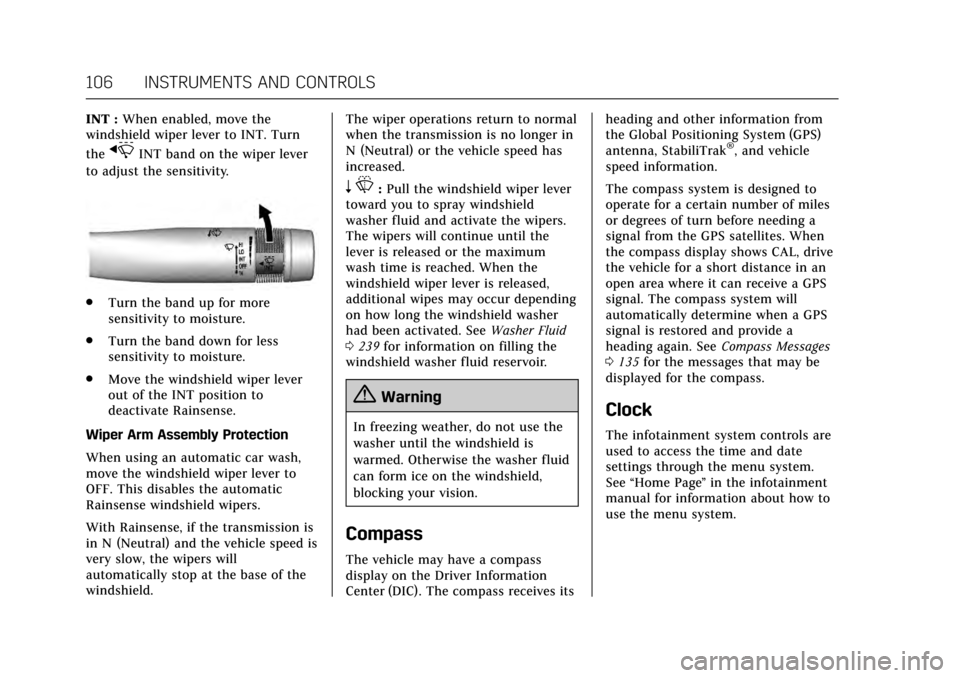
INT :When enabled, move the
windshield wiper lever to INT. Turn
the
xINT band on the wiper lever
to adjust the sensitivity.
. Turn the band up for more
sensitivity to moisture.
. Turn the band down for less
sensitivity to moisture.
. Move the windshield wiper lever
out of the INT position to
deactivate Rainsense.
Wiper Arm Assembly Protection
When using an automatic car wash,
move the windshield wiper lever to
OFF. This disables the automatic
Rainsense windshield wipers.
With Rainsense, if the transmission is
in N (Neutral) and the vehicle speed is
very slow, the wipers will
automatically stop at the base of the
windshield. The wiper operations return to normal
when the transmission is no longer in
N (Neutral) or the vehicle speed has
increased.
n
L: Pull the windshield wiper lever
toward you to spray windshield
washer fluid and activate the wipers.
The wipers will continue until the
lever is released or the maximum
wash time is reached. When the
windshield wiper lever is released,
additional wipes may occur depending
on how long the windshield washer
had been activated. See Washer Fluid
0 239 for information on filling the
windshield washer fluid reservoir.
{Warning
In freezing weather, do not use the
washer until the windshield is
warmed. Otherwise the washer fluid
can form ice on the windshield,
blocking your vision.
Compass
The vehicle may have a compass
display on the Driver Information
Center (DIC). The compass receives its heading and other information from
the Global Positioning System (GPS)
antenna, StabiliTrak
®, and vehicle
speed information.
The compass system is designed to
operate for a certain number of miles
or degrees of turn before needing a
signal from the GPS satellites. When
the compass display shows CAL, drive
the vehicle for a short distance in an
open area where it can receive a GPS
signal. The compass system will
automatically determine when a GPS
signal is restored and provide a
heading again. See Compass Messages
0 135 for the messages that may be
displayed for the compass.
Clock
The infotainment system controls are
used to access the time and date
settings through the menu system.
See “Home Page ”in the infotainment
manual for information about how to
use the menu system.
Page 108 of 314
Cadillac XTS Owner Manual (GMNA-Localizing-MidEast-10292881) - 2017 -
crc - 7/1/16
INSTRUMENTS AND CONTROLS 107
Setting the Clock
Time
To set the time:1. From the Home Page, touch the SETTINGS screen button, then
touch Time and Date.
2. Touch Set Time, then touch + or −to increase or decrease hours
or minutes, and change AM
or PM.
3. Touch 12-24 Hr for a 12 or 24 hour clock.
4. Touch
[Back to go back to the
previous menu.
Date
To set the date: 1. Touch the SETTINGS screen button, then touch Time
and Date.
2. Touch Set Date, then touch + or −to increase or decrease month,
day, or year.
3. Touch
[Back to go back to the
previous menu. Auto Set
When on, the time and date will
automatically update.
To set auto set:
1. Touch the SETTINGS screen button, then touch Time
and Date.
2. Touch Set Time or Set Date.
3. Touch Auto Set, then select On-Cell Network or Off-Manual
to manually set the time
and date.
4. Touch
[Back to go back to the
previous menu.
If auto set is on, the time displayed on
the clock may not update immediately
when driving into a new time zone.
Clock Display
When on, the digital clock will display
on the infotainment screen.
To set the clock display: 1. Touch the SETTINGS screen button, then touch Time
and Date. 2. Touch Clock Display, then select
Off or On.
3. Touch
[Back to go back to the
previous menu.
Power Outlets
Power Outlets 12 Volt Direct
Current
The accessory power outlet can be
used to plug in electrical equipment,
such as a cell phone or MP3 player.
The vehicle has one accessory power
outlet inside the center console.
Lift the cover to access the accessory
power outlet.
Certain accessory power plugs may
not be compatible with the accessory
power outlet and could overload
vehicle or adapter fuses. If a problem
is experienced, see your dealer.
When adding electrical equipment, be
sure to follow the proper installation
instructions included with the
equipment. See Add-On Electrical
Equipment 0220.