infotainment CADILLAC XTS 2019 Owner's Guide
[x] Cancel search | Manufacturer: CADILLAC, Model Year: 2019, Model line: XTS, Model: CADILLAC XTS 2019Pages: 376, PDF Size: 6.71 MB
Page 165 of 376
Cadillac XTS Owner Manual (GMNA-Localizing-U.S./Canada-12032610) -
2019 - crc - 8/22/18
164 CLIMATE CONTROLS
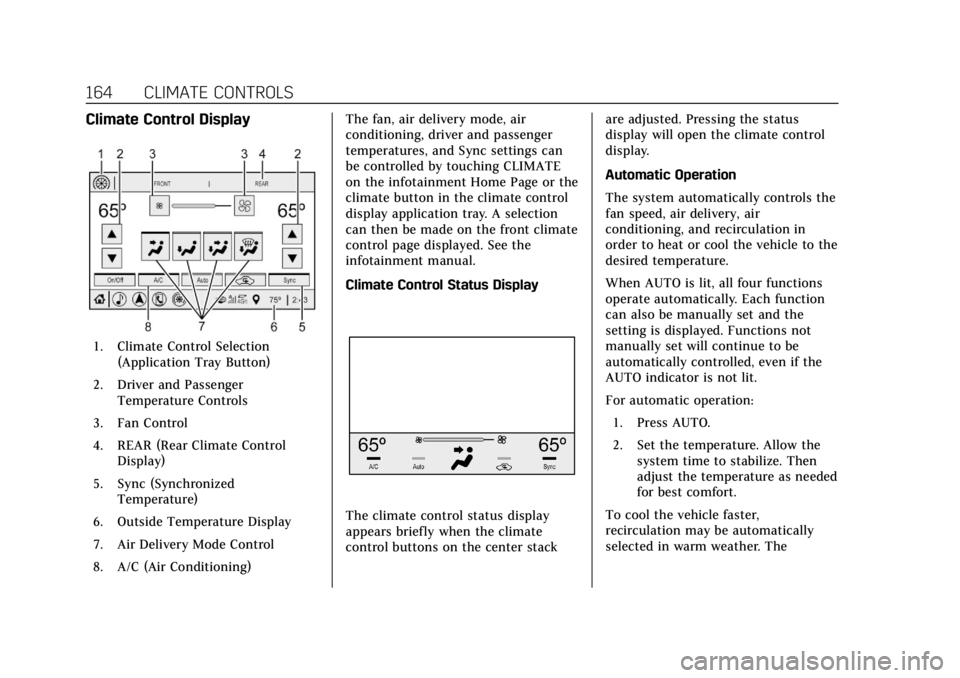
Climate Control Display
1. Climate Control Selection(Application Tray Button)
2. Driver and Passenger Temperature Controls
3. Fan Control
4. REAR (Rear Climate Control Display)
5. Sync (Synchronized Temperature)
6. Outside Temperature Display
7. Air Delivery Mode Control
8. A/C (Air Conditioning) The fan, air delivery mode, air
conditioning, driver and passenger
temperatures, and Sync settings can
be controlled by touching CLIMATE
on the infotainment Home Page or the
climate button in the climate control
display application tray. A selection
can then be made on the front climate
control page displayed. See the
infotainment manual.
Climate Control Status Display
The climate control status display
appears briefly when the climate
control buttons on the center stack
are adjusted. Pressing the status
display will open the climate control
display.
Automatic Operation
The system automatically controls the
fan speed, air delivery, air
conditioning, and recirculation in
order to heat or cool the vehicle to the
desired temperature.
When AUTO is lit, all four functions
operate automatically. Each function
can also be manually set and the
setting is displayed. Functions not
manually set will continue to be
automatically controlled, even if the
AUTO indicator is not lit.
For automatic operation:
1. Press AUTO.
2. Set the temperature. Allow the system time to stabilize. Then
adjust the temperature as needed
for best comfort.
To cool the vehicle faster,
recirculation may be automatically
selected in warm weather. The
Page 189 of 376
Cadillac XTS Owner Manual (GMNA-Localizing-U.S./Canada-12032610) -
2019 - crc - 8/22/18
188 DRIVING AND OPERATING
4. Before starting the engine, besure to unplug and store the cord
as it was before to keep it away
from moving engine parts.
The length of time the heater should
remain plugged in depends on several
factors. Ask a dealer in the area where
you will be parking the vehicle for the
best advice on this.
Retained Accessory
Power (RAP)
Some vehicle accessories may be used
after the ignition is turned off.
The power windows and sunroof,
if equipped, will continue to work for
up to 10 minutes or until any door is
opened.
The infotainment system will continue
to work for 10 minutes, until the
driver door is opened, or until the
ignition is turned on or placed in
ACC/ACCESSORY.
Shifting Into Park
1. Hold the brake pedal down and apply the parking brake. See
Electric Parking Brake 0194.
2. Move the shift lever into P (Park) by pushing the lever all the way
toward the front of the vehicle.
3. Turn the ignition off.
Leaving the Vehicle with the
Engine Running
{Warning
It can be dangerous to leave the
vehicle with the engine running.
It could overheat and catch fire.
It is dangerous to get out of the
vehicle if the shift lever is not fully
in P (Park) with the parking brake
firmly set. The vehicle can roll.
Do not leave the vehicle when the
engine is running. If you have left
the engine running, the vehicle can
move suddenly. You or others could (Continued)
Warning (Continued)
be injured. To be sure the vehicle
will not move, even when you are
on fairly level ground, always set
the parking brake and move the
shift lever to P (Park). See Shifting
Into Park 0188. If you are towing a
trailer, see Driving Characteristics
and Towing Tips 0230.
If you have to leave the vehicle with
the engine running, be sure the
vehicle is in P (Park) and the parking
brake is firmly set before you leave it.
After you have moved the shift lever
into P (Park), hold down the regular
brake pedal. See if you can move the
shift lever away from P (Park) without
first pulling it toward you. If you can,
it means that the shift lever was not
fully locked into P (Park).
Torque Lock
Torque lock is when the weight of the
vehicle puts too much force on the
parking pawl in the transmission. This
happens when parking on a hill and
Page 212 of 376
Cadillac XTS Owner Manual (GMNA-Localizing-U.S./Canada-12032610) -
2019 - crc - 8/22/18
DRIVING AND OPERATING 211
.Front camera lens in the front
grille or near the front emblem
. Front side and rear side panels
. Outside of the windshield in front
of the rearview mirror
. Side camera lens on the bottom of
the outside mirrors
. Rear side corner bumpers
. Rear Vision Camera above the
license plate
Assistance Systems for
Parking or Backing
If equipped, the Rear Vision Camera
(RVC), Rear Park Assist (RPA), Front
Park Assist (FPA), Surround Vision,
Front Vision Camera, Reverse
Automatic Braking (RAB) and Backing
Warning System, Rear Cross Traffic
Alert (RCTA), and Automatic Parking
Assist (APA) may help the driver park
or avoid objects. Always check around
the vehicle when parking or backing. Rear Vision Camera (RVC)
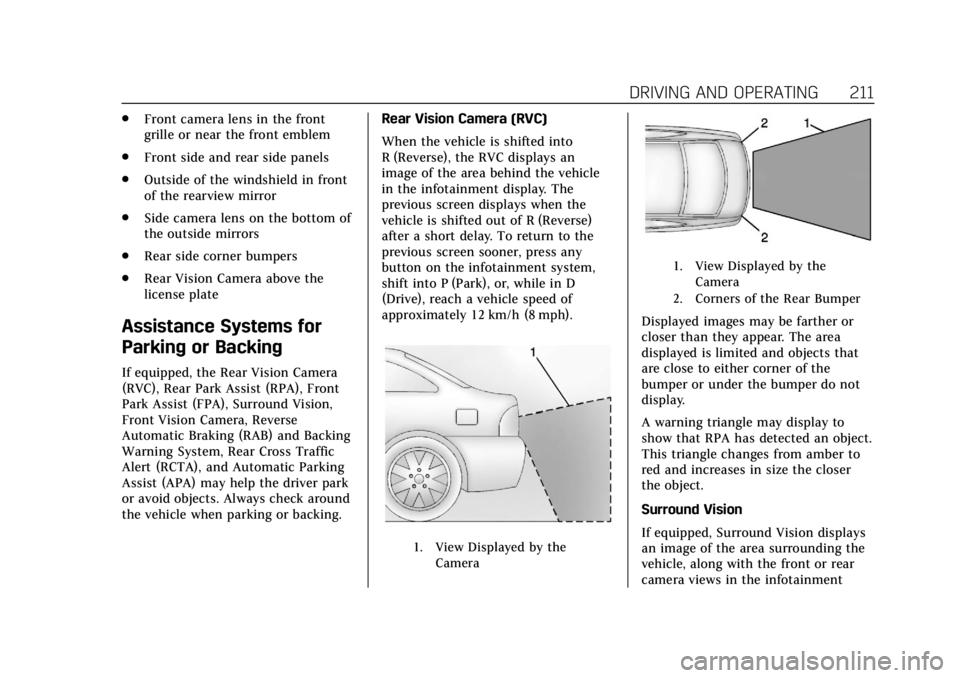
When the vehicle is shifted into
R (Reverse), the RVC displays an
image of the area behind the vehicle
in the infotainment display. The
previous screen displays when the
vehicle is shifted out of R (Reverse)
after a short delay. To return to the
previous screen sooner, press any
button on the infotainment system,
shift into P (Park), or, while in D
(Drive), reach a vehicle speed of
approximately 12 km/h (8 mph).
1. View Displayed by the
Camera
1. View Displayed by theCamera
2. Corners of the Rear Bumper
Displayed images may be farther or
closer than they appear. The area
displayed is limited and objects that
are close to either corner of the
bumper or under the bumper do not
display.
A warning triangle may display to
show that RPA has detected an object.
This triangle changes from amber to
red and increases in size the closer
the object.
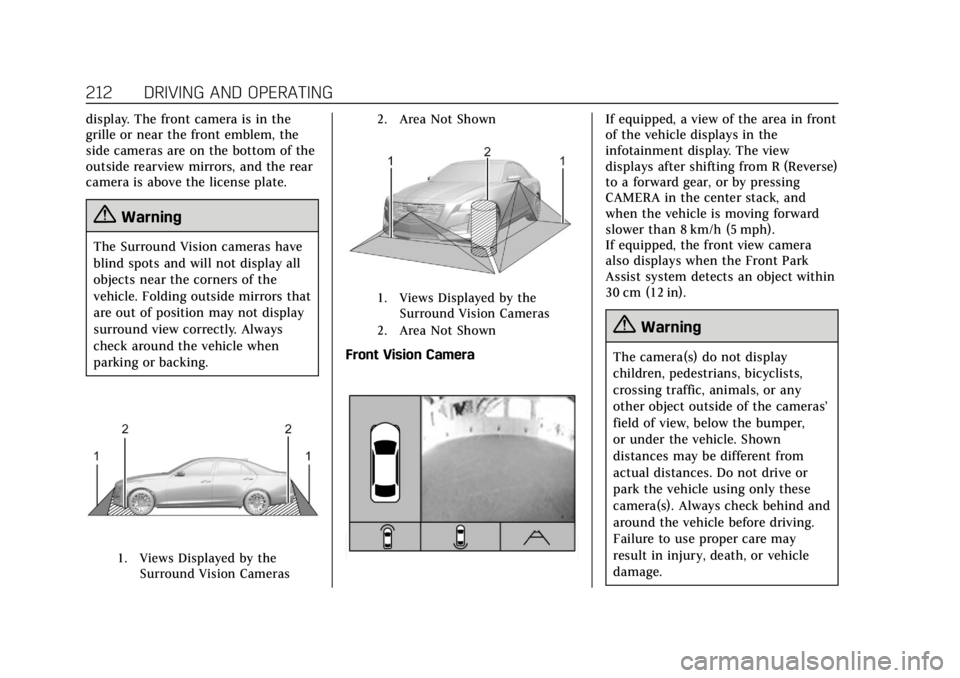
Surround Vision
If equipped, Surround Vision displays
an image of the area surrounding the
vehicle, along with the front or rear
camera views in the infotainment
Page 213 of 376
Cadillac XTS Owner Manual (GMNA-Localizing-U.S./Canada-12032610) -
2019 - crc - 8/22/18
212 DRIVING AND OPERATING
display. The front camera is in the
grille or near the front emblem, the
side cameras are on the bottom of the
outside rearview mirrors, and the rear
camera is above the license plate.
{Warning
The Surround Vision cameras have
blind spots and will not display all
objects near the corners of the
vehicle. Folding outside mirrors that
are out of position may not display
surround view correctly. Always
check around the vehicle when
parking or backing.
1. Views Displayed by theSurround Vision Cameras 2. Area Not Shown
1. Views Displayed by the
Surround Vision Cameras
2. Area Not Shown
Front Vision Camera
If equipped, a view of the area in front
of the vehicle displays in the
infotainment display. The view
displays after shifting from R (Reverse)
to a forward gear, or by pressing
CAMERA in the center stack, and
when the vehicle is moving forward
slower than 8 km/h (5 mph).
If equipped, the front view camera
also displays when the Front Park
Assist system detects an object within
30 cm (12 in).
{Warning
The camera(s) do not display
children, pedestrians, bicyclists,
crossing traffic, animals, or any
other object outside of the cameras’
field of view, below the bumper,
or under the vehicle. Shown
distances may be different from
actual distances. Do not drive or
park the vehicle using only these
camera(s). Always check behind and
around the vehicle before driving.
Failure to use proper care may
result in injury, death, or vehicle
damage.
Page 216 of 376
Cadillac XTS Owner Manual (GMNA-Localizing-U.S./Canada-12032610) -
2019 - crc - 8/22/18
DRIVING AND OPERATING 215
Safety Alert Seat pulses occur on the
left or right side, depending on the
direction of the detected vehicle.
Use caution while backing up when
towing a trailer, as the RCTA
detection zones that extend out from
the back of the vehicle do not move
further back when a trailer is towed.
Turning the Features On or Off
PressXon the center stack to turn
on or off the Front and Rear Park
Assist, Reverse Automatic Braking
(RAB), Rear Cross Traffic Alert
(RCTA), and the Backing Warning
System at the same time. The
indicator light next to the button
comes on when the features are on
and turns off when the features have
been disabled.
Turn off Park Assist, RCTA, and RAB
when towing a trailer.
To turn the RPA symbols or guidance
lines (on some models) on or off, see
“Rear Camera Park Assist Symbols”
under Vehicle Personalization 0147. On some models, select the guidance
lines button on the infotainment
display to turn them on or off.
RCTA can also be turned on or off
through vehicle personalization. See
“Collision/Detection Systems”
under
Vehicle Personalization 0147.
Automatic Parking Assist (APA)
If equipped, APA searches for and
steers the vehicle into parallel and
perpendicular parking spots. When
using APA, you must still shift gears,
and control the brakes and
accelerator. A display and audible
beeps help to guide parking
maneuvers.
Do not use APA when towing a trailer.
{Warning
APA does not apply the brakes. APA
may not detect objects in the
parking space, objects that are soft
or narrow, objects high off the
ground such as flatbed trucks,
or objects below ground level such
(Continued)
Warning (Continued)
as large potholes. Always verify that
the parking space is appropriate for
parking a vehicle. APA does not
respond to changes in the parking
space, such as movement of an
adjacent vehicle, or a person or
object entering the parking space.
APA does not detect or avoid traffic
that is behind or alongside of the
vehicle. Always be prepared to stop
the vehicle during the parking
maneuver.
Press
Oon the center stack to
enable the system to search for a
parking space that is large enough and
within 1.5 m (5 ft) of the vehicle. The
vehicle speed must be below
30 km/h (18 mph). The system cannot:
. Detect whether it is a legal parking
space.
. Park exactly lined up with the
vehicle next to it if the spot is
approached at an angle or if the
parking space is angled.
Page 217 of 376
Cadillac XTS Owner Manual (GMNA-Localizing-U.S./Canada-12032610) -
2019 - crc - 8/22/18
216 DRIVING AND OPERATING
.Park exactly centered in a spot
that is marked too large.
. Always detect short curbs.
When enabled, APA searches for
parallel parking spaces to the right of
the vehicle. To search for a parking
space to the left, turn on the left turn
signal or, if available, change the side
selection in the infotainment display.
To switch the parking mode between
parallel and perpendicular, press and
hold
Oduring the search process or,
if available, change the parking mode
in the infotainment display.
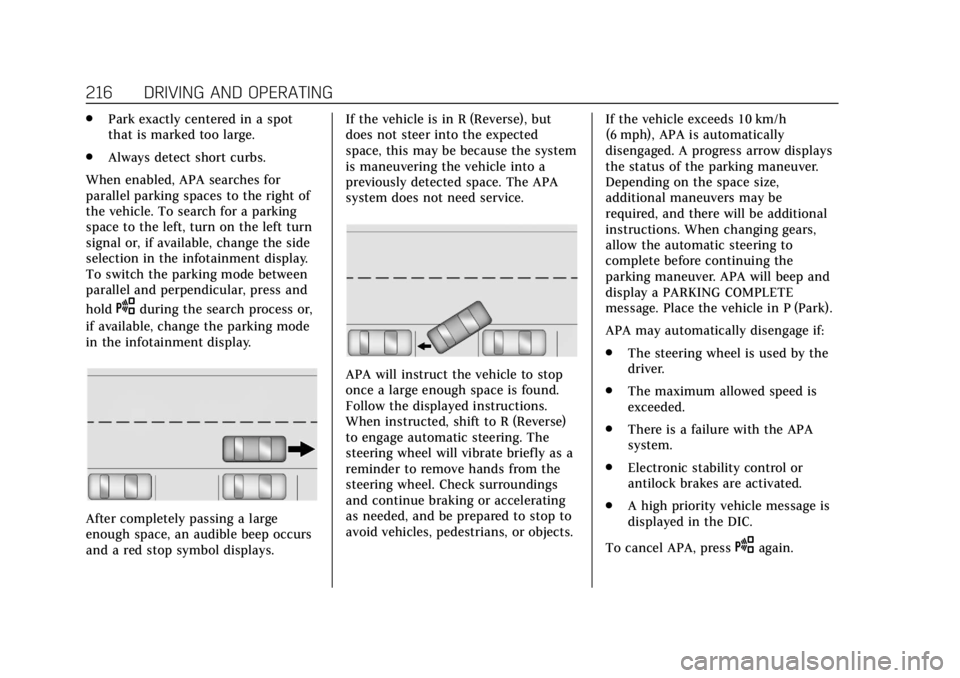
After completely passing a large
enough space, an audible beep occurs
and a red stop symbol displays. If the vehicle is in R (Reverse), but
does not steer into the expected
space, this may be because the system
is maneuvering the vehicle into a
previously detected space. The APA
system does not need service.
APA will instruct the vehicle to stop
once a large enough space is found.
Follow the displayed instructions.
When instructed, shift to R (Reverse)
to engage automatic steering. The
steering wheel will vibrate briefly as a
reminder to remove hands from the
steering wheel. Check surroundings
and continue braking or accelerating
as needed, and be prepared to stop to
avoid vehicles, pedestrians, or objects.
If the vehicle exceeds 10 km/h
(6 mph), APA is automatically
disengaged. A progress arrow displays
the status of the parking maneuver.
Depending on the space size,
additional maneuvers may be
required, and there will be additional
instructions. When changing gears,
allow the automatic steering to
complete before continuing the
parking maneuver. APA will beep and
display a PARKING COMPLETE
message. Place the vehicle in P (Park).
APA may automatically disengage if:
.
The steering wheel is used by the
driver.
. The maximum allowed speed is
exceeded.
. There is a failure with the APA
system.
. Electronic stability control or
antilock brakes are activated.
. A high priority vehicle message is
displayed in the DIC.
To cancel APA, press
Oagain.
Page 224 of 376
Cadillac XTS Owner Manual (GMNA-Localizing-U.S./Canada-12032610) -
2019 - crc - 8/22/18
DRIVING AND OPERATING 223
LCA may not operate when the LCA
sensors in the left or right corners of
the rear bumper are covered with
mud, dirt, snow, ice, or slush, or in
heavy rainstorms. For cleaning
instructions, see "Washing the
Vehicle" underExterior Care0312.
If the DIC still displays the system
unavailable message after cleaning
both sides of the vehicle toward the
rear corners of the vehicle, see your
dealer.
If the LCA displays do not light up
when moving vehicles are in the side
blind zone or rapidly approaching this
zone and the system is clean, the
system may need service. Take the
vehicle to your dealer.
Radio Frequency Information
See Radio Frequency Statement 0349.
Lane Departure
Warning (LDW)
If equipped, LDW may help avoid
crashes due to unintentional lane
departures. It may provide an alert if
the vehicle is crossing a lane without using a turn signal in that direction.
LDW uses a camera sensor to detect
the lane markings at speeds of 56
km/h (35 mph) or greater.
{Warning
The LDW system does not steer the
vehicle. The LDW system may not:
. Provide enough time to avoid
a crash.
. Detect lane markings under
poor weather or visibility
conditions. This can occur if
the windshield or headlamps
are blocked by dirt, snow,
or ice; if they are not in
proper condition; or if the sun
shines directly into the
camera.
. Detect road edges.
. Detect lanes on winding or
hilly roads.
If LDW only detects lane markings
on one side of the road, it will only
warn you when departing the lane (Continued)
Warning (Continued)
on the side where it has detected a
lane marking. Always keep your
attention on the road and maintain
proper vehicle position within the
lane, or vehicle damage, injury,
or death could occur. Always keep
the windshield, headlamps, and
camera sensors clean and in good
repair. Do not use LDW in bad
weather conditions.
How the System Works
The LDW camera sensor is on the
windshield ahead of the rearview
mirror.
To turn LDW on and off, press
@on
the center stack to the left of the
infotainment display. The control
indicator will light when LDW is on.
Page 270 of 376
Cadillac XTS Owner Manual (GMNA-Localizing-U.S./Canada-12032610) -
2019 - crc - 8/22/18
VEHICLE CARE 269
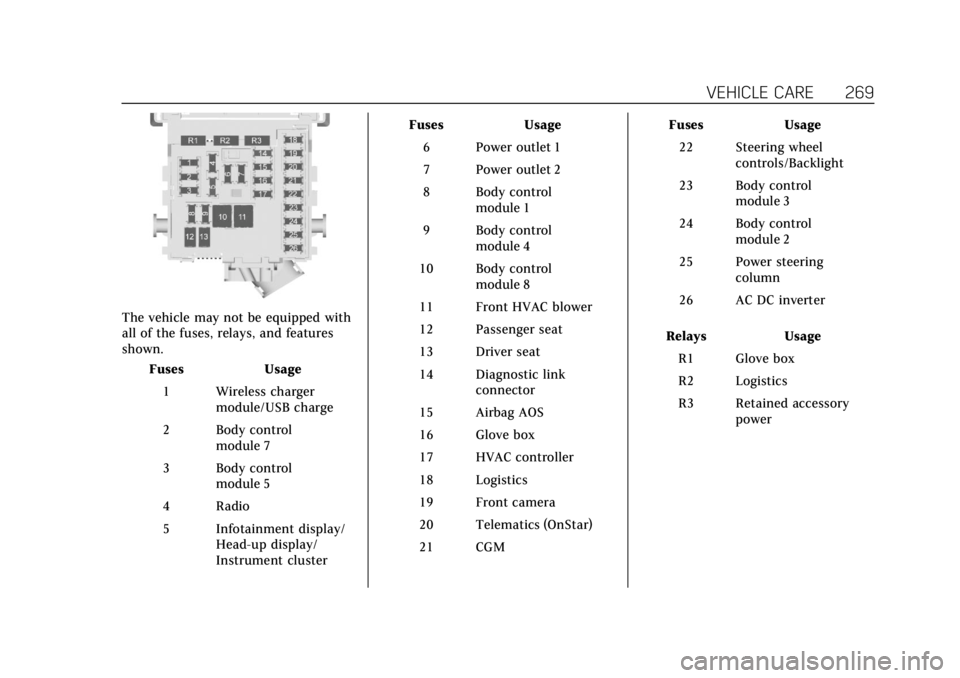
The vehicle may not be equipped with
all of the fuses, relays, and features
shown.Fuses Usage
1 Wireless charger module/USB charge
2 Body control module 7
3 Body control module 5
4 Radio
5 Infotainment display/ Head-up display/
Instrument cluster Fuses Usage
6 Power outlet 1
7 Power outlet 2
8 Body control module 1
9 Body control module 4
10 Body control module 8
11 Front HVAC blower
12 Passenger seat
13 Driver seat
14 Diagnostic link connector
15 Airbag AOS
16 Glove box
17 HVAC controller
18 Logistics
19 Front camera
20 Telematics (OnStar)
21 CGM Fuses Usage
22 Steering wheel controls/Backlight
23 Body control module 3
24 Body control module 2
25 Power steering column
26 AC DC inverter
Relays Usage R1 Glove box
R2 Logistics
R3 Retained accessory power
Page 340 of 376
Cadillac XTS Owner Manual (GMNA-Localizing-U.S./Canada-12032610) -
2019 - crc - 8/22/18
CUSTOMER INFORMATION 339
Customer
Information
Customer Information
Customer SatisfactionProcedure . . . . . . . . . . . . . . . . . . . . . . . 339
Customer Assistance Offices . . . . 341
Customer Assistance for Text Telephone (TTY) Users . . . . . . . . . 341
Online Owner Center . . . . . . . . . . . . . 342
GM Mobility Reimbursement Program . . . . . . . . . . . . . . . . . . . . . . . . . 342
Roadside Service . . . . . . . . . . . . . . . . . 343
Scheduling Service Appointments . . . . . . . . . . . . . . . . . . . 345
Courtesy Transportation Program . . . . . . . . . . . . . . . . . . . . . . . . . 345
Collision Damage Repair . . . . . . . . . 346
Publication Ordering Information . . . . . . . . . . . . . . . . . . . . . 348
Radio Frequency Statement . . . . . 349
Reporting Safety Defects
Reporting Safety Defects to the United States Government . . . . . 349
Reporting Safety Defects to the Canadian Government . . . . . . . . . 349 Reporting Safety Defects to
General Motors . . . . . . . . . . . . . . . . . 350
Vehicle Data Recording and
Privacy
Vehicle Data Recording andPrivacy . . . . . . . . . . . . . . . . . . . . . . . . . . . 350
Event Data Recorders . . . . . . . . . . . . 350
OnStar . . . . . . . . . . . . . . . . . . . . . . . . . . . . . 351
Infotainment System . . . . . . . . . . . . . 351
Customer Information
Customer Satisfaction
Procedure
Your satisfaction and goodwill are
important to your dealer and to
Cadillac. Normally, any concerns with
the sales transaction or the operation
of the vehicle will be resolved by your
dealer's sales or service departments.
Sometimes, however, despite the best
intentions of all concerned,
misunderstandings can occur. If your
concern has not been resolved to your
satisfaction, the following steps
should be taken:
STEP ONE : Discuss your concern
with a member of dealership
management. Normally, concerns can
be quickly resolved at that level. If the
matter has already been reviewed with
the sales, service or parts manager,
contact the owner of your dealership
or the general manager.
STEP TWO : If after contacting a
member of dealership management, it
appears your concern cannot be
resolved by your dealership without
Page 349 of 376
Cadillac XTS Owner Manual (GMNA-Localizing-U.S./Canada-12032610) -
2019 - crc - 8/22/18
348 CUSTOMER INFORMATION
Managing the Vehicle Damage
Repair Process
In the event that the vehicle requires
damage repairs, GM recommends that
you take an active role in its repair.
If you have a pre-determined repair
facility of choice, take the vehicle
there, or have it towed there. Specify
to the facility that any required
replacement collision parts be original
equipment parts, either new Genuine
GM parts or recycled original GM
parts. Remember, recycled parts will
not be covered by the GM vehicle
warranty.
Insurance pays the bill for the repair,
but you must live with the repair.
Depending on your policy limits, your
insurance company may initially value
the repair using aftermarket parts.
Discuss this with the repair
professional, and insist on Genuine
GM parts. Remember, if the vehicle is
leased, you may be obligated to have
the vehicle repaired with Genuine GM
parts, even if your insurance coverage
does not pay the full cost.If another party's insurance company
is paying for the repairs, you are not
obligated to accept a repair valuation
based on that insurance company's
collision policy repair limits, as you
have no contractual limits with that
company. In such cases, you can have
control of the repair and parts choices
as long as the cost stays within
reasonable limits.
Publication Ordering
Information
Service Manuals
Service manuals have the diagnosis
and repair information on the engine,
transmission, axle, suspension, brakes,
electrical system, steering system,
body, etc.
Customer Literature
Owner’s manuals are written
specifically for owners and are
intended to provide basic operational
information about the vehicle. The
owner’s manual includes the
Maintenance Schedule for all models.Customer literature publications
available for purchase include owner’s
manuals, warranty manuals,
infotainment manuals, and portfolios.
Portfolios include an owner’s manual,
warranty manual, infotainment
manual, if applicable, and zip lock bag
or pouch.
Current and Past Models
Service manuals and customer
literature are available for many
current and past model year GM
vehicles.
To order, call 1-800-551-4123
Monday–Friday, 8:00 a.m.–6:00 p.m.
eastern time
For credit card orders only (VISA,
MasterCard, or Discover), see Helm,
Inc. at: www.helminc.com.
To order by mail, write to:
Helm, Incorporated
Attention: Customer Service
47911 Halyard Drive
Plymouth, MI 48170
Make checks payable in U.S. funds.