AUX CHEVROLET AVALANCHE 2012 2.G Owner's Manual
[x] Cancel search | Manufacturer: CHEVROLET, Model Year: 2012, Model line: AVALANCHE, Model: CHEVROLET AVALANCHE 2012 2.GPages: 508, PDF Size: 7.78 MB
Page 240 of 508
Black plate (44,1)Chevrolet Avalanche Owner Manual - 2012
7-44 Infotainment System
Tips and Troubleshooting Chart (cont'd)
ProblemRecommended Action
Sometimes the wireless headphone audio cuts out or
buzzes. Check for obstructions, low batteries, reception range,
and interference from cellular telephone towers, or use a
cellular telephone in the vehicle.
Check that the headphones are on correctly using the
L (left) and R (right) on the headphones.
The remote and/or the headphones are lost. See your dealer for assistance.
The DVD is playing, but there is no picture or sound. Check that the RSE video screen is sourced to the DVD player.
DVD Display Error Messages
The DVD display error message
depends on the radio that is in the
vehicle. The video screen can
display one of the following:
Disc Load/Eject Error:This
message displays when there are
disc load or eject problems.
Disc Format Error: This message
displays if the disc is inserted with
the disc label wrong side up, or if
the disc is damaged. Disc Region Error:
This message
displays if the disc is not from a
correct region.
No Disc Inserted: This message
displays if no disc is present when
ZDVD or DVD/CD AUX is
pressed on the radio.
DVD Distortion
Video distortion can occur when
operating cellular phones, scanners,
CB radios, Global Position Systems
(GPS)*, two-way radios, mobile fax
machines, or walkie talkies.
It might be necessary to turn off the
DVD player when operating one of
these devices in or near the vehicle.
*Excludes the OnStar
®System.
Page 241 of 508
Black plate (45,1)Chevrolet Avalanche Owner Manual - 2012
Infotainment System 7-45
Cleaning the RSE Overhead
Console
When cleaning the RSE overhead
console surface, use only a clean
cloth dampened with clean water.
Cleaning the Video Screen
When cleaning the video screen,
use only a clean cloth dampened
with clean water. Use care when
directly touching or cleaning the
screen, as damage could result.
Rear Seat Audio (RSA)
System
Vehicles with this feature allow the
rear seat passengers to listen to
and control any of the music
sources: radio, CDs, DVDs, or other
auxiliary sources. However, the rear
seat passengers can only control
the music sources the front seat
passengers are not listening to,except on some radios where dual
control is allowed. For example, rear
seat passengers can control and
listen to a CD through the
headphones, while the driver listens
to the radio through the front
speakers. The rear seat passengers
have control of the volume for each
set of headphones.
The radio functionality is controlled
by both the RSA and the front radio.
Only one band can be tuned to at
one time. Changing the band on the
RSA or the front radio will change
the band on the other system,
if they are both sourced to the radio.
The RSA functions operate even
when the main radio is off. The front
audio system will display the
headphone icon when the RSA is
on, and will disappear from the
display when it is off.
Audio can be heard through wired
headphones (not included) plugged
into the jacks on the RSA. If the
vehicle has this feature, audio can
also be heard on Channel 2 of the
wireless headphones.
The audio system mutes the rear
speakers when the RSA audio is
active through the headphones.
To listen to an iPod or portable
audio device through the RSA,
attach the iPod or portable audio
device to the front auxiliary input (if
available), located on the front audio
system. Turn the iPod on, then
choose the front auxiliary input with
the RSA SRCE button.
Page 242 of 508
Black plate (46,1)Chevrolet Avalanche Owner Manual - 2012
7-46 Infotainment System
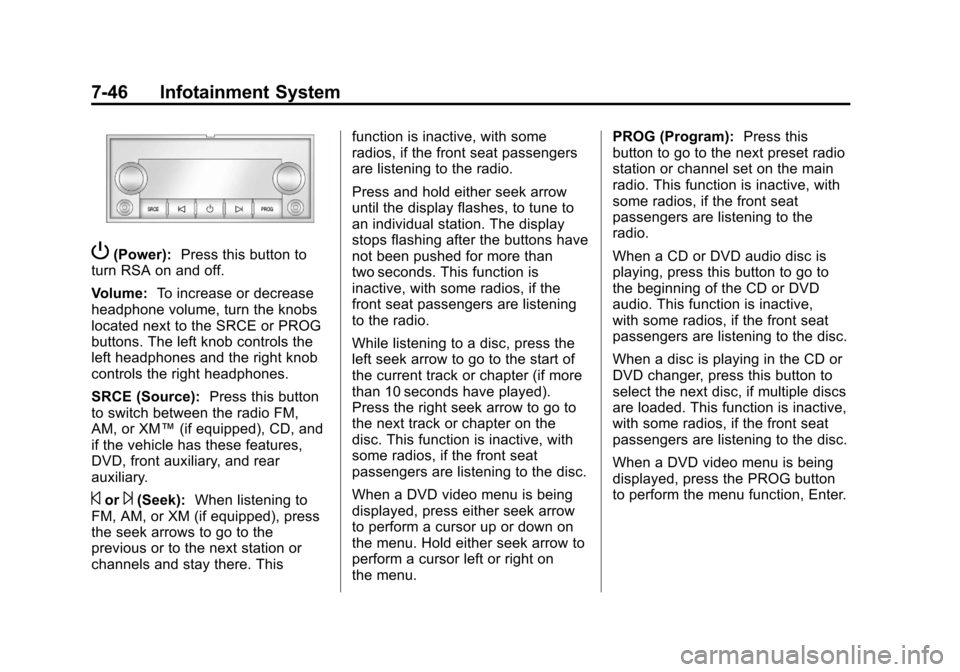
P(Power):Press this button to
turn RSA on and off.
Volume: To increase or decrease
headphone volume, turn the knobs
located next to the SRCE or PROG
buttons. The left knob controls the
left headphones and the right knob
controls the right headphones.
SRCE (Source): Press this button
to switch between the radio FM,
AM, or XM™ (if equipped), CD, and
if the vehicle has these features,
DVD, front auxiliary, and rear
auxiliary.
©or¨(Seek): When listening to
FM, AM, or XM (if equipped), press
the seek arrows to go to the
previous or to the next station or
channels and stay there. This function is inactive, with some
radios, if the front seat passengers
are listening to the radio.
Press and hold either seek arrow
until the display flashes, to tune to
an individual station. The display
stops flashing after the buttons have
not been pushed for more than
two seconds. This function is
inactive, with some radios, if the
front seat passengers are listening
to the radio.
While listening to a disc, press the
left seek arrow to go to the start of
the current track or chapter (if more
than 10 seconds have played).
Press the right seek arrow to go to
the next track or chapter on the
disc. This function is inactive, with
some radios, if the front seat
passengers are listening to the disc.
When a DVD video menu is being
displayed, press either seek arrow
to perform a cursor up or down on
the menu. Hold either seek arrow to
perform a cursor left or right on
the menu.PROG (Program):
Press this
button to go to the next preset radio
station or channel set on the main
radio. This function is inactive, with
some radios, if the front seat
passengers are listening to the
radio.
When a CD or DVD audio disc is
playing, press this button to go to
the beginning of the CD or DVD
audio. This function is inactive,
with some radios, if the front seat
passengers are listening to the disc.
When a disc is playing in the CD or
DVD changer, press this button to
select the next disc, if multiple discs
are loaded. This function is inactive,
with some radios, if the front seat
passengers are listening to the disc.
When a DVD video menu is being
displayed, press the PROG button
to perform the menu function, Enter.
Page 388 of 508
Black plate (44,1)Chevrolet Avalanche Owner Manual - 2012
10-44 Vehicle Care
FusesUsage
28 Fog Lamps
29 Horn
30 Passenger Side
High-Beam
Headlamp
31 Daytime Running
Lamps (DRL)
(If Equipped)
32 Driver Side
High-Beam
Headlamp
33 Daytime Running
Lamps 2
(If Equipped)
34 Sunroof
35 Key Ignition
System,
Theft‐Deterrent
System Fuses
Usage
36 Windshield Wiper
37 SEO B2 Upfitter
Usage (Battery)
38 Electric Adjustable
Pedals
39 Climate Controls
(Battery)
40 Airbag System
(Ignition)
41 Amplifier
42 Audio System
43 Miscellaneous
(Ignition), Cruise
Control
44 Liftgate Release
45 Airbag System
(Battery) Fuses
Usage
46 Instrument Panel
Cluster
47 Not Used
48 Auxiliary Climate
Control (Ignition)
49 Center
High-Mounted
Stoplamp (CHMSL)
50 Rear Defogger
51 Heated Mirrors
52 SEO B1 Upfitter
Usage (Battery)
53 Auxiliary Power
Outlet
54 Automatic Level
Control
Compressor Relay
Page 497 of 508

Black plate (1,1)Chevrolet Avalanche Owner Manual - 2012
INDEX i-1
A
Accessories andModifications . . . . . . . . . . . . . . . . . 10-3
Accessory Power . . . . . . . . . . . . . . 9-28
Active Fuel Management
®. . . . . 9-30
Add-On Electrical Equipment . . . . . . . . . . . . . . . . . . . 9-84
Additional Information, OnStar
®. . . . . . . . . . . . . . . . . . . . . . 14-5
Adjustable Throttle and Brake Pedal . . . . . . . . . . . . . . . . . . 9-22
Adjustments Lumbar, Front Seats . . . . . . . . . . . 3-4
Air Cleaner/Filter, Engine . . . . . 10-16
Air Vents . . . . . . . . . . . . . . . . . . . . . . 8-10
Airbag Adding Equipment to theVehicle . . . . . . . . . . . . . . . . . . . . . . 3-34
Airbag System Check . . . . . . . . . . . . . . . . . . . . . . . . 3-35
How Does an Airbag
Restrain? . . . . . . . . . . . . . . . . . . . 3-27
Passenger Sensing System . . . . . . . . . . . . . . . . . . . . . . 3-29
What Makes an Airbag
Inflate? . . . . . . . . . . . . . . . . . . . . . . 3-27 Airbag System (cont'd)
What Will You See after an
Airbag Inflates? . . . . . . . . . . . . . 3-28
When Should an Airbag
Inflate? . . . . . . . . . . . . . . . . . . . . . . 3-25
Where Are the Airbags? . . . . . . 3-24
Airbags Passenger Status Indicator . . . 5-17
Readiness Light . . . . . . . . . . . . . . 5-16
Servicing Airbag-EquippedVehicles . . . . . . . . . . . . . . . . . . . . . 3-34
System Check . . . . . . . . . . . . . . . . 3-22
Alarm System Anti-theft . . . . . . . . . . . . . . . . . . . . . . 2-17
AM-FM Radio . . . . . . . . . . . . . . . . . . . 7-8
Antenna Satellite Radio . . . . . . . . . . . . . . . . 7-13
Anti-theft
Alarm System . . . . . . . . . . . . . . . . 2-17
Alarm System Messages . . . . . 5-42
Antilock Brake System (ABS) . . . . . . . . . . . . . . . . 9-44
Warning Light . . . . . . . . . . . . . . . . . 5-22 Appearance Care
Exterior . . . . . . . . . . . . . . . . . . . . . 10-96
Interior . . . . . . . . . . . . . . . . . . . . . . 10-99
Armrest Storage . . . . . . . . . . . . . . . . 4-1
Assistance Program, Roadside . . . . . . . . . . . . . . . 13-7, 13-9
Audio Players . . . . . . . . . . . . . . . . . 7-14
CD . . . . . . . . . . . . . . . . . . . . . . . . . . . 7-14
CD/DVD . . . . . . . . . . . . . . . . . . . . . . 7-19
Audio System Radio Reception . . . . . . . . . . . . . . 7-13
Rear Seat (RSA) . . . . . . . . . . . . . 7-45
Theft-Deterrent Feature . . . . . . . . 7-2
Automatic Door Locks . . . . . . . . . . . . . . . . . . . . 2-8
Headlamp System . . . . . . . . . . . . . 6-4
Level Control . . . . . . . . . . . . . . . . . 9-50
Automatic Transmission . . . . . . . 9-32 Fluid . . . . . . . . . . . . . . . . . . . . . . . . 10-13
Manual Mode . . . . . . . . . . . . . . . . . 9-35
Shift Lock ControlFunction Check . . . . . . . . . . . 10-33
Auxiliary Devices . . . . . . . . . . . . . . 7-30
Axle, Front . . . . . . . . . . . . . . . . . . . . 10-31
Axle, Rear . . . . . . . . . . . . . . . . . . . . 10-31
Page 499 of 508

Black plate (3,1)Chevrolet Avalanche Owner Manual - 2012
INDEX i-3
CleaningExterior Care . . . . . . . . . . . . . . . 10-96
Interior Care . . . . . . . . . . . . . . . . 10-99
Climate Control Systems . . . . . . . 8-1 Air Conditioning . . . . . . . . . . . . . . . 8-1
Dual Automatic . . . . . . . . . . . . . . . . 8-4
Heating . . . . . . . . . . . . . . . . . . . . . . . . 8-1
Clock . . . . . . . . . . . . . . . . . . . . . . . . . . . 5-8
Cluster, Instrument . . . . . . . . . . . . 5-11
Collision Damage Repair . . . . . 13-14
Compass . . . . . . . . . . . . . . . . . . . . . . . 5-6
Connections, OnStar
®. . . . . . . . . 14-4
Continuous Damping Control (CDC) . . . . . . . . . . . . . . . . 9-50
Control of a Vehicle . . . . . . . . . . . . . 9-4
Convex Mirrors . . . . . . . . . . . . . . . . 2-20
Coolant Engine . . . . . . . . . . . . . . . . . . . . . . 10-18
Engine TemperatureGauge . . . . . . . . . . . . . . . . . . . . . . 5-14
Cooling System . . . . . . . . . . . . . . . 10-18
Engine Messages . . . . . . . . . . . . 5-37
Courtesy Transportation Program . . . . . . . . . . . . . . . . . . . . . 13-13
Cover
Cargo Panels . . . . . . . . . . . . . . . . . . 4-6 Cruise Control . . . . . . . . . . . . . . . . . 9-51
Light . . . . . . . . . . . . . . . . . . . . . . . . . . 5-26
Cupholders . . . . . . . . . . . . . . . . . . . . . 4-1
Customer Assistance . . . . . . . . . . 13-6 Offices . . . . . . . . . . . . . . . . . . 13-4, 13-5
Text Telephone (TTY)Users . . . . . . . . . . . . . . . . . . . . . . . 13-6
Customer Information Service PublicationsOrdering Information . . . . . . 13-16
Customer Satisfaction
Procedure . . . . . . . . . . . . . . 13-1, 13-3
D
Damage Repair, Collision . . . . . 13-14
Danger, Warnings, andCautions . . . . . . . . . . . . . . . . . . . . . . . . iv
Data Recorders, Event . . . . . . . 13-19
Daytime Running
Lamps (DRL) . . . . . . . . . . . . . . . . . . 6-3
Defensive Driving . . . . . . . . . . . . . . . 9-3
Delayed Locking . . . . . . . . . . . . . . . . 2-8
Devices, Auxiliary . . . . . . . . . . . . . 7-30
Diagnostics, OnStar
®. . . . . . . . . . 14-5
Distracted Driving . . . . . . . . . . . . . . . 9-2
Dome Lamps . . . . . . . . . . . . . . . . . . . 6-7 Door
Ajar Messages . . . . . . . . . . . . . . . 5-37
Delayed Locking . . . . . . . . . . . . . . . 2-8
Locks . . . . . . . . . . . . . . . . . . . . . . . . . . 2-7
Power Locks . . . . . . . . . . . . . . . . . . . 2-8
Drive Belt Routing, Engine . . . . . 12-3
Driver Information Center (DIC) . . . . . . . . . . . . . . . . . 5-26
Driving Characteristics andTowing Tips . . . . . . . . . . . . . . . . . 9-67
Defensive . . . . . . . . . . . . . . . . . . . . . . 9-3
Drunk . . . . . . . . . . . . . . . . . . . . . . . . . . 9-3
For Better Fuel Economy . . . . . 1-26
Highway Hypnosis . . . . . . . . . . . . 9-12
Hill and Mountain Roads . . . . . . 9-12
If the Vehicle is Stuck . . . . . . . . . 9-15
Loss of Control . . . . . . . . . . . . . . . . 9-5
Off-Road . . . . . . . . . . . . . . . . . . . . . . 9-6
Off-Road Recovery . . . . . . . . . . . . 9-5
Vehicle Load Limits . . . . . . . . . . . 9-16
Wet Roads . . . . . . . . . . . . . . . . . . . 9-11
Winter . . . . . . . . . . . . . . . . . . . . . . . . 9-13
Dual Automatic Climate Control System . . . . . . . . . . . . . . . . 8-4