change wheel CHEVROLET AVALANCHE 2012 2.G Owners Manual
[x] Cancel search | Manufacturer: CHEVROLET, Model Year: 2012, Model line: AVALANCHE, Model: CHEVROLET AVALANCHE 2012 2.GPages: 508, PDF Size: 7.78 MB
Page 5 of 508

Black plate (5,1)Chevrolet Avalanche Owner Manual - 2012
Introduction v
Vehicle Symbol Chart
Here are some additional symbols
that may be found on the vehicle
and what they mean. For more
information on the symbol, refer to
the Index.
0:Adjustable Pedals
9:Airbag Readiness Light
#:Air Conditioning
!:Antilock Brake System (ABS)
%:Audio Steering Wheel Controls
or OnStar®
$: Brake System Warning Light
":Charging System
I:Cruise Control
B: Engine Coolant Temperature
O:Exterior Lamps
#:Fog Lamps
.: Fuel Gauge
+:Fuses
3: Headlamp High/Low-Beam
Changer
(: Heated Steering Wheel
j:LATCH System Child
Restraints
*: Malfunction Indicator Lamp
::Oil Pressure
g:Outside Power Foldaway
Mirrors
}: Power
/:Remote Vehicle Start
>:Safety Belt Reminders
7:Tire Pressure Monitor
_: Tow/Haul Mode
d:Traction Control/StabiliTrak®
M:Windshield Washer Fluid
Page 9 of 508

Black plate (3,1)Chevrolet Avalanche Owner Manual - 2012
In Brief 1-3
A.Air Vents on page 8‑10.
B. Turn and Lane‐Change Lever. See Turn and Lane-Change
Signals on page 6‑5.
Windshield Wiper/Washer on
page 5‑5.
C. Instrument Cluster on
page 5‑11.
D. Hazard Warning Flashers on
page 6‑5 (Out of View).
E. Shift Lever. See Automatic
Transmission on page 9‑32.
F. Tow/Haul Mode on page 9‑36
(If Equipped).
G. Driver Information Center (DIC) Buttons. See Driver Information
Center (DIC) on page 5‑26.
H. AM-FM Radio on page 7‑8.
I. Exterior Lamp Controls on
page 6‑1. J. Dome Lamp Override. See
Dome Lamps on page 6‑7.
Instrument Panel Illumination
Control on page 6‑7.
Fog Lamps on page 6‑6
(If Equipped).
K. Automatic Transfer Case Control (If Equipped). See
Four-Wheel Drive (Two Speed
Automatic Transfer Case) on
page 9‑37 orFour-Wheel Drive
(Single Speed Automatic
Transfer Case) on page 9‑42.
L. Data Link Connector (DLC) (Out of View). See Malfunction
Indicator Lamp on page 5‑19.
M. Cruise Control on page 9‑51.
N. Steering Wheel Adjustment on
page 5‑2.
O. Horn on page 5‑5. P.
Steering Wheel Controls on
page 5‑3.
Q. Climate Control Systems on
page 8‑1 (If Equipped).
Dual Automatic Climate Control
System on page 8‑4
(If Equipped).
R. Power Outlets on page 5‑9.
S. StabiliTrak
®System on
page 9‑46.
Pedal Adjust Control (If
Equipped). See Adjustable
Throttle and Brake Pedal on
page 9‑22.
Ultrasonic Parking Assist on
page 9‑54 (If Equipped).
Power Assist Steps on
page 2‑16 (If Equipped).
T. Glove Box on page 4‑1.
Page 19 of 508
Black plate (13,1)Chevrolet Avalanche Owner Manual - 2012
In Brief 1-13
Power Foldaway Mirrors
To fold the mirrors:
1. Press (C) to fold the mirrors outto the driving position.
2. Press (D) to fold the mirrors in to the folded position.
Manual Foldaway Mirrors
Manually fold the mirrors inward
to prevent damage when going
through an automatic car wash.
To fold, pull the mirror toward the
vehicle. Push the mirror outward,
to return to its original position.
See Folding Mirrors on page 2‑21.
Interior Mirror
Vehicles with a manual rearview
mirror can be adjusted to see clearly
behind the vehicle. Hold the mirror
in the center to move it up or
down and side to side. To reduce
headlamp glare during nighttime
use, push the tab forward for
daytime use and pull it for
nighttime use. Vehicles with the automatic dimming
feature will automatically reduce the
glare of headlamps from behind the
vehicle. The dimming feature comes
on and the indicator light illuminates
each time the vehicle is started.
See
Automatic Dimming Rearview
Mirror on page 2‑22 for more
information.
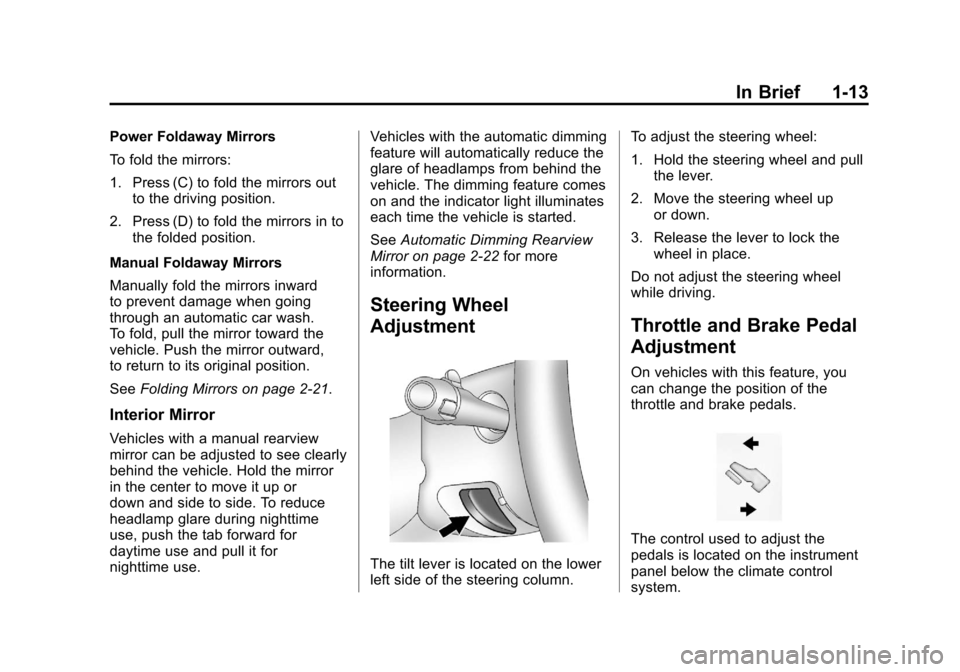
Steering Wheel
Adjustment
The tilt lever is located on the lower
left side of the steering column. To adjust the steering wheel:
1. Hold the steering wheel and pull
the lever.
2. Move the steering wheel up or down.
3. Release the lever to lock the wheel in place.
Do not adjust the steering wheel
while driving.
Throttle and Brake Pedal
Adjustment
On vehicles with this feature, you
can change the position of the
throttle and brake pedals.
The control used to adjust the
pedals is located on the instrument
panel below the climate control
system.
Page 27 of 508
Black plate (21,1)Chevrolet Avalanche Owner Manual - 2012
In Brief 1-21
For more information, refer to:
.www.xmradio.com or call
1-800-929-2100 (U.S.)
.www.xmradio.ca or call
1-877-438-9677 (Canada)
See Satellite Radio on page 7‑9.
Portable Audio Devices
This vehicle has an auxiliary input,
located on the audio faceplate, and
a USB port located in the center console. External devices such
as iPod
®, laptop computers,
MP3 players, CD changers, USB
storage device, etc. can be
connected to the auxiliary port using
a 3.5 mm (1/8 in) input jack or the
USB port depending on the audio
system.
See Auxiliary Devices on page 7‑30
for further information.
Bluetooth®
For vehicles with a Bluetooth
system, it allows users with a
Bluetooth‐enabled cell phone to
make and receive hands-free calls
using the vehicle’ s audio system
and controls.
The Bluetooth‐enabled cell phone
must be paired with the Bluetooth
system before it can be used in the
vehicle. Not all phones will support
all functions. For more information,
visit www.gm.com/bluetooth.
For more information, see Bluetooth
on page 7‑47.
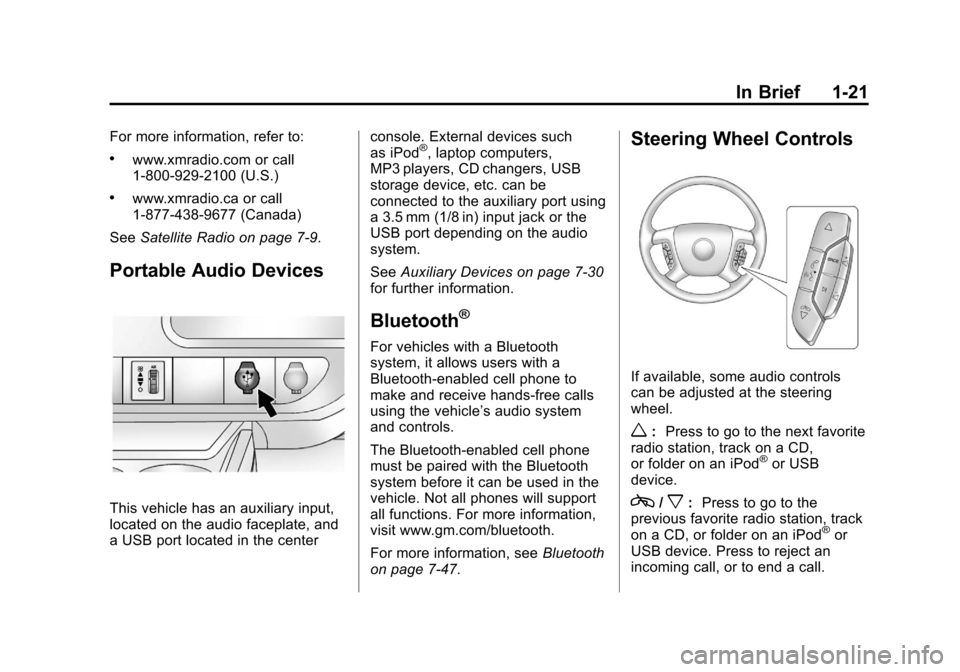
Steering Wheel Controls
If available, some audio controls
can be adjusted at the steering
wheel.
w: Press to go to the next favorite
radio station, track on a CD,
or folder on an iPod
®or USB
device.
c/x: Press to go to the
previous favorite radio station, track
on a CD, or folder on an iPod
®or
USB device. Press to reject an
incoming call, or to end a call.
Page 31 of 508
Black plate (25,1)Chevrolet Avalanche Owner Manual - 2012
In Brief 1-25
Performance and
Maintenance
StabiliTrak®System
The vehicle has a traction control
system that limits wheel spin and
the StabiliTrak system that assists
with directional control of the vehicle
in difficult driving conditions. Both
systems turn on automatically every
time the vehicle is started.
.To turn off traction control, press
and release
gon the instrument
panel. The appropriate DIC
message displays. See Ride
Control System Messages on
page 5‑40.
.To turn off both traction control
and StabiliTrak, press and hold
guntilgilluminates and the
appropriate DIC message
displays. See Ride Control
System Messages on page 5‑40.
.Press and releasegagain to
turn on both systems.
For more information, see
StabiliTrak
®System on page 9‑46.
Tire Pressure Monitor
This vehicle may have a Tire
Pressure Monitor System (TPMS).
The TPMS warning light alerts you
to a significant loss in pressure of
one of the vehicle's tires. If the
warning light comes on, stop as
soon as possible and inflate the
tires to the recommended pressure
shown on the Tire and Loading
Information label. See Vehicle Load
Limits on page 9‑16. The warning
light will remain on until the tire
pressure is corrected. During cooler conditions, the low tire
pressure warning light may appear
when the vehicle is first started and
then turn off. This may be an early
indicator that the tire pressures are
getting low and the tires need to be
inflated to the proper pressure.
The TPMS does not replace normal
monthly tire maintenance. It is the
driver
’s responsibility to maintain
correct tire pressures.
See Tire Pressure Monitor System
on page 10‑58.
Engine Oil Life System
The engine oil life system calculates
engine oil life based on vehicle use
and, on most vehicles, displays a
DIC message when it is necessary
to change the engine oil and filter.
The oil life system should be reset
to 100% only following an oil
change.
Page 94 of 508
Black plate (34,1)Chevrolet Avalanche Owner Manual - 2012
3-34 Seats and Restraints
Servicing the
Airbag-Equipped Vehicle
Airbags affect how the vehicle
should be serviced. There are parts
of the airbag system in several
places around the vehicle. Your
dealer and the service manual have
information about servicing the
vehicle and the airbag system. To
purchase a service manual, see
Service Publications Ordering
Information on page 13‑16.
{WARNING
For up to 10 seconds after the
vehicle is turned off and the
battery is disconnected, an airbag
can still inflate during improper
service. You can be injured if you
are close to an airbag when it
inflates. Avoid yellow connectors.
They are probably part of the
airbag system. Be sure to follow(Continued)
WARNING (Continued)
proper service procedures, and
make sure the person performing
work for you is qualified to do so.
Adding Equipment to the
Airbag-Equipped Vehicle
Q: Is there anything I might addto or change about the vehicle
that could keep the airbags
from working properly?
A: Yes. If you add things that
change the vehicle's frame,
bumper system, height, front end
or side sheet metal, they may
keep the airbag system from
working properly. Changing or
moving any parts of the front
seats, safety belts, the airbag
sensing and diagnostic module,
steering wheel, instrument
panel, roof-rail airbag modules,
ceiling headliner or pillar garnish
trim, overhead console, front sensors, side impact sensors,
or airbag wiring can affect the
operation of the airbag system.
In addition, the vehicle may
have a passenger sensing
system for the right front
passenger position, which
includes sensors that are part
of the passenger seat. The
passenger sensing system
may not operate properly if the
original seat trim is replaced
with non-GM covers, upholstery
or trim, or with GM covers,
upholstery or trim designed for a
different vehicle. Any object,
such as an aftermarket seat
heater or a comfort enhancing
pad or device, installed under or
on top of the seat fabric, could
also interfere with the operation
of the passenger sensing
system. This could either
prevent proper deployment of
the passenger airbag(s) or
prevent the passenger sensing
system from properly turning off
Page 135 of 508
Black plate (5,1)Chevrolet Avalanche Owner Manual - 2012
Instruments and Controls 5-5
While listening to a CD/DVD, press
and hold
¨to quickly move forward
through the tracks. Release to stop
on the desired track.
+
e: Press to increase volume.
−
e: Press to decrease volume.
Horn
To sound the horn, press the center
pad on the steering wheel.
Windshield Wiper/Washer
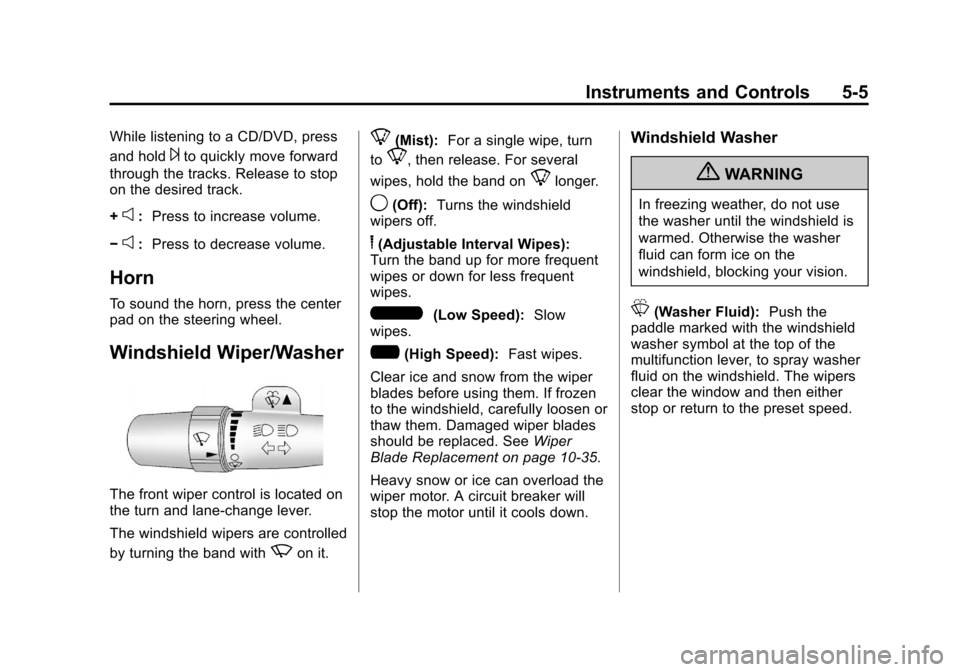
The front wiper control is located on
the turn and lane‐change lever.
The windshield wipers are controlled
by turning the band with
zon it.
8(Mist): For a single wipe, turn
to
8, then release. For several
wipes, hold the band on
8longer.
9(Off): Turns the windshield
wipers off.
6(Adjustable Interval Wipes):
Turn the band up for more frequent
wipes or down for less frequent
wipes.
6(Low Speed): Slow
wipes.
?(High Speed): Fast wipes.
Clear ice and snow from the wiper
blades before using them. If frozen
to the windshield, carefully loosen or
thaw them. Damaged wiper blades
should be replaced. See Wiper
Blade Replacement on page 10‑35.
Heavy snow or ice can overload the
wiper motor. A circuit breaker will
stop the motor until it cools down.
Windshield Washer
{WARNING
In freezing weather, do not use
the washer until the windshield is
warmed. Otherwise the washer
fluid can form ice on the
windshield, blocking your vision.
L(Washer Fluid): Push the
paddle marked with the windshield
washer symbol at the top of the
multifunction lever, to spray washer
fluid on the windshield. The wipers
clear the window and then either
stop or return to the preset speed.
Page 189 of 508
Black plate (1,1)Chevrolet Avalanche Owner Manual - 2012
Lighting 6-1
Lighting
Exterior Lighting
Exterior Lamp Controls . . . . . . . . 6-1
Exterior Lamps OffReminder . . . . . . . . . . . . . . . . . . . . 6-3
Headlamp High/Low-Beam Changer . . . . . . . . . . . . . . . . . . . . . 6-3
Flash-to-Pass . . . . . . . . . . . . . . . . . 6-3
Daytime Running Lamps (DRL) . . . . . . . . . . . . . . . . 6-3
Automatic Headlamp System . . . . . . . . . . . . . . . . . . . . . . 6-4
Hazard Warning Flashers . . . . . 6-5
Turn and Lane-Change Signals . . . . . . . . . . . . . . . . . . . . . . 6-5
Fog Lamps . . . . . . . . . . . . . . . . . . . . 6-6
Exterior Cargo Lamps . . . . . . . . . 6-6
Interior Lighting
Instrument Panel Illumination Control . . . . . . . . . . . . . . . . . . . . . . 6-7
Dome Lamps . . . . . . . . . . . . . . . . . 6-7
Reading Lamps . . . . . . . . . . . . . . . 6-7
Lighting Features
Entry/Exit Lighting . . . . . . . . . . . . . 6-8
Battery Load Management . . . . 6-8
Battery Power Protection . . . . . . 6-8
Exterior Lighting
Exterior Lamp Controls
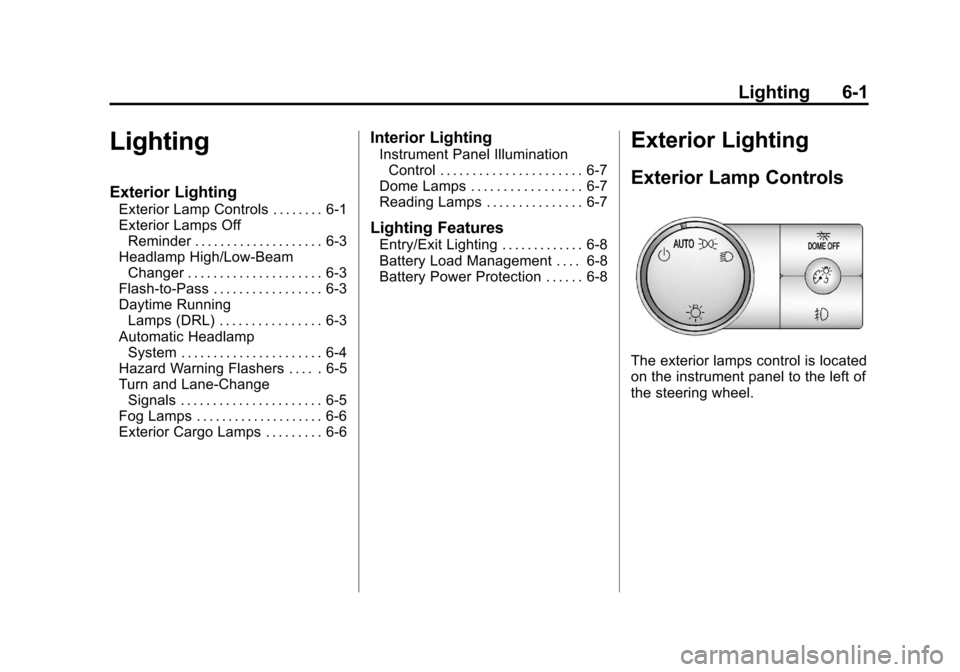
The exterior lamps control is located
on the instrument panel to the left of
the steering wheel.
Page 244 of 508
Black plate (48,1)Chevrolet Avalanche Owner Manual - 2012
7-48 Infotainment System
When to Speak:A short tone
sounds after the system responds
indicating when it is waiting for a
voice command. Wait until the tone
and then speak.
How to Speak: Speak clearly in a
calm and natural voice.
Audio System
When using the in‐vehicle Bluetooth
system, sound comes through the
vehicle's front audio system
speakers and overrides the audio
system. Use the audio system
volume knob, during a call, to
change the volume level. The
adjusted volume level remains in
memory for later calls. To prevent
missed calls, a minimum volume
level is used if the volume is turned
down too low.
Bluetooth Controls
Use the buttons located on the
steering wheel to operate the
in‐vehicle Bluetooth system. See
Steering Wheel Controls on
page 5‑3 for more information.
b/g(Mute/Push To Talk): Press
to answer incoming calls, confirm
system information, and start
speech recognition.
c/x(End): Press to end a call,
reject a call, or cancel an operation.
Pairing
A Bluetooth enabled cell phone
must be paired to the Bluetooth
system and then connected to the
vehicle before it can be used. See
the cell phone manufacturer's user
guide for Bluetooth functions before
pairing the cell phone. If a Bluetooth
phone is not connected, calls will be
made using OnStar Hands‐Free
Calling, if equipped. See OnStar
Overview on page 14‑1 for more
information.
Pairing Information
.A Bluetooth phone with MP3
capability cannot be paired to
the vehicle as a phone and an
MP3 player at the same time.
.Up to five cell phones can be
paired to the Bluetooth system.
.The pairing process is disabled
when the vehicle is moving.
.Pairing only needs to be
completed once, unless the
pairing information on the cell
phone changes or the cell phone
is deleted from the system.
.Only one paired cell phone can
be connected to the Bluetooth
system at a time.
.If multiple paired cell phones are
within range of the system, the
system connects to the first
available paired cell phone in the
order that they were first paired
to the system. To connect to a
different paired phone, see
“Connecting to a Different
Phone” later in this section.
Page 252 of 508

Black plate (2,1)Chevrolet Avalanche Owner Manual - 2012
8-2 Climate Controls
Temperature Control:Move
the thumbwheels up or down
to increase or decrease the
temperature on the driver side or
the passenger side of the vehicle.
A(Fan Control): Turn clockwise
or counterclockwise to increase or
decrease the fan speed. Turn the
knob all the way counterclockwise
to turn the front system off.
Air Delivery Mode Control: Turn
clockwise or counterclockwise to
change the direction of the airflow
inside the vehicle. The knob can be
positioned between two modes, for
a combination of those modes.
To change the current mode, select
one of the following:
H(Vent): Air is directed to the
instrument panel outlets.
)(Bi-Level): Air is divided
between the instrument panel and
floor outlets. Some air is directed
towards the windshield and side window outlets. Cooler air is
directed to the upper outlets and
warmer air to the floor outlets.
6(Floor):
Air is directed to the
floor outlets, with some of the air
directed to the windshield, side
window, and second row floor
outlets. In this mode, the system
automatically selects outside air.
Recirculation cannot be selected
when in Floor Mode.
-(Defog): The defog mode is
used to clear the windows of fog or
moisture. Air is directed to the
windshield, floor outlets, and side
window vents. In this mode, the
system turns off recirculation and
runs the air conditioning compressor
unless the outside temperature is
close to freezing. The recirculation
mode cannot be selected while in
the defog mode.
0(Defrost): The defrost mode is
used to remove fog or frost from
the windshield more quickly. Air is
directed to the windshield and side
window vents, with some directed to the floor vents. In this mode, the
system automatically forces outside
air into the vehicle. The recirculation
mode cannot be selected while
in the defrost mode. The air
conditioning compressor runs
automatically in this setting, unless
the outside temperature is close to
freezing.
Do not drive the vehicle until all the
windows are clear.
#(Air Conditioning):
Press this
button to turn the air conditioning
system on or off. An indicator
light comes on to show that the
air conditioning is on. The air
conditioning can be selected in any
mode as long as the fan control
is on.
On hot days, open the windows to
let hot inside air escape; then close
them. This helps to reduce the time
it takes for the vehicle to cool down.
It also helps the system to operate
more efficiently.