heat CHEVROLET BLAZER 1995 2.G Owners Manual
[x] Cancel search | Manufacturer: CHEVROLET, Model Year: 1995, Model line: BLAZER, Model: CHEVROLET BLAZER 1995 2.GPages: 380, PDF Size: 20.04 MB
Page 3 of 380
Downloaded from www.Manualslib.com manuals search engine Table of Contents
Inrroauction - How to Use this Manual
This section tells you how to use your manual and includes safety
and vehicle damage warnings and symbols.
Section 1 - Seats and Restraint Systems
This section tells you how to use your seats and safety belts
properly. It also explains the air bag system.
Section 2 - Features & Controls
This section explains how to start and operate your vehicle.
Section 3 - Comfort Controls & Audio Systems
This section tells you how to adjust the ventilation and comfort
controls and how to operate your audio system.
Section 4 - Your Driving and the Road
Here you’ll find helpful information and tips about the road and \
how
to drive under different conditions.
Section 5 - Problems on the Road
This section tells you what to do if you have a problem while
driving, such as a flat tire or engine overheating, etc.
Section 6- Service & Appearance Care
Here the manual tells you how to keep your vehicle running
properly and looking good.
Section 7 - Maintenance Schedule
This section tells you when to perform vehicle maintenance and
what fluids and lubricants to use.
Section 8 - Customer Assistance Information
This section tells you how to contact GM for assistance and how to
get service publications. It also gives you information on
“Reporting Safety Defects” on page
8-4.
Index
Here’s an alphabetical listing of almost every subject in this
manual. You
can use it to quickly find something you want to read.
1
Page 69 of 380
Downloaded from www.Manualslib.com manuals search engine Manual transmission:
The gear selector should be in neutral. Hold the clutch pedal to the floor and
start the engine. Your vehicle won’t start if the clutch pedal
is not all the
way down
- that’s a safety feature.
To start your V6 engine:
1. Without pushing the accelerator pedal, turn your ignition key to
START. When the engine starts, let
go of the key. The idle speed will
go down as your engine gets warm.
NOTICE:
Holding your key in START for longer than 15 seconds at a time
will cause your battery to be drained much sooner. And the
excessive heat can damage your starter motor.
2. If it doesn’t start right away, hold your key in START. If it doesn’t start
in
10 seconds, push the accelerator pedal all the way down for 5
seconds, or until it starts.
3. If your engine still won’t start, wait 15 seconds to let the starter motor
cool down and do it all again.
When the engine starts, let go
of the key and the accelerator pedal.
NOTICE:
Your engine is designed to work with the electronics in your
vehicle.
If you add electrical parts or accessories, you could
change the
way the fuel injection system operates. Before adding
electrical equipment, check with your dealer.
If you don’t, your
~ engine might not perform properly.
If you ever have to have your vehicle towed, see the part of this
manual that tells how to do it without damaging your vehicle.
See “Towing Your Vehicle” in the Index.
2- 17
Page 70 of 380
Downloaded from www.Manualslib.com manuals search engine Driving Through Deep Standing Water
I NOTICE:
If you drive too quickly through deep puddles or standing water,
water can come in through your engine's air intake and badly
damage your engine. Never drive through water that is slightly
lower than the underbody
of your vehicle. If you can't avoid
deep puddles
or standing water, drive through them very slowly.
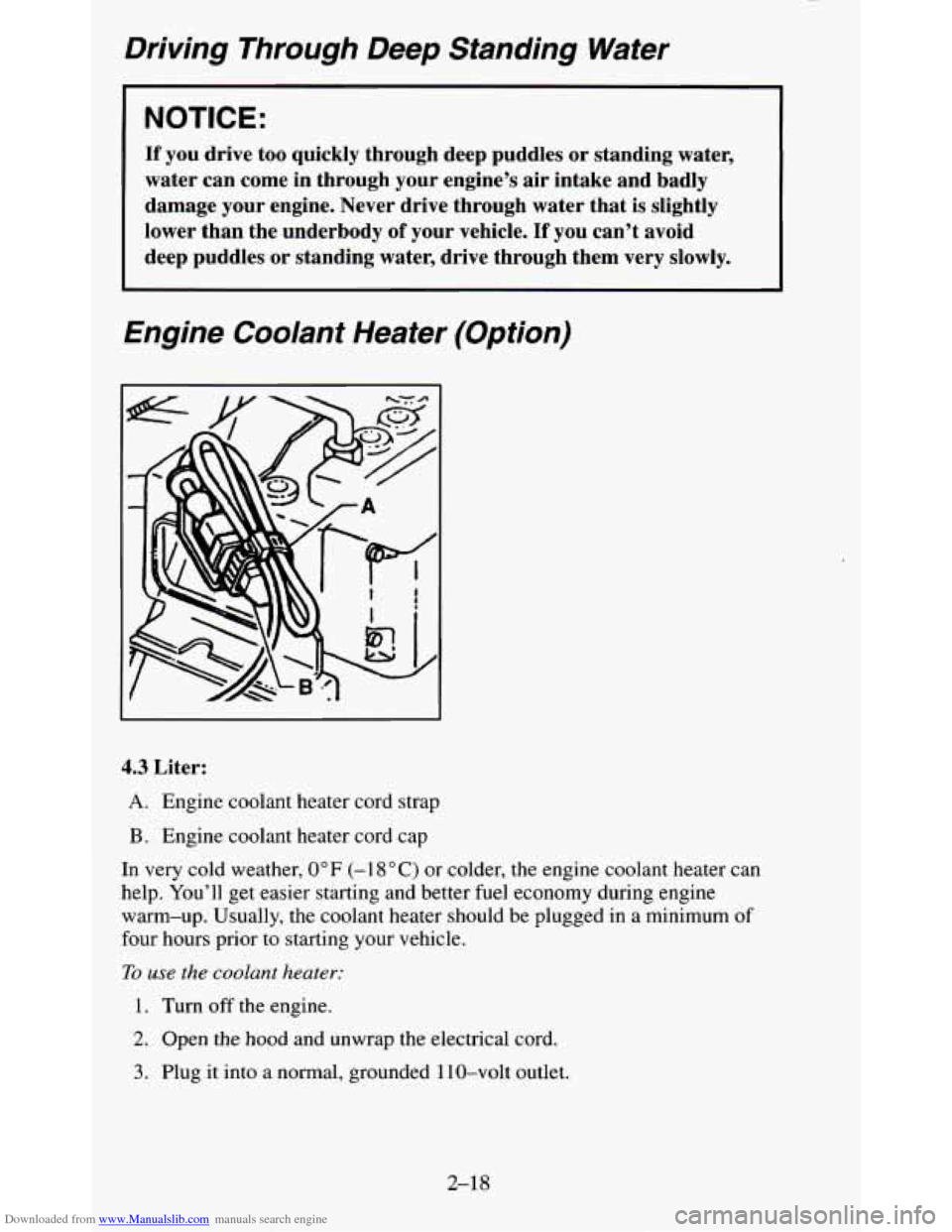
Engine Coolant Heater (Option)
4.3 Liter:
A. Engine coolant heater cord strap
B. Engine coolant heater cord cap
In very cold weather, 0°F (-1 8 "C) or colder, the engine coolant heater can
help. You'll get easier starting and better fuel economy during engine
warm-up. Usually, the coolant heater should be plugged in a mi\
nimum
of
four hours prior to starting your vehicle.
To
use the coolant heater:
1. Turn off the engine.
2. Open the hood and unwrap the electrical cord.
3. Plug it into a normal, grounded 1 10-volt outlet.
2-18
Page 71 of 380

Downloaded from www.Manualslib.com manuals search engine NOTICE:
After you’ve used the coolant heater, be sure to store the \
cord as
it was before to keep it away from moving engine parts. If you
don’t, it could be damaged.
How long should you keep the coolant heater plugged in? The answer
depends on the weather, the kind of oil you have, and some other things.
Instead of trying to list everything here, we ask that you contact your
GM
dealer in the area where you’ll be parking your vehicle. The dealer can give
you the best advice for that particular area.
Automatic Transmission
c There are several
different positions for
your shift lever.
If your vehicle is equipped with automatic transmission, it now features an
electronic shift position indicator within the instrument cluster. This display
must be powered anytime the shift lever is capable of being moved out of
the
PARK (P) position. This means that if your key is in the OFF position,
but not locked, there will be a small current drain on your battery which
could discharge your battery over a period of time. If
you have a need to
2- 19
Page 74 of 380
Downloaded from www.Manualslib.com manuals search engine FIRST GEAR (1) - This position gives you even more power (but
lower fuel economy) than SECOND GEAR (2).
You can use it on very
steep hills,
or in deep snow or mud. If the selector lever is put in FIRST
GEAR
(1) while the vehicle is moving forward, the transmission won’t
shift into FIRST GEAR
(1) until the vehicle is going slowly enough.
NOTICE:
If your rear wheels can’t rotate, don’t try to drive. This might
happen
if you were stuck in very deep sand or mud or were up
against a solid object. You could damage your transmission.
Also,
if you stop when going uphill, don’t hold your vehicle there
with only the accelerator pedal. This could overheat and damage
the transmission. Use your brakes or shift into
PARK (P) to hold
your vehicle in position on a hill.
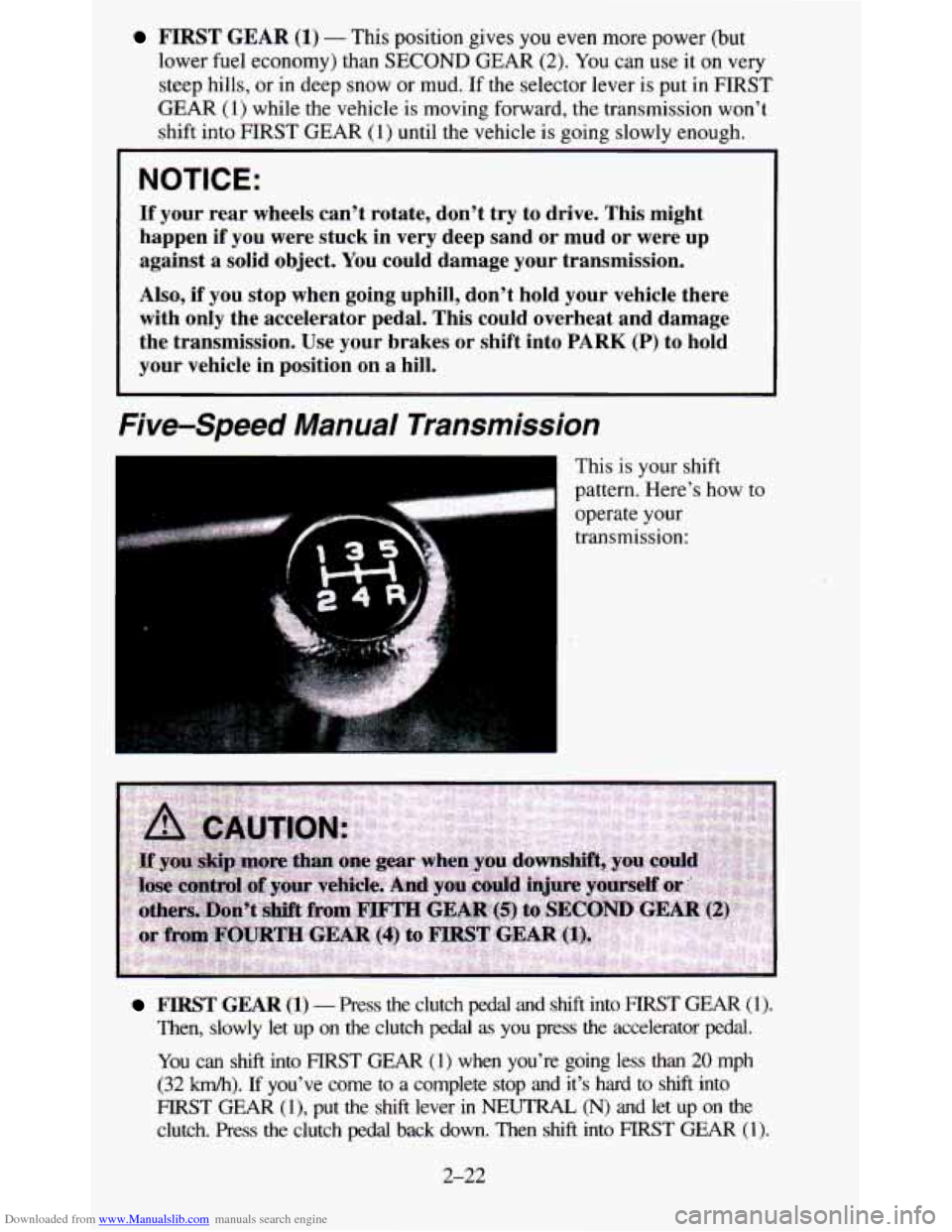
Five-Speed Manual Transmission
.- I
This is your shift
pattern. Here’s how
to
operate your
transmission:
FIRST GEAR (1) - Press the clutch pedal and shift into FlRST GEAR (1).
Then, slowly let up on the clutch pedal as you press the accelerator pedal.
You can shift into FIRST GEAR (1) when you’re going less than 20 mph
(32
km/h). If you’ve come to a complete stop and it’s hard to shift into
FIRST GEAR (1)’ put the shift lever in NEUTRAL, (N) and let up on the
clutch. Press the clutch pedal back down. Then shift into FIRST GEAR (1).
2-22
Page 77 of 380

Downloaded from www.Manualslib.com manuals search engine r
~~ ~
NOTICE: I
Driving with the parking brake on can cause your rear brakes \
to overheat. You may have to replace them, and you could also
damage other parts
of your vehicle.
If you are on a hill: See “Parking on Hills” in the Index. That section
shows how to turn your front wheels.
If you are towing a trailer and are parking on any hill: See “Towing a
Trailer” in the Index. That section shows what to
do first to keep the trailer
ffom moving.
Shifting Into PARK (P)
(Automatic Transmission
Models Only)
2-25
Page 92 of 380
Downloaded from www.Manualslib.com manuals search engine For a single wiping cycle, turn the band to MIST. Hold it there until the
wipers start, then let
go. The wipers will stop after one wipe. If you want
more wipes, hold the band on MIST longer.
You can set the wiper speed for a long or short delay between wipes.
This
can be very useful in light rain or snow. Turn the band to choose the delay
time. The closer to
LO, the shorter the delay.
For steady wiping at low speed, turn the band away from you to the
LO
position. For high speed wiping, turn the band further, to HI. To stop the
wipers
, move the band to the off symbol.
Remember that worn or damaged wiper blades may prevent you from
seeing well enough to drive safely. To avoid damage, be sure to clear ice
and snow from the wiper blades before using them. If they’re frozen to the
windshield, carefully loosen or thaw them.
If your blades do become worn
or damaged, get new blades or blade inserts.
Heavy snow or ice can overload your wipers. The windshield wiper motor is
protected
from overload by a circuit breaker and a fuse. If the motor
overheats due to heavy snow, etc., the wiper
will stop until the motor cools.
Although the circuit is protected from electrical overload, overload due to
heavy snow, etc. may cause wiper linkage damage. Always clear ice and
heavy snow from the windshield before using your windshield wipers.
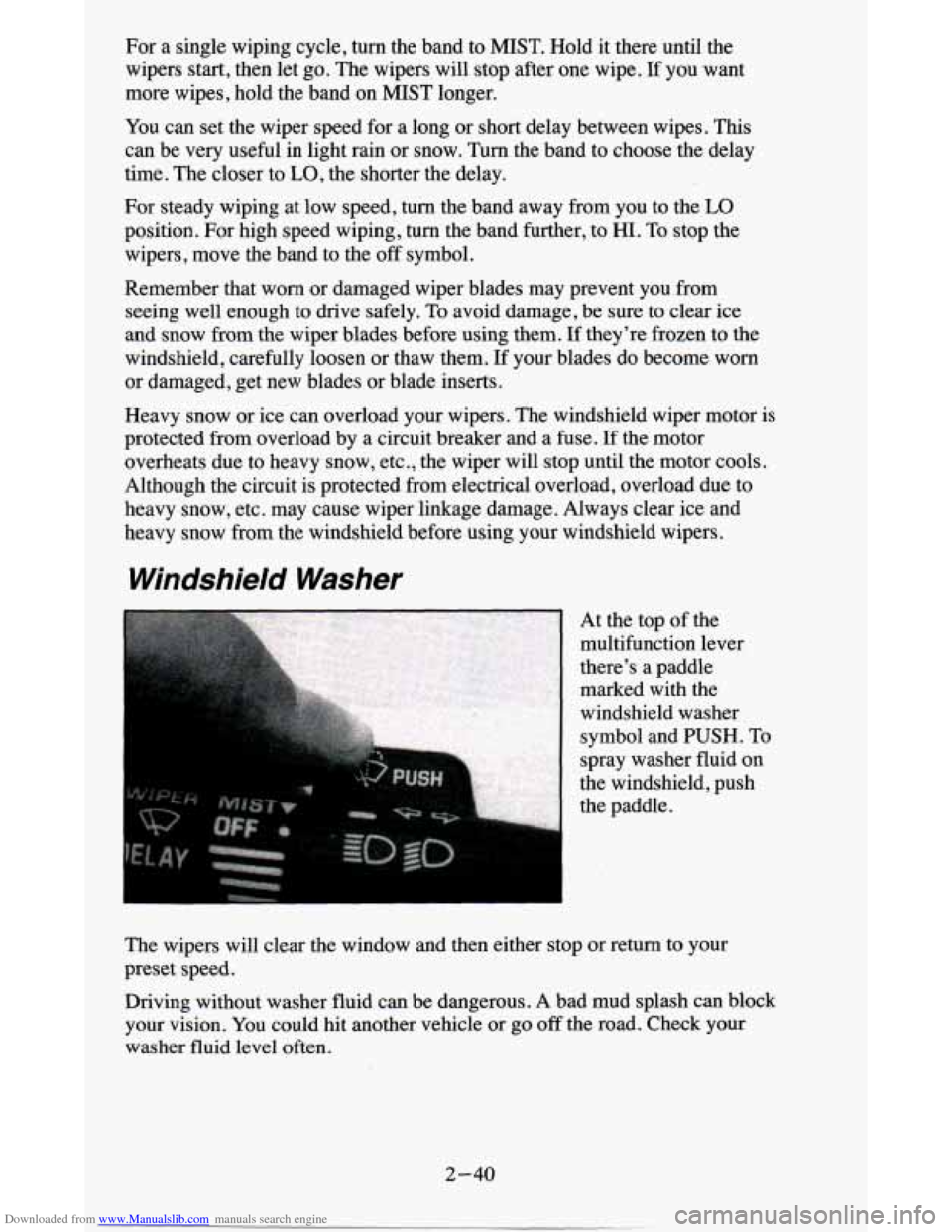
Windshield Washer
At the top of the
multifunction lever
there’s a paddle
marked with the
windshield washer
symbol and PUSH. To
spray washer fluid on
the windshield, push
the paddle.
The wipers will clear the window and then either stop or return to your
preset speed.
Driving without washer fluid can be dangerous. A bad mud splash can block
your vision. You could hit another vehicle or go
off the road. Check your
washer fluid level often.
2-40
Page 106 of 380
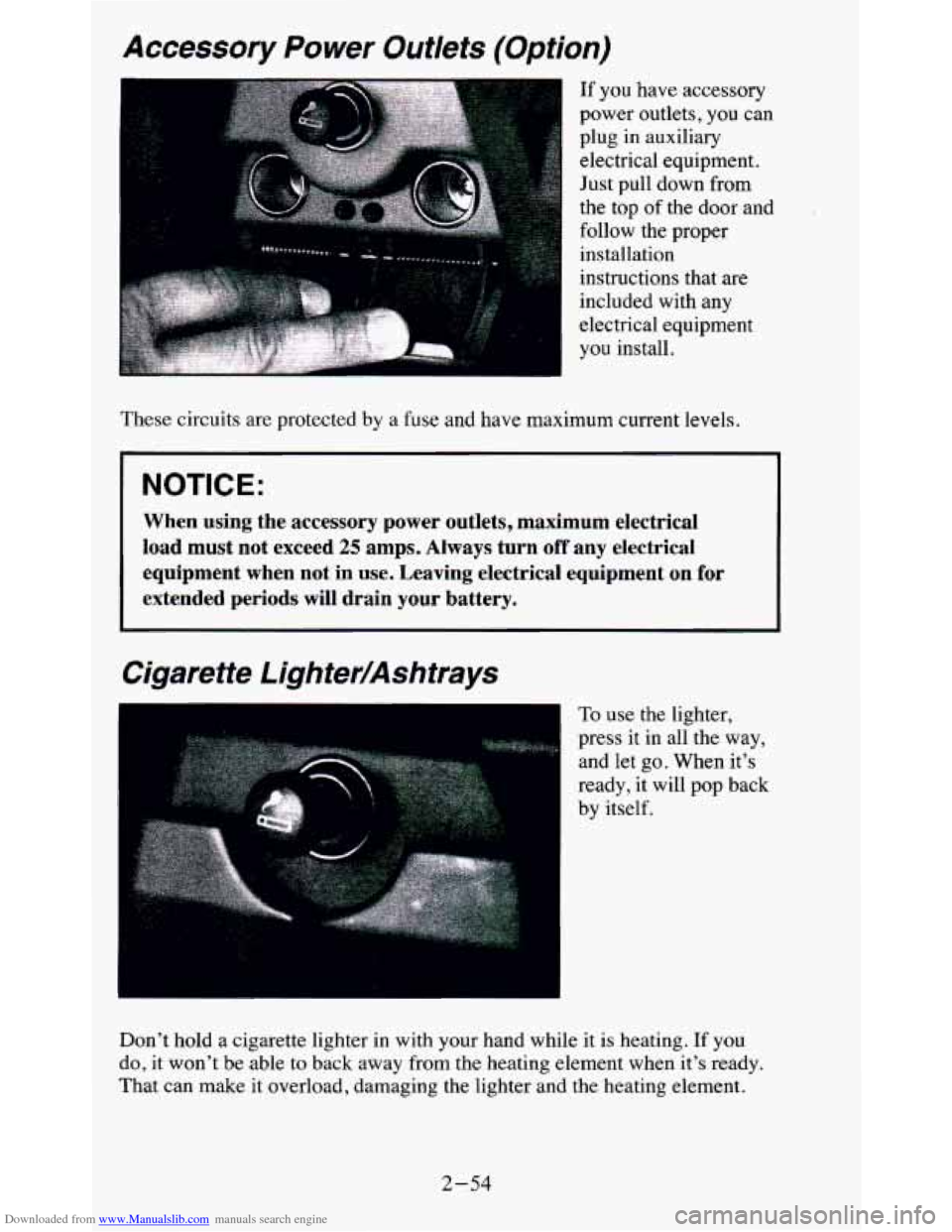
Downloaded from www.Manualslib.com manuals search engine Accessory Power Outlets (Option)
If you have accessory
power outlets, you can
plug in auxiliary
electrical equipment.
Just pull down from
the top of the door and
follow the proper installation
instructions that are
included with any
electrical equipment
you install.
These circuits are protected by a fuse and
have maximum current levels.
NOTICE:
When using the accessory power outlets, maximum electrical
load must not exceed 25 amps. Always turn off any electrical
equipment when not
in use. Leaving electrical equipment on for
extended periods will drain your battery.
Cigarette Lighter/Ashtrays
..
To use the lighter,
press it in all the way,
and let
go. When it's
ready,
it will pop back
by itself,
Don't hold a cigarette lighter in with
your hand while it is heating. If you
do, it won't be able to back away from the heating element when it's ready.
That can make it overload, damaging the lighter and the heating element.
2-54
Page 117 of 380
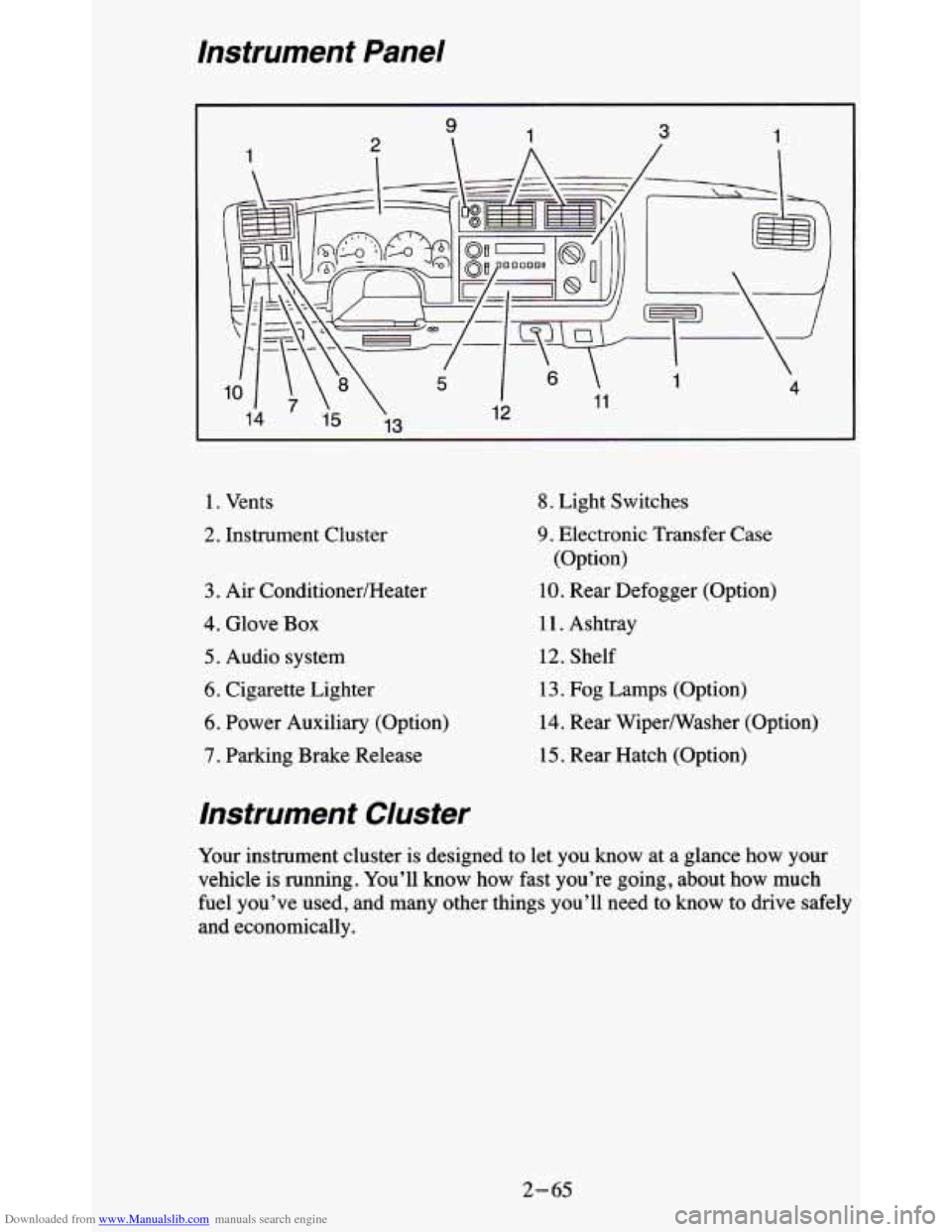
Downloaded from www.Manualslib.com manuals search engine Instrument Panel
1. Vents
2. Instrument Cluster
3. Air ConditionedHeater
4. Glove Box
5. Audio system
6. Cigarette Lighter
6. Power Auxiliary (Option)
7. Parking Brake Release
8. Light Switches
9. Electronic Transfer Case
(Option)
10. Rear Defogger (Option)
11. Ashtray
12. Shelf
13. Fog Lamps (Option)
14. Rear Wipermasher (Option)
15. Rear Hatch (Option)
Instrument Cluster
Your instrument cluster is designed to let you know at a glance how your
vehicle
is running. You’ll know how fast you’re going, about how much
fuel you’ve used, and many other things you’ll need to know to drive safely
and economically.
2- 65
Page 129 of 380
Downloaded from www.Manualslib.com manuals search engine Gages
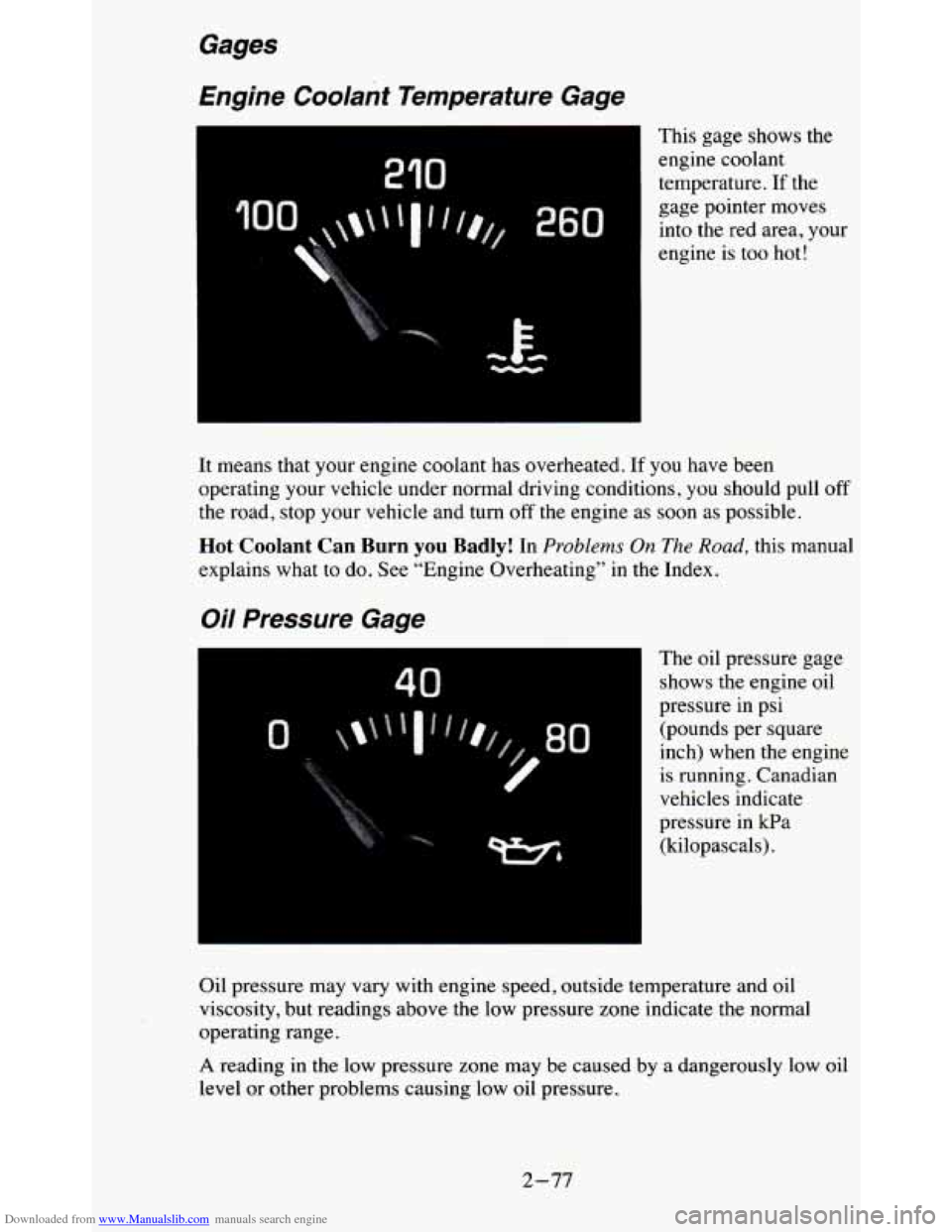
Engine Coolant Temperature Gage
I
210
0
rc E- -
This gage shows the
engine coolant
temperature.
If the
gage pointer moves into the red area, your
engine
is too hot!
It means that your engine coolant has overheated. If you have bee\
n
operating your vehicle under normal driving conditions, you shou\
ld pull off
the road, stop your vehicle and turn
off the engine as soon as possible.
Hot Coolant Can Burn you Badly! In Problems On The Road, this manual
explains what to do. See “Engine Overheating” in the Index.
Oil Pressure Gage
40
The oil pressure gage
shows the engine oil
pressure in psi (pounds per square
inch) when the engine
is running. Canadian
vehicles indicate
pressure in kPa (kilopascals).
Oil pressure may vary with engine speed, outside temperature and oil
viscosity, but readings above the low pressure zone indicate the normal
operating range.
A reading in the low pressure zone may be caused by a dangerously low oil
level or other problems causing low oil pressure.
2-77