ignition CHEVROLET BLAZER 1997 2.G Owner's Guide
[x] Cancel search | Manufacturer: CHEVROLET, Model Year: 1997, Model line: BLAZER, Model: CHEVROLET BLAZER 1997 2.GPages: 402, PDF Size: 21.93 MB
Page 152 of 402
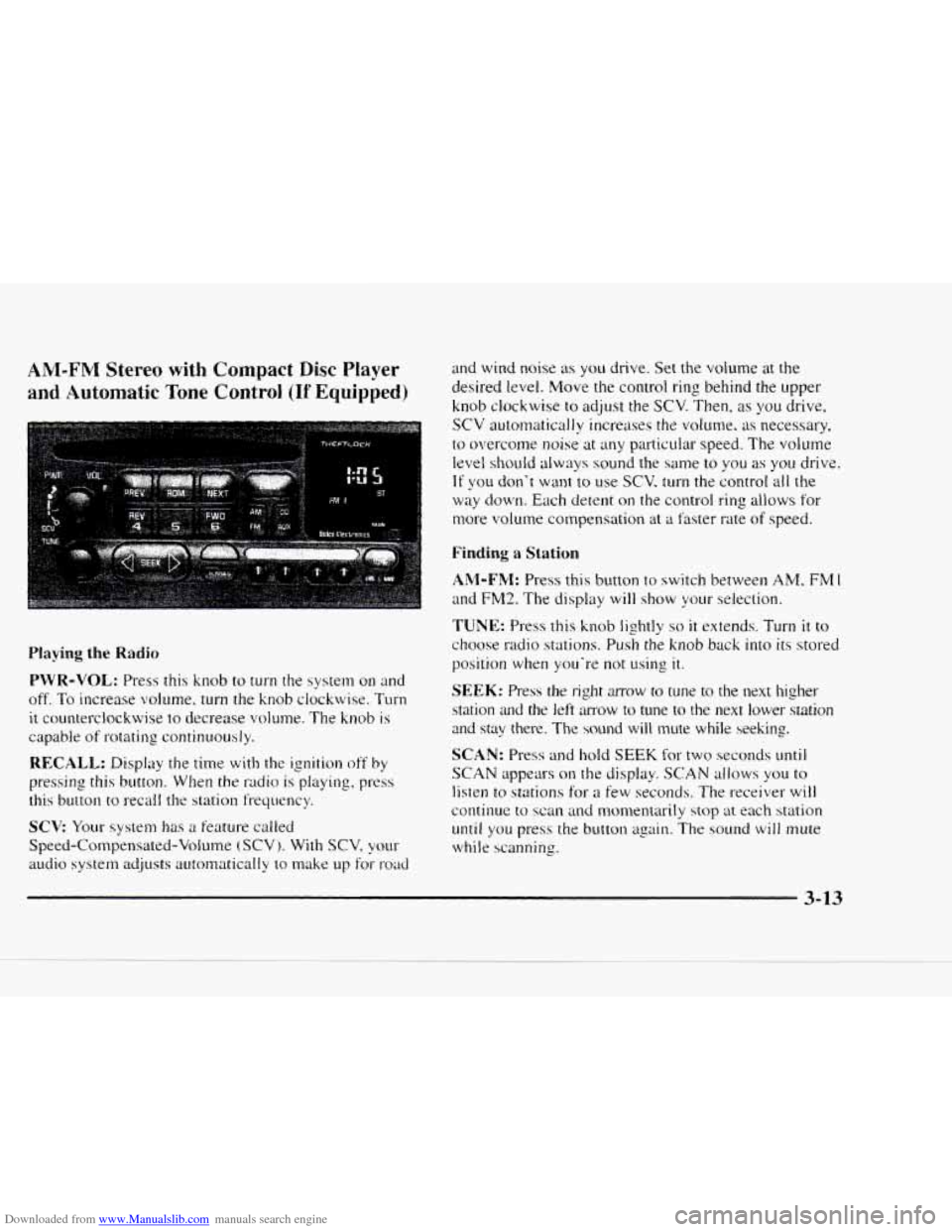
Downloaded from www.Manualslib.com manuals search engine AM-FM Stereo with Compact Disc Player
and Automatic Tone Control (If Equipped)
Playing the Radio
PWR-VOL: Press this knob to turn the system on and
off.
To increase volume, turn the knob clockwise. Turn
it counterclockwise to decrease volume. The knob is
capable of rotating continuously.
RECALL: Display the time with the ignition off by
pressing this button. When the radio is playing, press
this button
to recall the station frequency.
SCV Your system has a feature called
Speed-Compensated-Volume
(SCV j. With SCV, your
audio system adjusts autornatically to make up for- road
and wind noise as you drive. Set the volume at the
desired level. Move the control ring behind the upper
knob clockwise
to adjust the SCV. Then, as you drive,
SCV automatically increases the volume, as necessary.
to overcome noise at any particuiar speed. The volume
level shouId always sound the same to you as you drive.
If you don't want to use SCV. turn the control all the
way down. Each detent on the control ring allows for
more volume compensation at
a faster rate of speed.
Finding a Station
AM-FM: Press this button to switch between AM, FM 1
and FM2. The display will show your selection.
TUNE: Press this knob lightly so it extends. Turn it to
choose radio stations. Push the knob back into its stored
position
when you're not using it.
SEEK: Press the right mow to tune to the next higher
station
and the left amow to tune to the next lower station
and stay there. The sound will mute while seeking.
SCAN: Press and hold SEEK for two seconds mtil
SCAN appears on the display. SCAN allows you to
listen to stations for a few seconds. The receiver will
continue to scan and monxntarily stop at each station
until you press the button again. The sound will mute
while scanning.
3-13
Page 154 of 402
Downloaded from www.Manualslib.com manuals search engine Setting the Tone Adjusting the Speakers
BASS: Press lightly on this knob to release it froln its
stored position. Turn the
knob clockwise to increase
bass and counterclockwise
to decrease bass. When the
BASS control is rotated, the AUTO TONE setting will
change to MAN.
TREB: Press lightly on this knob to release it from its
stored position. Turn the knob clockwise
to increase
treble and counterclockwise
to decrease treble. When
the TREB control
is rotated, the AUTO TONE setting
will change to
MAN. If a station is weak or noisy. you
may want to decrease the treble.
Push these knobs back into their stored positions when
you’re
not using them.
AUTO TONE: Press this button to select among the
five preset equalization settings and tailor the sound
to
the music or voice being heard. Each time you press the
button, the selection will switch
to one of the preset
settings
of CLASSIC, NEWS. ROCK. POP or JAZZ.
The display will show which mode
the receiver is in. To
return to the manual mode, press and release this button
until MAN appears on the display. This will return the
tone adjustment
to the BASS and TREB controls. If a
BASS or TREB control
is rotated, the AUTO TONE
setting will change to MAN.
BAL: Press lightly on this knob to release it from its
stored position. Turn the control clockwise to adjust
sound
to the right speakers and counterclockwise to
adjust sound to the left speakers. The middle position
balances the sound between the speakers.
FADE: Press lightly on this knob to release it from its
stored position. Turn the control clockwise to adjust the
sound to the front and counterclockwise
for the rear
speakers. The middle position balances the sound
between the speakers.
Push these knobs back
into their stored positions when
you’re not using
them.
Playing a Compact Disc
PWR: Press this knob to turn the system on.
(Please note that you can also turn the system on when
you insert
a compact disc into the player with the
ignition
on.)
Insert a disc partway into the slot. label side LIP. The
player
will pull it in. Wait a few seconds and the disc
should play. CD and
a CD symbol will also appear on
the display. Anytime you are playing a CD. the letters
CD will be next
to the CD symbol.
Page 156 of 402
Downloaded from www.Manualslib.com manuals search engine CD AUX: To switch between the player and the radio
when
a disc is playing, press the AM-FM button. To
return
to the player, press CD AUX. When a disc is
playing,
the letters CD and the CD symbol will appear
on the display. (If the radio is turned off, the disc stays
in the player and will resume playing at the point where
it stopped.)
EJECT: Press this button to eject the disc from the
player and play the radio.
When the same or
a new disc is inserted, the disc wilI
start playing on track one. If
a compact disc is left
sitting
in the opening for more than a few seconds, the
player will pull the
CD back in. The radio will continue
playing. When the ignition is off, press this button to
load a CD. If you leave a compact disc in the player
while listening
to the radio. it may become warm.
Theft-Deterrent Feature
THEFTLOCK” is designed to discourage theft of your
radio. It works by using a secret code to disable all radio
functions whenever battery power
is removed.
The THEFTLOCK feature
for the radio may be used or
ignored.
If ignored, the system plays normally and the
radio is not protected by the feature. If THEFTLOCK is
activated, your radio will not operate if stolen.
When THEFTLOCK
is activated, the radio will display
LOC
to indicate a locked condition anytime battery
power
is removed. If your battery loses power for any
reason, you must unlock the radio with the secret code
before it will operate.
Activating the Theft-Deterrent Feature
The instructions which follow explain how to enter your
secret code to activate
the THEFTLOCK system. It is
recommended that you read through all nine steps
before starting the procedure.
NOTE: If you allow more than 15 seconds to elapse
between any steps, the radio automatically reverts
to
time and you must start the procedure over at Step 4.
3-17
Page 157 of 402
Downloaded from www.Manualslib.com manuals search engine I. Write down any three or four-digit number from
000 to 1999 and keep it in a safe place separate from
the vehicle.
2. Turn the isnition to ACCESSORY or RUN.
3. Turn the radio off.
4. Press the 1 and 4 buttons together. Hold thcm dow~l
until --- shows on the display. Next yo11 will use the
secret code number which
you have written down.
5. Press MN and 000 will appear on the display.
6. Press MN again to make the last two digits agree
with your code.
7. Press HR to 111ake the first one or two digits agree
with your
code.
8. Press AM-FM after- you have confirmed that the
code matches the secret code
you ha\;e written down.
The display will show REP to Ict you
know that you
need to repeat Steps 5 through 7 to confirm your
secret code.
Unlocking the Theft-Deterrent Feature After a
Power
Loss
Enter your secret code as follows: pause no more than
I5 seconds between steps:
1. LOC appears when the ignition is on.
2. Press MN and 000 cvill appear on the display.
3. Press MN again to lnake the last two digits agree
with your code.
4. Press HR to make the first one or two digits agree
with your code.
5. Press AM-FM after you have confirmed that the
code matches the secret code
~OLI have written down
The display will show SEC, indicating the radio is
now operable and secure.
If ~OLI enter the wrong code eight times, INOP will
appear on the display. You will have to wait an hour
with the ignition on before yo11 can try apin. When you
try asain. you will only have three chances to enter the
correct code before
lNOP appears.
If you lose or forger your code. contact your dealer.
3-18
Page 158 of 402
Downloaded from www.Manualslib.com manuals search engine Disabling the Theft-Deterrent Feature
Enter your secret code as follows; pause no more than
15 seconds between steps:
1. Turn the ignition to ACCESSORY or RUN.
2. Turn the radio off.
3. Press the 1 and 4 buttons together. Hold them down
until SEC shows on the display.
4. Press MN and 000 will appear on the display.
5. Press MN again to make the last two digits agree
with your code.
6. Press HR to make the first one or two digits agree
with your code.
7. Press AM-FM after you have confirmed that the
code matches the secret code you have written down.
The display will show
---, indicating that the radio is
no longer secured.
If the code entered is incorrect, SEC will appear on the
display. The radio will remain secured until
the correct
code is entered.
When battery power is removed and later applied
to a
secured radio, the radio won’t turn
on and LOC will
appear
on the display. To
unlock a secured radio,
see “Unlocking the
Theft-Deterrent Feature After
a Power Loss” earlier in
this section.
Understanding Radio Reception
FM Stereo
FM stereo will give you the best sound. But FM signals
will reach only about 10 to 40 miles (16 to 65 km). Tall
buildings or hills can interfere with
FM signals, causing
the sound to come and go.
AM
The range for most AM stations is greater than for FM,
especially at night. The longer range, however, can
cause stations to interfere with each other.
AM can pick
up noise from things like storms and power lines. Try
reducing
the treble to reduce this noise if you ever get it.
Tips About Your Audio System
Hearing damage from loud noise is almost undetectable
until it is too late. Your hearing can adapt to higher
volumes
of sound. Sound that seems normal can be loud
and harmful to your hearing. Take precautions by
adjusting the volume control on your radio to
a safe
sound level before your hearing adapts
to it.
3-19
Page 188 of 402
Downloaded from www.Manualslib.com manuals search engine If the water isn’t too deep, then drive through it slowly.
At fast speeds, water splashes
on your ignition system
and your vehicle can stall. Stalling can also occur if you
b get your tailpipe under water. And, as long as your
tailpipe is under water, you’ll never be able
to start your
engine. When
you go through water, remember that
when your brakes get wet, it may take you longer
to stop.
I A CAUTION:
Driving through rushing water can be dangerous.
Deep water can sweep your vehicle downstream
and you and your passengers could drown.
If it’s
only shallow water, it can still wash away the
ground from under your tires, and you could lose
traction and roll the vehicle over. Don’t drive
through rushing water.
See “Driving Through Water” in the Index for more
information on driving throwh water.
After Off-Road Driving
Remove any brush or debris that has collected on the
underbody, chassis or under the hood. These
accumulations can be
a fire hazard.
After operation in mud or sand, have
the brake linings
cleaned and checked. These substances can cause
glazing and uneven braking. Check the body structure.
steering, suspension, wheels, tires and exhaust system
for damage. Also, check the fuel lines and cooling
system for any leakage.
Your vehicle will require more frequent service due
to
off-road use. Refer to the Maintenance Schedule for
additional information.
Page 197 of 402
Downloaded from www.Manualslib.com manuals search engine Keep your vehicle in good shape. Check all fluid
levels and
also the brakes, tires. cooling system and
transmission. These parts can work hard
on
mountain roads.
Know how to go down hills. The most important
thing
to know is this: let your engine do some of the
slowing down. Shift
to a lower gear when you go
down a steep or long hill.
A CAUTION:
If you don’t shift down, your brakes could get so
hot that they wouldn’t work well. You would then
have poor braking or even none going down a
hill.
You could crash. Shift down to let your
engine assist your brakes on a steep
downhill slope.
I A CAUTION:
Coasting downhill in NEUTRAL (N) or with the
ignition
off is dangerous. Your brakes will have to
do all the work
of slowing down. They could get so
hot that they wouldn’t work well. You would then
have poor braking or even none going down a hill.
You could crash. Always have your engine running
and your vehicle in gear when you go downhill.
Know how to go uphill. You may want to shift down to a
lower gear. The lower gears help cool your engine and
transmission. and you can climb the
hill better.
Stay in your own lane when driving on two-lane
roads
in hills or mountains. Don‘t swing wide or cut
across the center
of the road. Drive at speeds that let
you stay in your own lane.
As you go over the top of a hill, be alert. There could be
something
in your lane. like a. stalled car or an accident.
You may see hishway signs on mountains that warn of
special problems. Examples are long grades, passing or
no-passing zones.
a falling rocks area or winding
roads.
Be alert to these and take appropriate action.
4-36
Page 202 of 402
Downloaded from www.Manualslib.com manuals search engine Recreational Vehicle Towing (Four-wheel Drive With Manual
Shift Transfer
Case Only)
1. Set the parking brake firmly.
2. Place an automatic transmission in PARK (P) or a
manual transmission in FIRST ( 1 ).
3. Firmly attach the vehicle being towed to the tow
vehicle.
Do not tow the vehicle by the rear bumper
bar. Refer
to the hitch manufacturer’s instructions.
4. Place the manual shift transfer case shift lever in
NEUTRAL
(N).
I A CAUTION:
Shifting the transfer case into NEUTRAL (N) can
cause your vehicle to roll even if the transmission
is in PARK (P), for an automatic transmission, or
if your vehicle is in gear, for a manual
transmission.
You or others could be injured.
Make sure the parking brake
is firmly set before
you shift the transfer case into NEUTRAL
(N).
5. Release the parking brake only after the vehicle
being towed
is firmly attached to the tow vehicle.
6. Insert the ignition key into the ignition switch and
turn it
one notch forward of the LOCK position. This
places the key
in the OFF position, which unlocks
the steering column while preventing battery drain.
Unlocking the steering column
will allow for proper
movement
of the front wheelshires during towing.
4-41
Page 221 of 402
Downloaded from www.Manualslib.com manuals search engine 2. Get the vehicles close enough so the jumper cabIes
can reach. but be sure the vehicles aren't touching
each other.
If they are, it could cause a ground
connection
you don't want. You wouldn't be able to
start your vehicle. and the bad grounding could
damage the electrical systems.
You could be injured if the vehicles roll. Set the
parking brake firmly on each vehicle. Put
an
automatic transmission in PARK (Pj or a manual
transmission
in NEUTRAL (N). If you have a
four-wheel-drive vehicle with a manual transfer case
shift lever. be sure the transfer case is not
in
NEUTRAL (N).
I A CAUTION:
An electric fan can start up even when the engine
is not running and can injure you. Keep hands,
clothing and tools away from any underhood
electric
Fan.
3. Turn off the ignition on both vehicles. Unplug
unnecessary accessories plugged into
the cigarette
lighter. or accessory power outlets,
if you have this
option.
Turn off all lamps that aren't needed as well
as radios. This will avoid sparks and help save both
batteries.
In addition, it could save your radio!
I NOTICE:
If you leave your radio on, it could be badly
damaged. The repair wouldn't be covered
by
your warranty.
I A CAUTION:
If your vehicle has air conditioning, the auxiliary
electric fan under the hood can
start up even
when the engine
is not running and can injure
you. Keep hands, clothing and tools away from
any underhood electric fan.
Page 226 of 402
Downloaded from www.Manualslib.com manuals search engine When your vehicle is being towed, have the ignition key
turned to the OFF position. The steering wheel should
be clamped in
a straight-ahead position with a clamping
device designed for towing service.
Do not use the
vehicle's steering column lock for this. The transmission
should be in NEUTRAL
(N) and the transfer case, if you
have one, should be in 2HI. The parking brake should
be released.
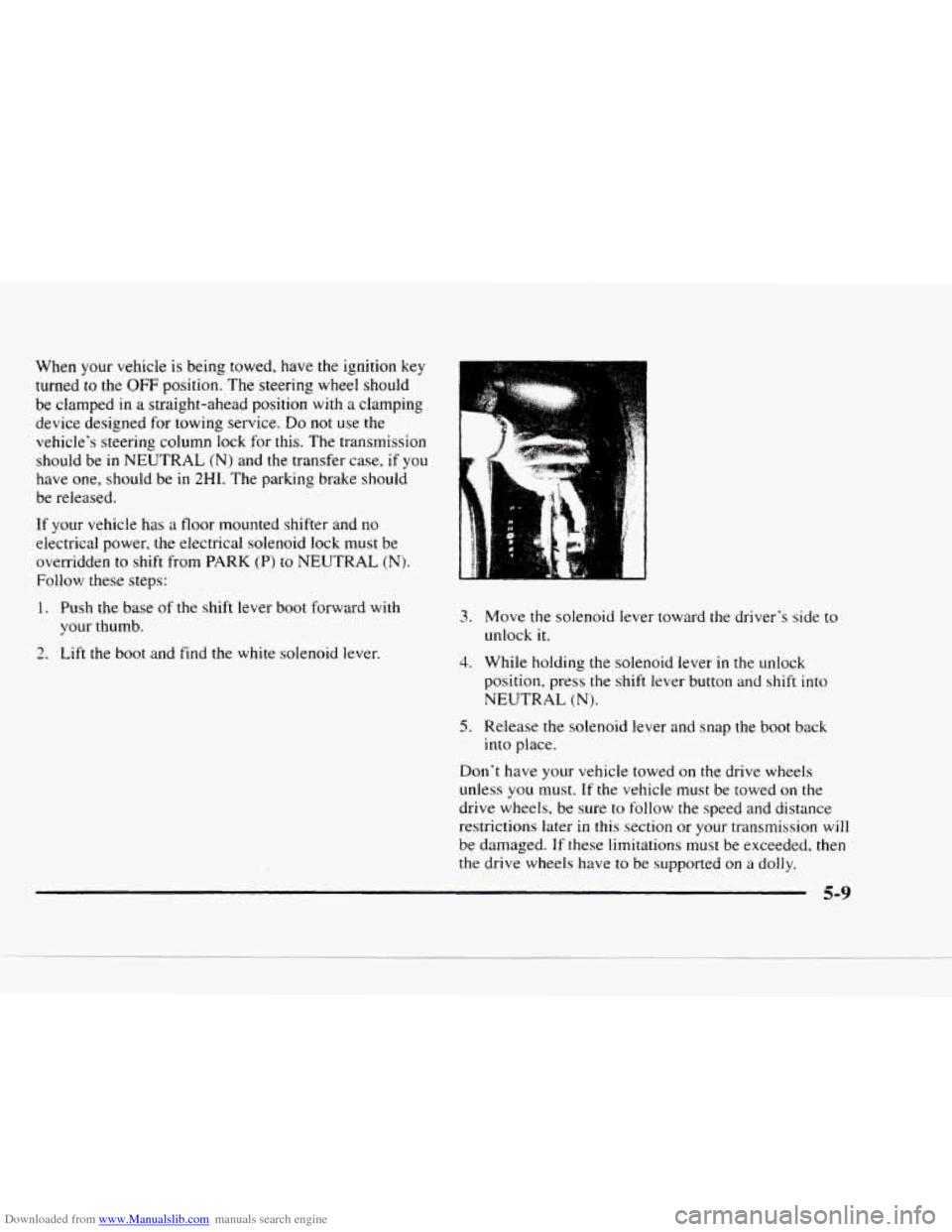
If your vehicie has a floor mounted shifter and no
electrical power, the electrical solenoid lock must be
overridden
to shift from PARK (P) to NEUTRAL (N).
Follow these steps:
1. Push the base of the shift lever boot forward with
your thumb.
2. Lift the boot and find the white solenoid lever.
1-
3.
4.
5.
Move the solenoid lever toward the driver's side to
unlock it.
While holding the solenoid lever in the unlock
position, press the shift lever button and shift into
NEUTRAL
(N).
Release the solenoid lever and snap the boot back
into place.
Don't have your vehicle towed on the drive wheels
unless you must.
If the vehicle must be towed on the
drive wheels, be sure to follow the speed and distance
restrictions later in this section or your transmission will
be damaged.
If these limitations must be exceeded, then
the drive wheels have to
be supported on a dolly.
5-9