ECO mode CHEVROLET BLAZER 2019 User Guide
[x] Cancel search | Manufacturer: CHEVROLET, Model Year: 2019, Model line: BLAZER, Model: CHEVROLET BLAZER 2019Pages: 404, PDF Size: 7.59 MB
Page 158 of 404
Chevrolet Blazer (GMNA-Localizing-U.S./Canada/Mexico-12461541) - 2019 -
CRC - 3/11/19
Instruments and Controls 157
instructions refer to a garage door
opener, but can be used for other
devices.
Do not use the Universal Remote
system with any garage door opener
that does not have the stop and
reverse feature. This includes any
garage door opener model
manufactured before April 1, 1982.
Read these instructions completely
before programming the Universal
Remote system. It may help to have
another person assist with the
programming process.
Keep the original hand-held
transmitter for use in other vehicles
as well as for future programming.
Erase the programming when
vehicle ownership is terminated.
See“Erasing Universal Remote
System Buttons” later in this
section.
To program a garage door opener,
park outside directly in line with and
facing the garage door opener
receiver. Clear all people and
objects near the garage door. Make sure the hand-held transmitter
has a new battery for quicker and
more accurate transmission of the
radio-frequency signal.
Programming the Universal
Remote System
For questions or programming help,
see www.homelink.com/gm or call
1-800-355-3515. For calls placed
outside the U.S., Canada, or Puerto
Rico, international rates will apply
and may differ based on landline or
mobile phone.
Programming involves
time-sensitive actions, and may time
out causing the procedure to be
repeated.
To program up to three devices:
1. Hold the end of the hand-held transmitter about 3 to 8 cm
(1 to 3 in) away from the
Universal Remote system
buttons with the indicator light
in view. The hand-held
transmitter was supplied by the
manufacturer of the garage
door opener receiver. 2. At the same time, press and
hold both the hand-held
transmitter button and one of
the three Universal Remote
system buttons to be used to
operate the garage door. Do
not release either button until
the indicator light changes from
a slow to a rapid flash. Then
release both buttons.
Some garage door openers
may require substitution of
Step 2 with the procedure
under “Radio Signals for Some
Gate Operators” later in this
section.
3. Press and hold the newly programmed Universal Remote
system button for five seconds
while watching the indicator
light and garage door
activation.
.If the indicator light stays on
continuously or the garage
door moves when the
button is pressed, then
programming is complete.
There is no need to
complete Steps 4–6.
Page 171 of 404
Chevrolet Blazer (GMNA-Localizing-U.S./Canada/Mexico-12461541) - 2019 -
CRC - 3/11/19
170 Climate Controls
Climate Controls
Climate Control Systems
Dual Automatic ClimateControl System . . . . . . . . . . . . . 170
Air Vents
Air Vents . . . . . . . . . . . . . . . . . . . . . 174
Maintenance
Passenger Compartment AirFilter . . . . . . . . . . . . . . . . . . . . . . . . 175
Service . . . . . . . . . . . . . . . . . . . . . . . 175
Climate Control Systems
Dual Automatic Climate Control System
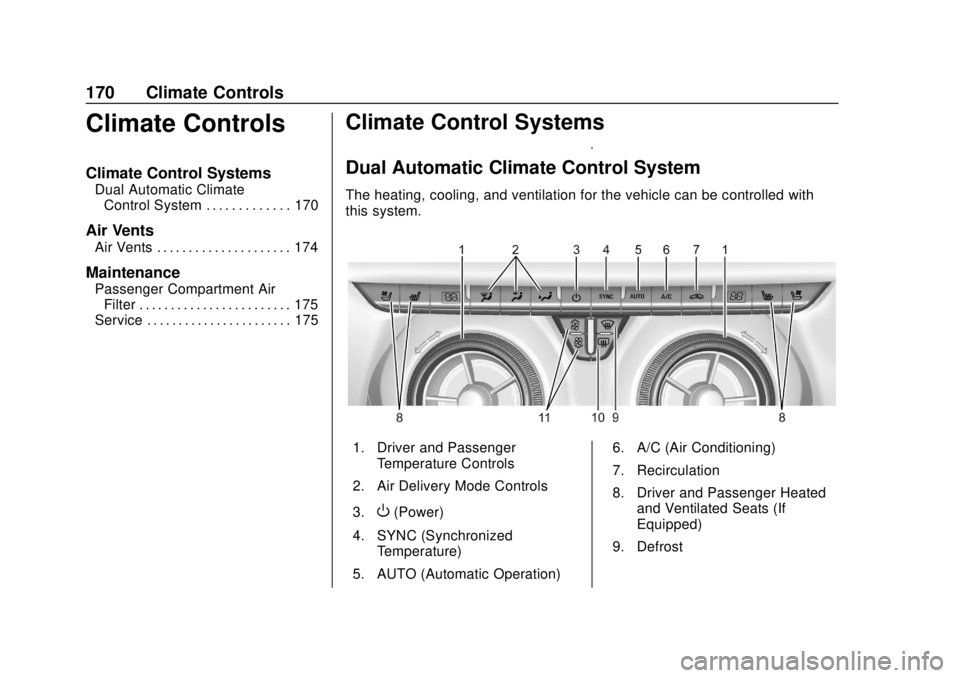
The heating, cooling, and ventilation for the vehicle can be controlled with
this system.
1. Driver and Passenger
Temperature Controls
2. Air Delivery Mode Controls
3.
O(Power)
4. SYNC (Synchronized Temperature)
5. AUTO (Automatic Operation) 6. A/C (Air Conditioning)
7. Recirculation
8. Driver and Passenger Heated
and Ventilated Seats (If
Equipped)
9. Defrost
Page 177 of 404
Chevrolet Blazer (GMNA-Localizing-U.S./Canada/Mexico-12461541) - 2019 -
CRC - 3/11/19
176 Driving and Operating
Driving and
Operating
Driving Information
Distracted Driving . . . . . . . . . . . . 177
Defensive Driving . . . . . . . . . . . . . 178
Drunk Driving . . . . . . . . . . . . . . . . . 178
Control of a Vehicle . . . . . . . . . . . 178
Braking . . . . . . . . . . . . . . . . . . . . . . . 178
Steering . . . . . . . . . . . . . . . . . . . . . . 179
Off-Road Recovery . . . . . . . . . . . 179
Loss of Control . . . . . . . . . . . . . . . 180
Off-Road Driving . . . . . . . . . . . . . 180
Driving on Wet Roads . . . . . . . . 184
Hill and Mountain Roads . . . . . 185
Winter Driving . . . . . . . . . . . . . . . . 186
If the Vehicle Is Stuck . . . . . . . . 187
Vehicle Load Limits . . . . . . . . . . . 188
Starting and Operating
New Vehicle Break-In . . . . . . . . . 192
Ignition Positions . . . . . . . . . . . . . 192
Starting the Engine . . . . . . . . . . . 194
Stop/Start System . . . . . . . . . . . . 195
Engine Heater . . . . . . . . . . . . . . . . 196
Retained AccessoryPower (RAP) . . . . . . . . . . . . . . . . 197
Shifting Into Park . . . . . . . . . . . . . 197 Shifting out of Park . . . . . . . . . . . 198
Parking over Things
That Burn . . . . . . . . . . . . . . . . . . . 199
Active Fuel Management . . . . . 199
Extended Parking . . . . . . . . . . . . 199
Engine Exhaust
Engine Exhaust . . . . . . . . . . . . . . 200
Running the Vehicle While Parked . . . . . . . . . . . . . . . . . . . . . . 201
Automatic Transmission
Automatic Transmission . . . . . . 201
Manual Mode . . . . . . . . . . . . . . . . . 203
Tow/Haul Mode . . . . . . . . . . . . . . . 204
Drive Systems
All-Wheel Drive . . . . . . . . . . . . . . . 204
Brakes
Antilock BrakeSystem (ABS) . . . . . . . . . . . . . . . 205
Electric Parking Brake . . . . . . . . 206
Brake Assist . . . . . . . . . . . . . . . . . . 207
Hill Start Assist (HSA) . . . . . . . . 208
Ride Control Systems
Traction Control/Electronic Stability Control . . . . . . . . . . . . . 208
Driver Mode Control . . . . . . . . . . 210
Cruise Control
Cruise Control . . . . . . . . . . . . . . . . 212
Adaptive Cruise Control . . . . . . 214
Driver Assistance Systems
Driver Assistance Systems . . . 223
Assistance Systems for Parking or Backing . . . . . . . . . . 225
Assistance Systems for Driving . . . . . . . . . . . . . . . . . . . . . . 229
Forward Collision Alert (FCA) System . . . . . . . . . . . . . . . . . . . . . . 229
Forward Automatic Braking (FAB) . . . . . . . . . . . . . . . 232
Front Pedestrian Braking (FPB) System . . . . . . . . . . . . . . . 233
Side Blind Zone Alert (SBZA) . . . . . . . . . . . . . . . . 236
Lane Change Alert (LCA) . . . . . 236
Lane Departure Warning (LDW) . . . . . . . . . . . . . 238
Lane Keep Assist (LKA) . . . . . . 238
Fuel
Top Tier Fuel . . . . . . . . . . . . . . . . . 240
Recommended Fuel . . . . . . . . . . 240
Prohibited Fuels . . . . . . . . . . . . . . 240
Fuels in Foreign Countries . . . 241
Fuel Additives . . . . . . . . . . . . . . . . 241
Filling the Tank . . . . . . . . . . . . . . . 241
Page 194 of 404
Chevrolet Blazer (GMNA-Localizing-U.S./Canada/Mexico-12461541) - 2019 -
CRC - 3/11/19
Driving and Operating 193
The Remote Keyless Entry (RKE)
transmitter must be in the vehicle for
the system to operate. If the
pushbutton start is not working, the
vehicle may be near a strong radio
antenna signal causing interference
to the Keyless Access system. See
Remote Keyless Entry (RKE)
System Operation027.
To shift out of P (Park), the ignition
must be on or in Service Mode and
the brake pedal must be applied.
Stopping the Engine/OFF (No
Indicator Lights) : When the
vehicle is stopped, press ENGINE
START/STOP once to turn the
engine off.
If the vehicle is in P (Park), the
ignition will turn off, and Retained
Accessory Power (RAP) will remain
active. See Retained Accessory
Power (RAP) 0197.
If the vehicle is not in P (Park), the
ignition will return to ACC/
ACCESSORY and display the
message SHIFT TO PARK in the Driver Information Center (DIC).
When the vehicle is shifted into
P (Park), the ignition will turn off.
Do not turn the engine off when the
vehicle is moving. This will cause a
loss of power assist in the brake
and steering systems and disable
the airbags.
If the vehicle must be shut off in an
emergency:
1. Brake using a firm and steady pressure. Do not pump the
brakes repeatedly. This may
deplete power assist, requiring
increased brake pedal force.
2. Shift the vehicle to N (Neutral). This can be done while the
vehicle is moving. After shifting
to N (Neutral), firmly apply the
brakes and steer the vehicle to
a safe location.
3. Come to a complete stop, shift to P (Park), and turn the
ignition off. The shift lever must
be in P (Park) to turn the
ignition off. 4. Set the parking brake. See
Electric Parking Brake 0206.
{Warning
Turning off the vehicle while
moving may cause loss of power
assist in the brake and steering
systems and disable the airbags.
While driving, only shut the
vehicle off in an emergency.
If the vehicle cannot be pulled over,
and must be shut off while driving,
press and hold ENGINE START/
STOP for longer than two seconds,
or press twice in five seconds.
ACC/ACCESSORY (Amber
Indicator Light) : This mode allows
some electrical accessories to be
used when the engine is off.
With the ignition off, pressing the
button one time without the brake
pedal applied will place the ignition
system in ACC/ACCESSORY.
Page 195 of 404
Chevrolet Blazer (GMNA-Localizing-U.S./Canada/Mexico-12461541) - 2019 -
CRC - 3/11/19
194 Driving and Operating
The ignition will switch from
ACC/ACCESSORY to OFF after
five minutes to prevent battery
rundown.
ON/RUN/START (Green Indicator
Light) :This mode is for driving and
starting. With the ignition off, and
the brake pedal applied, pressing
the button once will place the
ignition system in ON/RUN/START.
Once engine cranking begins,
release the button. Engine cranking
will continue until the engine starts.
See Starting the Engine 0194. The
ignition will then remain in ON/RUN.
Service Mode
This power mode is available for
service and diagnostics, and to
verify the proper operation of the
malfunction indicator lamp as may
be required for emission inspection
purposes. With the vehicle off, and
the brake pedal not applied,
pressing and holding ENGINE
START/STOP for more than
five seconds will place the vehicle in
Service Mode. The instruments and
audio systems will operate as they
do in ON/RUN, but the vehicle will not be able to be driven. The engine
will not start in Service Mode. Press
the button again to turn the
vehicle off.
Starting the Engine
Move the shift lever to P (Park) or
N (Neutral). The engine will not start
in any other position. To restart the
engine when the vehicle is already
moving, use N (Neutral) only.
Caution
Do not try to shift to P (Park) if the
vehicle is moving. If you do, you
could damage the transmission.
Shift to P (Park) only when the
vehicle is stopped.
Caution
If you add electrical parts or
accessories, you could change
the way the engine operates. Any
resulting damage would not be
(Continued)
Caution (Continued)
covered by the vehicle warranty.
SeeAdd-On Electrical Equipment
0 256.
Starting Procedure
1. With the Keyless Access
system, the RKE transmitter
must be in the vehicle. Press
ENGINE START/STOP with the
brake pedal applied. When the
engine begins cranking, let go
of the button.
The idle speed will go down as
the engine gets warm. Do not
race the engine immediately
after starting it.
If the RKE transmitter is not in
the vehicle, if there is
interference, or if the RKE
battery is low, the Driver
Information Center (DIC) will
display a message.
Page 197 of 404
Chevrolet Blazer (GMNA-Localizing-U.S./Canada/Mexico-12461541) - 2019 -
CRC - 3/11/19
196 Driving and Operating
.The accelerator pedal is
pressed.
. The engine or transmission is
not at the required operating
temperature.
. The outside temperature is not
in the required operating range.
. The vehicle is in any gear other
than D (Drive).
. Tow/Haul Mode or other driver
modes have been selected.
. The vehicle is on a steep hill or
grade.
. The driver door has been
opened or the driver seat belt
has been unbuckled.
. The hood has been opened.
. The Auto Stop has reached the
maximum allowed time.Engine Heater
The engine heater can provide
easier starting and better fuel
economy during engine warm-up in
cold weather conditions at or below
0 °F (−18 °C). Vehicles with an
engine heater should be plugged in
at least four hours before starting.
Some models may have an internal
thermostat in the cord which will
prevent engine heater operation at
temperatures above 0 °F (−18 °C).
{Warning
Do not plug in the engine block
heater while the vehicle is parked
in a garage or under a carport.
Property damage or personal
injury may result. Always park the
vehicle in a clear open area away
from buildings or structures.
To Use the Engine Heater
1. Turn off the engine.
2. Check the heater cord for
damage. If it is damaged, do
not use it. See your dealer for
a replacement. Inspect the
cord for damage yearly.
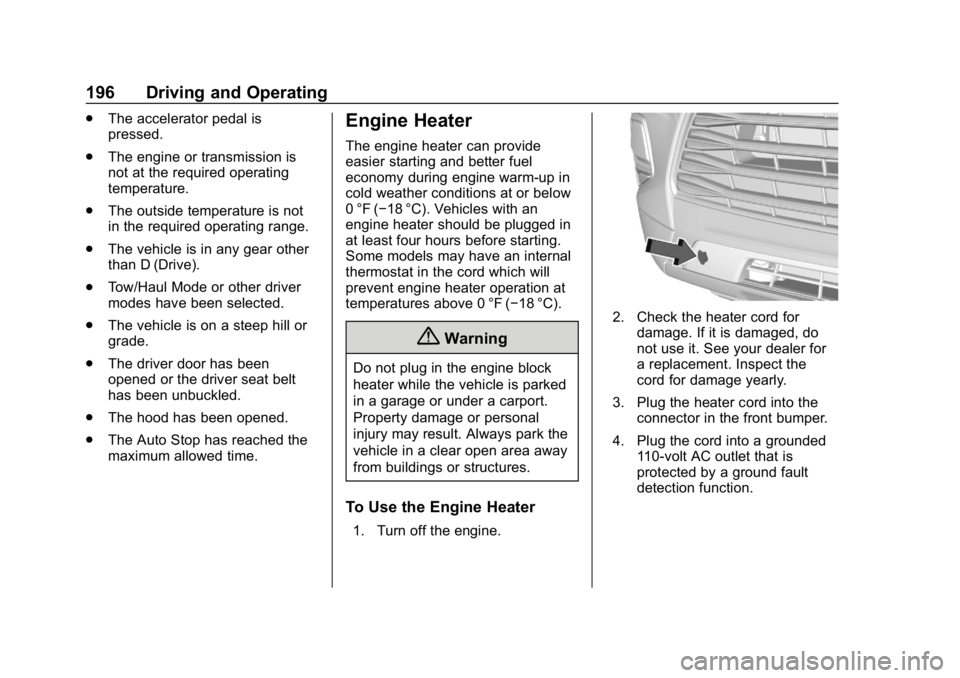
3. Plug the heater cord into the connector in the front bumper.
4. Plug the cord into a grounded 110-volt AC outlet that is
protected by a ground fault
detection function.
Page 200 of 404
Chevrolet Blazer (GMNA-Localizing-U.S./Canada/Mexico-12461541) - 2019 -
CRC - 3/11/19
Driving and Operating 199
The shift lock release is always
functional except in the case of an
uncharged or low voltage (less than
9-volt) battery.
If the vehicle has an uncharged
battery or a battery with low voltage,
try charging or jump starting the
battery. SeeJump Starting - North
America 0332.
To shift out of P (Park): 1. Turn the ignition on.
2. Apply the brake pedal.
3. Press the shift lever button.
4. Move the shift lever to the desired position.
If you still are unable to shift out of
P (Park): 1. Fully release the shift lever button.
2. While holding down the brake pedal, press the shift lever
button again.
3. Move the shift lever to the desired position. If you still cannot move the shift
lever from P (Park), see your dealer.
Parking over Things
That Burn
{Warning
Things that can burn could touch
hot exhaust parts under the
vehicle and ignite. Do not park
over papers, leaves, dry grass,
or other things that can burn.
Active Fuel Management
This vehicle's engine may be
equipped with Active Fuel
Management, which allows the
engine to operate on either all of its
cylinders, or in reduced cylinder
operation, depending on the driving
conditions.
When less power is required, such
as cruising at a constant vehicle
speed, the system will operate in
reduced operation mode, allowing
the vehicle to achieve better fuel
economy. When greater power
demands are required, such as
accelerating from a stop, passing,
or merging onto a freeway, the
system will maintain full-cylinder
operation.
If the vehicle has an Active Fuel
Management indicator, see Driver
Information Center (DIC) for more
information on using this display.Extended Parking
It is best not to park with the vehicle
running. If the vehicle is left running,
be sure it will not move and there is
adequate ventilation.
See
Shifting Into Park 0197 and
Engine Exhaust 0200.
Page 204 of 404
Chevrolet Blazer (GMNA-Localizing-U.S./Canada/Mexico-12461541) - 2019 -
CRC - 3/11/19
Driving and Operating 203
designed to improve fuel economy
and performance. Use the brake to
hold the vehicle on a hill. Do not use
the accelerator pedal.
L :This position gives you access
to gear ranges. This provides more
engine braking but lower fuel
economy than D (Drive). You can
use it on very steep hills, or in deep
snow or mud. See Manual Mode
0 203.
Operating Modes : The
transmission may operate in a lower
gear than normal to improve vehicle
performance. The engine speed
may be higher and there may be an
increase in noise during the
following conditions:
. When climbing a grade
. When driving downhill
. When driving in hot
temperatures, or at high altitudeManual Mode
Electronic Range Select
(ERS) Mode
ERS mode allows you to choose the
top-gear limit of the transmission
and the vehicle's speed while
driving downhill or towing a trailer.
The vehicle has an electronic shift
position indicator within the
instrument cluster. When using the
ERS mode a number will display
next to the L, indicating the highest
gear available for the range
selected.
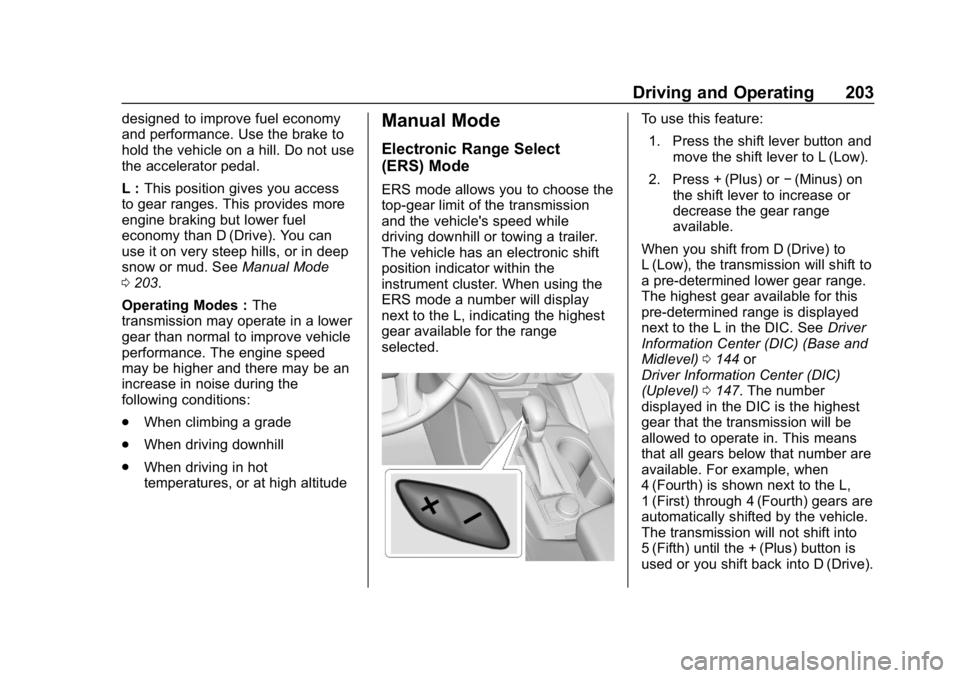
To use this feature:
1. Press the shift lever button and move the shift lever to L (Low).
2. Press + (Plus) or −(Minus) on
the shift lever to increase or
decrease the gear range
available.
When you shift from D (Drive) to
L (Low), the transmission will shift to
a pre-determined lower gear range.
The highest gear available for this
pre-determined range is displayed
next to the L in the DIC. See Driver
Information Center (DIC) (Base and
Midlevel) 0144 or
Driver Information Center (DIC)
(Uplevel) 0147. The number
displayed in the DIC is the highest
gear that the transmission will be
allowed to operate in. This means
that all gears below that number are
available. For example, when
4 (Fourth) is shown next to the L,
1 (First) through 4 (Fourth) gears are
automatically shifted by the vehicle.
The transmission will not shift into
5 (Fifth) until the + (Plus) button is
used or you shift back into D (Drive).
Page 205 of 404
Chevrolet Blazer (GMNA-Localizing-U.S./Canada/Mexico-12461541) - 2019 -
CRC - 3/11/19
204 Driving and Operating
If the transmission is in 9 (ninth)
gear when L (low) is selected, a
downshift to 7 (seventh) will be
commanded. If in 8 (eighth) through
2 (second), a single downshift will
occur.
While in L (Low), the transmission
will prevent shifting to a lower gear
range if the engine speed is too
high. You have a brief period of time
to slow the vehicle. If vehicle speed
is not reduced within the time
allowed, the lower gear range shift
will not be completed. You must
further slow the vehicle, then press
−(Minus) to the desired lower gear
range. Automatic Engine Grade Braking is
not available when the ERS is
active. It is available in D (Drive) for
both normal driving and Tow/Haul
Mode. While using the ERS, cruise
control and the Tow/Haul Mode can
be used. See
“Tow/Haul Mode”
following.
Tow/Haul Mode
This feature can assist when towing
or hauling a heavy load. See Driver
Mode Control 0210 to activate Tow/
Haul Mode.
Drive Systems
All-Wheel Drive
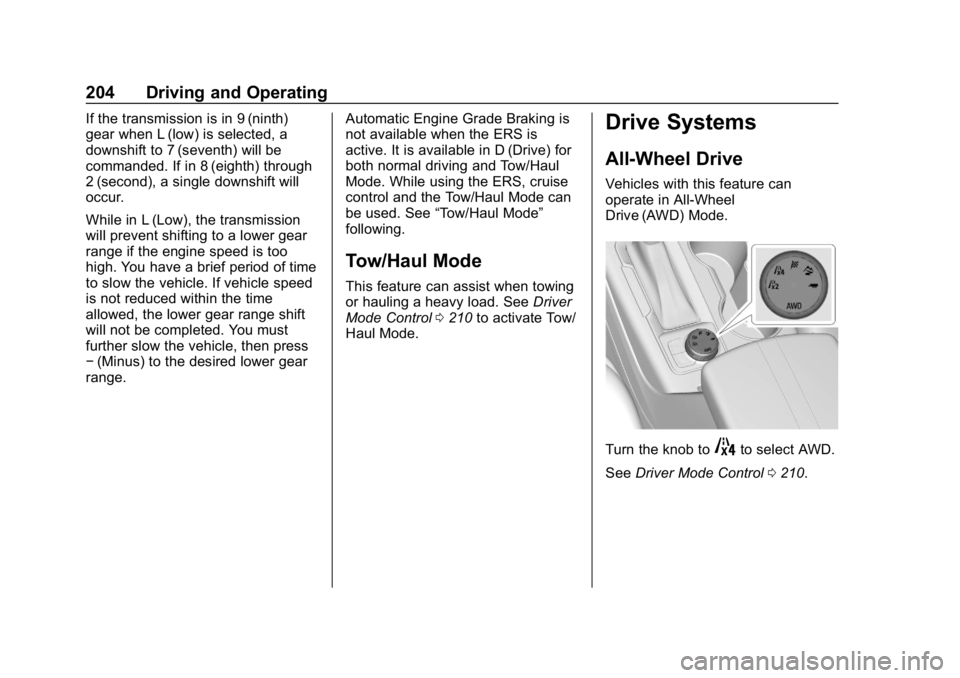
Vehicles with this feature can
operate in All-Wheel
Drive (AWD) Mode.
Turn the knob to4to select AWD.
See Driver Mode Control 0210.
Page 209 of 404
Chevrolet Blazer (GMNA-Localizing-U.S./Canada/Mexico-12461541) - 2019 -
CRC - 3/11/19
208 Driving and Operating
Hill Start Assist (HSA)
Hill Start Assist (HSA) will activate
when the vehicle is stopped on a
moderate to steep grade to help
prevent it from rolling in an
unintended direction. After the brake
pedal has been released and before
the accelerator pedal has been
pressed, HSA uses braking
pressure to hold the vehicle
stationary. If HSA is holding the
vehicle, a DIC message displays.
HSA will not activate in a forward
drive gear when facing downhill,
or in R (Reverse) when facing uphill.
Select the duration of the HSA
feature through vehicle
personalization. See”Extended Hill
Start Assist” under“Comfort and
Convenience” inVehicle
Personalization 0151. When
Standard Hold is selected, the
vehicle is held stationary for up to
four seconds after the brake pedal
is released. When Extended Hold is
selected, the vehicle is held
stationary for up to two minutes
after the brake pedal is released. In either case, override the hold
feature by pressing the accelerator
pedal and attempting to drive away.
If Standard Hold is selected, it will
hold the vehicle for four seconds
unless the driver door is opened or
the driver seat belt is unbuckled
after releasing the brake pedal.
If Extended Hold is selected, it will
hold the vehicle for two minutes
unless the driver door is opened
and the driver seat belt is unbuckled
prior to releasing the brake pedal.
When deactivated after five minutes,
or if it is deactivated when the driver
seat belt is unlatched or the driver
door is opened, the Electric Parking
Brake will engage to prevent vehicle
movement.
Ride Control Systems
Traction Control/
Electronic Stability
Control
System Operation
The vehicle has a Traction Control
System (TCS) and StabiliTrak/
Electronic Stability Control (ESC).
These systems help limit wheel spin
and assist the driver in maintaining
control, especially on slippery road
conditions.
TCS activates if it senses that any
of the drive wheels are spinning or
beginning to lose traction. When this
happens, TCS applies the brakes to
the spinning wheels and reduces
engine power to limit wheel spin.
StabiliTrak/ESC activates when the
vehicle senses a difference between
the intended path and the direction
the vehicle is actually traveling.
StabiliTrak/ESC selectively applies
braking pressure to any one of the