Front CHEVROLET BLAZER 2020 Owner's Manual
[x] Cancel search | Manufacturer: CHEVROLET, Model Year: 2020, Model line: BLAZER, Model: CHEVROLET BLAZER 2020Pages: 390, PDF Size: 6.5 MB
Page 7 of 390
Chevrolet Blazer Owner Manual (GMNA-Localizing-U.S./Canada/Mexico-
13557845) - 2020 - CRC - 3/24/20
6 Introduction
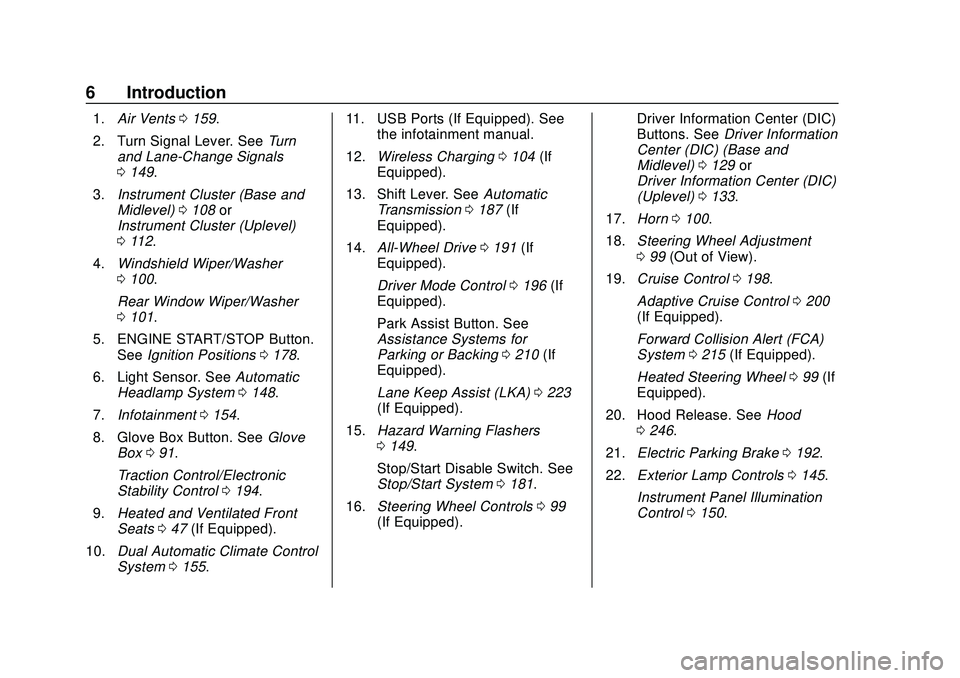
1.Air Vents 0159.
2. Turn Signal Lever. See Turn
and Lane-Change Signals
0 149.
3. Instrument Cluster (Base and
Midlevel) 0108 or
Instrument Cluster (Uplevel)
0 112.
4. Windshield Wiper/Washer
0100.
Rear Window Wiper/Washer
0 101.
5. ENGINE START/STOP Button. See Ignition Positions 0178.
6. Light Sensor. See Automatic
Headlamp System 0148.
7. Infotainment 0154.
8. Glove Box Button. See Glove
Box 091.
Traction Control/Electronic
Stability Control 0194.
9. Heated and Ventilated Front
Seats 047 (If Equipped).
10. Dual Automatic Climate Control
System 0155. 11. USB Ports (If Equipped). See
the infotainment manual.
12. Wireless Charging 0104 (If
Equipped).
13. Shift Lever. See Automatic
Transmission 0187 (If
Equipped).
14. All-Wheel Drive 0191 (If
Equipped).
Driver Mode Control 0196 (If
Equipped).
Park Assist Button. See
Assistance Systems for
Parking or Backing 0210 (If
Equipped).
Lane Keep Assist (LKA) 0223
(If Equipped).
15. Hazard Warning Flashers
0149.
Stop/Start Disable Switch. See
Stop/Start System 0181.
16. Steering Wheel Controls 099
(If Equipped). Driver Information Center (DIC)
Buttons. See
Driver Information
Center (DIC) (Base and
Midlevel) 0129 or
Driver Information Center (DIC)
(Uplevel) 0133.
17. Horn 0100.
18. Steering Wheel Adjustment
099 (Out of View).
19. Cruise Control 0198.
Adaptive Cruise Control 0200
(If Equipped).
Forward Collision Alert (FCA)
System 0215 (If Equipped).
Heated Steering Wheel 099 (If
Equipped).
20. Hood Release. See Hood
0 246.
21. Electric Parking Brake 0192.
22. Exterior Lamp Controls 0145.
Instrument Panel Illumination
Control 0150.
Page 13 of 390
Chevrolet Blazer Owner Manual (GMNA-Localizing-U.S./Canada/Mexico-
13557845) - 2020 - CRC - 3/24/20
12 Keys, Doors, and Windows
Programming Transmitters to
the Vehicle
Only RKE transmitters programmed
to the vehicle will work. If a
transmitter is lost or stolen, a
replacement can be purchased and
programmed through your dealer.
The vehicle can be reprogrammed
so that lost or stolen transmitters no
longer work. Each vehicle can have
up to eight transmitters matched
to it.
Programming with Recognized
Transmitters
A new transmitter can be
programmed to the vehicle when
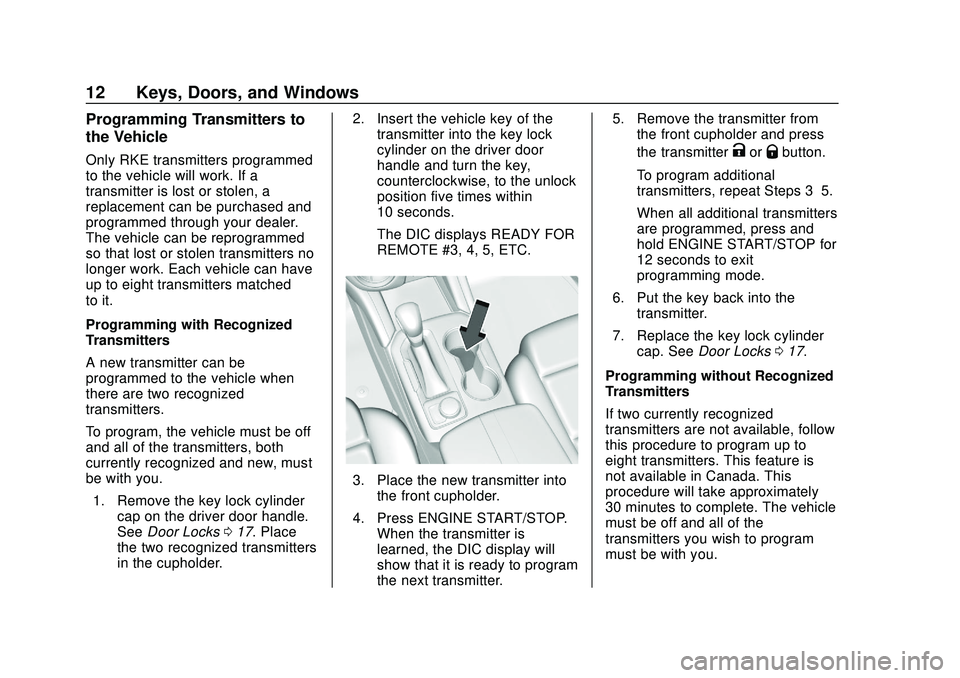
there are two recognized
transmitters.
To program, the vehicle must be off
and all of the transmitters, both
currently recognized and new, must
be with you.1. Remove the key lock cylinder cap on the driver door handle.
See Door Locks 017. Place
the two recognized transmitters
in the cupholder. 2. Insert the vehicle key of the
transmitter into the key lock
cylinder on the driver door
handle and turn the key,
counterclockwise, to the unlock
position five times within
10 seconds.
The DIC displays READY FOR
REMOTE #3, 4, 5, ETC.
3. Place the new transmitter intothe front cupholder.
4. Press ENGINE START/STOP. When the transmitter is
learned, the DIC display will
show that it is ready to program
the next transmitter. 5. Remove the transmitter from
the front cupholder and press
the transmitter
KorQbutton.
To program additional
transmitters, repeat Steps 3–5.
When all additional transmitters
are programmed, press and
hold ENGINE START/STOP for
12 seconds to exit
programming mode.
6. Put the key back into the transmitter.
7. Replace the key lock cylinder cap. See Door Locks 017.
Programming without Recognized
Transmitters
If two currently recognized
transmitters are not available, follow
this procedure to program up to
eight transmitters. This feature is
not available in Canada. This
procedure will take approximately
30 minutes to complete. The vehicle
must be off and all of the
transmitters you wish to program
must be with you.
Page 14 of 390
Chevrolet Blazer Owner Manual (GMNA-Localizing-U.S./Canada/Mexico-
13557845) - 2020 - CRC - 3/24/20
Keys, Doors, and Windows 13
1. Remove the key lock cylindercap on the driver door handle.
See Door Locks 017. Insert
the vehicle key of the
transmitter into the key lock
cylinder on the driver door
handle and turn the key,
counterclockwise, to the unlock
position five times within
10 seconds.
The DIC displays REMOTE
LEARN PENDING,
PLEASE WAIT.
2. Wait for 10 minutes until the DIC displays PRESS ENGINE
START BUTTON TO LEARN
and then press ENGINE
START/STOP.
The DIC will again display
REMOTE LEARN PENDING,
PLEASE WAIT.
3. Repeat Step 2 two additional times. After the third time all
previously known transmitters
will no longer work with the
vehicle. Remaining transmitters
can be relearned during the
next steps. The DIC should now display
READY FOR REMOTE # 1.
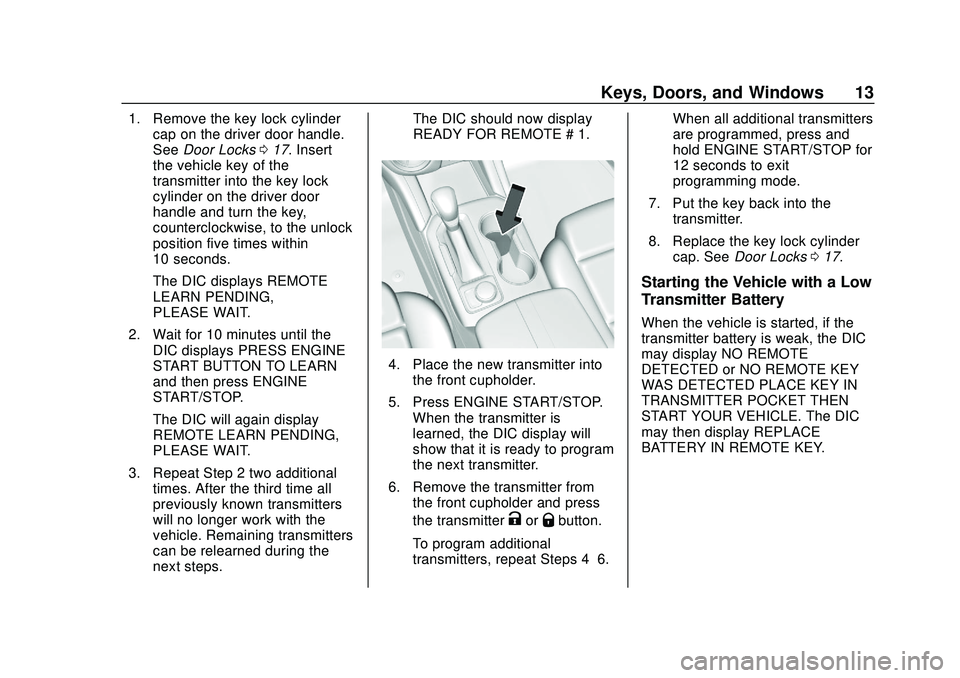
4. Place the new transmitter into
the front cupholder.
5. Press ENGINE START/STOP. When the transmitter is
learned, the DIC display will
show that it is ready to program
the next transmitter.
6. Remove the transmitter from the front cupholder and press
the transmitter
KorQbutton.
To program additional
transmitters, repeat Steps 4–6. When all additional transmitters
are programmed, press and
hold ENGINE START/STOP for
12 seconds to exit
programming mode.
7. Put the key back into the transmitter.
8. Replace the key lock cylinder cap. See Door Locks 017.
Starting the Vehicle with a Low
Transmitter Battery
When the vehicle is started, if the
transmitter battery is weak, the DIC
may display NO REMOTE
DETECTED or NO REMOTE KEY
WAS DETECTED PLACE KEY IN
TRANSMITTER POCKET THEN
START YOUR VEHICLE. The DIC
may then display REPLACE
BATTERY IN REMOTE KEY.
Page 15 of 390
Chevrolet Blazer Owner Manual (GMNA-Localizing-U.S./Canada/Mexico-
13557845) - 2020 - CRC - 3/24/20
14 Keys, Doors, and Windows
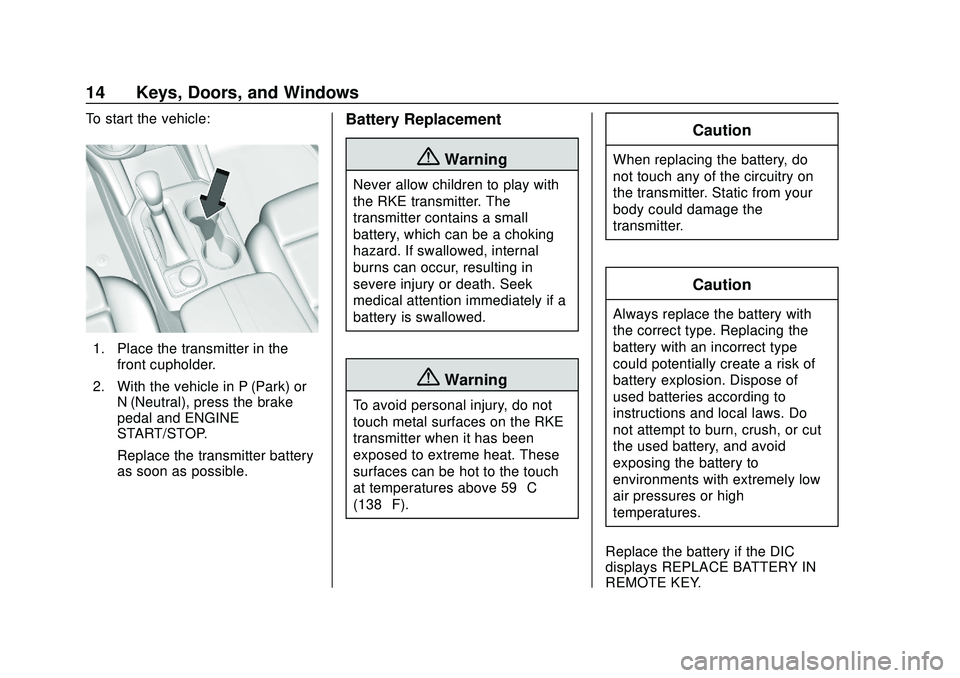
To start the vehicle:
1. Place the transmitter in thefront cupholder.
2. With the vehicle in P (Park) or N (Neutral), press the brake
pedal and ENGINE
START/STOP.
Replace the transmitter battery
as soon as possible.
Battery Replacement
{Warning
Never allow children to play with
the RKE transmitter. The
transmitter contains a small
battery, which can be a choking
hazard. If swallowed, internal
burns can occur, resulting in
severe injury or death. Seek
medical attention immediately if a
battery is swallowed.
{Warning
To avoid personal injury, do not
touch metal surfaces on the RKE
transmitter when it has been
exposed to extreme heat. These
surfaces can be hot to the touch
at temperatures above 59 °C
(138 °F).
Caution
When replacing the battery, do
not touch any of the circuitry on
the transmitter. Static from your
body could damage the
transmitter.
Caution
Always replace the battery with
the correct type. Replacing the
battery with an incorrect type
could potentially create a risk of
battery explosion. Dispose of
used batteries according to
instructions and local laws. Do
not attempt to burn, crush, or cut
the used battery, and avoid
exposing the battery to
environments with extremely low
air pressures or high
temperatures.
Replace the battery if the DIC
displays REPLACE BATTERY IN
REMOTE KEY.
Page 16 of 390
Chevrolet Blazer Owner Manual (GMNA-Localizing-U.S./Canada/Mexico-
13557845) - 2020 - CRC - 3/24/20
Keys, Doors, and Windows 15
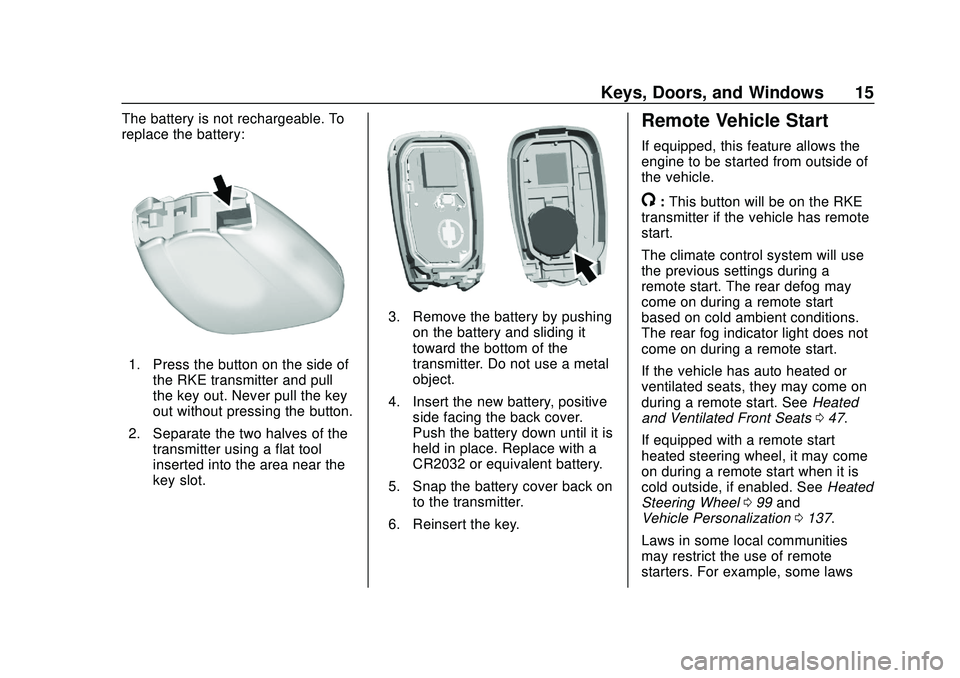
The battery is not rechargeable. To
replace the battery:
1. Press the button on the side ofthe RKE transmitter and pull
the key out. Never pull the key
out without pressing the button.
2. Separate the two halves of the transmitter using a flat tool
inserted into the area near the
key slot.
3. Remove the battery by pushingon the battery and sliding it
toward the bottom of the
transmitter. Do not use a metal
object.
4. Insert the new battery, positive side facing the back cover.
Push the battery down until it is
held in place. Replace with a
CR2032 or equivalent battery.
5. Snap the battery cover back on to the transmitter.
6. Reinsert the key.
Remote Vehicle Start
If equipped, this feature allows the
engine to be started from outside of
the vehicle.
/: This button will be on the RKE
transmitter if the vehicle has remote
start.
The climate control system will use
the previous settings during a
remote start. The rear defog may
come on during a remote start
based on cold ambient conditions.
The rear fog indicator light does not
come on during a remote start.
If the vehicle has auto heated or
ventilated seats, they may come on
during a remote start. See Heated
and Ventilated Front Seats 047.
If equipped with a remote start
heated steering wheel, it may come
on during a remote start when it is
cold outside, if enabled. See Heated
Steering Wheel 099 and
Vehicle Personalization 0137.
Laws in some local communities
may restrict the use of remote
starters. For example, some laws
Page 35 of 390
Chevrolet Blazer Owner Manual (GMNA-Localizing-U.S./Canada/Mexico-
13557845) - 2020 - CRC - 3/24/20
34 Keys, Doors, and Windows
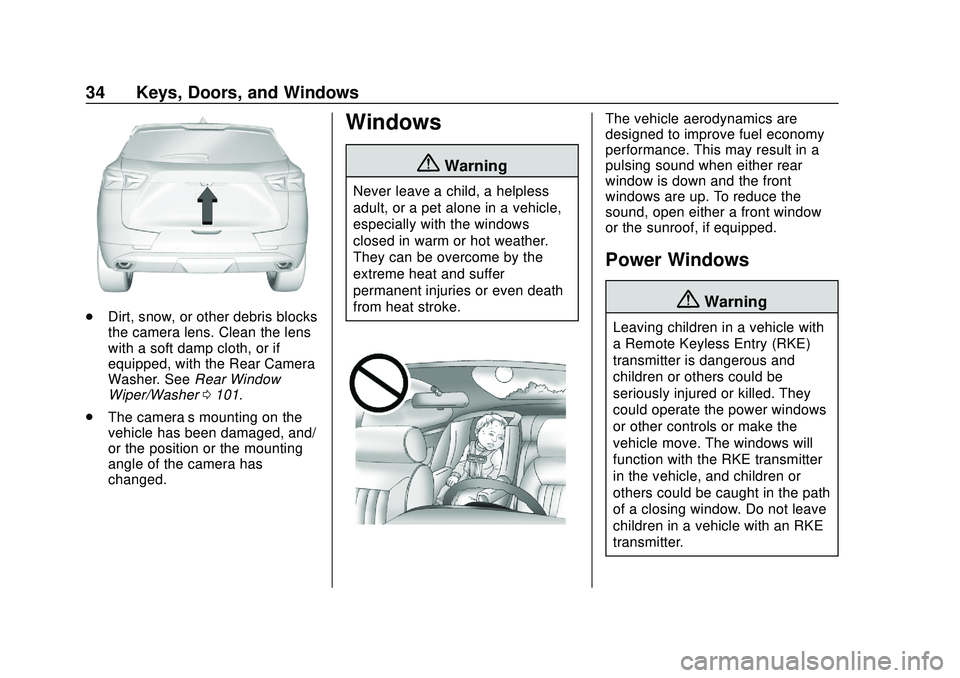
.Dirt, snow, or other debris blocks
the camera lens. Clean the lens
with a soft damp cloth, or if
equipped, with the Rear Camera
Washer. See Rear Window
Wiper/Washer 0101.
. The camera’s mounting on the
vehicle has been damaged, and/
or the position or the mounting
angle of the camera has
changed.
Windows
{Warning
Never leave a child, a helpless
adult, or a pet alone in a vehicle,
especially with the windows
closed in warm or hot weather.
They can be overcome by the
extreme heat and suffer
permanent injuries or even death
from heat stroke.
The vehicle aerodynamics are
designed to improve fuel economy
performance. This may result in a
pulsing sound when either rear
window is down and the front
windows are up. To reduce the
sound, open either a front window
or the sunroof, if equipped.
Power Windows
{Warning
Leaving children in a vehicle with
a Remote Keyless Entry (RKE)
transmitter is dangerous and
children or others could be
seriously injured or killed. They
could operate the power windows
or other controls or make the
vehicle move. The windows will
function with the RKE transmitter
in the vehicle, and children or
others could be caught in the path
of a closing window. Do not leave
children in a vehicle with an RKE
transmitter.
Page 40 of 390
Chevrolet Blazer Owner Manual (GMNA-Localizing-U.S./Canada/Mexico-
13557845) - 2020 - CRC - 3/24/20
Seats and Restraints 39
Seats and
Restraints
Head Restraints
Head Restraints . . . . . . . . . . . . . . . 40
Front Seats
Seat Adjustment . . . . . . . . . . . . . . . 42
Power Seat Adjustment . . . . . . . . 42
Lumbar Adjustment . . . . . . . . . . . . 43
Reclining Seatbacks . . . . . . . . . . . 43
Memory Seats . . . . . . . . . . . . . . . . . 45
Heated and Ventilated FrontSeats . . . . . . . . . . . . . . . . . . . . . . . . . 47
Rear Seats
Rear Seats . . . . . . . . . . . . . . . . . . . . 49
Heated Rear Seats . . . . . . . . . . . . 51
Seat Belts
Seat Belts . . . . . . . . . . . . . . . . . . . . . 52
How to Wear Seat BeltsProperly . . . . . . . . . . . . . . . . . . . . . . 53
Lap-Shoulder Belt . . . . . . . . . . . . . 55
Seat Belt Use During Pregnancy . . . . . . . . . . . . . . . . . . . . 58
Seat Belt Extender . . . . . . . . . . . . . 58
Safety System Check . . . . . . . . . . 58
Seat Belt Care . . . . . . . . . . . . . . . . . 59 Replacing Seat Belt System
Parts after a Crash . . . . . . . . . . . 59
Airbag System
Airbag System . . . . . . . . . . . . . . . . . 60
Where Are the Airbags? . . . . . . . 61
When Should an AirbagInflate? . . . . . . . . . . . . . . . . . . . . . . . 63
What Makes an Airbag Inflate? . . . . . . . . . . . . . . . . . . . . . . . 64
How Does an Airbag Restrain? . . . . . . . . . . . . . . . . . . . . . 64
What Will You See after an Airbag Inflates? . . . . . . . . . . . . . . 64
Passenger Sensing System . . . 66
Servicing the Airbag-Equipped Vehicle . . . . . . . . . . . . . . . . . . . . . . . 70
Adding Equipment to the Airbag-Equipped Vehicle . . . . . 70
Airbag System Check . . . . . . . . . . 71
Replacing Airbag System Parts after a Crash . . . . . . . . . . . . . . . . . 71
Child Restraints
Older Children . . . . . . . . . . . . . . . . . 72
Infants and Young Children . . . . 73
Child Restraint Systems . . . . . . . 76
Where to Put the Restraint . . . . . 77
Lower Anchors and Tethers forChildren (LATCH System) . . . . 79 Replacing LATCH System Parts
After a Crash . . . . . . . . . . . . . . . . . 85
Securing Child Restraints (With the Seat Belts in the
Rear Seat) . . . . . . . . . . . . . . . . . . . 85
Securing Child Restraints (With the Seat Belts in the
Front Seat) . . . . . . . . . . . . . . . . . . . 87
Page 41 of 390
Chevrolet Blazer Owner Manual (GMNA-Localizing-U.S./Canada/Mexico-
13557845) - 2020 - CRC - 3/24/20
40 Seats and Restraints
Head Restraints
The vehicle’s front seats have
adjustable head restraints in the
outboard seating positions.
{Warning
With head restraints that are not
installed and adjusted properly,
there is a greater chance that
occupants will suffer a neck/
spinal injury in a crash. Do not
drive until the head restraints for
all occupants are installed and
adjusted properly.
If your vehicle has rear head
restraints that fold down, always
return them to the full upright
position whenever an occupant is
seated in the seat.
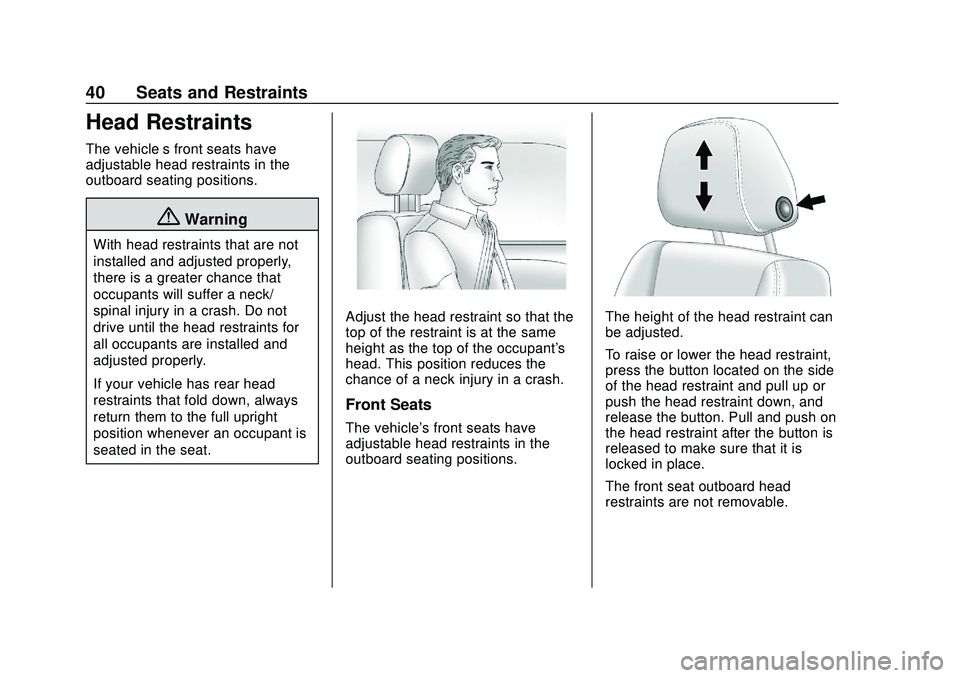
Adjust the head restraint so that the
top of the restraint is at the same
height as the top of the occupant's
head. This position reduces the
chance of a neck injury in a crash.
Front Seats
The vehicle's front seats have
adjustable head restraints in the
outboard seating positions.
The height of the head restraint can
be adjusted.
To raise or lower the head restraint,
press the button located on the side
of the head restraint and pull up or
push the head restraint down, and
release the button. Pull and push on
the head restraint after the button is
released to make sure that it is
locked in place.
The front seat outboard head
restraints are not removable.
Page 43 of 390
Chevrolet Blazer Owner Manual (GMNA-Localizing-U.S./Canada/Mexico-
13557845) - 2020 - CRC - 3/24/20
42 Seats and Restraints
Front Seats
Seat Adjustment
{Warning
You can lose control of the
vehicle if you try to adjust a driver
seat while the vehicle is moving.
Adjust the driver seat only when
the vehicle is not moving.
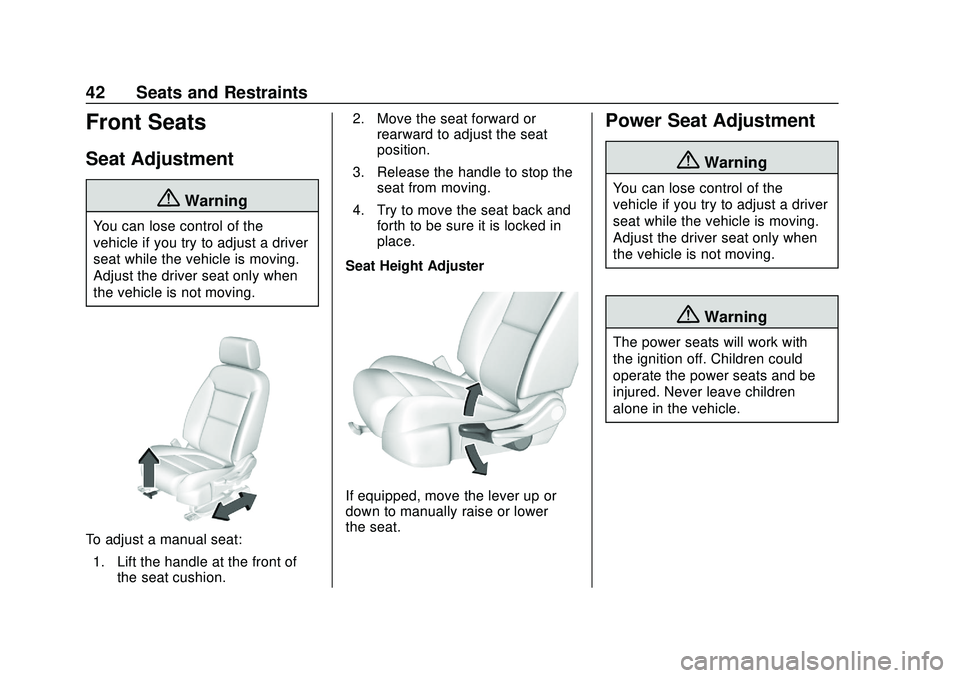
To adjust a manual seat:1. Lift the handle at the front of the seat cushion. 2. Move the seat forward or
rearward to adjust the seat
position.
3. Release the handle to stop the seat from moving.
4. Try to move the seat back and forth to be sure it is locked in
place.
Seat Height Adjuster
If equipped, move the lever up or
down to manually raise or lower
the seat.
Power Seat Adjustment
{Warning
You can lose control of the
vehicle if you try to adjust a driver
seat while the vehicle is moving.
Adjust the driver seat only when
the vehicle is not moving.
{Warning
The power seats will work with
the ignition off. Children could
operate the power seats and be
injured. Never leave children
alone in the vehicle.
Page 44 of 390
Chevrolet Blazer Owner Manual (GMNA-Localizing-U.S./Canada/Mexico-
13557845) - 2020 - CRC - 3/24/20
Seats and Restraints 43
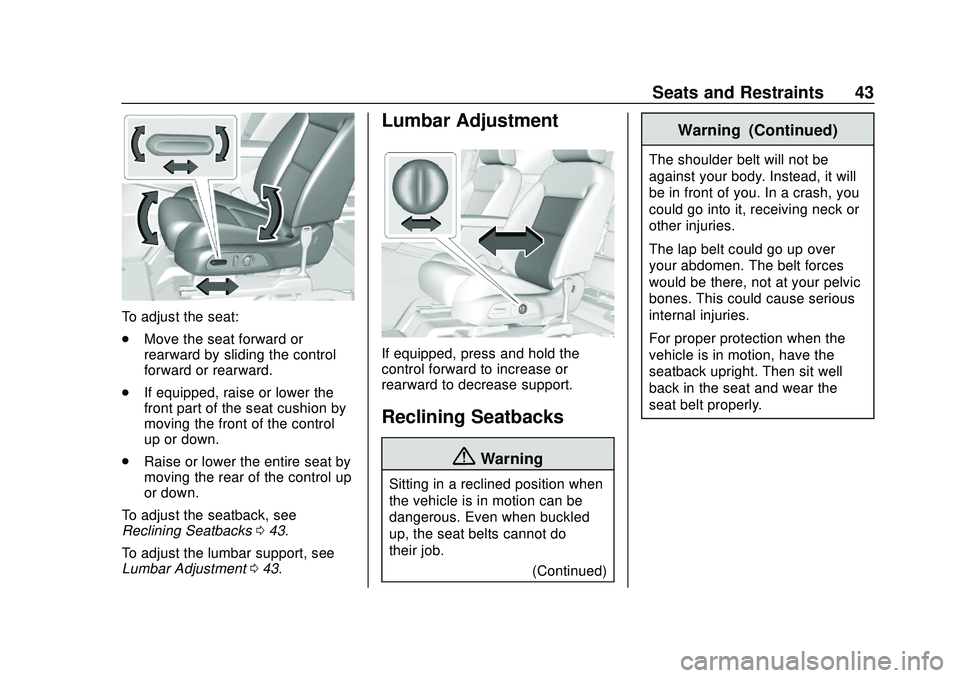
To adjust the seat:
.Move the seat forward or
rearward by sliding the control
forward or rearward.
. If equipped, raise or lower the
front part of the seat cushion by
moving the front of the control
up or down.
. Raise or lower the entire seat by
moving the rear of the control up
or down.
To adjust the seatback, see
Reclining Seatbacks 043.
To adjust the lumbar support, see
Lumbar Adjustment 043.
Lumbar Adjustment
If equipped, press and hold the
control forward to increase or
rearward to decrease support.
Reclining Seatbacks
{Warning
Sitting in a reclined position when
the vehicle is in motion can be
dangerous. Even when buckled
up, the seat belts cannot do
their job.
(Continued)
Warning (Continued)
The shoulder belt will not be
against your body. Instead, it will
be in front of you. In a crash, you
could go into it, receiving neck or
other injuries.
The lap belt could go up over
your abdomen. The belt forces
would be there, not at your pelvic
bones. This could cause serious
internal injuries.
For proper protection when the
vehicle is in motion, have the
seatback upright. Then sit well
back in the seat and wear the
seat belt properly.