Lift CHEVROLET BLAZER 2023 User Guide
[x] Cancel search | Manufacturer: CHEVROLET, Model Year: 2023, Model line: BLAZER, Model: CHEVROLET BLAZER 2023Pages: 360, PDF Size: 17.34 MB
Page 22 of 360
Chevrolet Blazer Owner Manual (GMNA-Localizing-U.S./Canada/Mexico-
16401961) - 2023 - CRC - 5/17/22
Keys, Doors, and Windows 21
the falling liftgate detection feature. Allow
the liftgate to complete its operation and
wait a few seconds before manually closing
the liftgate.
Obstacle Detection Features
If the liftgate encounters an obstacle during
a power open or close cycle, a warning
chime may sound and the liftgate will
automatically reverse direction and move a
short distance away from the obstacle. After
removing the obstruction, the power liftgate
operation can be used again. If the liftgate
encounters multiple obstacles on the same
power cycle, the power function will
deactivate. After removing the obstructions,
manually close the liftgate which will allow
normal power operation functions to
resume.
If the vehicle is locked while the liftgate is
closing, and an obstacle is encountered that
prevents the liftgate from completely
closing, the horn will sound as an alert that
the liftgate did not close.
Setting the 3/4 Mode
To change the position the liftgate stops at
when opening:1. Select MAX or 3/4 mode and power
open the liftgate.
2. Stop the liftgate movement at the desired height by pressing any liftgate
switch. Manually adjust the liftgate
position if needed.
3. Press and hold
lat the bottom of the
liftgate until the turn signals flash and a
beep sounds. This indicates the setting
has been recorded.
The liftgate cannot be set below a minimum
programmable height. If there is no light
flash or sound, then the height adjustment
may be too low.
Manual Operation
Select OFF to manually operate the liftgate.
See “Manual Liftgate” at the beginning of
this section.
Caution
Attempting to move the liftgate too
quickly and with excessive force may
result in damage to the vehicle. Operate the liftgate manually with a
smooth motion and moderate speed. The
system includes a feature that limits the
manual closing speed to protect the
components.
Hands-Free Operation
If equipped, the liftgate may be operated
with a kicking motion under the left side of
the rear bumper at the location of the
projected logo. See "Projected Logo" later in
this section. The remote key must be within
1 m (3 ft).
The hands-free feature will not work while
the liftgate is moving. To stop the liftgate
while in motion use one of the liftgate
switches.
The hands-free feature can be customized.
To view available settings for this feature,
touch the Settings icon on the infotainment
home page. Select
“Vehicle”to display the
list of available options and select “Comfort
and Convenience”. Choose from the
following:
On-Open and Close : The kicking motion is
activated to both open and close the
liftgate.
Page 23 of 360
Chevrolet Blazer Owner Manual (GMNA-Localizing-U.S./Canada/Mexico-
16401961) - 2023 - CRC - 5/17/22
22 Keys, Doors, and Windows
On-Open Only :The kicking motion is
activated to only open the liftgate.
Off : The feature is disabled.
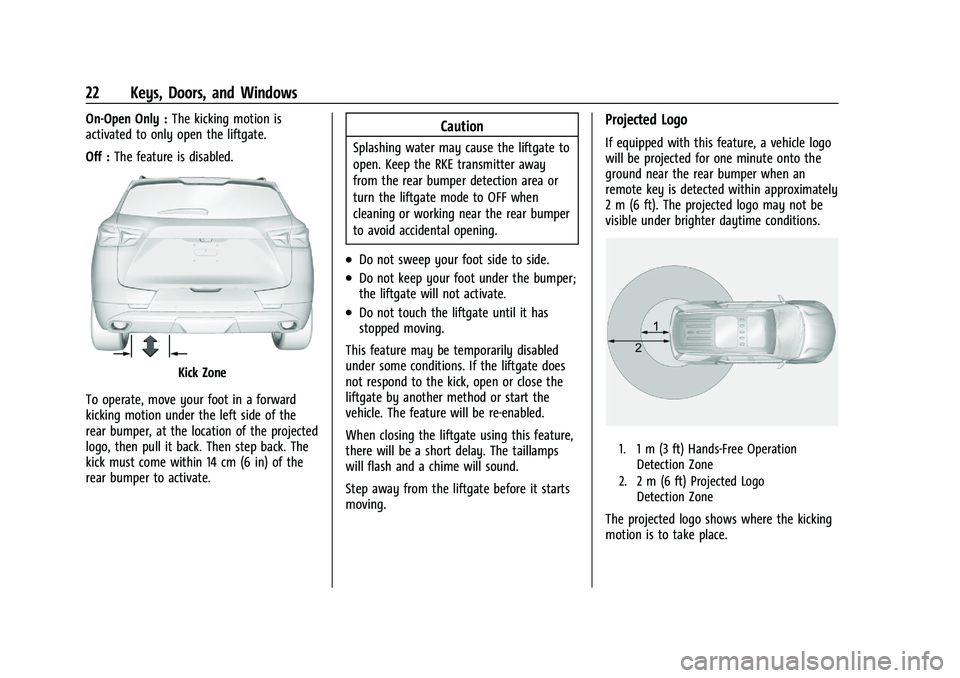
Kick Zone
To operate, move your foot in a forward
kicking motion under the left side of the
rear bumper, at the location of the projected
logo, then pull it back. Then step back. The
kick must come within 14 cm (6 in) of the
rear bumper to activate.
Caution
Splashing water may cause the liftgate to
open. Keep the RKE transmitter away
from the rear bumper detection area or
turn the liftgate mode to OFF when
cleaning or working near the rear bumper
to avoid accidental opening.
.Do not sweep your foot side to side.
.Do not keep your foot under the bumper;
the liftgate will not activate.
.Do not touch the liftgate until it has
stopped moving.
This feature may be temporarily disabled
under some conditions. If the liftgate does
not respond to the kick, open or close the
liftgate by another method or start the
vehicle. The feature will be re-enabled.
When closing the liftgate using this feature,
there will be a short delay. The taillamps
will flash and a chime will sound.
Step away from the liftgate before it starts
moving.
Projected Logo
If equipped with this feature, a vehicle logo
will be projected for one minute onto the
ground near the rear bumper when an
remote key is detected within approximately
2 m (6 ft). The projected logo may not be
visible under brighter daytime conditions.
1. 1 m (3 ft) Hands-Free Operation Detection Zone
2. 2 m (6 ft) Projected Logo Detection Zone
The projected logo shows where the kicking
motion is to take place.
Page 24 of 360
Chevrolet Blazer Owner Manual (GMNA-Localizing-U.S./Canada/Mexico-
16401961) - 2023 - CRC - 5/17/22
Keys, Doors, and Windows 23
The projected logo will only be available for
this remote key after it has been out of
range for at least 20 seconds.
If an remote key is again detected within
approximately 2 m (6 ft) of the liftgate,
or another hands-free operation has been
detected, the one-minute timer will be reset.
The projected logo will not work under
these conditions:
.The vehicle battery is low.
.The transmission is not in P (Park).
.Hands Free Liftgate Control is set to Off
in vehicle personalization. To view
available settings for this feature, touch
the Settings icon on the infotainment
home page. Select“Vehicle”to display
the list of available options and select
“Comfort and Convenience”.
.The power liftgate is turned off.
.The vehicle remains parked for 72 hours
or more, with no remote key use or
Keyless Access operation. To re-enable,
press any button on the remote key or
open and close a vehicle door.
The projected logo will not work for a single
remote key when a remote key:
.Has been left within approximately 2 m
(6 ft) of the liftgate for several minutes.
.Has been left inside the vehicle and all
vehicle doors are closed.
.Has approached the area outside of the
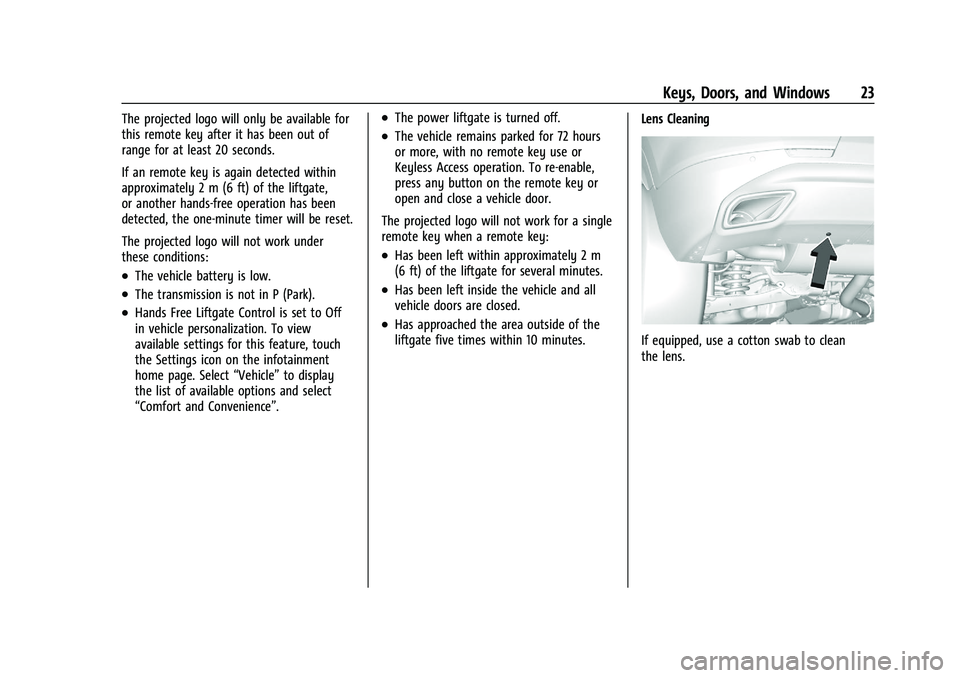
liftgate five times within 10 minutes. Lens Cleaning
If equipped, use a cotton swab to clean
the lens.
Page 25 of 360
Chevrolet Blazer Owner Manual (GMNA-Localizing-U.S./Canada/Mexico-
16401961) - 2023 - CRC - 5/17/22
24 Keys, Doors, and Windows
Hands-Free Liftgate and Projected Logo Availability
ActionHands-Free Liftgate Projected Logo
Remote key entering projected logo
detection zone Operative
On for one minute
Remote key left inside projected logo
detection zone for minimum of 10 minutes Operative
Off until remote key button press or a door is
opened and closed
Remote key brought in and out of projected
logo detection zone five times or more within
10 minutes Operative
Off for one hour or until remote key button
press or a door is opened and closed
Vehicle remains parked for more than
72 hours Operative
Off until remote key button press or a door is
opened and closed
Vehicle battery is low Non-operative Off
Transmission is not in P (Park) Non-operative Off
Power liftgate is turned off Non-operative Off
Hands-free liftgate is disabled in vehicle per-
sonalization Non-operative
Off
Vehicle Security
This vehicle has theft-deterrent features;
however, they do not make the vehicle
impossible to steal.
Vehicle Alarm System
This vehicle has an anti-theft alarm system.
Arming the Alarm System
1. Close the liftgate and the hood. Turn off
the vehicle. 2. Lock the vehicle in one of three ways:
.Use the remote key.
.Use the Keyless Access system.
.With a door open, press the
inside
Q.
Page 26 of 360
Chevrolet Blazer Owner Manual (GMNA-Localizing-U.S./Canada/Mexico-
16401961) - 2023 - CRC - 5/17/22
Keys, Doors, and Windows 25
3. After 30 seconds the alarm system willarm. Pressing
Qon the remote key a
second time will bypass the 30-second
delay and immediately arm the alarm
system.
The vehicle alarm system will not arm if the
doors are locked with the key.
If the driver door is opened without first
unlocking with the remote key, the horn will
chirp and the lights will flash to indicate
pre-alarm. If the vehicle is not started,
or the door is not unlocked by pressing
K
on the remote key during the 10-second
pre-alarm, the alarm will be activated.
The alarm will also be activated if a
passenger door, the liftgate, or the hood is
opened without first disarming the system.
When the alarm is activated, the turn
signals flash and the horn sounds for about
30 seconds. The alarm system will then
re-arm to monitor for the next unauthorized
event.
Disarming the Alarm System
To disarm the alarm system or turn off the
alarm if it has been activated:
.PressKon the remote key.
.Unlock the vehicle using the Keyless
Access system.
.Start the vehicle.
To avoid setting off the alarm by accident:
.Lock the vehicle after all occupants have
left the vehicle and all doors are closed.
.Always unlock a door with the remote
key or use the Keyless Access system.
Unlocking the driver door with the key will
not disarm the system or turn off the alarm.
How to Detect a Tamper Condition
IfKis pressed and the horn chirps and the
lights flash three times, the alarm was
activated while the alarm system was
armed.
If the alarm system has been activated, a
message will appear on the Driver
Information Center (DIC).
Immobilizer
See Radio Frequency Statement 0337.
Immobilizer Operation
This vehicle has a passive theft-deterrent
system. The system does not have to be manually
armed or disarmed.
The vehicle is automatically immobilized
when the remote key leaves the vehicle.
The immobilization system is disarmed
when the ignition is turned on or in ACC/
ACCESSORY and a valid remote key is in the
vehicle.
The security light, in the instrument cluster,
comes on if there is a problem with arming
or disarming the theft-deterrent system.
The system has one or more remote keys
matched to an immobilizer control unit in
the vehicle. Only a correctly matched
remote key will start the vehicle. If the
remote key is ever damaged, you may not
be able to start the vehicle.
When trying to start the vehicle, the
security light may come on briefly when the
ignition is turned on.
Page 37 of 360
Chevrolet Blazer Owner Manual (GMNA-Localizing-U.S./Canada/Mexico-
16401961) - 2023 - CRC - 5/17/22
36 Seats and Restraints
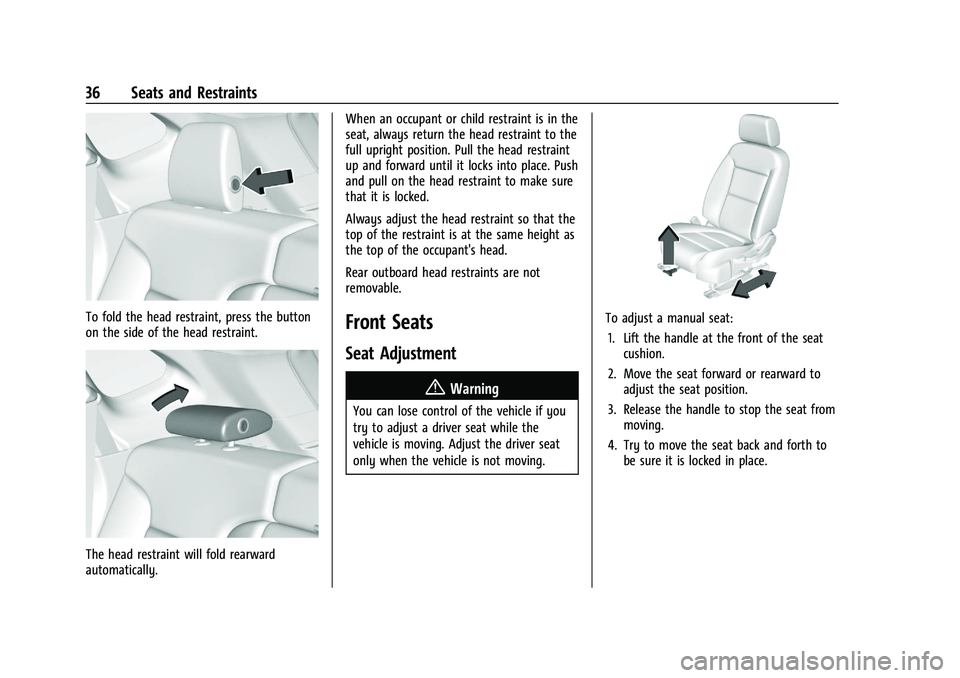
To fold the head restraint, press the button
on the side of the head restraint.
The head restraint will fold rearward
automatically.When an occupant or child restraint is in the
seat, always return the head restraint to the
full upright position. Pull the head restraint
up and forward until it locks into place. Push
and pull on the head restraint to make sure
that it is locked.
Always adjust the head restraint so that the
top of the restraint is at the same height as
the top of the occupant's head.
Rear outboard head restraints are not
removable.
Front Seats
Seat Adjustment
{Warning
You can lose control of the vehicle if you
try to adjust a driver seat while the
vehicle is moving. Adjust the driver seat
only when the vehicle is not moving.
To adjust a manual seat:
1. Lift the handle at the front of the seat cushion.
2. Move the seat forward or rearward to adjust the seat position.
3. Release the handle to stop the seat from moving.
4. Try to move the seat back and forth to be sure it is locked in place.
Page 39 of 360
Chevrolet Blazer Owner Manual (GMNA-Localizing-U.S./Canada/Mexico-
16401961) - 2023 - CRC - 5/17/22
38 Seats and Restraints
Do not have a seatback reclined if the
vehicle is moving.
Manual Reclining Seatbacks
{Warning
If either seatback is not locked, it could
move forward in a sudden stop or crash.
That could cause injury to the person
sitting there. Always push and pull on
the seatbacks to be sure they are locked.
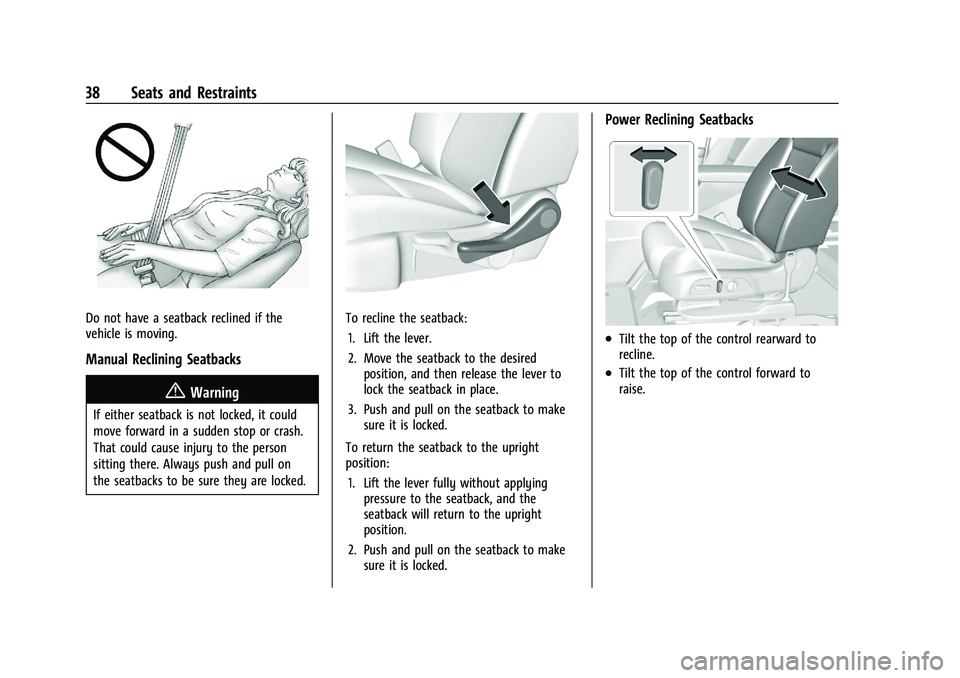
To recline the seatback:1. Lift the lever.
2. Move the seatback to the desired position, and then release the lever to
lock the seatback in place.
3. Push and pull on the seatback to make sure it is locked.
To return the seatback to the upright
position: 1. Lift the lever fully without applying pressure to the seatback, and the
seatback will return to the upright
position.
2. Push and pull on the seatback to make sure it is locked.
Power Reclining Seatbacks
.Tilt the top of the control rearward to
recline.
.Tilt the top of the control forward to
raise.
Page 44 of 360
Chevrolet Blazer Owner Manual (GMNA-Localizing-U.S./Canada/Mexico-
16401961) - 2023 - CRC - 5/17/22
Seats and Restraints 43
Rear Seats
Rear Seat Reminder
If equipped, the message REAR SEAT
REMINDER LOOK IN REAR SEAT displays
under certain conditions indicating there
may be an item or passenger in the rear
seat. Check before exiting the vehicle.
This feature will activate when a second row
door is opened while the vehicle is on or up
to 10 minutes before the vehicle is turned
on. There will be an alert when the vehicle
is turned off. The alert does not directly
detect objects in the rear seat; instead,
under certain conditions, it detects when a
rear door is opened and closed, indicating
that there may be something in the
rear seat.
The feature is active only once each time
the vehicle is turned on and off, and will
require reactivation by opening and closing
the second row doors. There may be an
alert even when there is nothing in the rear
seat; for example, if a child entered the
vehicle through the rear door and left the
vehicle without the vehicle being shut off.The feature can be turned on or off. Select
Settings > Vehicle > Rear Seat Reminder >
ON or OFF.Rear Seat Adjustment
The second row seats slide forward for
more room.
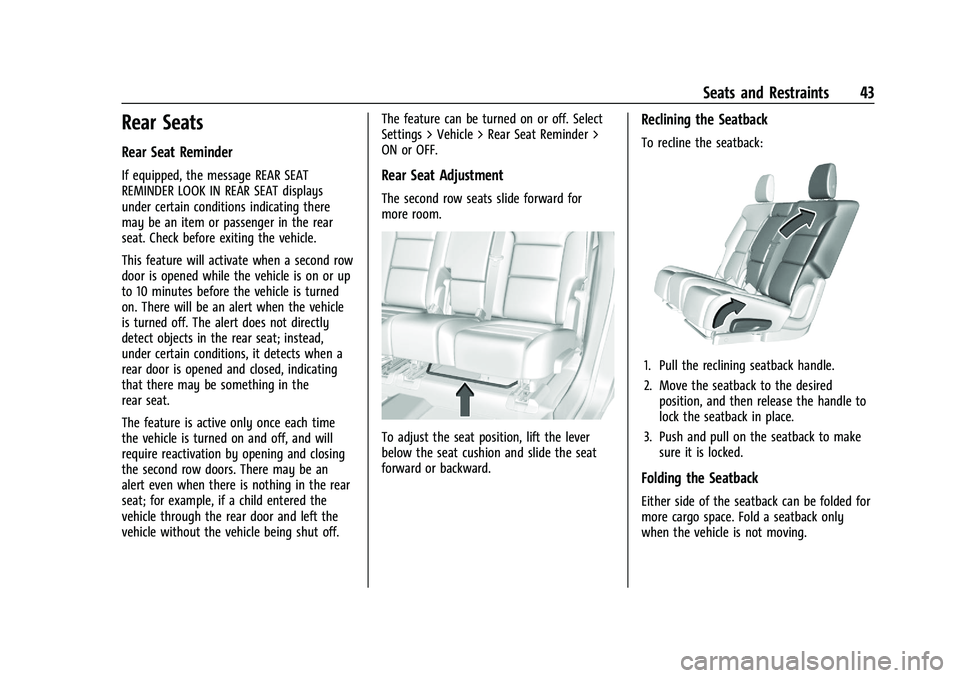
To adjust the seat position, lift the lever
below the seat cushion and slide the seat
forward or backward.
Reclining the Seatback
To recline the seatback:
1. Pull the reclining seatback handle.
2. Move the seatback to the desired
position, and then release the handle to
lock the seatback in place.
3. Push and pull on the seatback to make sure it is locked.
Folding the Seatback
Either side of the seatback can be folded for
more cargo space. Fold a seatback only
when the vehicle is not moving.
Page 45 of 360
Chevrolet Blazer Owner Manual (GMNA-Localizing-U.S./Canada/Mexico-
16401961) - 2023 - CRC - 5/17/22
44 Seats and Restraints
Caution
Folding a rear seat with the seat belts
still fastened may cause damage to the
seat or the seat belts. Always unbuckle
the seat belts and return them to their
normal stowed position before folding a
rear seat.
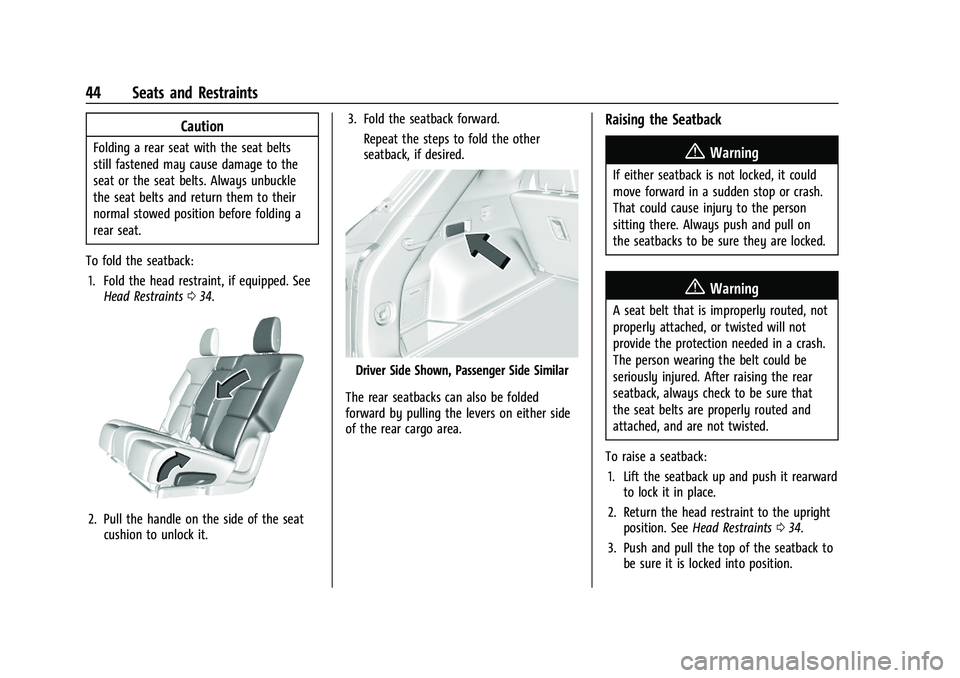
To fold the seatback: 1. Fold the head restraint, if equipped. See Head Restraints 034.
2. Pull the handle on the side of the seat
cushion to unlock it. 3. Fold the seatback forward.
Repeat the steps to fold the other
seatback, if desired.
Driver Side Shown, Passenger Side Similar
The rear seatbacks can also be folded
forward by pulling the levers on either side
of the rear cargo area.
Raising the Seatback
{Warning
If either seatback is not locked, it could
move forward in a sudden stop or crash.
That could cause injury to the person
sitting there. Always push and pull on
the seatbacks to be sure they are locked.
{Warning
A seat belt that is improperly routed, not
properly attached, or twisted will not
provide the protection needed in a crash.
The person wearing the belt could be
seriously injured. After raising the rear
seatback, always check to be sure that
the seat belts are properly routed and
attached, and are not twisted.
To raise a seatback: 1. Lift the seatback up and push it rearward to lock it in place.
2. Return the head restraint to the upright position. See Head Restraints 034.
3. Push and pull the top of the seatback to be sure it is locked into position.
Page 81 of 360
Chevrolet Blazer Owner Manual (GMNA-Localizing-U.S./Canada/Mexico-
16401961) - 2023 - CRC - 5/17/22
80 Storage
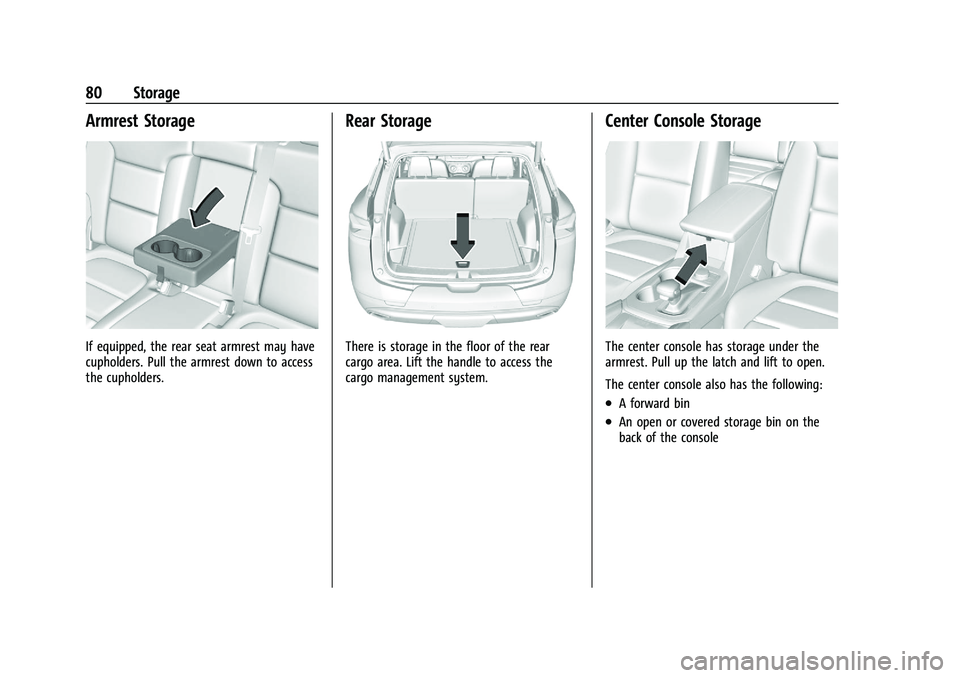
Armrest Storage
If equipped, the rear seat armrest may have
cupholders. Pull the armrest down to access
the cupholders.
Rear Storage
There is storage in the floor of the rear
cargo area. Lift the handle to access the
cargo management system.
Center Console Storage
The center console has storage under the
armrest. Pull up the latch and lift to open.
The center console also has the following:
.A forward bin
.An open or covered storage bin on the
back of the console