key battery CHEVROLET BOLT EV 2017 User Guide
[x] Cancel search | Manufacturer: CHEVROLET, Model Year: 2017, Model line: BOLT EV, Model: CHEVROLET BOLT EV 2017Pages: 361, PDF Size: 4.89 MB
Page 104 of 361
Chevrolet Bolt EV Owner Manual (GMNA-Localizing-U.S./Canada/Mexico-
10122739) - 2017 - CRC - 10/3/16
Instruments and Controls 103
Instruments and
Controls
Controls
Steering Wheel Adjustment . . . 104
Steering Wheel Controls . . . . . . 104
Heated Steering Wheel . . . . . . . 105
Horn . . . . . . . . . . . . . . . . . . . . . . . . . . 105
Pedestrian Safety Signal . . . . . 105
Windshield Wiper/Washer . . . . 106
Rear Window Wiper/Washer . . . . . . . . . . . . . . . . . . . . . 107
Compass . . . . . . . . . . . . . . . . . . . . . 108
Clock . . . . . . . . . . . . . . . . . . . . . . . . . 108
Power Outlets . . . . . . . . . . . . . . . . 109
Wireless Charging . . . . . . . . . . . . 110
Warning Lights, Gauges, and
Indicators
Warning Lights, Gauges, and Indicators . . . . . . . . . . . . . . . . . . . . 111
Instrument Cluster . . . . . . . . . . . . 111
Speedometer . . . . . . . . . . . . . . . . . 114
Odometer . . . . . . . . . . . . . . . . . . . . . 114
Trip Odometer . . . . . . . . . . . . . . . . 114
Battery Gauge (High Voltage) . . . . . . . . . . . . . . . . . . . . . 115
Driver Efficiency Gauge . . . . . . . 115
Power Indicator Gauge . . . . . . . 116 Safety Belt Reminders . . . . . . . . 116
Airbag Readiness Light . . . . . . . 117
Passenger Airbag Status
Indicator . . . . . . . . . . . . . . . . . . . . . 117
Charging System Light (12-Volt
Battery) . . . . . . . . . . . . . . . . . . . . . 118
Service Vehicle Soon Light . . . 118
Brake System Warning Light . . . . . . . . . . . . . . . . . . . . . . . . 118
Electric Parking Brake Light . . . . . . . . . . . . . . . . . . . . . . . . 119
Service Electric Parking Brake Light . . . . . . . . . . . . . . . . . . . . . . . . 119
Antilock Brake System (ABS) Warning Light . . . . . . . . . . . . . . . 120
Sport Mode Light . . . . . . . . . . . . . 120
Lane Keep Assist (LKA) Light . . . . . . . . . . . . . . . . . . . . . . . . 120
Vehicle Ahead Indicator . . . . . . 120
Pedestrian Ahead Indicator . . . 121
Traction Off Light . . . . . . . . . . . . . 121
StabiliTrak®OFF Light . . . . . . . . 121
Traction Control System (TCS)/ StabiliTrak
®Light . . . . . . . . . . . 121
Tire Pressure Light . . . . . . . . . . . 122
Security Light . . . . . . . . . . . . . . . . . 122
Vehicle Ready Light . . . . . . . . . . 122
High-Beam On Light . . . . . . . . . . 123
Lamps On Reminder . . . . . . . . . 123
Cruise Control Light . . . . . . . . . . 123
Door Ajar Light . . . . . . . . . . . . . . . 123
Information Displays
Power Flows . . . . . . . . . . . . . . . . . 124
Programmable Charging . . . . . . 124
Energy Information . . . . . . . . . . . 131
Energy Settings . . . . . . . . . . . . . . 132
Driver Information Center (DIC) . . . . . . . . . . . . . . . . 133
Vehicle Messages
Vehicle Messages . . . . . . . . . . . . 135
Battery and ChargingMessages . . . . . . . . . . . . . . . . . . . 135
Brake System Messages . . . . . 136
Compass Messages . . . . . . . . . . 136
Cruise Control Messages . . . . . 136
Door Ajar Messages . . . . . . . . . . 136
Electric Drive Unit Messages . . . . . . . . . . . . . . . . . . . 137
Key and Lock Messages . . . . . 137
Lamp Messages . . . . . . . . . . . . . . 138
Object Detection System Messages . . . . . . . . . . . . . . . . . . . 138
Propulsion Power Messages . . . . . . . . . . . . . . . . . . . 139
Ride Control System Messages . . . . . . . . . . . . . . . . . . . 140
Airbag System Messages . . . . 140
Security Messages . . . . . . . . . . . 140
Service Vehicle Messages . . . . 140
Starting the Vehicle Messages . . . . . . . . . . . . . . . . . . . 141
Page 132 of 361
Chevrolet Bolt EV Owner Manual (GMNA-Localizing-U.S./Canada/Mexico-
10122739) - 2017 - CRC - 10/3/16
Instruments and Controls 131
The Charging Interrupted or
Overridden pop-up will appear if any
of the following conditions occur:
.The charging options have been
updated through the mobile app.
See KeyPass 044.
. The charge process was
interrupted by the utility
company through OnStar as
authorized by the vehicle owner
(available in select regions).
. There was an unintended loss of
AC power during the plug-in
charge event. For example,
there was a power outage or the
charge cord was unplugged from
the wall.
See Utility Interruption of Charging
0 245.
Programmable Charging
Disabled
When the Programmable Charging
system is disabled, the Unable to
Charge screen will display.
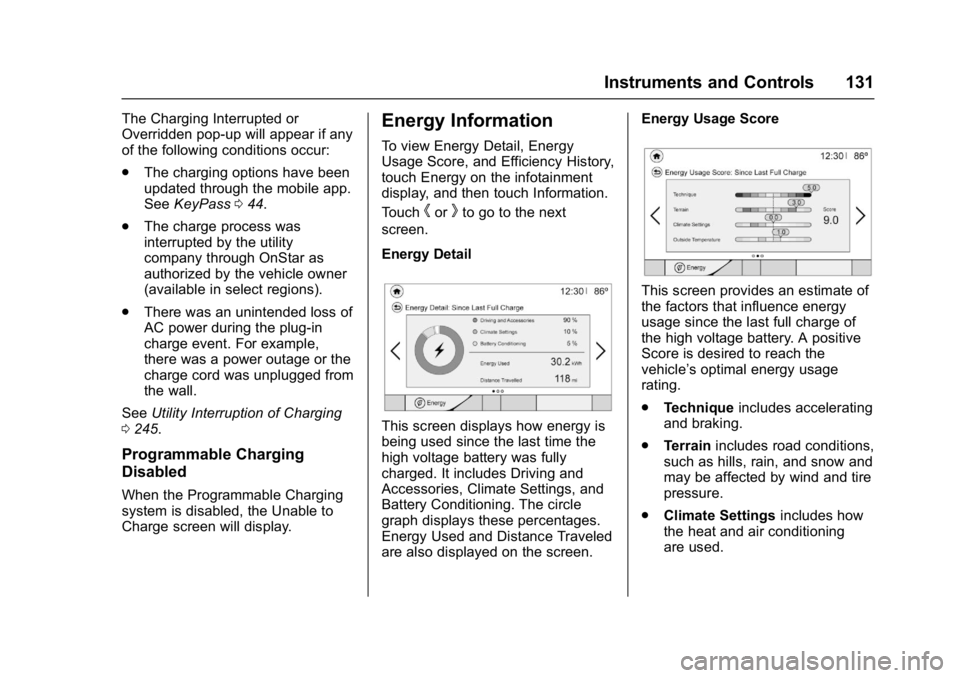
Energy Information
To view Energy Detail, Energy
Usage Score, and Efficiency History,
touch Energy on the infotainment
display, and then touch Information.
Touch
horkto go to the next
screen.
Energy Detail
This screen displays how energy is
being used since the last time the
high voltage battery was fully
charged. It includes Driving and
Accessories, Climate Settings, and
Battery Conditioning. The circle
graph displays these percentages.
Energy Used and Distance Traveled
are also displayed on the screen. Energy Usage Score
This screen provides an estimate of
the factors that influence energy
usage since the last full charge of
the high voltage battery. A positive
Score is desired to reach the
vehicle’s optimal energy usage
rating.
.
Technique includes accelerating
and braking.
. Terrain includes road conditions,
such as hills, rain, and snow and
may be affected by wind and tire
pressure.
. Climate Settings includes how
the heat and air conditioning
are used.
Page 138 of 361
Chevrolet Bolt EV Owner Manual (GMNA-Localizing-U.S./Canada/Mexico-
10122739) - 2017 - CRC - 10/3/16
Instruments and Controls 137
This symbol will be displayed if the
vehicle is out of P (Park). Close the
door completely.
HOOD OPEN
This message will display along with
a hood open symbol when the hood
is open. Close the hood completely.
REAR ACCESS OPEN
This message will display along with
a symbol when the liftgate is open.
Close the liftgate completely.
Electric Drive Unit
Messages
SHIFT TO PARK
This message displays when the
vehicle should be shifted to
P (Park). This may appear when
attempting to turn off the vehicle
when it is not in P (Park).
Key and Lock Messages
NO REMOTE KEY WAS
DETECTED PLACE KEY IN
TRANSMITTER POCKET, THEN
START YOUR VEHICLE
This message displays when trying
to start the vehicle if an RKE
transmitter is not detected. The
transmitter battery may be weak.
NO REMOTE DETECTED
This message displays when the
RKE transmitter is not detected
while attempting to start the vehicle.
The transmitter battery may be
weak. See“Starting the Vehicle with
a Low Transmitter Battery” under
Remote Keyless Entry (RKE)
System Operation 033.
NO REMOTE DETECTED,
PRESS BRAKE TO RESTART
This message displays if the RKE
transmitter is no longer detected in
the vehicle. Press the brake pedal
and POWER
Oto restart the
vehicle, or press POWER
Owithout
pressing the brake pedal to turn the vehicle off. If the vehicle is turned
off and a valid transmitter is not
available, the vehicle will not restart.
NUMBER OF KEYS
PROGRAMMED
This message displays when
programming new keys to the
vehicle.
REMOTE LEFT IN VEHICLE
This message displays when
leaving the vehicle with the RKE
transmitter still inside.
REPLACE BATTERY IN
REMOTE KEY
This message displays when the
battery in the RKE transmitter needs
to be replaced.
SERVICE KEYLESS START
SYSTEM
This message displays when the
pushbutton start system needs
service. Take the vehicle to your
dealer.
Page 204 of 361
Chevrolet Bolt EV Owner Manual (GMNA-Localizing-U.S./Canada/Mexico-
10122739) - 2017 - CRC - 10/3/16
Driving and Operating 203
Starting and Stopping the
Vehicle
Starting Procedure
Press the P (Park) button on the
shifter, or move the shift lever into
N (Neutral). The propulsion system
will not start in any other position.
Caution
Do not try to shift to P (Park) if the
vehicle is moving or the electric
drive unit could be damaged.
Shift to P (Park) only when the
vehicle is stopped.
Caution
If you add electrical parts or
accessories, you could change
the way the vehicle operates. Any
resulting damage would not be
covered by the vehicle warranty.The Remote Keyless Entry (RKE)
transmitter must be in the vehicle.
Press the brake pedal, then press
and release POWER
O.
If the RKE transmitter is not in the
vehicle or something is interfering
with the transmitter, a message
displays in the Driver Information
Center (DIC).
If the vehicle will not start due to a
low RKE transmitter battery, the
vehicle can still be driven. See Key
and Lock Messages 0137 and
Remote Keyless Entry (RKE)
System Operation 033.
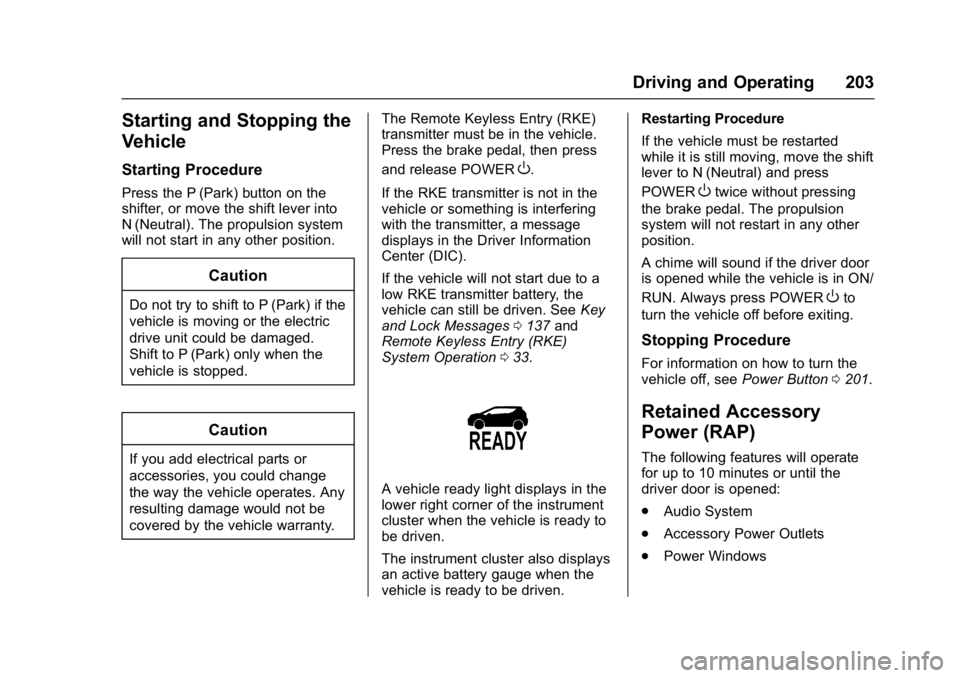
A vehicle ready light displays in the
lower right corner of the instrument
cluster when the vehicle is ready to
be driven.
The instrument cluster also displays
an active battery gauge when the
vehicle is ready to be driven. Restarting Procedure
If the vehicle must be restarted
while it is still moving, move the shift
lever to N (Neutral) and press
POWER
Otwice without pressing
the brake pedal. The propulsion
system will not restart in any other
position.
A chime will sound if the driver door
is opened while the vehicle is in ON/
RUN. Always press POWER
Oto
turn the vehicle off before exiting.
Stopping Procedure
For information on how to turn the
vehicle off, see Power Button0201.
Retained Accessory
Power (RAP)
The following features will operate
for up to 10 minutes or until the
driver door is opened:
.
Audio System
. Accessory Power Outlets
. Power Windows
Page 206 of 361
Chevrolet Bolt EV Owner Manual (GMNA-Localizing-U.S./Canada/Mexico-
10122739) - 2017 - CRC - 10/3/16
Driving and Operating 205
The shift lock is always functional
except in the case of an uncharged
or low charged 12-volt battery (less
than 9 volts).
If the vehicle has an uncharged
12-volt battery or a 12-volt battery
with low voltage, try charging or
jump starting the 12-volt battery.
To shift out of P (Park):1. Apply the brake pedal.
2. Press POWER
Oto start the
vehicle.
3. Verify that the vehicle is unplugged and the vehicle
ready light is on.
4. Press the shift lock release button on the side of the shift
lever.
5. Move the shift lever into the desired position.
6. The indicator will turn white and the gear indicator on the
shift lever will turn red when
the vehicle is no longer in
P (Park). 7. After releasing the shift lever, it
will return to the center
position.
Extended Parking
It is better not to park with the
vehicle running. If the vehicle is left
while running, follow the proper
steps to be sure the vehicle will not
move and there is adequate
ventilation. See Shifting Into Park
0 204.
If the vehicle is left in P (Park) while
running and the Remote Keyless
Entry (RKE) transmitter is outside
the vehicle, the vehicle will turn off
after one hour.
If the vehicle is left in P (Park) while
running and the RKE transmitter is
inside, the vehicle will run for two
hours. At the end of the second
hour, the vehicle will turn off.
The timer will reset if the vehicle is
taken out of P (Park) while it is
running.
Electric Vehicle
Operating Modes
Driver Selected Operating
Modes
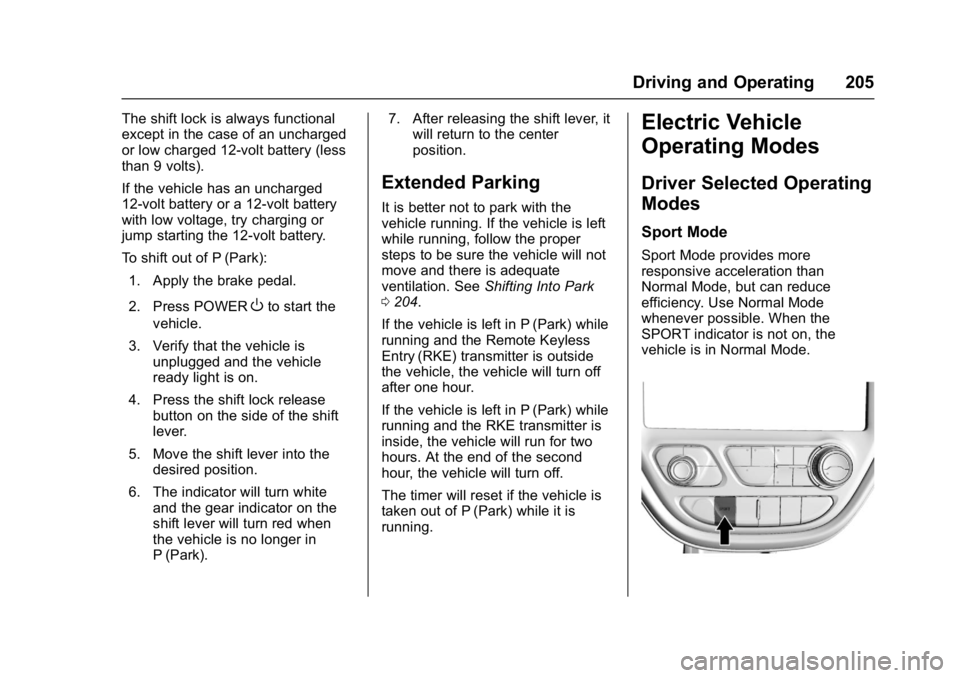
Sport Mode
Sport Mode provides more
responsive acceleration than
Normal Mode, but can reduce
efficiency. Use Normal Mode
whenever possible. When the
SPORT indicator is not on, the
vehicle is in Normal Mode.
Page 236 of 361
Chevrolet Bolt EV Owner Manual (GMNA-Localizing-U.S./Canada/Mexico-
10122739) - 2017 - CRC - 10/3/16
Driving and Operating 235
Stop Charge
Controls on the charging station can
be used to stop the charge process
at any time.
To stop the charge when inside the
vehicle, you may use the stop
charging button on the Charging
screen. SeeProgrammable
Charging 0124.
There is also an available mobile
app with several charging functions.
See KeyPass 044.
Stop Charge —Automatic
When the vehicle no longer needs
to use power from the charging
station, it will stop charging and the
DC vehicle plug will be unlocked
from the DC charge port.
Energy can still be consumed from
the charging station when the
vehicle’s displays and indicators
show that the battery is fully
charged. This is to ensure the
battery is in optimal temperature
operating range to maximize vehicle
range. See Programmable Charging
0 124. End Charge
1. Wait until the charging process has been fully stopped, the
vehicle plug is unlocked, and
the Charging Status Indicator is
solid green or off.
2. Unplug the DC vehicle plug from the DC charge port on the
vehicle and close the dust
cover.
3. Close the charge port door by pressing firmly in the center
until it latches.
4. The Electric Parking Brake should be manually
disengaged before driving the
vehicle.
5. To start another DC charge, remove the DC vehicle plug
and reconnect.Delayed Charging
Override
To temporarily override a delayed
charge event, unplug the charge
cord from the charge port and then
plug it back in within five seconds.
A single audible chirp will sound
and charging will begin immediately.
To cancel a temporary override,
unplug the charge cord, wait for
10 seconds, and then plug the
charge cord back in. A double
audible chirp will sound and
charging will be delayed.
See Programmable Charging 0124
for advanced charge scheduling
options.
Page 250 of 361
Chevrolet Bolt EV Owner Manual (GMNA-Localizing-U.S./Canada/Mexico-
10122739) - 2017 - CRC - 10/3/16
Vehicle Care 249
Jump Starting
Jump Starting - NorthAmerica . . . . . . . . . . . . . . . . . . . . . 295
Towing the Vehicle
Towing the Vehicle . . . . . . . . . . . 299
Recreational VehicleTowing . . . . . . . . . . . . . . . . . . . . . . 299
Appearance Care
Exterior Care . . . . . . . . . . . . . . . . . 301
Interior Care . . . . . . . . . . . . . . . . . . 305
Floor Mats . . . . . . . . . . . . . . . . . . . . 308
General Information
For service and parts needs, visit
your dealer. You will receive
genuine GM parts and GM-trained
and supported service people.
Genuine GM parts have one of
these marks:
California Proposition
65 Warning
WARNING: Most motor vehicles,
including this one, as well as many
of its service parts and fluids, contain and/or emit chemicals
known to the State of California to
cause cancer and birth defects or
other reproductive harm. Many parts
and systems, many fluids, and
some component wear by-products
contain and/or emit these
chemicals.
See
Battery - North America 0257
and Jump Starting - North America
0 295.
California Perchlorate
Materials Requirements
Certain types of automotive
applications, such as airbag
initiators, safety belt pretensioners,
and lithium batteries contained in
Remote Keyless Entry transmitters,
may contain perchlorate materials.
Special handling may be necessary.
For additional information, see
www.dtsc.ca.gov/hazardouswaste/
perchlorate.
Page 342 of 361
Chevrolet Bolt EV Owner Manual (GMNA-Localizing-U.S./Canada/Mexico-
10122739) - 2017 - CRC - 10/3/16
OnStar 341
.Obtain and customize the Wi-Fi®
hotspot name or SSID and
password, if equipped.
Press
Qto connect to an
Advisor to:
. Verify account information or
update contact information.
. Get driving directions.
. Receive a Diagnostic check of
the vehicle's key operating
systems.
. Receive Roadside Assistance.
. Manage Wi-Fi Settings,
if equipped.
Press
>to get a priority connection
to an OnStar Advisor available
24/7 to:
. Get help for an emergency.
. Be a Good Samaritan or
respond to an AMBER Alert.
. Get assistance in severe
weather or other crisis situations
and find evacuation routes.
OnStar Services
Emergency
Emergency Services require an
active, OnStar service plan
(excludes Basic Plan). With
Automatic Crash Response, built-in
sensors can automatically alert a
specially trained OnStar Advisor
who is immediately connected in to
the vehicle to help.
Press
>for a priority connection to
an OnStar Advisor who can contact
emergency service providers, direct
them to your exact location, and
relay important information.
With OnStar Crisis Assist, specially
trained Advisors are available
24 hours a day, 7 days a week, to
provide a central point of contact,
assistance, and information during a
crisis.
With Roadside Assistance, Advisors
can locate a nearby service provider
to help with a flat tire, a battery
jump, or an empty gas tank.
Security
If equipped, OnStar provides these
services:
. With Stolen Vehicle Assistance,
OnStar Advisors can use GPS to
pinpoint the vehicle and help
authorities quickly recover it.
. With Remote Ignition Block™,
if equipped, OnStar can block
the engine from being restarted.
. With Stolen Vehicle Slowdown
®,
if equipped, OnStar can work
with law enforcement to
gradually slow the vehicle down.
Theft Alarm Notification
If equipped, if the doors are locked
and the vehicle alarm sounds, a
notification by text, e-mail, or phone
call will be sent. If the vehicle is
stolen, an OnStar Advisor can work
with authorities to recover the
vehicle.
Navigation
OnStar navigation requires a
specific OnStar service plan.
Page 355 of 361

Chevrolet Bolt EV Owner Manual (GMNA-Localizing-U.S./Canada/Mexico-
10122739) - 2017 - CRC - 10/3/16
354 Index
General Information (cont'd)Vehicle Care . . . . . . . . . . . . . . . . . . 249
GM Mobility Reimbursement Program . . . . . . . . . . . . . . . . . . . . . . . 327
H
Halogen Bulbs . . . . . . . . . . . . . . . . . . 261
Hands-Free Phone . . . . . . . . . . . . . 175
Hazard Warning Flashers . . . . . . . 151
Head Restraints . . . . . . . . . . . . . . . . . 55
Headlamps
Aiming . . . . . . . . . . . . . . . . . . . . . . . . 261
Automatic . . . . . . . . . . . . . . . . . . . . . 150
Bulb Replacement . . . . . . . . . . . . 261
Daytime RunningLamps (DRL) . . . . . . . . . . . . . . . . 150
Flash-to-Pass . . . . . . . . . . . . . . . . . 150
High Intensity Discharge (HID) Lighting . . . . . . . . . . . . . . . 262
High-Beam On Light . . . . . . . . . . 123
High/Low Beam Changer . . . . . 150
Lamps On Reminder . . . . . . . . . 123
Heated Rear Seats . . . . . . . . . . . . . . . . . . . . . 62
Steering Wheel . . . . . . . . . . . . . . . 105
Heated Front Seats . . . . . . . . . . . . . . 58
Heating . . . . . . . . . . . . . . . . . . . . . . . . . 184
High Voltage Battery Gauge . . . . 115 High Voltage Devices and
Wiring . . . . . . . . . . . . . . . . . . . . . . . . . 263
High-Beam On Light . . . . . . . . . . . . 123
Hill and Mountain Roads . . . . . . . . 196
Hill Start Assist (HSA) . . . . . . . . . . 212
Hood . . . . . . . . . . . . . . . . . . . . . . . . . . . 251
Horn . . . . . . . . . . . . . . . . . . . . . . . . . . . . 105
How to Wear Safety Belts Properly . . . . . . . . . . . . . . . . . . . . . . . . 63
HVAC . . . . . . . . . . . . . . . . . . . . . . . . . . . 184
I
Immobilizer . . . . . . . . . . . . . . . . . . . . . . 47
Indicator Pedestrian Ahead . . . . . . . . . . . . 121
Vehicle Ahead . . . . . . . . . . . . . . . . 120
Infants and Young Children,
Restraints . . . . . . . . . . . . . . . . . . . . . . 82
Information Energy . . . . . . . . . . . . . . . . . . . . . . . 131
Instrument Cluster . . . . . . . . . . . . . . 111
Instrument Panel
Storage Area . . . . . . . . . . . . . . . . . 100
Interior Rearview Mirrors . . . . . . . . . 49
Introduction . . . . . . . . . . . . . . . . . . 2, 155
J
Jump Starting - North America . . . . . . . . . . . . . . . . . . . . . . . 295
K
Key and Lock Messages . . . . . . . . 137
Keyless EntryRemote (RKE) System . . . . . . . . . 33
KeyPass . . . . . . . . . . . . . . . . . . . . . . . . . 44
Keys . . . . . . . . . . . . . . . . . . . . . . . . . . . . . 32
L
Labeling, Tire Sidewall . . . . . . . . . . 272
Lamps Courtesy . . . . . . . . . . . . . . . . . . . . . . 152
Daytime Running (DRL) . . . . . . 150
Dome . . . . . . . . . . . . . . . . . . . . . . . . . 152
Exterior Controls . . . . . . . . . . . . . . 148
Exterior Lamps OffReminder . . . . . . . . . . . . . . . . . . . 150
License Plate . . . . . . . . . . . . . . . . . 262
Messages . . . . . . . . . . . . . . . . . . . . 138
On Reminder . . . . . . . . . . . . . . . . . 123
Reading . . . . . . . . . . . . . . . . . . . . . . 153
Lane Change Alert (LCA) . . . . . . . 227
Lane Departure
Warning (LDW) . . . . . . . . . . . . . . . . 229
Lane Keep Assist (LKA) . . . . . . . . 229
Lane Keep Assist Light . . . . . . . . . 120
Page 357 of 361

Chevrolet Bolt EV Owner Manual (GMNA-Localizing-U.S./Canada/Mexico-
10122739) - 2017 - CRC - 10/3/16
356 Index
Mirrors (cont'd)Folding . . . . . . . . . . . . . . . . . . . . . . . . . 49
Manual Rearview . . . . . . . . . . . . . . . 49
Power . . . . . . . . . . . . . . . . . . . . . . . . . . 49
Mirrors, Interior Rearview . . . . . . . . 49
Mobile Applications KeyPass . . . . . . . . . . . . . . . . . . . . . . . . 44
Modes Driver Selected . . . . . . . . . . . . . . . 205
Monitor System, Tire Pressure . . . . . . . . . . . . . . . . . . . . . . 277
Multi-band Antenna . . . . . . . . . . . . . 163
N
Navigation OnStar®. . . . . . . . . . . . . . . . . . . . . . 341
New Vehicle Break-In . . . . . . . . . . . 201
New Vehicle Limited Warranty . . . . . . . . . . . . . . . . . . . . . . 321
O
Object Detection System
Messages . . . . . . . . . . . . . . . . . . . . . 138
Odometer . . . . . . . . . . . . . . . . . . . . . . . 114
Trip . . . . . . . . . . . . . . . . . . . . . . . . . . . .114
Off-Road Recovery . . . . . . . . . . . . . . . . . . . . . 194
Older Children, Restraints . . . . . . . 81
Online Owner Center . . . . . . . . . . . 326 OnStar . . . . . . . . . . . . . . . . . . . . . . . . . 339
OnStar System . . . . . . . . . . . . . . . . . 173
OnStar
®Additional
Information . . . . . . . . . . . . . . . . . . . . 345
OnStar
®Connections . . . . . . . . . . . 342
OnStar®Diagnostics . . . . . . . . . . . . 344
OnStar®Emergency . . . . . . . . . . . . 341
OnStar®Navigation . . . . . . . . . . . . . 341
OnStar®Overview . . . . . . . . . . . . . . 340
OnStar®Security . . . . . . . . . . . . . . . 341
Operation
Infotainment System . . . . . . . . . . 156
Ordering Service Publications . . . . . . . . . . 335
Outlets Power . . . . . . . . . . . . . . . . . . . . . . . . 109
Overview . . . . . . . . . . . . . . . . . . . . . . . 156 Underhood Compartment . . . . . 253
Owner Checks and Services . . . . 313
P
Park Shifting Into . . . . . . . . . . . . . . . . . . . 204
Shifting Out of . . . . . . . . . . . . . . . . 204
Parking Extended . . . . . . . . . . . . . . . . . . . . . 205
Parking Assist . . . . . . . . . . . . . . . . . . 219
Parking or Backing Assistance Systems . . . . . . . . . . 219 Passenger Airbag Status
Indicator . . . . . . . . . . . . . . . . . . . . . . 117
Passenger Compartment Air Filter . . . . . . . . . . . . . . . . . . . . . . . . . . 189
Passenger Sensing System . . . . . 74
Pedestrian Ahead Indicator . . . . . 121
Pedestrian Safety Signal . . . . . . . 105
Perchlorate Materials Requirements, California . . . . . . 249
Personalization Vehicle . . . . . . . . . . . . . . . . . . . . . . . 142
Phone Bluetooth . . . . . . . . . . . . . . . . . . . . . 173
Hands-Free . . . . . . . . . . . . . . . . . . . 175
Plug-In Charging . . . . . . . . . . . . . . . 231
Port USB . . . . . . . . . . . . . . . . . . . . . . . . . . 164
Power Button . . . . . . . . . . . . . . . . . . . . . . . . 201
Door Locks . . . . . . . . . . . . . . . . . . . . . 42
Flows . . . . . . . . . . . . . . . . . . . . . . . . . 124
Indicator Gauge . . . . . . . . . . . . . . .116
Mirrors . . . . . . . . . . . . . . . . . . . . . . . . . . 49
Outlets . . . . . . . . . . . . . . . . . . . . . . . 109
Protection, Battery . . . . . . . . . . . . 154
Retained Accessory (RAP) . . . 203
Windows . . . . . . . . . . . . . . . . . . . . . . . 52
Pregnancy, Using Safety Belts . . . 66