battery CHEVROLET BOLT EV 2017 Owner's Guide
[x] Cancel search | Manufacturer: CHEVROLET, Model Year: 2017, Model line: BOLT EV, Model: CHEVROLET BOLT EV 2017Pages: 361, PDF Size: 4.89 MB
Page 134 of 361
Chevrolet Bolt EV Owner Manual (GMNA-Localizing-U.S./Canada/Mexico-
10122739) - 2017 - CRC - 10/3/16
Instruments and Controls 133
.Radio Power Down : This
allows high voltage battery
power to be conserved.
Set the value for the reminder to
be displayed.
To set high voltage battery charge
level for Radio Power Down, touch
Energy, then Energy Settings, then
Radio Power Down. Select Off, 2%,
4%, 6%, 8%, or 10%.
Low Power Mode
This allows high voltage battery
power to be conserved.
1. Press and hold
O.
2. Touch Yes. The screen will turn off, and the audio is paused.
3. Press
Oagain to turn radio on.
Driver Information
Center (DIC)
The DIC is displayed in the
instrument cluster. It shows the
status of many vehicle systems. The
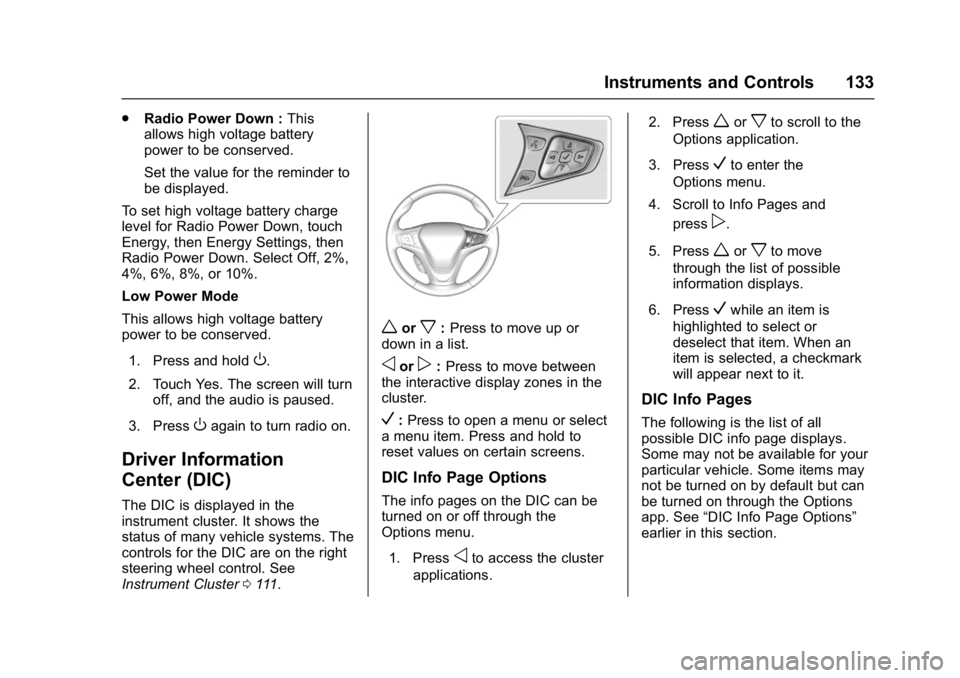
controls for the DIC are on the right
steering wheel control. See
Instrument Cluster 0111.
worx:Press to move up or
down in a list.
oorp: Press to move between
the interactive display zones in the
cluster.
V: Press to open a menu or select
a menu item. Press and hold to
reset values on certain screens.
DIC Info Page Options
The info pages on the DIC can be
turned on or off through the
Options menu.
1. Press
oto access the cluster
applications. 2. Press
worxto scroll to the
Options application.
3. Press
Vto enter the
Options menu.
4. Scroll to Info Pages and press
p.
5. Press
worxto move
through the list of possible
information displays.
6. Press
Vwhile an item is
highlighted to select or
deselect that item. When an
item is selected, a checkmark
will appear next to it.
DIC Info Pages
The following is the list of all
possible DIC info page displays.
Some may not be available for your
particular vehicle. Some items may
not be turned on by default but can
be turned on through the Options
app. See “DIC Info Page Options”
earlier in this section.
Page 136 of 361
Chevrolet Bolt EV Owner Manual (GMNA-Localizing-U.S./Canada/Mexico-
10122739) - 2017 - CRC - 10/3/16
Instruments and Controls 135
Vehicle Messages
Messages displayed in the DIC
indicate the status of the vehicle or
some action that may be needed to
correct a condition. Multiple
messages may display one after the
other.
The messages that do not require
immediate action can be
acknowledged and cleared by
pressing
V.
The messages that require
immediate action cannot be cleared
until that action is performed.
All messages should be taken
seriously; clearing the message
does not correct the problem.
The following are the possible
messages and some information
about them.
Battery and Charging
Messages
BATTERY SAVER ACTIVE
This message displays when the
vehicle has detected that the 12-volt
battery voltage has dropped and
vehicle features are being disabled.
The 12-volt battery saver system
starts reducing certain features
trying to save the charge of the
12-volt battery. Turn off unnecessary
features to allow the battery to
recharge. This message may also
display when the high voltage
battery is very low.
CHARGE CORD CONNECTED
This message displays when the
charge cord is connected to the
vehicle. The vehicle cannot be
shifted out of P (Park) with the
charge cord connected.
CHARGE DOOR OPEN
This message displays when the
charge port door is open and the
vehicle is shifted out of P (Park). The charge port door should be kept
fully closed when the vehicle is not
charging.
BATTERY TOO COLD, PLUG IN
TO WARM
This message displays during
extremely cold temperatures, when
the vehicle will not start until the
high voltage battery is warm
enough.
Plug the vehicle in to an AC
charging station and make sure
POWER
Ois off to allow the
charging system to warm the high
voltage battery, then the vehicle can
be started. DC charging cannot be
used to recover a cold high voltage
battery.
CHARGE VEHICLE SOON
This message displays when the
high voltage battery is low and the
vehicle needs to be charged.
Page 137 of 361
Chevrolet Bolt EV Owner Manual (GMNA-Localizing-U.S./Canada/Mexico-
10122739) - 2017 - CRC - 10/3/16
136 Instruments and Controls
OUT OF ENERGY, CHARGE
VEHICLE NOW !
This message displays when the
high voltage battery is out of energy.
The vehicle must be charged.
PROBLEM DETECTED WITH
CHARGING STATION
This message displays when there
is a problem with the high voltage
charging station.
SERVICE BATTERY
CHARGING SYSTEM
This message displays when there
is a fault in the 12-volt battery
charging system. Take the vehicle to
your dealer for service.
SERVICE HIGH VOLTAGE
CHARGING SYSTEM
This message displays when there
is a problem with the high voltage
charging system. See your dealer
for service.
Brake System Messages
BRAKE FLUID LOW
This message displays when the
brake fluid level is low.
RELEASE PARKING BRAKE
This message displays if the Electric
Parking Brake is on while the
vehicle is in motion. Release it
before attempting to drive.
SERVICE BRAKE ASSIST
This message displays when there
is a problem with the brake boost
system. When this message
displays, the brake pedal may be
harder to push and the stopping
distance may be longer. See your
dealer for service.
SERVICE PARKING BRAKE
This message displays when there
is a problem with the Electric
Parking Brake. See your dealer for
service.
STEP ON BRAKE TO
RELEASE PARK BRAKE
This message displays when
attempting to release the Electric
Parking Brake without the brake
pedal applied.
Compass Messages
Dashes may be displayed if the
vehicle temporarily loses
communication with the Global
Positioning System (GPS).
Cruise Control Messages
CRUISE SET TO XXX
This message displays when the
cruise control is set and shows the
speed it was set to. SeeCruise
Control 0215.
Door Ajar Messages
DOOR(S) OPEN
A door open symbol will be
displayed on the DIC showing which
door is open.
Page 138 of 361
Chevrolet Bolt EV Owner Manual (GMNA-Localizing-U.S./Canada/Mexico-
10122739) - 2017 - CRC - 10/3/16
Instruments and Controls 137
This symbol will be displayed if the
vehicle is out of P (Park). Close the
door completely.
HOOD OPEN
This message will display along with
a hood open symbol when the hood
is open. Close the hood completely.
REAR ACCESS OPEN
This message will display along with
a symbol when the liftgate is open.
Close the liftgate completely.
Electric Drive Unit
Messages
SHIFT TO PARK
This message displays when the
vehicle should be shifted to
P (Park). This may appear when
attempting to turn off the vehicle
when it is not in P (Park).
Key and Lock Messages
NO REMOTE KEY WAS
DETECTED PLACE KEY IN
TRANSMITTER POCKET, THEN
START YOUR VEHICLE
This message displays when trying
to start the vehicle if an RKE
transmitter is not detected. The
transmitter battery may be weak.
NO REMOTE DETECTED
This message displays when the
RKE transmitter is not detected
while attempting to start the vehicle.
The transmitter battery may be
weak. See“Starting the Vehicle with
a Low Transmitter Battery” under
Remote Keyless Entry (RKE)
System Operation 033.
NO REMOTE DETECTED,
PRESS BRAKE TO RESTART
This message displays if the RKE
transmitter is no longer detected in
the vehicle. Press the brake pedal
and POWER
Oto restart the
vehicle, or press POWER
Owithout
pressing the brake pedal to turn the vehicle off. If the vehicle is turned
off and a valid transmitter is not
available, the vehicle will not restart.
NUMBER OF KEYS
PROGRAMMED
This message displays when
programming new keys to the
vehicle.
REMOTE LEFT IN VEHICLE
This message displays when
leaving the vehicle with the RKE
transmitter still inside.
REPLACE BATTERY IN
REMOTE KEY
This message displays when the
battery in the RKE transmitter needs
to be replaced.
SERVICE KEYLESS START
SYSTEM
This message displays when the
pushbutton start system needs
service. Take the vehicle to your
dealer.
Page 140 of 361
Chevrolet Bolt EV Owner Manual (GMNA-Localizing-U.S./Canada/Mexico-
10122739) - 2017 - CRC - 10/3/16
Instruments and Controls 139
PARK ASSIST OFF
This message displays when the
Parking Assist system has been
turned off or when there is a
temporary condition causing the
system to be disabled.
SERVICE FORWARD
COLLISION SYSTEM
If this message displays, see your
dealer for service. Forward Collision
Alert (FCA) and/or Forward
Automatic Braking (FAB) may not
work. Do not use these systems
until the vehicle has been repaired.
SERVICE PARK ASSIST
SYSTEM
This message displays if there is a
problem with the Parking Assist
system. Do not use this system to
help you park. See your dealer for
service.
SERVICE FRONT CAMERA
If this message remains on after
continued driving, the vehicle needs
service. Take the vehicle to your
dealer. Do not use the Front
Pedestrian Braking (FPB), ForwardCollision Alert (FCA), Forward
Automatic Braking (FAB), Lane
Keep Assist (LKA), and Lane
Departure Warning (LDW) features.
SERVICE SIDE DETECTION
SYSTEM
If this message remains on after
continued driving, the vehicle needs
service. Side Blind Zone Alert
(SBZA), Lane Change Alert (LCA),
and Rear Cross Traffic Alert (RCTA)
features will not work. See your
dealer for service.
SIDE DETECTION
TEMPORARILY UNAVAILABLE
This message indicates that Lane
Change Alert (LCA), and Rear
Cross Traffic Alert (RCTA) are
disabled either because the sensor
is blocked and cannot detect
vehicles in the blind zone, or the
vehicle is passing through an open
area, such as the desert, where
there is insufficient data for
operation. This message may also
activate during heavy rain or due to
road spray. The vehicle does not
need service.
TAKE STEERING
If LKA does not detect active driver
steering, an alert and chime may be
provided. Move the steering wheel
to dismiss. See
Lane Keep Assist
(LKA) 0229.
Propulsion Power
Messages
PROPULSION POWER IS
REDUCED
This message displays when the
propulsion power is reduced and
can affect the ability to accelerate.
If this message is on, but there is no
reduction in performance, proceed
to your destination. The
performance may be reduced the
next time the vehicle is driven. The
vehicle may be driven at a reduced
speed while this message is on, but
maximum acceleration and speed
may be reduced.
This message is most commonly
displayed when the high voltage
battery charge level is low. The
vehicle is limiting power to maximize
range.
Page 141 of 361
Chevrolet Bolt EV Owner Manual (GMNA-Localizing-U.S./Canada/Mexico-
10122739) - 2017 - CRC - 10/3/16
140 Instruments and Controls
This message can display when the
vehicle is parked during extreme
cold conditions without being
plugged in. While driving the vehicle
with this message displayed, the
vehicle speed may be reduced until
the high voltage battery is
conditioned.
Ride Control System
Messages
LOW TRACTION
This message displays when the
Antilock Brake System (ABS) is
active and is working to assist the
driver with control of the vehicle in
difficult driving conditions.
SERVICE STABILITRAK
or ESC
This message displays when there
is a problem detected with the
StabiliTrak system. The vehicle is
safe to drive, but the StabiliTrak
system is not operational.
SERVICE TRACTION
CONTROL
This message displays when there
is a problem detected with the
Traction Control System (TCS). The
vehicle is safe to drive, but the TCS
is not operational.
STABILITRAK or ESC OFF
This message displays when
StabiliTrak is turned off. Adjust your
driving accordingly.
TRACTION CONTROL OFF
This message displays when the
Traction Control System (TCS) is
turned off. Adjust your driving
accordingly.
TRACTION CONTROL ON
This message displays when the
Traction Control System (TCS) is
turned on.
Airbag System Messages
SERVICE AIRBAG
This message displays if there is a
problem with the airbag system. See
your dealer for service.
Security Messages
SERVICE THEFT ALARM
This message displays if there is a
problem with the alarm. See your
dealer for service.
SERVICE THEFT DETERRENT
SYSTEM
This message displays if there is a
problem with the theft-deterrent
system. See your dealer for service.
Service Vehicle Messages
SERVICE HEATER
This message displays if there is a
problem with the heater system.
Take the vehicle to your dealer for
service.
Page 149 of 361
Chevrolet Bolt EV Owner Manual (GMNA-Localizing-U.S./Canada/Mexico-
10122739) - 2017 - CRC - 10/3/16
148 Lighting
Lighting
Exterior Lighting
Exterior Lamp Controls . . . . . . . 148
Exterior Lamps OffReminder . . . . . . . . . . . . . . . . . . . 150
Headlamp High/Low-Beam Changer . . . . . . . . . . . . . . . . . . . . 150
Flash-to-Pass . . . . . . . . . . . . . . . . 150
Daytime Running Lamps (DRL) . . . . . . . . . . . . . . . 150
Automatic Headlamp System . . . . . . . . . . . . . . . . . . . . . . 150
Hazard Warning Flashers . . . . . 151
Turn and Lane-Change Signals . . . . . . . . . . . . . . . . . . . . . . 151
Interior Lighting
Instrument Panel IlluminationControl . . . . . . . . . . . . . . . . . . . . . . 152
Courtesy Lamps . . . . . . . . . . . . . . 152
Dome Lamps . . . . . . . . . . . . . . . . . 152
Reading Lamps . . . . . . . . . . . . . . 153
Lighting Features
Entry Lighting . . . . . . . . . . . . . . . . 153
Exit Lighting . . . . . . . . . . . . . . . . . . 153
Battery Power Protection . . . . . 154
Exterior Lighting
Exterior Lamp Controls
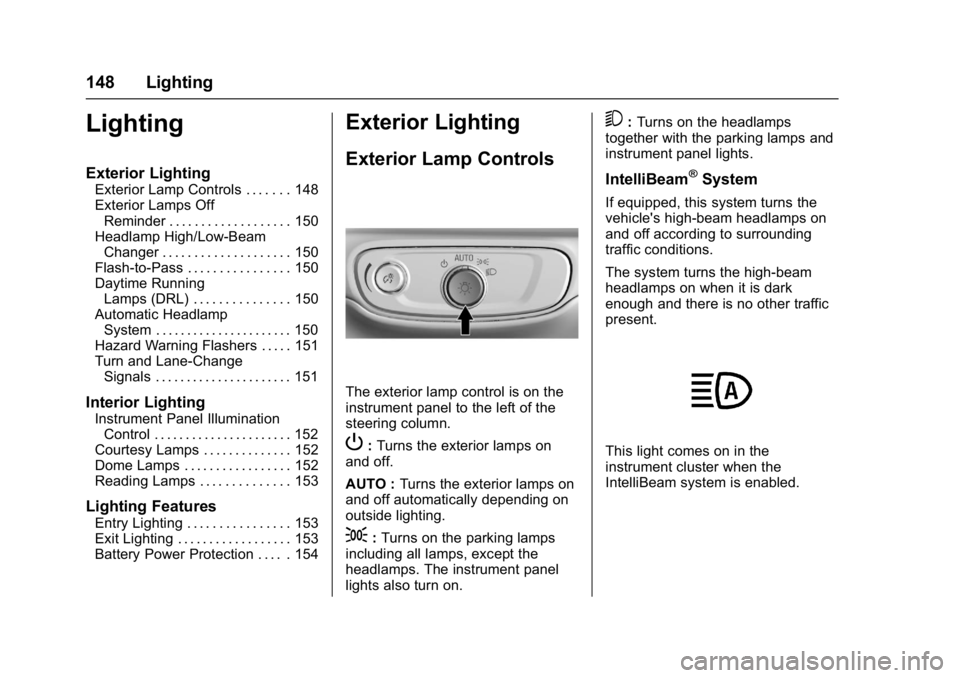
The exterior lamp control is on the
instrument panel to the left of the
steering column.
P: Turns the exterior lamps on
and off.
AUTO : Turns the exterior lamps on
and off automatically depending on
outside lighting.
;: Turns on the parking lamps
including all lamps, except the
headlamps. The instrument panel
lights also turn on.
5: Turns on the headlamps
together with the parking lamps and
instrument panel lights.
IntelliBeam®System
If equipped, this system turns the
vehicle's high-beam headlamps on
and off according to surrounding
traffic conditions.
The system turns the high-beam
headlamps on when it is dark
enough and there is no other traffic
present.
This light comes on in the
instrument cluster when the
IntelliBeam system is enabled.
Page 155 of 361
Chevrolet Bolt EV Owner Manual (GMNA-Localizing-U.S./Canada/Mexico-
10122739) - 2017 - CRC - 10/3/16
154 Lighting
Battery Power Protection
The battery saver feature is
designed to protect the vehicle's
12-volt battery.
If some interior lamps and/or the
headlamps are left on and the
vehicle is turned off, the battery
rundown protection system
automatically turns the lamp off after
some time.
Page 192 of 361

Chevrolet Bolt EV Owner Manual (GMNA-Localizing-U.S./Canada/Mexico-
10122739) - 2017 - CRC - 10/3/16
Driving and Operating 191
Driving and
Operating
Driving Information
Distracted Driving . . . . . . . . . . . . 192
Defensive Driving . . . . . . . . . . . . . 192
Drunk Driving . . . . . . . . . . . . . . . . . 193
Control of a Vehicle . . . . . . . . . . . 193
Braking . . . . . . . . . . . . . . . . . . . . . . . 193
Steering . . . . . . . . . . . . . . . . . . . . . . 193
Off-Road Recovery . . . . . . . . . . . 194
Loss of Control . . . . . . . . . . . . . . . 194
Driving on Wet Roads . . . . . . . . 195
Hill and Mountain Roads . . . . . 196
Winter Driving . . . . . . . . . . . . . . . . 196
If the Vehicle Is Stuck . . . . . . . . 197
Vehicle Load Limits . . . . . . . . . . . 197
Starting and Operating
New Vehicle Break-In . . . . . . . . . 201
Power Button . . . . . . . . . . . . . . . . . 201
Starting and Stopping theVehicle . . . . . . . . . . . . . . . . . . . . . . 203
Retained Accessory Power (RAP) . . . . . . . . . . . . . . . . 203
Shifting Into Park . . . . . . . . . . . . . 204
Shifting out of Park . . . . . . . . . . . 204
Extended Parking . . . . . . . . . . . . 205
Electric Vehicle Operating
Modes
Driver Selected Operating Modes . . . . . . . . . . . . . . . . . . . . . . 205
Electric Drive Unit
Electric Drive Unit . . . . . . . . . . . . 206
Brakes
Antilock BrakeSystem (ABS) . . . . . . . . . . . . . . . 210
Electric Parking Brake . . . . . . . . 210
Brake Assist . . . . . . . . . . . . . . . . . . 212
Hill Start Assist (HSA) . . . . . . . . 212
Regenerative Braking . . . . . . . . 212
Ride Control Systems
Traction Control/Electronic Stability Control . . . . . . . . . . . . . 213
Cruise Control
Cruise Control . . . . . . . . . . . . . . . . 215
Driver Assistance Systems
Driver Assistance Systems . . . 218
Assistance Systems forParking or Backing . . . . . . . . . . 219
Assistance Systems for Driving . . . . . . . . . . . . . . . . . . . . . . 222
Forward Collision Alert (FCA) System . . . . . . . . . . . . . . . . . . . . . . 222 Forward Automatic
Braking (FAB) . . . . . . . . . . . . . . . 224
Front Pedestrian Braking (FPB) System . . . . . . . . . . . . . . . 225
Side Blind Zone
Alert (SBZA) . . . . . . . . . . . . . . . . 227
Lane Change Alert (LCA) . . . . . 227
Lane Departure Warning (LDW) . . . . . . . . . . . . . 229
Lane Keep Assist (LKA) . . . . . . 229
Charging
When to Charge . . . . . . . . . . . . . . 231
Plug-In Charging . . . . . . . . . . . . . 231
Delayed Charging Override . . . 235
Charging Status Feedback . . . 236
Charge Cord . . . . . . . . . . . . . . . . . 239
Utility Interruption of Charging . . . . . . . . . . . . . . . . . . . . 245
Electrical Requirements for Battery Charging . . . . . . . . . . . . 246
Trailer Towing
General TowingInformation . . . . . . . . . . . . . . . . . . 246
Conversions and Add-Ons
Add-On ElectricalEquipment . . . . . . . . . . . . . . . . . . 247
Page 198 of 361
Chevrolet Bolt EV Owner Manual (GMNA-Localizing-U.S./Canada/Mexico-
10122739) - 2017 - CRC - 10/3/16
Driving and Operating 197
.Tie a red cloth to an outside
mirror.
To save energy, run the vehicle for
only short periods as needed to
warm the vehicle and then shut the
vehicle off and partially close the
window. Moving about to keep warm
also helps.
If it takes some time for help to
arrive, when running the vehicle,
push the accelerator pedal slightly
so the vehicle runs faster than the
idle speed. This keeps the battery
charged to restart the vehicle and to
signal for help with the headlamps.
Do this as little as possible to save
electricity.
If the Vehicle Is Stuck
Slowly and cautiously spin the
wheels to free the vehicle when
stuck in sand, mud, ice, or snow.
The Traction Control System (TCS)
must be turned off by pressing the
TCS/ESC button. Traction control is
not completely off, but will only
engage if the maneuver can cause
damage to the electric drive unit.
{Warning
If the vehicle's tires spin at high
speed, they can explode, and you
or others could be injured. The
vehicle can overheat, causing an
underhood compartment fire or
other damage. Spin the wheels as
little as possible and avoid going
above 56 km/h (35 mph).
Rocking the Vehicle to Get
it Out
Turn the steering wheel left and
right to clear the area around the
front wheels. Turn off TCS. Shift
back and forth between R (Reverse)
and a low forward gear, spinning the
wheels as little as possible. To
prevent electric drive unit wear, wait
until the wheels stop spinning
before shifting gears. Release the
accelerator pedal while shifting, and
press lightly on the accelerator
pedal when the electric drive unit is
in gear. Slowly spinning the wheels
in the forward and reverse
directions causes a rocking motion that could free the vehicle. If that
does not get the vehicle out after a
few tries, it might need to be towed
out. See
Towing the Vehicle 0299.
Vehicle Load Limits
It is very important to know how
much weight the vehicle can
carry. This weight is called the
vehicle capacity weight and
includes the weight of all
occupants, cargo, and all
nonfactory-installed options.
Two labels on the vehicle may
show how much weight it may
properly carry: the Tire and
Loading Information label and
the Certification label.
{Warning
Do not load the vehicle any
heavier than the Gross
Vehicle Weight Rating
(GVWR), or either the
maximum front or rear Gross
(Continued)