battery CHEVROLET BOLT EV 2017 User Guide
[x] Cancel search | Manufacturer: CHEVROLET, Model Year: 2017, Model line: BOLT EV, Model: CHEVROLET BOLT EV 2017Pages: 361, PDF Size: 4.89 MB
Page 39 of 361
Chevrolet Bolt EV Owner Manual (GMNA-Localizing-U.S./Canada/Mexico-
10122739) - 2017 - CRC - 10/3/16
38 Keys, Doors, and Windows
6. Remove the transmitter fromthe transmitter pocket and
press
KorQ.
To program additional
transmitters, repeat Steps 4–6.
When all additional transmitters
are programmed, press and
hold POWER
Ofor 12 seconds
to exit programming mode.
7. Put the key back into the transmitter.
Starting the Vehicle with a Low
Transmitter Battery
While trying to start the vehicle,
if the transmitter battery is weak or if
there is interference with the signal,
the DIC may display NO REMOTE
DETECTED or USE
TRANSMITTER POCKET TO
START. The REPLACE BATTERY
IN REMOTE KEY message may
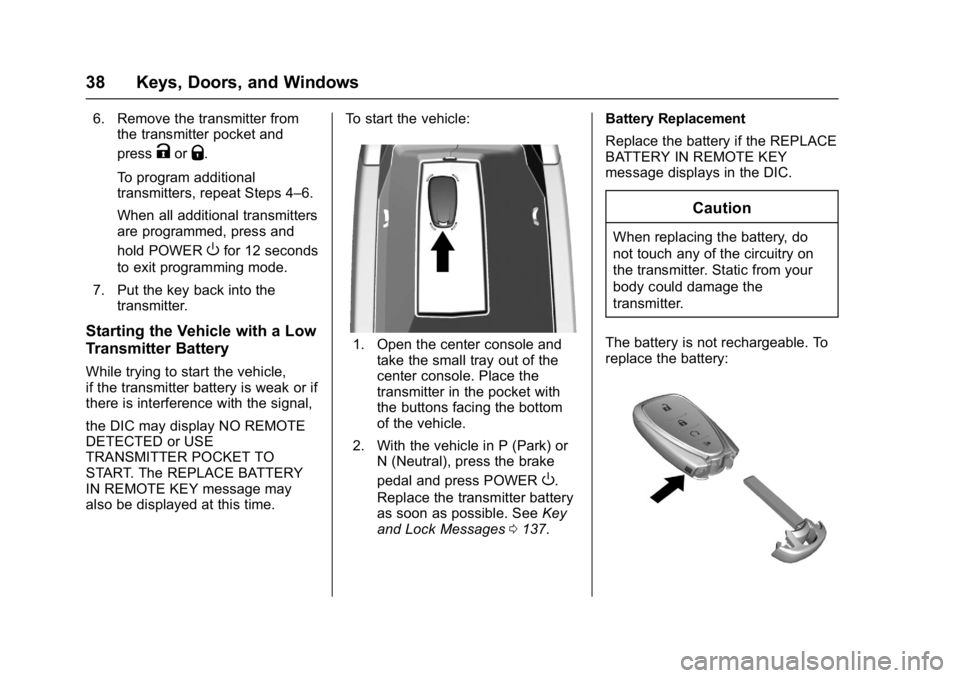
also be displayed at this time. To start the vehicle:
1. Open the center console and
take the small tray out of the
center console. Place the
transmitter in the pocket with
the buttons facing the bottom
of the vehicle.
2. With the vehicle in P (Park) or N (Neutral), press the brake
pedal and press POWER
O.
Replace the transmitter battery
as soon as possible. See Key
and Lock Messages 0137. Battery Replacement
Replace the battery if the REPLACE
BATTERY IN REMOTE KEY
message displays in the DIC.
Caution
When replacing the battery, do
not touch any of the circuitry on
the transmitter. Static from your
body could damage the
transmitter.
The battery is not rechargeable. To
replace the battery:
Page 40 of 361
Chevrolet Bolt EV Owner Manual (GMNA-Localizing-U.S./Canada/Mexico-
10122739) - 2017 - CRC - 10/3/16
Keys, Doors, and Windows 39
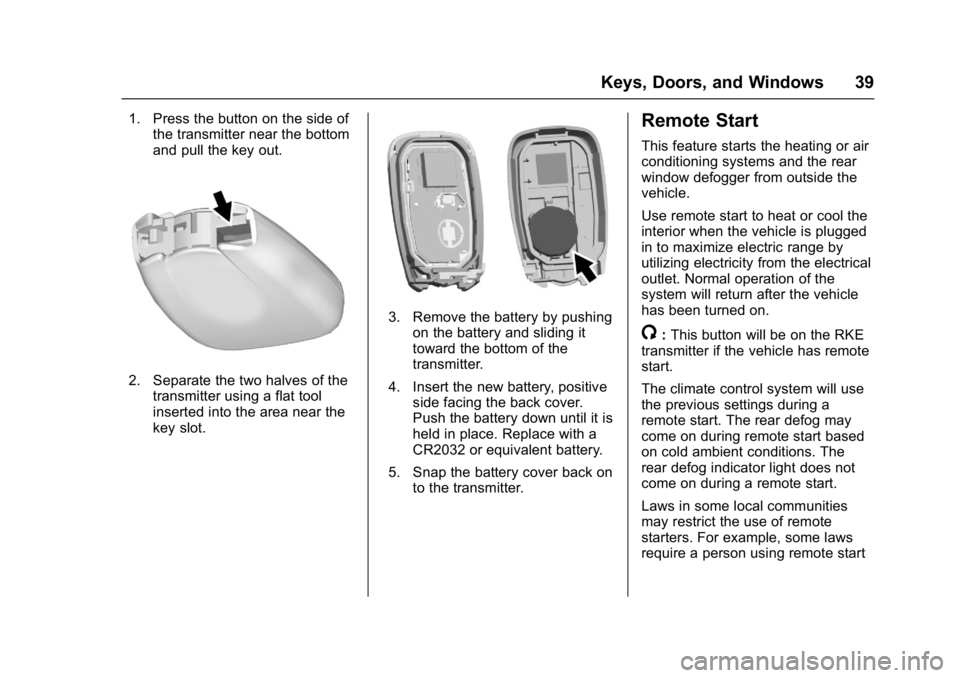
1. Press the button on the side ofthe transmitter near the bottom
and pull the key out.
2. Separate the two halves of the
transmitter using a flat tool
inserted into the area near the
key slot.
3. Remove the battery by pushingon the battery and sliding it
toward the bottom of the
transmitter.
4. Insert the new battery, positive side facing the back cover.
Push the battery down until it is
held in place. Replace with a
CR2032 or equivalent battery.
5. Snap the battery cover back on to the transmitter.
Remote Start
This feature starts the heating or air
conditioning systems and the rear
window defogger from outside the
vehicle.
Use remote start to heat or cool the
interior when the vehicle is plugged
in to maximize electric range by
utilizing electricity from the electrical
outlet. Normal operation of the
system will return after the vehicle
has been turned on.
/:This button will be on the RKE
transmitter if the vehicle has remote
start.
The climate control system will use
the previous settings during a
remote start. The rear defog may
come on during remote start based
on cold ambient conditions. The
rear defog indicator light does not
come on during a remote start.
Laws in some local communities
may restrict the use of remote
starters. For example, some laws
require a person using remote start
Page 45 of 361
Chevrolet Bolt EV Owner Manual (GMNA-Localizing-U.S./Canada/Mexico-
10122739) - 2017 - CRC - 10/3/16
44 Keys, Doors, and Windows
Caution
Pulling the inside door handle
while the rear door safety locks
are engaged could damage your
vehicle. Do not pull the inside
door handle while the rear door
safety locks are engaged.
KeyPass
If equipped, this feature allows a
smartphone to be connected to the
vehicle and remote vehicle functions
to be requested. Features vary
depending on availability.
Features include:
.Remote commands –Use to
lock/unlock the vehicle, remote
start for the cabin climate,
or sound or cancel the horn and
flash the lights.
. Vehicle status –View the
vehicle’s range and battery level,
charging status, and tire
pressure.
. Welcome lighting –Request light
when approaching the vehicle. .
Location services –Save the
parked location or start
navigation at the vehicle’s GPS
coordinates.
Setup Function
. KeyPass Setup
‐Managing Priority Setting
‐ Modifying Priority Setting
. Revocation
Active Remote Function
. Door Lock/Unlock
. Remote Start/Stop
. Panic Alarm Activation/
Termination
. Remote Charge Termination
. High Voltage Charge Functions
‐Temporary Charging Override
Update
‐ Change the Charging Mode
Permanently
‐ Update Departure Time
Schedule
‐ High Voltage Priority Charging
Activate and De-activate ‐
Select Charge Level/Limit
Preference Screen
. Vehicle Locator
. Routing w/Available Mileage
Passive Function
Approach Detection/Welcome
Lighting
Visual Display for Vehicle
Information
. Low Battery Indication
. Tire Pressure
. Remote Engine Start Status
. Odometer Reading
. Rear Closure Ajar Switch Status
. Electric Parking Brake Status
. Hood Status
. High Voltage Battery State of
Charge Status
. GPS Signal for End of Trip
. Charge Mode Status
‐Available Mileage
‐ Charge Start and End Times
Status
Page 46 of 361
Chevrolet Bolt EV Owner Manual (GMNA-Localizing-U.S./Canada/Mexico-
10122739) - 2017 - CRC - 10/3/16
Keys, Doors, and Windows 45
‐Full Week of Time Based
Delayed Charging Status
‐ Disable Rate Based and
Delayed Charging Status
‐ High Voltage Charging System
Fault (Unable to Charge)
‐ High Voltage Charger Power
Level
‐ High Voltage Battery Charge
Cord Connected Indication
‐ Charge Complete
‐ Usable State of Charge
‐ High Voltage Depletion Mode
Range
‐ High Voltage Battery State of
Charge Status
Pairing
A smartphone must be paired to the
KeyPass Module and then it must
be connected to the vehicle before it
can be used.
Setup Information
. Up to three smartphones can be
set up and connected to the
vehicle. .
Setup is disabled when the
vehicle is moving.
. Pairing only needs to be
completed once per smartphone,
unless the pairing information on
the smartphone changes or the
smartphone is deleted.
Setup Process 1. Enable the KeyPass function through vehicle
personalization. See Vehicle
Personalization 0142.
2. Download the myChevrolet app to the smartphone from the
appropriate app store.
3. The vehicle must be on and in P (Park).
4. Open the App and touch Search for New Vehicles.
5. Choose your vehicle and touch Done.
6. Aim the smartphone camera at the QR code on the
infotainment display to scan
the security key. If the camera
is not working, the QR code
can be entered manually. 7. The infotainment display
provides confirmation that the
pairing process was completed
successfully.
. Select Settings from the Home
Page on the infotainment
display.
. Select KeyPass.
. Select Manage KeyPass
Devices.
Deleting a Paired Smartphone 1. Select Settings from the Home Page on the infotainment
display.
2. Select KeyPass.
3. Select Manage KeyPass Devices.
4. Touch Delete next to the smartphone to be deleted, and
follow the prompts.
Page 49 of 361
Chevrolet Bolt EV Owner Manual (GMNA-Localizing-U.S./Canada/Mexico-
10122739) - 2017 - CRC - 10/3/16
48 Keys, Doors, and Windows
transmitter will start the vehicle.
If the transmitter is damaged, you
may not be able to start the vehicle.
When trying to start the vehicle, the
security light comes on briefly when
the vehicle is turned on.
If the vehicle does not start and the
security light stays on, there is a
problem with the system. Turn the
vehicle off and try again.
If the RKE transmitter appears to be
undamaged, try another transmitter,
or place the transmitter in the
transmitter pocket.See
“Starting the Vehicle with a Low
Transmitter Battery” underRemote
Keyless Entry (RKE) System
Operation 033.
If the vehicle does not start with the
other transmitter or with the
transmitter placed in the transmitter
pocket, the vehicle needs service.
See your dealer who can service
the theft-deterrent system and have
a new transmitter programmed to
the vehicle.
Do not leave the transmitter or
device that disarms or deactivates
the theft-deterrent system in the
vehicle.Exterior Mirrors
Convex Mirrors
{Warning
A convex mirror can make things,
like other vehicles, look farther
away than they really are. If you
cut too sharply into the right lane,
you could hit a vehicle on the
right. Check the inside mirror or
glance over your shoulder before
changing lanes.
The passenger side mirror is convex
shaped. A convex mirror's surface is
curved so more can be seen from
the driver seat.
Page 54 of 361
Chevrolet Bolt EV Owner Manual (GMNA-Localizing-U.S./Canada/Mexico-
10122739) - 2017 - CRC - 10/3/16
Keys, Doors, and Windows 53
may be held up to the second
position to close the window. The
window will return to normal
operation once the obstruction or
condition is removed.
Safety Function Override
This is for vehicles with the
express-up feature. If the battery on
the vehicle has been recharged or
disconnected, or is not working, the
windows will need to be
reprogrammed for the express-up
feature to work. Before
reprogramming, replace or recharge
the vehicle's battery.
To program the driver window:1. Close all doors with the vehicle on or in Service Mode.
2. Press and hold the power window switch until the window
is fully open.
3. Pull the power window switch up until the window is fully
closed. 4. Continue holding the switch up
for approximately two seconds
after the window is completely
closed.
Window Lockout
This feature prevents the rear
passenger windows from operating,
except from the driver position.
Press
2on the driver door to
activate the window lockout. The
indicator light in the switch will
illuminate when activated.
Press
2again to deactivate the
window lockout.
Sun Visors
Pull the sun visor down to block out
glare. Detach the sun visor from the
center mount and swing it to the
side to block glare from the side
windows.
Visor Vanity Mirror
The vehicle may have vanity mirrors
and card holders on the back of the
sun visors. Swing down the sun
visor to expose the vanity mirror.
Page 75 of 361
Chevrolet Bolt EV Owner Manual (GMNA-Localizing-U.S./Canada/Mexico-
10122739) - 2017 - CRC - 10/3/16
74 Seats and Restraints
activate, without airbag inflation,
after an event that exceeds a
predetermined threshold. You can
lock the doors, turn off the interior
lamps, and turn off the hazard
warning flashers by using the
controls for those features.
{Warning
A crash severe enough to inflate
the airbags may have also
damaged important functions in
the vehicle, such as the brake
and steering systems, etc. Even if
the vehicle appears to be drivable
after a moderate crash, there may
be concealed damage that could
make it difficult to safely operate
the vehicle.
Use caution if attempting to
restart the vehicle after a crash
has occurred.
If an airbag inflates or the vehicle
has been in a crash, the sensing
system may shut down the high
voltage system. When this occurs,
the high voltage battery is disconnected and the vehicle will
not start. The SERVICE VEHICLE
SOON message in the Driver
Information Center (DIC) will be
displayed. Before the vehicle can be
operated again, it must be serviced
at your dealer.
In many crashes severe enough to
inflate the airbag, windshields are
broken by vehicle deformation.
Additional windshield breakage may
also occur from the front outboard
passenger airbag.
.
Airbags are designed to inflate
only once. After an airbag
inflates, you will need some new
parts for the airbag system.
If you do not get them, the
airbag system will not be there
to help protect you in another
crash. A new system will include
airbag modules and possibly
other parts. The service manual
for the vehicle covers the need
to replace other parts. .
The vehicle has a crash sensing
and diagnostic module which
records information after a
crash. See Vehicle Data
Recording and Privacy 0338
and Event Data Recorders
0 338.
. Let only qualified technicians
work on the airbag systems.
Improper service can mean that
an airbag system will not work
properly. See your dealer for
service.
Passenger Sensing
System
The vehicle has a passenger
sensing system for the front
outboard passenger position. The
passenger airbag status indicator
will light on the overhead console
when the vehicle is started.
Page 80 of 361
Chevrolet Bolt EV Owner Manual (GMNA-Localizing-U.S./Canada/Mexico-
10122739) - 2017 - CRC - 10/3/16
Seats and Restraints 79
Warning (Continued)
seatback may interfere with the
proper operation of the passenger
sensing system.
Servicing the
Airbag-Equipped Vehicle
Airbags affect how the vehicle
should be serviced. There are parts
of the airbag system in several
places around the vehicle. Your
dealer and the service manual have
information about servicing the
vehicle and the airbag system. To
purchase a service manual, see
Service Publications Ordering
Information0335.
{Warning
For up to 10 seconds after the
vehicle is turned off and the 12‐
volt battery is disconnected, an
airbag can still inflate during
improper service. You can be
(Continued)
Warning (Continued)
injured if you are close to an
airbag when it inflates. Avoid
yellow connectors. They are
probably part of the airbag
system. Be sure to follow proper
service procedures, and make
sure the person performing work
for you is qualified to do so.
Adding Equipment to the
Airbag-Equipped Vehicle
Adding accessories that change the
vehicle's frame, bumper system,
height, front end, or side sheet
metal, may keep the airbag system
from working properly. The
operation of the airbag system can
also be affected by changing any
parts of the front seats, safety belts,
airbag sensing and diagnostic
module, steering wheel, instrument
panel, any of the airbag modules,
ceiling or pillar garnish trim,
overhead console, front sensors,
side impact sensors, or airbag
wiring. Your dealer and the service manual
have information about the location
of the airbag sensors, sensing and
diagnostic module, and airbag
wiring.
In addition, the vehicle has a
passenger sensing system for the
front outboard passenger position,
which includes sensors that are part
of the passenger seat. The
passenger sensing system may not
operate properly if the original seat
trim is replaced with non-GM
covers, upholstery, or trim; or with
GM covers, upholstery, or trim
designed for a different vehicle. Any
object, such as an aftermarket seat
heater or a comfort-enhancing pad
or device, installed under or on top
of the seat fabric, could also
interfere with the operation of the
passenger sensing system. This
could either prevent proper
deployment of the passenger
airbag(s) or prevent the passenger
sensing system from properly
turning off the passenger airbag(s).
See
Passenger Sensing System
0 74.
Page 104 of 361
Chevrolet Bolt EV Owner Manual (GMNA-Localizing-U.S./Canada/Mexico-
10122739) - 2017 - CRC - 10/3/16
Instruments and Controls 103
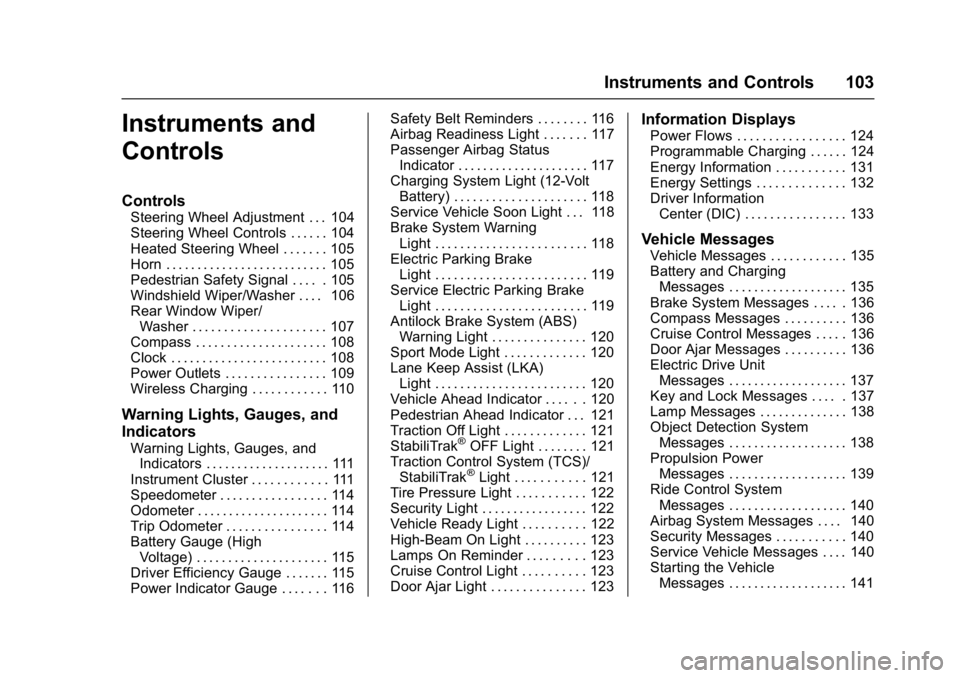
Instruments and
Controls
Controls
Steering Wheel Adjustment . . . 104
Steering Wheel Controls . . . . . . 104
Heated Steering Wheel . . . . . . . 105
Horn . . . . . . . . . . . . . . . . . . . . . . . . . . 105
Pedestrian Safety Signal . . . . . 105
Windshield Wiper/Washer . . . . 106
Rear Window Wiper/Washer . . . . . . . . . . . . . . . . . . . . . 107
Compass . . . . . . . . . . . . . . . . . . . . . 108
Clock . . . . . . . . . . . . . . . . . . . . . . . . . 108
Power Outlets . . . . . . . . . . . . . . . . 109
Wireless Charging . . . . . . . . . . . . 110
Warning Lights, Gauges, and
Indicators
Warning Lights, Gauges, and Indicators . . . . . . . . . . . . . . . . . . . . 111
Instrument Cluster . . . . . . . . . . . . 111
Speedometer . . . . . . . . . . . . . . . . . 114
Odometer . . . . . . . . . . . . . . . . . . . . . 114
Trip Odometer . . . . . . . . . . . . . . . . 114
Battery Gauge (High Voltage) . . . . . . . . . . . . . . . . . . . . . 115
Driver Efficiency Gauge . . . . . . . 115
Power Indicator Gauge . . . . . . . 116 Safety Belt Reminders . . . . . . . . 116
Airbag Readiness Light . . . . . . . 117
Passenger Airbag Status
Indicator . . . . . . . . . . . . . . . . . . . . . 117
Charging System Light (12-Volt
Battery) . . . . . . . . . . . . . . . . . . . . . 118
Service Vehicle Soon Light . . . 118
Brake System Warning Light . . . . . . . . . . . . . . . . . . . . . . . . 118
Electric Parking Brake Light . . . . . . . . . . . . . . . . . . . . . . . . 119
Service Electric Parking Brake Light . . . . . . . . . . . . . . . . . . . . . . . . 119
Antilock Brake System (ABS) Warning Light . . . . . . . . . . . . . . . 120
Sport Mode Light . . . . . . . . . . . . . 120
Lane Keep Assist (LKA) Light . . . . . . . . . . . . . . . . . . . . . . . . 120
Vehicle Ahead Indicator . . . . . . 120
Pedestrian Ahead Indicator . . . 121
Traction Off Light . . . . . . . . . . . . . 121
StabiliTrak®OFF Light . . . . . . . . 121
Traction Control System (TCS)/ StabiliTrak
®Light . . . . . . . . . . . 121
Tire Pressure Light . . . . . . . . . . . 122
Security Light . . . . . . . . . . . . . . . . . 122
Vehicle Ready Light . . . . . . . . . . 122
High-Beam On Light . . . . . . . . . . 123
Lamps On Reminder . . . . . . . . . 123
Cruise Control Light . . . . . . . . . . 123
Door Ajar Light . . . . . . . . . . . . . . . 123
Information Displays
Power Flows . . . . . . . . . . . . . . . . . 124
Programmable Charging . . . . . . 124
Energy Information . . . . . . . . . . . 131
Energy Settings . . . . . . . . . . . . . . 132
Driver Information Center (DIC) . . . . . . . . . . . . . . . . 133
Vehicle Messages
Vehicle Messages . . . . . . . . . . . . 135
Battery and ChargingMessages . . . . . . . . . . . . . . . . . . . 135
Brake System Messages . . . . . 136
Compass Messages . . . . . . . . . . 136
Cruise Control Messages . . . . . 136
Door Ajar Messages . . . . . . . . . . 136
Electric Drive Unit Messages . . . . . . . . . . . . . . . . . . . 137
Key and Lock Messages . . . . . 137
Lamp Messages . . . . . . . . . . . . . . 138
Object Detection System Messages . . . . . . . . . . . . . . . . . . . 138
Propulsion Power Messages . . . . . . . . . . . . . . . . . . . 139
Ride Control System Messages . . . . . . . . . . . . . . . . . . . 140
Airbag System Messages . . . . 140
Security Messages . . . . . . . . . . . 140
Service Vehicle Messages . . . . 140
Starting the Vehicle Messages . . . . . . . . . . . . . . . . . . . 141
Page 110 of 361
Chevrolet Bolt EV Owner Manual (GMNA-Localizing-U.S./Canada/Mexico-
10122739) - 2017 - CRC - 10/3/16
Instruments and Controls 109
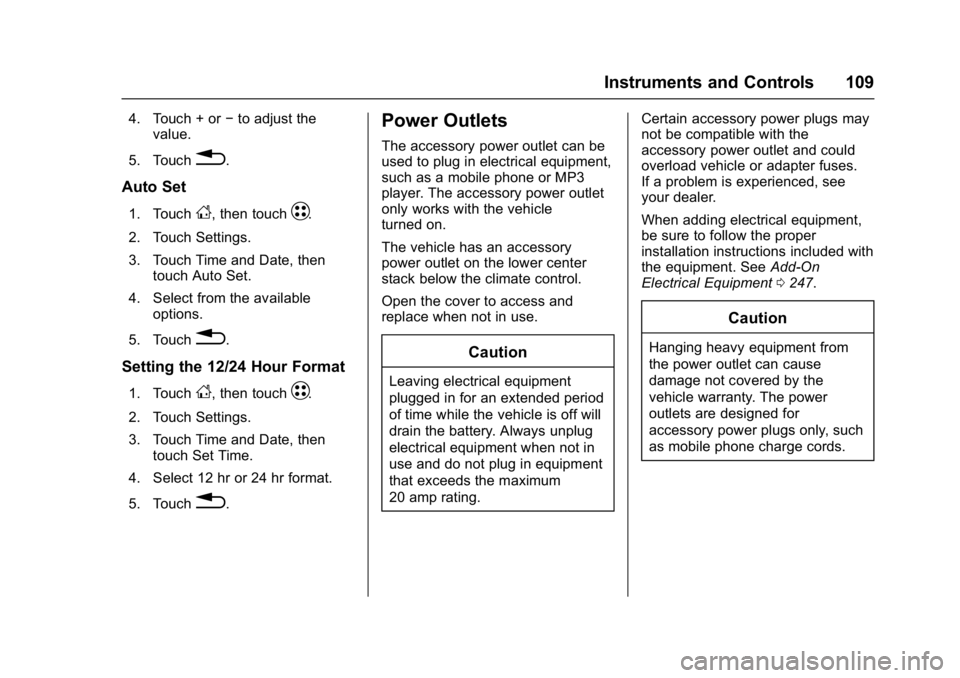
4. Touch + or−to adjust the
value.
5. Touch
0.
Auto Set
1. TouchD, then touchT.
2. Touch Settings.
3. Touch Time and Date, then touch Auto Set.
4. Select from the available options.
5. Touch
0.
Setting the 12/24 Hour Format
1. TouchD, then touchT.
2. Touch Settings.
3. Touch Time and Date, then touch Set Time.
4. Select 12 hr or 24 hr format.
5. Touch
0.
Power Outlets
The accessory power outlet can be
used to plug in electrical equipment,
such as a mobile phone or MP3
player. The accessory power outlet
only works with the vehicle
turned on.
The vehicle has an accessory
power outlet on the lower center
stack below the climate control.
Open the cover to access and
replace when not in use.
Caution
Leaving electrical equipment
plugged in for an extended period
of time while the vehicle is off will
drain the battery. Always unplug
electrical equipment when not in
use and do not plug in equipment
that exceeds the maximum
20 amp rating. Certain accessory power plugs may
not be compatible with the
accessory power outlet and could
overload vehicle or adapter fuses.
If a problem is experienced, see
your dealer.
When adding electrical equipment,
be sure to follow the proper
installation instructions included with
the equipment. See
Add-On
Electrical Equipment 0247.
Caution
Hanging heavy equipment from
the power outlet can cause
damage not covered by the
vehicle warranty. The power
outlets are designed for
accessory power plugs only, such
as mobile phone charge cords.