battery CHEVROLET BOLT EV 2017 Workshop Manual
[x] Cancel search | Manufacturer: CHEVROLET, Model Year: 2017, Model line: BOLT EV, Model: CHEVROLET BOLT EV 2017Pages: 361, PDF Size: 4.89 MB
Page 236 of 361
Chevrolet Bolt EV Owner Manual (GMNA-Localizing-U.S./Canada/Mexico-
10122739) - 2017 - CRC - 10/3/16
Driving and Operating 235
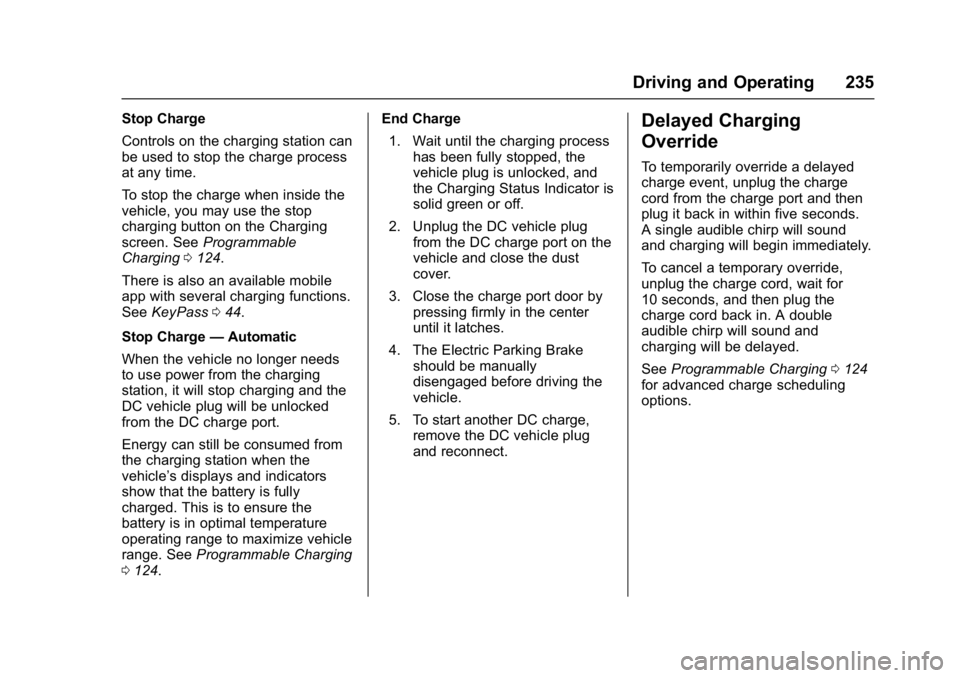
Stop Charge
Controls on the charging station can
be used to stop the charge process
at any time.
To stop the charge when inside the
vehicle, you may use the stop
charging button on the Charging
screen. SeeProgrammable
Charging 0124.
There is also an available mobile
app with several charging functions.
See KeyPass 044.
Stop Charge —Automatic
When the vehicle no longer needs
to use power from the charging
station, it will stop charging and the
DC vehicle plug will be unlocked
from the DC charge port.
Energy can still be consumed from
the charging station when the
vehicle’s displays and indicators
show that the battery is fully
charged. This is to ensure the
battery is in optimal temperature
operating range to maximize vehicle
range. See Programmable Charging
0 124. End Charge
1. Wait until the charging process has been fully stopped, the
vehicle plug is unlocked, and
the Charging Status Indicator is
solid green or off.
2. Unplug the DC vehicle plug from the DC charge port on the
vehicle and close the dust
cover.
3. Close the charge port door by pressing firmly in the center
until it latches.
4. The Electric Parking Brake should be manually
disengaged before driving the
vehicle.
5. To start another DC charge, remove the DC vehicle plug
and reconnect.Delayed Charging
Override
To temporarily override a delayed
charge event, unplug the charge
cord from the charge port and then
plug it back in within five seconds.
A single audible chirp will sound
and charging will begin immediately.
To cancel a temporary override,
unplug the charge cord, wait for
10 seconds, and then plug the
charge cord back in. A double
audible chirp will sound and
charging will be delayed.
See Programmable Charging 0124
for advanced charge scheduling
options.
Page 237 of 361
Chevrolet Bolt EV Owner Manual (GMNA-Localizing-U.S./Canada/Mexico-
10122739) - 2017 - CRC - 10/3/16
236 Driving and Operating
Charging Status
Feedback
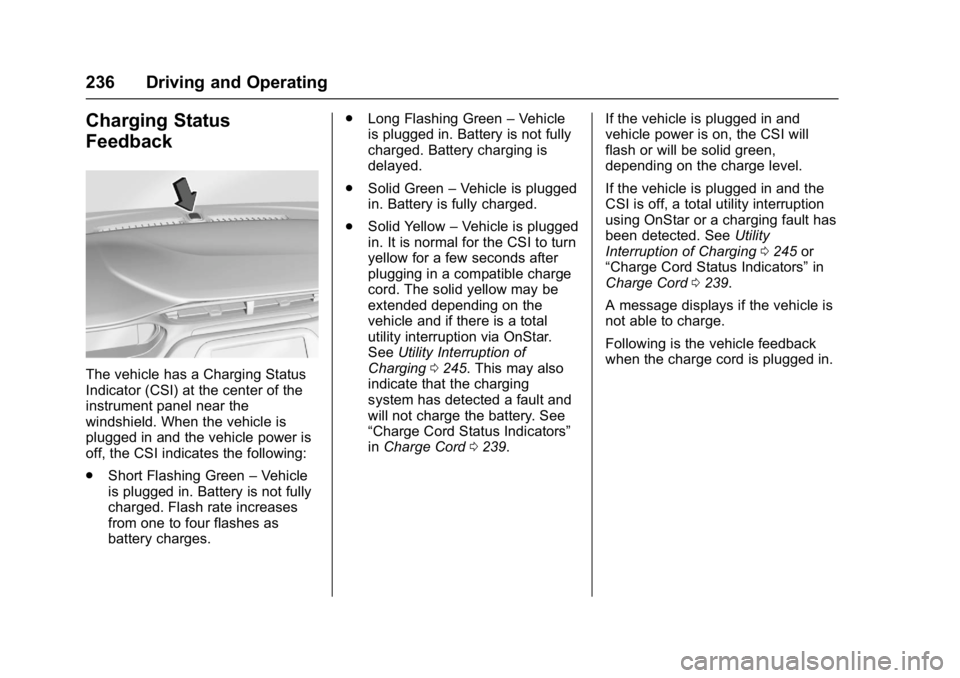
The vehicle has a Charging Status
Indicator (CSI) at the center of the
instrument panel near the
windshield. When the vehicle is
plugged in and the vehicle power is
off, the CSI indicates the following:
.Short Flashing Green –Vehicle
is plugged in. Battery is not fully
charged. Flash rate increases
from one to four flashes as
battery charges. .
Long Flashing Green –Vehicle
is plugged in. Battery is not fully
charged. Battery charging is
delayed.
. Solid Green –Vehicle is plugged
in. Battery is fully charged.
. Solid Yellow –Vehicle is plugged
in. It is normal for the CSI to turn
yellow for a few seconds after
plugging in a compatible charge
cord. The solid yellow may be
extended depending on the
vehicle and if there is a total
utility interruption via OnStar.
See Utility Interruption of
Charging 0245. This may also
indicate that the charging
system has detected a fault and
will not charge the battery. See
“Charge Cord Status Indicators”
in Charge Cord 0239. If the vehicle is plugged in and
vehicle power is on, the CSI will
flash or will be solid green,
depending on the charge level.
If the vehicle is plugged in and the
CSI is off, a total utility interruption
using OnStar or a charging fault has
been detected. See
Utility
Interruption of Charging 0245 or
“Charge Cord Status Indicators” in
Charge Cord 0239.
A message displays if the vehicle is
not able to charge.
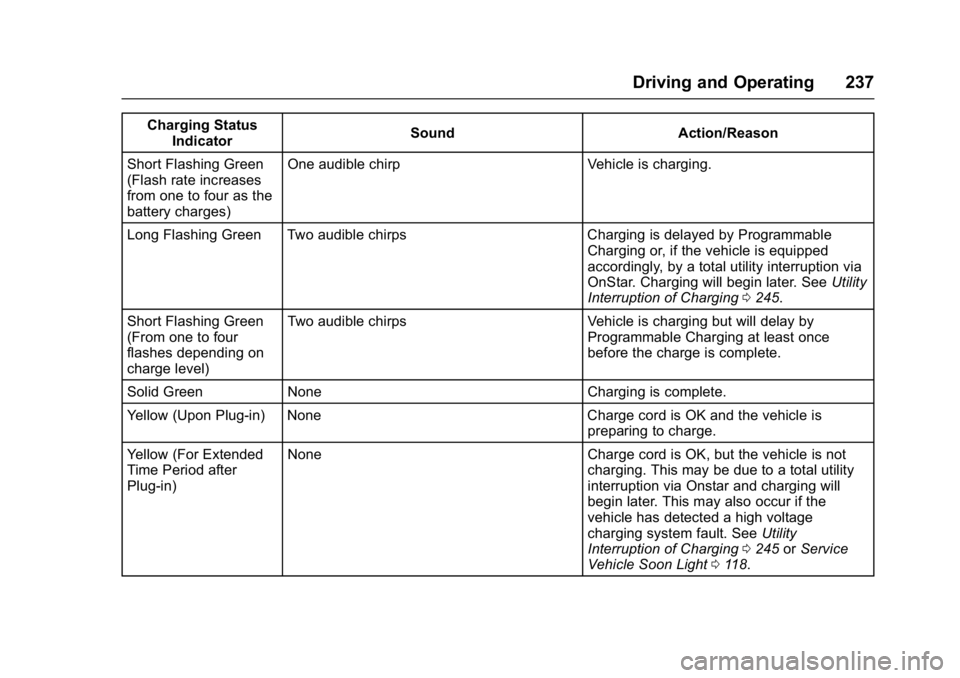
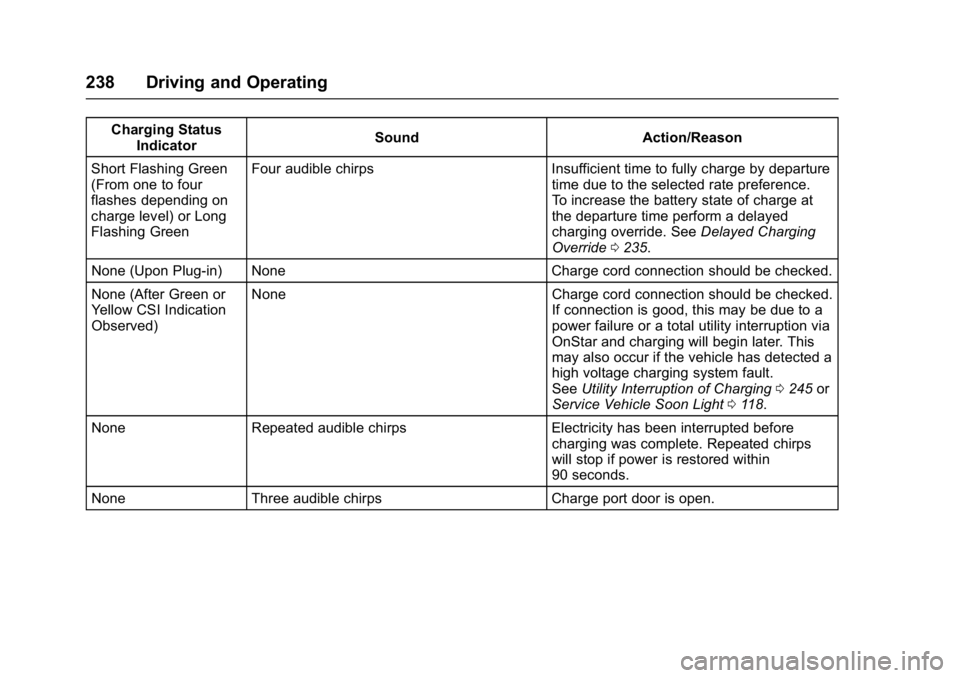
Following is the vehicle feedback
when the charge cord is plugged in.
Page 238 of 361
Chevrolet Bolt EV Owner Manual (GMNA-Localizing-U.S./Canada/Mexico-
10122739) - 2017 - CRC - 10/3/16
Driving and Operating 237
Charging StatusIndicator Sound Action/Reason
Short Flashing Green
(Flash rate increases
from one to four as the
battery charges) One audible chirp Vehicle is charging.
Long Flashing Green Two audible chirps Charging is delayed by Programmable Charging or, if the vehicle is equipped
accordingly, by a total utility interruption via
OnStar. Charging will begin later. SeeUtility
Interruption of Charging 0245.
Short Flashing Green
(From one to four
flashes depending on
charge level) Two audible chirps Vehicle is charging but will delay by
Programmable Charging at least once
before the charge is complete.
Solid Green None Charging is complete.
Yellow (Upon Plug-in) None Charge cord is OK and the vehicle is preparing to charge.
Yellow (For Extended
Time Period after
Plug-in) None Charge cord is OK, but the vehicle is not
charging. This may be due to a total utility
interruption via Onstar and charging will
begin later. This may also occur if the
vehicle has detected a high voltage
charging system fault. SeeUtility
Interruption of Charging 0245 orService
Vehicle Soon Light 0118.
Page 239 of 361
Chevrolet Bolt EV Owner Manual (GMNA-Localizing-U.S./Canada/Mexico-
10122739) - 2017 - CRC - 10/3/16
238 Driving and Operating
Charging StatusIndicator Sound Action/Reason
Short Flashing Green
(From one to four
flashes depending on
charge level) or Long
Flashing Green Four audible chirps Insufficient time to fully charge by departure
time due to the selected rate preference.
To increase the battery state of charge at
the departure time perform a delayed
charging override. SeeDelayed Charging
Override 0235.
None (Upon Plug-in) None Charge cord connection should be checked.
None (After Green or
Yellow CSI Indication
Observed) None Charge cord connection should be checked.
If connection is good, this may be due to a
power failure or a total utility interruption via
OnStar and charging will begin later. This
may also occur if the vehicle has detected a
high voltage charging system fault.
SeeUtility Interruption of Charging 0245 or
Service Vehicle Soon Light 0118.
None Repeated audible chirps Electricity has been interrupted before charging was complete. Repeated chirps
will stop if power is restored within
90 seconds.
None Three audible chirps Charge port door is open.
Page 240 of 361
Chevrolet Bolt EV Owner Manual (GMNA-Localizing-U.S./Canada/Mexico-
10122739) - 2017 - CRC - 10/3/16
Driving and Operating 239
To disable this feature, see“Charge
Power Loss Alert” inEnergy
Information 0131.
To stop this alert, do one of the
following:
. Unplug the charge cord.
. Press
Kon the RKE transmitter.
. Press and hold
7on the RKE
transmitter, then press again to
stop the panic alarm.
. Press the horn pad.
Charge Cord
IMPORTANT SAFETY
INSTRUCTIONS
This symbol indicates risk of
electrical shock if misused.
See Radio Frequency Statement
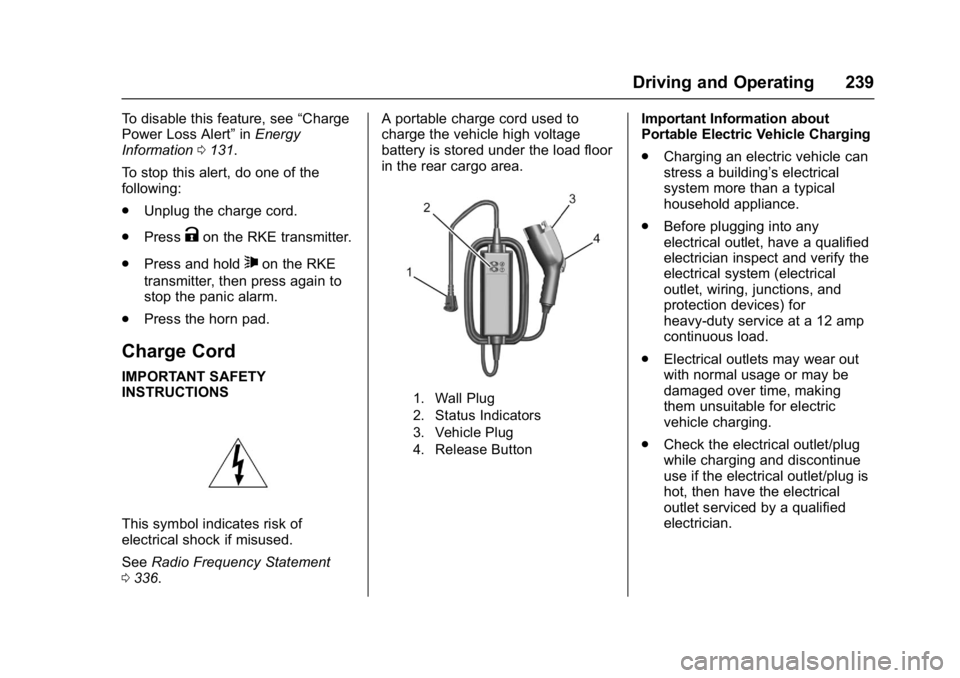
0 336. A portable charge cord used to
charge the vehicle high voltage
battery is stored under the load floor
in the rear cargo area.
1. Wall Plug
2. Status Indicators
3. Vehicle Plug
4. Release Button
Important Information about
Portable Electric Vehicle Charging
.
Charging an electric vehicle can
stress a building’ s electrical
system more than a typical
household appliance.
. Before plugging into any
electrical outlet, have a qualified
electrician inspect and verify the
electrical system (electrical
outlet, wiring, junctions, and
protection devices) for
heavy-duty service at a 12 amp
continuous load.
. Electrical outlets may wear out
with normal usage or may be
damaged over time, making
them unsuitable for electric
vehicle charging.
. Check the electrical outlet/plug
while charging and discontinue
use if the electrical outlet/plug is
hot, then have the electrical
outlet serviced by a qualified
electrician.
Page 247 of 361
Chevrolet Bolt EV Owner Manual (GMNA-Localizing-U.S./Canada/Mexico-
10122739) - 2017 - CRC - 10/3/16
246 Driving and Operating
2. Verify that the chargingstation’s circuit breaker has not
been tripped.
3. Plug the portable charge cord into the wall outlet, verify that
the indicator light on the charge
cord is solid green, and
connect it to the vehicle. See
“Charge Cord Status
Indicators” inCharge Cord
0 239.
4. If the vehicle charges with the portable charge cord, there
may be a problem with the
charging station. Try to charge
the vehicle with a different
240-volt charging station, such
as a public station. If both
attempts charge the vehicle,
contact the charging station
manufacturer.
Electrical Requirements
for Battery Charging
This vehicle is capable of being
charged with most standard vehicle
charging equipment that complies
with one or more of the following: .
SAE J1772
. SAE J2847-2
. IEC 61851-1
. IEC 61851-22
. IEC 61851-23
. IEC 61851-24
. IEC 62196-1
. IEC 62196-2
. IEC 62196-3
. ISO 15118
The portable charge cord requires a
minimum circuit capacity of
120 volts and 15 amps.
Caution
Do not use portable or stationary
backup generating equipment to
charge the vehicle. This may
cause damage to the vehicle's
charging system. Only charge the
vehicle from utility supplied
power.
Trailer Towing
General Towing
Information
The vehicle is neither designed nor
intended to tow a trailer.
Page 248 of 361
Chevrolet Bolt EV Owner Manual (GMNA-Localizing-U.S./Canada/Mexico-
10122739) - 2017 - CRC - 10/3/16
Driving and Operating 247
Conversions and
Add-Ons
Add-On Electrical
Equipment
{Warning
The Data Link Connector (DLC) is
used for vehicle service and
Emission Inspection/Maintenance
testing. SeeService Vehicle Soon
Light 0118. A device connected
to the DLC —such as an
aftermarket fleet or
driver-behavior tracking device —
may interfere with vehicle
systems. This could affect vehicle
operation and cause a crash.
Such devices may also access
information stored in the vehicle’s
systems.
Caution
Some electrical equipment can
damage the vehicle or cause
components to not work and
would not be covered by the
vehicle warranty. Always check
with your dealer before adding
electrical equipment.
Add-on equipment can drain the
vehicle's 12-volt battery, even if the
vehicle is not operating.
When adding electrical equipment, it
should only be connected using the
accessory power outlets. The
maximum power that can be
supplied by one accessory power
outlet or spread across all three is
200 watts or 15 amps. Exceeding
200 watts or 15 amps may cause
erratic vehicle operation. The vehicle has an airbag system.
Before attempting to add anything
electrical to the vehicle, see
Servicing the Airbag-Equipped
Vehicle
079 and Adding Equipment
to the Airbag-Equipped Vehicle
0 79.
Page 249 of 361
Chevrolet Bolt EV Owner Manual (GMNA-Localizing-U.S./Canada/Mexico-
10122739) - 2017 - CRC - 10/3/16
248 Vehicle Care
Vehicle Care
General Information
General Information . . . . . . . . . . 249
California Proposition65 Warning . . . . . . . . . . . . . . . . . 249
California Perchlorate Materials Requirements . . . . . 249
Accessories and Modifications . . . . . . . . . . . . . . . . 250
Vehicle Checks
Doing Your OwnService Work . . . . . . . . . . . . . . . 250
Hood . . . . . . . . . . . . . . . . . . . . . . . . . 251
Underhood Compartment Overview . . . . . . . . . . . . . . . . . . . . 253
Cooling System . . . . . . . . . . . . . . 254
Washer Fluid . . . . . . . . . . . . . . . . . 255
Brakes . . . . . . . . . . . . . . . . . . . . . . . 256
Brake Fluid . . . . . . . . . . . . . . . . . . . 257
Battery - North America . . . . . . 257
Wiper Blade Replacement . . . . 259
Headlamp Aiming
Headlamp Aiming . . . . . . . . . . . . 261
Bulb Replacement
Bulb Replacement . . . . . . . . . . . . 261
Halogen Bulbs . . . . . . . . . . . . . . . . 261
High Intensity Discharge (HID) Lighting . . . . . . . . . . . . . . . . . . . . . 262
LED Lighting . . . . . . . . . . . . . . . . . 262
Taillamps, Turn Signal,
Stoplamps, and Back-Up
Lamps . . . . . . . . . . . . . . . . . . . . . . 262
License Plate Lamp . . . . . . . . . . 262
Replacement Bulbs . . . . . . . . . . . 263
Electrical System
High Voltage Devices and Wiring . . . . . . . . . . . . . . . . . . . . . . . 263
Electrical System Overload . . . 263
Underhood Compartment Fuse Block . . . . . . . . . . . . . . . . . . . . . . . . 264
Instrument Panel Fuse Block . . . . . . . . . . . . . . . . . . . . . . . . 268
Wheels and Tires
Tires . . . . . . . . . . . . . . . . . . . . . . . . . . 270
All-Season Tires . . . . . . . . . . . . . . 270
Winter Tires . . . . . . . . . . . . . . . . . . 271
Self-Sealing Tires . . . . . . . . . . . . 271
Tire Sidewall Labeling . . . . . . . . 272 Tire Designations . . . . . . . . . . . . . 273
Tire Terminology and
Definitions . . . . . . . . . . . . . . . . . . 273
Tire Pressure . . . . . . . . . . . . . . . . . 276
Tire Pressure Monitor System . . . . . . . . . . . . . . . . . . . . . . 277
Tire Pressure Monitor Operation . . . . . . . . . . . . . . . . . . . 278
Tire Inspection . . . . . . . . . . . . . . . . 281
Tire Rotation . . . . . . . . . . . . . . . . . 281
When It Is Time for New Tires . . . . . . . . . . . . . . . . . . . . . . . . 282
Buying New Tires . . . . . . . . . . . . . 283
Different Size Tires and Wheels . . . . . . . . . . . . . . . . . . . . . . 284
Uniform Tire Quality Grading . . . . . . . . . . . . . . . . . . . . . 285
Wheel Alignment and Tire Balance . . . . . . . . . . . . . . . . . . . . . 286
Wheel Replacement . . . . . . . . . . 286
Tire Chains . . . . . . . . . . . . . . . . . . . 287
If a Tire Goes Flat . . . . . . . . . . . . 288
Tire Sealant and Compressor Kit . . . . . . . . . . . . . 289
Storing the Tire Sealant and Compressor Kit . . . . . . . . . . . . . 295
Page 250 of 361
Chevrolet Bolt EV Owner Manual (GMNA-Localizing-U.S./Canada/Mexico-
10122739) - 2017 - CRC - 10/3/16
Vehicle Care 249
Jump Starting
Jump Starting - NorthAmerica . . . . . . . . . . . . . . . . . . . . . 295
Towing the Vehicle
Towing the Vehicle . . . . . . . . . . . 299
Recreational VehicleTowing . . . . . . . . . . . . . . . . . . . . . . 299
Appearance Care
Exterior Care . . . . . . . . . . . . . . . . . 301
Interior Care . . . . . . . . . . . . . . . . . . 305
Floor Mats . . . . . . . . . . . . . . . . . . . . 308
General Information
For service and parts needs, visit
your dealer. You will receive
genuine GM parts and GM-trained
and supported service people.
Genuine GM parts have one of
these marks:
California Proposition
65 Warning
WARNING: Most motor vehicles,
including this one, as well as many
of its service parts and fluids, contain and/or emit chemicals
known to the State of California to
cause cancer and birth defects or
other reproductive harm. Many parts
and systems, many fluids, and
some component wear by-products
contain and/or emit these
chemicals.
See
Battery - North America 0257
and Jump Starting - North America
0 295.
California Perchlorate
Materials Requirements
Certain types of automotive
applications, such as airbag
initiators, safety belt pretensioners,
and lithium batteries contained in
Remote Keyless Entry transmitters,
may contain perchlorate materials.
Special handling may be necessary.
For additional information, see
www.dtsc.ca.gov/hazardouswaste/
perchlorate.
Page 251 of 361
Chevrolet Bolt EV Owner Manual (GMNA-Localizing-U.S./Canada/Mexico-
10122739) - 2017 - CRC - 10/3/16
250 Vehicle Care
Accessories and
Modifications
Adding non-dealer accessories or
making modifications to the vehicle
can affect vehicle performance and
safety, including such things as
airbags, braking, stability, ride and
handling, emissions systems,
aerodynamics, durability, and
electronic systems like antilock
brakes, traction control, and stability
control. These accessories or
modifications could even cause
malfunction or damage not covered
by the vehicle warranty.
Damage to suspension components
caused by modifying vehicle height
outside of factory settings will not be
covered by the vehicle warranty.Damage to vehicle components
resulting from modifications or the
installation or use of non-GM
certified parts, including control
module or software modifications, is
not covered under the terms of the
vehicle warranty and may affect
remaining warranty coverage for
affected parts.
GM Accessories are designed to
complement and function with other
systems on the vehicle. See your
dealer to accessorize the vehicle
using genuine GM Accessories
installed by a dealer technician.
Also, see
Adding Equipment to the
Airbag-Equipped Vehicle 079.
Vehicle Checks
Doing Your Own
Service Work
{Warning
Never try to do your own service
on high voltage battery
components. You can be injured
and the vehicle can be damaged
if you try to do your own service
work. Service and repair of these
high voltage battery components
should only be performed by a
trained dealer technician with the
proper knowledge and tools.
Exposure to high voltage can
cause shock, burns, and even
death. The high voltage
components in the vehicle can
only be serviced by technicians
with special training.
High voltage components are
identified by labels. Do not
remove, open, take apart,
(Continued)