lock CHEVROLET BOLT EV 2017 Workshop Manual
[x] Cancel search | Manufacturer: CHEVROLET, Model Year: 2017, Model line: BOLT EV, Model: CHEVROLET BOLT EV 2017Pages: 361, PDF Size: 4.89 MB
Page 138 of 361
Chevrolet Bolt EV Owner Manual (GMNA-Localizing-U.S./Canada/Mexico-
10122739) - 2017 - CRC - 10/3/16
Instruments and Controls 137
This symbol will be displayed if the
vehicle is out of P (Park). Close the
door completely.
HOOD OPEN
This message will display along with
a hood open symbol when the hood
is open. Close the hood completely.
REAR ACCESS OPEN
This message will display along with
a symbol when the liftgate is open.
Close the liftgate completely.
Electric Drive Unit
Messages
SHIFT TO PARK
This message displays when the
vehicle should be shifted to
P (Park). This may appear when
attempting to turn off the vehicle
when it is not in P (Park).
Key and Lock Messages
NO REMOTE KEY WAS
DETECTED PLACE KEY IN
TRANSMITTER POCKET, THEN
START YOUR VEHICLE
This message displays when trying
to start the vehicle if an RKE
transmitter is not detected. The
transmitter battery may be weak.
NO REMOTE DETECTED
This message displays when the
RKE transmitter is not detected
while attempting to start the vehicle.
The transmitter battery may be
weak. See“Starting the Vehicle with
a Low Transmitter Battery” under
Remote Keyless Entry (RKE)
System Operation 033.
NO REMOTE DETECTED,
PRESS BRAKE TO RESTART
This message displays if the RKE
transmitter is no longer detected in
the vehicle. Press the brake pedal
and POWER
Oto restart the
vehicle, or press POWER
Owithout
pressing the brake pedal to turn the vehicle off. If the vehicle is turned
off and a valid transmitter is not
available, the vehicle will not restart.
NUMBER OF KEYS
PROGRAMMED
This message displays when
programming new keys to the
vehicle.
REMOTE LEFT IN VEHICLE
This message displays when
leaving the vehicle with the RKE
transmitter still inside.
REPLACE BATTERY IN
REMOTE KEY
This message displays when the
battery in the RKE transmitter needs
to be replaced.
SERVICE KEYLESS START
SYSTEM
This message displays when the
pushbutton start system needs
service. Take the vehicle to your
dealer.
Page 139 of 361
Chevrolet Bolt EV Owner Manual (GMNA-Localizing-U.S./Canada/Mexico-
10122739) - 2017 - CRC - 10/3/16
138 Instruments and Controls
Lamp Messages
AUTO LIGHT CONTROL
ON/OFF
A message will display when the
automatic light control has been
turned on or off.
CHECK LAMP or LAMP
FAILURE
Depending on the lamp, one of
these messages may display.
TURN INDICATORS FAILURE
This messages displays when the
turn signal has gone out and needs
to be replaced. Take the vehicle to
your dealer.
TURN SIGNAL ON
This message displays if the turn
signal has been left on. Turn off the
turn signal.
Object Detection System
Messages
FORWARD COLLISION
SYSTEM OFF
This message displays when
Forward Automatic Braking (FAB)
has been turned off.
FORWARD COLLISION
SYSTEM REDUCED
This message displays when
Forward Automatic Braking (FAB)
has been set to the Alert setting.
FORWARD COLLISION
SYSTEM UNAVAILABLE
This message displays when
Forward Automatic Braking (FAB)
has been unavailable for some time.
FAB does not need service. This
message can display under the
following conditions:
.The front of the vehicle or
windshield is not clean. Keep
these areas clean and free of
mud, dirt, snow, ice, and slush. .
Heavy rain or snow is interfering
with the object detection
performance.
This message may also be
displayed if there is a problem with
the StabiliTrak system.
LANE CHANGE ALERT
SYSTEM OFF
This message indicates that the
driver has turned the Side Blind
Zone Alert (SBZA) and Lane
Change Alert (LCA) systems off.
LANE KEEP ASSIST SYSTEM
or LANE DEPARTURE
WARNING UNAVAILABLE
This message displays when the
Lane Keep Assist (LKA) and Lane
Departure Warning (LDW) system is
temporarily unavailable. The LKA
system does not need service.
This message could be due to the
camera being blocked. Clean the
outside of the windshield behind the
rearview mirror.
Page 140 of 361
Chevrolet Bolt EV Owner Manual (GMNA-Localizing-U.S./Canada/Mexico-
10122739) - 2017 - CRC - 10/3/16
Instruments and Controls 139
PARK ASSIST OFF
This message displays when the
Parking Assist system has been
turned off or when there is a
temporary condition causing the
system to be disabled.
SERVICE FORWARD
COLLISION SYSTEM
If this message displays, see your
dealer for service. Forward Collision
Alert (FCA) and/or Forward
Automatic Braking (FAB) may not
work. Do not use these systems
until the vehicle has been repaired.
SERVICE PARK ASSIST
SYSTEM
This message displays if there is a
problem with the Parking Assist
system. Do not use this system to
help you park. See your dealer for
service.
SERVICE FRONT CAMERA
If this message remains on after
continued driving, the vehicle needs
service. Take the vehicle to your
dealer. Do not use the Front
Pedestrian Braking (FPB), ForwardCollision Alert (FCA), Forward
Automatic Braking (FAB), Lane
Keep Assist (LKA), and Lane
Departure Warning (LDW) features.
SERVICE SIDE DETECTION
SYSTEM
If this message remains on after
continued driving, the vehicle needs
service. Side Blind Zone Alert
(SBZA), Lane Change Alert (LCA),
and Rear Cross Traffic Alert (RCTA)
features will not work. See your
dealer for service.
SIDE DETECTION
TEMPORARILY UNAVAILABLE
This message indicates that Lane
Change Alert (LCA), and Rear
Cross Traffic Alert (RCTA) are
disabled either because the sensor
is blocked and cannot detect
vehicles in the blind zone, or the
vehicle is passing through an open
area, such as the desert, where
there is insufficient data for
operation. This message may also
activate during heavy rain or due to
road spray. The vehicle does not
need service.
TAKE STEERING
If LKA does not detect active driver
steering, an alert and chime may be
provided. Move the steering wheel
to dismiss. See
Lane Keep Assist
(LKA) 0229.
Propulsion Power
Messages
PROPULSION POWER IS
REDUCED
This message displays when the
propulsion power is reduced and
can affect the ability to accelerate.
If this message is on, but there is no
reduction in performance, proceed
to your destination. The
performance may be reduced the
next time the vehicle is driven. The
vehicle may be driven at a reduced
speed while this message is on, but
maximum acceleration and speed
may be reduced.
This message is most commonly
displayed when the high voltage
battery charge level is low. The
vehicle is limiting power to maximize
range.
Page 141 of 361
Chevrolet Bolt EV Owner Manual (GMNA-Localizing-U.S./Canada/Mexico-
10122739) - 2017 - CRC - 10/3/16
140 Instruments and Controls
This message can display when the
vehicle is parked during extreme
cold conditions without being
plugged in. While driving the vehicle
with this message displayed, the
vehicle speed may be reduced until
the high voltage battery is
conditioned.
Ride Control System
Messages
LOW TRACTION
This message displays when the
Antilock Brake System (ABS) is
active and is working to assist the
driver with control of the vehicle in
difficult driving conditions.
SERVICE STABILITRAK
or ESC
This message displays when there
is a problem detected with the
StabiliTrak system. The vehicle is
safe to drive, but the StabiliTrak
system is not operational.
SERVICE TRACTION
CONTROL
This message displays when there
is a problem detected with the
Traction Control System (TCS). The
vehicle is safe to drive, but the TCS
is not operational.
STABILITRAK or ESC OFF
This message displays when
StabiliTrak is turned off. Adjust your
driving accordingly.
TRACTION CONTROL OFF
This message displays when the
Traction Control System (TCS) is
turned off. Adjust your driving
accordingly.
TRACTION CONTROL ON
This message displays when the
Traction Control System (TCS) is
turned on.
Airbag System Messages
SERVICE AIRBAG
This message displays if there is a
problem with the airbag system. See
your dealer for service.
Security Messages
SERVICE THEFT ALARM
This message displays if there is a
problem with the alarm. See your
dealer for service.
SERVICE THEFT DETERRENT
SYSTEM
This message displays if there is a
problem with the theft-deterrent
system. See your dealer for service.
Service Vehicle Messages
SERVICE HEATER
This message displays if there is a
problem with the heater system.
Take the vehicle to your dealer for
service.
Page 143 of 361
Chevrolet Bolt EV Owner Manual (GMNA-Localizing-U.S./Canada/Mexico-
10122739) - 2017 - CRC - 10/3/16
142 Instruments and Controls
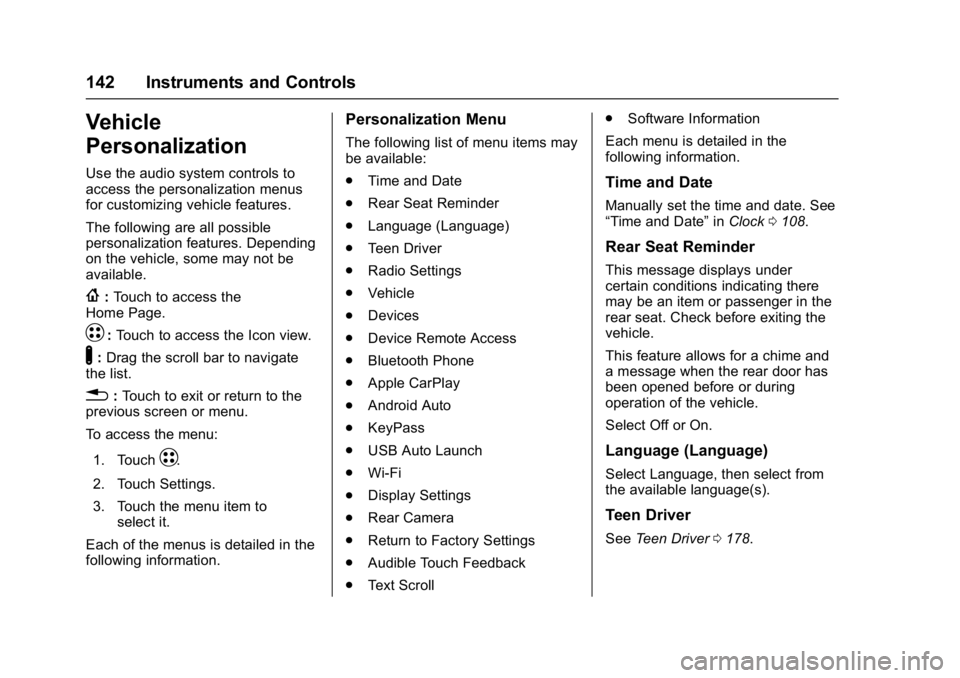
Vehicle
Personalization
Use the audio system controls to
access the personalization menus
for customizing vehicle features.
The following are all possible
personalization features. Depending
on the vehicle, some may not be
available.
{:Touch to access the
Home Page.
T: Touch to access the Icon view.
Y: Drag the scroll bar to navigate
the list.
0 :Touch to exit or return to the
previous screen or menu.
To access the menu:
1. Touch
T.
2. Touch Settings.
3. Touch the menu item to select it.
Each of the menus is detailed in the
following information.
Personalization Menu
The following list of menu items may
be available:
. Time and Date
. Rear Seat Reminder
. Language (Language)
. Teen Driver
. Radio Settings
. Vehicle
. Devices
. Device Remote Access
. Bluetooth Phone
. Apple CarPlay
. Android Auto
. KeyPass
. USB Auto Launch
. Wi-Fi
. Display Settings
. Rear Camera
. Return to Factory Settings
. Audible Touch Feedback
. Text Scroll .
Software Information
Each menu is detailed in the
following information.
Time and Date
Manually set the time and date. See
“Time and Date” inClock 0108.
Rear Seat Reminder
This message displays under
certain conditions indicating there
may be an item or passenger in the
rear seat. Check before exiting the
vehicle.
This feature allows for a chime and
a message when the rear door has
been opened before or during
operation of the vehicle.
Select Off or On.
Language (Language)
Select Language, then select from
the available language(s).
Teen Driver
See Teen Driver 0178.
Page 144 of 361
Chevrolet Bolt EV Owner Manual (GMNA-Localizing-U.S./Canada/Mexico-
10122739) - 2017 - CRC - 10/3/16
Instruments and Controls 143
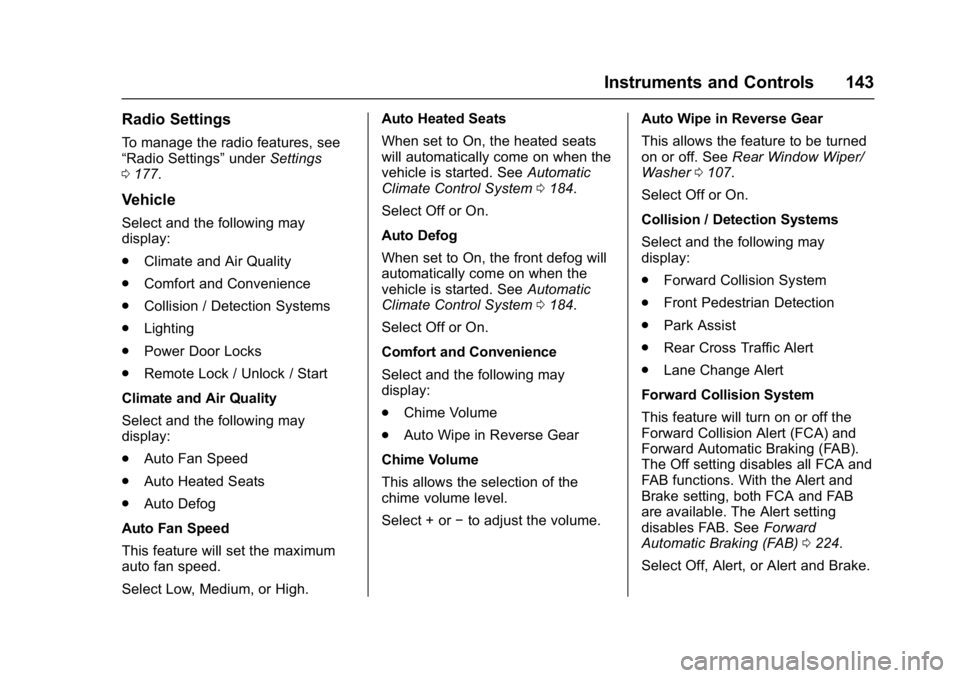
Radio Settings
To manage the radio features, see
“Radio Settings”underSettings
0 177.
Vehicle
Select and the following may
display:
.
Climate and Air Quality
. Comfort and Convenience
. Collision / Detection Systems
. Lighting
. Power Door Locks
. Remote Lock / Unlock / Start
Climate and Air Quality
Select and the following may
display:
. Auto Fan Speed
. Auto Heated Seats
. Auto Defog
Auto Fan Speed
This feature will set the maximum
auto fan speed.
Select Low, Medium, or High. Auto Heated Seats
When set to On, the heated seats
will automatically come on when the
vehicle is started. See
Automatic
Climate Control System 0184.
Select Off or On.
Auto Defog
When set to On, the front defog will
automatically come on when the
vehicle is started. See Automatic
Climate Control System 0184.
Select Off or On.
Comfort and Convenience
Select and the following may
display:
. Chime Volume
. Auto Wipe in Reverse Gear
Chime Volume
This allows the selection of the
chime volume level.
Select + or −to adjust the volume. Auto Wipe in Reverse Gear
This allows the feature to be turned
on or off. See
Rear Window Wiper/
Washer 0107.
Select Off or On.
Collision / Detection Systems
Select and the following may
display:
. Forward Collision System
. Front Pedestrian Detection
. Park Assist
. Rear Cross Traffic Alert
. Lane Change Alert
Forward Collision System
This feature will turn on or off the
Forward Collision Alert (FCA) and
Forward Automatic Braking (FAB).
The Off setting disables all FCA and
FAB functions. With the Alert and
Brake setting, both FCA and FAB
are available. The Alert setting
disables FAB. See Forward
Automatic Braking (FAB) 0224.
Select Off, Alert, or Alert and Brake.
Page 145 of 361
Chevrolet Bolt EV Owner Manual (GMNA-Localizing-U.S./Canada/Mexico-
10122739) - 2017 - CRC - 10/3/16
144 Instruments and Controls
Front Pedestrian Detection
This allows the feature’s notification
to be customized.
Select Off, Alert, or Alert and Brake.
Park Assist
This allows the feature to be turned
on or off.
Select Off or On.
Rear Cross Traffic Alert
This allows the Rear Cross Traffic
Alert feature to be turned on or off.
Select Off or On. SeeAssistance
Systems for Parking or Backing
0 219.
Lane Change Alert
This allows the Lane Change Alert
feature to be turned on or off.
Select Off or On. See Lane Change
Alert (LCA) 0227.
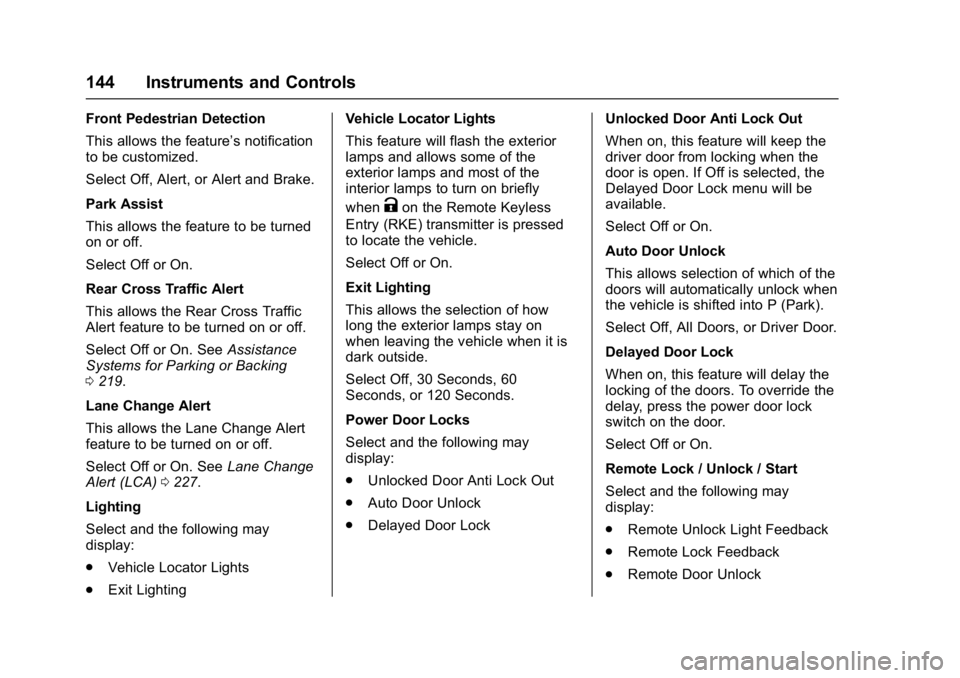
Lighting
Select and the following may
display:
. Vehicle Locator Lights
. Exit Lighting Vehicle Locator Lights
This feature will flash the exterior
lamps and allows some of the
exterior lamps and most of the
interior lamps to turn on briefly
when
Kon the Remote Keyless
Entry (RKE) transmitter is pressed
to locate the vehicle.
Select Off or On.
Exit Lighting
This allows the selection of how
long the exterior lamps stay on
when leaving the vehicle when it is
dark outside.
Select Off, 30 Seconds, 60
Seconds, or 120 Seconds.
Power Door Locks
Select and the following may
display:
. Unlocked Door Anti Lock Out
. Auto Door Unlock
. Delayed Door Lock Unlocked Door Anti Lock Out
When on, this feature will keep the
driver door from locking when the
door is open. If Off is selected, the
Delayed Door Lock menu will be
available.
Select Off or On.
Auto Door Unlock
This allows selection of which of the
doors will automatically unlock when
the vehicle is shifted into P (Park).
Select Off, All Doors, or Driver Door.
Delayed Door Lock
When on, this feature will delay the
locking of the doors. To override the
delay, press the power door lock
switch on the door.
Select Off or On.
Remote Lock / Unlock / Start
Select and the following may
display:
.
Remote Unlock Light Feedback
. Remote Lock Feedback
. Remote Door Unlock
Page 146 of 361
Chevrolet Bolt EV Owner Manual (GMNA-Localizing-U.S./Canada/Mexico-
10122739) - 2017 - CRC - 10/3/16
Instruments and Controls 145
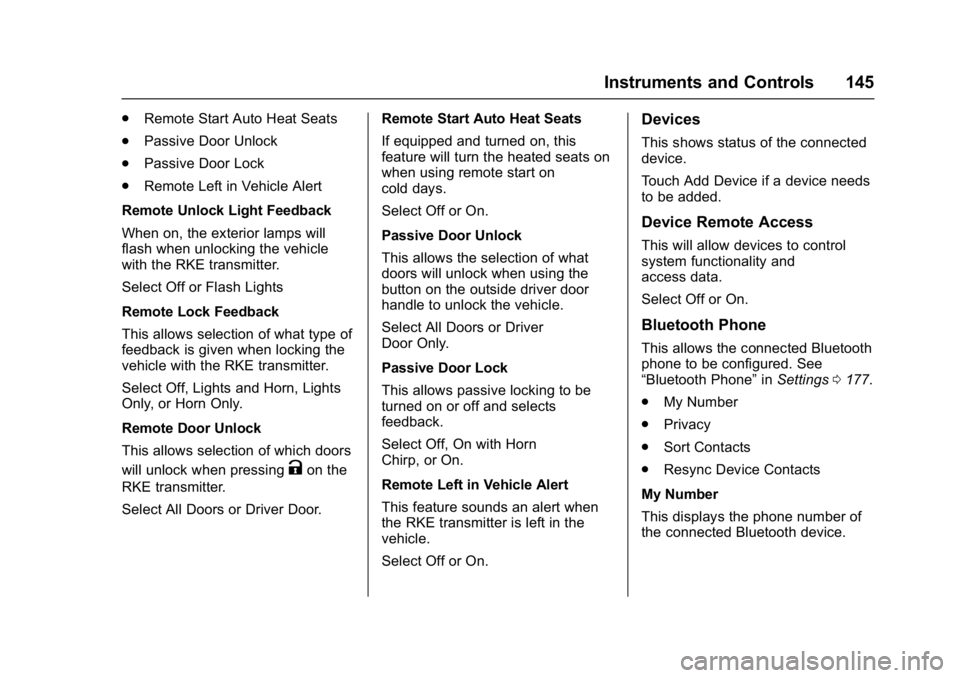
.Remote Start Auto Heat Seats
. Passive Door Unlock
. Passive Door Lock
. Remote Left in Vehicle Alert
Remote Unlock Light Feedback
When on, the exterior lamps will
flash when unlocking the vehicle
with the RKE transmitter.
Select Off or Flash Lights
Remote Lock Feedback
This allows selection of what type of
feedback is given when locking the
vehicle with the RKE transmitter.
Select Off, Lights and Horn, Lights
Only, or Horn Only.
Remote Door Unlock
This allows selection of which doors
will unlock when pressing
Kon the
RKE transmitter.
Select All Doors or Driver Door. Remote Start Auto Heat Seats
If equipped and turned on, this
feature will turn the heated seats on
when using remote start on
cold days.
Select Off or On.
Passive Door Unlock
This allows the selection of what
doors will unlock when using the
button on the outside driver door
handle to unlock the vehicle.
Select All Doors or Driver
Door Only.
Passive Door Lock
This allows passive locking to be
turned on or off and selects
feedback.
Select Off, On with Horn
Chirp, or On.
Remote Left in Vehicle Alert
This feature sounds an alert when
the RKE transmitter is left in the
vehicle.
Select Off or On.
Devices
This shows status of the connected
device.
Touch Add Device if a device needs
to be added.
Device Remote Access
This will allow devices to control
system functionality and
access data.
Select Off or On.
Bluetooth Phone
This allows the connected Bluetooth
phone to be configured. See
“Bluetooth Phone”
inSettings 0177.
. My Number
. Privacy
. Sort Contacts
. Resync Device Contacts
My Number
This displays the phone number of
the connected Bluetooth device.
Page 150 of 361

Chevrolet Bolt EV Owner Manual (GMNA-Localizing-U.S./Canada/Mexico-
10122739) - 2017 - CRC - 10/3/16
Lighting 149
Turning On and Enabling
IntelliBeam
To enable the IntelliBeam system,
press
bon the turn signal lever
when the exterior lamp control is in
the AUTO or
5position.
The blue high-beam on light
appears on the instrument cluster
when the high beams are on.
Driving with IntelliBeam
The system only activates the high
beams when driving over 40 km/h
(25 mph).
There is a sensor near the top
center of the windshield that
automatically controls the system. Keep this area of the windshield
clear of debris to allow for best
system performance.
The high-beam headlamps remain
on, under the automatic control,
until one of the following situations
occurs:
.
The system detects an
approaching vehicle’s
headlamps.
. The system detects a preceding
vehicle’s taillamps.
. The outside light is bright
enough that high-beam
headlamps are not required.
. The vehicle's speed drops below
20 km/h (12 mph).
. The IntelliBeam system is
disabled by the high/low-beam
changer or the flash-to-pass
feature. If this happens,
press
bon the turn signal
lever when the exterior
lamp control is in the AUTO
or
5position. The instrument cluster light will
come on to indicate the
IntelliBeam system is
reactivated.
The high beams may not turn off
automatically if the system cannot
detect another vehicle's lamps
because of any of the following:
. The other vehicle’s lamps are
missing, damaged, obstructed
from view, or otherwise
undetected.
. The other vehicle‘s lamps are
covered with dirt, snow, and/or
road spray.
. The other vehicle’s lamps cannot
be detected due to dense
exhaust, smoke, fog, snow, road
spray, mist, or other airborne
obstructions.
. The vehicle's windshield is dirty,
cracked, or obstructed by
something that blocks the view
of the light sensor.
Page 153 of 361
Chevrolet Bolt EV Owner Manual (GMNA-Localizing-U.S./Canada/Mexico-
10122739) - 2017 - CRC - 10/3/16
152 Lighting
Raise or lower the lever until the
arrow starts to flash to signal a lane
change. Hold it there until the lane
change is completed.
If the lever is briefly pressed and
released, the turn signal flashes
three times.
The turn and lane-change signal
can be turned off manually by
moving the lever back to its original
position.
If after signaling a turn or lane
change, the arrow flashes rapidly or
does not come on, a signal bulb
may be burned out.
Replace any burned out bulbs. If a
bulb is not burned out, check the
fuse. SeeUnderhood Compartment
Fuse Block 0264.Interior Lighting
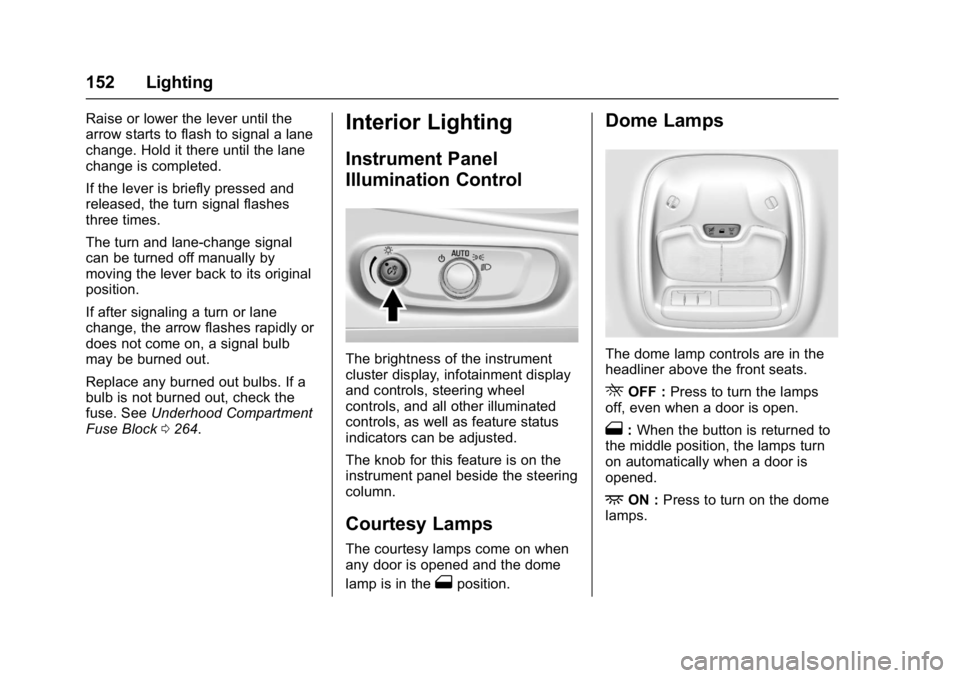
Instrument Panel
Illumination Control
The brightness of the instrument
cluster display, infotainment display
and controls, steering wheel
controls, and all other illuminated
controls, as well as feature status
indicators can be adjusted.
The knob for this feature is on the
instrument panel beside the steering
column.
Courtesy Lamps
The courtesy lamps come on when
any door is opened and the dome
lamp is in the
1position.
Dome Lamps
The dome lamp controls are in the
headliner above the front seats.
ROFF : Press to turn the lamps
off, even when a door is open.
1: When the button is returned to
the middle position, the lamps turn
on automatically when a door is
opened.
+ON : Press to turn on the dome
lamps.