on star CHEVROLET BOLT EV 2020 Service Manual
[x] Cancel search | Manufacturer: CHEVROLET, Model Year: 2020, Model line: BOLT EV, Model: CHEVROLET BOLT EV 2020Pages: 347, PDF Size: 5.7 MB
Page 107 of 347
Chevrolet BOLT EV Owner Manual (GMNA-Localizing-U.S./Canada/Mexico-
13556250) - 2020 - CRC - 2/11/20
106 Instruments and Controls
When the Light Flashes First and
Then Is On Steady
This indicates that there may be a
problem with the TPMS. The light
flashes for about one minute and
stays on steady until the vehicle is
off. This sequence repeats each
time the vehicle is started.
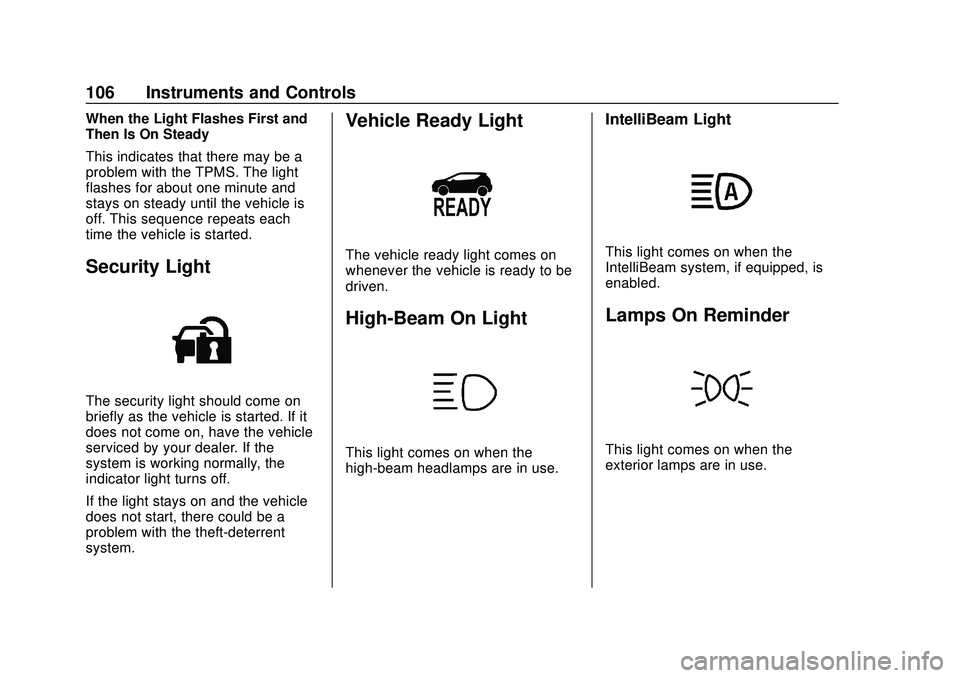
Security Light
The security light should come on
briefly as the vehicle is started. If it
does not come on, have the vehicle
serviced by your dealer. If the
system is working normally, the
indicator light turns off.
If the light stays on and the vehicle
does not start, there could be a
problem with the theft-deterrent
system.
Vehicle Ready Light
The vehicle ready light comes on
whenever the vehicle is ready to be
driven.
High-Beam On Light
This light comes on when the
high-beam headlamps are in use.
IntelliBeam Light
This light comes on when the
IntelliBeam system, if equipped, is
enabled.
Lamps On Reminder
This light comes on when the
exterior lamps are in use.
Page 109 of 347
Chevrolet BOLT EV Owner Manual (GMNA-Localizing-U.S./Canada/Mexico-
13556250) - 2020 - CRC - 2/11/20
108 Instruments and Controls
.When outdoors, plug into an
electrical outlet that is
weatherproof while in use.
. Mount the charge cord to reduce
strain on the electrical
outlet/plug.
. Do not place the charge cord in
a position where it is expected to
be submerged in water.
{Danger
Improper use of portable electric
vehicle charge cords may cause
a fire, electrical shock, or burns,
and may result in damage to
property, serious injury, or death.
. Do not use extension cords,
multi-outlet power strips,
splitters, grounding
adaptors, surge protectors,
or similar devices.
. Do not use an electrical
outlet that is worn or
damaged, or will not hold
the plug firmly in place.
(Continued)
Danger (Continued)
.Do not use an electrical
outlet that is not properly
grounded.
. Do not use an electrical
outlet that is on a circuit with
other electrical loads.
See Plug-In Charging 0214.
Programmable Charging
Modes
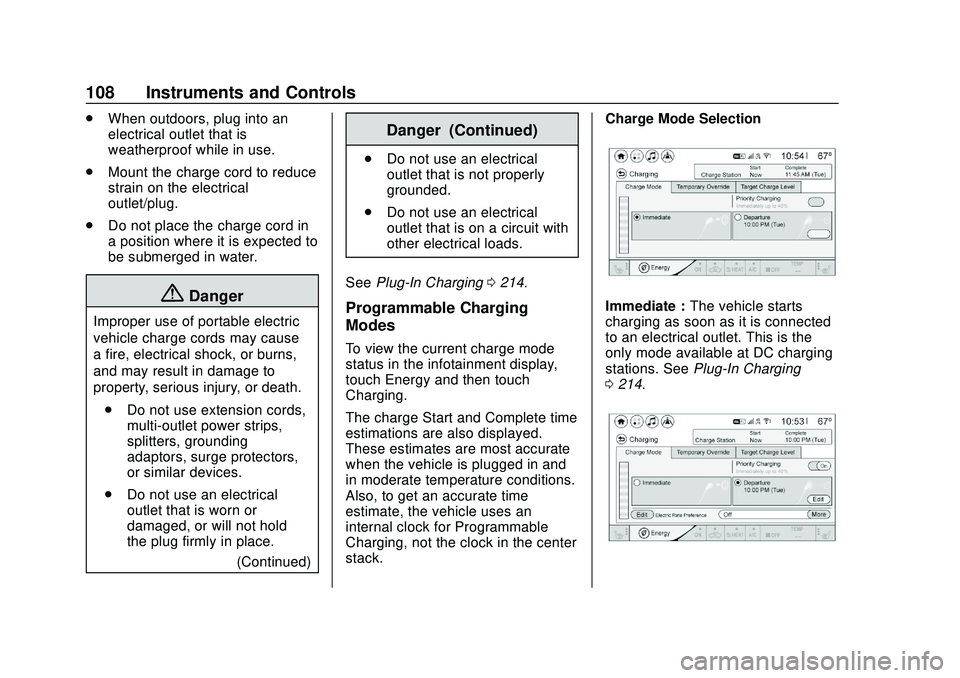
To view the current charge mode
status in the infotainment display,
touch Energy and then touch
Charging.
The charge Start and Complete time
estimations are also displayed.
These estimates are most accurate
when the vehicle is plugged in and
in moderate temperature conditions.
Also, to get an accurate time
estimate, the vehicle uses an
internal clock for Programmable
Charging, not the clock in the center
stack. Charge Mode Selection
Immediate :
The vehicle starts
charging as soon as it is connected
to an electrical outlet. This is the
only mode available at DC charging
stations. See Plug-In Charging
0 214.
Page 111 of 347
Chevrolet BOLT EV Owner Manual (GMNA-Localizing-U.S./Canada/Mexico-
13556250) - 2020 - CRC - 2/11/20
110 Instruments and Controls
{Warning
Using a charge level that exceeds
the electrical circuit or electrical
outlet capacity may start a fire or
damage the electrical circuit. Use
the lowest charge level until a
qualified electrician inspects the
electrical circuit capacity. Use the
lowest charge level if the
electrical circuit or electrical outlet
capacity is not known.
Electric Rate Preference
The vehicle estimates the charging
start time based on the utility rate
schedule, utility rate preference, and
programmed departure time for the
current day of the week. The vehicle
will charge during the least
expensive rate periods to achieve a
full battery charge by the departure
time. Electrical rate information from
the utility company for the charging
location is required for this mode.
If the selected charge mode is
Departure, then electric rate
preference selection will display. Electric Rate Preference Selection
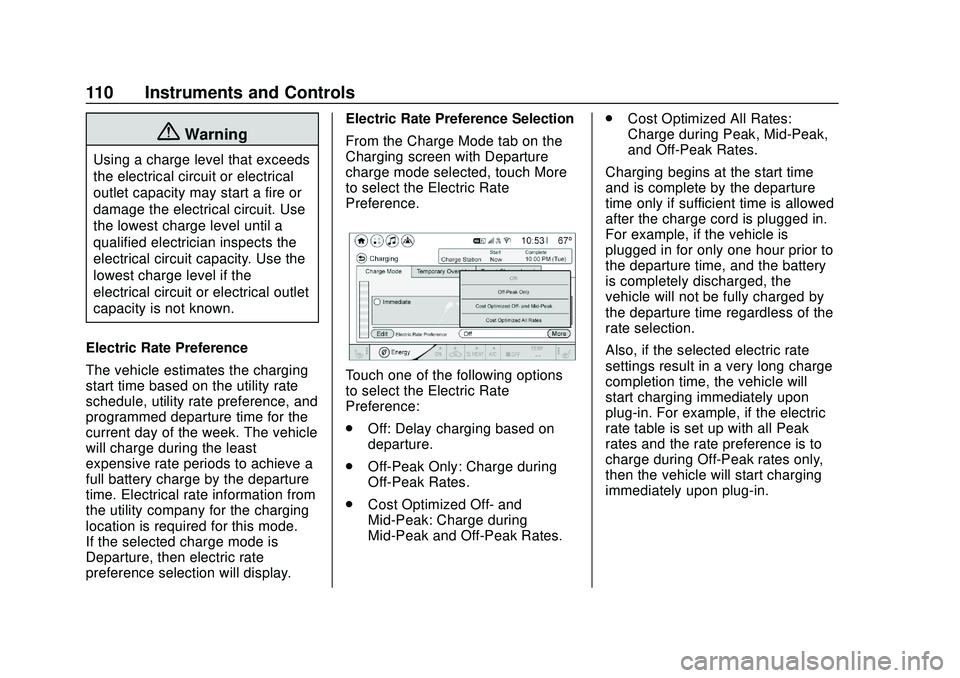
From the Charge Mode tab on the
Charging screen with Departure
charge mode selected, touch More
to select the Electric Rate
Preference.
Touch one of the following options
to select the Electric Rate
Preference:
.
Off: Delay charging based on
departure.
. Off-Peak Only: Charge during
Off-Peak Rates.
. Cost Optimized Off- and
Mid-Peak: Charge during
Mid-Peak and Off-Peak Rates. .
Cost Optimized All Rates:
Charge during Peak, Mid-Peak,
and Off-Peak Rates.
Charging begins at the start time
and is complete by the departure
time only if sufficient time is allowed
after the charge cord is plugged in.
For example, if the vehicle is
plugged in for only one hour prior to
the departure time, and the battery
is completely discharged, the
vehicle will not be fully charged by
the departure time regardless of the
rate selection.
Also, if the selected electric rate
settings result in a very long charge
completion time, the vehicle will
start charging immediately upon
plug-in. For example, if the electric
rate table is set up with all Peak
rates and the rate preference is to
charge during Off-Peak rates only,
then the vehicle will start charging
immediately upon plug-in.
Page 112 of 347
Chevrolet BOLT EV Owner Manual (GMNA-Localizing-U.S./Canada/Mexico-
13556250) - 2020 - CRC - 2/11/20
Instruments and Controls 111
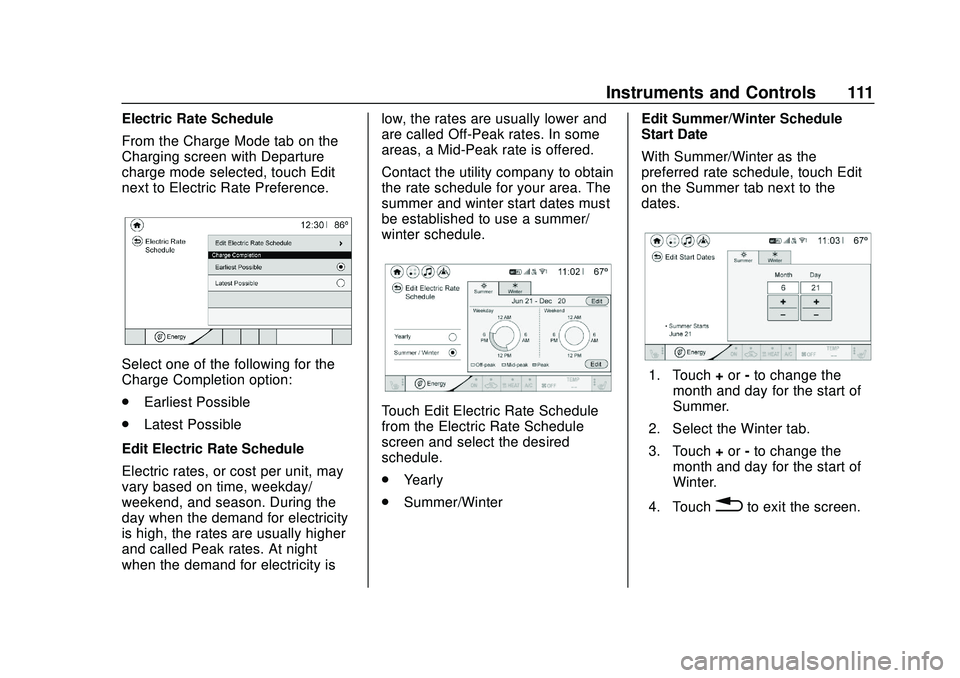
Electric Rate Schedule
From the Charge Mode tab on the
Charging screen with Departure
charge mode selected, touch Edit
next to Electric Rate Preference.
Select one of the following for the
Charge Completion option:
.Earliest Possible
. Latest Possible
Edit Electric Rate Schedule
Electric rates, or cost per unit, may
vary based on time, weekday/
weekend, and season. During the
day when the demand for electricity
is high, the rates are usually higher
and called Peak rates. At night
when the demand for electricity is low, the rates are usually lower and
are called Off-Peak rates. In some
areas, a Mid-Peak rate is offered.
Contact the utility company to obtain
the rate schedule for your area. The
summer and winter start dates must
be established to use a summer/
winter schedule.
Touch Edit Electric Rate Schedule
from the Electric Rate Schedule
screen and select the desired
schedule.
.
Yearly
. Summer/Winter Edit Summer/Winter Schedule
Start Date
With Summer/Winter as the
preferred rate schedule, touch Edit
on the Summer tab next to the
dates.
1. Touch
+or -to change the
month and day for the start of
Summer.
2. Select the Winter tab.
3. Touch +or -to change the
month and day for the start of
Winter.
4. Touch
0to exit the screen.
Page 113 of 347
Chevrolet BOLT EV Owner Manual (GMNA-Localizing-U.S./Canada/Mexico-
13556250) - 2020 - CRC - 2/11/20
112 Instruments and Controls
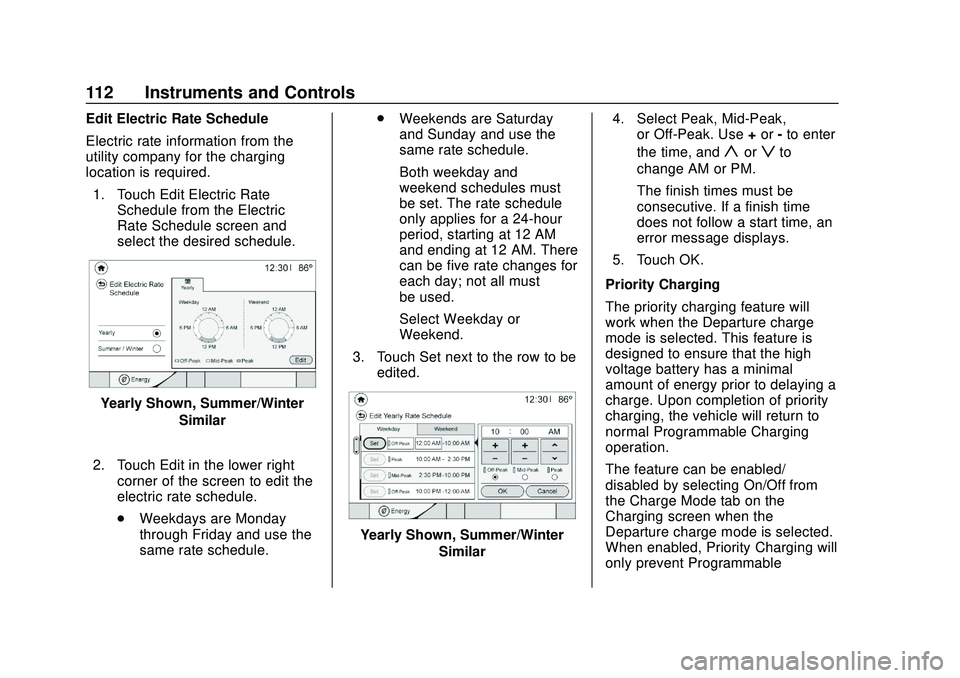
Edit Electric Rate Schedule
Electric rate information from the
utility company for the charging
location is required.1. Touch Edit Electric Rate Schedule from the Electric
Rate Schedule screen and
select the desired schedule.
Yearly Shown, Summer/Winter
Similar
2. Touch Edit in the lower right corner of the screen to edit the
electric rate schedule.
.Weekdays are Monday
through Friday and use the
same rate schedule. .
Weekends are Saturday
and Sunday and use the
same rate schedule.
Both weekday and
weekend schedules must
be set. The rate schedule
only applies for a 24-hour
period, starting at 12 AM
and ending at 12 AM. There
can be five rate changes for
each day; not all must
be used.
Select Weekday or
Weekend.
3. Touch Set next to the row to be edited.
Yearly Shown, Summer/Winter
Similar 4. Select Peak, Mid-Peak,
or Off-Peak. Use +or -to enter
the time, and
yorzto
change AM or PM.
The finish times must be
consecutive. If a finish time
does not follow a start time, an
error message displays.
5. Touch OK.
Priority Charging
The priority charging feature will
work when the Departure charge
mode is selected. This feature is
designed to ensure that the high
voltage battery has a minimal
amount of energy prior to delaying a
charge. Upon completion of priority
charging, the vehicle will return to
normal Programmable Charging
operation.
The feature can be enabled/
disabled by selecting On/Off from
the Charge Mode tab on the
Charging screen when the
Departure charge mode is selected.
When enabled, Priority Charging will
only prevent Programmable
Page 118 of 347
Chevrolet BOLT EV Owner Manual (GMNA-Localizing-U.S./Canada/Mexico-
13556250) - 2020 - CRC - 2/11/20
Instruments and Controls 117
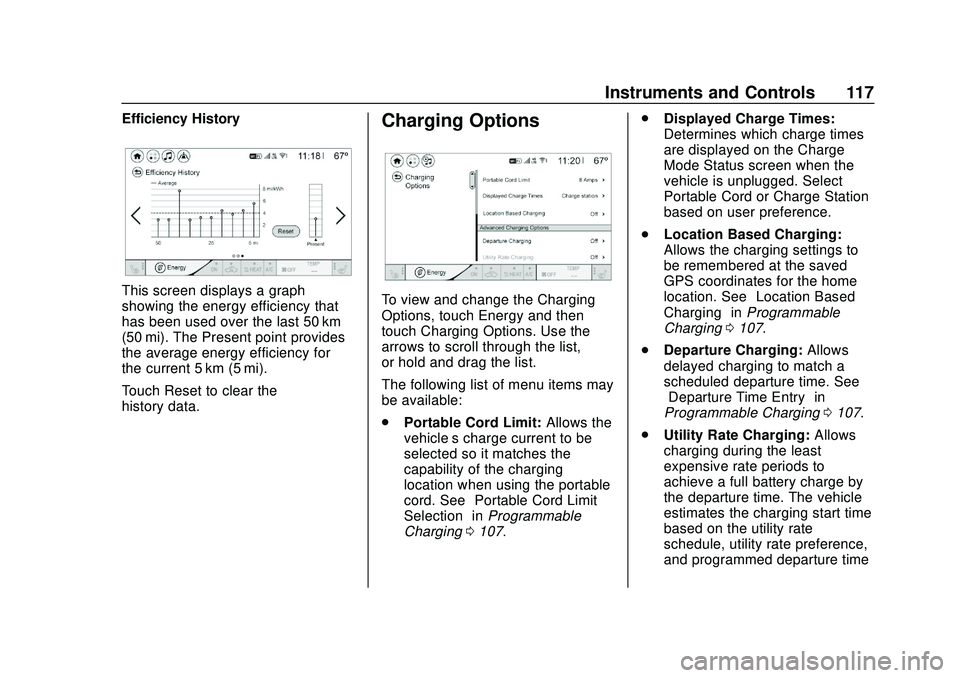
Efficiency History
This screen displays a graph
showing the energy efficiency that
has been used over the last 50 km
(50 mi). The Present point provides
the average energy efficiency for
the current 5 km (5 mi).
Touch Reset to clear the
history data.
Charging Options
To view and change the Charging
Options, touch Energy and then
touch Charging Options. Use the
arrows to scroll through the list,
or hold and drag the list.
The following list of menu items may
be available:
.Portable Cord Limit: Allows the
vehicle’s charge current to be
selected so it matches the
capability of the charging
location when using the portable
cord. See “Portable Cord Limit
Selection” inProgrammable
Charging 0107. .
Displayed Charge Times:
Determines which charge times
are displayed on the Charge
Mode Status screen when the
vehicle is unplugged. Select
Portable Cord or Charge Station
based on user preference.
. Location Based Charging:
Allows the charging settings to
be remembered at the saved
GPS coordinates for the home
location. See “Location Based
Charging” inProgrammable
Charging 0107.
. Departure Charging: Allows
delayed charging to match a
scheduled departure time. See
“Departure Time Entry” in
Programmable Charging 0107.
. Utility Rate Charging: Allows
charging during the least
expensive rate periods to
achieve a full battery charge by
the departure time. The vehicle
estimates the charging start time
based on the utility rate
schedule, utility rate preference,
and programmed departure time
Page 121 of 347
Chevrolet BOLT EV Owner Manual (GMNA-Localizing-U.S./Canada/Mexico-
13556250) - 2020 - CRC - 2/11/20
120 Instruments and Controls
Timer :This display can be used as
a timer. To start the timer, press
V
while this display is active. The
display will show the amount of time
that has passed since the timer was
last reset. To stop the timer, press
V
briefly while this display is active
and the timer is running. To reset
the timer to zero, press and hold
V
while this display is active.
Follow Distance Indicator : The
current follow time to the vehicle
ahead is displayed as a time value
on this page.
Blank Page : The Blank Page
display allows for no information to
be displayed in the cluster info
display areas.
Vehicle Messages
Messages displayed on the DIC
indicate the status of the vehicle or
some action that may be needed to
correct a condition. Multiple
messages may appear one after
another.
The messages that do not require
immediate action can be
acknowledged and cleared by
pressing
V. The messages that
require immediate action cannot be
cleared until that action is
performed.
All messages should be taken
seriously; clearing the message
does not correct the problem.
If a SERVICE message appears,
see your dealer.
Follow the instructions given in the
messages. The system displays
messages regarding the following
topics:
. Service Messages
. Fluid Levels
. Vehicle Security .
Brakes
. Ride Control Systems
. Driver Assistance Systems
. Cruise Control
. Lighting and Bulb Replacement
. Wiper/Washer Systems
. Doors and Windows
. Seat Belts
. Airbag Systems
. Propulsion and Transmission
. Tire Pressure
. Battery
Propulsion Power
Messages
PROPULSION POWER IS
REDUCED
This message displays when the
propulsion power is reduced and
can affect the ability to accelerate.
The vehicle may be driven at a
reduced speed while this message
is on, but maximum acceleration
and speed may be reduced.
Page 123 of 347
Chevrolet BOLT EV Owner Manual (GMNA-Localizing-U.S./Canada/Mexico-
13556250) - 2020 - CRC - 2/11/20
122 Instruments and Controls
.Software Information
Each menu is detailed in the
following information.
Time and Date
Manually set the time and date. See
Clock 090.
Rear Seat Reminder
This message displays under
certain conditions indicating there
may be an item or passenger in the
rear seat. Check before exiting the
vehicle.
This feature allows for a chime and
a message when the rear door has
been opened before or during
operation of the vehicle.
Select Off or On.
Language (Language)
Select Language, then select from
the available language(s).
Teen Driver
See Teen Driver 0158.
Radio Settings
To manage the radio features, see
“Radio Settings” underSettings
0 157.
Vehicle
Select and the following may
display:
.
Climate and Air Quality
. Comfort and Convenience
. Collision / Detection Systems
. Lighting
. Power Door Locks
. Remote Lock / Unlock / Start
Climate and Air Quality
Select and the following may
display:
. Auto Fan Speed
. Auto Heated Seats
. Auto Defog
Auto Fan Speed
This feature will set the maximum
auto fan speed. Select Low, Medium, or High.
Auto Heated Seats
When set to On and it is cold
outside, both the heated seats and
the heated steering wheel will
automatically turn on when the
vehicle is started. See
Automatic
Climate Control System 0163.
Select Off or On.
Auto Defog
When set to On, the front defog will
automatically come on when the
vehicle is started. See Automatic
Climate Control System 0163.
Select Off or On.
Comfort and Convenience
Select and the following may
display:
. Chime Volume
. Auto Wipe in Reverse Gear
Chime Volume
This allows the selection of the
chime volume level.
Select + or −to adjust the volume.
Page 125 of 347
Chevrolet BOLT EV Owner Manual (GMNA-Localizing-U.S./Canada/Mexico-
13556250) - 2020 - CRC - 2/11/20
124 Instruments and Controls
Unlocked Door Anti Lock Out
When on, this feature will keep the
driver door from locking when the
door is open. If Off is selected, the
Delayed Door Lock menu will be
available.
Select Off or On.
Auto Door Unlock
This allows selection of which of the
doors will automatically unlock when
the vehicle is shifted into P (Park).
Select Off, All Doors, or Driver Door.
Delayed Door Lock
When on, this feature will delay the
locking of the doors. To override the
delay, press the power door lock
switch on the door.
Select Off or On.
Remote Lock / Unlock / Start
Select and the following may
display:
.Remote Unlock Light Feedback
. Remote Lock Feedback
. Remote Door Unlock .
Remote Start Auto Heat Seats
. Passive Door Unlock
. Passive Door Lock
. Remote Left in Vehicle Alert
Remote Unlock Light Feedback
When on, the exterior lamps will
flash when unlocking the vehicle
with the RKE transmitter.
Select Off or Flash Lights.
Remote Lock Feedback
This allows selection of what type of
feedback is given when locking the
vehicle with the RKE transmitter.
Select Off, Lights and Horn, Lights
Only, or Horn Only.
Remote Door Unlock
This allows selection of which doors
will unlock when pressing
Kon the
RKE transmitter.
Select All Doors or Driver Door. Remote Start Auto Heat Seats
If equipped and turned on, this
feature will turn the heated seats on
when using remote start on
cold days.
If equipped with auto heated
steering wheel, this feature will turn
on when the remote start auto
heated seats turn on.
Select Off or On.
Passive Door Unlock
This allows the selection of what
doors will unlock when using the
button on the outside driver door
handle to unlock the vehicle.
Select All Doors or Driver
Door Only.
Passive Door Lock
This allows passive locking to be
turned on or off and selects
feedback.
Select Off, On with Horn
Chirp, or On.
Page 128 of 347
Chevrolet BOLT EV Owner Manual (GMNA-Localizing-U.S./Canada/Mexico-
13556250) - 2020 - CRC - 2/11/20
Instruments and Controls 127
in OnStar connection, if equipped,
or a secure Wi-Fi hotspot, such as a
mobile hotspot, home or public
network. Applicable data rates may
apply.
Update Preference
Select to download new vehicle
software updates in the background.
Select Off or On. Software
downloads require Internet
connectivity through the vehicle’s
built-in OnStar connection,
if equipped, or a secure Wi-Fi
hotspot, such as a mobile hotspot,
home or public network. Applicable
data rates may apply.