ECU CHEVROLET CAMARO 1982 Repair Guide
[x] Cancel search | Manufacturer: CHEVROLET, Model Year: 1982, Model line: CAMARO, Model: CHEVROLET CAMARO 1982Pages: 875, PDF Size: 88.64 MB
Page 201 of 875
GM – CAMARO 1982-1992 – Repair Guide (Checked by WxMax) 201
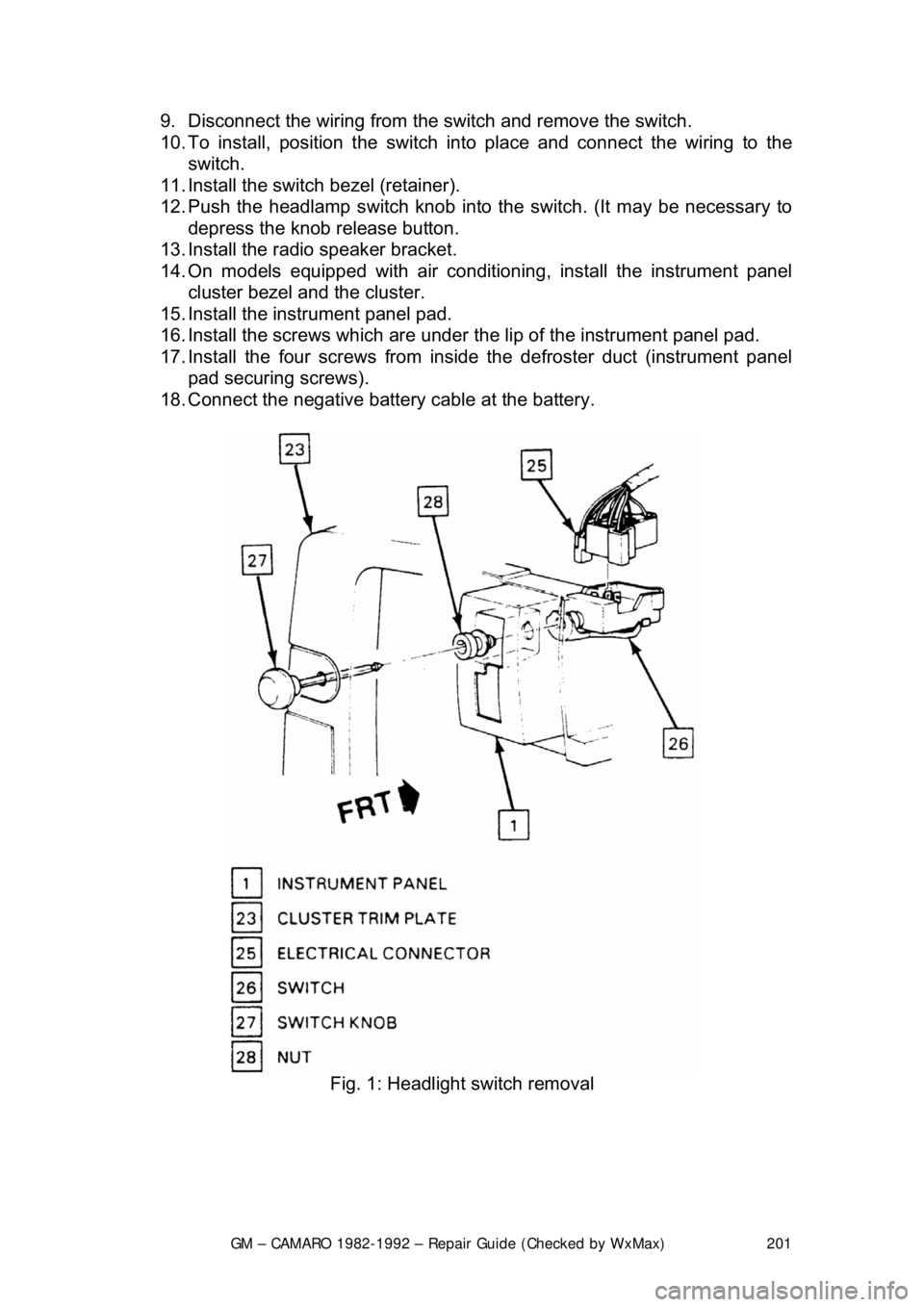
9. Disconnect the wiring from the
switch and remove the switch.
10. To install, position t he switch into place and connect the wiring to the
switch.
11. Install the switch bezel (retainer).
12. Push the headlamp switch knob into the switch. (It may be necessary to
depress the knob release button.
13. Install the radio speaker bracket.
14. On models equipped with air conditioni ng, install the instrument panel
cluster bezel and the cluster.
15. Install the inst rument panel pad.
16. Install the screws which are under t he lip of the instrument panel pad.
17. Install the four screw s from inside the defroster duct (instrument panel
pad securing screws).
18. Connect the negative battery cable at the battery.
Fig. 1: Headlight switch removal
Page 202 of 875
GM – CAMARO 1982-1992 – Repair Guide (Checked by WxMax) 202
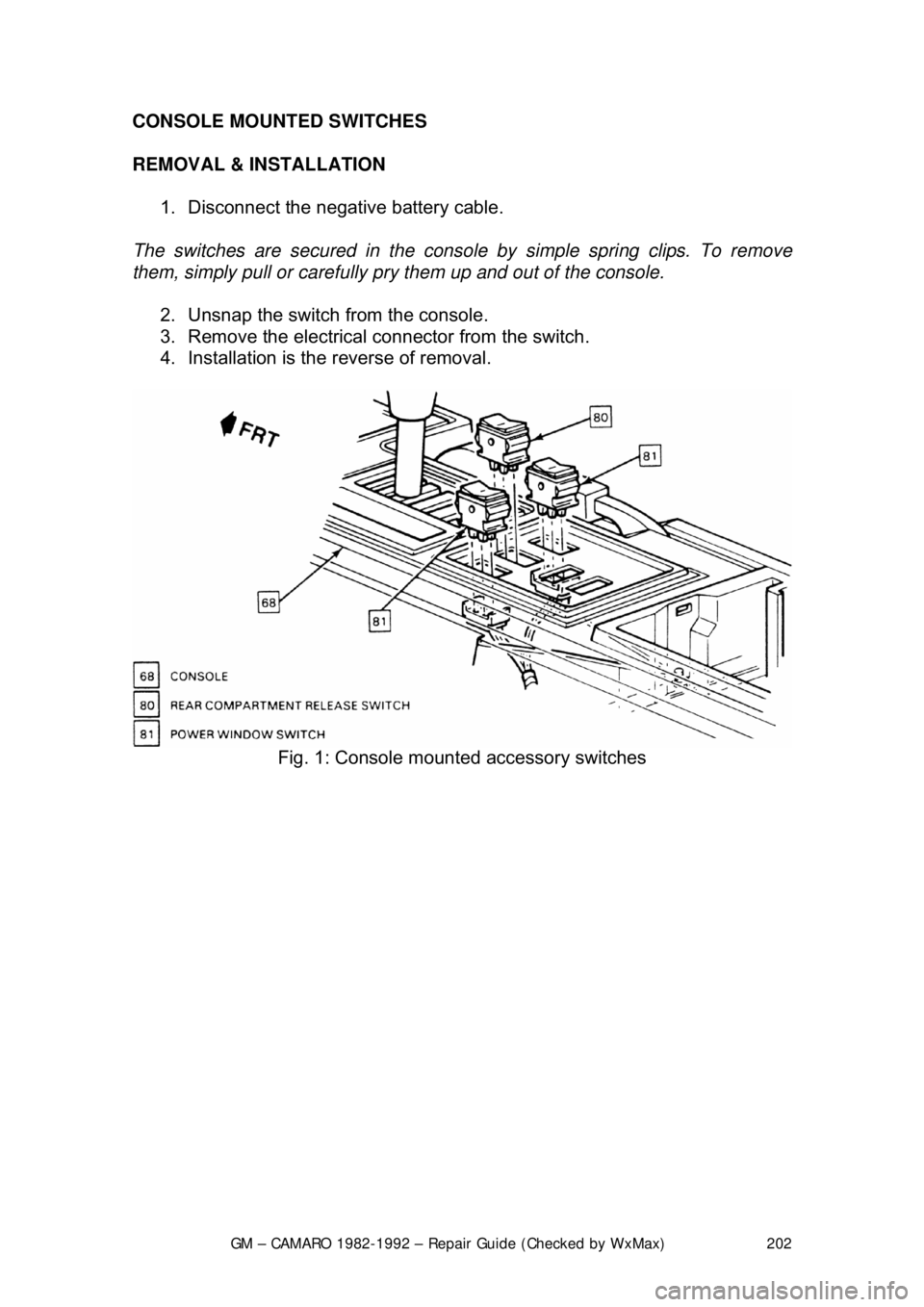
CONSOLE MOUNTED SWITCHES
REMOVAL & INSTALLATION
1. Disconnect the negative battery cable.
The switches are secured in the consol e by simple spring clips. To remove
them, simply pull or carefully pr y them up and out of the console.
2. Unsnap the switch from the console.
3. Remove the electrical connector from the switch.
4. Installation is the reverse of removal.
Fig. 1: Console mounted accessory switches
Page 213 of 875
GM – CAMARO 1982-1992 – Repair Guide (Checked by WxMax) 213
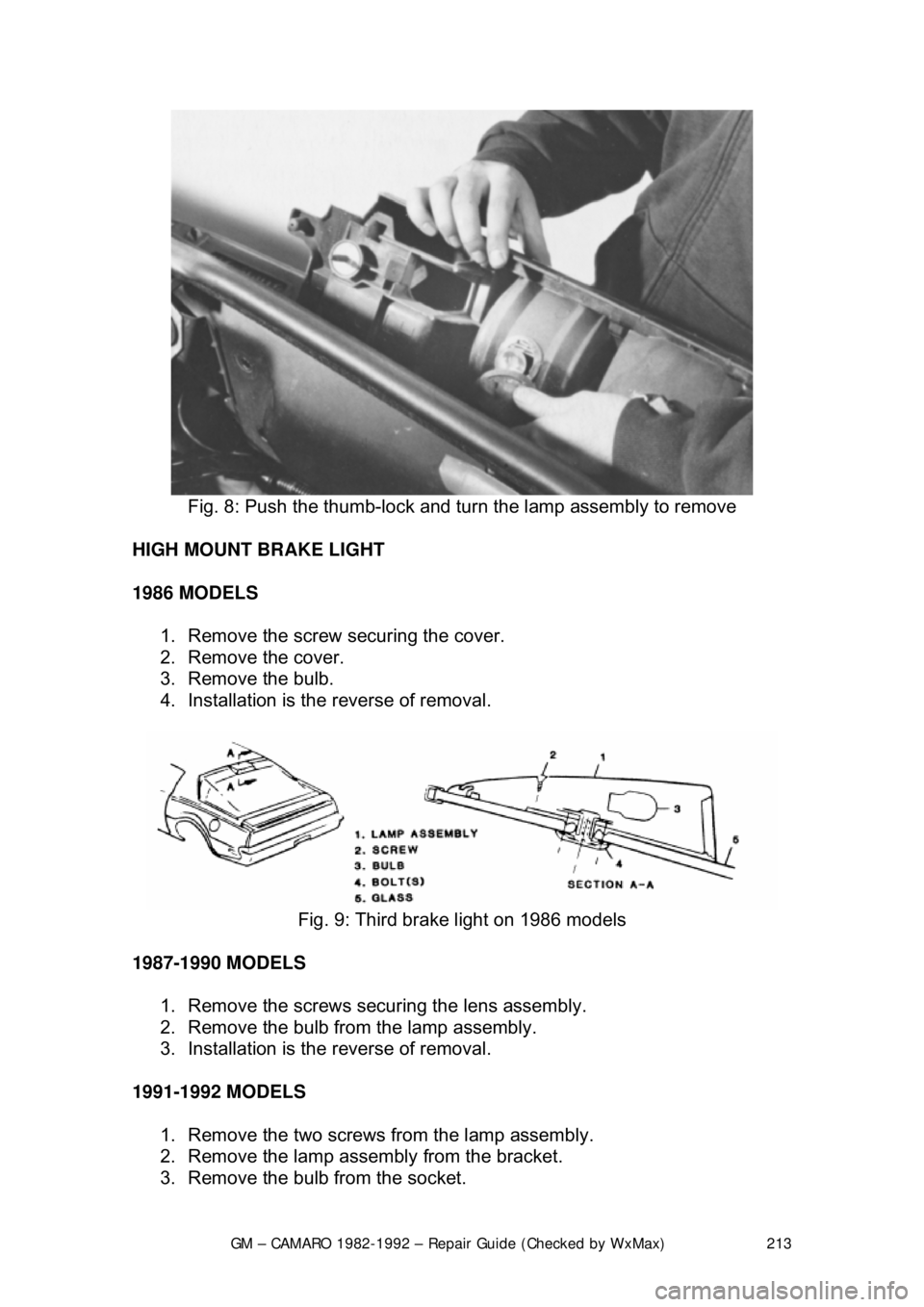
Fig. 8: Push the thumb-lock and turn the lamp assembly to remove
HIGH MOUNT BRAKE LIGHT
1986 MODELS 1. Remove the screw securing the cover.
2. Remove the cover.
3. Remove the bulb.
4. Installation is the reverse of removal.
Fig. 9: Third brake light on 1986 models
1987-1990 MODELS 1. Remove the screws securing the lens assembly.
2. Remove the bulb from the lamp assembly.
3. Installation is the reverse of removal.
1991-1992 MODELS 1. Remove the two screws fr om the lamp assembly.
2. Remove the lamp assembly from the bracket.
3. Remove the bulb from the socket.
Page 216 of 875
GM – CAMARO 1982-1992 – Repair Guide (Checked by WxMax) 216
PASSENGER AREA LAMPS
The passenger area courtesy lamps can
be replaced by first removing the
appropriate trim panel, then removing the bulb from the socket. Most panels are
fastened by screws or snap-fasteners. Be careful not to force the trim panel off,
as you may damage it. Do not pry with tools which may damage the panel, use
tools designed for panel removal only.
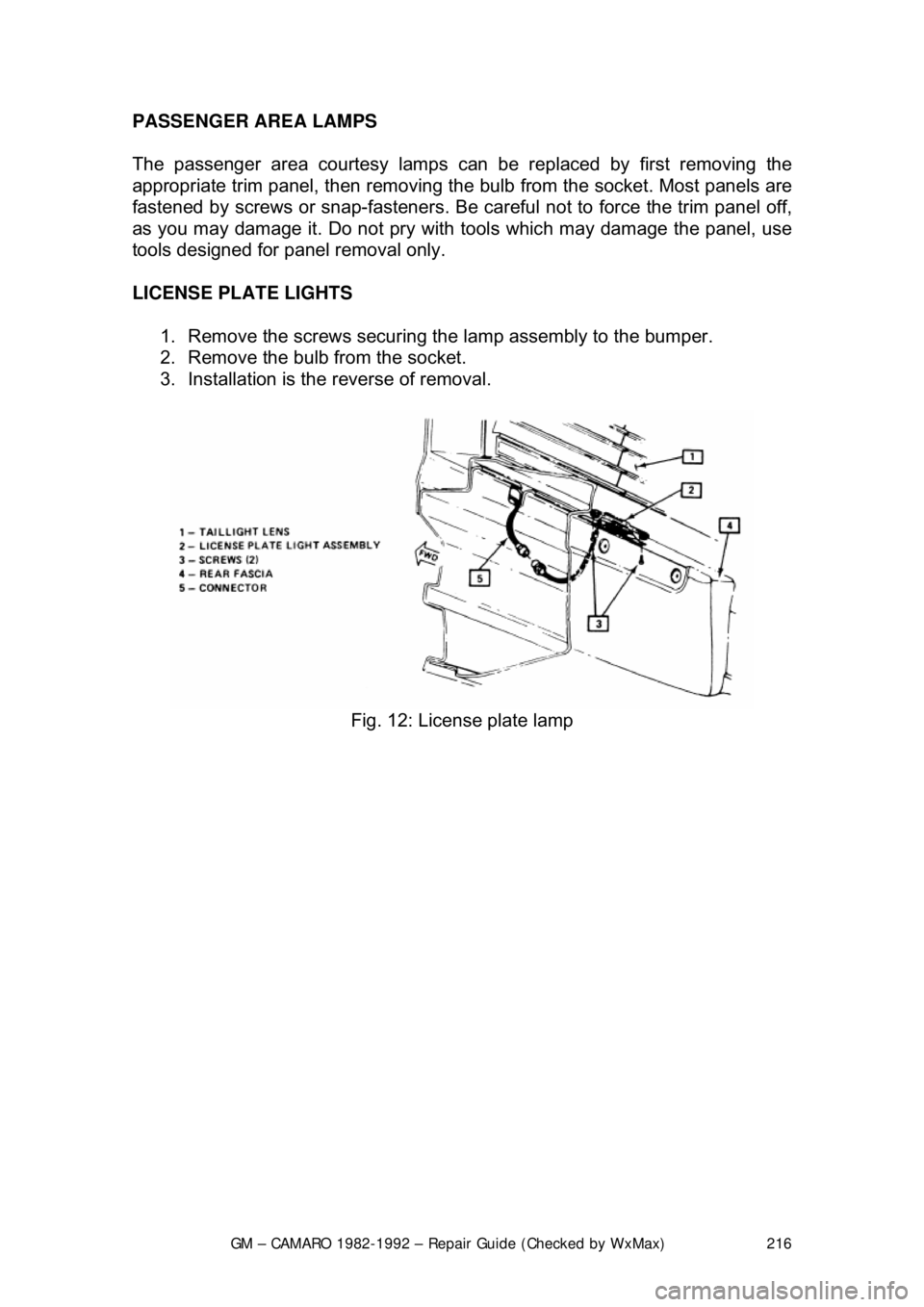
LICENSE PLATE LIGHTS
1. Remove the screws securing the lamp assembly to the bumper.
2. Remove the bulb from the socket.
3. Installation is the reverse of removal.
Fig. 12: License plate lamp
Page 223 of 875

GM – CAMARO 1982-1992 – Repair Guide (Checked by WxMax) 223
FUSIBLE LINKS
In addition to circuit breakers and fuses,
the wiring harness incorporates fusible
links to protect the wiring. Links are used rather than a fuse, in wiring circuits
that are not normally fused, such as th e ignition circuit. The fusible links are
color coded red in the charging and load circuits to match the color coding of
the circuits they protect. Each link is four gauges smaller than the cable it
protects, and is marked on the insulation with the gauge size because the
insulation makes it appear heavier than it really is. The engine compartment
wiring harness has several fusible links. The same size wire with a special
Hypalon insulation must be used w hen replacing a fusible link.
For more details, see the information on fusible links at the beginning of this
section.
The links are located in the following areas:
1. A molded splice at the starter solenoid Bat terminal, a 14 gauge red wire.
2. A 16 gauge red fusible link at the j unction block to protect the unfused
wiring of 12 gauge or larger wire. This link stops at the bulkhead
connector.
3. The alternator warning light and fiel d circuitry is protected by a 20 gauge
red wire fusible link used in the batte ry feed-to-voltage regulator number
3 terminal. The link is installed as a molded splice in the circuit at the
junction block.
4. The ammeter circuit is protected by two 20 gauge fusible links installed
as molded splices in the circuit at t he junction block and battery to starter
circuit.
REPLACEMENT 1. Determine the circuit that is damaged.
2. Disconnect the negative battery terminal.
3. Cut the damaged fuse link from the harness and discard it.
4. Identify and procure the proper fuse link and butt connectors.
5. Strip the wire about
1/2 in. (13mm) on each end.
6. Connect the fusible link and crimp the butt connectors making sure that the wires are secure.
7. Solder each connection with resin core solder, and wrap the connections
with plastic electrical tape.
8. Reinstall the wir e in the harness.
9. Connect the negative battery terminal and test the system for proper
operation.
CIRCUIT BREAKERS
Various circuit breakers are located under the instrument panel. In order to gain
access to these components, it may be ne cessary to first remove the under
dash padding. Most of the circuit breakers are located in the convenience
center or the fuse panel.
Page 289 of 875
GM – CAMARO 1982-1992 – Repair Guide (Checked by WxMax) 289
6. Make sure that levers L, M, and N
are in their Neutral positions (center
detents).
7. Align the holes of levers E, H, and J with the notch in the shifter
assembly (G). Insert an alignment gauge (J-33195) to hold the levers in
this position.
8. Insert swivel S into lever E and insta ll washer Q. Secure with retainer P.
9. Apply rearward pressure (Z) to leve r N. Tighten locknuts R and T (at the
same time) against swivel S to 25 ft. lbs. (34 Nm).
10. Repeat steps 8 and 9 for rod D and levers J and M.
11. Repeat steps 8 and 9 for rod K and levers H and L.
12. Remove the alignment gauge, lower t he vehicle, and check the operation
of the shifting mechanism.
13. Reconnect the negative battery cable.
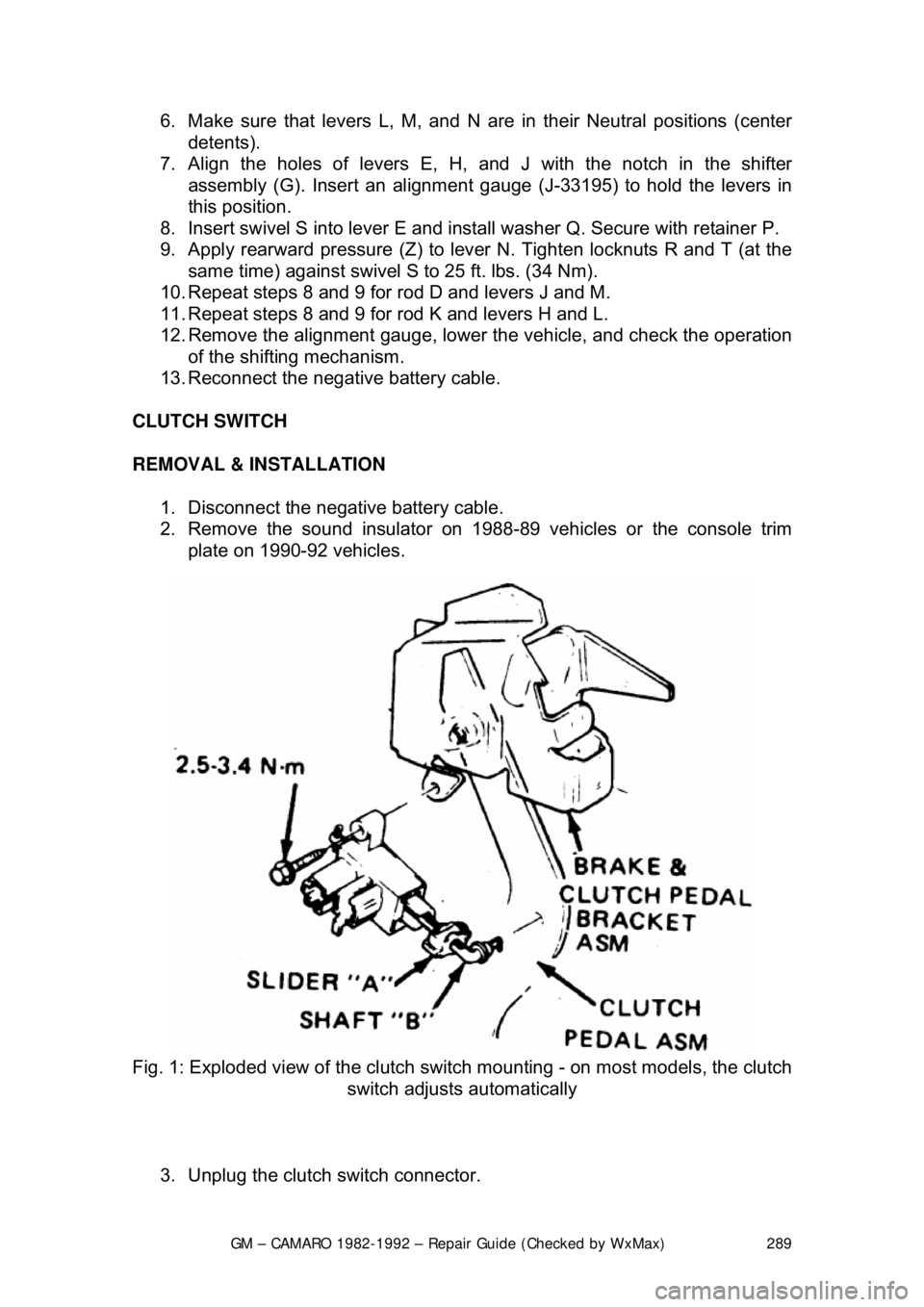
CLUTCH SWITCH
REMOVAL & INSTALLATION 1. Disconnect the negative battery cable.
2. Remove the sound insulator on 1988- 89 vehicles or the console trim
plate on 1990-92 vehicles.
Fig. 1: Exploded view of the clutch swit ch mounting - on most models, the clutch
switch adjusts automatically
3. Unplug the clutch switch connector.
Page 293 of 875

GM – CAMARO 1982-1992 – Repair Guide (Checked by WxMax) 293
4. Remove the torque arm from t
he vehicle as outlined under Rear
Suspension in
Suspension & Steering of this repair guide.
5. Mark the driveshaft and the rear ax le pinion flange to indicate their
relationship. Unbolt the rear universal joint straps. Lower the rear of the
driveshaft, being careful to keep the universal joint caps in place.
Withdraw the driveshaft from the transmission and remove it from the
vehicle.
6. Disconnect the speedometer cable a nd the electrical connectors from the
transmission.
7. Remove the exhaust pipe brace.
8. Remove the transmission shifter support attaching bolts from the
transmission.
9. On 4-speed transmissions only, disconnec t the shift linkage at the shifter.
10. Raise the transmission slight ly with a jack, then remove the
crossmember attaching bolts.
11. Remove the transmission mount atta ching bolts, then remove the mount
and crossmember from the vehicle.
12. Remove the transmission attachi ng bolts, then with the aid of an
assistant, move the transmission r earward and downward out of the
vehicle.
To install: 13. Apply a light coating of high temperature grease to the main drive gear
bearing retainer and to the splined por tion of the main drive gear. This
will assure free movement of the clutch and transmission components
during assembly.
14. Install the transmission and secu re with transmission mounting bolts
Torque transmission-to-clutch housing bo lts to 55 ft. lbs. (74 Nm).
15. Install the mount and cr ossmember into the vehicle, then install the
transmission mount attaching bolts. Torque both the mount-to-
crossmember bolts and t he mount-to-transmission bolts to 35 ft. lbs. (47
Nm).
16. Install the crossmember attach ing bolts. Torque the crossmember-to-
body bolts to 35 ft. lbs.
17. On 4-speed transmissions only, connect the shift linkage at the shifter and adjust the shift linkage.
18. Install the transmission shifte r support attaching bolts to the
transmission. Torque shifter bracket-to -extension housing to 25 ft. lbs.
(35 Nm).
19. Install the exhaust pipe brace.
20. Connect the speedometer cable and the electrical connectors to the
transmission.
21. Install the driveshaft into the tr ansmission. Then, align the marks on the
driveshaft and the rear axle pinion fl ange. Bolt the rear universal joint
straps.
22. Install the torque arm into the vehicle.
23. Fill the transmission wi th lubricant. Then install the filler plug and torque
to 15 ft. lbs. (20 Nm).
24. Lower the vehicle.
Page 294 of 875

GM – CAMARO 1982-1992 – Repair Guide (Checked by WxMax) 294
25. Connect the negative battery cable at the battery.
CLUTCH
UNDERSTANDING THE CLUTCH
The purpose of the clutch is to disconnect and connect engine power at the
transmission. A vehicle at rest requires a lot of engine torque to get all that
weight moving. An internal combustion engine does not develop a high starting
torque (unlike steam engines) so it must be allowed to operate without any load
until it builds up enough torque to move the vehicle. To a point, torque
increases with engine rpm. The clutch a llows the engine to build up torque by
physically disconnecting t he engine from the transmission, relieving the engine
of any load or resistance.
The transfer of engine power to the tr ansmission (the load) must be smooth and
gradual; if it weren't, driv e line components would wear out or break quickly.
This gradual power transfer is made possi ble by gradually releasing the clutch
pedal. The clutch disc and pressure plat e are the connecting link between the
engine and transmission. When the clutch pedal is released, the disc and plate
contact each other (the clutch is engag ed) physically joining the engine and
transmission. When the pedal is pushed in, the disc and plate separate (the
clutch is disengaged) disconnecting the engine from the transmission.
Most clutch assemblies consists of t he flywheel, the clutch disc, the clutch
pressure plate, the throw out bearing and fork, the actuating linkage and the
pedal. The flywheel and clutch pressure plate (driving members) are connected
to the engine crankshaft and rotate with it. The clutch disc is located between
the flywheel and pressure plate, and is splined to the transmission shaft. A
driving member is one that is attached to the engine and transfers engine power
to a driven member (clutch disc) on t he transmission shaft. A driving member
(pressure plate) rotates (drives) a driv en member (clutch disc) on contact and,
in so doing, turns the transmission shaft.
There is a circular di aphragm spring within th e pressure plate cover
(transmission side). In a relaxed state (w hen the clutch pedal is fully released)
this spring is convex; that is, it is dished outward toward the transmission.
Pushing in the clutch peda l actuates the attached linkage. Connected to the
other end of this is the throw out fork, which hold the throw out bearing. When
the clutch pedal is depre ssed, the clutch linkage pushes the fork and bearing
forward to contact the diaphragm spring of the pressure plate. The outer edges
of the spring are secured to the pressure plate and are pivoted on rings so that
when the center of the spring is compre ssed by the throw out bearing, the outer
edges bow outward and, by so doing, pu ll the pressure plate in the same
direction - away from the clutch disc. This action se parates the disc from the
plate, disengaging the clutch and allowing the transmission to be shifted into
another gear. A coil type clutch return sp ring attached to the clutch pedal arm
permits full release of the pedal. Releasing the pedal pulls the throw out bearing
away from the diaphragm spring resulting in a reversal of spring position. As
bearing pressure is gradually released from the spring center, the outer edges
Page 322 of 875

GM – CAMARO 1982-1992 – Repair Guide (Checked by WxMax) 322
CAUTION - The transmission must be secu red to the transmission jack
17. Remove the transmission from the vehicle. Be careful not to damage the oil cooler lines, throttle valve cable, or the shift control cable. Also, keep
the rear of the transmissi on lower than the front to avoid the possibility of
the torque converter disengagi ng from the transmission.
To install: 18. Position the transmission and converter into place.
19. Install the transmission -to-engine mounting bolts.
20. Connect the throttle valve cable and oil cooler lines to the transmissio\
n.
21. Install the transmission cro ssmember and secure with bolts.
22. Install the transmission mount bolt.
23. Matchmark the torque converter-to-f lywheel. Install the torque converter-
to-flywheel attaching bolts.
Before installing the converter-to-flywheel bolts, be sure that the weld nuts on
the converter are flush with the flywheel, and that the converter rotates freely by
hand in this position.
24. Install the flywheel cover.
25. Install the torque arm-to-transmission bolts.
26. Connect the speedometer cable, el ectrical connectors and the shift
control cable from the transmission.
27. Connect the catalytic converter s upport bracket at the transmission.
28. Align the matchmark m ade earlier, then install the driveshaft to the axle
pinion. Bolt the universal joint straps to the pinion flange.
29. Lower the vehicle.
30. Install the dipstick tube using a ne w dipstick tube O-ring and secure with
the bolt. Install the tran smission oil dipstick.
31. Connect the throttle valve (TV) c ontrol cable at the carburetor.
32. Install the air cleaner assembly.
33. Connect the negative battery cable at the battery.
DRIVELINE
DRIVESHAFT AND U-JOINTS
The U-joint is secured to the yoke in one of two ways. Dana and Cleveland
shafts use a conventional snapring to ho ld each bearing cup in the yoke. The
snapring fits into a groove located in eac h yoke end just on top of each bearing
cup. The Saginaw design shaft secures its U-joints in another way. Nylon
material is injected through a small hole in the yoke and flows along a circular
groove between the U-joint and the yoke , creating a synthetic snapring.
Disassembly of the Saginaw U-joint requi res the joint to be pressed from the
yoke. This results in damage to the be aring cups and destruction of the nylon
rings.
Page 323 of 875
GM – CAMARO 1982-1992 – Repair Guide (Checked by WxMax) 323
Replacement kits include new bearing
cups and conventional snaprings to
replace the original nylon rings. These replacement rings must go inboard of the
yoke in contrast to outboard mounting of the Dana and Cleveland designs.
Previous service to the Saginaw U-joints can be recognized by the presence of
snaprings inboard of the yoke.
Bad U-joints, requiring replacement, will produce a clunking sound when the car
is put into gear. This is due to worn needle bearings or a scored trunnion end
possibly caused by improper lubricati on during assembly. Camaro U-joints
require no periodic maintenance and theref ore have no lubrication fittings.
DRIVESHAFT
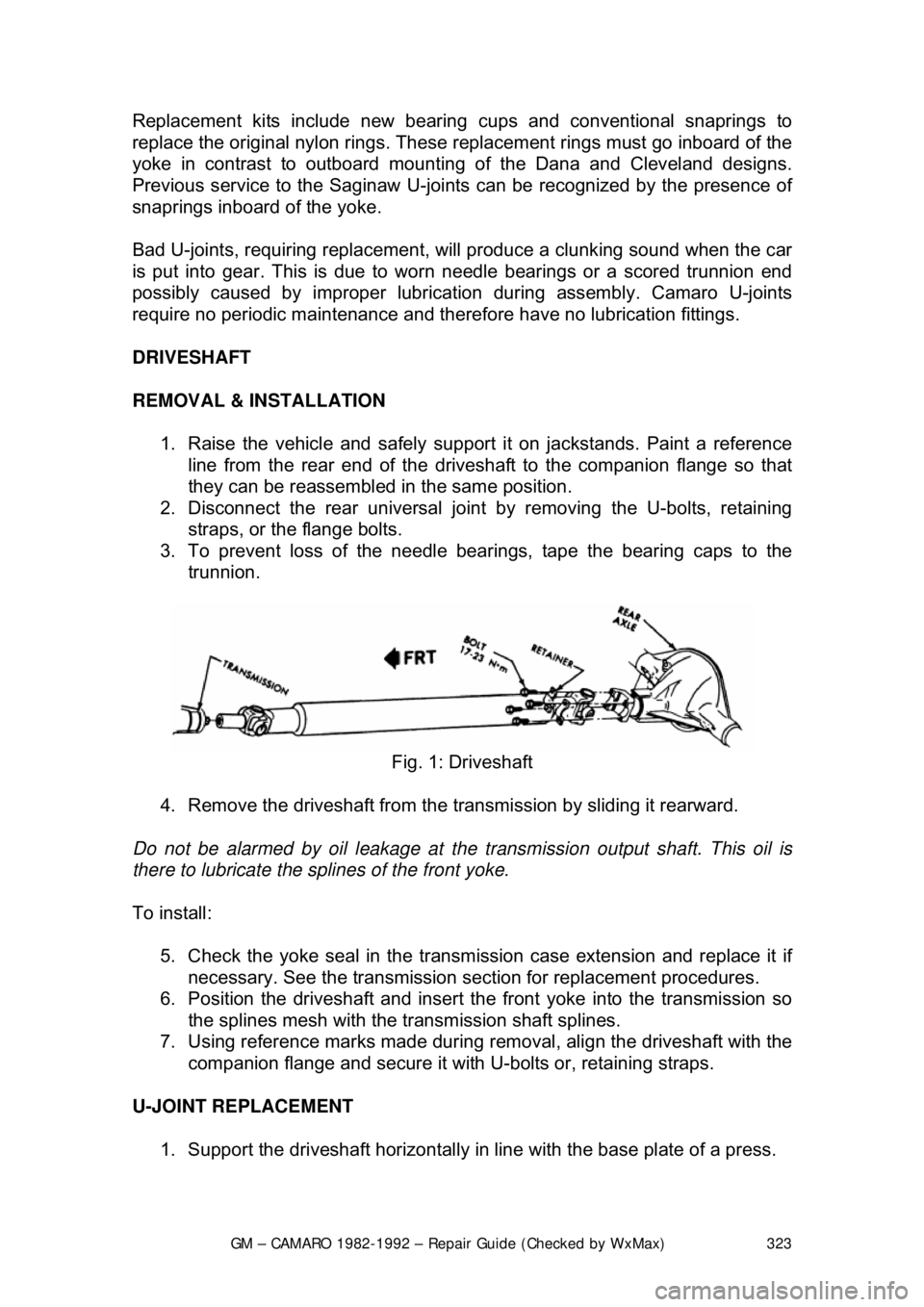
REMOVAL & INSTALLATION 1. Raise the vehicle and safely su pport it on jackstands. Paint a reference
line from the rear end of the drives haft to the companion flange so that
they can be reassembled in the same position.
2. Disconnect the rear universal join t by removing the U-bolts, retaining
straps, or the flange bolts.
3. To prevent loss of the needle bear ings, tape the bearing caps to the
trunnion.
Fig. 1: Driveshaft
4. Remove the driveshaft from the tr ansmission by sliding it rearward.
Do not be alarmed by oil l eakage at the transmission output shaft. This oil is
there to lubricate the sp lines of the front yoke.
To install: 5. Check the yoke seal in the transmi ssion case extension and replace it if
necessary. See the transmission sect ion for replacement procedures.
6. Position the driveshaft and insert t he front yoke into the transmission so
the splines mesh with the transmission shaft splines.
7. Using reference marks made during re moval, align the driveshaft with the
companion flange and secure it with U-bolts or, retaining straps.
U-JOINT REPLACEMENT 1. Support the driveshaft horizontally in line with the base plate of a press.