steering CHEVROLET CAMARO 1982 Repair Guide
[x] Cancel search | Manufacturer: CHEVROLET, Model Year: 1982, Model line: CAMARO, Model: CHEVROLET CAMARO 1982Pages: 875, PDF Size: 88.64 MB
Page 160 of 875
GM – CAMARO 1982-1992 – Repair Guide (Checked by WxMax) 160
damage, and legal considerations (such as t
he fact that it is a federal crime to
vent refrigerant into the atmosphere), dictate that the A/C components on your
vehicle should be serviced only by a Motor Vehicle Air Conditioning (MVAC)
trained, and EPA certified aut omotive technician.
If your vehicle's A/C system uses R-12 re frigerant and is in need of recharging,
the A/C system can be c onverted over to R-134a refrigerant (less
environmentally harmful and expensive). Refer to General Information &
Maintenance for additional information on R- 12 to R-134a conversions, and for
additional considerations dealing with your vehicle's A/C system.
CONTROL CABLES
REMOVAL & INSTALLATION
Some of the following cables will not be used on all models and model years.
Left and Right Air Vent Cables 1. Remove the left and right sound insulators.
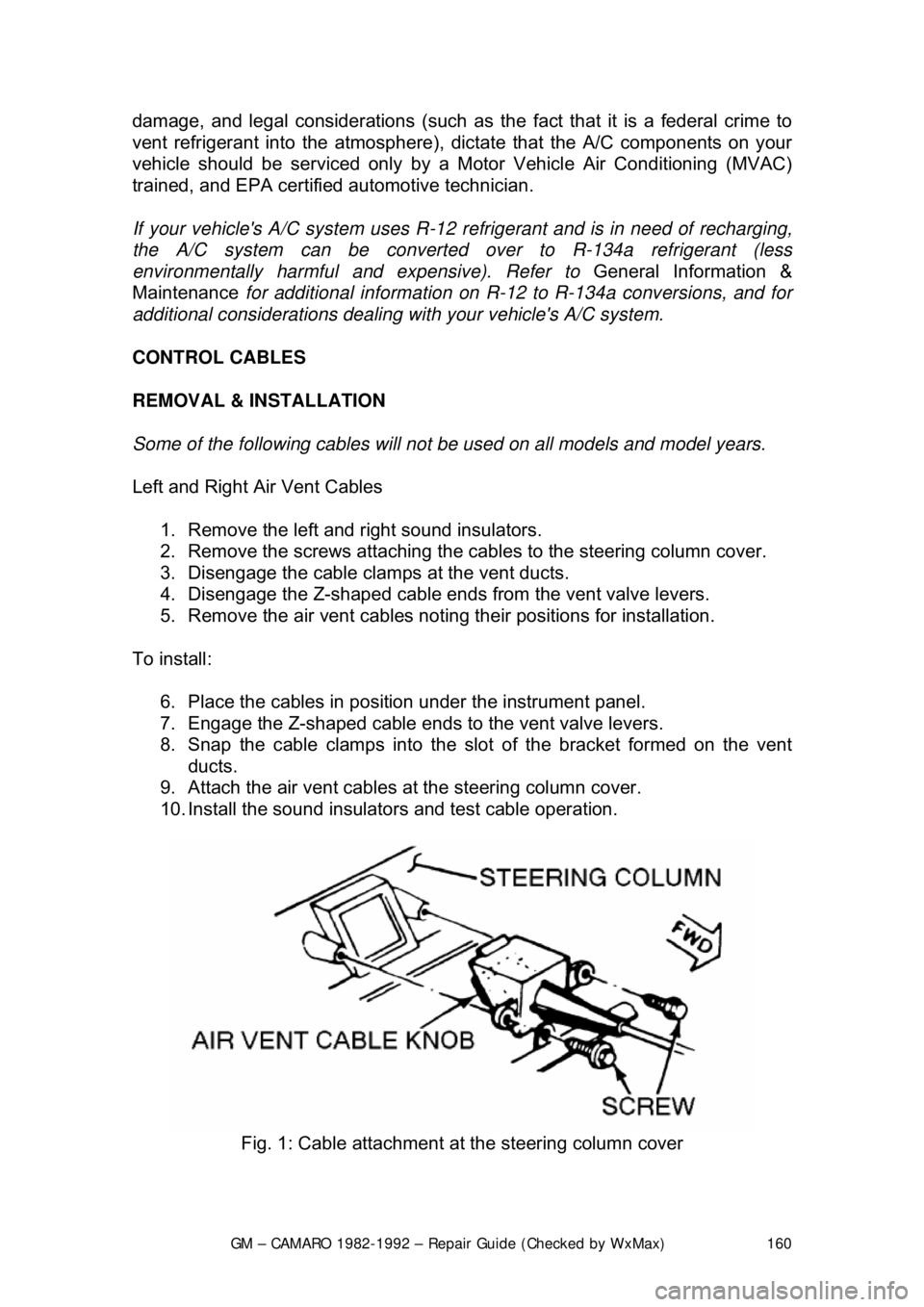
2. Remove the screws attaching the cabl es to the steering column cover.
3. Disengage the cable clamps at the vent ducts.
4. Disengage the Z-shaped c able ends from the vent valve levers.
5. Remove the air vent cables notin g their positions for installation.
To install: 6. Place the cables in posi tion under the instrument panel.
7. Engage the Z-shaped cable ends to the vent valve levers.
8. Snap the cable clamps into the slot of the bracket formed on the vent
ducts.
9. Attach the air vent cables at the steering column cover.
10. Install the sound insulators and test cable operation.
Fig. 1: Cable attachment at the steering column cover
Page 176 of 875
GM – CAMARO 1982-1992 – Repair Guide (Checked by WxMax) 176
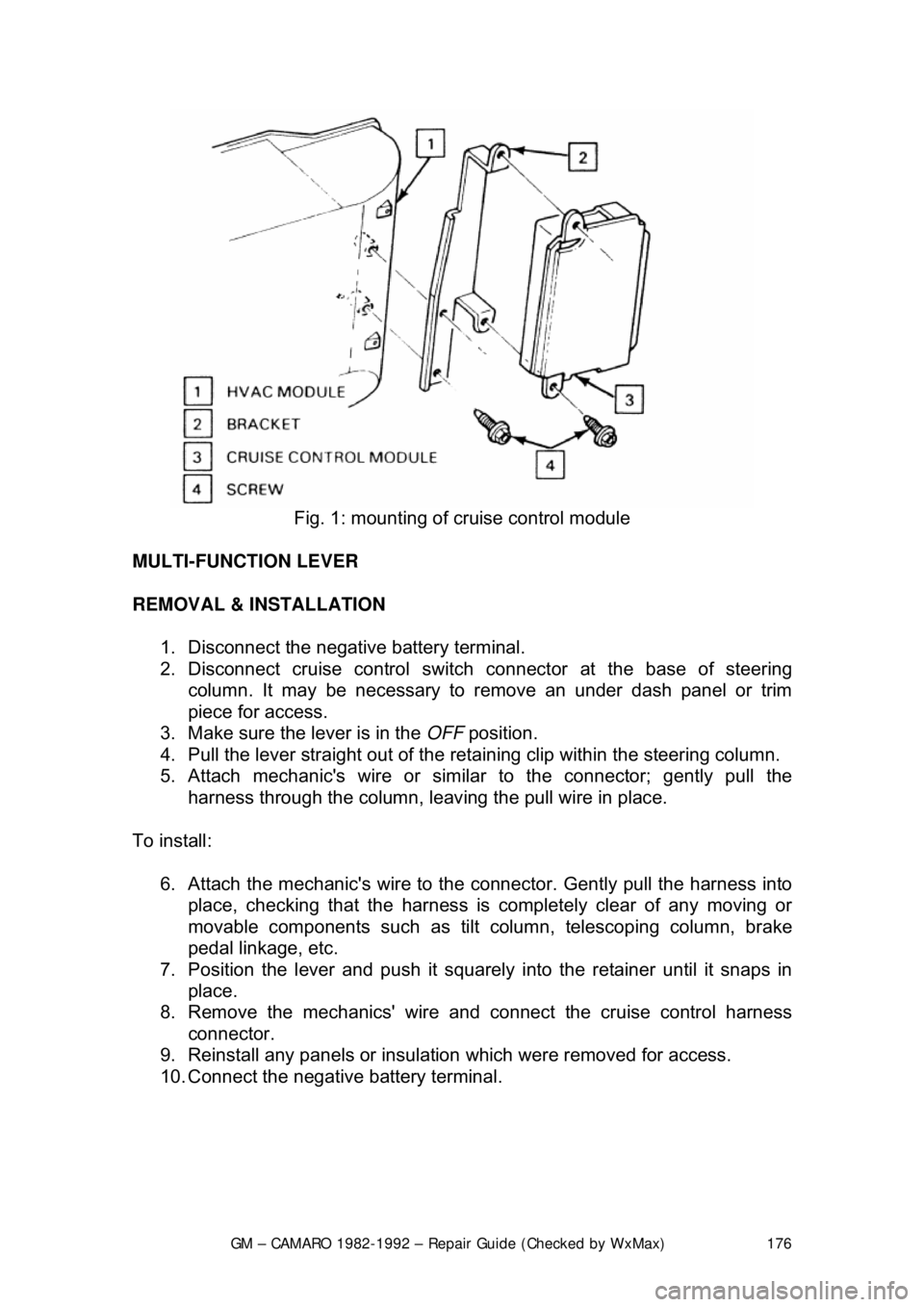
Fig. 1: mounting of cruise control module
MULTI-FUNCTION LEVER
REMOVAL & INSTALLATION 1. Disconnect the negative battery terminal.
2. Disconnect cruise control switch connector at the base of steering
column. It may be necessary to re move an under dash panel or trim
piece for access.
3. Make sure the lever is in the OFF position.
4. Pull the lever straight out of the retaining clip within the steering column.
5. Attach mechanic's wire or simi lar to the connector; gently pull the
harness through the column, leaving the pull wire in place.
To install: 6. Attach the mechanic's wire to the connector. Gently pull the harness into
place, checking that the harness is completely clear of any moving or
movable components such as tilt column, telescoping column, brake
pedal linkage, etc.
7. Position the lever and push it squarely into the re tainer until it snaps in
place.
8. Remove the mechanics' wire and connect the cruise control harness
connector.
9. Reinstall any panels or insulation which were removed for access.
10. Connect the negative battery terminal.
Page 197 of 875

GM – CAMARO 1982-1992 – Repair Guide (Checked by WxMax) 197
PUMP IN WASHER TANK
1. Drain the washer tank and disconnect the wire connectors.
2. Disconnect and remove the reservoir
3. Remove the washer pump from the reservoir.
4. Installation is the reverse of t he removal procedure. Ensure pump is
pushed fully into the reservoir.
INSTRUMENTS AND SWITCHES
INSTRUMENT CLUSTER
REMOVAL & INSTALLATION
SPORT COUPE MODEL 1. Disconnect the negative battery cable.
2. Remove the instrument cluster bezel.
3. Remove the cluster attachment screws.
4. Pull the cluster out. Disconnect t he speedometer cable and electrical
connections.
5. Remove the cluster lens.
6. Install the cluster lens.
7. Connect the speedometer and electrical connections.
8. Push the cluster in.
9. Install the cluster attachment screws.
10. Install the instrument cluster bezel.
11. Connect the negative battery cable.
BERLINETTA MODEL 1. Disconnect the negative battery cable.
2. Remove the instrument cluster bezel.
3. Remove the 8 steering column tr im cover screws and trim cover.
4. Remove the right and left hand pod a ttaching screws at the bottom front
of each pod. Pull the pods rearward and disconnect the electrical
connection.
5. Remove the 5 cluster lens screws and lens.
6. Remove the 2 steering column bolts and lower the column.
7. Pull the instrument cluster rear ward and disconnect the electrical
connection. Remove the instrument cluster.
8. To install, position the inst rument cluster into place.
9. Connect the electrical connection and push the cluster forward.
10. Lift the column and install the 2 steering column bolts.
11. Install the lens and install the 5 cluster lens screws.
12. Connect the electrical connection to each pod and push forward. Install
the right and left hand pod attaching scr ews at the bottom front of each
pod. Pull the pods rearward and disconnect the electrical connection.
13. Install the trim cover and install th e 8 steering column trim cover screws.
14. Install the instrument cluster bezel.
Page 200 of 875

GM – CAMARO 1982-1992 – Repair Guide (Checked by WxMax) 200
9. Lubricate the speedometer cable
with an appropriate lubricant, being
sure to cover the lower thirds of the cable.
10. Insert the cable into the casi ng, then connect the cable and casing
assembly to the speedometer.
11. Install the instrument cluster, then install the cluster attaching screws.
12. Install the instrument cluster trim plate.
13. On models without cruise control, connect the speedometer cable strap
at the power brake booste r. On models with cruise control, connect the
speedometer cable at the cr uise control transducer.
14. Connect the negative battery cable at the battery.
WIPER SWITCH
REMOVAL & INSTALLATION
The wiper switch is part of the multi-function lever, located on the steering
wheel column.
1. Disconnect the electrical connector of the multi-function lever, located
under the instrument panel.
2. Remove the protective cover from the wire.
3. Grasp the lever firmly, twist and pull (the tang on the lever must align
with the socket) the lever straight out.
4. Pull the wire through the steering column.
To install: 5. Slide a music wire tool through the steering column and connect the
lever wire to the tool wire; pull t he wire through the steering column.
6. Push the control lever into the sp ring loaded socket (be sure to align the
tang).
7. Install the protective cover to the wire.
8. Connect the electrical connector of the multi-function lever.
HEADLIGHT SWITCH
REMOVAL & INSTALLATION 1. Disconnect the negative batte ry cable at the battery.
2. Remove the four screws from insi de the defroster duct (instrument panel
pad securing screws).
3. Remove the screws which are under the lip of the instrument panel pad.
4. Remove the instrument panel pad.
5. On models equipped with air condition ing, remove the instrument panel
cluster bezel and the cluster.
6. Remove the radio speaker bracket.
7. Pull the headlamp switch knob to the ON position, depress the locking
button for the knob and shaft (locat ed on the switch), and remove the
knob and shaft.
8. Remove the switch bezel (retainer).
Page 219 of 875
GM – CAMARO 1982-1992 – Repair Guide (Checked by WxMax) 219
FUSE BLOCK
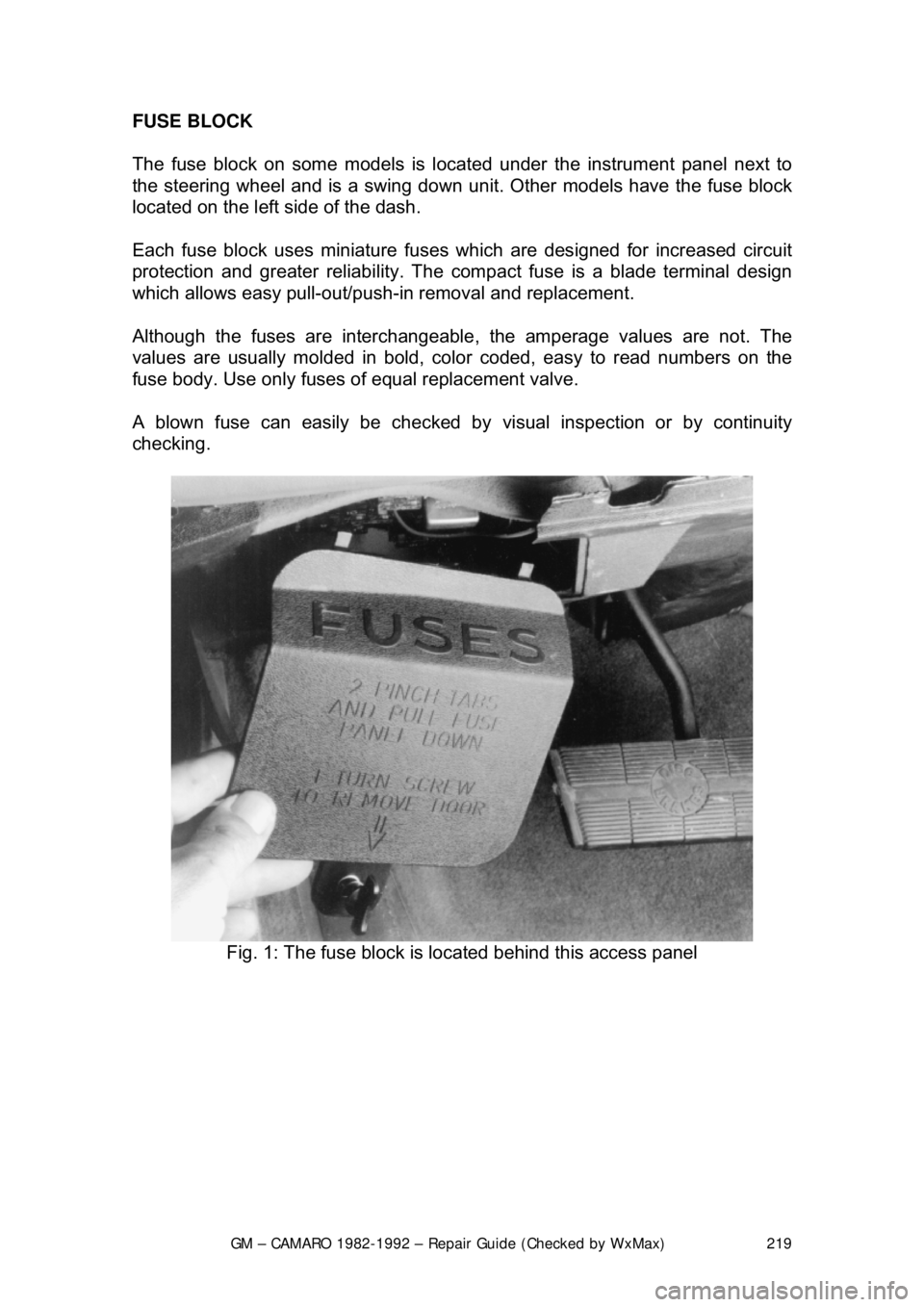
The fuse block on some models is loca
ted under the instrument panel next to
the steering wheel an d is a swing down unit. Other models have the fuse block
located on the left side of the dash.
Each fuse block uses miniature fuse s which are designed for increased circuit
protection and greater reliabi lity. The compact fuse is a blade terminal design
which allows easy pull-out/push- in removal and replacement.
Although the fuses are interchangeable , the amperage values are not. The
values are usually molded in bold, color coded, easy to read numbers on the
fuse body. Use only fuses of equal replacement valve.
A blown fuse can easily be checked by visual inspection or by continuity
checking.
Fig. 1: The fuse block is located behind this access panel
Page 293 of 875

GM – CAMARO 1982-1992 – Repair Guide (Checked by WxMax) 293
4. Remove the torque arm from t
he vehicle as outlined under Rear
Suspension in
Suspension & Steering of this repair guide.
5. Mark the driveshaft and the rear ax le pinion flange to indicate their
relationship. Unbolt the rear universal joint straps. Lower the rear of the
driveshaft, being careful to keep the universal joint caps in place.
Withdraw the driveshaft from the transmission and remove it from the
vehicle.
6. Disconnect the speedometer cable a nd the electrical connectors from the
transmission.
7. Remove the exhaust pipe brace.
8. Remove the transmission shifter support attaching bolts from the
transmission.
9. On 4-speed transmissions only, disconnec t the shift linkage at the shifter.
10. Raise the transmission slight ly with a jack, then remove the
crossmember attaching bolts.
11. Remove the transmission mount atta ching bolts, then remove the mount
and crossmember from the vehicle.
12. Remove the transmission attachi ng bolts, then with the aid of an
assistant, move the transmission r earward and downward out of the
vehicle.
To install: 13. Apply a light coating of high temperature grease to the main drive gear
bearing retainer and to the splined por tion of the main drive gear. This
will assure free movement of the clutch and transmission components
during assembly.
14. Install the transmission and secu re with transmission mounting bolts
Torque transmission-to-clutch housing bo lts to 55 ft. lbs. (74 Nm).
15. Install the mount and cr ossmember into the vehicle, then install the
transmission mount attaching bolts. Torque both the mount-to-
crossmember bolts and t he mount-to-transmission bolts to 35 ft. lbs. (47
Nm).
16. Install the crossmember attach ing bolts. Torque the crossmember-to-
body bolts to 35 ft. lbs.
17. On 4-speed transmissions only, connect the shift linkage at the shifter and adjust the shift linkage.
18. Install the transmission shifte r support attaching bolts to the
transmission. Torque shifter bracket-to -extension housing to 25 ft. lbs.
(35 Nm).
19. Install the exhaust pipe brace.
20. Connect the speedometer cable and the electrical connectors to the
transmission.
21. Install the driveshaft into the tr ansmission. Then, align the marks on the
driveshaft and the rear axle pinion fl ange. Bolt the rear universal joint
straps.
22. Install the torque arm into the vehicle.
23. Fill the transmission wi th lubricant. Then install the filler plug and torque
to 15 ft. lbs. (20 Nm).
24. Lower the vehicle.
Page 301 of 875
GM – CAMARO 1982-1992 – Repair Guide (Checked by WxMax) 301
MASTER CYLINDER
Before removing the hydraulic compon
ents for repair, remove the clutch
housing dust cover to verify the malf unction. Measure the movement of the
slave cylinder push rod by pushing the cl utch pedal to the floor; the minimum
movement should be 14mm. Do not r eplace the cylinder if its movement
exceeds the minimum.
REMOVAL & INSTALLATION
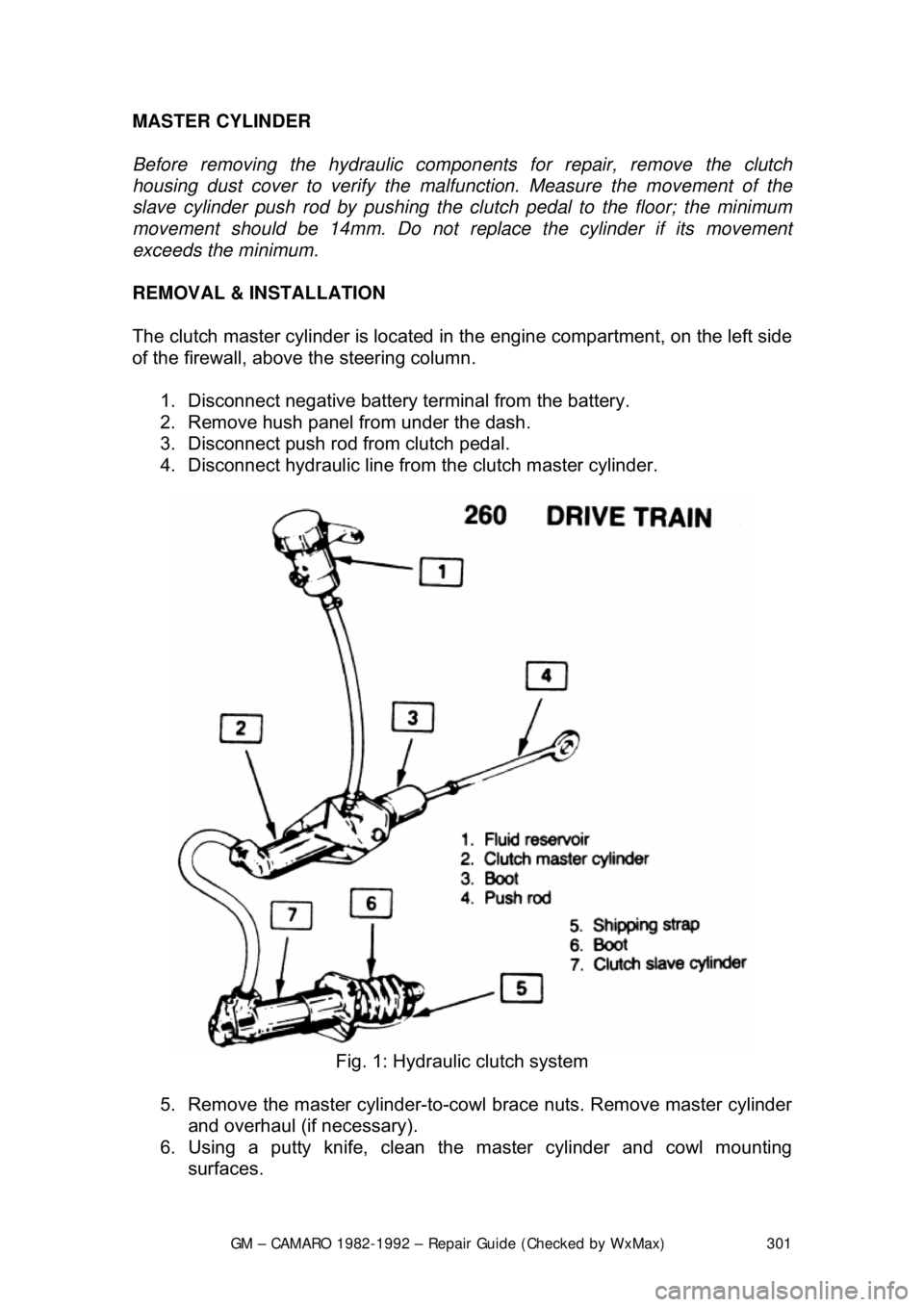
The clutch master cylinder is located in the engine compartment, on the left side
of the firewall, above the steering column.
1. Disconnect negative battery terminal from the battery.
2. Remove hush panel from under the dash.
3. Disconnect push rod from clutch pedal.
4. Disconnect hydraulic line from the clutch master cylinder.
Fig. 1: Hydraulic clutch system
5. Remove the master cylinder-to-cowl brace nuts. Remove master cylinder
and overhaul (if necessary).
6. Using a putty knife, clean th e master cylinder and cowl mounting
surfaces.
Page 315 of 875
GM – CAMARO 1982-1992 – Repair Guide (Checked by WxMax) 315
7. Install the console tr
im to the console.
PARK LOCK CABLE
REMOVAL & INSTALLATION
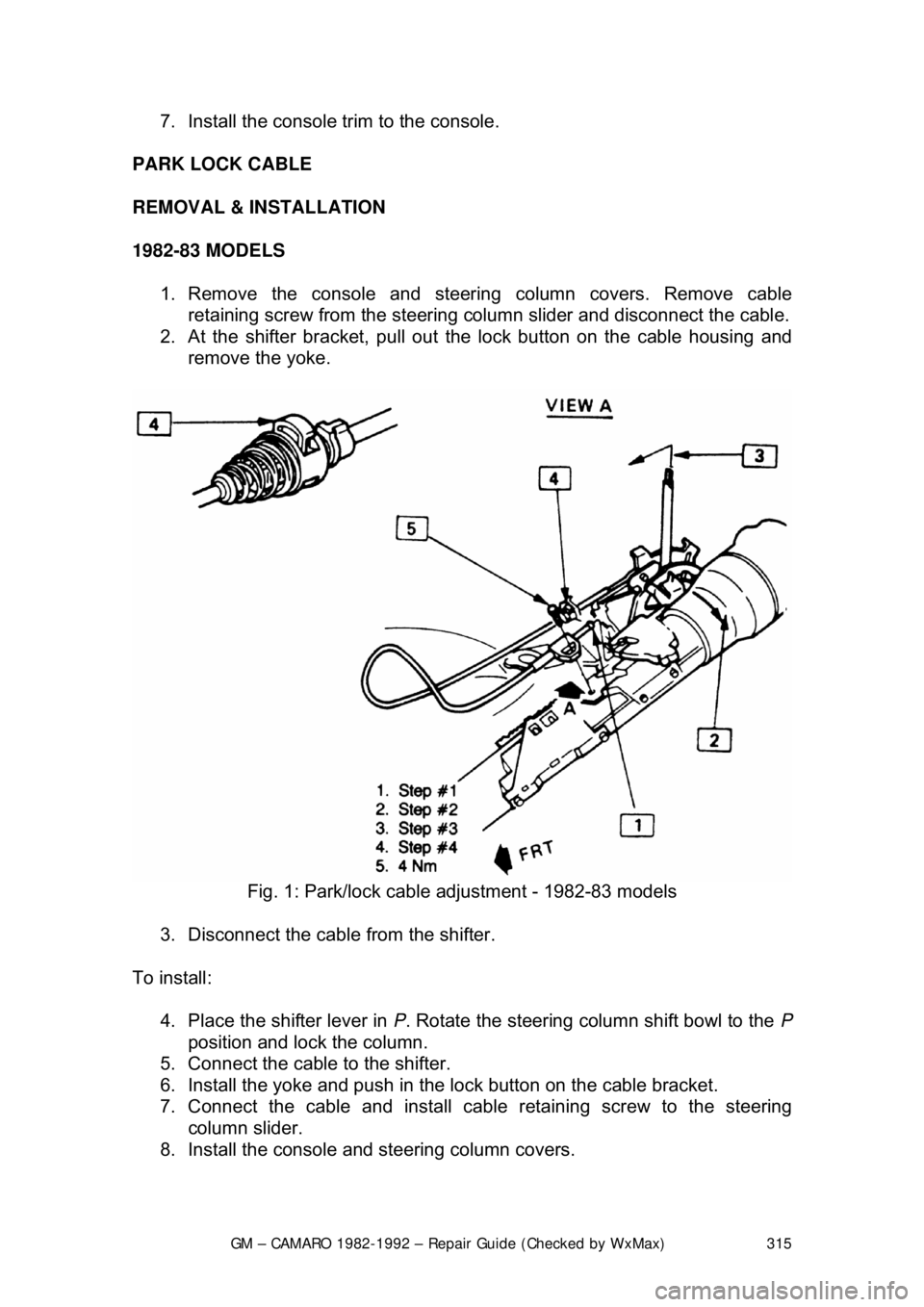
1982-83 MODELS 1. Remove the console and steering column covers. Remove cable retaining screw from the steering colu mn slider and disconnect the cable.
2. At the shifter bracket, pull out t he lock button on the cable housing and
remove the yoke.
Fig. 1: Park/lock cable adjustment - 1982-83 models
3. Disconnect the cable from the shifter.
To install: 4. Place the shifter lever in P. Rotate the steering column shift bowl to the P
position and lock the column.
5. Connect the cable to the shifter.
6. Install the yoke and push in t he lock button on the cable bracket.
7. Connect the cable and install cabl e retaining screw to the steering
column slider.
8. Install the console and steering column covers.
Page 317 of 875

GM – CAMARO 1982-1992 – Repair Guide (Checked by WxMax) 317
1. Place the shifter lever in the
P position. Remove the negative battery
cable.
2. Turn the key to RUN.
3. Remove the left side instrument panel sound insulator and kick panels.
4. Remove the floor console.
5. Remove the cable nut and clip. Remove the cable from the bracket, move the button to the UP position and unsnap the cable end from the
lever lock pin.
6. Lower the steering column. Remove the cable clips.
To install: 7. Place the shifter lever into the P position and the ignition key to the RUN
position.
8. After installing the cable ends, push the cable connector nose toward th\
e connector as far as possible and push down the lock button.
9. Complete the installation by reversing the removal procedure.
EXTENSION HOUSING SEAL (IN VEHICLE)
REMOVAL & INSTALLATION
This seal controls transmission oil leakage around the driveshaft. Continued
failure of this seal usually indicates a worn output shaft bushing. If so, there will
be signs of the same wear on the driveshaft where it contacts the seal and
bushing. The seal is available and is fairly simple to install, with the proper tool.
1. Raise and safely support rear of t he vehicle to minimize transmission oil
loss when the driveshaft is removed.
2. Unbolt the driveshaft fr om the differential and center support bearing, if
equipped. Wrap tape around the bearing cu ps to keep them in place on
the universal joint and slide the sh aft out of the transmission.
3. Use a small pry tool to carefully pr y out the old seal. Be careful not to
insert the tool too far into the hous ing or the bushing will be damaged.
4. Use an oil seal installation tool to evenly drive the new seal into the
housing. Make sure the tool only cont acts the outer metal portion of the
seal.
5. Install the driveshaft. Torque the uni versal bearing cup retainer bolts to
15 ft. lbs. (20 Nm). Recheck fluid level.
TRANSMISSION
REMOVAL & INSTALLATION 1. Disconnect the negative batte ry cable at the battery.
2. Remove the air cleaner assembly.
3. Disconnect the throttle valve (TV) control cable at the carburetor.
Page 364 of 875

GM – CAMARO 1982-1992 – Repair Guide (Checked by WxMax) 364
5. Drain the radiator and remove t
he radiator hoses. Disconnect the heater
hoses and the transmission cooler lines.
6. Remove the upper half of the radi ator shroud, if equipped with a manual
transmission. Remove the radiator and fan shroud assembly, if equipped
with an automatic transmission.
7. Disconnect the throttle linkage, includi ng the cruise control detent cable.
8. Remove the air conditioning compressor and lay aside.
Do not disconnect the air conditioning lines.
9. Disconnect the power steering pump and drain the fluid into a suitable
container. Remove the vacuum brake booster line.
10. Remove the distributor cap and spark plug wires.
11. Disconnect the engine electrical connection at the bulkhead connection
and disconnect any necessary vacuum hoses.
12. Working inside the vehicle, re move the right-hand hush panel and
disconnect the ECM harness at the EC M. Raise and safely support the
vehicle. Remove the right fenderwell splash shield and feed the harness
through the fenderwell.
13. Disconnect the exhaust pipes at the exhaust manifolds and remove
exhaust system from the vehicle.
14. Remove the flywheel cover and remo ve the converter bolts, if equipped
with automatic transmission.
15. Disconnect the transmission an d starter wire connections.
16. Remove the bellhousing and t he motor mount through-bolts.
17. Disconnect the clutch fork return spring, if equipped with a manual
transmission. Lower the vehicle.
18. Relieve the fuel system pressu re. Disconnect the fuel lines.
19. Support the transmission with a suit able jack. Attach an engine lifting
device.
20. Remove the engine assembly.
To install: 21. Position the engine assembly in the vehicle.
22. Attach the motor mount to engine br ackets and lower the engine in place.
Remove the engine lifting device and the transmission jack.
23. Raise and support the vehicle safely.
24. Install the motor mount through-bolts and tighten the nuts to specification. Install t he bellhousing bolts and tight en to 35 ft. lbs. (47
Nm).
25. On vehicles with automatic transmissi on, install the converter to flywheel
attaching bolts to 46 ft. lbs. (63 Nm).
26. Install the flywheel splash shield and tighten to 89 inch lbs. (10 Nm).
Install the clutch return spring, if equipped with manual transmission.
27. Connect the starter wires and the fuel lines.
28. Install the exhaust system.
29. Lower the vehicle.
30. Install the power steering pump and the air conditioning compressor.