lights CHEVROLET CAMARO 2013 5.G User Guide
[x] Cancel search | Manufacturer: CHEVROLET, Model Year: 2013, Model line: CAMARO, Model: CHEVROLET CAMARO 2013 5.GPages: 404, PDF Size: 5.45 MB
Page 145 of 404
Black plate (41,1)Chevrolet Camaro Owner Manual (Include Mex) - 2012
Instruments and Controls 5-41
Exit Lighting
This allows the selection of how
long the exterior lamps stay on
when leaving the vehicle when it is
dark outside.
Press the MENU/SELECT knob
when Exit Lighting is highlighted.
Turn the knob to select Off,
30 Seconds, 1 Minute, or 2 Minutes.
Press the knob to confirm and go
back to the last menu.
Vehicle Locator Lights
This allows the vehicle locator lights
to be turned on or off.
Press the MENU/SELECT knob
when Vehicle Locator Lights is
highlighted. Turn the knob to select
On or Off. Press the knob to confirm
and go back to the last menu.Power Door Locks
Select Power Door Locks and the
following will be displayed:
.Unlocked Door Anti Lock Out
.Auto Door Unlock
.Delayed Door Lock
Unlocked Door Anti Lock Out
When on, this feature will keep the
driver door from locking when the
door is open. If off is selected, the
Delayed Door Lock menu will be
available.
Press the MENU/SELECT knob
when Auto Door Unlock is
highlighted. Turn the knob to select
On or Off. Press the knob to confirm
and go back to the last menu. Auto Door Unlock
This allows selection of which of the
doors will automatically unlock when
the vehicle is shifted into P (Park)
(automatic transmission) or when
the key is removed from the ignition
(manual transmission).
Press the MENU/SELECT knob
when Auto Door Unlock is
highlighted. Turn the knob to select
All Doors, Driver Door, or Off. Press
the knob to confirm and go back to
the last menu.
Delayed Door Lock
When on, this feature will delay the
locking of the doors. To override the
delay, press the power door lock on
the center console.
Press the MENU/SELECT knob
when Delayed Door Lock is
highlighted. Turn the knob to select
On or Off. Press the knob to confirm
and go back to the last menu.
Page 146 of 404
Black plate (42,1)Chevrolet Camaro Owner Manual (Include Mex) - 2012
5-42 Instruments and Controls
Remote Lock/Unlock
Select Remote Lock/Unlock and the
following may be displayed:
.Unlock Feedback (Lights)
.Locking Feedback
.Door Unlock Options
Unlock Feedback (Lights)
When on, the exterior lamps will
flash when unlocking the vehicle
with the RKE transmitter.
Press the MENU/SELECT knob
when Unlock Feedback (Lights) is
highlighted. Turn the knob to select
Flash Lights or Off. Press the knob
to confirm and go back to the
last menu. Locking Feedback
This allows selection of what type of
feedback is given when unlocking
the vehicle with the RKE transmitter.
Press the MENU/SELECT knob
when Locking Feedback is
highlighted. Turn the knob to select
Lights and Horn, Lights Only, Horn
Only, or Off. Press the knob to
confirm and go back to the
last menu.
Door Unlock Options
This allows selection of which doors
will unlock when pressing the unlock
button on the RKE transmitter.
Press the MENU/SELECT knob
when Door Unlock Options is
highlighted. Turn the knob to select
All Doors or Driver Door Only. Press
the knob to confirm and go back to
the last menu.Return to Factory Settings
Select Return to Factory Settings to
return all of the vehicle
personalization to the default
settings. Turn the knob to select Yes
or No. Press the knob to confirm
and go back to the last menu.
Page 151 of 404
Black plate (1,1)Chevrolet Camaro Owner Manual (Include Mex) - 2012
Lighting 6-1
Lighting
Exterior Lighting
Exterior Lamp Controls . . . . . . . . 6-1
Headlamp High/Low-BeamChanger . . . . . . . . . . . . . . . . . . . . . 6-2
Flash-to-Pass . . . . . . . . . . . . . . . . . 6-2
Daytime Running Lamps (DRL) . . . . . . . . . . . . . . . . 6-2
Automatic Headlamp System . . . . . . . . . . . . . . . . . . . . . . 6-3
Hazard Warning Flashers . . . . . 6-4
Turn and Lane-Change Signals . . . . . . . . . . . . . . . . . . . . . . 6-4
Front Fog Lamps . . . . . . . . . . . . . . 6-5
Interior Lighting
Instrument Panel Illumination Control . . . . . . . . . . . . . . . . . . . . . . 6-5
Dome Lamps . . . . . . . . . . . . . . . . . 6-6
Lighting Features
Entry Lighting . . . . . . . . . . . . . . . . . 6-6
Theater Dimming . . . . . . . . . . . . . . 6-6
Battery Load Management . . . . 6-6
Battery Power Protection . . . . . . 6-7
Exterior Lighting
Exterior Lamp Controls
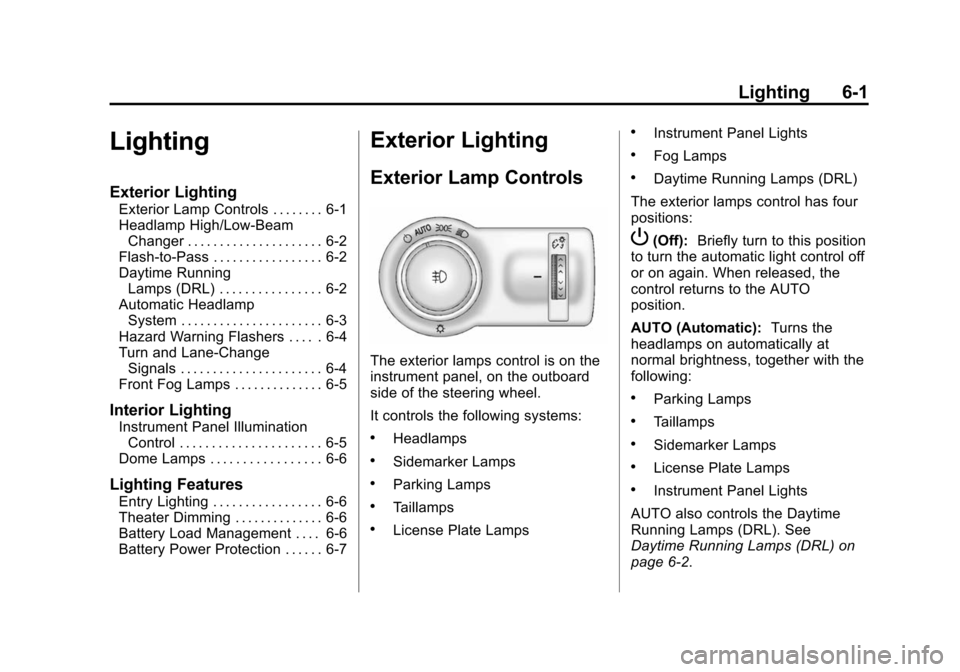
The exterior lamps control is on the
instrument panel, on the outboard
side of the steering wheel.
It controls the following systems:
.Headlamps
.Sidemarker Lamps
.Parking Lamps
.Taillamps
.License Plate Lamps
.Instrument Panel Lights
.Fog Lamps
.Daytime Running Lamps (DRL)
The exterior lamps control has four
positions:
P(Off): Briefly turn to this position
to turn the automatic light control off
or on again. When released, the
control returns to the AUTO
position.
AUTO (Automatic): Turns the
headlamps on automatically at
normal brightness, together with the
following:
.Parking Lamps
.Taillamps
.Sidemarker Lamps
.License Plate Lamps
.Instrument Panel Lights
AUTO also controls the Daytime
Running Lamps (DRL). See
Daytime Running Lamps (DRL) on
page 6‑2.
Page 152 of 404
Black plate (2,1)Chevrolet Camaro Owner Manual (Include Mex) - 2012
6-2 Lighting
;(Parking Lamps):Turns the
parking lamps on together with the
following:
.Taillamps
.Sidemarker Lamps
.License Plate Lamps
.Instrument Panel Lights
A warning chime sounds if the driver
door is opened when the ignition
switch is off and the parking lamps
are on.
5(Headlamps): Turns the
headlamps on together with the
lamps listed below.
.Parking Lamps
.Taillamps
.Sidemarker Lamps
.License Plate Lamps
.Instrument Panel Lights A warning chime sounds if the driver
door is opened when the ignition
switch is off and the headlamps
are on.
#(Front Fog Lamps):
Turns the
fog lamps on or off. The fog lamps
come on together with the following:
.Parking Lamps
.Taillamps
.Sidemarker Lamps
.License Plate Lamps
.Instrument Panel Lights
See Front Fog Lamps on page 6‑5.
Headlamp High/
Low-Beam Changer
Push the turn signal/lane change
lever away from you and release, to
turn the high beams on. To return to
low beams, push the lever again or
pull it toward you and release.
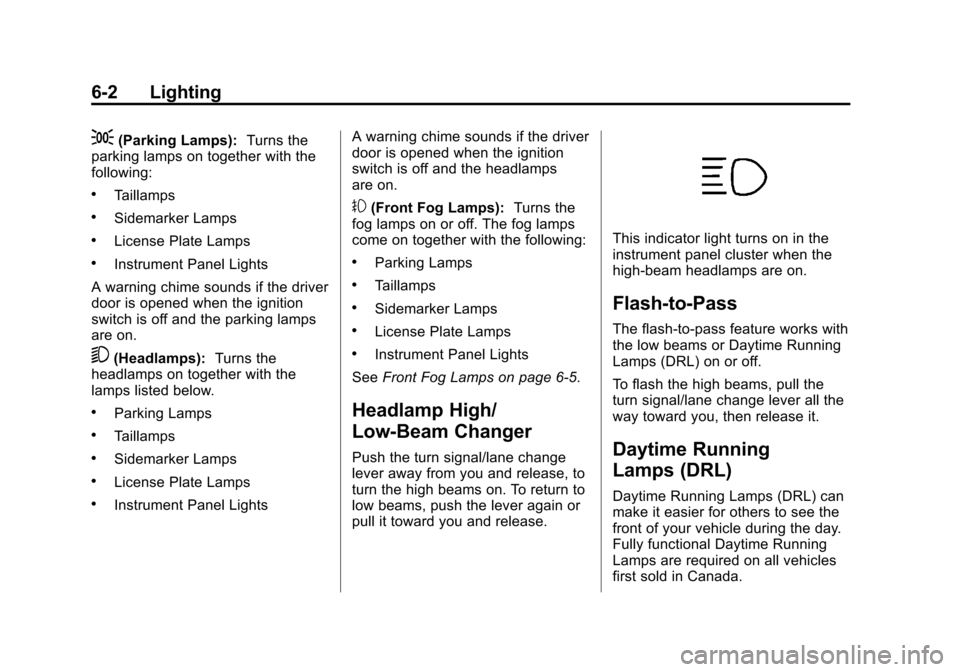
This indicator light turns on in the
instrument panel cluster when the
high‐beam headlamps are on.
Flash-to-Pass
The flash‐to‐pass feature works with
the low beams or Daytime Running
Lamps (DRL) on or off.
To flash the high beams, pull the
turn signal/lane change lever all the
way toward you, then release it.
Daytime Running
Lamps (DRL)
Daytime Running Lamps (DRL) can
make it easier for others to see the
front of your vehicle during the day.
Fully functional Daytime Running
Lamps are required on all vehicles
first sold in Canada.
Page 153 of 404

Black plate (3,1)Chevrolet Camaro Owner Manual (Include Mex) - 2012
Lighting 6-3
A light sensor on top of the
instrument panel makes the DRL
work, so be sure it is not covered.
The DRL system will make the
low‐beam headlamps come on at a
reduced brightness or for vehicles
with High Intensity Discharge (HID)
headlamps, the dedicated DRL
lights will come on when the
following conditions are met:
.The ignition is in the ON/RUN
position.
.The exterior lamps control is in
AUTO, or has been briefly
turned to OFF to turn the
automatic light control on again.
.The engine is running.
When the DRL are on, the
headlamps, taillamps, sidemarker,
instrument panel, and other lamps
will not be on.
The headlamps automatically
change from DRL to the regular
headlamps depending on the darkness of the surroundings. The
other lamps that come on with the
headlamps will also come on.
When it is bright enough outside,
the headlamps will go off and the
DRL will come on.
To turn the DRL off or on again, turn
the exterior lamps control to the off
position and then release. For
vehicles first sold in Canada, the
DRL cannot be turned off.
The regular headlamp system
should be turned on when needed.
Automatic Headlamp
System
When it is dark enough outside and
the headlamp switch is in AUTO,
the automatic headlamp system will
turn on the headlamps at the normal
brightness along with other lamps
such as the taillamps, sidemarker
lamps, parking lamps, license plate
lamps, and the instrument panel
lights. The radio lights will also
be dim.To turn off the automatic headlamp
system, turn the exterior lamps
switch to the off position and then
release. For vehicles first sold in
Canada, the transmission must be
in the P (Park) position, before the
automatic headlamp system can be
turned off.The vehicle has a light sensor
located on the top of the instrument
panel. Do not cover this sensor or
the system will come on whenever
the ignition is on.
The system may also turn on the
headlamps when driving through a
parking garage, heavy overcast
weather, or a tunnel. This is normal.
Page 154 of 404

Black plate (4,1)Chevrolet Camaro Owner Manual (Include Mex) - 2012
6-4 Lighting
There is a delay in the transition
between the daytime and nighttime
operation of the Daytime Running
Lamps (DRL) and the automatic
headlamp systems so that driving
under bridges or bright overhead
street lights does not affect the
system. The DRL and automatic
headlamp system will only be
affected when the light sensor sees
a change in lighting lasting longer
than the delay.
If the vehicle is started in a dark
garage, the automatic headlamp
system comes on immediately. If it
is light outside when the vehicle
leaves the garage, there will be a
slight delay before the automatic
headlamp system changes to
the DRL. During that delay, the
instrument panel cluster may not be
as bright as usual. Make sure the
instrument panel brightness control
is in the full bright position. See
Instrument Panel Illumination
Control on page 6‑5.Hazard Warning Flashers
|Hazard Warning Flasher:
Press this button to make the front
and rear turn signal lamps flash on
and off. This warns others that you
are having trouble. Press again to
turn the flashers off.
Turn and Lane-Change
Signals
An arrow on the instrument panel
cluster flashes in the direction of the
turn or lane change.
Move the lever all the way up or
down to signal a turn.
Raise or lower the lever until the
arrow starts to flash to signal a lane
change. Hold it there until the lane
change is completed. If the lever is
briefly pressed and released, the
turn signal flashes three times.
The lever returns to its starting
position whenever it is released.
If after signaling a turn or lane
change the arrow flashes rapidly or
does not come on, a signal bulb
might be burned out.
Page 155 of 404
Black plate (5,1)Chevrolet Camaro Owner Manual (Include Mex) - 2012
Lighting 6-5
Have the bulbs replaced. If the bulb
is not burned out, check the fuse.
SeeElectrical System Overload on
page 10‑39.
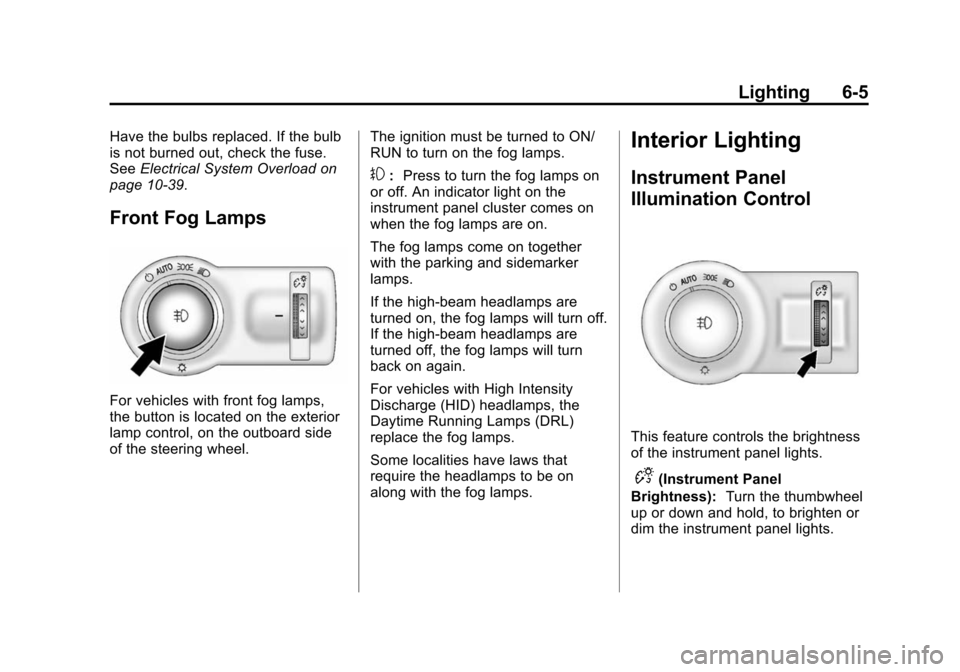
Front Fog Lamps
For vehicles with front fog lamps,
the button is located on the exterior
lamp control, on the outboard side
of the steering wheel. The ignition must be turned to ON/
RUN to turn on the fog lamps.
#:
Press to turn the fog lamps on
or off. An indicator light on the
instrument panel cluster comes on
when the fog lamps are on.
The fog lamps come on together
with the parking and sidemarker
lamps.
If the high‐beam headlamps are
turned on, the fog lamps will turn off.
If the high‐beam headlamps are
turned off, the fog lamps will turn
back on again.
For vehicles with High Intensity
Discharge (HID) headlamps, the
Daytime Running Lamps (DRL)
replace the fog lamps.
Some localities have laws that
require the headlamps to be on
along with the fog lamps.
Interior Lighting
Instrument Panel
Illumination Control
This feature controls the brightness
of the instrument panel lights.
D(Instrument Panel
Brightness): Turn the thumbwheel
up or down and hold, to brighten or
dim the instrument panel lights.
Page 161 of 404
Black plate (3,1)Chevrolet Camaro Owner Manual (Include Mex) - 2012
Infotainment System 7-3
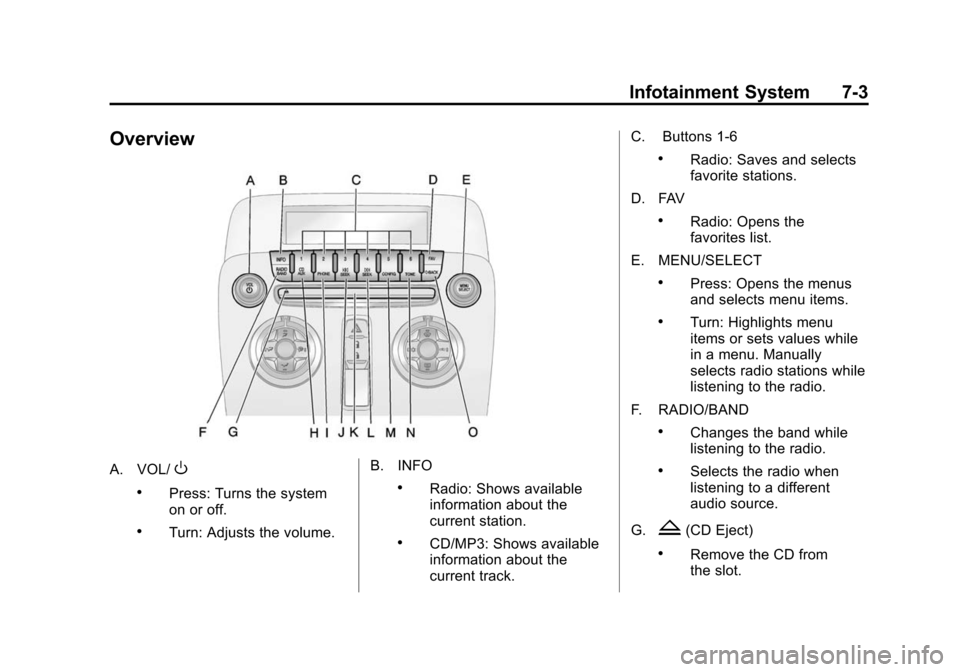
Overview
A. VOL/O
.Press: Turns the system
on or off.
.Turn: Adjusts the volume.B. INFO
.Radio: Shows available
information about the
current station.
.CD/MP3: Shows available
information about the
current track.C. Buttons 1‐6
.Radio: Saves and selects
favorite stations.
D. FAV
.Radio: Opens the
favorites list.
E. MENU/SELECT
.Press: Opens the menus
and selects menu items.
.Turn: Highlights menu
items or sets values while
in a menu. Manually
selects radio stations while
listening to the radio.
F. RADIO/BAND
.Changes the band while
listening to the radio.
.Selects the radio when
listening to a different
audio source.
G.
Z(CD Eject)
.Remove the CD from
the slot.
Page 212 of 404
Black plate (18,1)Chevrolet Camaro Owner Manual (Include Mex) - 2012
9-18 Driving and Operating
to left while turning the key to ACC/
ACCESSORY. If this does not work,
then the vehicle needs service.
B (ACC/ACCESSORY):This
position provides power to some of
the electrical accessories. It unlocks
the steering wheel and ignition. To
move the key from ACC/
ACCESSORY to LOCK/OFF, push
in the key and then turn it to
LOCK/OFF.
C (ON/RUN): The ignition switch
stays in this position when the
engine is running. This position can
be used to operate the electrical
accessories, including the
ventilation fan and 12‐volt power
outlet, as well as to display some
warning and indicator lights. This
position can also be used for
service and diagnostics, and to
verify the proper operation of the
malfunction indicator lamp as may be required for emission inspection
purposes. The transmission is also
unlocked in this position on
automatic transmission vehicles.
The battery could be drained if the
key is left in the ACC/ACCESSORY
or ON/RUN position with the engine
off. The vehicle might not start if the
battery is allowed to drain for an
extended period of time.
D (START):
This position starts the
engine. When the engine starts,
release the key. The ignition switch
will return to ON/RUN for normal
driving.
A warning tone sounds when the
driver door is opened if the ignition
is still in ACC/ACCESSORY and the
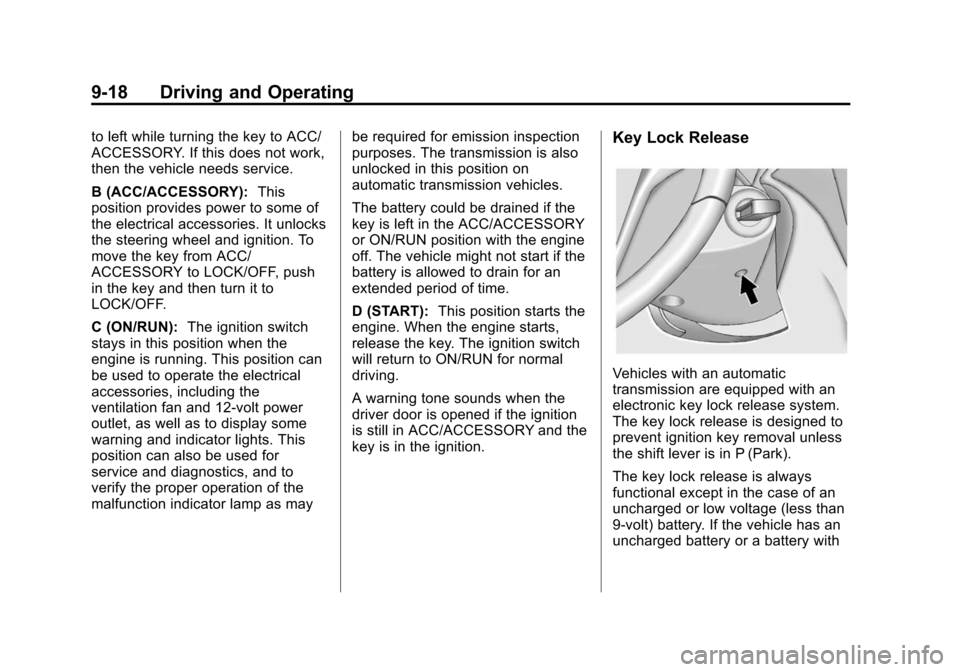
key is in the ignition.Key Lock Release
Vehicles with an automatic
transmission are equipped with an
electronic key lock release system.
The key lock release is designed to
prevent ignition key removal unless
the shift lever is in P (Park).
The key lock release is always
functional except in the case of an
uncharged or low voltage (less than
9‐volt) battery. If the vehicle has an
uncharged battery or a battery with
Page 333 of 404
Black plate (85,1)Chevrolet Camaro Owner Manual (Include Mex) - 2012
Vehicle Care 10-85
Notice:If any accessories are left
on or plugged in during the jump
starting procedure, they could be
damaged. The repairs would not
be covered by the vehicle
warranty. Whenever possible,
turn off or unplug all accessories
on either vehicle when jump
starting the vehicle.
4. Turn the ignition to LOCK/OFF
and switch off all lights and
accessories in both vehicles,
except the hazard warning
flashers if needed.
{WARNING
An electric fan can start up even
when the engine is not running
and can injure you. Keep hands,
clothing and tools away from any
underhood electric fan.
{WARNING
Using a match near a battery can
cause battery gas to explode.
People have been hurt doing this,
and some have been blinded.
Use a flashlight if you need more
light.
Be sure the battery has enough
water. You do not need to add
water to the battery installed in
your new vehicle. But if a battery
has filler caps, be sure the right
amount of fluid is there. If it is low,
add water to take care of that
first. If you don't, explosive gas
could be present.
Battery fluid contains acid that
can burn you. Do not get it on
you. If you accidentally get it in
your eyes or on your skin, flush
the place with water and get
medical help immediately.
{WARNING
Fans or other moving engine
parts can injure you badly. Keep
your hands away from moving
parts once the engine is running.
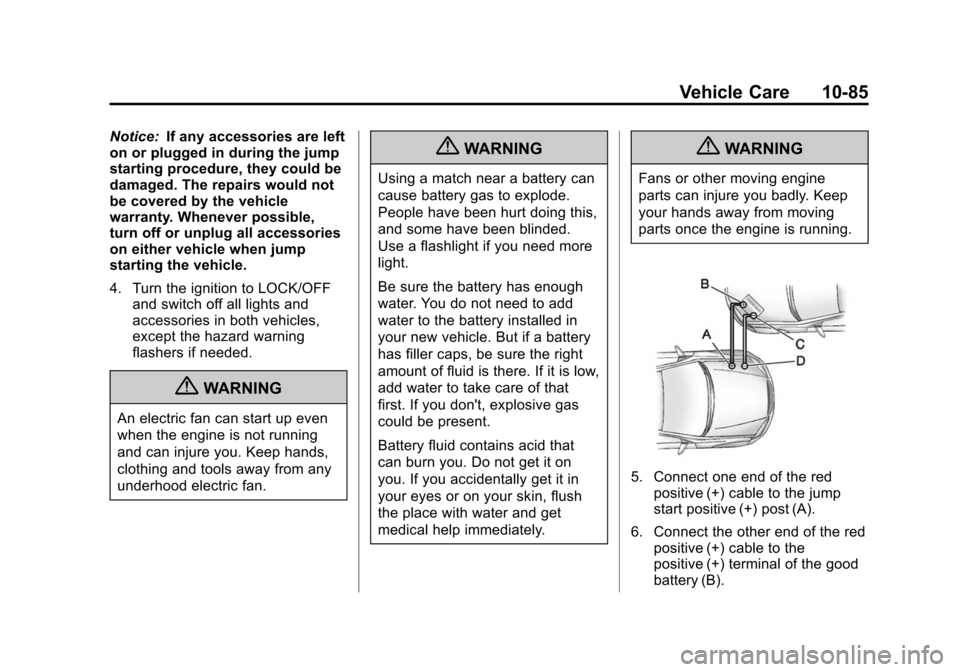
5. Connect one end of the redpositive (+) cable to the jump
start positive (+) post (A).
6. Connect the other end of the red positive (+) cable to the
positive (+) terminal of the good
battery (B).