display CHEVROLET CAMARO 2013 5.G Workshop Manual
[x] Cancel search | Manufacturer: CHEVROLET, Model Year: 2013, Model line: CAMARO, Model: CHEVROLET CAMARO 2013 5.GPages: 404, PDF Size: 5.45 MB
Page 225 of 404
Black plate (31,1)Chevrolet Camaro Owner Manual (Include Mex) - 2012
Driving and Operating 9-31
and let up on the clutch. Press the
clutch pedal back down. Then shift
into 1 (First).
2 (Second):Press the clutch pedal
as you let up on the accelerator
pedal and shift into 2 (Second).
Then, slowly let up on the clutch
pedal as you press the accelerator
pedal.
3 (Third), 4 (Fourth), 5 (Fifth), and
6 (Sixth): Shift into 3 (Third),
4 (Fourth), 5 (Fifth), and 6 (Sixth) the
same way you do for 2 (Second).
Slowly let up on the clutch pedal as
you press the accelerator pedal.
To stop, let up on the accelerator
pedal and press the brake pedal.
Just before the vehicle stops, press
the clutch pedal and the brake
pedal, and shift to Neutral.
Neutral: Use this position when
you start or idle the engine. The
shift lever is in Neutral when it is
centered in the shift pattern, not in
any gear. R (Reverse):
To back up, press
down the clutch pedal and shift into
R (Reverse). On V8 models, apply
pressure to get the lever past
5 (Fifth) and 6 (Sixth) into
R (Reverse). Let up on the clutch
pedal slowly while pressing the
accelerator pedal.
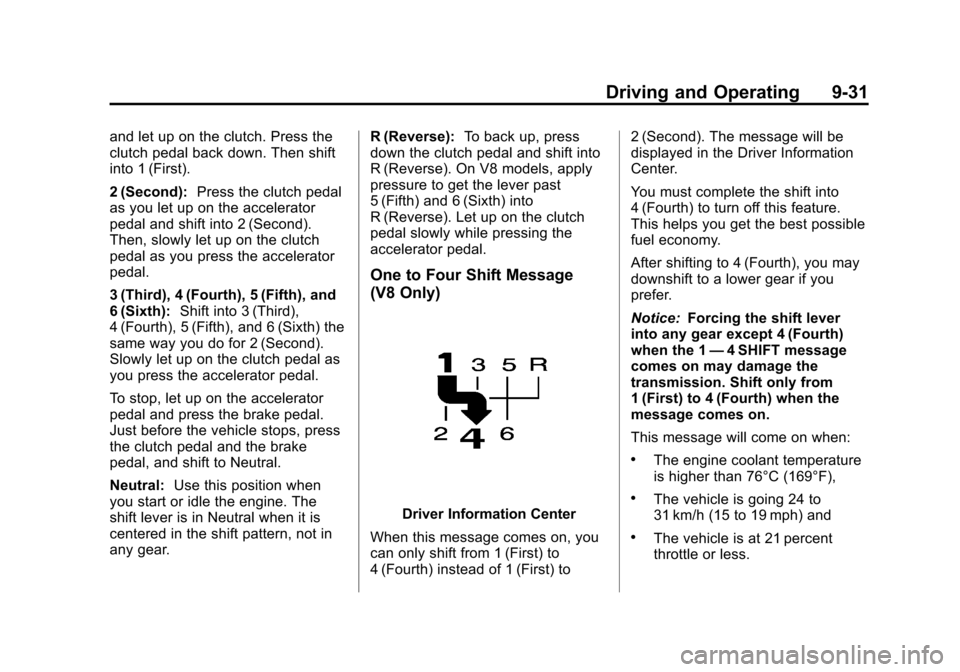
One to Four Shift Message
(V8 Only)
Driver Information Center
When this message comes on, you
can only shift from 1 (First) to
4 (Fourth) instead of 1 (First) to 2 (Second). The message will be
displayed in the Driver Information
Center.
You must complete the shift into
4 (Fourth) to turn off this feature.
This helps you get the best possible
fuel economy.
After shifting to 4 (Fourth), you may
downshift to a lower gear if you
prefer.
Notice:
Forcing the shift lever
into any gear except 4 (Fourth)
when the 1 —4 SHIFT message
comes on may damage the
transmission. Shift only from
1 (First) to 4 (Fourth) when the
message comes on.
This message will come on when:
.The engine coolant temperature
is higher than 76°C (169°F),
.The vehicle is going 24 to
31 km/h (15 to 19 mph) and
.The vehicle is at 21 percent
throttle or less.
Page 230 of 404
Black plate (36,1)Chevrolet Camaro Owner Manual (Include Mex) - 2012
9-36 Driving and Operating
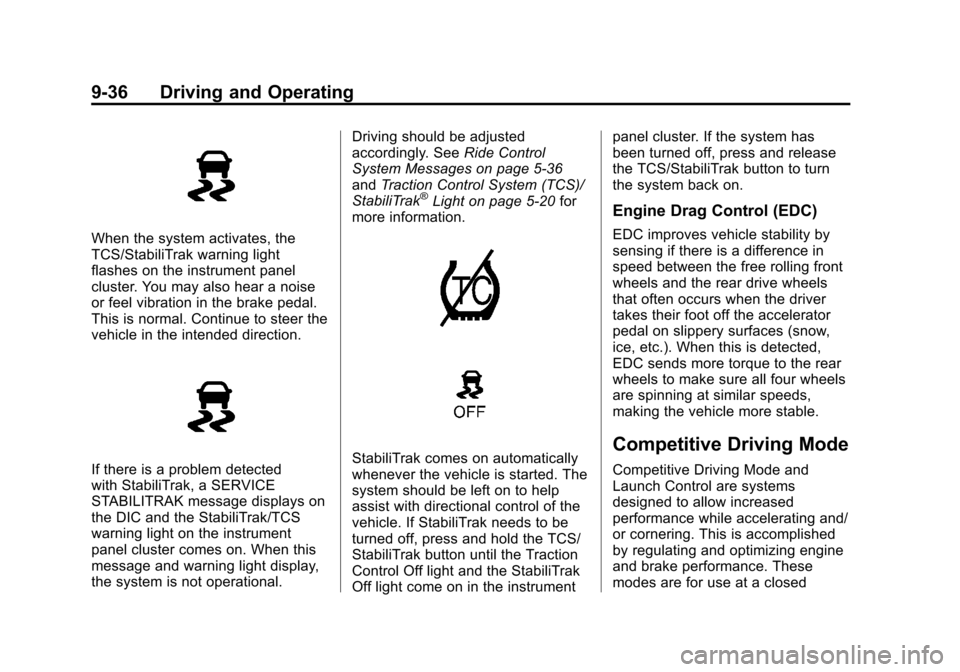
When the system activates, the
TCS/StabiliTrak warning light
flashes on the instrument panel
cluster. You may also hear a noise
or feel vibration in the brake pedal.
This is normal. Continue to steer the
vehicle in the intended direction.
If there is a problem detected
with StabiliTrak, a SERVICE
STABILITRAK message displays on
the DIC and the StabiliTrak/TCS
warning light on the instrument
panel cluster comes on. When this
message and warning light display,
the system is not operational.Driving should be adjusted
accordingly. See
Ride Control
System Messages on page 5‑36
and Traction Control System (TCS)/
StabiliTrak
®Light on page 5‑20 for
more information.
StabiliTrak comes on automatically
whenever the vehicle is started. The
system should be left on to help
assist with directional control of the
vehicle. If StabiliTrak needs to be
turned off, press and hold the TCS/
StabiliTrak button until the Traction
Control Off light and the StabiliTrak
Off light come on in the instrument panel cluster. If the system has
been turned off, press and release
the TCS/StabiliTrak button to turn
the system back on.
Engine Drag Control (EDC)
EDC improves vehicle stability by
sensing if there is a difference in
speed between the free rolling front
wheels and the rear drive wheels
that often occurs when the driver
takes their foot off the accelerator
pedal on slippery surfaces (snow,
ice, etc.). When this is detected,
EDC sends more torque to the rear
wheels to make sure all four wheels
are spinning at similar speeds,
making the vehicle more stable.
Competitive Driving Mode
Competitive Driving Mode and
Launch Control are systems
designed to allow increased
performance while accelerating and/
or cornering. This is accomplished
by regulating and optimizing engine
and brake performance. These
modes are for use at a closed
Page 231 of 404
Black plate (37,1)Chevrolet Camaro Owner Manual (Include Mex) - 2012
Driving and Operating 9-37
course race track and are not
intended for use on public roads.
They will not compensate for a
driver’s inexperience or lack of
familiarity with the race track.
Drivers who prefer to allow the
system to have more control of the
engine and brake systems are
advised to turn StabiliTrak on. See
Competitive Driving on page 9‑6 for
more information.
Notice: Do not attempt to shift
when the drive wheels are
spinning and do not have
traction. This may cause damage
to the transmission. Damage
caused by misuse of the vehicle
is not covered by the vehicle
warranty. See the warranty book
for additional information.
Competitive Driving Mode
In Competitive Driving Mode, the
StabiliTrak System helps maintain
directional control of the vehicle by
selective brake application and control of engine torque. The
Traction Control System (TCS)
helps control wheel spin and
Launch Control is available. Adjust
your driving style to account for the
available engine power. See
“Launch Control”
later in this
section.
This light is on when the vehicle is
in the Competitive Driving Mode.
On vehicles with a V8 engine, this
optional handling mode can be
selected by pressing the StabiliTrak/
TCS button on the console quickly
two times. STABILITRAK
COMPETITIVE MODE displays in
the Driver Information Center (DIC).
See Ride Control System Messages
on page 5‑36. When the StabiliTrak button is
pressed again, or the vehicle is
restarted, the StabiliTrak and TCS
systems are on.
Launch Control (V8 with
Manual Transmission
Models Only)
A Launch Control feature is
available, within Competitive Driving
Mode on vehicles with a manual
transmission, to allow the driver to
achieve high levels of vehicle
acceleration in a straight line.
Launch Control is a form of traction
control that manages tire spin while
launching the vehicle. This feature
is intended for use during closed
course race events where
consistent zero to sixty and quarter
mile times are desirable.
Launch Control is only available
when the following criteria are met:
.Competitive Driving Mode is
selected.
.The vehicle is not moving.
Page 235 of 404
Black plate (41,1)Chevrolet Camaro Owner Manual (Include Mex) - 2012
Driving and Operating 9-41
WARNING (Continued)
URPA, always check behind the
vehicle and check all mirrors
before backing.
How the System Works
URPA comes on automatically when
the shift lever is moved into
R (Reverse). A single tone sounds
to indicate the system is working.
URPA operates only at speeds less
than 8 km/h (5 mph).
An obstacle is indicated by audible
beeps. The interval between the
beeps becomes shorter as the
vehicle gets closer to the obstacle.
When the distance is less than
30 cm (12 in), the beeping is a
continuous tone for five seconds.
To be detected, objects must be at
least 20 cm (8 in) off the ground and
below trunk level. Objects must also
be within 2.5 m (8 ft) from the rearbumper. The distance objects can
be detected may be less during
warmer or humid weather.
Turning the System On and Off
The URPA system can be turned on
and off using the infotainment
system controls. See
Vehicle
Personalization on page 5‑39 for
more information.
When the system is off, PARK
ASSIST OFF displays on the Driver
Information Center (DIC). The
message disappears after a short
period of time.
URPA defaults to the on setting
each time the vehicle is started.
When the System Does Not
Seem to Work Properly
The following messages may be
displayed on the DIC:
SERVICE PARKING ASSIST: If
this message occurs, take the
vehicle to your dealer to repair the
system. PARK ASSIST Off:
If the URPA
system does not activate due to a
temporary condition, the message
displays on the DIC. This can occur
under the following conditions:
.The driver has disabled the
system.
.The ultrasonic sensors are not
clean. Keep the vehicle's rear
bumper free of mud, dirt, snow,
ice, and slush. For cleaning
instructions, see Exterior Care
on page 10‑88.
.The park assist sensors are
covered by frost or ice. Frost or
ice can form around and behind
the sensors and may not always
be seen; this can occur after
washing the vehicle in cold
weather. The message may not
clear until the frost or ice has
melted.
.An object was hanging out of the
trunk during the last drive cycle.
Once the object is removed,
URPA will return to normal
operation.
Page 236 of 404
Black plate (42,1)Chevrolet Camaro Owner Manual (Include Mex) - 2012
9-42 Driving and Operating
.The bumper is damaged. Take
the vehicle to your dealer to
repair the system.
.Other conditions, such as
vibrations from a jackhammer or
the compression of air brakes on
a very large truck, are affecting
system performance.
Rear Vision
Camera (RVC)
This vehicle may have an RVC
system. Read this entire section
before using it.
{WARNING
The RVC system does not display
pedestrians, bicyclists, animals,
or any other object located
outside the camera's field of view,
below the bumper, or under the
vehicle.(Continued)
WARNING (Continued)
Do not back the vehicle using
only the RVC screen or by using
the screen during longer, higher
speed backing maneuvers,
or where there could be
cross-traffic. Perceived distances
may be different from actual
distances.
Failure to use proper care before
backing may result in injury,
death, or vehicle damage. Always
check before backing by checking
behind and around the vehicle.
The rear vision camera system is
designed to help the driver when
backing up by displaying a view of
the area behind the vehicle. When
the key is in ON/RUN and the driver
shifts the vehicle into R (Reverse),
the video image automatically
appears on the inside rearview
mirror. Once the driver shifts out of R (Reverse), the video image
automatically disappears from the
inside rearview mirror.
Rear Vision Camera Errors
If the rear vision camera system
requires service, a flashing symbol
will appear in the inside rearview
mirror.
If any other problem occurs or if a
problem persists, see your dealer.
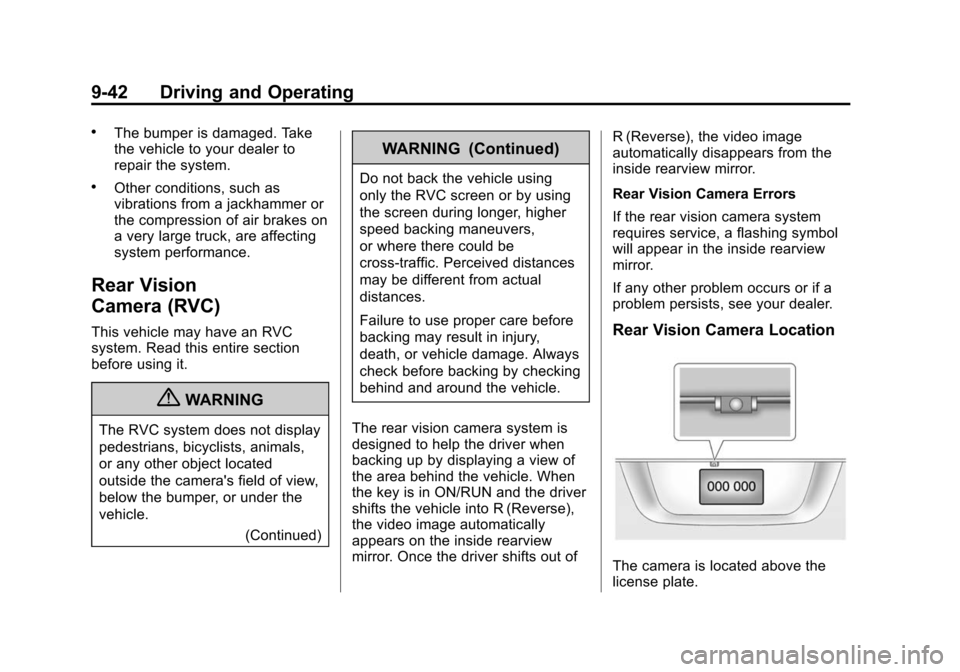
Rear Vision Camera Location
The camera is located above the
license plate.
Page 237 of 404
Black plate (43,1)Chevrolet Camaro Owner Manual (Include Mex) - 2012
Driving and Operating 9-43
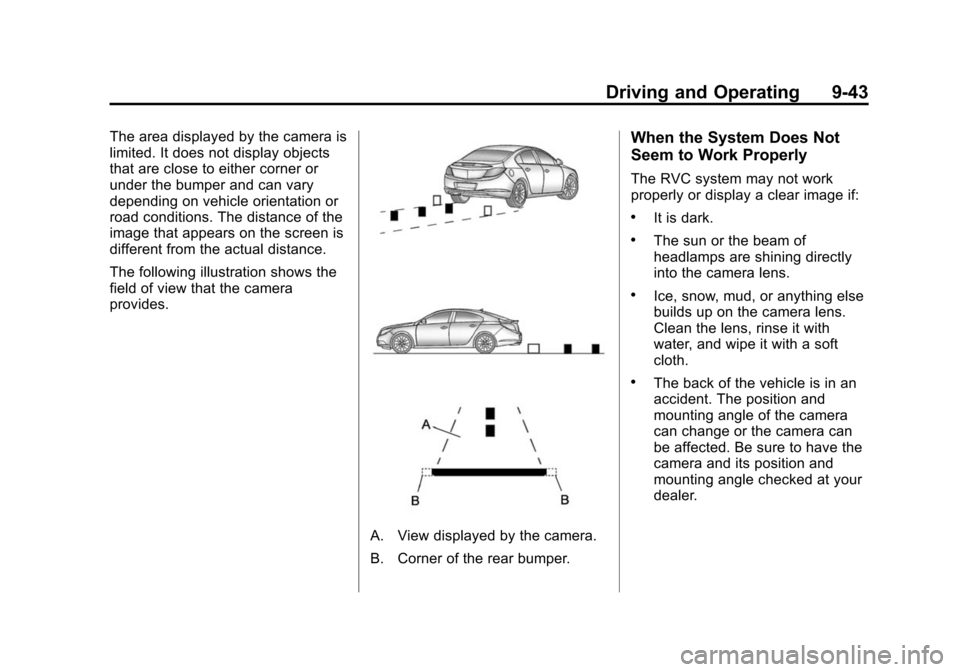
The area displayed by the camera is
limited. It does not display objects
that are close to either corner or
under the bumper and can vary
depending on vehicle orientation or
road conditions. The distance of the
image that appears on the screen is
different from the actual distance.
The following illustration shows the
field of view that the camera
provides.
A. View displayed by the camera.
B. Corner of the rear bumper.
When the System Does Not
Seem to Work Properly
The RVC system may not work
properly or display a clear image if:
.It is dark.
.The sun or the beam of
headlamps are shining directly
into the camera lens.
.Ice, snow, mud, or anything else
builds up on the camera lens.
Clean the lens, rinse it with
water, and wipe it with a soft
cloth.
.The back of the vehicle is in an
accident. The position and
mounting angle of the camera
can change or the camera can
be affected. Be sure to have the
camera and its position and
mounting angle checked at your
dealer.
Page 260 of 404
Black plate (12,1)Chevrolet Camaro Owner Manual (Include Mex) - 2012
10-12 Vehicle Care
Selecting the Right Engine Oil
Selecting the right engine oil
depends on both the proper oil
specification and viscosity grade.
SeeRecommended Fluids and
Lubricants on page 11‑13.
Specification
Use and ask for licensed engine oils
with the dexos1™ approved
certification mark. Engine oils
meeting the requirements for the
vehicle should have the dexos1
approved certification mark. This
certification mark indicates that the
oil has been approved to the dexos1
specification.
Notice: Failure to use the
recommended engine oil or
equivalent can result in engine
damage not covered by the
vehicle warranty. Check with your
dealer or service provider on
whether the oil is approved to the
dexos1 specification.
Viscosity Grade
SAE 5W‐30 is the best viscosity
grade for the vehicle. Do not use
other viscosity grade oils such as
SAE 10W‐30, 10W‐40, or 20W‐50. If in an area of extreme cold, where
the temperature falls below
−20°F
(−29°C), an SAE 0W‐30 oil should
be used. An oil of this viscosity
grade will provide easier cold
starting for the engine at extremely
low temperatures. When selecting
an oil of the appropriate viscosity
grade, always select an oil that
meets the dexos1 specification or
equivalent. See “Specification”for
more information.
Engine Oil Additives/Engine
Oil Flushes
Do not add anything to the oil. The
recommended oils with the dexos
specification and displaying the
dexos certification mark are all that
is needed for good performance and
engine protection.
Engine oil system flushes are not
recommended and could cause
engine damage not covered by the
vehicle warranty.
Page 273 of 404
Black plate (25,1)Chevrolet Camaro Owner Manual (Include Mex) - 2012
Vehicle Care 10-25
Notice:Engine damage from
running the engine without
coolant is not covered by the
warranty.
Notice: If the engine catches fire
because of being driven with no
coolant, the vehicle can be badly
damaged. The costly repairs
would not be covered by the
vehicle warranty.
If Steam Is Coming from the
Engine Compartment
{WARNING
Steam from an overheated engine
can burn you badly, even if you
just open the hood. Stay away
from the engine if you see or hear
steam coming from it. Just turn it
off and get everyone away from
the vehicle until it cools down.
Wait until there is no sign of
steam or coolant before you open
the hood.
(Continued)
WARNING (Continued)
If you keep driving when the
engine is overheated, the liquids
in it can catch fire. You or others
could be badly burned. Stop the
engine if it overheats, and get out
of the vehicle until the engine
is cool.
If No Steam Is Coming from
the Engine Compartment
If an engine overheat warning is
displayed but no steam can be seen
or heard, the problem may not be
too serious. Sometimes the engine
can get a little too hot when the
vehicle:
.Climbs a long hill on a hot day.
.Stops after high-speed driving.
.Idles for long periods in traffic.
.Tows a trailer. If the overheat warning is displayed
with no sign of steam:
1. Turn the air off.
2. Turn the heater on to the highest
temperature and to the highest
fan speed. Open the windows as
necessary.
3. In heavy traffic, let the engine idle in N (Neutral) while stopped.
If it is safe to do so, pull off the
road, shift to P (Park) or
N (Neutral) and let the
engine idle.
If the temperature overheat gauge
is no longer in the overheat zone
or an overheat warning no longer
displays, the vehicle can be driven.
Continue to drive the vehicle slow
for about 10 minutes. Keep a safe
vehicle distance from the car in front
of you. If the warning does not come
back on, continue to drive normally.
Page 274 of 404
Black plate (26,1)Chevrolet Camaro Owner Manual (Include Mex) - 2012
10-26 Vehicle Care
If the warning continues, pull over,
stop, and park the vehicle
right away.
If there is no sign of steam, idle the
engine for three minutes while
parked. If the warning is still
displayed, turn off the engine
until it cools down.
Power Steering Fluid
The power steering fluid reservoir is
located under the engine cover on
the driver side toward the front of
the engine compartment. See
Engine Compartment Overview on
page 10‑6.
When to Check Power Steering
Fluid
It is not necessary to regularly
check power steering fluid unless
you suspect there is a leak in the
system or an unusual noise is
heard. A fluid loss in this system
could indicate a problem. Have the
system inspected and repaired.
How to Check Power Steering
Fluid
Notice:Extremely small amounts
of contamination can cause
steering system damage and
cause it to not work properly. Do
not allow contaminants to contact
the fluid side of the reservoir cap/
dipstick or from entering the
reservoir.
Check the level after the vehicle has
been driven for at least 20 minutes
so the fluid is warm. To check the power steering fluid:
1. Turn the ignition key to LOCK/
OFF and let the engine
compartment cool down.
2. Remove the engine cover. Refer toEngine Cover on page 10‑10.
3. Wipe the cap and the top of the reservoir clean.
4. Turn the cap counterclockwise and pull it straight up.
5. Wipe the dipstick with a clean rag.
6. Replace the cap and completely tighten it.
7. Remove the cap again and look at the fluid level on the dipstick.
Page 282 of 404
Black plate (34,1)Chevrolet Camaro Owner Manual (Include Mex) - 2012
10-34 Vehicle Care
warranty. Do not allow the wiper
blade arm to touch the
windshield.
5. Reverse steps 1 through 3 for wiper blade replacement.
Windshield Replacement
If the vehicle is equipped with the
Head‐Up display (HUD) system and
the windshield needs to be
replaced, get one that is designed
for HUD or the HUD image may
look out of focus.
Headlamp Aiming
Headlamp aim has been preset at
the factory and should need no
further adjustment.
However, if the vehicle is damaged
in a crash, the headlamp aim may
be affected. Aim adjustment to the
low-beam headlamps may be
necessary if oncoming drivers flash
their high-beam headlamps at you
(for vertical aim).
If the headlamps need to be
re-aimed, it is recommended that
the vehicle be taken to a dealer for
service.
Bulb Replacement
For the proper type of replacement
bulbs, see Replacement Bulbs on
page 10‑39.
For any bulb‐changing procedure
not listed in this section, contact
your dealer.
Halogen Bulbs
{WARNING
Halogen bulbs have pressurized
gas inside and can burst if you
drop or scratch the bulb. You or
others could be injured. Be sure
to read and follow the instructions
on the bulb package.