lit CHEVROLET CAMARO 2017 6.G Workshop Manual
[x] Cancel search | Manufacturer: CHEVROLET, Model Year: 2017, Model line: CAMARO, Model: CHEVROLET CAMARO 2017 6.GPages: 391, PDF Size: 6.65 MB
Page 196 of 391
Chevrolet Camaro Owner Manual (GMNA-Localizing-U.S./Canada/Mexico-
9804281) - 2017 - crc - 4/25/16
Climate Controls 195
It helps to quickly cool the air inside
the vehicle or reduce the outside air
and odors that may enter.
Operation in the recirculation mode
while the air conditioner is off
increases humidity and may cause
the windows to fog.
Recirculation is not available in the
defrost or defog modes.
To improve fuel efficiency and to
cool the vehicle faster, recirculation
may be automatically selected in
warm weather. The recirculation
light will not come on. Press
@to
select recirculation; press it again to
select outside air.
Rear Window Defogger
1: Press to turn the rear window
defogger on or off. An indicator light
on the button comes on to show that
the rear window defogger is on. The
defogger turns off if the ignition is
turned to ACC/ACCESSORY
or OFF. The rear window defogger can be
set to automatic operation. See
“Climate and Air Quality”
under
Vehicle Personalization 0144.
When Auto Rear Defog is selected,
the rear window defogger turns on
automatically when the interior
temperature is cold and the outside
temperature is about 7 °C (44 °F)
and below.
The heated outside rearview mirrors
turn on when the rear window
defogger button is on and help to
clear fog or frost from the surface of
the mirrors.
Do not drive the vehicle until all
windows are clear.Caution
Do not use a razor blade or sharp
object to clear the inside rear
window. Do not adhere anything
to the defogger grid lines in the
rear glass. These actions may
damage the rear defogger.
Repairs would not be covered by
the vehicle warranty. Remote Start Climate Control
Operation, If Equipped :
The
climate control system may run
when the vehicle is started remotely.
See Remote Vehicle Start 035. The
system uses the driver ’s previous
settings to heat or cool the inside of
the vehicle. The rear defog may
come on during remote start based
on cold ambient conditions. The
rear defog indicator light does not
come on during a remote start.
When enabled, the front heated
seats, if equipped, will turn on
automatically if it is cold outside.
See Vehicle Personalization 0144.
The heated seat indicator lights do
not come on during a remote start.
Page 197 of 391
Chevrolet Camaro Owner Manual (GMNA-Localizing-U.S./Canada/Mexico-
9804281) - 2017 - crc - 4/25/16
196 Climate Controls
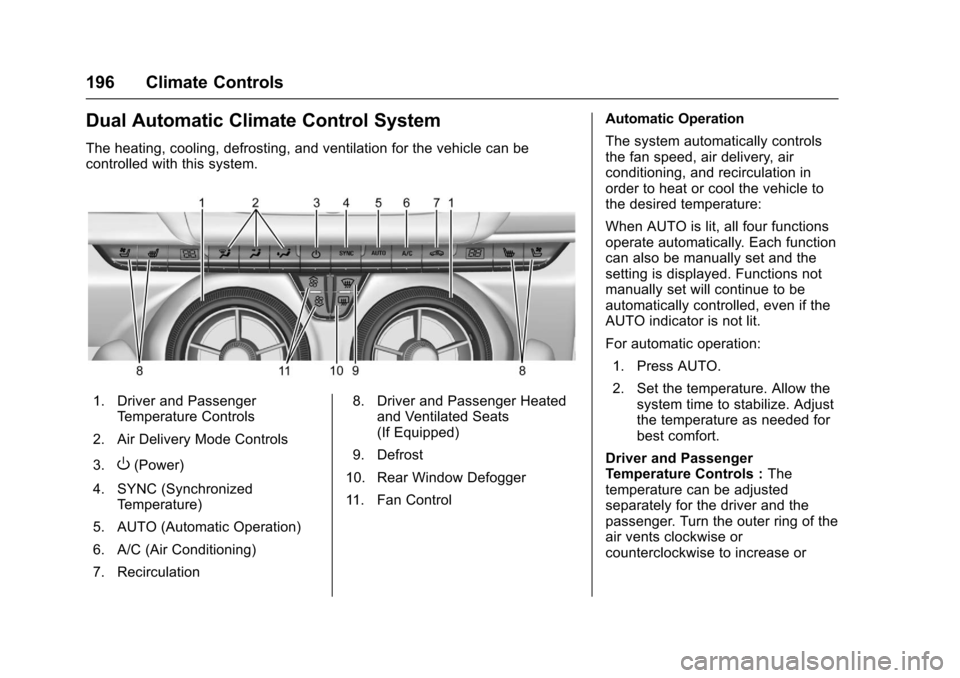
Dual Automatic Climate Control System
The heating, cooling, defrosting, and ventilation for the vehicle can be
controlled with this system.
1. Driver and PassengerTemperature Controls
2. Air Delivery Mode Controls
3.
O(Power)
4. SYNC (Synchronized Temperature)
5. AUTO (Automatic Operation)
6. A/C (Air Conditioning)
7. Recirculation 8. Driver and Passenger Heated
and Ventilated Seats
(If Equipped)
9. Defrost
10. Rear Window Defogger
11. Fan Control Automatic Operation
The system automatically controls
the fan speed, air delivery, air
conditioning, and recirculation in
order to heat or cool the vehicle to
the desired temperature:
When AUTO is lit, all four functions
operate automatically. Each function
can also be manually set and the
setting is displayed. Functions not
manually set will continue to be
automatically controlled, even if the
AUTO indicator is not lit.
For automatic operation:
1. Press AUTO.
2. Set the temperature. Allow the system time to stabilize. Adjust
the temperature as needed for
best comfort.
Driver and Passenger
Temperature Controls : The
temperature can be adjusted
separately for the driver and the
passenger. Turn the outer ring of the
air vents clockwise or
counterclockwise to increase or
Page 198 of 391
Chevrolet Camaro Owner Manual (GMNA-Localizing-U.S./Canada/Mexico-
9804281) - 2017 - crc - 4/25/16
Climate Controls 197
decrease the driver or passenger
temperature setting. The setting will
appear on the temperature display.
SYNC :Press to link the passenger
climate temperature settings to the
driver setting. The SYNC indicator
light will turn on. When the
passenger settings are adjusted, the
SYNC indicator light turns off.
Manual Operation
O: Press to turn the fan off or on.
hori:Press to increase or
decrease the fan speed.
Air Delivery Mode Controls :
Press
X,Y, or[to change the
direction of the airflow. Any
combination of the three buttons
can be selected. The indicator light
in the button will turn on. The
current mode appears in the display
screen. Pressing any of the three
buttons cancels automatic air
delivery control and the direction of
the airflow is controlled manually.
Press AUTO to return to automatic
operation. To change the current mode, select
one or more of the following:
X:
Clears the windows of fog or
moisture. Air is directed to the
windshield and side window outlets.
Y: Air is directed to the instrument
panel outlets.
[: Air is directed to the floor
outlets.
0: Clears the windshield of fog or
frost more quickly. Air is only
directed to the windshield and side
window outlets. The air conditioning
may turn on automatically to
remove fog.
For best results, clear all snow and
ice from the windshield before
defrosting.
Do not drive the vehicle until all
windows are clear.
Air Conditioning
A/C : Press to turn the air
conditioning on or off. An indicator
light turns on. If the fan is turned off
or the outside temperature falls below freezing, the air conditioning
will not run, but the indicator light
will be lit.
The air conditioning might
automatically come on when
0is
selected.
@: Press to turn on recirculation.
An indicator light comes on. Air is
recirculated inside the vehicle.
It helps to quickly cool the air inside
the vehicle or reduce the outside air
and odors that may enter.
Operation in the recirculation mode
while the air conditioner is off
increases humidity and may cause
the windows to fog.
Recirculation is not available in the
defrost or defog modes.
To improve fuel efficiency and to
cool the vehicle faster, recirculation
may be automatically selected in
warm weather. The recirculation
light will not come on. Press
@to
select recirculation; press it again to
select outside air.
Page 199 of 391
Chevrolet Camaro Owner Manual (GMNA-Localizing-U.S./Canada/Mexico-
9804281) - 2017 - crc - 4/25/16
198 Climate Controls
Rear Window Defogger
1:Press to turn the rear window
defogger on or off. An indicator light
on the button comes on to show that
the rear window defogger is on. The
defogger turns off if the ignition is
turned to ACC/ACCESSORY
or OFF.
The rear window defogger can be
set to automatic operation. See
“Climate and Air Quality” under
Vehicle Personalization 0144.
When Auto Rear Defog is selected,
the rear window defogger turns on
automatically when the interior
temperature is cold and the outside
temperature is about 7 °C (44 °F)
and below.
The heated outside rearview mirrors
turn on when the rear window
defogger button is on and help to
clear fog or frost from the surface of
the mirrors.
Do not drive the vehicle until all
windows are clear.Caution
Do not use a razor blade or sharp
object to clear the inside rear
window. Do not adhere anything
to the defogger grid lines in the
rear glass. These actions may
damage the rear defogger.
Repairs would not be covered by
the vehicle warranty.
LorM(If Equipped) : PressLorMto heat the driver or
passenger seat.
Press
{orC, if equipped, to
ventilate the driver or passenger
seat. See Heated and Ventilated
Front Seats 060.
Remote Start Climate Control
Operation, If Equipped : The
climate control system may run
when the vehicle is started remotely.
See Remote Vehicle Start 035. The
system uses the driver ’s previous
settings to heat or cool the inside of
the vehicle. The rear defog may
come on during remote start based
on cold ambient conditions. The rear defog indicator light does not
come on during a remote start.
When enabled, the front heated
seats, if equipped, will turn on
automatically if it is cold outside.
See
Vehicle Personalization 0144.
The heated seat indicator lights do
not come on during a remote start.
Page 201 of 391
Chevrolet Camaro Owner Manual (GMNA-Localizing-U.S./Canada/Mexico-
9804281) - 2017 - crc - 4/25/16
200 Driving and Operating
Driving and
Operating
Driving Information
Distracted Driving . . . . . . . . . . . . 201
Defensive Driving . . . . . . . . . . . . . 201
Drunk Driving . . . . . . . . . . . . . . . . . 201
Control of a Vehicle . . . . . . . . . . . 202
Braking . . . . . . . . . . . . . . . . . . . . . . . 202
Steering . . . . . . . . . . . . . . . . . . . . . . 202
Off-Road Recovery . . . . . . . . . . . 203
Loss of Control . . . . . . . . . . . . . . . 203
Track Events and CompetitiveDriving . . . . . . . . . . . . . . . . . . . . . . 204
Driving on Wet Roads . . . . . . . . 208
Hill and Mountain Roads . . . . . 209
Winter Driving . . . . . . . . . . . . . . . . 210
If the Vehicle Is Stuck . . . . . . . . . 211
Vehicle Load Limits . . . . . . . . . . . 212
Starting and Operating
New Vehicle Break-In . . . . . . . . . 215
Ignition Positions . . . . . . . . . . . . . 216
Starting the Engine . . . . . . . . . . . 218
Engine Heater . . . . . . . . . . . . . . . . 220
Retained Accessory Power (RAP) . . . . . . . . . . . . . . . . 221
Shifting Into Park . . . . . . . . . . . . . 221
Shifting out of Park . . . . . . . . . . . 222 Parking . . . . . . . . . . . . . . . . . . . . . . . 223
Parking over Things
That Burn . . . . . . . . . . . . . . . . . . . 223
Active Fuel Management
®. . . . 223
Extended Parking . . . . . . . . . . . . 223
Engine Exhaust
Engine Exhaust . . . . . . . . . . . . . . 224
Running the Vehicle While
Parked . . . . . . . . . . . . . . . . . . . . . . 224
Automatic Transmission
Automatic Transmission . . . . . . 225
Manual Mode . . . . . . . . . . . . . . . . . 227
Manual Transmission
Manual Transmission . . . . . . . . . 229
Active Rev Match . . . . . . . . . . . . . 231
Brakes
Antilock BrakeSystem (ABS) . . . . . . . . . . . . . . . 232
Electric Parking Brake . . . . . . . . 232
Brake Assist . . . . . . . . . . . . . . . . . . 234
Hill Start Assist (HSA) . . . . . . . . 234
Ride Control Systems
Traction Control/Electronic Stability Control . . . . . . . . . . . . . 235
Driver Mode Control . . . . . . . . . . 236
Competitive Driving Mode . . . . 240
Limited-Slip Rear Axle . . . . . . . . 242
Cruise Control
Cruise Control . . . . . . . . . . . . . . . . 242
Driver Assistance Systems
Driver Assistance Systems . . . 245
Assistance Systems for Parking or Backing . . . . . . . . . . 246
Side Blind Zone Alert (SBZA) . . . . . . . . . . . . . . . . 248
Lane Change Alert (LCA) . . . . . 248
Fuel
Fuel . . . . . . . . . . . . . . . . . . . . . . . . . . 250
California Fuel Requirements . . . . . . . . . . . . . . . 251
Fuels in Foreign Countries . . . 251
Fuel Additives . . . . . . . . . . . . . . . . 251
Filling the Tank . . . . . . . . . . . . . . . 252
Filling a Portable Fuel Container . . . . . . . . . . . . . . . . . . . 253
Trailer Towing
General TowingInformation . . . . . . . . . . . . . . . . . . 254
Conversions and Add-Ons
Add-On ElectricalEquipment . . . . . . . . . . . . . . . . . . 254
Page 209 of 391
Chevrolet Camaro Owner Manual (GMNA-Localizing-U.S./Canada/Mexico-
9804281) - 2017 - crc - 4/25/16
208 Driving and Operating
the original deflector, the push
pins are pushed from the
top down.
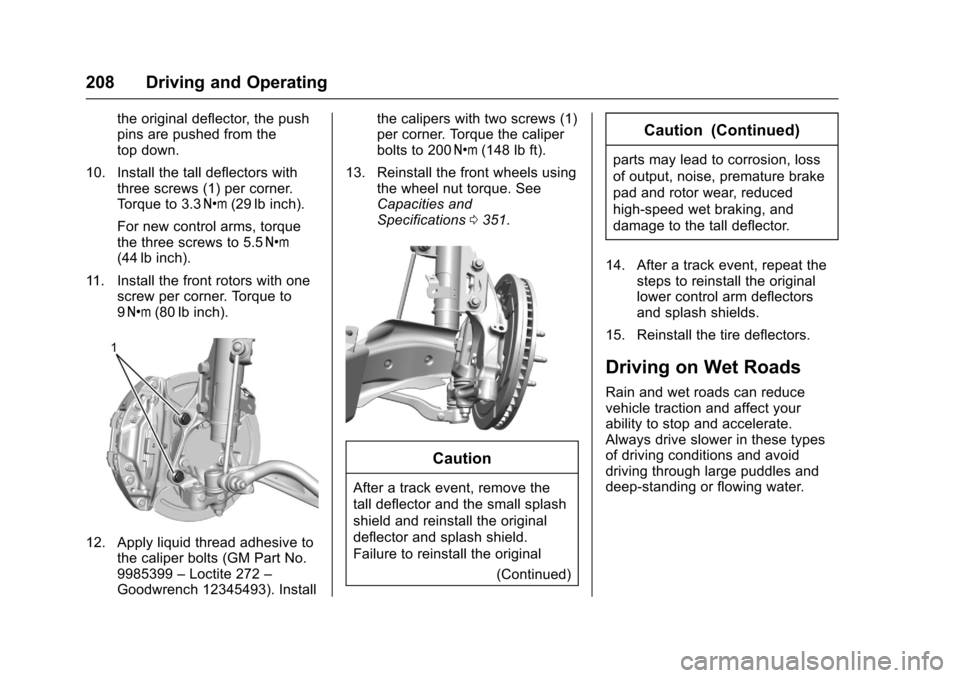
10. Install the tall deflectors with three screws (1) per corner.
Torque to 3.3 Y(29 lb inch).
For new control arms, torque
the three screws to 5.5 Y
(44 lb inch).
11. Install the front rotors with one screw per corner. Torque to
9Y (80 lb inch).
12. Apply liquid thread adhesive to
the caliper bolts (GM Part No.
9985399 –Loctite 272 –
Goodwrench 12345493). Install the calipers with two screws (1)
per corner. Torque the caliper
bolts to 200
Y(148 lb ft).
13. Reinstall the front wheels using the wheel nut torque. See
Capacities and
Specifications 0351.
Caution
After a track event, remove the
tall deflector and the small splash
shield and reinstall the original
deflector and splash shield.
Failure to reinstall the original
(Continued)
Caution (Continued)
parts may lead to corrosion, loss
of output, noise, premature brake
pad and rotor wear, reduced
high-speed wet braking, and
damage to the tall deflector.
14. After a track event, repeat the steps to reinstall the original
lower control arm deflectors
and splash shields.
15. Reinstall the tire deflectors.
Driving on Wet Roads
Rain and wet roads can reduce
vehicle traction and affect your
ability to stop and accelerate.
Always drive slower in these types
of driving conditions and avoid
driving through large puddles and
deep-standing or flowing water.
Page 210 of 391
Chevrolet Camaro Owner Manual (GMNA-Localizing-U.S./Canada/Mexico-
9804281) - 2017 - crc - 4/25/16
Driving and Operating 209
{Warning
Wet brakes can cause crashes.
They might not work as well in a
quick stop and could cause
pulling to one side. You could
lose control of the vehicle.
After driving through a large
puddle of water or a car/vehicle
wash, lightly apply the brake
pedal until the brakes work
normally.
Flowing or rushing water creates
strong forces. Driving through
flowing water could cause the
vehicle to be carried away. If this
happens, you and other vehicle
occupants could drown. Do not
ignore police warnings and be
very cautious about trying to drive
through flowing water.
Hydroplaning
Hydroplaning is dangerous. Water
can build up under the vehicle's
tires so they actually ride on the
water. This can happen if the road is
wet enough and you are going fast
enough. When the vehicle is
hydroplaning, it has little or no
contact with the road.
There is no hard and fast rule about
hydroplaning. The best advice is to
slow down when the road is wet.
Other Rainy Weather Tips
Besides slowing down, other wet
weather driving tips include:
.Allow extra following distance.
. Pass with caution.
. Keep windshield wiping
equipment in good shape.
. Keep the windshield washer fluid
reservoir filled.
. Have good tires with proper
tread depth. See Tires0292.
. Turn off cruise control.
Hill and Mountain Roads
Driving on steep hills or through
mountains is different than driving
on flat or rolling terrain. Tips include:
.Keep the vehicle serviced and in
good shape.
. Check all fluid levels and brakes,
tires, cooling system, and
transmission.
. Shift to a lower gear when going
down steep or long hills.
{Warning
Using the brakes to slow the
vehicle on a long downhill slope
can cause brake overheating, can
reduce brake performance, and
could result in a loss of braking.
Shift the transmission to a lower
gear to let the engine assist the
brakes on a steep downhill slope.
Page 211 of 391
Chevrolet Camaro Owner Manual (GMNA-Localizing-U.S./Canada/Mexico-
9804281) - 2017 - crc - 4/25/16
210 Driving and Operating
{Warning
Coasting downhill in N (Neutral)
or with the ignition off is
dangerous. This can cause
overheating of the brakes and
loss of steering. Always have the
engine running and the vehicle
in gear.
. Drive at speeds that keep the
vehicle in its own lane. Do not
swing wide or cross the
center line.
. Be alert on top of hills;
something could be in your lane
(e.g., stalled car, accident).
. Pay attention to special road
signs (e.g., falling rocks area,
winding roads, long grades,
passing or no-passing zones)
and take appropriate action.
Winter Driving
Driving on Snow or Ice
Snow or ice between the tires and
the road creates less traction or
grip, so drive carefully. Wet ice can
occur at about 0 °C (32 °F) when
freezing rain begins to fall. Avoid
driving on wet ice or in freezing rain
until roads can be treated.
For Slippery Road Driving:
.Accelerate gently. Accelerating
too quickly causes the wheels to
spin and makes the surface
under the tires slick.
. Turn on Traction Control. See
Traction Control/Electronic
Stability Control 0235.
. The Antilock Brake System
(ABS) improves vehicle stability
during hard stops, but the
brakes should be applied sooner
than when on dry pavement.
See Antilock Brake System
(ABS) 0232.
. Allow greater following distance
and watch for slippery spots. Icy
patches can occur on otherwise clear roads in shaded areas.
The surface of a curve or an
overpass can remain icy when
the surrounding roads are clear.
Avoid sudden steering
maneuvers and braking while
on ice.
. Turn off cruise control.
Blizzard Conditions
Stop the vehicle in a safe place and
signal for help. Stay with the vehicle
unless there is help nearby.
If possible, use Roadside
Assistance. See Roadside
Assistance Program 0358. To get
help and keep everyone in the
vehicle safe:
. Turn on the hazard warning
flashers.
. Tie a red cloth to an outside
mirror.
Page 212 of 391
Chevrolet Camaro Owner Manual (GMNA-Localizing-U.S./Canada/Mexico-
9804281) - 2017 - crc - 4/25/16
Driving and Operating 211
{Warning
Snow can trap engine exhaust
under the vehicle. This may
cause exhaust gases to get
inside. Engine exhaust contains
carbon monoxide (CO), which
cannot be seen or smelled. It can
cause unconsciousness and even
death.
If the vehicle is stuck in snow:. Clear snow from the base of
the vehicle, especially any
blocking the exhaust pipe.
. Open a window about 5 cm
(2 in) on the vehicle side
that is away from the wind,
to bring in fresh air.
. Fully open the air outlets on
or under the instrument
panel.
. Adjust the climate control
system to circulate the air
inside the vehicle and set
(Continued)
Warning (Continued)
the fan speed to the highest
setting. See“Climate
Control Systems.”
For more information about CO,
see Engine Exhaust 0224.
To save fuel, run the engine for
short periods to warm the vehicle
and then shut the engine off and
partially close the window. Moving
about to keep warm also helps.
If it takes time for help to arrive,
when running the engine, push the
accelerator pedal slightly so the
engine runs faster than the idle
speed. This keeps the battery
charged to restart the vehicle and to
signal for help with the headlamps.
Do this as little as possible, to
save fuel.
If the Vehicle Is Stuck
Slowly and cautiously spin the
wheels to free the vehicle when
stuck in sand, mud, ice, or snow. If stuck too severely for the traction
system to free the vehicle, turn the
traction system off and use the
rocking method. See
Traction
Control/Electronic Stability
Control 0235.
{Warning
If the vehicle's tires spin at high
speed, they can explode, and you
or others could be injured. The
vehicle can overheat, causing an
engine compartment fire or other
damage. Spin the wheels as little
as possible and avoid going
above 56 km/h (35 mph).
Rocking the Vehicle to Get
it Out
Turn the steering wheel left and
right to clear the area around the
front wheels. Turn off any traction
system. Shift back and forth
between R (Reverse) and a low
forward gear, spinning the wheels
as little as possible. To prevent
transmission wear, wait until the
wheels stop spinning before shifting
Page 221 of 391
Chevrolet Camaro Owner Manual (GMNA-Localizing-U.S./Canada/Mexico-
9804281) - 2017 - crc - 4/25/16
220 Driving and Operating
transmission, move the shift lever to
R (Reverse) and set the parking
brake after turning off the engine by
pressing and holding ENGINE
START/STOP.
If the RKE transmitter is not
detected inside the vehicle when it
is turned to OFF, the DIC displays a
message. SeeKey and Lock
Messages 0138.
Engine Heater
On vehicles with the 3.6L
V6 engine, if equipped. The engine
coolant heater can help in cold
weather conditions at or below
−18 °C (0 °F) for easier starting and
better fuel economy during engine
warm-up. Plug in the coolant heater
at least four hours before starting
the vehicle. An internal thermostat
in the plug end of the cord will
prevent engine coolant heater
operation at temperatures above
−18 °C (0 °F).
Using the Engine Coolant
Heater
1. Turn off the engine. 2. Open the hood and unwrap the
electrical cord.
The electrical cord is on the
passenger side of the engine
compartment, next to the
engine compartment fuse
block.
Check the heater cord for
damage. If it is damaged, do
not use it. See your dealer for
a replacement. Inspect the
cord for damage yearly.
3. Plug it into a normal, grounded 110-volt AC outlet.
{Warning
Improper use of the heater cord
or an extension cord can damage
the cord and may result in
overheating and fire.
. Plug the cord into a
three-prong electrical utility
receptacle that is protected
by a ground fault detection
function. An ungrounded
outlet could cause an
electric shock.
. Use a weatherproof,
heavy-duty, 15 amp-rated
extension cord if needed.
Failure to use the
recommended extension
cord in good operating
condition, or using a
damaged heater or
extension cord, could make
(Continued)