horn CHEVROLET CAMARO 2023 Owners Manual
[x] Cancel search | Manufacturer: CHEVROLET, Model Year: 2023, Model line: CAMARO, Model: CHEVROLET CAMARO 2023Pages: 345, PDF Size: 16.19 MB
Page 6 of 345
Chevrolet Camaro Owner Manual (GMNA-Localizing-U.S./Canada/Mexico-
16408685) - 2023 - CRC - 3/28/22
Introduction 5
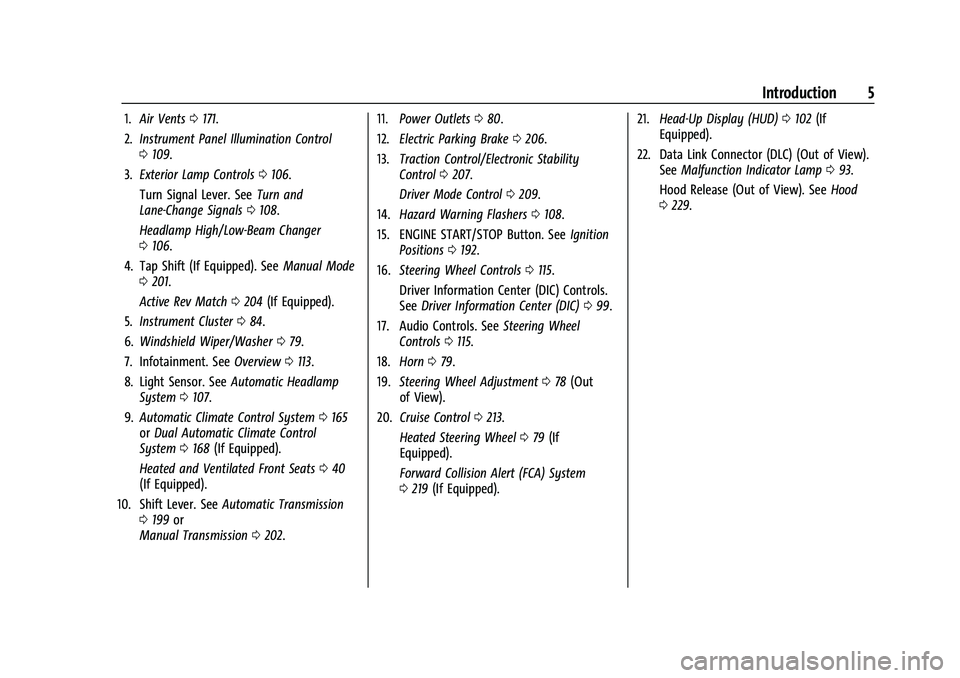
1.Air Vents 0171.
2. Instrument Panel Illumination Control
0109.
3. Exterior Lamp Controls 0106.
Turn Signal Lever. See Turn and
Lane-Change Signals 0108.
Headlamp High/Low-Beam Changer
0 106.
4. Tap Shift (If Equipped). See Manual Mode
0 201.
Active Rev Match 0204 (If Equipped).
5. Instrument Cluster 084.
6. Windshield Wiper/Washer 079.
7. Infotainment. See Overview0113.
8. Light Sensor. See Automatic Headlamp
System 0107.
9. Automatic Climate Control System 0165
or Dual Automatic Climate Control
System 0168 (If Equipped).
Heated and Ventilated Front Seats 040
(If Equipped).
10. Shift Lever. See Automatic Transmission
0 199 or
Manual Transmission 0202. 11.
Power Outlets 080.
12. Electric Parking Brake 0206.
13. Traction Control/Electronic Stability
Control 0207.
Driver Mode Control 0209.
14. Hazard Warning Flashers 0108.
15. ENGINE START/STOP Button. See Ignition
Positions 0192.
16. Steering Wheel Controls 0115.
Driver Information Center (DIC) Controls.
See Driver Information Center (DIC) 099.
17. Audio Controls. See Steering Wheel
Controls 0115.
18. Horn 079.
19. Steering Wheel Adjustment 078 (Out
of View).
20. Cruise Control 0213.
Heated Steering Wheel 079 (If
Equipped).
Forward Collision Alert (FCA) System
0 219 (If Equipped). 21.
Head-Up Display (HUD) 0102 (If
Equipped).
22. Data Link Connector (DLC) (Out of View). SeeMalfunction Indicator Lamp 093.
Hood Release (Out of View). See Hood
0 229.
Page 8 of 345
Chevrolet Camaro Owner Manual (GMNA-Localizing-U.S./Canada/Mexico-
16408685) - 2023 - CRC - 3/28/22
Keys, Doors, and Windows 7
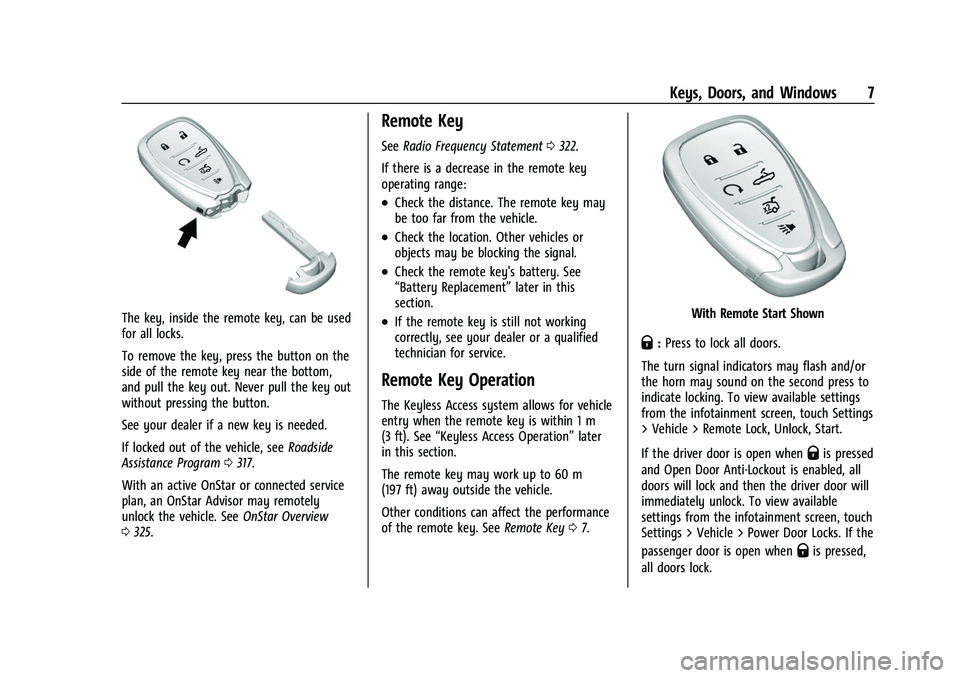
The key, inside the remote key, can be used
for all locks.
To remove the key, press the button on the
side of the remote key near the bottom,
and pull the key out. Never pull the key out
without pressing the button.
See your dealer if a new key is needed.
If locked out of the vehicle, seeRoadside
Assistance Program 0317.
With an active OnStar or connected service
plan, an OnStar Advisor may remotely
unlock the vehicle. See OnStar Overview
0 325.
Remote Key
See Radio Frequency Statement 0322.
If there is a decrease in the remote key
operating range:
.Check the distance. The remote key may
be too far from the vehicle.
.Check the location. Other vehicles or
objects may be blocking the signal.
.Check the remote key's battery. See
“Battery Replacement” later in this
section.
.If the remote key is still not working
correctly, see your dealer or a qualified
technician for service.
Remote Key Operation
The Keyless Access system allows for vehicle
entry when the remote key is within 1 m
(3 ft). See “Keyless Access Operation” later
in this section.
The remote key may work up to 60 m
(197 ft) away outside the vehicle.
Other conditions can affect the performance
of the remote key. See Remote Key07.
With Remote Start Shown
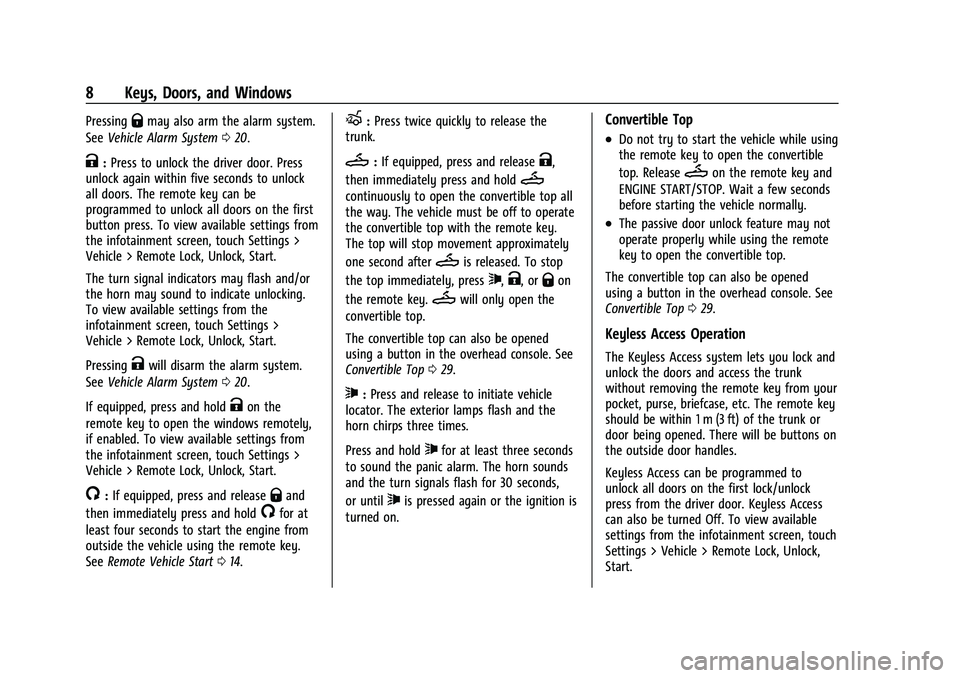
Q:Press to lock all doors.
The turn signal indicators may flash and/or
the horn may sound on the second press to
indicate locking. To view available settings
from the infotainment screen, touch Settings
> Vehicle > Remote Lock, Unlock, Start.
If the driver door is open when
Qis pressed
and Open Door Anti-Lockout is enabled, all
doors will lock and then the driver door will
immediately unlock. To view available
settings from the infotainment screen, touch
Settings > Vehicle > Power Door Locks. If the
passenger door is open when
Qis pressed,
all doors lock.
Page 9 of 345
Chevrolet Camaro Owner Manual (GMNA-Localizing-U.S./Canada/Mexico-
16408685) - 2023 - CRC - 3/28/22
8 Keys, Doors, and Windows
PressingQmay also arm the alarm system.
See Vehicle Alarm System 020.
K:Press to unlock the driver door. Press
unlock again within five seconds to unlock
all doors. The remote key can be
programmed to unlock all doors on the first
button press. To view available settings from
the infotainment screen, touch Settings >
Vehicle > Remote Lock, Unlock, Start.
The turn signal indicators may flash and/or
the horn may sound to indicate unlocking.
To view available settings from the
infotainment screen, touch Settings >
Vehicle > Remote Lock, Unlock, Start.
Pressing
Kwill disarm the alarm system.
See Vehicle Alarm System 020.
If equipped, press and hold
Kon the
remote key to open the windows remotely,
if enabled. To view available settings from
the infotainment screen, touch Settings >
Vehicle > Remote Lock, Unlock, Start.
/: If equipped, press and releaseQand
then immediately press and hold
/for at
least four seconds to start the engine from
outside the vehicle using the remote key.
See Remote Vehicle Start 014.
X:Press twice quickly to release the
trunk.
M: If equipped, press and releaseK,
then immediately press and hold
M
continuously to open the convertible top all
the way. The vehicle must be off to operate
the convertible top with the remote key.
The top will stop movement approximately
one second after
Mis released. To stop
the top immediately, press
7,K, orQon
the remote key.
Mwill only open the
convertible top.
The convertible top can also be opened
using a button in the overhead console. See
Convertible Top 029.
7:Press and release to initiate vehicle
locator. The exterior lamps flash and the
horn chirps three times.
Press and hold
7for at least three seconds
to sound the panic alarm. The horn sounds
and the turn signals flash for 30 seconds,
or until
7is pressed again or the ignition is
turned on.
Convertible Top
.Do not try to start the vehicle while using
the remote key to open the convertible
top. Release
Mon the remote key and
ENGINE START/STOP. Wait a few seconds
before starting the vehicle normally.
.The passive door unlock feature may not
operate properly while using the remote
key to open the convertible top.
The convertible top can also be opened
using a button in the overhead console. See
Convertible Top 029.
Keyless Access Operation
The Keyless Access system lets you lock and
unlock the doors and access the trunk
without removing the remote key from your
pocket, purse, briefcase, etc. The remote key
should be within 1 m (3 ft) of the trunk or
door being opened. There will be buttons on
the outside door handles.
Keyless Access can be programmed to
unlock all doors on the first lock/unlock
press from the driver door. Keyless Access
can also be turned Off. To view available
settings from the infotainment screen, touch
Settings > Vehicle > Remote Lock, Unlock,
Start.
Page 11 of 345
Chevrolet Camaro Owner Manual (GMNA-Localizing-U.S./Canada/Mexico-
16408685) - 2023 - CRC - 3/28/22
10 Keys, Doors, and Windows
Passive Locking
With Keyless Access the vehicle will lock
several seconds after all doors are closed if
the vehicle is off and at least one remote
key has been removed or none remain in
the vehicle.
If other electronic devices interfere with the
remote key signal, the vehicle may not
detect the remote key inside the vehicle.
If passive locking is enabled, the doors may
lock with the remote key inside the vehicle.
Do not leave the remote key in an
unattended vehicle.
To view available settings from the
infotainment screen, touch Settings >
Vehicle > Remote Lock, Unlock, Start.
Temporary Disable of Passive Locking
Temporarily disable passive locking by
pressing and holding
Kon the interior door
switch with a door open for at least
four seconds, or until three chimes are
heard. Passive locking will then remain
disabled until
Qon the interior door is
pressed, or until the vehicle is turned on. Remote Left In Vehicle Alert
When the vehicle is turned off and an
remote key is left in the vehicle, the horn
will chirp three times after all doors are
closed. To view available settings from the
infotainment screen, touch Settings >
Vehicle > Remote Lock, Unlock, Start.
Remote No Longer In Vehicle Alert
If the vehicle is on with a door open, and
then all doors are closed, the vehicle will
check for remote keys inside. If an remote
key is not detected, the Driver Information
Center (DIC) will display NO REMOTE
DETECTED and the horn will chirp three
times.
This occurs only once each time the vehicle
is driven.
To view available settings from the
infotainment screen, touch Settings >
Vehicle > Remote Lock, Unlock, Start.
Keyless Trunk Opening
When the doors are locked, press the touch
pad to open the trunk if the remote key is
within 1 m (3 ft).Key Access
To access a vehicle with a weak remote key
battery, see
Door Locks015.
Programming Remote Keys to the
Vehicle
Only remote keys programmed to the
vehicle will work. If a remote key is lost or
stolen, a replacement can be purchased and
programmed through your dealer. The
vehicle can be reprogrammed so that lost or
stolen remote keys no longer work. Any
remaining remote keys will need to be
reprogrammed. Each vehicle can have up to
eight remote keys matched to it.
Programming with Recognized Remote Keys
A new remote key can be programmed to
the vehicle when there are two recognized
remote keys. To program, the vehicle must
be off and all of the remote keys, both
currently recognized and new, must be
with you.
Page 19 of 345
Chevrolet Camaro Owner Manual (GMNA-Localizing-U.S./Canada/Mexico-
16408685) - 2023 - CRC - 3/28/22
18 Keys, Doors, and Windows
.If equipped with an automatic
transmission, shift the transmission into
P (Park).
.If equipped with a manual transmission,
turn the vehicle off when parked.
Automatic door locking cannot be disabled.
Automatic door unlocking can be enabled
through vehicle personalization. To view
available settings for this feature, touch the
Settings icon on the infotainment home
page. Select “Vehicle”to display the list of
available options and select “Power Door
Locks”.
Lockout Protection
If the vehicle is on or in accessory mode and
the power door lock switch is pressed with
the driver door open, all the doors will lock
and only the driver door will unlock.
If the vehicle is off and locking is requested
while a door is open, when all doors are
closed the vehicle will check for remote keys
inside. If an remote key is detected and the
number of remote keys inside has not
reduced, the driver door will unlock and the
horn will chirp three times. Lockout Protection can be manually
overridden with the driver door open by
pressing and holding
Qon the power door
lock switch.
Open Door Anti-Lockout
If Open Door Anti-Lockout has been turned
on and the vehicle is off, the driver door is
open, and locking is requested, all the doors
will lock and the driver door will remain
unlocked. The Open Door Anti-Lockout
feature can be turned on or off. To view
available settings from the infotainment
screen, touch Settings > Vehicle > Power
Door Locks.
Doors
Trunk
{Warning
Exhaust gases can enter the vehicle if it
is driven with the liftgate, trunk/hatch
open, or with any objects that pass
through the seal between the body and
the trunk/hatch or liftgate. Engine
(Continued)
Warning (Continued)
exhaust contains carbon monoxide (CO)
which cannot be seen or smelled. It can
cause unconsciousness and even death.
If the vehicle must be driven with the
liftgate, or trunk/hatch open:
.Close all of the windows.
.Fully open the air outlets on or under
the instrument panel.
.Adjust the climate control system to a
setting that brings in only outside air
and set the fan speed to the highest
setting. See“Climate Control Systems”
in the Index.
.If the vehicle has a power liftgate,
disable the power liftgate function.
For more information about carbon
monoxide, see Engine Exhaust 0198.
Trunk Release
To open the trunk from outside of the
vehicle:
.PressXtwice quickly on the
remote key.
Page 22 of 345
Chevrolet Camaro Owner Manual (GMNA-Localizing-U.S./Canada/Mexico-
16408685) - 2023 - CRC - 3/28/22
Keys, Doors, and Windows 21
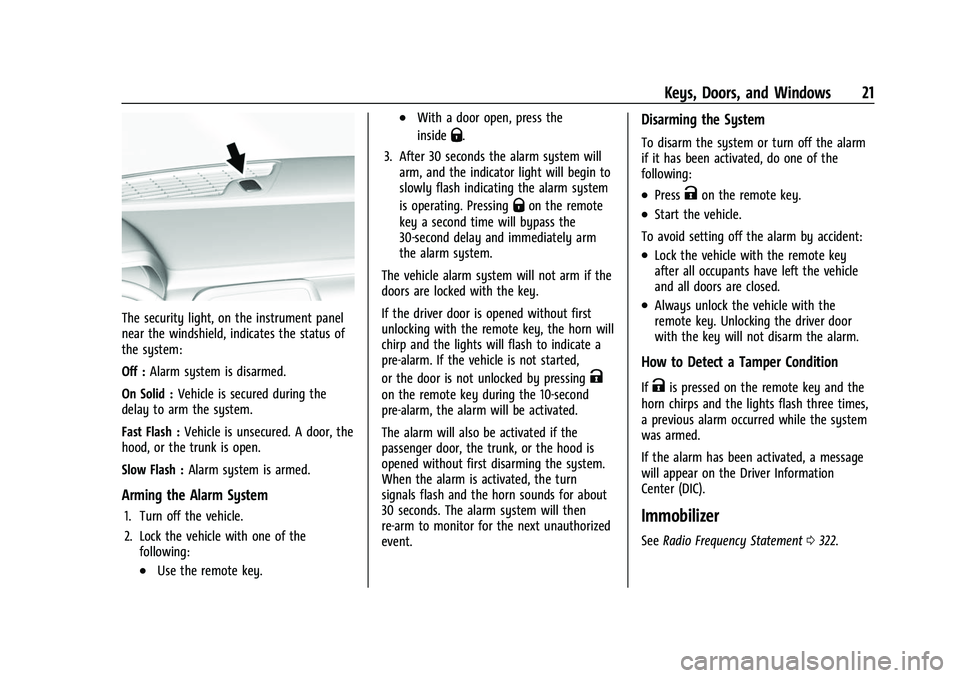
The security light, on the instrument panel
near the windshield, indicates the status of
the system:
Off :Alarm system is disarmed.
On Solid : Vehicle is secured during the
delay to arm the system.
Fast Flash : Vehicle is unsecured. A door, the
hood, or the trunk is open.
Slow Flash : Alarm system is armed.
Arming the Alarm System
1. Turn off the vehicle.
2. Lock the vehicle with one of the
following:
.Use the remote key.
.With a door open, press the
inside
Q.
3. After 30 seconds the alarm system will arm, and the indicator light will begin to
slowly flash indicating the alarm system
is operating. Pressing
Qon the remote
key a second time will bypass the
30-second delay and immediately arm
the alarm system.
The vehicle alarm system will not arm if the
doors are locked with the key.
If the driver door is opened without first
unlocking with the remote key, the horn will
chirp and the lights will flash to indicate a
pre-alarm. If the vehicle is not started,
or the door is not unlocked by pressing
K
on the remote key during the 10-second
pre-alarm, the alarm will be activated.
The alarm will also be activated if the
passenger door, the trunk, or the hood is
opened without first disarming the system.
When the alarm is activated, the turn
signals flash and the horn sounds for about
30 seconds. The alarm system will then
re-arm to monitor for the next unauthorized
event.
Disarming the System
To disarm the system or turn off the alarm
if it has been activated, do one of the
following:
.PressKon the remote key.
.Start the vehicle.
To avoid setting off the alarm by accident:
.Lock the vehicle with the remote key
after all occupants have left the vehicle
and all doors are closed.
.Always unlock the vehicle with the
remote key. Unlocking the driver door
with the key will not disarm the alarm.
How to Detect a Tamper Condition
IfKis pressed on the remote key and the
horn chirps and the lights flash three times,
a previous alarm occurred while the system
was armed.
If the alarm has been activated, a message
will appear on the Driver Information
Center (DIC).
Immobilizer
See Radio Frequency Statement 0322.
Page 79 of 345
Chevrolet Camaro Owner Manual (GMNA-Localizing-U.S./Canada/Mexico-
16408685) - 2023 - CRC - 3/28/22
78 Instruments and Controls
Instruments and Controls
Controls
Steering Wheel Adjustment . . . . . . . . . . . . 78
Heated Steering Wheel . . . . . . . . . . . . . . . . . 79
Horn . . . . . . . . . . . . . . . . . . . . . . . . . . . . . . . . . . . 79
Windshield Wiper/Washer . . . . . . . . . . . . . . 79
Compass . . . . . . . . . . . . . . . . . . . . . . . . . . . . . . . 80
Clock . . . . . . . . . . . . . . . . . . . . . . . . . . . . . . . . . . . 80
Power Outlets . . . . . . . . . . . . . . . . . . . . . . . . . . 80
Wireless Charging . . . . . . . . . . . . . . . . . . . . . . 81
Warning Lights, Gauges, and Indicators
Warning Lights, Gauges, andIndicators . . . . . . . . . . . . . . . . . . . . . . . . . . . . . 83
Instrument Cluster . . . . . . . . . . . . . . . . . . . . . 84
Speedometer . . . . . . . . . . . . . . . . . . . . . . . . . . . 87
Odometer . . . . . . . . . . . . . . . . . . . . . . . . . . . . . . 88
Trip Odometer . . . . . . . . . . . . . . . . . . . . . . . . . 88
Tachometer . . . . . . . . . . . . . . . . . . . . . . . . . . . . 88
Fuel Gauge . . . . . . . . . . . . . . . . . . . . . . . . . . . . . 88
Boost Gauge (Uplevel Cluster Only) . . . . 89
Engine Oil Pressure Gauge (Uplevel Cluster Only) . . . . . . . . . . . . . . . . . . . . . . . . . 89
Engine Coolant Temperature Gauge . . . . 90
Voltmeter Gauge (Uplevel Cluster Only) . . . . . . . . . . . . . . . . . . . . . . . . . . 91
Seat Belt Reminders . . . . . . . . . . . . . . . . . . . . 91
Airbag Readiness Light . . . . . . . . . . . . . . . . . 92
Passenger Airbag Status Indicator . . . . . . 92 Charging System Light . . . . . . . . . . . . . . . . . 93
Malfunction Indicator Lamp . . . . . . . . . . . . 93
Brake System Warning Light . . . . . . . . . . . 95
Electric Parking Brake Light . . . . . . . . . . . . . 95
Service Electric Parking Brake Light . . . . . 95
Antilock Brake System (ABS) Warning
Light . . . . . . . . . . . . . . . . . . . . . . . . . . . . . . . . . 96
Performance Shifting Light . . . . . . . . . . . . . 96
Vehicle Ahead Indicator . . . . . . . . . . . . . . . . 96
Traction Off Light . . . . . . . . . . . . . . . . . . . . . . 96
StabiliTrak OFF Light . . . . . . . . . . . . . . . . . . . . 97
Traction Control System (TCS)/StabiliTrak Light . . . . . . . . . . . . . . . . . . . . . . . . . . . . . . . . . . 97
Tire Pressure Light . . . . . . . . . . . . . . . . . . . . . . 97
Engine Oil Pressure Light . . . . . . . . . . . . . . . 98
Low Fuel Warning Light . . . . . . . . . . . . . . . . 98
Security Light . . . . . . . . . . . . . . . . . . . . . . . . . . 98
High-Beam On Light . . . . . . . . . . . . . . . . . . . . 99
Lamps On Reminder . . . . . . . . . . . . . . . . . . . . 99
Cruise Control Light . . . . . . . . . . . . . . . . . . . . 99
Door Ajar Light . . . . . . . . . . . . . . . . . . . . . . . . . 99
Information Displays
Driver Information Center (DIC) . . . . . . . . 99
Head-Up Display (HUD) . . . . . . . . . . . . . . . . 102
Vehicle Messages
Vehicle Messages . . . . . . . . . . . . . . . . . . . . . . 105
Engine Power Messages . . . . . . . . . . . . . . . 105
Vehicle Speed Messages . . . . . . . . . . . . . . . 105
Controls
Steering Wheel Adjustment
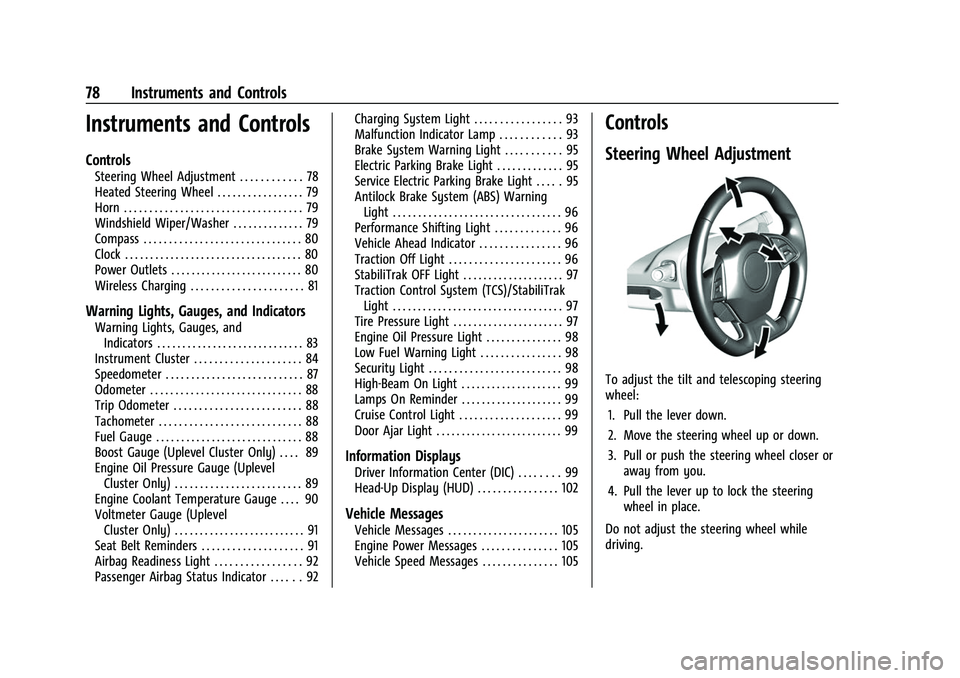
To adjust the tilt and telescoping steering
wheel:
1. Pull the lever down.
2. Move the steering wheel up or down.
3. Pull or push the steering wheel closer or away from you.
4. Pull the lever up to lock the steering wheel in place.
Do not adjust the steering wheel while
driving.
Page 80 of 345
Chevrolet Camaro Owner Manual (GMNA-Localizing-U.S./Canada/Mexico-
16408685) - 2023 - CRC - 3/28/22
Instruments and Controls 79
Heated Steering Wheel
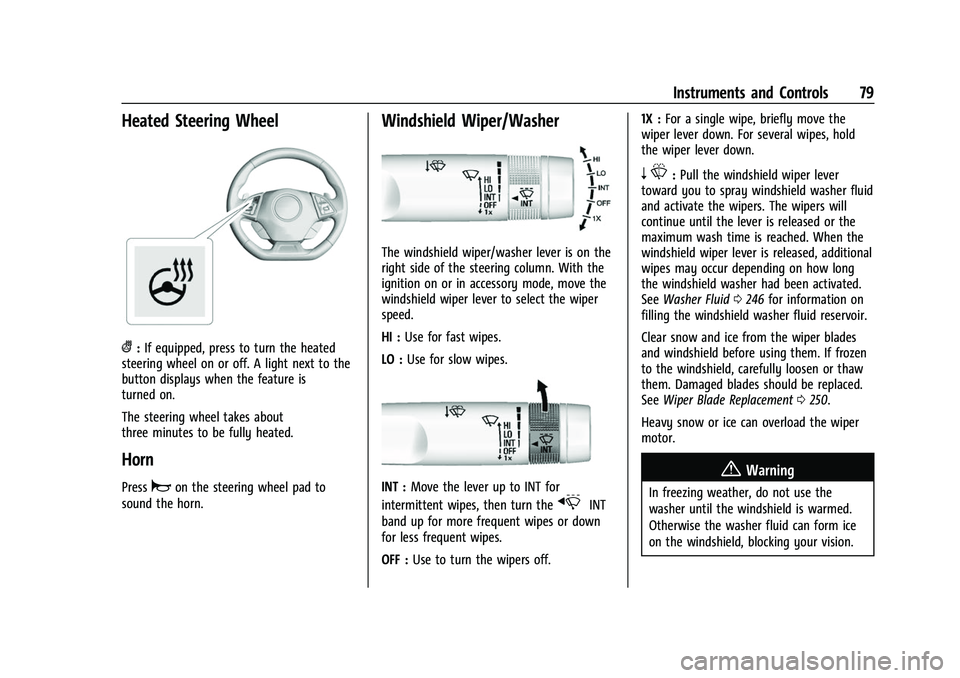
(:If equipped, press to turn the heated
steering wheel on or off. A light next to the
button displays when the feature is
turned on.
The steering wheel takes about
three minutes to be fully heated.
Horn
Pressaon the steering wheel pad to
sound the horn.
Windshield Wiper/Washer
The windshield wiper/washer lever is on the
right side of the steering column. With the
ignition on or in accessory mode, move the
windshield wiper lever to select the wiper
speed.
HI : Use for fast wipes.
LO : Use for slow wipes.
INT : Move the lever up to INT for
intermittent wipes, then turn the
xINT
band up for more frequent wipes or down
for less frequent wipes.
OFF : Use to turn the wipers off. 1X :
For a single wipe, briefly move the
wiper lever down. For several wipes, hold
the wiper lever down.
n L: Pull the windshield wiper lever
toward you to spray windshield washer fluid
and activate the wipers. The wipers will
continue until the lever is released or the
maximum wash time is reached. When the
windshield wiper lever is released, additional
wipes may occur depending on how long
the windshield washer had been activated.
See Washer Fluid 0246 for information on
filling the windshield washer fluid reservoir.
Clear snow and ice from the wiper blades
and windshield before using them. If frozen
to the windshield, carefully loosen or thaw
them. Damaged blades should be replaced.
See Wiper Blade Replacement 0250.
Heavy snow or ice can overload the wiper
motor.
{Warning
In freezing weather, do not use the
washer until the windshield is warmed.
Otherwise the washer fluid can form ice
on the windshield, blocking your vision.
Page 259 of 345
Chevrolet Camaro Owner Manual (GMNA-Localizing-U.S./Canada/Mexico-
16408685) - 2023 - CRC - 3/28/22
258 Vehicle Care
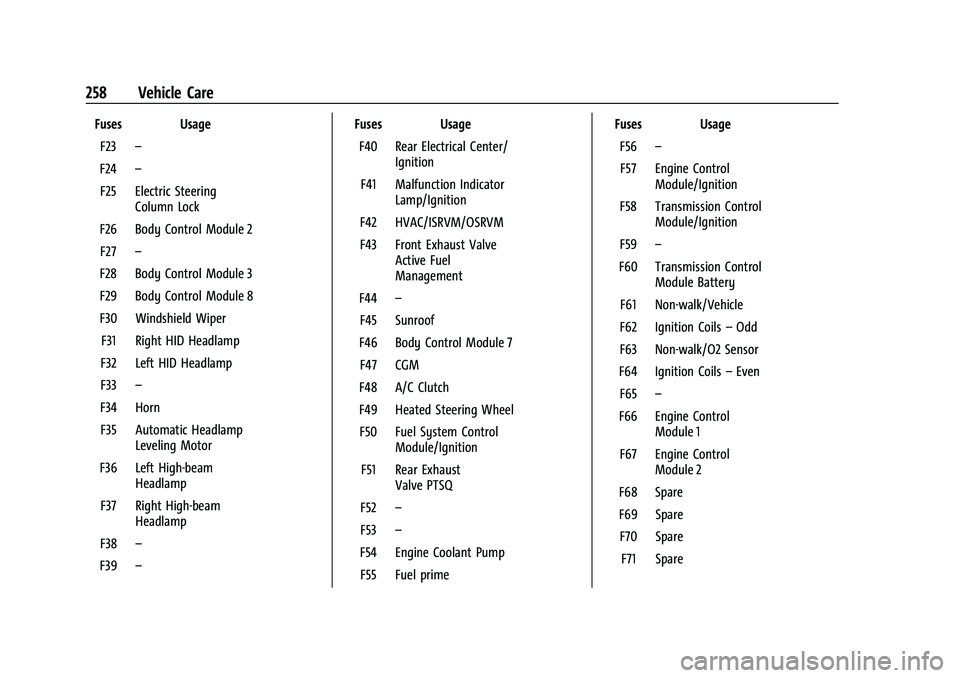
Fuses UsageF23 –
F24 –
F25 Electric Steering Column Lock
F26 Body Control Module 2 F27 –
F28 Body Control Module 3
F29 Body Control Module 8
F30 Windshield Wiper F31 Right HID Headlamp
F32 Left HID Headlamp
F33 –
F34 Horn F35 Automatic Headlamp Leveling Motor
F36 Left High-beam Headlamp
F37 Right High-beam Headlamp
F38 –
F39 – Fuses Usage
F40 Rear Electrical Center/ Ignition
F41 Malfunction Indicator Lamp/Ignition
F42 HVAC/ISRVM/OSRVM
F43 Front Exhaust Valve Active Fuel
Management
F44 –
F45 Sunroof
F46 Body Control Module 7 F47 CGM
F48 A/C Clutch
F49 Heated Steering Wheel F50 Fuel System Control Module/Ignition
F51 Rear Exhaust Valve PTSQ
F52 –
F53 –
F54 Engine Coolant Pump F55 Fuel prime Fuses Usage
F56 –
F57 Engine Control Module/Ignition
F58 Transmission Control Module/Ignition
F59 –
F60 Transmission Control Module Battery
F61 Non-walk/Vehicle
F62 Ignition Coils –Odd
F63 Non-walk/O2 Sensor
F64 Ignition Coils –Even
F65 –
F66 Engine Control Module 1
F67 Engine Control Module 2
F68 Spare
F69 Spare F70 Spare F71 Spare
Page 273 of 345
Chevrolet Camaro Owner Manual (GMNA-Localizing-U.S./Canada/Mexico-
16408685) - 2023 - CRC - 3/28/22
272 Vehicle Care
Factory-installed Tire Inflator Kits use a GM
approved liquid tire sealant. Using
non-approved tire sealants could damage the
TPMS sensors. SeeTire Sealant and
Compressor Kit 0280 for information
regarding the inflator kit materials and
instructions.
TPMS Malfunction Light and Message
The TPMS will not function properly if one
or more of the TPMS sensors are missing or
inoperable. When the system detects a
malfunction, the low tire pressure warning
light flashes for about one minute and then
stays on for the remainder of the ignition
cycle. A DIC warning message also displays.
The malfunction light and DIC warning
message come on at each ignition cycle
until the problem is corrected. Some of the
conditions that can cause these to come
on are:
.One of the road tires has been replaced
with the spare tire. The spare tire does
not have a TPMS sensor. The malfunction
light and DIC message should go off after
the road tire is replaced and the sensor
matching process is performed
successfully. See “TPMS Sensor Matching
Process” later in this section.
.The TPMS sensor matching process was
not done or not completed successfully
after rotating the tires. The malfunction
light and the DIC message should go off
after successfully completing the sensor
matching process. See "TPMS Sensor
Matching Process" later in this section.
.One or more TPMS sensors are missing or
damaged. The malfunction light and the
DIC message should go off when the
TPMS sensors are installed and the sensor
matching process is performed
successfully. See your dealer for service.
.Replacement tires or wheels do not match
the original equipment tires or wheels.
Tires and wheels other than those
recommended could prevent the TPMS
from functioning properly. See Buying
New Tires 0276.
.Operating electronic devices or being near
facilities using radio wave frequencies
similar to the TPMS could cause the TPMS
sensors to malfunction.
If the TPMS is not functioning properly it
cannot detect or signal a low tire pressure
condition. See your dealer for service if the
TPMS malfunction light and DIC message
come on and stay on.
Tire Fill Alert (If Equipped)
This feature provides visual and audible
alerts outside the vehicle to help when
inflating an underinflated tire to the
recommended cold tire pressure.
When the low tire pressure warning light
comes on: 1. Park the vehicle in a safe, level place.
2. Set the parking brake firmly.
3. Place the vehicle in P (Park).
4. Add air to the tire that is underinflated. The turn signal lamp will flash.
When the recommended pressure is
reached, the horn sounds once and the
turn signal lamp will stop flashing and
briefly turn solid.
Repeat these steps for all underinflated tires
that have illuminated the low tire pressure
warning light.
{Warning
Overinflating a tire could cause the tire
to rupture and you or others could be
injured. Do not exceed the maximum (Continued)