audio CHEVROLET CAMARO SS 2010 User Guide
[x] Cancel search | Manufacturer: CHEVROLET, Model Year: 2010, Model line: CAMARO SS, Model: CHEVROLET CAMARO SS 2010Pages: 372, PDF Size: 1.91 MB
Page 150 of 372

Retrieving stations
Press the FAV button to open a
favorite page or to switch to another
favorite page. Briefly press one of
the 1-6 buttons to retrieve the
station.
XM Messages
XL (Explicit Language Channels):
These channels, or any others,
can be blocked by request,
by calling 1-800-852-XMXM (9696).
XM Updating:The encryption
code is being updated, no action
is required.
Loading XM:The audio system is
acquiring and processing audio
and text data, no action is needed.
Channel Off Air:This channel
is not currently in service.
Channel Unauth:This channel is
blocked or cannot be received
with the XM Subscription package.Channel Unavail:This previously
assigned channel is no longer
assigned.
No Artist Info:No artist information
is available.
No Title Info:No song title
information is available.
No CAT Info:No category
information is available.
No Information:No text or
informational messages are
available.
No XM Signal:The vehicle may
be in a location that where the
XM signal is being blocked.
When the vehicle is moved,
the signal should return.
CAT Not Found:There are no
channels available for the selected
category.XM Theftlocked:The XM receiver
in the vehicle may have been in
another vehicle. XM receivers
cannot be swapped between
vehicles. If this message is received
after having the vehicle serviced,
check with your dealer/retailer.
XM Radio ID:If tuned to channel 0,
this message alternates with the
XM Radio 8 digit radio ID label.
This label is needed to activate the
service.
Unknown:If this message is
received when tuned to channel 0,
there could be a receiver fault.
Consult with your dealer/retailer.
Check XM Receivr:If this message
does not clear within a short period of
time, the receiver could have a fault.
Consult with your dealer/retailer.
XM Not Available:If this message
does not clear within a short period of
time, the receiver could have a fault.
Consult with your dealer/retailer.
6-12 Infotainment System
Page 152 of 372
If a cellular telephone antenna
needs to be attached to the glass,
make sure that the grid lines for
the AM-FM antenna are not
damaged. There is enough space
between the grid lines to attach
a cellular telephone antenna without
interfering with radio reception.
Notice:Using a razor blade or
sharp object to clear the inside
rear window can damage the rear
window antenna and/or the rear
window defogger. Repairs would
not be covered by the vehicle
warranty. Do not clear the inside
rear window with sharp objects.Notice:Do not apply aftermarket
glass tinting with metallic lm.
The metallic lm in some tinting
materials will interfere with or
distort the incoming radio
reception. Any damage caused to
your backglass antenna due to
metallic tinting materials will
not be covered by the vehicle
warranty.
Satellite Radio Antenna
For vehicles with XM™ Satellite
Radio Service, the antenna is
located on the decklid of the vehicle.
Keep the antenna clear of
obstructions for clear radio
reception.
Audio Players
CD Player
The CD player can play audio CDs
and MP3 CDs.
The CD player will not play
8 cm (3 inches) CDs.
Care of CDs
Sound quality can be reduced due to
disc quality, recording method,
quality of the music recorded, and
how the disc has been handled.
Handle discs carefully and store
them in their original cases or other
protective cases away from direct
sunlight and dust. If the bottom
surface of a disc is damaged, the
disc may not play properly or at all.
Do not touch the bottom surface of a
disc while handling it; this could
damage the surface. Pick up discs by
grasping the outer edges or the edge
of the hole and the outer edge.
6-14 Infotainment System
Page 155 of 372
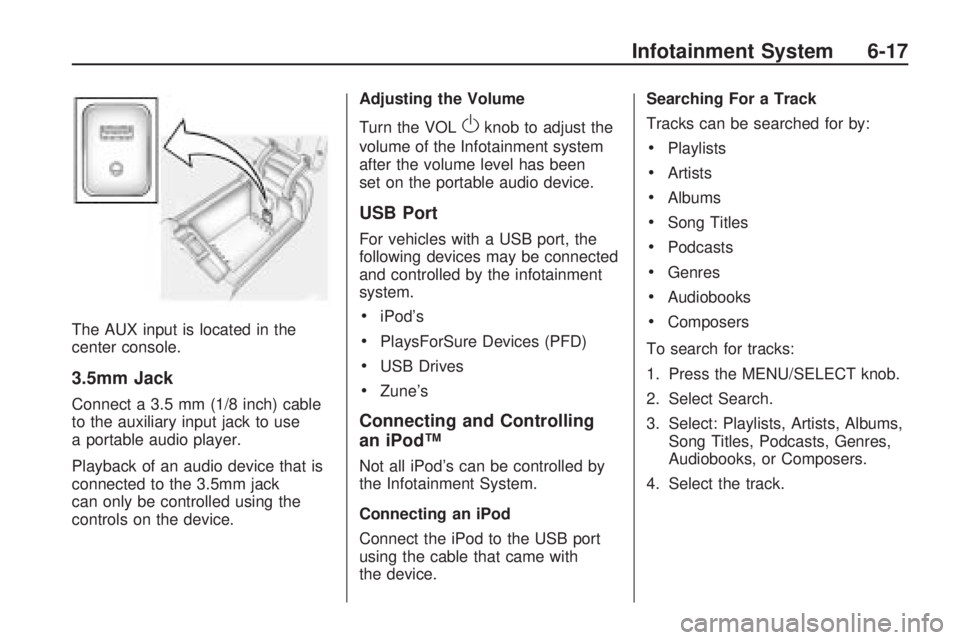
The AUX input is located in the
center console.
3.5mm Jack
Connect a 3.5 mm (1/8 inch) cable
to the auxiliary input jack to use
a portable audio player.
Playback of an audio device that is
connected to the 3.5mm jack
can only be controlled using the
controls on the device.Adjusting the Volume
Turn the VOL
Oknob to adjust the
volume of the Infotainment system
after the volume level has been
set on the portable audio device.
USB Port
For vehicles with a USB port, the
following devices may be connected
and controlled by the infotainment
system.
•iPod’s
•PlaysForSure Devices (PFD)
•USB Drives
•Zune’s
Connecting and Controlling
an iPod™
Not all iPod’s can be controlled by
the Infotainment System.
Connecting an iPod
Connect the iPod to the USB port
using the cable that came with
the device.Searching For a Track
Tracks can be searched for by:
•Playlists
•Artists
•Albums
•Song Titles
•Podcasts
•Genres
•Audiobooks
•Composers
To search for tracks:
1. Press the MENU/SELECT knob.
2. Select Search.
3. Select: Playlists, Artists, Albums,
Song Titles, Podcasts, Genres,
Audiobooks, or Composers.
4. Select the track.
Infotainment System 6-17
Page 157 of 372
Connecting and Controlling a
USB Drive
The infotainment system can only
play back .mp3 and .wma files from
a USB drive.
Only the first 10,000 songs are
recognized on the device.
When a device is not supported,
the message “No supported
data found. You can safely
disconnect the device” appears.
Connecting a USB Drive
Connect the USB drive to the
USB port using the cable that came
with the device.
Searching For a Track
It is normal for the search feature to
take some time to display the
information after reading the disc
due to the amount of information
stored on the disc.
Files that do not have any meta
data stored in the ID3 tag display
as Unknown.Tracks can be searched for by:
•Playlists*
•Artists
•Albums
•Song Titles
•Genres
•Folder View
*This only displays if a playlist is
found on the device.
To search for tracks:
1. Press the MENU/SELECT knob.
2. Select Search.
3. Select: Playlists, Artists,
Albums, Song Titles, Genres,
or Folder View.
4. Select the track.
Shuffle Functionality
Press the MENU/SELECT knob and
set Shuffle Songs (Random) to
On or Off.
On:Plays current tracks in random
order.Off:Plays current tracks in
sequential order.
Repeat Functionality
Press the MENU/SELECT knob and
set Repeat to On or Off.
Repeat On:Repeats the current
track.
Repeat Off:Playback starts from
the beginning of the current
track after the last track finishes.
Connecting a Bluetooth®
Device
Before a Bluetooth device can be
connected to the infotainment
system, it must first be paired to the
system. Not all Bluetooth devices
can be paired to the infotainment
system. Before pairing the Bluetooth
device, become familiar with its
user guide for Bluetooth functions.
The system only connects to
Bluetooth devices that support
A2DP (Advanced Audio Distribution
Profile) version 1.2.
Infotainment System 6-19
Page 160 of 372
Controlling a Bluetooth®
Device
Bluetooth devices that support
AVRCP (Audio/Video Remote
Control Profile) version 1.0 may
be able to be controlled by the
Infotainment System.
Press and release
gSEEK /
lSEEK to skip tracks. Press and
hold
gSEEK /lSEEK to fast
forward or fast reverse within
a track.
Other Information
The Bluetooth®word mark and
logos are owned by the Bluetooth®
SIG, Inc. and any use of such
marks by General Motors is under
license. Other trademarks and
trade names are those of their
respective owners.
SeeRadio Frequency Statement
(US, Can) on page 12-15for
FCC information.
Phone
Bluetooth (Overview)
Vehicles with a Bluetooth system
can use a Bluetooth capable
cell phone with a Hands Free Profile
to make and receive phone calls.
The infotainment system and
voice recognition are used to
control the system. The system
can be used while in ON/RUN or
ACC/ACCESSORY. The range
of the Bluetooth system can be up
to 9.1 m (30 ft.). Not all phones
support all functions and not
all phones work with the Bluetooth
system. See www.gm.com/bluetooth
for more information about
compatible phones.
Bluetooth Controls
Use the buttons located on the
infotainment system and the
steering wheel to operate the
Bluetooth system.Steering Wheel Controls
b/g(Push To Talk):Press to
answer incoming calls, to confirm
system information, and to start
voice recognition.
c/$(End Call / Mute):Press
to end a call, reject a call, or to
cancel an operation.
Infotainment System Controls
MENU/SELECT:Press and turn
to navigate the menu screens.
SeeOperation on page 6-4for
more information.
PHONE:Press to enter the Phone
main menu.
CONFIG:Press to enter the
System Configuration menu.
6-22 Infotainment System
Page 161 of 372
Voice Recognition
The voice recognition system is
used to interpret commands
that control the system and dial
phone numbers.
Noise:The system may not
recognize voice commands if there
is too much background noise.
When to Speak:A tone sounds to
indicate that the system is ready
for a voice command. Wait for
the tone and then speak.
How to Speak:Speak clearly in a
calm and natural voice.
Audio System
When using the Bluetooth system,
sound comes through the vehicle’s
front audio system speakers
and overrides the audio system.
Use the audio system volume knob,
during a call, to change the
volume level. The adjusted volume
level remains in memory for later
calls. The system maintains a
minimum volume level.
Other Information
The Bluetooth®word mark and
logos are owned by the Bluetooth®
SIG, Inc. and any use of such
marks by General Motors is under
license. Other trademarks and
trade names are those of their
respective owners.
SeeRadio Frequency Statement
(US, Can) on page 12-15for
FCC information.
Bluetooth
(Infotainment Controls)
Pairing
A Bluetooth enabled cell phone
must be paired to the Bluetooth
system first and then connected to
the vehicle before it can be
used. See the cell phone
manufacturer user guide for
Bluetooth functions before pairing
the cell phone. If a Bluetooth phone
is not connected, calls will be
made using OnStar
®Hands-FreeCalling, if available. Refer to the
OnStar owner’s guide for more
information.
The pairing process can be started
by using the voice recognition
system or the controls on the
infotainment system.
Pairing Information:
•Up to five cell phones can be
paired to the Bluetooth system.
•The pairing process is disabled
when the vehicle is moving.
•The Bluetooth system
automatically links with the first
available paired cell phone in the
order the phone was paired.
•Only one paired cell phone can
be connected to the Bluetooth
system at a time.
•Pairing should only need to be
completed once, unless changes
to the pairing information have
been made or the phone is
deleted.
Infotainment System 6-23
Page 170 of 372

Once connected, the person called
will be heard through the audio
speakers.
Using the Re-dial Command
1. Press
bg. The system
responds “Ready” followed
by a tone.
2. After the tone, say “Re-dial”.
The system responds “Re-dial
using
dials the last number called from
the connected Bluetooth phone.
Once connected, the person called
will be heard through the audio
speakers.
Receiving a Call
When an incoming call is received,
the audio system mutes and a
ring tone is heard in the vehicle.
•Pressbgto answer the call.
•Pressc$to ignore a call.
Call Waiting
Call waiting must be supported on
the Bluetooth phone and enabled by
the wireless service carrier to work.
•Pressbgto answer an incoming
call when another call is active.
The original call is placed on hold.
•Pressbgagain to return to the
original call.
•To ignore the incoming call,
no action is required.
•Pressc$to disconnect the
current call and switch to the call
on hold.
Three-Way Calling
Three-Way Calling must be
supported on the Bluetooth phone
and enabled by the wireless service
carrier to work.
1. While on a call press
bg.
The system responds “Ready”
followed by a tone.2. Say “Three-way call”. The system
responds “Three-way call, please
say dial or call”.
3. Use the dial or call command to
dial the number of the third party
to be called.
4. Once the call is connected,
press
bgto link all the callers
together.
Ending a Call
Pressc$to end a call.
Muting a Call
During a call, all sounds from inside
the vehicle can be muted so that
the person on the other end of
the call cannot hear them.
To Mute a call
1. Press
bg. The system responds
“Ready” followed by a tone.
2. Say “Mute Call”. The system
responds “Call muted”.
6-32 Infotainment System
Page 171 of 372

To Cancel Mute
1. Press
bg. The system responds
“Ready” followed by a tone.
2. After the tone, say “Mute Call”.
The system responds
“Resuming call”.
Transferring a Call
Audio can be transferred between
the in-vehicle Bluetooth system
and the cell phone.
To Transfer Audio to the Cell
Phone
During a call with the audio in the
vehicle:
1. Press
bg. The system responds
“Ready” followed by a tone.
2. Say “Transfer Call.” The system
responds “Transferring call” and
the audio transfers to the cell
phone.To Transfer Audio to the
In-Vehicle Bluetooth System
The cell phone must be paired and
connected with the Bluetooth
system before a call can be
transferred. The connection process
can take up to two minutes after
the key is turned to ON/RUN
or ACC/ACCESSORY.
During a call with the audio on
the cell phone, press
bg.
The audio transfers to the vehicle.
Voice Pass-Thru
Voice Pass-Thru allows access to
the voice recognition commands
on the cell phone. See the cell
phone manufacturer user guide to
see if the cell phone supports
this feature.To access contacts stored in the
cell phone:
1. Press
bg. The system
responds “Ready” followed
by a tone.
2. Say “Bluetooth”. The system
responds “Bluetooth ready”
followed by a tone.
3. Say “Voice”. The system
responds “OK, accessing
•The cell phone’s normal
prompt messages will
go through its cycle according
to the phone’s operating
instructions.
Infotainment System 6-33
Page 195 of 372
If charging or jump starting the
battery does not work, remove the
plug covering the hole below the
ignition lock. Insert a screwdriver into
the opening as far as it will go and
remove the key from the ignition.
Retained Accessory
Power (RAP)
These vehicle accessories may be
used for up to 10 minutes after
the engine is turned off:
•Audio System
•Power Windows
The power windows will continue to
work for up to 10 minutes or until any
door is opened. The radio will work
when the key is in ON/RUN or
ACC/ACCESSORY. Once the key is
turned from ON/RUN to LOCK/OFF,
the radio will continue to work for
10 minutes, or until the driver door
is opened or the key is removed
from the ignition.
Starting the Engine
Place the transmission in the
proper gear.
Automatic Transmission
Move the shift lever to P (Park) or
N (Neutral). The engine will not start
in any other position. To restart the
vehicle when it is already moving,
use N (Neutral) only.
Notice:Do not try to shift to
P (Park) if the vehicle is moving.
If you do, you could damage
the transmission. Shift to P (Park)
only when the vehicle is stopped.
Manual Transmission
The shift lever should be in
N (Neutral) and the parking brake
engaged. Hold the clutch pedal
down to the floor and start the
engine. The vehicle will not start
if the clutch pedal is not all the
way down.Starting Procedure
1. With your foot off the accelerator
pedal, turn the ignition key to
START. When the engine starts,
let go of the key. The idle speed
will go down as the engine
warms. Do not race the engine
immediately after starting it. Allow
the oil to warm up and lubricate all
moving parts.
The vehicle has a
Computer-Controlled Cranking
System. This feature assists in
starting the engine and protects
components. If the ignition key
is turned to the START position,
and then released when the
engine begins cranking, the
engine will continue cranking
for a few seconds or until the
vehicle starts. If the engine
does not start and the key
is held in START for many
seconds, cranking stops
after 15 seconds to prevent
cranking motor damage.
Driving and Operating 8-19
Page 361 of 372
A
Accessories and
Modifications...................... 9-3
Accessory Power.................8-19
Active Fuel Management™....8-25
Adding Equipment to the
Airbag-Equipped Vehicle....2-33
Add-On Electrical
Equipment.......................8-55
Air Cleaner/Filter, Engine.......9-16
Air Vents.............................. 7-3
Airbag System
Check.............................2-34
How Does an Airbag
Restrain?.....................2-27
Passenger Sensing
System........................2-28
What Makes an Airbag
Inflate?........................2-26
What Will You See After
an Airbag Inflates?........2-27
When Should an Airbag
Inflate?........................2-25
Where Are the Airbags?.....2-23Airbag System (cont.)
Airbags
Adding Equipment to the
Vehicle........................2-33
Passenger Status
Indicator.......................4-18
Readiness Light................4-17
Servicing Airbag-Equipped
Vehicles.......................2-32
System Check..................2-21
Alarm System
Anti-Theft........................1-10
AM-FM Radio........................ 6-8
Antenna
Satellite Radio..................6-14
Antilock Brake
System (ABS)..................8-31
Warning Light...................4-23
Anti-Theft
Alarm System..................1-10
Alarm System Messages....4-35
Appearance Care
Exterior...........................9-88
Interior............................9-92
Assistance Program,
Roadside.........................12-6Audio Players......................6-14
CD .................................6-14
Audio System
Backglass Antenna............6-13
Radio Reception...............6-13
Theft-Deterrent Feature....... 6-2
Automatic
Dimming Mirrors...............1-12
Headlamp System.............. 5-3
Automatic Transmission.........8-26
Fluid...............................9-14
Manual Mode...................8-29
Shiftlock Control System
Check..........................9-32
Auxiliary Devices..................6-16
Axle, Rear..........................9-30
B
Battery...............................9-29
Jump Starting...................9-84
Load Management.............. 5-6
Power Protection................ 5-7
Voltage and Charging
Messages....................4-30
Blade Replacement, Wiper....9-33
INDEX i-1