tow CHEVROLET CAMARO SS 2010 User Guide
[x] Cancel search | Manufacturer: CHEVROLET, Model Year: 2010, Model line: CAMARO SS, Model: CHEVROLET CAMARO SS 2010Pages: 372, PDF Size: 1.91 MB
Page 77 of 372
If the airbag is off, the off indicator
in the passenger airbag status
indicator will come on and stay
on when the vehicle is started.
If a child restraint has been
installed and the on indicator is lit,
see “If the On Indicator is Lit for a
Child Restraint” underPassenger
Sensing System on page 2-28for
more information.
To remove the child restraint,
unbuckle the vehicle safety belt and
let it return to the stowed position.
If the seat has a safety belt
guide, return the safety belt into
the guide by snapping the guide
around the webbing.
Seats and Restraints 2-53
Page 87 of 372

Horn
Press near or on the horn symbols
on the steering wheel pad to sound
the horn.
Windshield Wiper/Washer
The windshield wiper/washer lever
is located on the inboard side of
the steering column.
Push up or pull down on the lever
to place it in one of the following
positions.
8(Mist):For a single wiping cycle.
The lever returns to its starting
position when released. For more
cycles, hold the lever down before
releasing it.
9(Off):Turns the wipers off.
6(Intermittent):Move the lever to
choose a delayed wiping cycle.
For vehicles with the variable
intermittent feature, the time
between wipes can be adjusted.
Turn the
&band for a longer
or shorter delay interval.
x(Low):Slow wipes.
[(High):Fast wipes.
Windshield Washer:Pull the lever
toward you to spray washer fluid
on the windshield. The spray
continues until the lever is released.
The wipers will run a few times.
SeeWasher Fluid on page 9-26for
information on filling the windshield
washer fluid reservoir.
{WARNING
In freezing weather, do not use
your washer until the windshield is
warmed. Otherwise the washer
fluid can form ice on the
windshield, blocking your vision.
Clear ice and snow from the wiper
blades before using them. If the
wiper blades are frozen to the
windshield, gently loosen or thaw
them. If they become damaged,
install new blades or blade inserts.
SeeWiper Blade Replacement
on page 9-33.
Heavy snow or ice can overload the
wiper motor. A circuit breaker will
stop the motor until it cools down.
Instruments and Controls 4-7
Page 94 of 372
Engine Coolant
Temperature Gage
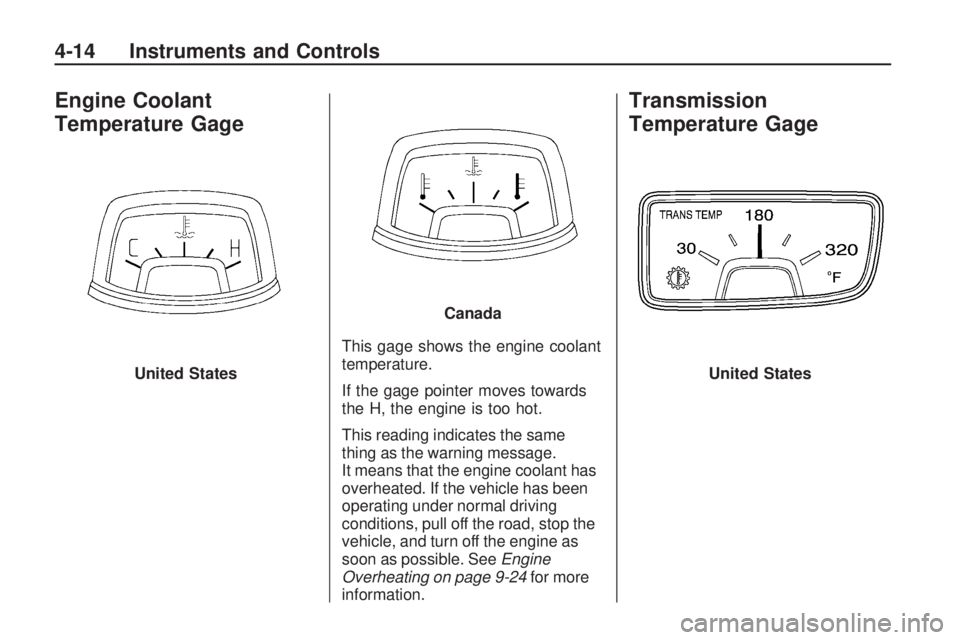
This gage shows the engine coolant
temperature.
If the gage pointer moves towards
the H, the engine is too hot.
This reading indicates the same
thing as the warning message.
It means that the engine coolant has
overheated. If the vehicle has been
operating under normal driving
conditions, pull off the road, stop the
vehicle, and turn off the engine as
soon as possible. SeeEngine
Overheating on page 9-24for more
information.
Transmission
Temperature Gage
United States
Canada
United States
4-14 Instruments and Controls
Page 102 of 372
Brake System
Warning Light
The vehicle’s hydraulic brake
system is divided into two parts.
If one part is not working, the other
part can still work and stop the
vehicle. For good braking both parts
need to work well.
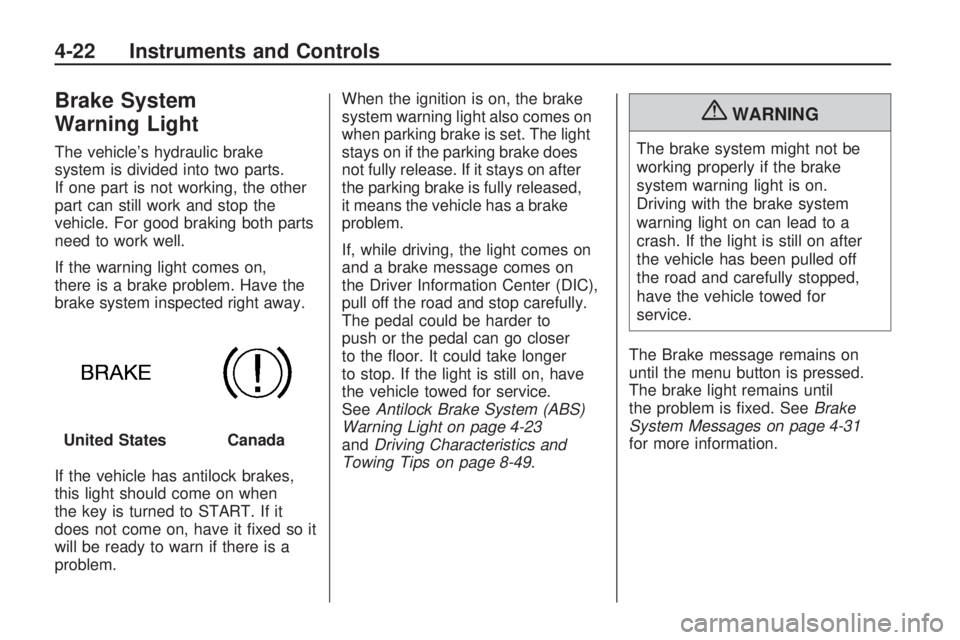
If the warning light comes on,
there is a brake problem. Have the
brake system inspected right away.
If the vehicle has antilock brakes,
this light should come on when
the key is turned to START. If it
does not come on, have it fixed so it
will be ready to warn if there is a
problem.When the ignition is on, the brake
system warning light also comes on
when parking brake is set. The light
stays on if the parking brake does
not fully release. If it stays on after
the parking brake is fully released,
it means the vehicle has a brake
problem.
If, while driving, the light comes on
and a brake message comes on
the Driver Information Center (DIC),
pull off the road and stop carefully.
The pedal could be harder to
push or the pedal can go closer
to the floor. It could take longer
to stop. If the light is still on, have
the vehicle towed for service.
SeeAntilock Brake System (ABS)
Warning Light on page 4-23
andDriving Characteristics and
Towing Tips on page 8-49.
{WARNING
The brake system might not be
working properly if the brake
system warning light is on.
Driving with the brake system
warning light on can lead to a
crash. If the light is still on after
the vehicle has been pulled off
the road and carefully stopped,
have the vehicle towed for
service.
The Brake message remains on
until the menu button is pressed.
The brake light remains until
the problem is fixed. SeeBrake
System Messages on page 4-31
for more information. United States
Canada
4-22 Instruments and Controls
Page 132 of 372

;(Parking Lamps):Turns the
parking lamps on together with the
following:
•Taillamps
•Sidemarker Lamps
•License Plate Lamps
•Instrument Panel Lights
A warning chime sounds if the
driver’s door is opened when the
ignition switch is off and the parking
lamps are on.
2(Headlamps):Turns the
headlamps on together with the
following lamps listed below.
•Parking Lamps
•Taillamps
•Sidemarker Lamps
•License Plate Lamps
•Instrument Panel LightsA warning chime sounds if the
driver’s door is opened when the
ignition switch is off and the
headlamps are on.
#(Front Fog Lamps):Push the
fog lamps button in to turn the
fog lamps on or off. The fog lamps
come on together with the
following:
•Parking Lamps
•Taillamps
•Sidemarker Lamps
•License Plate Lamps
•Instrument Panel Lights
SeeFront Fog Lamps on page 5-5.
Headlamp High/
Low-Beam Changer
23
Headlamp High/Low Beam
Changer:Push the turn and
lane change lever away from
you to turn the high beams on.
Pull the lever towards you to return
to low beams.
This indicator light turns on in the
instrument panel cluster when
the high beam headlamps are on.
5-2 Lighting
Page 133 of 372

Flash-to-Pass
The flash-to-pass feature works with
the low-beams or daytime running
lamps (DRL) on or off.
To flash the high beams, pull the turn
signal/lane change lever all the way
towards you. Then release it.
Daytime Running
Lamps (DRL)
Daytime Running Lamps (DRL) can
make it easier for others to see
the front of your vehicle during
the day. Fully functional daytime
running lamps are required on
all vehicles first sold in Canada.
A light sensor on top of the
instrument panel makes the DRL
work, so be sure it is not covered.
The DRL system will make the
low-beam headlamps come on at a
reduced brightness or for vehicles
with High Intensity Discharge(HID) headlamps, the dedicated
DRL lights will come on when
the following conditions are met:
•The ignition is in the ON/RUN
position.
•The exterior lamps control is
in AUTO, or has been briefly
turned to OFF to turn the
automatic light control on again.
•The engine is running.
When the DRL are on, the
headlamps, taillamps, sidemarker,
instrument panel and other
lamps will not be on.
The headlamps automatically
change from DRL to the regular
headlamps depending on the
darkness of the surroundings.
The other lamps that come on with
the headlamps will also come on.
When it is bright enough outside,
the headlamps will go off and
the DRL will come on.To turn the DRL lamps off or on
again, turn the exterior lamps control
to the off position and then release.
For vehicles first sold in Canada, the
DRL lamps cannot be turned off.
The regular headlamp system should
be turned on when needed.
Automatic Headlamp
System
When it is dark enough outside and
the headlamp switch is in AUTO, the
automatic headlamp system will turn
on the headlamps at the normal
brightness along with other lamps
such as the taillamps, sidemarker,
parking lamps, license plate lamps,
and the instrument panel lights.
The radio lights will also be dim.
To turn off the automatic headlamp
system, turn the exterior lamps
switch to the off position and then
release. For vehicles first sold in
Canada, the transmission must be in
the P (Park) position, before the
automatic headlamp system can be
turned off.
Lighting 5-3
Page 175 of 372

Passenger Compartment
Air Filter
The passenger compartment air
filter removes most of the pollen
and dust from the air that enters
the vehicle. The filter will need
to be replaced periodically.
SeeScheduled Maintenance on
page 10-2.
Using the climate control system
without an air filter installed is
not recommended. Water or other
debris could enter the system
and result in leaks or noises.
Always install a new filter when
removing the old filter.
Air Vents
Use the air outlets located in the
center and on the side of the
instrument panel to direct the
airflow. Use the thumbwheels
near the center air outlets to
direct airflow to the left or right.
Operation Tips
•In defog or defrost mode, warm
air flows from the some air
outlets. To improve side window
defogging or defrosting, direct
side air outlets towards the side
windows.
•Clear away any ice, snow, or
leaves from air inlets at the
base of the windshield that
could block the flow of air into
the vehicle.
•Keep the path under the front
seats clear of objects to help
circulate the air inside of
the vehicle more effectively.
•Use of non-GM approved hood
deflectors can adversely affect
the performance of the system.
Check with your dealer/retailer
before adding equipment to
the outside of the vehicle.
Climate Controls 7-3
Page 177 of 372
Driving and
Operating
Driving InformationDriving for Better Fuel
Economy............................8-2
Defensive Driving..................8-2
Drunk Driving.......................8-3
Control of a Vehicle...............8-3
Braking................................8-4
Steering...............................8-5
Off-Road Recovery................8-6
Loss of Control.....................8-6
Competitive Driving................8-7
Driving on Wet Roads............8-8
Highway Hypnosis.................8-9
Hill and Mountain Roads........8-9
Winter Driving.....................8-10
If the Vehicle is Stuck..........8-11
Vehicle Load Limits..............8-12
Starting and OperatingNew Vehicle Break-In...........8-16
Ignition Positions.................8-17
Retained Accessory
Power (RAP).....................8-19
Starting the Engine..............8-19Engine Heater.....................8-20
Shifting Into Park.................8-21
Shifting Out of Park.............8-22
Parking..............................8-24
Parking Over Things
That Burn.........................8-24
Active Fuel Management™. . . .8-25
Engine ExhaustEngine Exhaust...................8-25
Running the Vehicle While
Parked.............................8-26
Automatic TransmissionAutomatic Transmission........8-26
Manual Mode......................8-29
Manual TransmissionManual Transmission...........8-30
BrakesAntilock Brake
System (ABS)...................8-31
Parking Brake.....................8-32
Brake Assist.......................8-33
Ride Control SystemsTraction Control
System (TCS)...................8-34
StabiliTrak System...............8-36
Competitive
Driving Mode.....................8-37
Limited-Slip Rear Axle..........8-38
Cruise ControlCruise Control.....................8-38
Object Detection SystemsUltrasonic Parking Assist......8-41
FuelFuel...................................8-43
Recommended Fuel.............8-44
Gasoline Specifications.........8-44
California Fuel
Requirements....................8-45
Fuels in Foreign Countries.....8-45
Fuel Additives.....................8-45
Filling the Tank...................8-46
Filling a Portable Fuel
Container..........................8-48
TowingGeneral Towing Information. . . .8-48
Driving Characteristics and
Towing Tips......................8-49
Trailer Towing.....................8-53
Towing Equipment...............8-55
Conversions and Add-OnsAdd-On Electrical
Equipment........................8-55
Driving and Operating 8-1
Page 188 of 372

Rocking the Vehicle to
Get it Out
Turn the steering wheel left and
right to clear the area around the
front wheels. Turn off any traction
system. Shift back and forth between
R (Reverse) and a forward gear,
or with a manual transmission,
between 1 (First) or 2 (Second) and
R (Reverse), spinning the wheels
as little as possible. To prevent
transmission wear, wait until the
wheels stop spinning before shifting
gears. Release the accelerator pedal
while shifting, and press lightly on
the accelerator pedal when the
transmission is in gear. Slowly
spinning the wheels in the forward
and reverse directions causes a
rocking motion that could free the
vehicle. If that does not get the
vehicle out after a few tries, it might
need to be towed out. If the vehicle
does need to be towed out, see
Towing the Vehicle on page 9-87.
Vehicle Load Limits
It is very important to know how
much weight the vehicle can
carry. This weight is called the
vehicle capacity weight and
includes the weight of all
occupants, cargo and all
nonfactory-installed options.
Two labels on the vehicle
show how much weight it
may properly carry, the Tire
and Loading Information label
and the Certification label.{WARNING
Do not load the vehicle any
heavier than the Gross Vehicle
Weight Rating (GVWR), or
either the maximum front or
rear Gross Axle Weight Rating
(GAWR). If you do, parts on
the vehicle can break, and
it can change the way your
vehicle handles. These could
cause you to lose control and
crash. Also, overloading can
shorten the life of the vehicle.
8-12 Driving and Operating
Page 190 of 372

5.Determine the combined
weight of luggage and
cargo being loaded on the
vehicle. That weight may not
safely exceed the available
cargo and luggage load
capacity calculated in Step 4.
6.If your vehicle will be towing
a trailer, the load from your
trailer will be transferred to
your vehicle. Consult this
manual to determine how this
reduces the available cargo
and luggage load capacity
of your vehicle.
SeeTrailer Towing on page 8-53
for important information on
towing a trailer, towing safety
rules and trailering tips.
A.Vehicle Capacity Weight
for Example 1=453 kg
(1,000 lbs).
B.Subtract Occupant Weight
68 kg (150 lbs)×2=136 kg
(300 lbs).
C.Available Occupant and
Cargo Weight=317 kg
(700 lbs).
A.Vehicle Capacity Weight
for Example 2=453 kg
(1,000 lbs).
B.Subtract Occupant Weight
68 kg (150 lbs)×5=340 kg
(750 lbs).
C.Available Cargo
Weight=113 kg (250 lbs).
Example 1Example 2
8-14 Driving and Operating