tow CHEVROLET CAMARO SS 2010 Owner's Manual
[x] Cancel search | Manufacturer: CHEVROLET, Model Year: 2010, Model line: CAMARO SS, Model: CHEVROLET CAMARO SS 2010Pages: 372, PDF Size: 1.91 MB
Page 197 of 372

To Use The Engine Coolant
Heater
1. Turn off the engine.
2. Open the hood and unwrap the
electrical cord.
The electrical cord is located
on the passenger side of the
engine compartment, in front
of the underhood fuse block
for V6 models.
3. Plug it into a normal, grounded
110-volt AC outlet.
{WARNING
Plugging the cord into an
ungrounded outlet could cause
an electrical shock. Also, the
wrong kind of extension cord
could overheat and cause a fire.
You could be seriously injured.
Plug the cord into a properly
grounded three-prong 110-volt AC
outlet. If the cord will not reach,
use a heavy-duty three-prong
extension cord rated for at least
15 amps.
4. Before starting the engine, be
sure to unplug and store the cord
as it was before to keep it away
from moving engine parts. If you
do not it could be damaged.
The length of time the heater
should remain plugged in depends
on several factors. Ask a dealer/
retailer in the area where you will
be parking the vehicle for the best
advice on this.
Shifting Into Park
{WARNING
It can be dangerous to get out of
the vehicle if the shift lever is not
fully in P (Park) with the parking
brake firmly set. The vehicle can
roll. If you have left the engine
running, the vehicle can move
suddenly. You or others could be
injured. To be sure the vehicle will
not move, even when you are on
fairly level ground, use the steps
that follow. If you are pulling a
trailer, seeDriving Characteristics
and Towing Tips on page 8-49.
Use this procedure to shift into
P (Park):
1. Hold the brake pedal down and
set the parking brake.
SeeParking Brake on page 8-32
for more information.
2. Hold the button on the shift lever
and push the lever toward the
front of the vehicle into P (Park).
Driving and Operating 8-21
Page 200 of 372
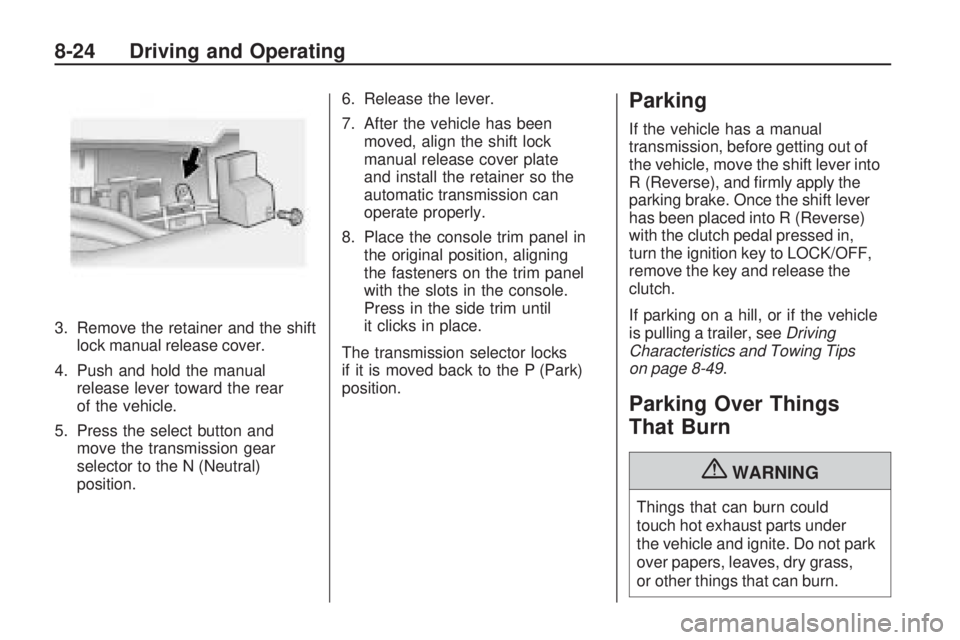
3. Remove the retainer and the shift
lock manual release cover.
4. Push and hold the manual
release lever toward the rear
of the vehicle.
5. Press the select button and
move the transmission gear
selector to the N (Neutral)
position.6. Release the lever.
7. After the vehicle has been
moved, align the shift lock
manual release cover plate
and install the retainer so the
automatic transmission can
operate properly.
8. Place the console trim panel in
the original position, aligning
the fasteners on the trim panel
with the slots in the console.
Press in the side trim until
it clicks in place.
The transmission selector locks
if it is moved back to the P (Park)
position.
Parking
If the vehicle has a manual
transmission, before getting out of
the vehicle, move the shift lever into
R (Reverse), and firmly apply the
parking brake. Once the shift lever
has been placed into R (Reverse)
with the clutch pedal pressed in,
turn the ignition key to LOCK/OFF,
remove the key and release the
clutch.
If parking on a hill, or if the vehicle
is pulling a trailer, seeDriving
Characteristics and Towing Tips
on page 8-49.
Parking Over Things
That Burn
{WARNING
Things that can burn could
touch hot exhaust parts under
the vehicle and ignite. Do not park
over papers, leaves, dry grass,
or other things that can burn.
8-24 Driving and Operating
Page 202 of 372

Running the Vehicle
While Parked
It is better not to park with the
engine running. But if you ever have
to, here are some things to know.
{WARNING
Idling a vehicle in an enclosed
area with poor ventilation is
dangerous. Engine exhaust may
enter the vehicle. Engine exhaust
contains Carbon Monoxide (CO)
which cannot be seen or smelled.
It can cause unconsciousness
and even death. Never run the
engine in an enclosed area
that has no fresh air ventilation.
For more information, seeEngine
Exhaust on page 8-25.
{WARNING
It can be dangerous to get out
of the vehicle if the automatic
transmission shift lever is not fully
in P (Park) with the parking brake
firmly set. The vehicle can roll.
Do not leave the vehicle when
the engine is running unless you
have to. If you have left the engine
running, the vehicle can move
suddenly. You or others could be
injured. To be sure the vehicle will
not move, even when you are on
fairly level ground, always set the
parking brake and move the shift
lever to P (Park).
Follow the proper steps to be
sure the vehicle will not move.
SeeShifting Into Park on page 8-21.
If parking on a hill and pulling a
trailer, seeDriving Characteristics
and Towing Tips on page 8-49.
Automatic
Transmission
The automatic transmission has a
shift lever located on the console
between the seats.
P (Park):This position locks the
rear wheels. It is the best position
to use when starting the engine
because the vehicle cannot move
easily.
8-26 Driving and Operating
Page 203 of 372

{WARNING
It is dangerous to get out of the
vehicle if the shift lever is not fully
in P (Park) with the parking brake
firmly set. The vehicle can roll.
Do not leave the vehicle when
the engine is running unless you
have to. If you have left the engine
running, the vehicle can move
suddenly. You or others could be
injured. To be sure the vehicle will
not move, even when you are on
fairly level ground, always set the
parking brake and move the shift
lever to P (Park). SeeShifting
Into Park on page 8-21.Ifyou
are pulling a trailer, seeDriving
Characteristics and Towing Tips
on page 8-49.
Make sure the shift lever is fully
in P (Park) before starting the
engine. The vehicle has an
automatic transmission shift lock
control system. The regular brakemust be fully applied first and then
the shift lever button pressed before
shifting from P (Park) when the
ignition key is in ON/RUN. If you
cannot shift out of P (Park), ease
pressure on the shift lever, then
push the shift lever all the way
into P (Park) as you maintain brake
application. Then press the shift
lever button and move the shift lever
into another gear. SeeShifting Out
of Park on page 8-22.
R (Reverse):Use this gear to
back up.
Notice:Shifting to R (Reverse)
while the vehicle is moving
forward could damage the
transmission. The repairs would
not be covered by the vehicle
warranty. Shift to R (Reverse)
only after the vehicle is stopped.
To rock the vehicle back and forth
to get out of snow, ice or sand
without damaging the transmission,
seeIf the Vehicle is Stuck on
page 8-11.N (Neutral):In this position, the
engine does not connect with the
wheels. To restart the engine when
the vehicle is already moving,
use N (Neutral) only. Also, use
N (Neutral) when the vehicle is
being towed.
{WARNING
Shifting into a drive gear while the
engine is running at high speed is
dangerous. Unless your foot is
firmly on the brake pedal, the
vehicle could move very rapidly.
You could lose control and hit
people or objects. Do not shift into
a drive gear while the engine is
running at high speed.
Notice:Shifting out of P (Park)
or N (Neutral) with the engine
running at high speed may
damage the transmission. The
repairs would not be covered by
the vehicle warranty. Be sure the
engine is not running at high
speed when shifting the vehicle.
Driving and Operating 8-27
Page 209 of 372
To release the parking brake:
1. Hold the brake pedal down.
2. Pull the parking brake handle up
until you can press the release
button.
3. Hold the release button in as you
move the brake handle all the
way down.
Notice:Driving with the parking
brake on can overheat the brake
system and cause premature wear
or damage to brake system parts.
Make sure that the parking brake
is fully released and the brake
warning light is off before driving.Driving with the parking brake
applied will cause a warning chime to
sound and the Park Brake message
to appear in the DIC. The message
will remain on until:
•the parking brake is released
•the vehicle comes to a stop.
If you are towing a trailer and you
are parking on a hill, seeDriving
Characteristics and Towing Tips
on page 8-49.
Brake Assist
This vehicle has a Brake Assist
feature designed to assist the driver
in stopping or decreasing vehicle
speed in emergency driving
conditions. This feature uses the
stability system hydraulic brakecontrol module to supplement
the power brake system under
conditions where the driver has
quickly and forcefully applied the
brake pedal in an attempt to quickly
stop or slow down the vehicle.
The stability system hydraulic brake
control module increases brake
pressure at each corner of the
vehicle until the ABS activates.
Minor brake pedal pulsations or
pedal movement during this time
is normal and the driver should
continue to apply the brake pedal
as the driving situation dictates
The Brake Assist feature will
automatically disengage when the
brake pedal is released or brake
pedal pressure is quickly decreased.
Driving and Operating 8-33
Page 215 of 372
Setting Cruise Control
{WARNING
If you leave your cruise control
on when you are not using cruise,
you might hit a button and go into
cruise when you do not want to.
You could be startled and even
lose control. Keep the cruise
control switch off until you want
to use cruise control.
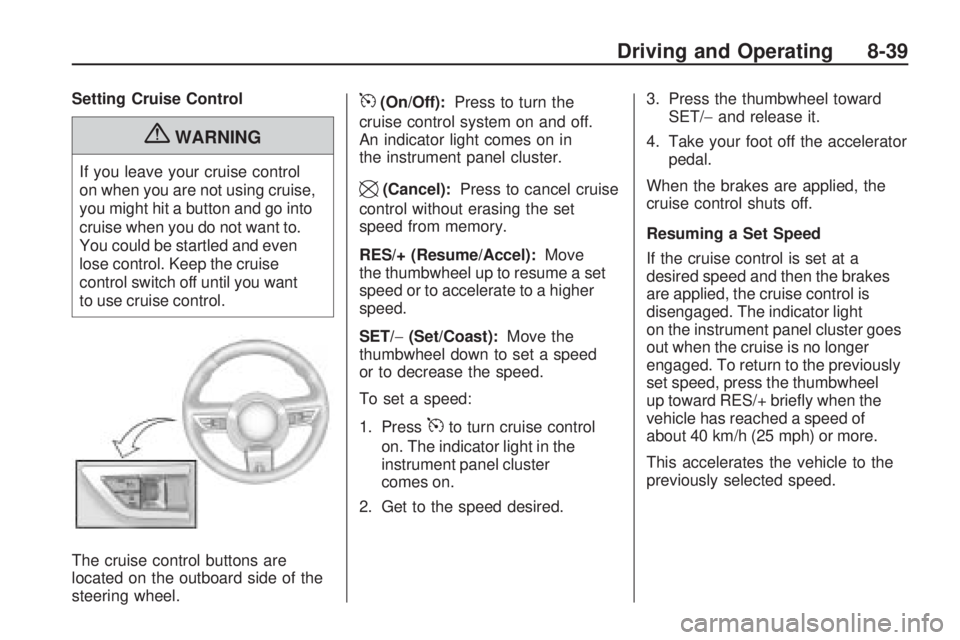
The cruise control buttons are
located on the outboard side of the
steering wheel.
5(On/Off):Press to turn the
cruise control system on and off.
An indicator light comes on in
the instrument panel cluster.
\(Cancel):Press to cancel cruise
control without erasing the set
speed from memory.
RES/+ (Resume/Accel):Move
the thumbwheel up to resume a set
speed or to accelerate to a higher
speed.
SET/−(Set/Coast):Move the
thumbwheel down to set a speed
or to decrease the speed.
To set a speed:
1. Press
5to turn cruise control
on. The indicator light in the
instrument panel cluster
comes on.
2. Get to the speed desired.3. Press the thumbwheel toward
SET/−and release it.
4. Take your foot off the accelerator
pedal.
When the brakes are applied, the
cruise control shuts off.
Resuming a Set Speed
If the cruise control is set at a
desired speed and then the brakes
are applied, the cruise control is
disengaged. The indicator light
on the instrument panel cluster goes
out when the cruise is no longer
engaged. To return to the previously
set speed, press the thumbwheel
up toward RES/+ briefly when the
vehicle has reached a speed of
about 40 km/h (25 mph) or more.
This accelerates the vehicle to the
previously selected speed.
Driving and Operating 8-39
Page 216 of 372
Increasing Speed While Using
Cruise Control
There are two ways to go to a
higher speed.
•Disengage the cruise control,
but do not turn it off.
•If the cruise control system is
already engaged, press the
thumbwheel up toward RES/+
and hold it until the vehicle
accelerates to the desired speed,
and then release the switch.
To increase the speed in small
amounts, press the thumbwheel
up toward RES/+ briefly and then
release it. Each time this is done,
the vehicle goes about 1.6 km/h
(1 mph) faster.
Reducing Speed While Using
Cruise Control
If the cruise control system is
already engaged,
•Push the thumbwheel toward
SET/−and hold until the desired
lower speed is reached, then
release it.
•To slow down in very small
amounts, push the thumbwheel
toward SET/−briefly. Each time
this is done, the vehicle goes
about 1.6 km/h (1 mph) slower.
Passing Another Vehicle While
Using Cruise Control
Use the accelerator pedal to
increase the vehicle’s speed.
When you take your foot off the
pedal, the vehicle will slow down
to the previously set cruise control
speed.
Using Cruise Control on Hills
How well the cruise control works
on hills depends upon the vehicle’s
speed, load, and the steepness of
the hills. When going up steep hills,
you might have to step on the
accelerator pedal to maintain the
vehicle’s speed. When going
downhill, you might have to brake
or shift to a lower gear to maintain
the vehicle’s speed. When the
brakes are applied the cruise
control shuts off.Ending Cruise Control
There are three ways to end the
cruise control:
•Step lightly on the brake pedal
or clutch; when cruise control
disengages, the indicator light
on the instrument panel cluster
goes out.
•Press5to turn off the cruise
control system.
•Press\to disengage the cruise
control.
Erasing Speed Memory
The cruise control set speed
memory is erased when the cruise
control or the ignition is turned off.
8-40 Driving and Operating
Page 219 of 372

When the System Does Not
Seem to Work Properly
If the URPA system does not
activate due to a temporary
condition, the message PARK
ASSIST OFF displays on the DIC
and a red light comes on the rear
URPA display when the shift lever is
moved into R (Reverse). This can
occur under the following conditions:
•The ultrasonic sensors are not
clean. Keep the vehicle’s rear
bumper free of mud, dirt, snow,
ice and slush. For cleaning
instructions, seeExterior Care
on page 9-88.
•A trailer was attached to the
vehicle, or an object was hanging
out of the trunk during the last
drive cycle, making the red light
come on in the rear display.
Once the attached object is
removed, URPA will return
to normal operation.
•A tow bar is attached to the
vehicle.
•The vehicle’s bumper is
damaged. Take the vehicle to
your dealer/retailer to repair the
system.
•Other conditions may affect
system performance, such as
vibrations from a jackhammer or
the compression of air brakes on
a very large truck that is near the
vehicle.
If the system is still disabled, after
driving forward at least 25 km/h
(15 mph), take the vehicle to your
dealer/retailer.
Fuel
Use of the recommended fuel
is an important part of the proper
maintenance of this vehicle. To help
keep the engine clean and maintain
optimum vehicle performance, we
recommend the use of gasoline
advertised as TOP TIER Detergent
Gasoline.
Look for the TOP TIER label on the
fuel pump to ensure gasoline meets
enhanced detergency standards
developed by auto companies. A list
of marketers providing TOP TIER
Detergent Gasoline can be found
at www.toptiergas.com.
Driving and Operating 8-43
Page 224 of 372

Filling a Portable Fuel
Container
{WARNING
Never fill a portable fuel container
while it is in the vehicle. Static
electricity discharge from the
container can ignite the fuel vapor.
You can be badly burned and the
vehicle damaged if this occurs.
To help avoid injury to you and
others:
•Dispense fuel only into
approved containers.
•Do not fill a container while
it is inside a vehicle, in a
vehicle’s trunk, pickup bed,
or on any surface other than
the ground.
(Continued)
WARNING (Continued)
•Bring the fill nozzle in contact
with the inside of the fill
opening before operating the
nozzle. Contact should be
maintained until the filling is
complete.
•Do not smoke while
pumping fuel.
•Do not use a cellular phone
while pumping fuel.
Towing
General Towing
Information
Only use towing equipment that
has been designed for the vehicle.
Contact your dealer/retailer or towing
retailer for assistance with preparing
the vehicle for towing a trailer.
See the following trailer towing
information in this section:
•For information on driving while
towing a trailer, see Driving
Characteristics and Towing Tips.
•For maximum vehicle and trailer
weights, see Trailer Towing.
•For information on equipment
to tow a trailer, see Towing
Equipment.
For information on towing a disabled
vehicle, seeTowing the Vehicle
on page 9-87. For information on
towing the vehicle behind another
vehicle — such as a motorhome,
seeRecreational Vehicle Towing
on page 9-87.
8-48 Driving and Operating
Page 225 of 372
Driving Characteristics
and Towing Tips
{WARNING
The driver can lose control
when pulling a trailer if the correct
equipment is not used or the
vehicle is not driven properly.
For example, if the trailer is too
heavy, the brakes may not work
well — or even at all. The driver
and passengers could be seriously
injured. The vehicle may also be
damaged; the resulting repairs
would not be covered by the
vehicle warranty. Pull a trailer only
if all the steps in this section have
been followed. Ask your dealer/
retailer for advice and information
about towing a trailer with the
vehicle.The vehicle can tow a trailer if it
is equipped with the proper trailer
towing equipment. To identify the
trailering capacity of the vehicle,
seeTrailer Towing on page 8-53.
Trailering changes handling,
acceleration, braking, durability
and fuel economy. With the added
weight, the engine, transmission,
wheel assemblies and tires are
forced to work harder and under
greater loads. The trailer also adds
wind resistance, increasing the
pulling requirements. For safe
trailering, correctly use the proper
trailering equipment.
The following information has
important trailering tips and rules
for your safety and that of your
passengers. Read this section
carefully before pulling a trailer.
Pulling A Trailer
Here are some important points:
•There are many laws, including
speed limit restrictions that apply
to trailering. Check for legal
requirements with state or
provincial police.
•Do not tow a trailer at all during
the first 1 600 km (1,000 miles)
the new vehicle is driven.
The engine, axle or other
parts could be damaged.
•During the first 800 km
(500 miles) that a trailer is
towed, do not drive over 80 km/h
(50 mph) and do not make starts
at full throttle. This reduces wear
on the vehicle.
Driving and Operating 8-49