warning CHEVROLET CAMARO SS 2010 Repair Manual
[x] Cancel search | Manufacturer: CHEVROLET, Model Year: 2010, Model line: CAMARO SS, Model: CHEVROLET CAMARO SS 2010Pages: 372, PDF Size: 1.91 MB
Page 117 of 372
Vehicle Reminder
Messages
Ice Possible Drive With Care
This message is displayed when ice
conditions are possible.
Turn Wiper Control to
Intermittent First
This message is displayed when
attempting to adjust the intermittent
wiper speed without intermittent
selected on the wiper control.
SeeWindshield Wiper/Washer on
page 4-7.
Vehicle Speed Messages
Driver Selected Speed Limit
Exceeded
This message is displayed when the
vehicle speed is greater than the
set speed. See “Speed Warning”
underDriver Information Center
(DIC) on page 4-27.
Vehicle Messages
Messages are displayed on the DIC
to notify the driver that the status
of the vehicle has changed and that
some action may be needed by
the driver to correct the condition.
Multiple messages may appear
one after another.
Some messages may not require
immediate action. For those you can
press SET to acknowledge that
you received the messages and to
clear them. Some messages
cannot be cleared because they are
more urgent. These messages
require action. You should take
any messages that appear on the
display seriously and remember that
clearing the messages will only
make the messages disappear,
not correct the problem. Possible
messages that can be displayed
and some information about them,
grouped by subject, are in the
following information.
Window Messages
Open, Then Close Driver
Window
This message is displayed when the
window needs to be reprogrammed.
If the vehicle’s battery has been
recharged or disconnected, you will
need to reprogram each front
window for the express up feature
to work. SeePower Windows
on page 1-14for more information.
Open, Then Close Passenger
Window
This message is displayed when the
window needs to be reprogrammed.
If the vehicle’s battery has been
recharged or disconnected, you will
need to reprogram each front
window for the express up feature
to work. SeePower Windows
on page 1-14for more information.
Instruments and Controls 4-37
Page 131 of 372
Lighting
Exterior LightingExterior Lamp Controls...........5-1
Headlamp High/Low-Beam
Changer.............................5-2
Flash-to-Pass........................5-3
Daytime Running
Lamps (DRL)......................5-3
Automatic Headlamp
System..............................5-3
Hazard Warning Flashers.......5-4
Turn and Lane-Change
Signals...............................5-4
Front Fog Lamps..................5-5
Interior LightingInstrument Panel
Illumination Control..............5-5
Dome Lamps........................5-6
Lighting FeaturesEntry Lighting.......................5-6
Theater Dimming...................5-6
Battery Load Management......5-6
Battery Power Protection........5-7
Exterior Lighting
Exterior Lamp Controls
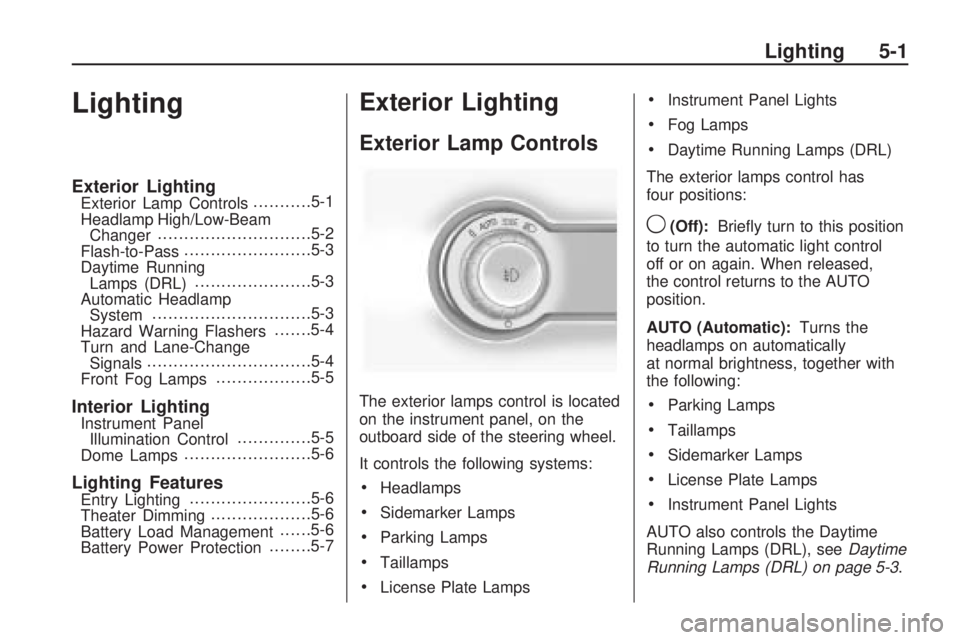
The exterior lamps control is located
on the instrument panel, on the
outboard side of the steering wheel.
It controls the following systems:
•Headlamps
•Sidemarker Lamps
•Parking Lamps
•Taillamps
•License Plate Lamps
•Instrument Panel Lights
•Fog Lamps
•Daytime Running Lamps (DRL)
The exterior lamps control has
four positions:
9(Off):Briefly turn to this position
to turn the automatic light control
off or on again. When released,
the control returns to the AUTO
position.
AUTO (Automatic):Turns the
headlamps on automatically
at normal brightness, together with
the following:
•Parking Lamps
•Taillamps
•Sidemarker Lamps
•License Plate Lamps
•Instrument Panel Lights
AUTO also controls the Daytime
Running Lamps (DRL), seeDaytime
Running Lamps (DRL) on page 5-3.
Lighting 5-1
Page 132 of 372

;(Parking Lamps):Turns the
parking lamps on together with the
following:
•Taillamps
•Sidemarker Lamps
•License Plate Lamps
•Instrument Panel Lights
A warning chime sounds if the
driver’s door is opened when the
ignition switch is off and the parking
lamps are on.
2(Headlamps):Turns the
headlamps on together with the
following lamps listed below.
•Parking Lamps
•Taillamps
•Sidemarker Lamps
•License Plate Lamps
•Instrument Panel LightsA warning chime sounds if the
driver’s door is opened when the
ignition switch is off and the
headlamps are on.
#(Front Fog Lamps):Push the
fog lamps button in to turn the
fog lamps on or off. The fog lamps
come on together with the
following:
•Parking Lamps
•Taillamps
•Sidemarker Lamps
•License Plate Lamps
•Instrument Panel Lights
SeeFront Fog Lamps on page 5-5.
Headlamp High/
Low-Beam Changer
23
Headlamp High/Low Beam
Changer:Push the turn and
lane change lever away from
you to turn the high beams on.
Pull the lever towards you to return
to low beams.
This indicator light turns on in the
instrument panel cluster when
the high beam headlamps are on.
5-2 Lighting
Page 134 of 372

The vehicle has a light sensor
located on the top of the instrument
panel. Do not cover this sensor
or the system will come on
whenever the ignition is on.
The system may also turn on the
headlamps when driving through a
parking garage, heavy overcast
weather, or a tunnel. This is normal.
There is a delay in the transition
between the daytime and nighttime
operation of the Daytime Running
Lamps (DRL) and the automatic
headlamp systems so that driving
under bridges or bright overhead
street lights does not affect the
system. The DRL and automatic
headlamp system will only be
affected when the light sensor sees
a change in lighting lasting longer
than the delay.If the vehicle is started in a dark
garage, the automatic headlamp
system comes on immediately. If it
is light outside when the vehicle
leaves the garage, there will
be a slight delay before the
automatic headlamp system
changes to the DRL. During that
delay, the instrument panel cluster
may not be as bright as usual.
Make sure the instrument panel
brightness control is in the full bright
position. SeeInstrument Panel
Illumination Control on page 5-5.
Hazard Warning Flashers
|
Hazard Warning Flasher:
Press this button located on the
instrument panel near the audio
system, to make the front and rear
turn signal lamps flash on and
off. This warns others that you are
having trouble. Press again to
turn the flashers off.
Turn and Lane-Change
Signals
An arrow on the instrument panel
cluster flashes in the direction of the
turn or lane change.
Move the lever all the way up or
down to signal a turn.
Raise or lower the lever until the
arrow starts to flash to signal a lane
change. Hold it there until the
lane change is completed. If the
lever is briefly pressed and released,
the turn signal flashes three times.
5-4 Lighting
Page 139 of 372
Infotainment
System
IntroductionIntroduction..........................6-1
Theft-Deterrent Feature..........6-2
Overview..............................6-2
Operation.............................6-4
RadioAM-FM Radio.......................6-8
Satellite Radio.....................6-10
Radio Reception..................6-13
Backglass Antenna..............6-13
Satellite Radio Antenna........6-14
Audio PlayersCD Player..........................6-14
Auxiliary Devices.................6-16
PhoneBluetooth (Overview)............6-22
Bluetooth
(Infotainment Controls)........6-23
Bluetooth
(Voice Recognition)............6-26
Introduction
Read the following pages to
become familiar with the
infotainment system features.
{WARNING
Taking your eyes off the road
for extended periods could cause
a crash resulting in injury or
death to you or others. Do not
give extended attention to
entertainment tasks while driving.
This system provides access to
many audio and non audio listings.
To minimize taking your eyes off
the road while driving, do the
following while the vehicle is parked:
•Become familiar with the
operation and controls of
the audio system.
•Set up the tone, speaker
adjustments, and preset radio
stations.For more information, seeDefensive
Driving on page 8-2.
Notice:Contact your
dealer/retailer before adding any
equipment.
Adding audio or communication
equipment could interfere
with the operation of the vehicle’s
engine, radio, or other systems,
and could damage them.
Follow federal rules covering
mobile radio and telephone
equipment.
The vehicle has Retained Accessory
Power (RAP). With RAP, the
infotainment system can play even
after the ignition is turned off.
SeeRetained Accessory Power
(RAP) on page 8-19for more
information.
Infotainment System 6-1
Page 178 of 372

Driving Information
Driving for Better
Fuel Economy
Driving habits can affect fuel
mileage. Here are some driving tips
to get the best fuel economy
possible.
•Avoid fast starts and accelerate
smoothly.
•Brake gradually and avoid abrupt
stops.
•Avoid idling the engine for long
periods of time.
•When road and weather
conditions are appropriate,
use cruise control, if equipped.
•Always follow posted speed limits
or drive more slowly when
conditions require.
•Keep vehicle tires properly
inflated.
•Combine several trips into a
single trip.
•Replace the vehicle’s tires with
the same TPC Spec number
molded into the tire’s sidewall
near the size.
•Follow recommended scheduled
maintenance.
Defensive Driving
Defensive driving means “always
expect the unexpected.” The first
step in driving defensively is to wear
your safety belt, seeSafety Belts on
page 2-6.
{WARNING
Assume that other road users
(pedestrians, bicyclists, and other
drivers) are going to be careless
and make mistakes. Anticipate
what they might do and be ready.
In addition:
•Allow enough following
distance between you and
the driver in front of you.
•Focus on the task of driving.
Driver distraction can cause
collisions resulting in injury or
possible death. These simple
defensive driving techniques
could save your life.
8-2 Driving and Operating
Page 179 of 372

Drunk Driving
{WARNING
Drinking and then driving is
very dangerous. Your reflexes,
perceptions, attentiveness, and
judgment can be affected by
even a small amount of alcohol.
You can have a serious — or even
fatal — collision if you drive after
drinking. Do not drink and drive or
ride with a driver who has been
drinking. Ride home in a cab; or if
you are with a group, designate a
driver who will not drink.
Death and injury associated with
drinking and driving is a global
tragedy.
Alcohol affects four things that
anyone needs to drive a vehicle:
judgment, muscular coordination,
vision, and attentiveness.Police records show that
almost 40 percent of all motor
vehicle-related deaths involve
alcohol. In most cases, these deaths
are the result of someone who was
drinking and driving. In recent years,
more than 17,000 annual motor
vehicle-related deaths have been
associated with the use of alcohol,
with about 250,000 people injured.
For persons under 21, it is against
the law in every U.S. state to drink
alcohol. There are good medical,
psychological, and developmental
reasons for these laws.
The obvious way to eliminate the
leading highway safety problem
is for people never to drink alcohol
and then drive.
Medical research shows that alcohol
in a person’s system can make crash
injuries worse, especially injuries
to the brain, spinal cord, or heart.This means that when anyone
who has been drinking — driver
or passenger — is in a crash, that
person’s chance of being killed or
permanently disabled is higher than
if the person had not been drinking.
Control of a Vehicle
The following three systems
help to control the vehicle while
driving — brakes, steering, and
accelerator. At times, as when
driving on snow or ice, it is easy to
ask more of those control systems
than the tires and road can provide.
Meaning, you can lose control of the
vehicle. SeeStabiliTrak System on
page 8-36.
Adding non-dealer/non-retailer
accessories can affect vehicle
performance. SeeAccessories
and Modications on page 9-3.
Driving and Operating 8-3
Page 180 of 372

Braking
SeeBrake System Warning Light on
page 4-22.
Braking action involves perception
time and reaction time. Deciding
to push the brake pedal is
perception time. Actually doing
it is reaction time.
Average reaction time is about
three-fourths of a second. But that
is only an average. It might be less
with one driver and as long as two or
three seconds or more with another.
Age, physical condition, alertness,
coordination, and eyesight all play
a part. So do alcohol, drugs,
and frustration. But even in
three-fourths of a second, a vehicle
moving at 100 km/h (60 mph) travels
20 m (66 ft). That could be a lot of
distance in an emergency, so
keeping enough space between
the vehicle and others is important.And, of course, actual stopping
distances vary greatly with the
surface of the road, whether it is
pavement or gravel; the condition of
the road, whether it is wet, dry, or icy;
tire tread; the condition of the brakes;
the weight of the vehicle; and the
amount of brake force applied.
Avoid needless heavy
braking. Some people drive
in spurts — heavy acceleration
followed by heavy braking — rather
than keeping pace with traffic. This
is a mistake. The brakes might not
have time to cool between hard
stops. The brakes will wear out much
faster with a lot of heavy braking.
Keeping pace with the traffic and
allowing realistic following distances
eliminates a lot of unnecessary
braking. That means better braking
and longer brake life.If the engine ever stops while
the vehicle is being driven, brake
normally but do not pump the brakes.
If the brakes are pumped, the pedal
could get harder to push down. If the
engine stops, there will still be some
power brake assist but it will be used
when the brake is applied. Once the
power assist is used up, it can take
longer to stop and the brake pedal
will be harder to push.
Adding non-dealer/non-retailer
accessories can affect vehicle
performance. SeeAccessories
and Modications on page 9-3.
8-4 Driving and Operating
Page 183 of 372
Of course, traction is reduced when
water, snow, ice, gravel, or other
material is on the road. For safety,
slow down and adjust your driving
to these conditions. It is important
to slow down on slippery surfaces
because stopping distance is longer
and vehicle control more limited.
While driving on a surface with
reduced traction, try your best to
avoid sudden steering, acceleration,
or braking, including reducing vehicle
speed by shifting to a lower gear.
Any sudden changes could cause
the tires to slide. You might not
realize the surface is slippery until
the vehicle is skidding. Learn to
recognize warning clues — such as
enough water, ice, or packed snow
on the road to make a mirrored
surface — and slow down when
you have any doubt.
Remember: Any Antilock Brake
System (ABS) helps avoid only
the braking skid.Competitive Driving
Competitive driving may affect the
vehicle warranty. See the warranty
book before using the vehicle for
racing or other competitive driving.
The new vehicle break-in must be
performed before the vehicle is used
for competitive driving. SeeNew
Vehicle Break-In on page 8-16.
Notice:If you use your vehicle
for competitive driving, the engine
may use more oil than it would
with normal use. Low oil levels
can damage the engine. Be sure
to check the oil level often during
competitive driving and keep the
level at or near the upper mark
that shows the proper operating
range on the engine oil dipstick.
For information on how to add oil,
seeEngine Oil on page 9-10.For competitive driving, it is
recommended that the brake fluid be
replaced with a high performance
brake fluid that has a dry boiling point
greater than 279°C (534°F). After
conversion to the high performance
brake fluid, follow the brake fluid
service recommendations outlined
by the fluid manufacturer. Do not
use silicone or DOT-5 brake fluids.
If the vehicle is used for racing,
competitive driving, sustained high
speed, or events that generate
excessive wheel slip, the rear axle
fluid temperatures will be higher
than would occur in normal driving.
We recommend that the rear axle
fluid be drained and refilled with
new fluid after every six hours of
racing or competitive driving.
SeeRecommended Fluids and
Lubricants on page 10-7for what
fluid to use.
Driving and Operating 8-7
Page 184 of 372

Regularly inspect the driveshaft/
propshaft couplings and halfshaft
boots for cracking or grease leakage.
It is not recommended that the
vehicle be used for ongoing race
track/competitive driving.
Driving on Wet Roads
Rain and wet roads can reduce
vehicle traction and affect your
ability to stop and accelerate.
Always drive slower in these types
of driving conditions and avoid
driving through large puddles and
deep-standing or flowing water.
{WARNING
Wet brakes can cause crashes.
They might not work as well in
a quick stop and could cause
pulling to one side. You could
lose control of the vehicle.
After driving through a large
puddle of water or a car/vehicle
wash, lightly apply the brake
pedal until the brakes work
normally.
Flowing or rushing water creates
strong forces. Driving through
flowing water could cause your
vehicle to be carried away. If this
happens, you and other vehicle
occupants could drown. Do not
ignore police warnings and be
very cautious about trying to
drive through flowing water.
Hydroplaning
Hydroplaning is dangerous. Water
can build up under your vehicle’s
tires so they actually ride on the
water. This can happen if the road
is wet enough and you are going
fast enough. When your vehicle
is hydroplaning, it has little or no
contact with the road.
There is no hard and fast rule about
hydroplaning. The best advice is
to slow down when the road is wet.
Other Rainy Weather Tips
Besides slowing down, other wet
weather driving tips include:
•Allow extra following distance.
•Pass with caution.
•Keep windshield wiping
equipment in good shape.
•Keep the windshield washer fluid
reservoir filled.
•Have good tires with proper tread
depth. SeeTires on page 9-48.
•Turn off cruise control.
8-8 Driving and Operating