alarm CHEVROLET CAMARO SS 2018 Owners Manual
[x] Cancel search | Manufacturer: CHEVROLET, Model Year: 2018, Model line: CAMARO SS, Model: CHEVROLET CAMARO SS 2018Pages: 386, PDF Size: 5.57 MB
Page 9 of 386
Chevrolet Camaro Owner Manual (GMNA-Localizing-U.S./Canada/Mexico-
11348325) - 2018 - crc - 4/11/17
8 In Brief
Initial Drive
Information
This section provides a brief
overview about some of the
important features that may or may
not be on your specific vehicle.
For more detailed information, refer
to each of the features which can be
found later in this owner’s manual.
Remote Keyless Entry
(RKE) System
The Remote Keyless Entry (RKE)
transmitter may be used to lock and
unlock the doors from up to 60 m
(197 ft) away from the vehicle.
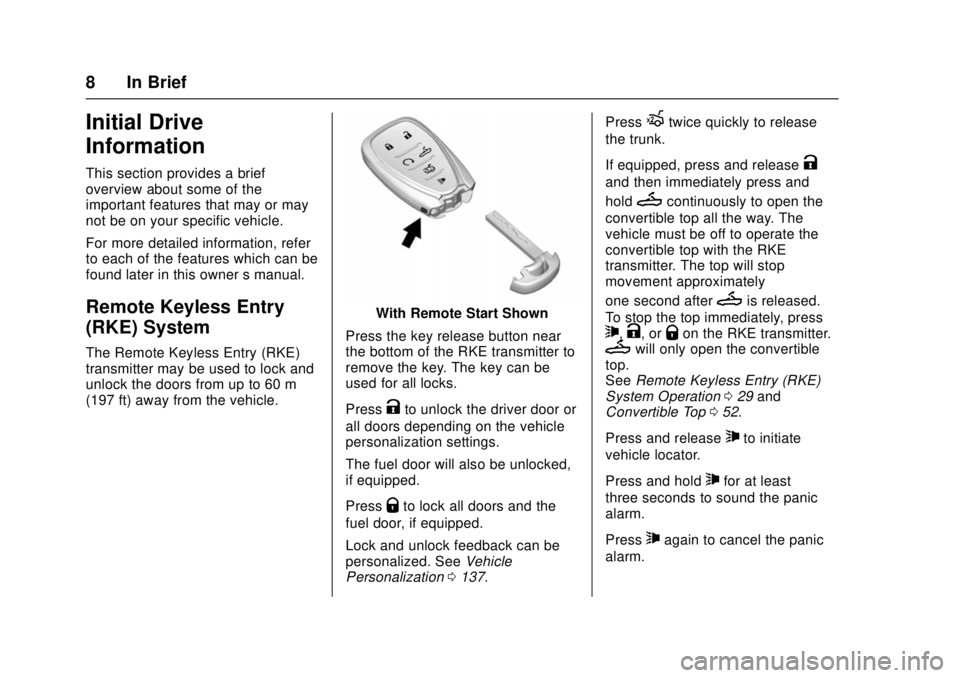
With Remote Start Shown
Press the key release button near
the bottom of the RKE transmitter to
remove the key. The key can be
used for all locks.
Press
Kto unlock the driver door or
all doors depending on the vehicle
personalization settings.
The fuel door will also be unlocked,
if equipped.
Press
Qto lock all doors and the
fuel door, if equipped.
Lock and unlock feedback can be
personalized. See Vehicle
Personalization 0137. Press
Xtwice quickly to release
the trunk.
If equipped, press and release
K
and then immediately press and
hold
Mcontinuously to open the
convertible top all the way. The
vehicle must be off to operate the
convertible top with the RKE
transmitter. The top will stop
movement approximately
one second after
Mis released.
To stop the top immediately, press
7,K, orQon the RKE transmitter.Mwill only open the convertible
top.
See Remote Keyless Entry (RKE)
System Operation 029 and
Convertible Top 052.
Press and release
7to initiate
vehicle locator.
Press and hold
7for at least
three seconds to sound the panic
alarm.
Press
7again to cancel the panic
alarm.
Page 29 of 386
Chevrolet Camaro Owner Manual (GMNA-Localizing-U.S./Canada/Mexico-
11348325) - 2018 - crc - 4/11/17
28 Keys, Doors, and Windows
Keys, Doors, and
Windows
Keys and Locks
Keys . . . . . . . . . . . . . . . . . . . . . . . . . . . 28
Remote Keyless Entry (RKE)System . . . . . . . . . . . . . . . . . . . . . . . 29
Remote Keyless Entry (RKE) System Operation . . . . . . . . . . . . 29
Remote Vehicle Start . . . . . . . . . . 36
Door Locks . . . . . . . . . . . . . . . . . . . . 37
Power Door Locks . . . . . . . . . . . . . 39
Delayed Locking . . . . . . . . . . . . . . . 40
Automatic Door Locks . . . . . . . . . 40
Lockout Protection . . . . . . . . . . . . . 40
Doors
Trunk . . . . . . . . . . . . . . . . . . . . . . . . . . 41
Vehicle Security
Vehicle Security . . . . . . . . . . . . . . . . 44
Vehicle Alarm System . . . . . . . . . 44
Immobilizer . . . . . . . . . . . . . . . . . . . . 45
Immobilizer Operation . . . . . . . . . 45
Exterior Mirrors
Convex Mirrors . . . . . . . . . . . . . . . . 46
Power Mirrors . . . . . . . . . . . . . . . . . . 46
Heated Mirrors . . . . . . . . . . . . . . . . . 47 Automatic Dimming Mirror . . . . . 47
Reverse Tilt Mirrors . . . . . . . . . . . . 47
Interior Mirrors
Interior Rearview Mirrors . . . . . . . 47
Manual Rearview Mirror . . . . . . . . 47
Automatic Dimming Rearview
Mirror . . . . . . . . . . . . . . . . . . . . . . . . . 48
Windows
Windows . . . . . . . . . . . . . . . . . . . . . . . 48
Power Windows . . . . . . . . . . . . . . . 48
Sun Visors . . . . . . . . . . . . . . . . . . . . . 51
Roof
Sunroof . . . . . . . . . . . . . . . . . . . . . . . . 51
Convertible Top . . . . . . . . . . . . . . . . 52
Keys and Locks
Keys
{Warning
Leaving children in a vehicle with
a Remote Keyless Entry (RKE)
transmitter is dangerous and
children or others could be
seriously injured or killed. They
could operate the power windows
or other controls or make the
vehicle move. The windows will
function with the RKE transmitter
in the vehicle, and children or
others could be caught in the path
of a closing window. Do not leave
children in a vehicle with an RKE
transmitter.
Page 31 of 386

Chevrolet Camaro Owner Manual (GMNA-Localizing-U.S./Canada/Mexico-
11348325) - 2018 - crc - 4/11/17
30 Keys, Doors, and Windows
With Remote Start Shown
Q:Press to lock all doors, and if
equipped, the fuel door.
The turn signal indicators may flash
and/or the horn may sound on the
second press to indicate locking.
See Vehicle Personalization 0137.
If the passenger door is open when
Qis pressed, all doors lock.
If the driver door is open when
Qis
pressed, all doors lock and the
driver door will immediately unlock,
if enabled through vehicle
personalization. Pressing
Qmay also arm the alarm
system. See Vehicle Alarm System
0 44.
K:Press to unlock the driver door.
Press unlock again within
five seconds to unlock all doors.
The RKE transmitter can be
programmed to unlock all doors on
the first button press. See Vehicle
Personalization 0137.
The turn signal indicators may flash
and/or the horn may sound to
indicate unlocking. See Vehicle
Personalization 0137.
Pressing
Kwill disarm the alarm
system. See Vehicle Alarm System
0 44.
If equipped, press and hold
Kon
the RKE transmitter to open the
windows remotely, if enabled. See
Vehicle Personalization 0137.
If equipped, pressing
Kwill also
unlock the fuel door.
/: If equipped, press and releaseQand then immediately press and
hold
/for at least four seconds to start the engine from outside the
vehicle using the RKE transmitter.
See
Remote Vehicle Start 036.
X:Press twice quickly to release
the trunk.
M: If equipped, press and
release
K, then immediately press
and hold
Mcontinuously to open
the convertible top all the way. The
vehicle must be off to operate the
convertible top with the RKE
transmitter. The top will stop
movement approximately
one second after
Mis released.
To stop the top immediately, press
7,K, orQon the RKE transmitter.Mwill only open the
convertible top.
The convertible top can also be
opened using a button in the
overhead console. See Convertible
Top 052.
7:Press and release to initiate
vehicle locator. The exterior lamps
flash and the horn chirps three
times.
Page 32 of 386

Chevrolet Camaro Owner Manual (GMNA-Localizing-U.S./Canada/Mexico-
11348325) - 2018 - crc - 4/11/17
Keys, Doors, and Windows 31
Press and hold7for at least
three seconds to sound the panic
alarm. The horn sounds and the
turn signals flash until
7is pressed
again or the ignition is turned on.
Convertible Top
. Do not try to start the vehicle
while using the RKE transmitter
to open the convertible top.
Release
Mon the RKE
transmitter and ENGINE START/
STOP. Wait a few seconds
before starting the vehicle
normally.
. The passive door unlock feature
may not operate properly while
using the RKE transmitter to
open the convertible top.
The convertible top can also be
opened using a button in the
overhead console. See Convertible
Top 052.
Keyless Access Operation
The Keyless Access system lets
you lock and unlock the doors and
access the trunk without removing
the RKE transmitter from your pocket, purse, briefcase, etc. The
RKE transmitter should be within
1 m (3 ft) of the door or trunk being
opened. If equipped, there will be
buttons on the outside door
handles.
Keyless Access can be
programmed to unlock all doors on
the first lock/unlock press from the
driver door. See
Vehicle
Personalization 0137.
If equipped with memory seats, RKE
transmitters 1 and 2 are linked to
the seating positions of memory 1 or
2. See Memory Seats 060.
Keyless Unlocking/Locking from
the Driver Door
When the doors are locked and the
RKE transmitter is within 1 m (3 ft)
of the driver door handle, pressing
the lock/unlock button on the driver
door handle will unlock the driver
door. If the lock/unlock button is
pressed again within five seconds,
the passenger door will unlock. Pull
the door handle to unlatch the door.
Driver Side Shown, Passenger Side Similar
Pressing the lock/unlock button will
cause all doors to lock if any of the
following occur:
. It has been more than
five seconds since the first lock/
unlock button press.
. Two lock/unlock button presses
were used to unlock all doors.
. Any vehicle door has opened
and all doors are now closed.
Page 45 of 386
Chevrolet Camaro Owner Manual (GMNA-Localizing-U.S./Canada/Mexico-
11348325) - 2018 - crc - 4/11/17
44 Keys, Doors, and Windows
Vehicle Security
This vehicle has theft-deterrent
features; however, they do not make
the vehicle impossible to steal.
Vehicle Alarm System
This vehicle has an anti-theft alarm
system.
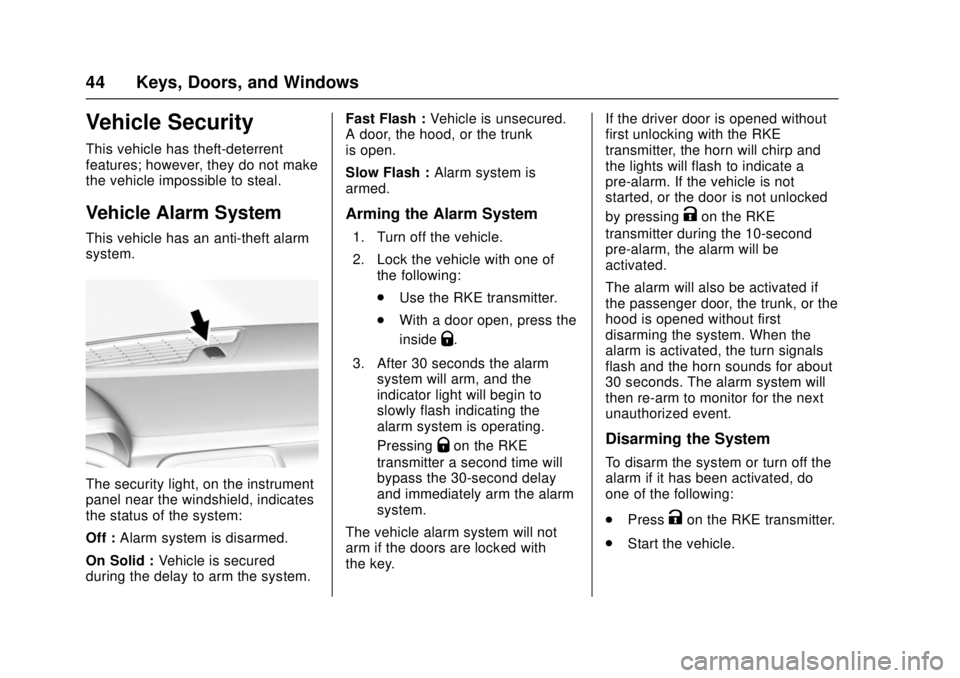
The security light, on the instrument
panel near the windshield, indicates
the status of the system:
Off :Alarm system is disarmed.
On Solid : Vehicle is secured
during the delay to arm the system. Fast Flash :
Vehicle is unsecured.
A door, the hood, or the trunk
is open.
Slow Flash : Alarm system is
armed.
Arming the Alarm System
1. Turn off the vehicle.
2. Lock the vehicle with one of the following:
.Use the RKE transmitter.
. With a door open, press the
inside
Q.
3. After 30 seconds the alarm system will arm, and the
indicator light will begin to
slowly flash indicating the
alarm system is operating.
Pressing
Qon the RKE
transmitter a second time will
bypass the 30-second delay
and immediately arm the alarm
system.
The vehicle alarm system will not
arm if the doors are locked with
the key. If the driver door is opened without
first unlocking with the RKE
transmitter, the horn will chirp and
the lights will flash to indicate a
pre-alarm. If the vehicle is not
started, or the door is not unlocked
by pressing
Kon the RKE
transmitter during the 10-second
pre-alarm, the alarm will be
activated.
The alarm will also be activated if
the passenger door, the trunk, or the
hood is opened without first
disarming the system. When the
alarm is activated, the turn signals
flash and the horn sounds for about
30 seconds. The alarm system will
then re-arm to monitor for the next
unauthorized event.
Disarming the System
To disarm the system or turn off the
alarm if it has been activated, do
one of the following:
. Press
Kon the RKE transmitter.
. Start the vehicle.
Page 46 of 386
Chevrolet Camaro Owner Manual (GMNA-Localizing-U.S./Canada/Mexico-
11348325) - 2018 - crc - 4/11/17
Keys, Doors, and Windows 45
To avoid setting off the alarm by
accident:
.Lock the vehicle with the RKE
transmitter after all occupants
have left the vehicle and all
doors are closed.
. Always unlock the vehicle with
the RKE transmitter. Unlocking
the driver door with the key will
not disarm the alarm.
How to Detect a Tamper
Condition
IfKis pressed on the RKE
transmitter and the horn chirps and
the lights flash three times, a
previous alarm occurred while the
system was armed.
If the alarm has been activated, a
message will appear on the Driver
Information Center (DIC).
Immobilizer
See Radio Frequency Statement
0 358.
Immobilizer Operation
This vehicle has a passive
theft-deterrent system.
The system does not have to be
manually armed or disarmed.
The vehicle is automatically
immobilized when the transmitter
leaves the vehicle.
The immobilization system is
disarmed when the ignition button is
pressed and a valid transmitter is
found in the vehicle.
The security light in the instrument
cluster comes on when there is a
problem with arming or disarming
the theft-deterrent system.
The system has one or more
transmitters matched to an
immobilizer control unit in your
vehicle. Only a correctly matched
transmitter will start the vehicle. If the transmitter is ever damaged,
you may not be able to start your
vehicle.
When trying to start the vehicle, the
security light comes on briefly when
the ignition is turned on.
If the engine does not start and the
security light stays on, there is a
problem with the system. Turn the
vehicle off and try again.
If the RKE transmitter appears to be
undamaged, try another transmitter.
Or, you may try placing the
transmitter in the rear cupholder in
the center console. See
“Starting
the Vehicle with a Low Transmitter
Battery” underRemote Keyless
Entry (RKE) System Operation 029.
If the engine does not start with the
other transmitter or when the
transmitter is in the rear cupholder
in the center console, your vehicle
needs service. See your dealer who
can service the theft-deterrent
system and have a new transmitter
programmed to the vehicle.
Page 365 of 386

Chevrolet Camaro Owner Manual (GMNA-Localizing-U.S./Canada/Mexico-
11348325) - 2018 - crc - 4/11/17
364 OnStar
OnStar Services
Emergency
Emergency Services require an
active, OnStar service plan
(excludes Basic Plan). With
Automatic Crash Response, built-in
sensors can automatically alert a
specially trained OnStar Advisor
who is immediately connected in to
the vehicle to help.
Press
Ufor a priority connection to
an OnStar Advisor who can contact
emergency service providers, direct
them to your exact location, and
relay important information.
With OnStar Crisis Assist, specially
trained Advisors are available
24 hours a day, 7 days a week, to
provide a central point of contact,
assistance, and information during a
crisis.
With Roadside Assistance, Advisors
can locate a nearby service provider
to help with a flat tire, a battery
jump, or an empty gas tank.
Security
If equipped, OnStar provides these
services:
. With Stolen Vehicle Assistance,
OnStar Advisors can use GPS to
pinpoint the vehicle and help
authorities quickly recover it.
. With Remote Ignition Block,
if equipped, OnStar can block
the engine from being restarted.
. With Stolen Vehicle Slowdown,
if equipped, OnStar can work
with law enforcement to
gradually slow the vehicle down.
Theft Alarm Notification
If equipped, if the doors are locked
and the vehicle alarm sounds, a
notification by text, e-mail, or phone
call will be sent. If the vehicle is
stolen, an OnStar Advisor can work
with authorities to recover the
vehicle.
Navigation
OnStar navigation requires a
specific OnStar service plan. Press
|to receive Turn-by-Turn
directions or have them sent to the
vehicle navigation screen,
if equipped.
Turn-by-Turn Navigation
1. Press|to connect to an
Advisor.
2. Request directions to be downloaded to the vehicle.
3. Follow the voice-guided commands.
Using Voice Commands
During a Planned Route
Cancel Route
1. Press
Q. System responds:
“OnStar ready,” then a tone.
2. Say “Cancel route.” System
responds: “Do you want to
cancel directions?”
3. Say “Yes.”System responds:
“OK, request completed, thank
you, goodbye.”
Page 375 of 386

Chevrolet Camaro Owner Manual (GMNA-Localizing-U.S./Canada/Mexico-
11348325) - 2018 - crc - 4/11/17
374 Index
IndexA
Accessories andModifications . . . . . . . . . . . . . . . . . . 250
Accessory Power . . . . . . . . . . . . . . . 215
Active Fuel Management . . . . . . . 216
Active Rev Match . . . . . . . . . . . . . . . 224
Add-On Electrical Equipment . . . 247
Additional Information OnStar . . . . . . . . . . . . . . . . . . . . . . . 368
Additional Maintenance
and Care . . . . . . . . . . . . . . . . . . . . . . 336
Agreements Trademarks and License . . . . . 184
Air Cleaner/Filter, Engine . . . . . . . 261
Air Conditioning . . . . . . . . . . . 186, 189
Air Filter, Passenger
Compartment . . . . . . . . . . . . . . . . . 192
Air Vents . . . . . . . . . . . . . . . . . . . . . . . 192
Airbag System Check . . . . . . . . . . . . . . . . . . . . . . . . . . 83
How Does an AirbagRestrain? . . . . . . . . . . . . . . . . . . . . . 76
Passenger Sensing System . . . . 78
What Makes an Airbag Inflate? . . . . . . . . . . . . . . . . . . . . . . . . 76
What Will You See after an Airbag Inflates? . . . . . . . . . . . . . . . 76 Airbag System (cont'd)
When Should an Airbag
Inflate? . . . . . . . . . . . . . . . . . . . . . . . . 75
Where Are the Airbags? . . . . . . . . 73
Airbags Adding Equipment to theVehicle . . . . . . . . . . . . . . . . . . . . . . . . 82
Passenger Status Indicator . . . 122
Readiness Light . . . . . . . . . . . . . . 121
Servicing Airbag-Equipped Vehicles . . . . . . . . . . . . . . . . . . . . . . . 82
System Check . . . . . . . . . . . . . . . . . . 71
Alarm Vehicle Security . . . . . . . . . . . . . . . . 44
Alert Lane Change . . . . . . . . . . . . . . . . . 241
Side Blind Zone (SBZA) . . . . . . 241
All-Season Tires . . . . . . . . . . . . . . . . 287
AM-FM Radio . . . . . . . . . . . . . . . . . . . 160
Antenna . . . . . . . . . . . . . . . . . . . . . . . . 163
Backglass . . . . . . . . . . . . . . . . . . . . 163
Multi-band . . . . . . . . . . . . . . . . . . . . 164
Antilock Brake System (ABS) . . . 225
Warning Light . . . . . . . . . . . . . . . . . 126
Appearance Care Exterior . . . . . . . . . . . . . . . . . . . . . . . 319
Interior . . . . . . . . . . . . . . . . . . . . . . . . 324
Page 383 of 386

Chevrolet Camaro Owner Manual (GMNA-Localizing-U.S./Canada/Mexico-
11348325) - 2018 - crc - 4/11/17
382 Index
S
Safety Defects ReportingCanadian Government . . . . . . . . 359
General Motors . . . . . . . . . . . . . . . 359
U.S. Government . . . . . . . . . . . . . 358
Safety System Check . . . . . . . . . . . . 70
Satellite Radio . . . . . . . . . . . . . . . . . . 161
Scheduling Appointments . . . . . . . 354
Sealant Kit, Tire . . . . . . . . . . . . . . . . 308
Seat Belts . . . . . . . . . . . . . . . . . . . . . . . 65 Care . . . . . . . . . . . . . . . . . . . . . . . . . . . . 70
Extender . . . . . . . . . . . . . . . . . . . . . . . . 70
How to Wear Seat BeltsProperly . . . . . . . . . . . . . . . . . . . . . . . 66
Lap-Shoulder Belt . . . . . . . . . . . . . . 67
Reminders . . . . . . . . . . . . . . . . . . . . 121
Replacing after a Crash . . . . . . . . 71
Use During Pregnancy . . . . . . . . . . 69
Seatback Latches . . . . . . . . . . . . . . . 63
Seats
Head Restraints . . . . . . . . . . . . . . . . 59
Heated and Ventilated Front . . . . 64
Memory . . . . . . . . . . . . . . . . . . . . . . . . . 60
Power Adjustment, Front . . . . . . . 59
Rear . . . . . . . . . . . . . . . . . . . . . . . . . . . . 65
Reclining Seatbacks . . . . . . . . . . . . 60
Securing Child Restraints . . . . 96, 98 Security
Light . . . . . . . . . . . . . . . . . . . . . . . . . . 128
OnStar . . . . . . . . . . . . . . . . . . . . . . . 364
Vehicle . . . . . . . . . . . . . . . . . . . . . . . . . 44
Vehicle Alarm . . . . . . . . . . . . . . . . . . . 44
Service . . . . . . . . . . . . . . . . . . . . . . . . . 193 Accessories and
Modifications . . . . . . . . . . . . . . . . 250
Doing Your Own Work . . . . . . . . 250
Maintenance Records . . . . . . . . 342
Maintenance, General Information . . . . . . . . . . . . . . . . . . 329
Parts Identification Label . . . . . 343
Publications Ordering Information . . . . . . . . . . . . . . . . . . 357
Scheduling Appointments . . . . . 354
Service Electric Parking Brake Light . . . . . . . . . . . . . . . . . . . . 126
Services Special Application . . . . . . . . . . . 336
Servicing the Airbag . . . . . . . . . . . . . 82
Shift Lock Control Function
Check, Automatic
Transmission . . . . . . . . . . . . . . . . . . 273
Shifting
Into Park . . . . . . . . . . . . . . . . . . . . . . 215
Out of Park . . . . . . . . . . . . . . . . . . . 216
Side Blind Zone Alert (SBZA) . . . 241 Sidemarker
Bulb Replacement . . . . . . . . . . . . 277
Signals, Turn and Lane-Change . . . . . . . . . . . . . . . . . 151
Software Updates . . . . . . . . . . . . . . 159
Special Application Services . . . . 336
Specifications and Capacities . . . . . . . . . . . . . . . . . . . . . 344
Speedometer . . . . . . . . . . . . . . . . . . . 116
StabiliTrak OFF Light . . . . . . . . . . . . . . . . . . . . . 127
Start Assist, Hill . . . . . . . . . . . . . . . . . 228
Start Vehicle, Remote . . . . . . . . . . . 36
Starter Switch Check . . . . . . . . . . . 272
Starting the Engine . . . . . . . . . . . . . 212
Steering . . . . . . . . . . . . . . . . . . . . . . . . 196 Heated Wheel . . . . . . . . . . . . . . . . 105
Wheel Adjustment . . . . . . . . . . . . 104
Wheel Controls . . . . . . . . . . . . . . . 104
Stoplamps and Back-Up Lamps Bulb Replacement . . . . . . . . . . . . 277
Storage Rear . . . . . . . . . . . . . . . . . . . . . . . . . . 101
Storage Areas Center Console . . . . . . . . . . . . . . . 102
Convenience Net . . . . . . . . . . . . . 102
Glove Box . . . . . . . . . . . . . . . . . . . . 101
Storage Compartments . . . . . . . . . 101
Page 385 of 386

Chevrolet Camaro Owner Manual (GMNA-Localizing-U.S./Canada/Mexico-
11348325) - 2018 - crc - 4/11/17
384 Index
UpdatesSoftware . . . . . . . . . . . . . . . . . . . . . . 159
USB Port . . . . . . . . . . . . . . . . . . . . . . . 164
Using This Manual . . . . . . . . . . . . . . . . 2
V
Vehicle Alarm System . . . . . . . . . . . . . . . . . . 44
Canadian Owners . . . . . . . . . . . . . . . 2
Control . . . . . . . . . . . . . . . . . . . . . . . 196
Identification Number (VIN) . . . 343
Load Limits . . . . . . . . . . . . . . . . . . . 206
Messages . . . . . . . . . . . . . . . . . . . . 136
Personalization . . . . . . . . . . . . . . . 137
Remote Start . . . . . . . . . . . . . . . . . . . 36
Security . . . . . . . . . . . . . . . . . . . . . . . . 44
Speed Messages . . . . . . . . . . . . . 137
Towing . . . . . . . . . . . . . . . . . . . . . . . . 317
Vehicle Care Storing the Tire Sealantand Compressor Kit . . . . . . . . . 314
Tire Pressure . . . . . . . . . . . . . . . . . 293
Vehicle Data Recording and Privacy . . . . . . . . . . . . . . . . . . . . . . . . 360
Ventilation, Air . . . . . . . . . . . . . . . . . . 192
Visors . . . . . . . . . . . . . . . . . . . . . . . . . . . 51
Voltmeter Gauge . . . . . . . . . . . . . . . 120
W
Warning Brake System Light . . . . . . . . . . . 125
Caution and Danger . . . . . . . . . . . . . 3
Warning Lights, Gauges, and
Indicators . . . . . . . . . . . . . . . . . . . . . 111
Warnings Hazard Flashers . . . . . . . . . . . . . . 151
Washer Fluid . . . . . . . . . . . . . . . . . . . 269
Wheels Alignment and Tire Balance . . 305
Different Size . . . . . . . . . . . . . . . . . 303
Replacement . . . . . . . . . . . . . . . . . 305
When It Is Time for New
Tires . . . . . . . . . . . . . . . . . . . . . . . . . . 301
Where to Put the Restraint . . . . . . 89
Wi-Fi . . . . . . . . . . . . . . . . . . . . . . . . . . . 365
Windows . . . . . . . . . . . . . . . . . . . . . . . . 48 Power . . . . . . . . . . . . . . . . . . . . . . . . . . 48
Windshield Replacement . . . . . . . . . . . . . . . . . 274
Wiper/Washer . . . . . . . . . . . . . . . . 105
Winter Driving . . . . . . . . . . . . . . . . . . . . . . . . 204
Winter Tires . . . . . . . . . . . . . . . . . . . . 287
Wiper Blade Replacement . . . . . . 274
Wireless Charging . . . . . . . . . . . . . . 109