horn CHEVROLET CAPTIVA SPORT 2013 Owners Manual
[x] Cancel search | Manufacturer: CHEVROLET, Model Year: 2013, Model line: CAPTIVA SPORT, Model: CHEVROLET CAPTIVA SPORT 2013Pages: 374, PDF Size: 6.66 MB
Page 7 of 374
Black plate (3,1)Chevrolet Captiva Sport Owner Manual - 2013 - crc - 11/12/12
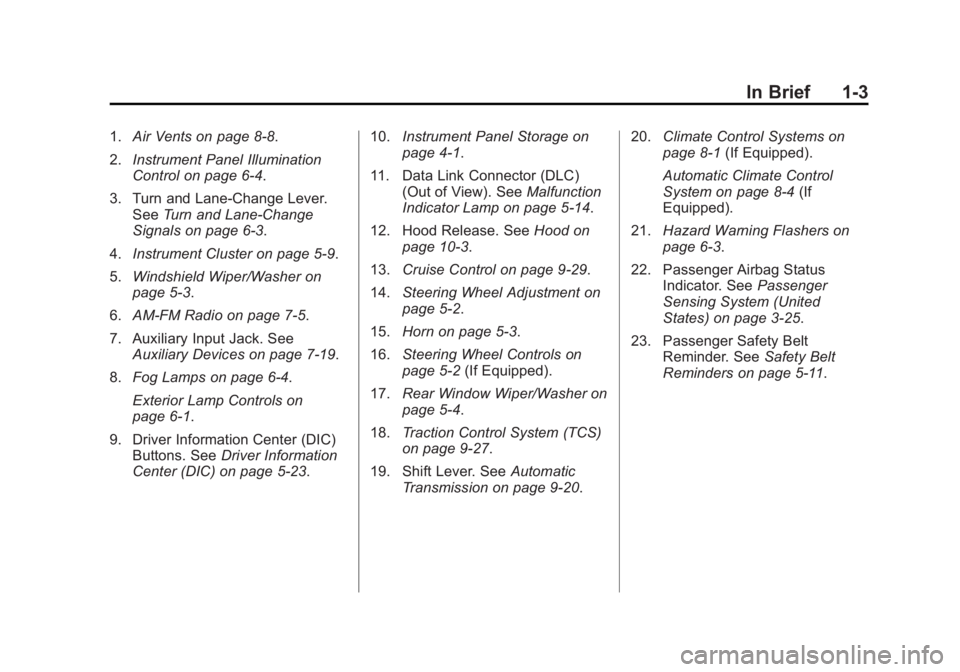
In Brief 1-31. Air Vents on page 8 ‑ 8 .
2. Instrument Panel Illumination
Control on page 6 ‑ 4 .
3. Turn and Lane-Change Lever.
See Turn and Lane-Change
Signals on page 6 ‑ 3 .
4. Instrument Cluster on page 5 ‑ 9 .
5. Windshield Wiper/Washer on
page 5 ‑ 3 .
6. AM-FM Radio on page 7 ‑ 5 .
7. Auxiliary Input Jack. See
Auxiliary Devices on page 7 ‑ 19 .
8. Fog Lamps on page 6 ‑ 4 .
Exterior Lamp Controls on
page 6 ‑ 1 .
9. Driver Information Center (DIC)
Buttons. See Driver Information
Center (DIC) on page 5 ‑ 23 . 10. Instrument Panel Storage on
page 4 ‑ 1 .
11. Data Link Connector (DLC)
(Out of View). See Malfunction
Indicator Lamp on page 5 ‑ 14 .
12. Hood Release. See Hood on
page 10 ‑ 3 .
13. Cruise Control on page 9 ‑ 29 .
14. Steering Wheel Adjustment on
page 5 ‑ 2 .
15. Horn on page 5 ‑ 3 .
16. Steering Wheel Controls on
page 5 ‑ 2 (If Equipped).
17. Rear Window Wiper/Washer on
page 5 ‑ 4 .
18. Traction Control System (TCS)
on page 9 ‑ 27 .
19. Shift Lever. See Automatic
Transmission on page 9 ‑ 20 . 20. Climate Control Systems on
page 8 ‑ 1 (If Equipped).
Automatic Climate Control
System on page 8 ‑ 4 (If
Equipped).
21. Hazard Warning Flashers on
page 6 ‑ 3 .
22. Passenger Airbag Status
Indicator. See Passenger
Sensing System (United
States) on page 3 ‑ 25 .
23. Passenger Safety Belt
Reminder. See Safety Belt
Reminders on page 5 ‑ 11 .
Page 29 of 374
Black plate (3,1)Chevrolet Captiva Sport Owner Manual - 2013 - crc - 11/12/12
Keys, Doors, and Windows 2-3
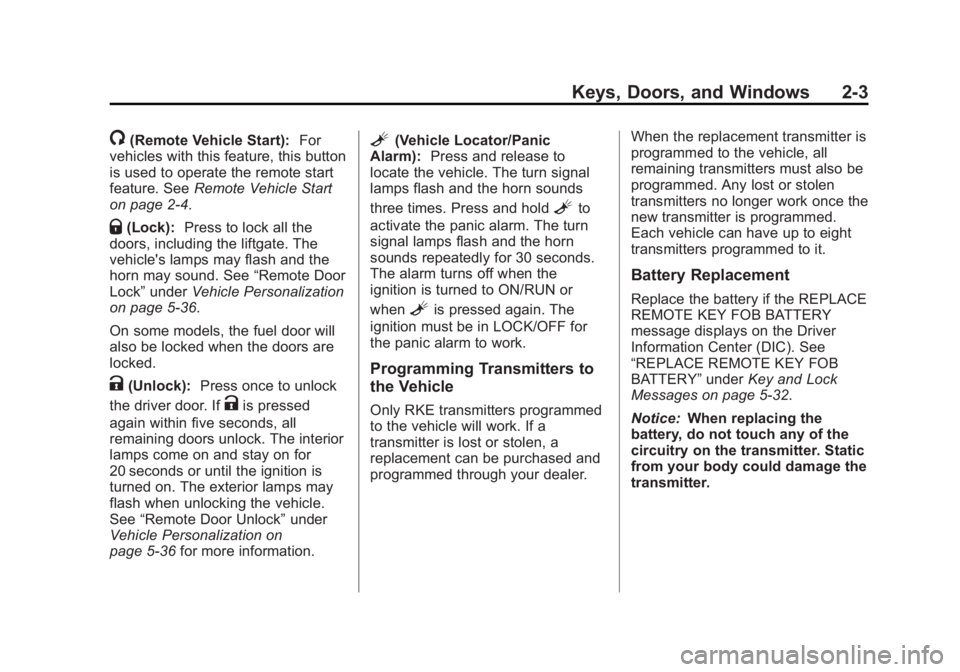
/ (Remote Vehicle Start): For
vehicles with this feature, this button
is used to operate the remote start
feature. See Remote Vehicle Start
on page 2 ‑ 4 .
Q (Lock): Press to lock all the
doors, including the liftgate. The
vehicle's lamps may flash and the
horn may sound. See “ Remote Door
Lock ” under Vehicle Personalization
on page 5 ‑ 36 .
On some models, the fuel door will
also be locked when the doors are
locked.
K (Unlock): Press once to unlock
the driver door. If
K is pressed
again within five seconds, all
remaining doors unlock. The interior
lamps come on and stay on for
20 seconds or until the ignition is
turned on. The exterior lamps may
flash when unlocking the vehicle.
See “ Remote Door Unlock ” under
Vehicle Personalization on
page 5 ‑ 36 for more information. L (Vehicle Locator/Panic
Alarm): Press and release to
locate the vehicle. The turn signal
lamps flash and the horn sounds
three times. Press and hold
L to
activate the panic alarm. The turn
signal lamps flash and the horn
sounds repeatedly for 30 seconds.
The alarm turns off when the
ignition is turned to ON/RUN or
when
L is pressed again. The
ignition must be in LOCK/OFF for
the panic alarm to work.
Programming Transmitters to
the Vehicle Only RKE transmitters programmed
to the vehicle will work. If a
transmitter is lost or stolen, a
replacement can be purchased and
programmed through your dealer. When the replacement transmitter is
programmed to the vehicle, all
remaining transmitters must also be
programmed. Any lost or stolen
transmitters no longer work once the
new transmitter is programmed.
Each vehicle can have up to eight
transmitters programmed to it.
Battery Replacement Replace the battery if the REPLACE
REMOTE KEY FOB BATTERY
message displays on the Driver
Information Center (DIC). See
“ REPLACE REMOTE KEY FOB
BATTERY ” under Key and Lock
Messages on page 5 ‑ 32 .
Notice: When replacing the
battery, do not touch any of the
circuitry on the transmitter. Static
from your body could damage the
transmitter.
Page 33 of 374
Black plate (7,1)Chevrolet Captiva Sport Owner Manual - 2013 - crc - 11/12/12
Keys, Doors, and Windows 2-7Automatic Door Unlock The doors can be programmed to
automatically unlock when the shift
lever is moved into P (Park). See
“ Auto Door Unlock ” in Vehicle
Personalization on page 5 ‑ 36 .
Lockout Protection When the power door lock switch is
pressed with the key in the ignition,
and any door is open, all the doors
lock and the driver door unlocks.
When doors are closed with the key
in the ignition, the horn will sound
as a reminder.
If the doors are locked with the
Remote Keyless Entry (RKE)
transmitter, and the key is in the
ignition, a chime sounds and all
except the driver door lock.
The lockout protection feature can
be overridden by holding the power
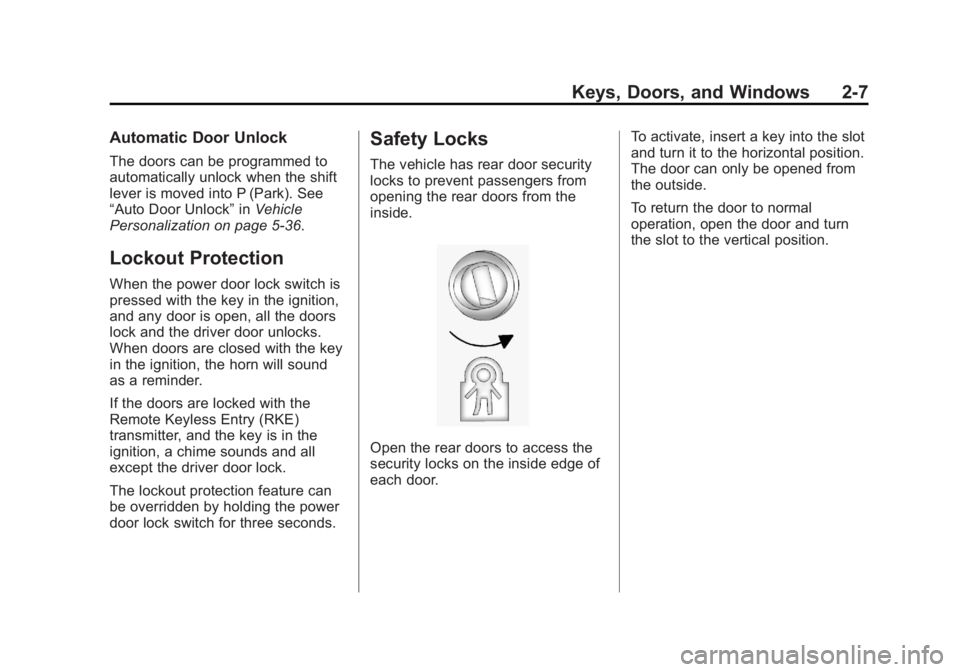
door lock switch for three seconds. Safety Locks The vehicle has rear door security
locks to prevent passengers from
opening the rear doors from the
inside.
Open the rear doors to access the
security locks on the inside edge of
each door. To activate, insert a key into the slot
and turn it to the horizontal position.
The door can only be opened from
the outside.
To return the door to normal
operation, open the door and turn
the slot to the vertical position.
Page 35 of 374
Black plate (9,1)Chevrolet Captiva Sport Owner Manual - 2013 - crc - 11/12/12
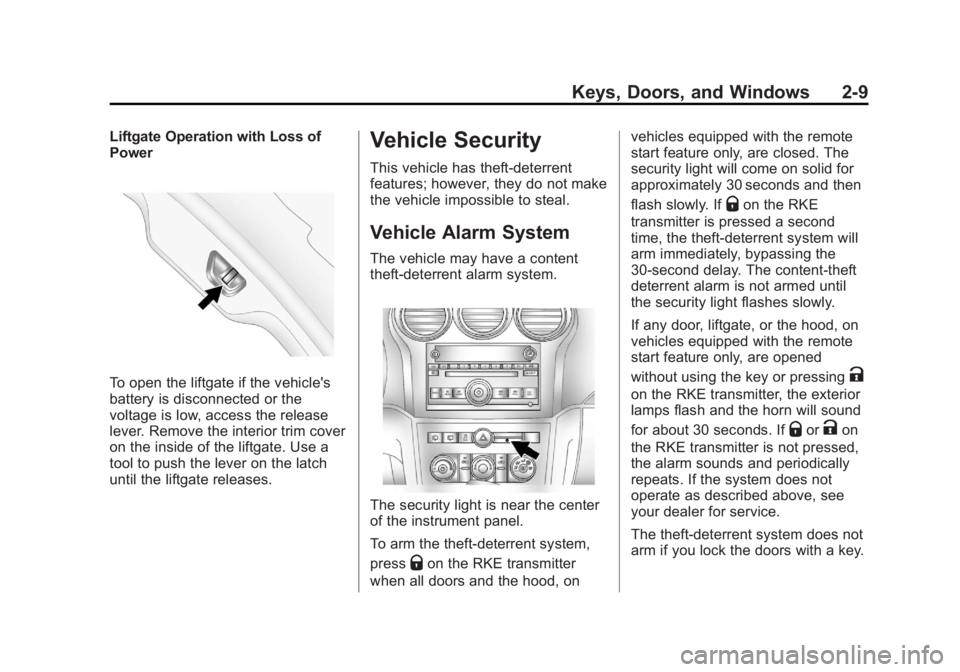
Keys, Doors, and Windows 2-9Liftgate Operation with Loss of
Power
To open the liftgate if the vehicle's
battery is disconnected or the
voltage is low, access the release
lever. Remove the interior trim cover
on the inside of the liftgate. Use a
tool to push the lever on the latch
until the liftgate releases. Vehicle Security This vehicle has theft-deterrent
features; however, they do not make
the vehicle impossible to steal.
Vehicle Alarm System The vehicle may have a content
theft-deterrent alarm system.
The security light is near the center
of the instrument panel.
To arm the theft-deterrent system,
press
Q on the RKE transmitter
when all doors and the hood, on vehicles equipped with the remote
start feature only, are closed. The
security light will come on solid for
approximately 30 seconds and then
flash slowly. If
Q on the RKE
transmitter is pressed a second
time, the theft-deterrent system will
arm immediately, bypassing the
30-second delay. The content-theft
deterrent alarm is not armed until
the security light flashes slowly.
If any door, liftgate, or the hood, on
vehicles equipped with the remote
start feature only, are opened
without using the key or pressing
Kon the RKE transmitter, the exterior
lamps flash and the horn will sound
for about 30 seconds. If
Q or
K on
the RKE transmitter is not pressed,
the alarm sounds and periodically
repeats. If the system does not
operate as described above, see
your dealer for service.
The theft-deterrent system does not
arm if you lock the doors with a key.
Page 36 of 374
Black plate (10,1)Chevrolet Captiva Sport Owner Manual - 2013 - crc - 11/12/12
2-10 Keys, Doors, and Windows To avoid setting off the alarm by
accident, always unlock a door with
the RKE transmitter or a key.
Unlocking a door any other way will
set off the alarm if the system has
been armed.
If you set off the alarm by accident,
turn off the alarm by pressing
Q or
K on the RKE transmitter or by
placing the key in the ignition and
turning it to START.
Testing the Alarm To test the alarm:
1. From inside the vehicle, lower
the driver window and open the
driver door.
2. Get out of the vehicle, close the
door, and activate the system by
locking the doors with the RKE
transmitter.
3. Wait for the security light to flash
slowly. 4. Reach in through the window,
unlock the door with the manual
door lock, and open the door.
This should set off the alarm.
If the alarm does not sound when it
should, but the vehicle's headlamps
flash, check to see if the horn
works. The horn fuse may be blown.
To replace the fuse, see Fuses and
Circuit Breakers on page 10 ‑ 30 .
If the alarm does not sound or the
vehicle's headlamps do not flash,
see your dealer for service.
Immobilizer See Radio Frequency Statement on
page 13 ‑ 20 for information
regarding Part 15 of the Federal
Communications Commission (FCC)
rules and Industry Canada
Standards RSS-GEN/210/220/310. Immobilizer Operation This vehicle has PASS-Key ®
III+
(Personalized Automotive Security
System) theft-deterrent system.
PASS-Key III+ is a passive
theft-deterrent system.
The system is automatically armed
when the key is removed from the
ignition.
You do not have to manually arm or
disarm the system.
The security light comes on if there
is a problem with the theft-deterrent
system operation.
When the PASS-Key III+ system
senses that someone is using the
wrong key, it prevents the vehicle
from starting. Anyone using a
trial-and-error method to start the
vehicle will be discouraged because
of the high number of electrical key
codes.
Page 97 of 374
Black plate (1,1)Chevrolet Captiva Sport Owner Manual - 2013 - crc - 11/12/12
Instruments and Controls 5-1
Instruments and
Controls Controls Steering Wheel Adjustment . . . 5-2
Steering Wheel Controls . . . . . . 5-2
Horn . . . . . . . . . . . . . . . . . . . . . . . . . . 5-3
Windshield Wiper/Washer . . . . . 5-3
Rear Window Wiper/
Washer . . . . . . . . . . . . . . . . . . . . . . 5-4
Compass . . . . . . . . . . . . . . . . . . . . . 5-4
Clock . . . . . . . . . . . . . . . . . . . . . . . . . 5-6
Power Outlets . . . . . . . . . . . . . . . . . 5-7
Warning Lights, Gauges, and
Indicators Warning Lights, Gauges, and
Indicators . . . . . . . . . . . . . . . . . . . . 5-8
Instrument Cluster . . . . . . . . . . . . 5-9
Speedometer . . . . . . . . . . . . . . . . 5-10
Odometer . . . . . . . . . . . . . . . . . . . . 5-10
Trip Odometer . . . . . . . . . . . . . . . 5-10
Tachometer . . . . . . . . . . . . . . . . . . 5-10
Fuel Gauge . . . . . . . . . . . . . . . . . . 5-10
Safety Belt Reminders . . . . . . . 5-11 Airbag Readiness Light . . . . . . 5-12
Passenger Airbag Status
Indicator (United States) . . . . 5-12
Charging System Light . . . . . . 5-13
Malfunction
Indicator Lamp . . . . . . . . . . . . . 5-14
Service Vehicle Soon
Light . . . . . . . . . . . . . . . . . . . . . . . 5-16
Brake System Warning
Light . . . . . . . . . . . . . . . . . . . . . . . 5-16
Electric Parking Brake
Light . . . . . . . . . . . . . . . . . . . . . . . 5-17
Antilock Brake System (ABS)
Warning Light . . . . . . . . . . . . . . 5-18
All-Wheel-Drive Light . . . . . . . . 5-18
Power Steering Warning
Light . . . . . . . . . . . . . . . . . . . . . . . 5-19
StabiliTrak ®
Indicator Light . . . 5-19
Traction Control System
(TCS) Warning Light . . . . . . . 5-19
Engine Coolant Temperature
Warning Light . . . . . . . . . . . . . . 5-20
Tire Pressure Light . . . . . . . . . . 5-20
Fuel Economy Light . . . . . . . . . 5-20
Low Fuel Warning Light . . . . . . 5-21
Security Light . . . . . . . . . . . . . . . . 5-21 Reduced Engine Power
Light . . . . . . . . . . . . . . . . . . . . . . . 5-21
High-Beam On Light . . . . . . . . . 5-22
Front Fog Lamp Light . . . . . . . . 5-22
Low Washer Fluid Warning
Light . . . . . . . . . . . . . . . . . . . . . . . 5-22
Cruise Control Light . . . . . . . . . 5-22
Door Ajar Light . . . . . . . . . . . . . . 5-22
Gate Ajar Light . . . . . . . . . . . . . . 5-23
Information Displays Driver Information
Center (DIC) . . . . . . . . . . . . . . . 5-23
Vehicle Messages Vehicle Messages . . . . . . . . . . . 5-28
Brake System Messages . . . . 5-28
Compass Messages . . . . . . . . . 5-29
Cruise Control Messages . . . . 5-29
Door Ajar Messages . . . . . . . . . 5-29
Engine Cooling System
Messages . . . . . . . . . . . . . . . . . . 5-30
Engine Oil Messages . . . . . . . . 5-30
Engine Power Messages . . . . 5-31
Fuel System Messages . . . . . . 5-31
Key and Lock Messages . . . . . 5-32
Lamp Messages . . . . . . . . . . . . . 5-32
Page 99 of 374
Black plate (3,1)Chevrolet Captiva Sport Owner Manual - 2013 - crc - 11/12/12
Instruments and Controls 5-3
J /
0 (Call/Mute): For vehicles with
Bluetooth ®
and OnStar ®
, press to
interact with those systems. See
Bluetooth on page 7 ‑ 23 or OnStar
Overview on page 14 ‑ 1 for more
information. Press and release to
mute the system. Press it again to
turn the sound back on.
K (End Call): Press to reject an
incoming call, or end a current call.
Press to silence the vehicle
speakers while using the
infotainment system. Press again to
turn the sound on.
v + or
v − (Volume): Move the
thumbwheel up or down to increase
or to decrease the volume.
Horn Press
a on the steering wheel pad
to sound the horn. Windshield Wiper/Washer
The windshield wiper lever is on the
right side of the steering column.
Move the lever up or down to select
the wiper speed.
8 (Mist): Single wipe, briefly move
the lever down. The lever returns to
its starting position when released.
For several wipes, hold the
lever down.
9 (Off): Turns the windshield
wipers off. 3 (Adjustable Interval Wipes):
Sets a delay between wipes. Move
the switch on top of the lever left for
less frequent wipes or right for more
frequent wipes.
a (Low): Slow wipes.
1 (High): Fast wipes.
Clear ice and snow from the wiper
blades before using them. If frozen
to the windshield, carefully loosen or
thaw them. Damaged wiper blades
should be replaced. See Wiper
Blade Replacement on page 10 ‑ 25 .
Heavy snow or ice can overload the
wiper motor. A circuit breaker will
stop the motor until it cools down.
Rainsense ™Notice: Going through an
automatic car wash with the
wipers on can damage them. Turn
the wipers off when going
through an automatic car wash.
Page 134 of 374
Black plate (38,1)Chevrolet Captiva Sport Owner Manual - 2013 - crc - 11/12/12
5-38 Instruments and Controls Press
U until PRESS
V TO SET
REMOTE DOOR LOCK appears on
the DIC display. Press
V once to
access the settings for this feature.
Then press
U to scroll through the
following settings:
VERIFICATION OFF: There will be
no feedback when you press
Q on
the RKE transmitter.
VERIFICATION LIGHTS ONLY:
The exterior lamps will flash when
you press
Q on the RKE transmitter.
VERIFICATION HORN ONLY: The
horn will sound on the second press
of
Q on the RKE transmitter.
VERIFICATION HORN & LIGHTS
(default): The exterior lamps will
flash when you press
Q on the RKE
transmitter, and the horn will sound
when
Q is pressed again within
five seconds of the previous
command. VERIFICATION NO CHANGE: No
change will be made to this feature.
The current setting will remain.
To select a setting, press
V while
the desired setting is displayed on
the DIC.
REMOTE DOOR UNLOCK
This feature allows you to select the
type of feedback you will receive
when unlocking the vehicle with the
Remote Keyless Entry (RKE)
transmitter. You will not receive
feedback when unlocking the
vehicle with the RKE transmitter if
the doors are open. See Remote
Keyless Entry (RKE) System
Operation on page 2 ‑ 2 .
Press
U until PRESS
V TO SET
REMOTE DOOR UNLOCK appears
on the DIC display. Press
V once to
access the settings for this feature. Then press
U to scroll through the
following settings:
VERIF LIGHTS OFF: The exterior
lamps will not flash when you press
K on the RKE transmitter.
VERIF LIGHTS ON (default): The
exterior lamps will flash when you
press
K on the RKE transmitter.
VERIF NO CHANGE: No change
will be made to this feature. The
current setting will remain.
To select a setting, press
V while
the desired setting is displayed on
the DIC.
DELAY DOOR LOCK
This feature allows you to select
whether or not the locking of the
vehicle's doors will be delayed.
When locking the doors with the
power door lock switch and a door
is open, this feature will delay
locking the doors until five seconds
after the last door is closed. You will
hear three chimes to signal that the
delayed locking feature is in use.
Page 266 of 374
Black plate (32,1)Chevrolet Captiva Sport Owner Manual - 2013 - crc - 11/12/12
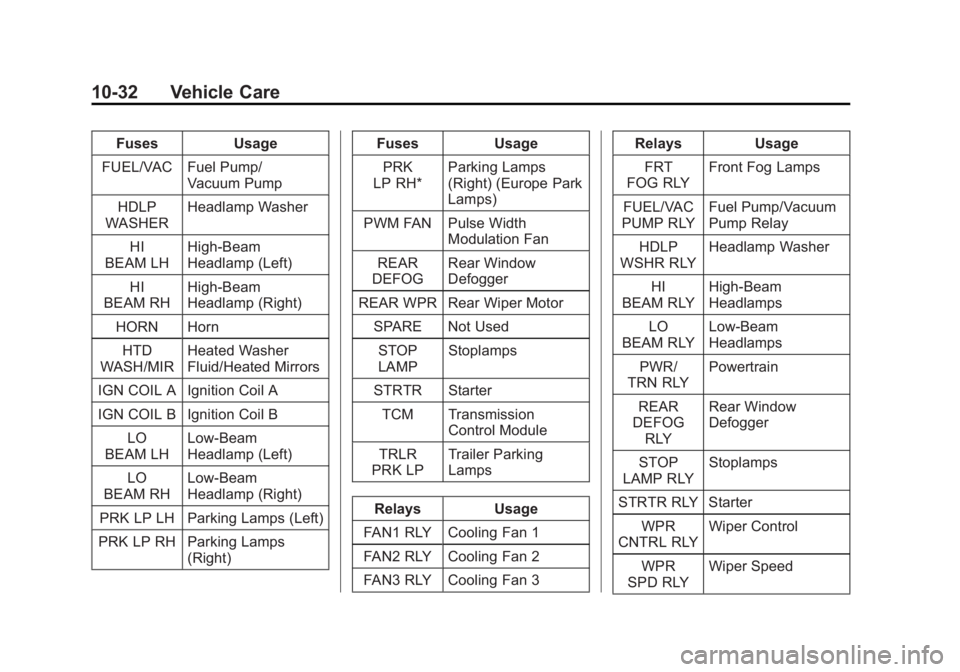
10-32 Vehicle Care Fuses Usage
FUEL/VAC Fuel Pump/
Vacuum Pump
HDLP
WASHER Headlamp Washer
HI
BEAM LH High-Beam
Headlamp (Left)
HI
BEAM RH High-Beam
Headlamp (Right)
HORN Horn
HTD
WASH/MIR Heated Washer
Fluid/Heated Mirrors
IGN COIL A Ignition Coil A
IGN COIL B Ignition Coil B
LO
BEAM LH Low-Beam
Headlamp (Left)
LO
BEAM RH Low-Beam
Headlamp (Right)
PRK LP LH Parking Lamps (Left)
PRK LP RH Parking Lamps
(Right) Fuses Usage
PRK
LP RH* Parking Lamps
(Right) (Europe Park
Lamps)
PWM FAN Pulse Width
Modulation Fan
REAR
DEFOG Rear Window
Defogger
REAR WPR Rear Wiper Motor
SPARE Not Used
STOP
LAMP Stoplamps
STRTR Starter
TCM Transmission
Control Module
TRLR
PRK LP Trailer Parking
Lamps
Relays Usage
FAN1 RLY Cooling Fan 1
FAN2 RLY Cooling Fan 2
FAN3 RLY Cooling Fan 3 Relays Usage
FRT
FOG RLY Front Fog Lamps
FUEL/VAC
PUMP RLY Fuel Pump/Vacuum
Pump Relay
HDLP
WSHR RLY Headlamp Washer
HI
BEAM RLY High-Beam
Headlamps
LO
BEAM RLY Low-Beam
Headlamps
PWR/
TRN RLY Powertrain
REAR
DEFOG
RLY Rear Window
Defogger
STOP
LAMP RLY Stoplamps
STRTR RLY Starter
WPR
CNTRL RLY Wiper Control
WPR
SPD RLY Wiper Speed
Page 282 of 374
Black plate (48,1)Chevrolet Captiva Sport Owner Manual - 2013 - crc - 11/12/12
10-48 Vehicle Care .
Operating electronic devices or
being near facilities using radio
wave frequencies similar to the
TPMS could cause the TPMS
sensors to malfunction.
TPMS Sensor Matching
Process Each TPMS sensor has a unique
identification code. The identification
code needs to be matched to a new
tire/wheel position after rotating the
vehicle ’ s tires or replacing one or
more of the TPMS sensors. Also,
the TPMS sensor matching process
should be performed after replacing
a spare tire with a road tire
containing the TPMS sensor. The
malfunction light should go off at the
next ignition cycle. The sensors are
matched to the tire/wheel positions,
using a TPMS relearn tool, in the
following order: driver side front tire,
passenger side front tire, passenger
side rear tire, and driver side rear.
See your dealer for service or to
purchase a relearn tool. There are two minutes to match the
first tire/wheel position, and
five minutes overall to match all four
tire/wheel positions. If it takes
longer, the matching process stops
and must be restarted.
The TPMS matching process is:
1. Set the parking brake.
2. Turn the ignition to ON/RUN with
the engine off.
3. Press and hold the RKE
transmitter's
Q and
K buttons at
the same time, for about
three seconds. The horn will
sound twice to indicate the
receiver is ready for the sensor
matching process to begin.
4. Start with the driver side front
tire. The driver side turn signal
lamp comes on.
5. Place the relearn tool against
the tire sidewall, near the valve
stem. Then press the button to
activate the TPMS sensor.
A horn chirp confirms that the sensor identification code has
been matched to this tire and
wheel position.
6. Proceed to the passenger side
front tire. The passenger side
front turn signal lamp comes on.
Repeat the procedure in Step 5.
7. Proceed to the passenger side
rear tire. The passenger side
rear turn signal lamp comes on.
Repeat the procedure in Step 5.
8. Proceed to the driver side rear
tire. The driver side rear turn
signal lamp comes on. Repeat
the procedure in Step 5. The
horn sounds two times to
indicate the sensor identification
code has been matched to the
driver side rear tire, and the
TPMS sensor matching process
is no longer active.
9. Turn the ignition to LOCK/OFF.
10. Set all four tires to the
recommended air pressure
level as indicated on the Tire
and Loading Information label.