reset CHEVROLET CAVALIER 2004 3.G User Guide
[x] Cancel search | Manufacturer: CHEVROLET, Model Year: 2004, Model line: CAVALIER, Model: CHEVROLET CAVALIER 2004 3.GPages: 354, PDF Size: 2.42 MB
Page 146 of 354
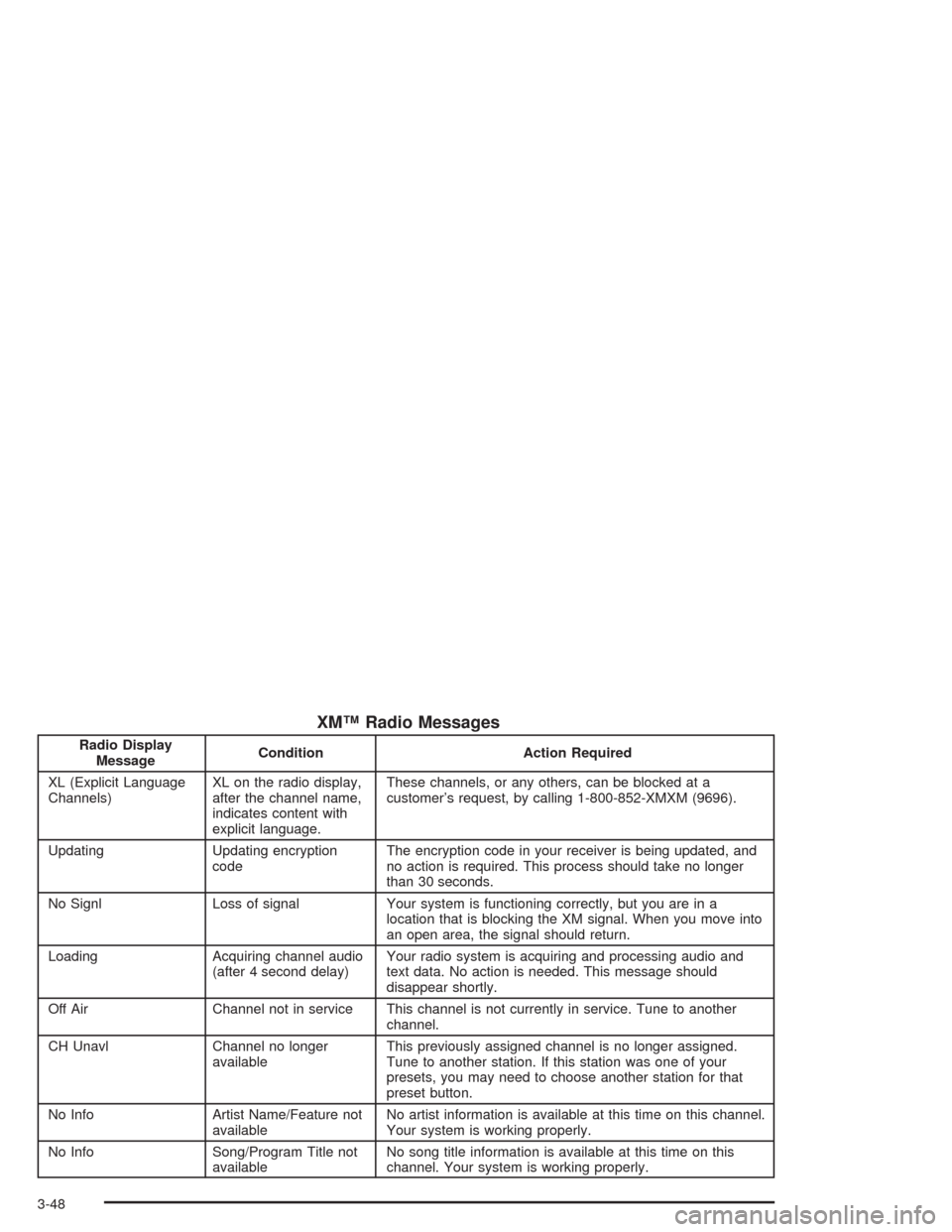
XM™ Radio Messages
Radio Display
MessageCondition Action Required
XL (Explicit Language
Channels)XL on the radio display,
after the channel name,
indicates content with
explicit language.These channels, or any others, can be blocked at a
customer’s request, by calling 1-800-852-XMXM (9696).
Updating Updating encryption
codeThe encryption code in your receiver is being updated, and
no action is required. This process should take no longer
than 30 seconds.
No Signl Loss of signal Your system is functioning correctly, but you are in a
location that is blocking the XM signal. When you move into
an open area, the signal should return.
Loading Acquiring channel audio
(after 4 second delay)Your radio system is acquiring and processing audio and
text data. No action is needed. This message should
disappear shortly.
Off Air Channel not in service This channel is not currently in service. Tune to another
channel.
CH Unavl Channel no longer
availableThis previously assigned channel is no longer assigned.
Tune to another station. If this station was one of your
presets, you may need to choose another station for that
preset button.
No Info Artist Name/Feature not
availableNo artist information is available at this time on this channel.
Your system is working properly.
No Info Song/Program Title not
availableNo song title information is available at this time on this
channel. Your system is working properly.
3-48
Page 152 of 354
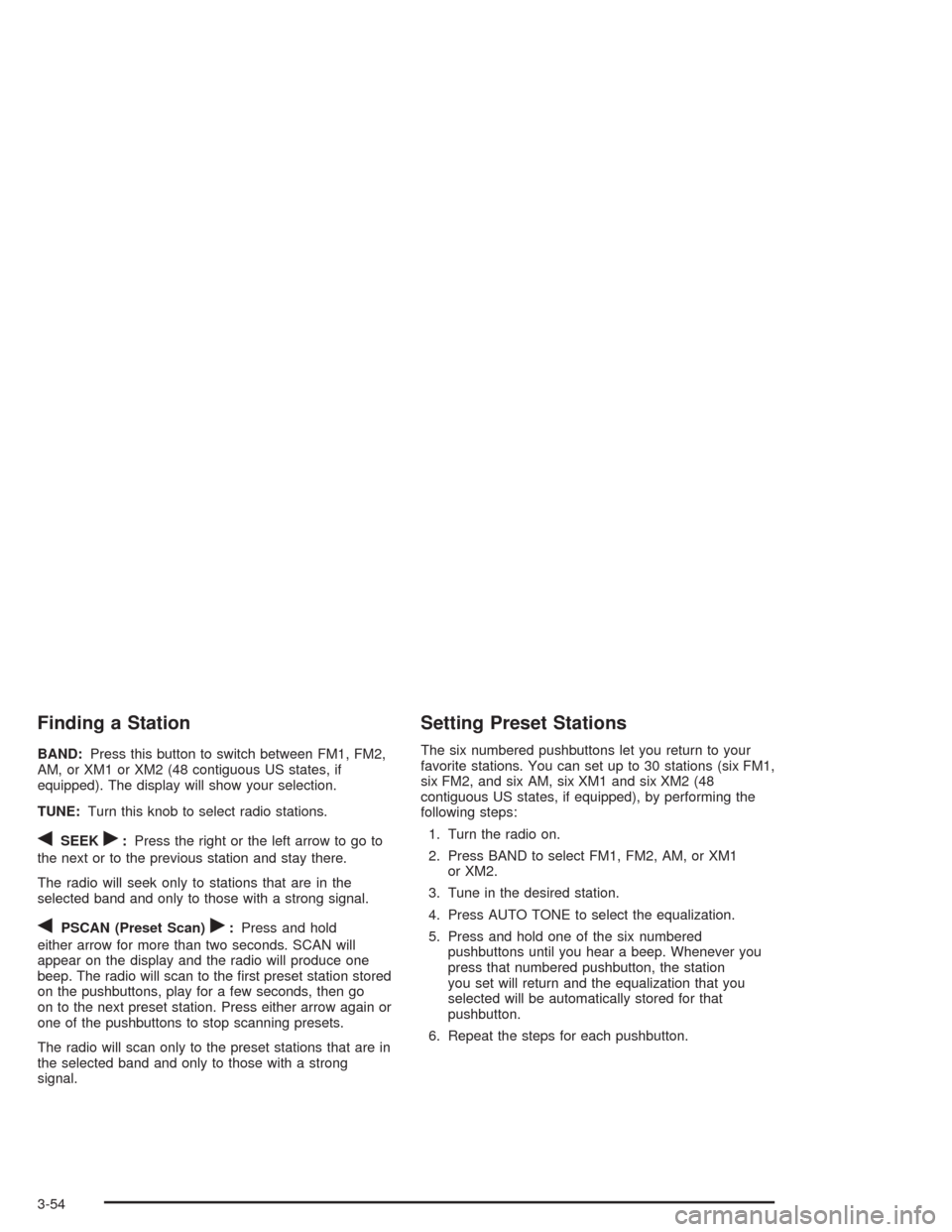
Finding a Station
BAND:Press this button to switch between FM1, FM2,
AM, or XM1 or XM2 (48 contiguous US states, if
equipped). The display will show your selection.
TUNE:Turn this knob to select radio stations.
qSEEKr:Press the right or the left arrow to go to
the next or to the previous station and stay there.
The radio will seek only to stations that are in the
selected band and only to those with a strong signal.
qPSCAN (Preset Scan)r:Press and hold
either arrow for more than two seconds. SCAN will
appear on the display and the radio will produce one
beep. The radio will scan to the rst preset station stored
on the pushbuttons, play for a few seconds, then go
on to the next preset station. Press either arrow again or
one of the pushbuttons to stop scanning presets.
The radio will scan only to the preset stations that are in
the selected band and only to those with a strong
signal.
Setting Preset Stations
The six numbered pushbuttons let you return to your
favorite stations. You can set up to 30 stations (six FM1,
six FM2, and six AM, six XM1 and six XM2 (48
contiguous US states, if equipped), by performing the
following steps:
1. Turn the radio on.
2. Press BAND to select FM1, FM2, AM, or XM1
or XM2.
3. Tune in the desired station.
4. Press AUTO TONE to select the equalization.
5. Press and hold one of the six numbered
pushbuttons until you hear a beep. Whenever you
press that numbered pushbutton, the station
you set will return and the equalization that you
selected will be automatically stored for that
pushbutton.
6. Repeat the steps for each pushbutton.
3-54
Page 156 of 354
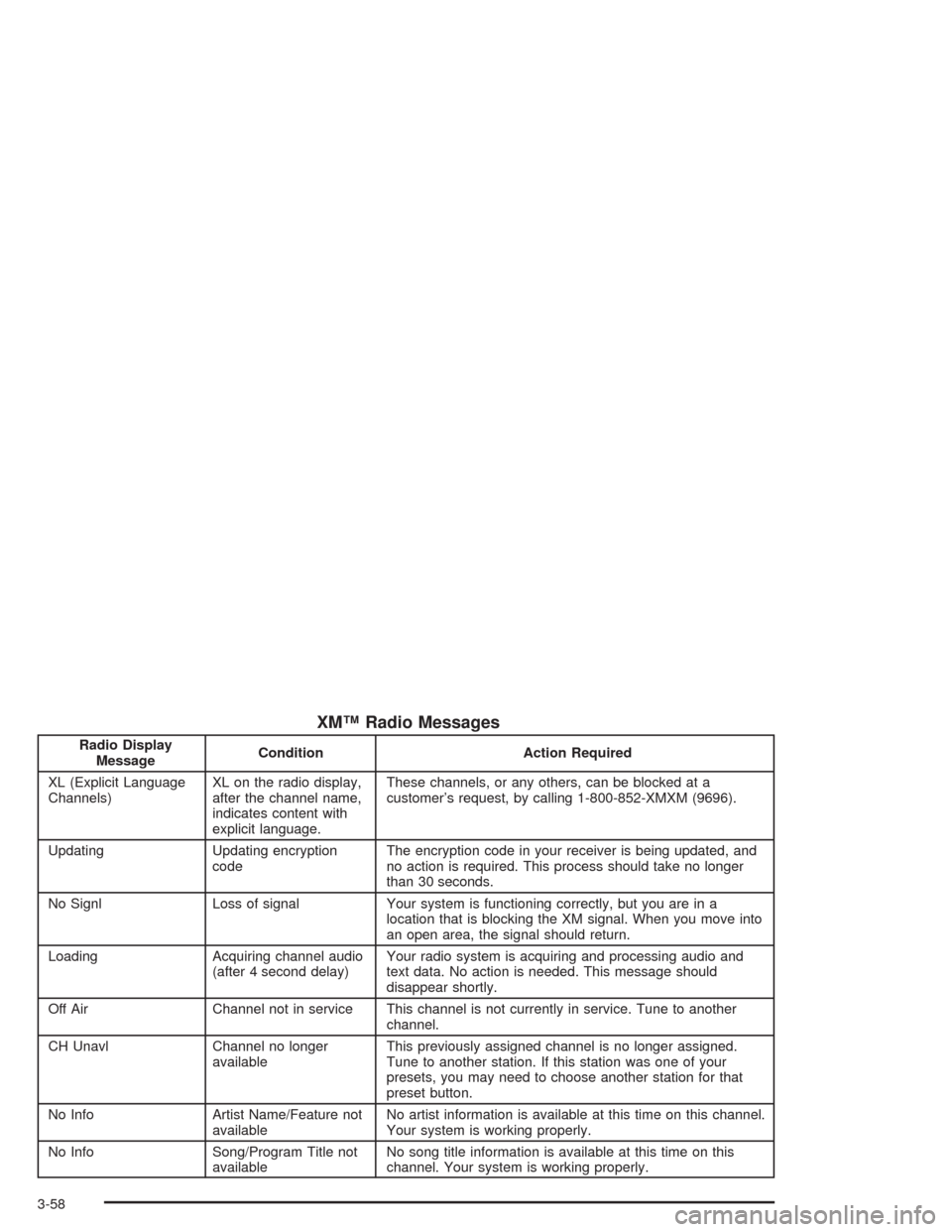
XM™ Radio Messages
Radio Display
MessageCondition Action Required
XL (Explicit Language
Channels)XL on the radio display,
after the channel name,
indicates content with
explicit language.These channels, or any others, can be blocked at a
customer’s request, by calling 1-800-852-XMXM (9696).
Updating Updating encryption
codeThe encryption code in your receiver is being updated, and
no action is required. This process should take no longer
than 30 seconds.
No Signl Loss of signal Your system is functioning correctly, but you are in a
location that is blocking the XM signal. When you move into
an open area, the signal should return.
Loading Acquiring channel audio
(after 4 second delay)Your radio system is acquiring and processing audio and
text data. No action is needed. This message should
disappear shortly.
Off Air Channel not in service This channel is not currently in service. Tune to another
channel.
CH Unavl Channel no longer
availableThis previously assigned channel is no longer assigned.
Tune to another station. If this station was one of your
presets, you may need to choose another station for that
preset button.
No Info Artist Name/Feature not
availableNo artist information is available at this time on this channel.
Your system is working properly.
No Info Song/Program Title not
availableNo song title information is available at this time on this
channel. Your system is working properly.
3-58
Page 164 of 354
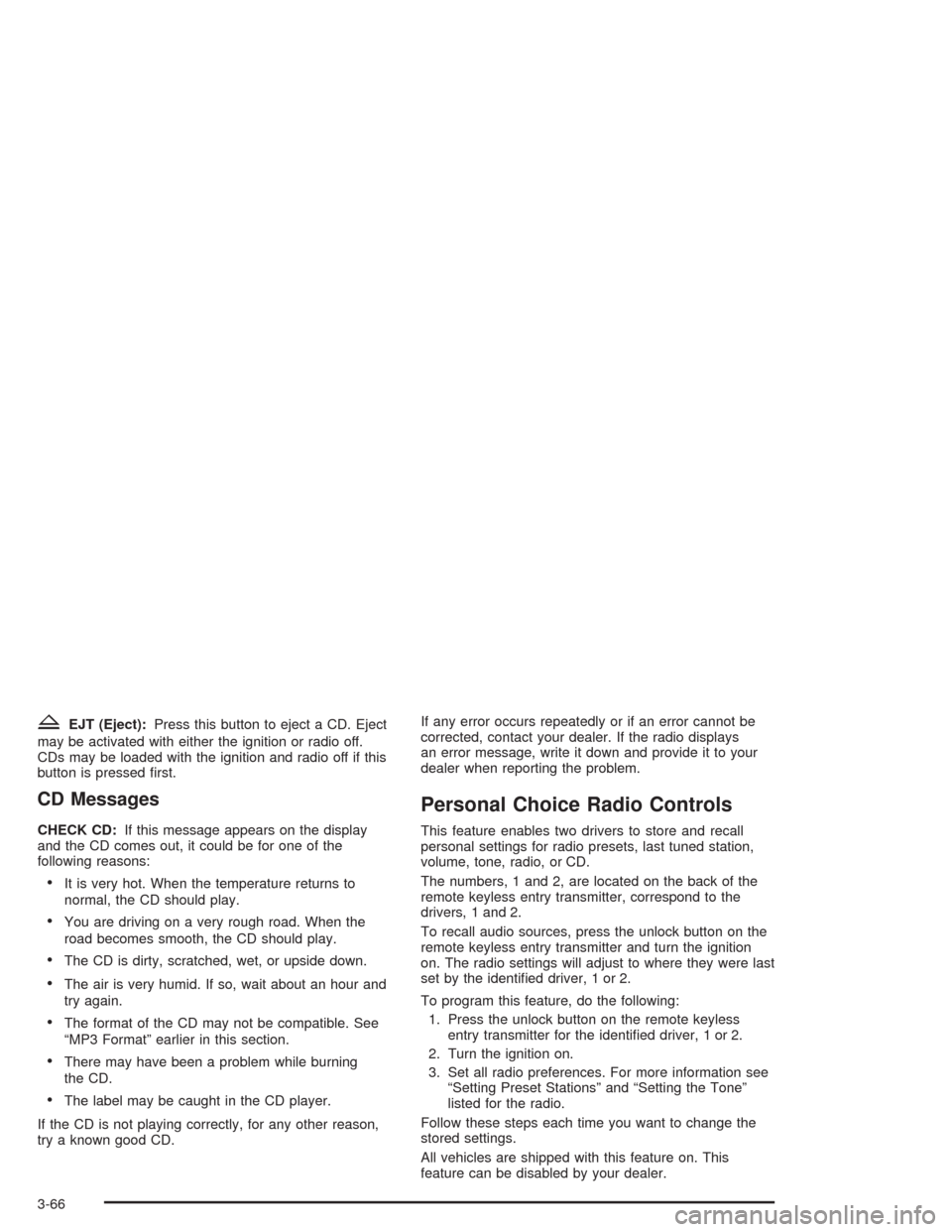
ZEJT (Eject):Press this button to eject a CD. Eject
may be activated with either the ignition or radio off.
CDs may be loaded with the ignition and radio off if this
button is pressed rst.
CD Messages
CHECK CD:If this message appears on the display
and the CD comes out, it could be for one of the
following reasons:
It is very hot. When the temperature returns to
normal, the CD should play.
You are driving on a very rough road. When the
road becomes smooth, the CD should play.
The CD is dirty, scratched, wet, or upside down.
The air is very humid. If so, wait about an hour and
try again.
The format of the CD may not be compatible. See
“MP3 Format” earlier in this section.
There may have been a problem while burning
the CD.
The label may be caught in the CD player.
If the CD is not playing correctly, for any other reason,
try a known good CD.If any error occurs repeatedly or if an error cannot be
corrected, contact your dealer. If the radio displays
an error message, write it down and provide it to your
dealer when reporting the problem.
Personal Choice Radio Controls
This feature enables two drivers to store and recall
personal settings for radio presets, last tuned station,
volume, tone, radio, or CD.
The numbers, 1 and 2, are located on the back of the
remote keyless entry transmitter, correspond to the
drivers, 1 and 2.
To recall audio sources, press the unlock button on the
remote keyless entry transmitter and turn the ignition
on. The radio settings will adjust to where they were last
set by the identied driver, 1 or 2.
To program this feature, do the following:
1. Press the unlock button on the remote keyless
entry transmitter for the identied driver, 1 or 2.
2. Turn the ignition on.
3. Set all radio preferences. For more information see
“Setting Preset Stations” and “Setting the Tone”
listed for the radio.
Follow these steps each time you want to change the
stored settings.
All vehicles are shipped with this feature on. This
feature can be disabled by your dealer.
3-66
Page 268 of 354
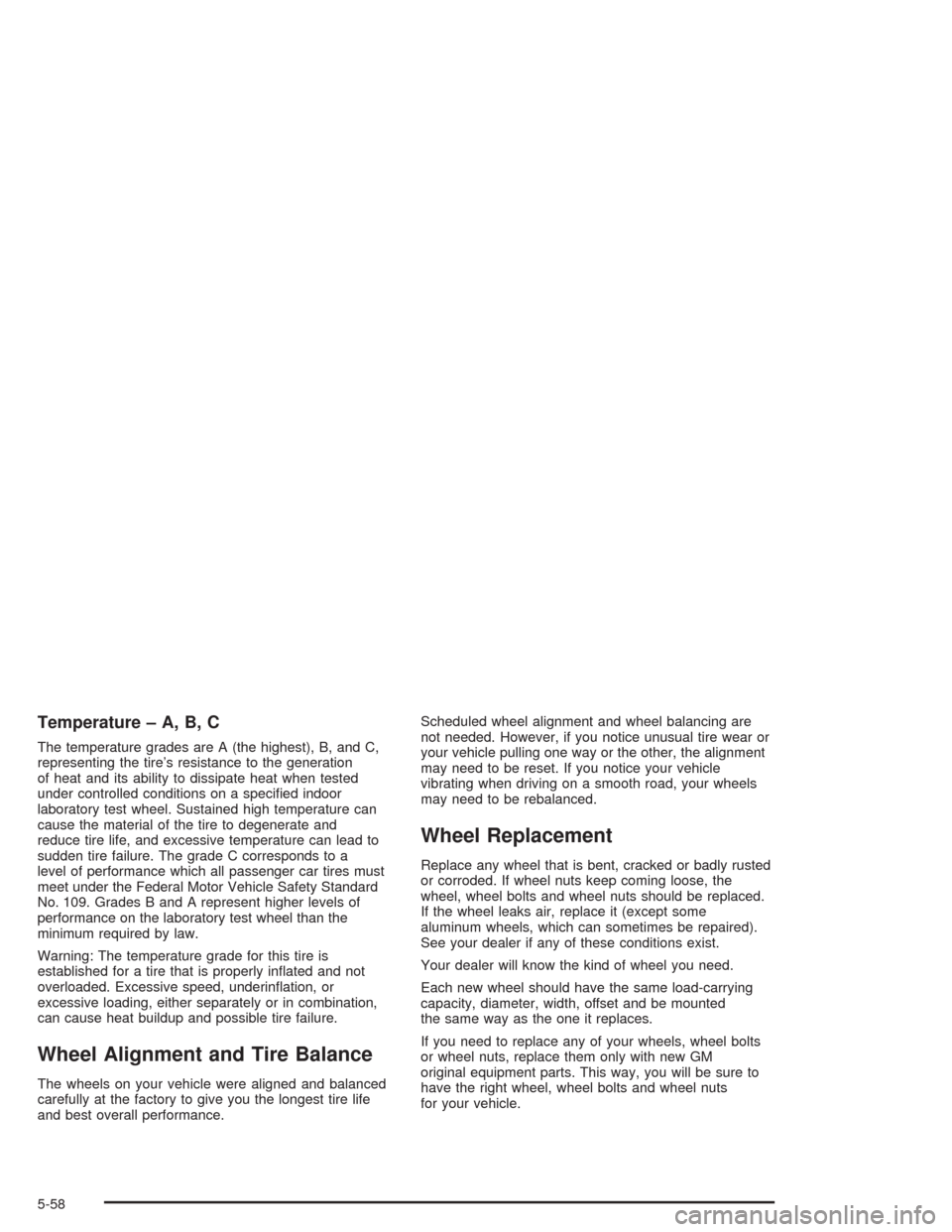
Temperature – A, B, C
The temperature grades are A (the highest), B, and C,
representing the tire’s resistance to the generation
of heat and its ability to dissipate heat when tested
under controlled conditions on a specied indoor
laboratory test wheel. Sustained high temperature can
cause the material of the tire to degenerate and
reduce tire life, and excessive temperature can lead to
sudden tire failure. The grade C corresponds to a
level of performance which all passenger car tires must
meet under the Federal Motor Vehicle Safety Standard
No. 109. Grades B and A represent higher levels of
performance on the laboratory test wheel than the
minimum required by law.
Warning: The temperature grade for this tire is
established for a tire that is properly inated and not
overloaded. Excessive speed, underination, or
excessive loading, either separately or in combination,
can cause heat buildup and possible tire failure.
Wheel Alignment and Tire Balance
The wheels on your vehicle were aligned and balanced
carefully at the factory to give you the longest tire life
and best overall performance.Scheduled wheel alignment and wheel balancing are
not needed. However, if you notice unusual tire wear or
your vehicle pulling one way or the other, the alignment
may need to be reset. If you notice your vehicle
vibrating when driving on a smooth road, your wheels
may need to be rebalanced.
Wheel Replacement
Replace any wheel that is bent, cracked or badly rusted
or corroded. If wheel nuts keep coming loose, the
wheel, wheel bolts and wheel nuts should be replaced.
If the wheel leaks air, replace it (except some
aluminum wheels, which can sometimes be repaired).
See your dealer if any of these conditions exist.
Your dealer will know the kind of wheel you need.
Each new wheel should have the same load-carrying
capacity, diameter, width, offset and be mounted
the same way as the one it replaces.
If you need to replace any of your wheels, wheel bolts
or wheel nuts, replace them only with new GM
original equipment parts. This way, you will be sure to
have the right wheel, wheel bolts and wheel nuts
for your vehicle.
5-58
Page 351 of 354
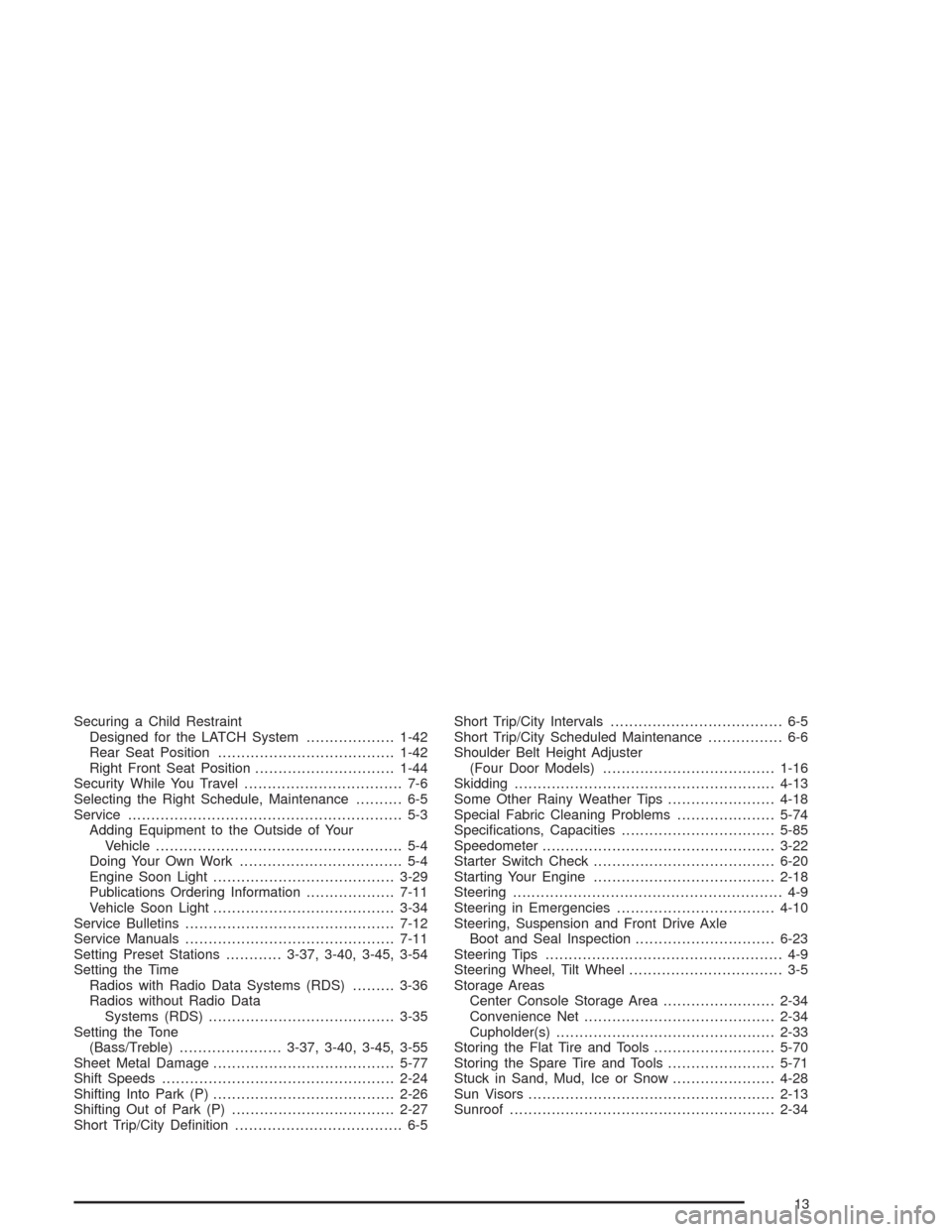
Securing a Child Restraint
Designed for the LATCH System...................1-42
Rear Seat Position......................................1-42
Right Front Seat Position..............................1-44
Security While You Travel.................................. 7-6
Selecting the Right Schedule, Maintenance.......... 6-5
Service........................................................... 5-3
Adding Equipment to the Outside of Your
Vehicle..................................................... 5-4
Doing Your Own Work................................... 5-4
Engine Soon Light.......................................3-29
Publications Ordering Information...................7-11
Vehicle Soon Light.......................................3-34
Service Bulletins.............................................7-12
Service Manuals.............................................7-11
Setting Preset Stations............3-37, 3-40, 3-45, 3-54
Setting the Time
Radios with Radio Data Systems (RDS).........3-36
Radios without Radio Data
Systems (RDS)........................................3-35
Setting the Tone
(Bass/Treble)......................3-37, 3-40, 3-45, 3-55
Sheet Metal Damage.......................................5-77
Shift Speeds..................................................2-24
Shifting Into Park (P).......................................2-26
Shifting Out of Park (P)...................................2-27
Short Trip/City Denition.................................... 6-5Short Trip/City Intervals..................................... 6-5
Short Trip/City Scheduled Maintenance................ 6-6
Shoulder Belt Height Adjuster
(Four Door Models).....................................1-16
Skidding........................................................4-13
Some Other Rainy Weather Tips.......................4-18
Special Fabric Cleaning Problems.....................5-74
Specications, Capacities.................................5-85
Speedometer..................................................3-22
Starter Switch Check.......................................6-20
Starting Your Engine.......................................2-18
Steering.......................................................... 4-9
Steering in Emergencies..................................4-10
Steering, Suspension and Front Drive Axle
Boot and Seal Inspection..............................6-23
Steering Tips................................................... 4-9
Steering Wheel, Tilt Wheel................................. 3-5
Storage Areas
Center Console Storage Area........................2-34
Convenience Net.........................................2-34
Cupholder(s)...............................................2-33
Storing the Flat Tire and Tools..........................5-70
Storing the Spare Tire and Tools.......................5-71
Stuck in Sand, Mud, Ice or Snow......................4-28
Sun Visors.....................................................2-13
Sunroof.........................................................2-34
13