radio CHEVROLET CITY EXPRESS 2015 User Guide
[x] Cancel search | Manufacturer: CHEVROLET, Model Year: 2015, Model line: CITY EXPRESS, Model: CHEVROLET CITY EXPRESS 2015Pages: 297, PDF Size: 3.5 MB
Page 108 of 297
Black plate (21,1)Chevrolet City Express Owner Manual (GMNA-Localizing-U.S./Canada-
7707496) - 2015 - CRC - 11/26/14
Instruments and Controls 5-21Trip A or Trip B See Trip Odometer on page 5-8 .
Instant Fuel Economy This display shows the approximate
fuel economy at any given moment.
Average Fuel Economy This display shows the approximate
average fuel economy since the last
time it was reset.
Distance to Empty This display shows an estimated
distance that the vehicle can be
driven before refueling.
When the fuel level is low, the
display will automatically show the
distance to empty display and the
numbers will flash. When the fuel
level is even lower, ( – – – – ) is
displayed.
Outside Temperature (If
Equipped)
On some vehicles, the outside
temperature can be displayed. Vehicle
Personalization Vehicle Personalization
(Radio with
Touchscreen Only) Use the audio system controls to
access the personalization menus
for customizing vehicle features.
The following are all possible
personalization features. Depending
on the vehicle, some may not be
available.
Infotainment System Audio
Controls
Using the Faceplate
BACK .
Press to exit a menu. .
Press to return to a previous
screen. Using the Touch Screen
Press a screen feature to: .
View more feature options. .
Enable or disable the feature.
Q : Press to scroll up.
R : Press to scroll down.
To access the
personalization menu:
1. Press INFO on the faceplate,
then select
8 Settings on the
Home page.
2. Select the desired feature to
display a list of available
options.
3. Select the desired feature
setting.
Personalization Menus
The following list of menu items may
be available: .
e Audio .
I System
Page 109 of 297
Black plate (22,1)Chevrolet City Express Owner Manual (GMNA-Localizing-U.S./Canada-
7707496) - 2015 - CRC - 11/26/14
5-22 Instruments and Controls .
n Navigation .
H Traffic.
G Phone & Bluetooth .
J SXM
Each menu is detailed in the
following information.
e Audio
See “ Audio Settings ” in “ AM-FM
Radio ” in the infotainment manual.
I System
Select and the following may
display: .
Display .
Clock Settings .
Language .
Camera Settings .
Temperature Unit .
Touchscreen Click .
System Beeps .
Return to Factory Settings/Clear
Memory .
Software Licenses
Display
Select and the following may
display: .
Brightness .
Display Mode .
Scroll Direction
Brightness
This feature adjusts the brightness
of the display.
Select Very Bright, Bright, Default,
Dark, or Very Dark.
Display Mode
This feature adjusts the display to
make it easier to see due to the
lighting in the vehicle.
Select Automatic, Day, or Night. Scroll Direction
This feature changes what direction
the menus scroll on the screen.
Select Up or Down.
Clock Settings
See Clock on page 5-3 .
Language
Select Language, then select from
the available language(s).
Camera Settings
Select and the following may
display: .
Display Mode .
Brightness .
Contrast .
Color
Display Mode
This feature changes the display
mode of the rear view camera..
Select Automatic, Day, or Night.
Page 110 of 297
Black plate (23,1)Chevrolet City Express Owner Manual (GMNA-Localizing-U.S./Canada-
7707496) - 2015 - CRC - 11/26/14
Instruments and Controls 5-23Brightness
This feature adjusts the brightness
of the display.
Select − or + to change the setting.
Contrast
This feature adjusts the contrast of
the display.
Select − or + to change the setting.
Color
This feature adjusts the color of the
display.
Select − or + to change the setting.
Temperature Unit
Select to change the temperature
unit reading between celsius and
fahrenheit. Touchscreen Click
When on, a click sound will be
heard when a key on the screen is
touched.
Select ON or OFF.
System Beeps
When on, a beep sound will be
heard when a pop-up message
appears on the screen or a
faceplate button is pressed and held
for two seconds.
Select ON or OFF.
Return to Factory Settings/Clear
Memory
Select to return all settings to
default and to clear the memory.
Select Yes or No. Software Licenses
Select to view software license
information.
n Navigation
See “ Navigation ” in the infotainment
manual.
H Traffic
See “
H Traffic ” in the
infotainment manual.
G Phone & Bluetooth
See “ Bluetooth ” in the infotainment
manual.
J SXM
See “ SXM Settings ” in “ AM-FM
Radio ” in the infotainment manual.
Page 118 of 297
Black plate (1,1)Chevrolet City Express Owner Manual (GMNA-Localizing-U.S./Canada-
7707496) - 2015 - CRC - 11/26/14
Infotainment System 7-1
Infotainment
System Introduction Infotainment . . . . . . . . . . . . . . . . . . . 7-1
Theft-Deterrent Feature . . . . . . . 7-2
Overview . . . . . . . . . . . . . . . . . . . . . . 7-2
Operation . . . . . . . . . . . . . . . . . . . . . 7-4
Radio AM-FM Radio . . . . . . . . . . . . . . . . . 7-5
Radio Reception . . . . . . . . . . . . . . 7-6
Fixed Mast Antenna . . . . . . . . . . . 7-6
Audio Players CD Player . . . . . . . . . . . . . . . . . . . . . 7-7
Auxiliary Jack . . . . . . . . . . . . . . . . . 7-9
Phone Bluetooth . . . . . . . . . . . . . . . . . . . . 7-10
Trademarks and License
Agreements
Trademarks and License
Agreements . . . . . . . . . . . . . . . . 7-19 Introduction Infotainment Base radio information is included in
this manual. See the infotainment
manual for information on other
available infotainment systems.
Read the following pages to
become familiar with these features.
{ WarningTaking your eyes off the road for
too long or too often while using
any infotainment feature can
cause a crash. You or others
could be injured or killed. Do not
give extended attention to
infotainment tasks while driving.
Limit your glances at the vehicle
displays and focus your attention
on driving. Use voice commands
whenever possible. The infotainment system has built-in
features intended to help avoid
distraction by disabling some
functions when driving. These
functions may gray out when they
are unavailable. Many infotainment
features are also available through
the instrument cluster and steering
wheel controls.
Before driving: .
Become familiar with the
operation, faceplate buttons, and
screen buttons. .
Set up the audio by presetting
favorite stations, setting the
tone, and adjusting the
speakers. .
Set up phone numbers in
advance so they can be called
easily by pressing a single
button or by using a single voice
command if equipped with
Bluetooth phone capability.
See Defensive Driving on page 9-2 .
Page 119 of 297
Black plate (2,1)Chevrolet City Express Owner Manual (GMNA-Localizing-U.S./Canada-
7707496) - 2015 - CRC - 11/26/14
7-2 Infotainment System
Theft-Deterrent Feature The theft-deterrent feature works by
learning a portion of the Vehicle
Identification Number (VIN) to the
infotainment system. The
infotainment system does not
operate if it is stolen or moved to a
different vehicle.
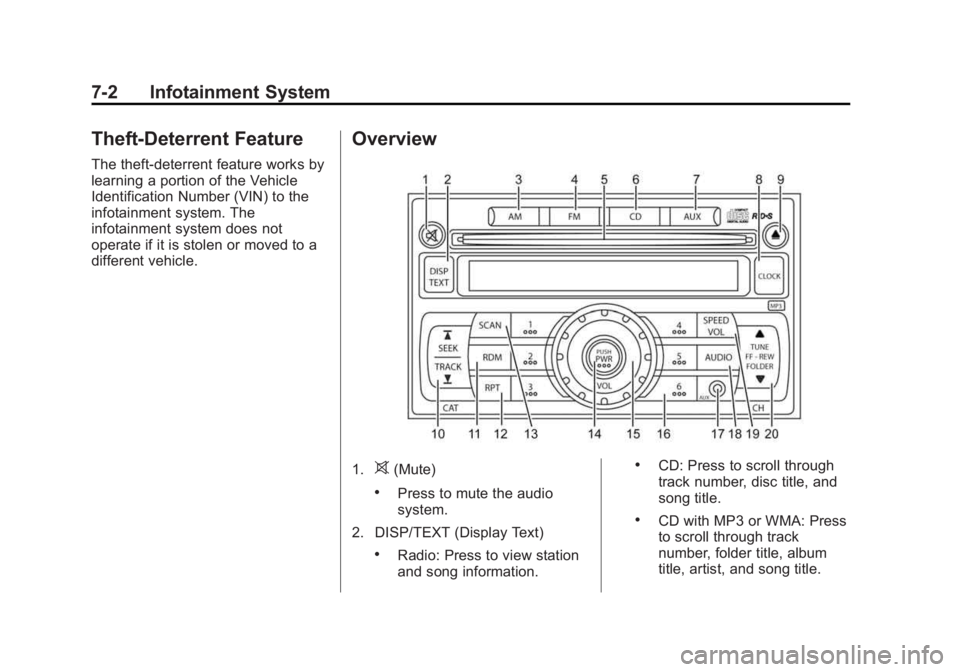
Overview
1.
> (Mute) .
Press to mute the audio
system.
2. DISP/TEXT (Display Text) .
Radio: Press to view station
and song information. .
CD: Press to scroll through
track number, disc title, and
song title. .
CD with MP3 or WMA: Press
to scroll through track
number, folder title, album
title, artist, and song title.
Page 120 of 297
Black plate (3,1)Chevrolet City Express Owner Manual (GMNA-Localizing-U.S./Canada-
7707496) - 2015 - CRC - 11/26/14
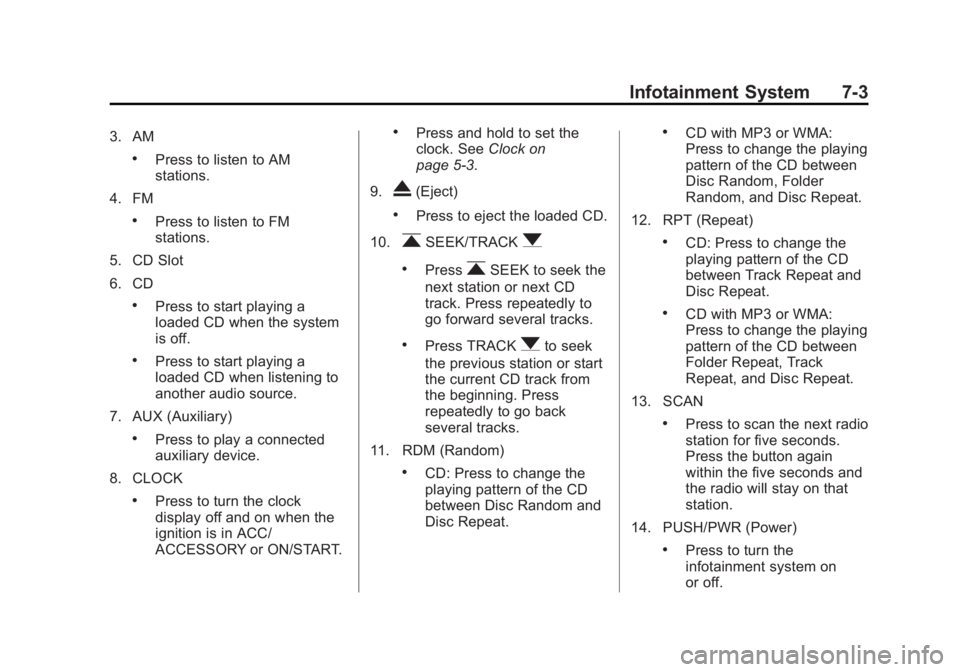
Infotainment System 7-33. AM .
Press to listen to AM
stations.
4. FM .
Press to listen to FM
stations.
5. CD Slot
6. CD .
Press to start playing a
loaded CD when the system
is off. .
Press to start playing a
loaded CD when listening to
another audio source.
7. AUX (Auxiliary) .
Press to play a connected
auxiliary device.
8. CLOCK .
Press to turn the clock
display off and on when the
ignition is in ACC/
ACCESSORY or ON/START. .
Press and hold to set the
clock. See Clock on
page 5-3 .
9.
X (Eject) .
Press to eject the loaded CD.
10.
r SEEK/TRACK
q .
Press
r SEEK to seek the
next station or next CD
track. Press repeatedly to
go forward several tracks. .
Press TRACK
q to seek
the previous station or start
the current CD track from
the beginning. Press
repeatedly to go back
several tracks.
11. RDM (Random) .
CD: Press to change the
playing pattern of the CD
between Disc Random and
Disc Repeat. .
CD with MP3 or WMA:
Press to change the playing
pattern of the CD between
Disc Random, Folder
Random, and Disc Repeat.
12. RPT (Repeat) .
CD: Press to change the
playing pattern of the CD
between Track Repeat and
Disc Repeat. .
CD with MP3 or WMA:
Press to change the playing
pattern of the CD between
Folder Repeat, Track
Repeat, and Disc Repeat.
13. SCAN .
Press to scan the next radio
station for five seconds.
Press the button again
within the five seconds and
the radio will stay on that
station.
14. PUSH/PWR (Power) .
Press to turn the
infotainment system on
or off.
Page 121 of 297
Black plate (4,1)Chevrolet City Express Owner Manual (GMNA-Localizing-U.S./Canada-
7707496) - 2015 - CRC - 11/26/14
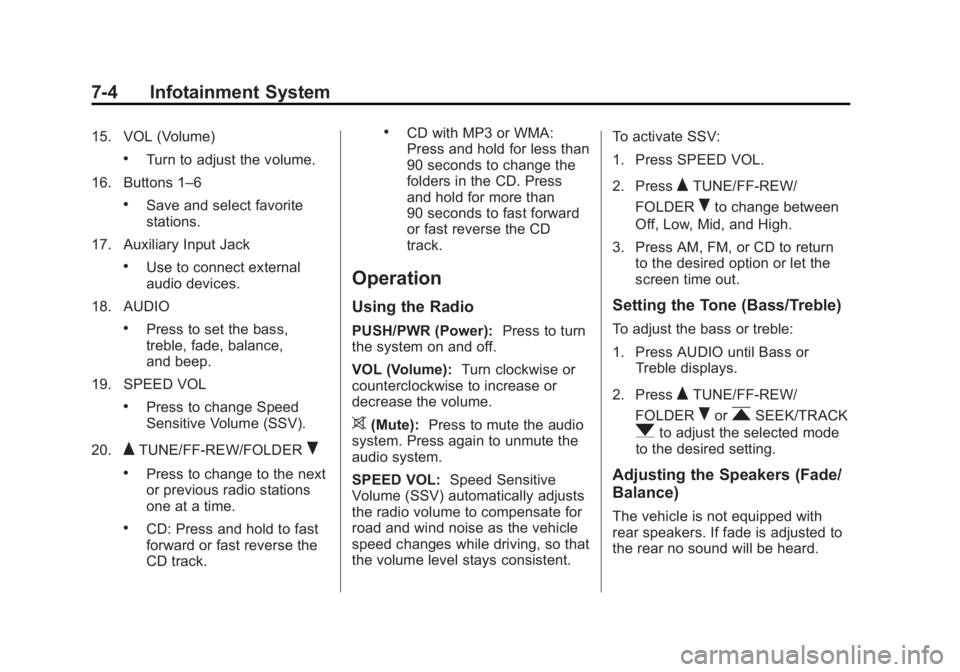
7-4 Infotainment System 15. VOL (Volume) .
Turn to adjust the volume.
16. Buttons 1 – 6.
Save and select favorite
stations.
17. Auxiliary Input Jack .
Use to connect external
audio devices.
18. AUDIO .
Press to set the bass,
treble, fade, balance,
and beep.
19. SPEED VOL .
Press to change Speed
Sensitive Volume (SSV).
20.
Q TUNE/FF-REW/FOLDER
R.
Press to change to the next
or previous radio stations
one at a time. .
CD: Press and hold to fast
forward or fast reverse the
CD track. .
CD with MP3 or WMA:
Press and hold for less than
90 seconds to change the
folders in the CD. Press
and hold for more than
90 seconds to fast forward
or fast reverse the CD
track.
Operation Using the Radio PUSH/PWR (Power): Press to turn
the system on and off.
VOL (Volume): Turn clockwise or
counterclockwise to increase or
decrease the volume.
> (Mute): Press to mute the audio
system. Press again to unmute the
audio system.
SPEED VOL: Speed Sensitive
Volume (SSV) automatically adjusts
the radio volume to compensate for
road and wind noise as the vehicle
speed changes while driving, so that
the volume level stays consistent. To activate SSV:
1. Press SPEED VOL.
2. Press
Q TUNE/FF-REW/
FOLDER
R to change between
Off, Low, Mid, and High.
3. Press AM, FM, or CD to return
to the desired option or let the
screen time out.
Setting the Tone (Bass/Treble) To adjust the bass or treble:
1. Press AUDIO until Bass or
Treble displays.
2. Press
Q TUNE/FF-REW/
FOLDER
R or
r SEEK/TRACK
q to adjust the selected mode
to the desired setting.
Adjusting the Speakers (Fade/
Balance)
The vehicle is not equipped with
rear speakers. If fade is adjusted to
the rear no sound will be heard.
Page 122 of 297
Black plate (5,1)Chevrolet City Express Owner Manual (GMNA-Localizing-U.S./Canada-
7707496) - 2015 - CRC - 11/26/14
Infotainment System 7-5To adjust the fade or balance:
1. Press AUDIO until Fade or
Balance displays.
2. Press
Q TUNE/FF-REW/
FOLDER
R or
r SEEK/TRACK
q to adjust the selected mode
to the desired setting.
Menu Selection Sound (Beep) To turn the menu selection sound on
or off:
1. Press AUDIO until Beep ON/
OFF displays.
2. Press
Q TUNE/FF-REW/
FOLDER
R or
r SEEK/TRACK
q to select ON or OFF. Radio AM-FM Radio Finding a Station AM: Press to change to AM
stations.
FM: Press to change to FM
stations and press to change
between FM1 and FM2. The FM
stereo indicator (ST) illuminates
during FM stereo reception. When
the stereo broadcast signal is weak,
the radio automatically changes
from stereo to monaural reception.
r SEEK/TRACK
q : Press
rSEEK to fast seek or scan the next
station.
Press TRACK
q to fast seek or
scan the previous station.
Q TUNE/FF-REW/FOLDER
R :
Press to change to the next or
previous radio stations one at
a time. SCAN: Press to scan the next
radio station for five seconds. Press
the button again within the
five seconds and the radio will stay
on that station.
Storing a Favorite Station Set up radio station favorites while
the vehicle is parked.
Up to 18 stations (six FM1, six FM2,
and six AM), can be programmed on
the six numbered buttons.
To store a station as a favorite:
1. Select the desired radio band
AM, FM1, or FM2.
2. Tune to the desired radio station.
3. Press and hold one of the
six keys until a beep sounds.
When that key is pressed and
released, the station that was
set returns.
4. Repeat the steps for each radio
station to be stored as a favorite.
Page 123 of 297
Black plate (6,1)Chevrolet City Express Owner Manual (GMNA-Localizing-U.S./Canada-
7707496) - 2015 - CRC - 11/26/14
7-6 Infotainment System
Radio Reception Frequency interference and static
can occur during normal radio
reception if items such as cell phone
chargers, vehicle convenience
accessories, and external electronic
devices are plugged into the
accessory power outlet. If there is
interference or static, unplug the
item from the accessory power
outlet.
AM The range for most AM stations is
greater than for FM, especially at
night. The longer range can cause
station frequencies to interfere with
each other. For better radio
reception, most AM radio stations
boost the power levels during the
day, and then reduce these levels
during the night. Static can also
occur when things like storms and power lines interfere with radio
reception. When this happens, try
reducing the treble on the radio.
FM Stereo FM stereo gives the best sound, but
FM signals reach only about 16 to
65 km (10 to 40 mi). Tall buildings or
hills can interfere with FM signals,
causing the sound to fade in
and out.
Cellular Phone Usage Cellular phone usage may cause
interference with the radio. This
interference may occur when
making or receiving phone calls,
charging the phone's battery,
or simply having the phone on. This
interference causes an increased
level of static while listening to the
radio. If static is received while
listening to the radio, unplug the
cellular phone and turn it off. Fixed Mast Antenna The multi-band antenna is on the
roof of the vehicle. The antenna is
used for AM, FM, and navigation
System, if equipped. Tall buildings,
hills, trees, heavy foliage, tunnels,
bridges, and garages will affect
reception. Keep the antenna clear of
obstructions for clear reception.
Make sure there is sufficient
clearance when entering garages or
parking structures.
Page 125 of 297
Black plate (8,1)Chevrolet City Express Owner Manual (GMNA-Localizing-U.S./Canada-
7707496) - 2015 - CRC - 11/26/14
7-8 Infotainment System Ejecting a CD
X : Press and release to eject the
disc. Remove the CD when Remove
Disc displays. If the disc is not
removed, after several seconds the
disc is automatically pulled back into
the player, but doesn ’ t start to play.
Playing a CD If the ignition or radio is turned off
with a CD in the player, it stays in
the player. When the ignition or
radio is turned on, the CD starts
playing where it stopped, if it was
the last selected audio source.
CD: Press to start a loaded CD.
DISP/TEXT (Display Text): Press
to display additional information
related to the CD. If information is
available, the track number, disc
title, folder title, album title, artist,
and song title information will
display on the screen with each
press of the button. r SEEK/TRACK
q : Press
rSEEK to seek the next CD track.
Press repeatedly to go forward
several tracks.
Press TRACK
q to start the
current CD track from the beginning.
Press repeatedly to go back several
tracks.
RDM (Random): CD: Press to
change the playing pattern of the
CD between Disc Random and Disc
Repeat.
CD with MP3 or WMA: Press to
change the playing pattern of the
CD between Disc Random, Folder
Random, and Disc Repeat.
RPT (Repeat): CD: Press to
change the playing pattern of the
CD between Track Repeat and Disc
Repeat.
CD with MP3 or WMA: Press to
change the playing pattern of the
CD between Folder Repeat, Track
Repeat, and Disc Repeat. MP3-Supported Files Radios with CD/MP3 have the
capability of playing CD, CD-R,
or CD-RW disc.
Format
Radios that have the capability of
playing MP3s can play .mp3 or .wma
files that were recorded onto a
CD-R or CD-RW disc. The files can
be recorded with the following fixed
bit rates: 8 kbps, 48 kbps,192 kbps,
and 320 kbps or a variable bit rate.
Compressed Audio or Mixed Mode
Discs
The radio can play discs that
contain both uncompressed CD
audio and MP3 files. If both formats
are on the disc, the radio reads all
MP3 files first, then the
uncompressed CD audio files.