display CHEVROLET CITY EXPRESS 2018 Owner's Guide
[x] Cancel search | Manufacturer: CHEVROLET, Model Year: 2018, Model line: CITY EXPRESS, Model: CHEVROLET CITY EXPRESS 2018Pages: 287, PDF Size: 4.19 MB
Page 160 of 287
Chevrolet City Express Owner Manual (GMNA-Localizing-U.S./Canada-
11683523) - 2018 - CRC - 7/10/17
Driving and Operating 159
.Control brake pressure at
individual wheels and engine
output to help the driver maintain
control of the vehicle in the
following conditions:
‐Understeer (vehicle tends to
not follow the steered path
despite increased steering
input)
‐ Oversteer (vehicle tends to
spin due to certain road or
driving conditions)
TCS and Electronic Stability Control
can help the driver to maintain
control of the vehicle, but cannot
prevent loss of vehicle control in all
driving situations.
When the TCS and Electronic
Stability Control systems operate,
the
dindicator in the instrument
cluster flashes to note the following:
. The road may be slippery or the
system may determine some
action is required to help keep
the vehicle on the steered path. .
You may feel a pulsation in the
brake pedal and hear a noise or
vibration from under the hood.
This is normal and indicates that
the traction control system is
working properly.
. Adjust your speed and driving to
the road conditions.
See Traction Control System (TCS)/
Electronic Stability Control Light
0 95 and Electronic Stability Control
(ESC) Off Light 096.
If a malfunction occurs in the
systems, the
dindicator comes on
in the instrument cluster. The TCS
and Electronic Stability Control
systems automatically turn off when
the indicator light is on.
Turning the Systems Off
and On
The TCS/Electronic Stability Control
button is on the instrument panel, to
the left of the steering wheel.
Caution
Do not repeatedly brake or
accelerate heavily when TCS is
off. The vehicle driveline could be
damaged.
To turn off TCS and Electronic
Stability Control, press and
release
g. The Electronic Stability
Control (ESC) Off Light
gcomes on
and stays on in the instrument
cluster.
To turn TCS and Electronic
Stability Control on again, press and
release
g. The Electronic Stability
Control (ESC) Off Light
gdisplayed
in the instrument cluster will turn off.
When
gis used to turn off the
systems, the TCS system still
operates to prevent one drive wheel
from slipping by transferring power
to a non–slipping drive wheel. The
Page 164 of 287
Chevrolet City Express Owner Manual (GMNA-Localizing-U.S./Canada-
11683523) - 2018 - CRC - 7/10/17
Driving and Operating 163
Reducing Speed While Using
Cruise Control
If the cruise control system is
already activated:
.Press and hold COAST/SET
until the desired lower speed is
reached, then release it.
. To decrease the vehicle speed in
small increments, briefly press
COAST/SET. For each press,
the vehicle goes about 1.6 km/h
(1 mph) slower.
Passing Another Vehicle While
Using Cruise Control
Use the accelerator pedal to
increase the vehicle speed. When
you take your foot off the pedal, the
vehicle will slow down to the
previous set cruise speed. While
pressing the accelerator pedal or
shortly following the release to
override cruise control, briefly
pressing COAST/SET will result in
cruise set to the current vehicle
speed. Ending Cruise Control
There are four ways to end cruise
control:
.
Step lightly on the brake pedal.
. Press CANCEL.
. Shift the transmission to
N (Neutral).
. To turn off cruise control, press
CRUISE ON/OFF.
Erasing Speed Memory
The cruise control set speed is
erased from memory if CRUISE ON/
OFF is pressed or if the vehicle is
turned off.Driver Assistance
Systems
Rear Vision
Camera (RVC)
If equipped, when the shift lever is
shifted into R (Reverse), the display
shows the view to the rear of the
vehicle.
{Warning
. Failure to follow the
warnings and instructions
for proper use of the Rear
Vision Camera (RVC) could
result in serious injury or
death.
. The RVC is a convenience
but it is not a substitute for
proper backing. Always turn
and look out the windows,
and check mirrors to be
sure that it is safe to move
before operating the vehicle.
Always back up slowly.
(Continued)
Page 165 of 287
Chevrolet City Express Owner Manual (GMNA-Localizing-U.S./Canada-
11683523) - 2018 - CRC - 7/10/17
164 Driving and Operating
Warning (Continued)
.The system is designed as
an aid to the driver in
showing large stationary
objects directly behind the
vehicle, to help avoid
damaging the vehicle.
. The system cannot
completely eliminate blind
spots and may not show
every object.
. Underneath the bumper and
the corner areas of the
bumper cannot be viewed
on the RVC display because
of its monitoring range
limitation. The system will
not show small objects
below the bumper, and may
not show objects close to
the bumper or on the
ground.
(Continued)
Warning (Continued)
.Objects viewed on the RVC
display differ from actual
distance because a
wide-angle lens is used.
. Objects on the RVC display
will appear visually opposite
than when viewed in the
rearview and outside
mirrors.
. Make sure that the back
doors are securely closed
when backing up.
. Do no put anything on the
rearview camera. The
rearview camera is installed
on the back door.
. When washing the vehicle
with high pressure water, be
sure not to spray it around
the camera. Otherwise,
water may enter the camera
unit causing water
(Continued)
Warning (Continued)
condensation on the lens, a
malfunction, fire, or an
electric shock.
. Do not strike the camera.
It is a precision instrument.
Otherwise, it may
malfunction or cause
damage resulting in a fire or
an electric shock.
Caution
There is a plastic cover over the
camera. Do not scratch the cover
when cleaning dirt or snow from
the cover.
Page 166 of 287
Chevrolet City Express Owner Manual (GMNA-Localizing-U.S./Canada-
11683523) - 2018 - CRC - 7/10/17
Driving and Operating 165
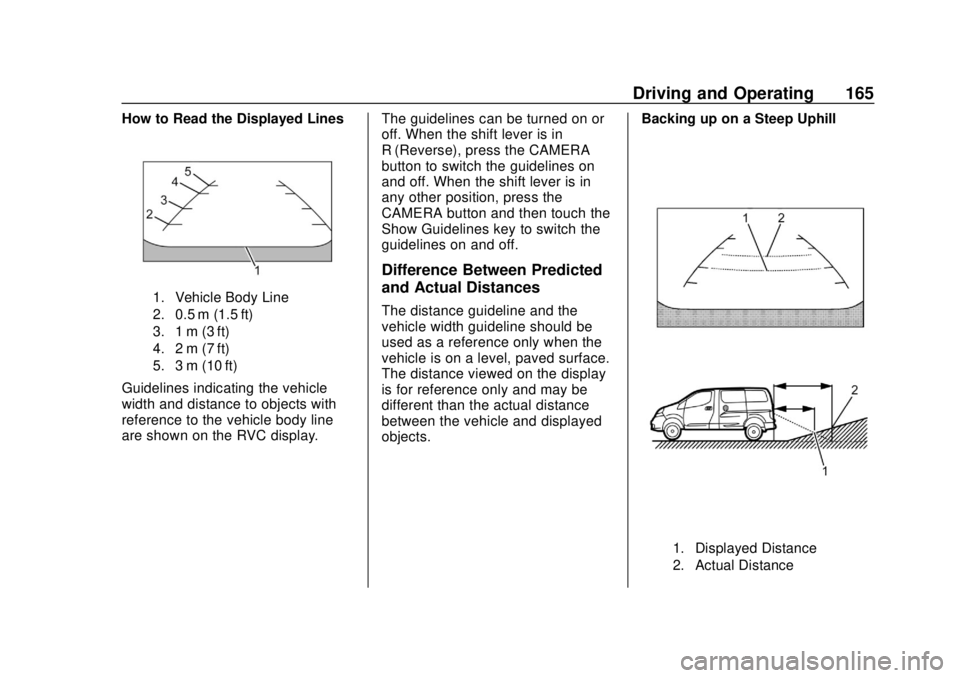
How to Read the Displayed Lines
1. Vehicle Body Line
2. 0.5 m (1.5 ft)
3. 1 m (3 ft)
4. 2 m (7 ft)
5. 3 m (10 ft)
Guidelines indicating the vehicle
width and distance to objects with
reference to the vehicle body line
are shown on the RVC display.The guidelines can be turned on or
off. When the shift lever is in
R (Reverse), press the CAMERA
button to switch the guidelines on
and off. When the shift lever is in
any other position, press the
CAMERA button and then touch the
Show Guidelines key to switch the
guidelines on and off.
Difference Between Predicted
and Actual Distances
The distance guideline and the
vehicle width guideline should be
used as a reference only when the
vehicle is on a level, paved surface.
The distance viewed on the display
is for reference only and may be
different than the actual distance
between the vehicle and displayed
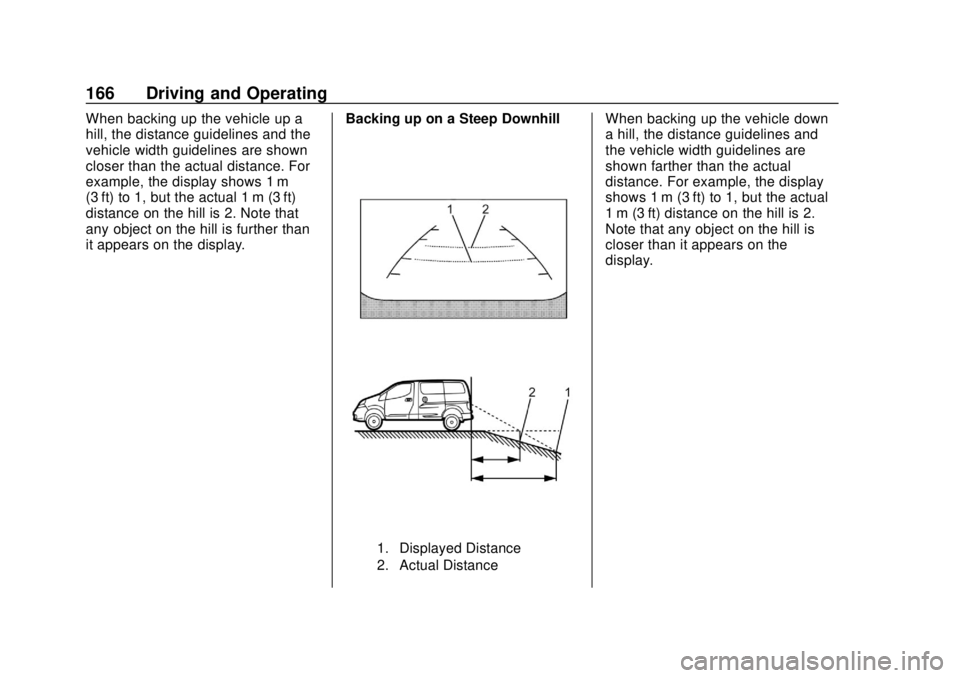
objects.Backing up on a Steep Uphill
1. Displayed Distance
2. Actual Distance
Page 167 of 287
Chevrolet City Express Owner Manual (GMNA-Localizing-U.S./Canada-
11683523) - 2018 - CRC - 7/10/17
166 Driving and Operating
When backing up the vehicle up a
hill, the distance guidelines and the
vehicle width guidelines are shown
closer than the actual distance. For
example, the display shows 1 m
(3 ft) to 1, but the actual 1 m (3 ft)
distance on the hill is 2. Note that
any object on the hill is further than
it appears on the display.Backing up on a Steep Downhill
1. Displayed Distance
2. Actual Distance
When backing up the vehicle down
a hill, the distance guidelines and
the vehicle width guidelines are
shown farther than the actual
distance. For example, the display
shows 1 m (3 ft) to 1, but the actual
1 m (3 ft) distance on the hill is 2.
Note that any object on the hill is
closer than it appears on the
display.
Page 168 of 287
Chevrolet City Express Owner Manual (GMNA-Localizing-U.S./Canada-
11683523) - 2018 - CRC - 7/10/17
Driving and Operating 167
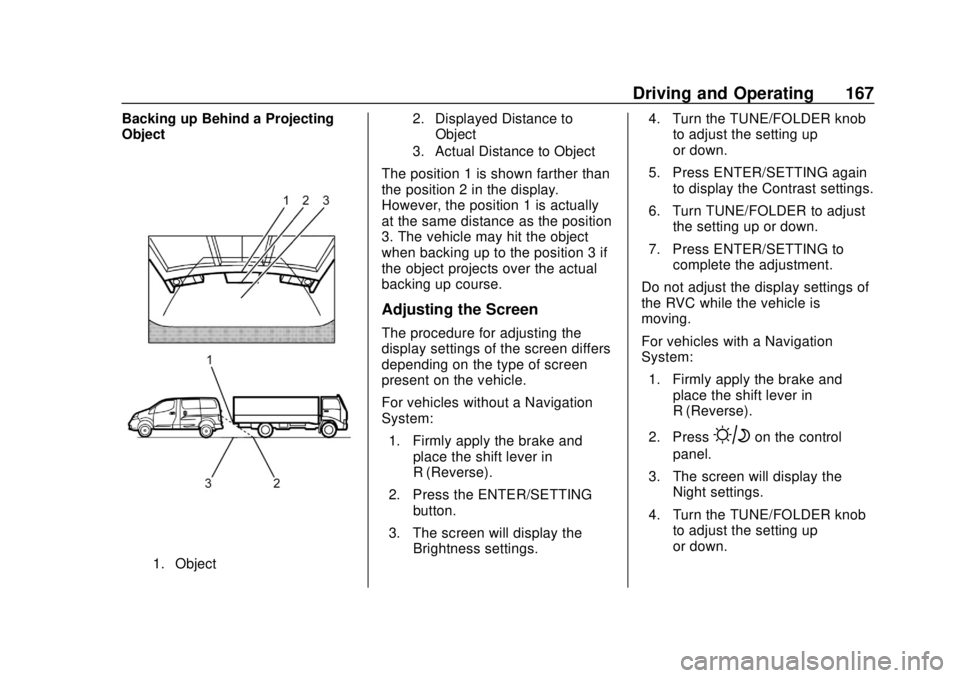
Backing up Behind a Projecting
Object
1. Object2. Displayed Distance to
Object
3. Actual Distance to Object
The position 1 is shown farther than
the position 2 in the display.
However, the position 1 is actually
at the same distance as the position
3. The vehicle may hit the object
when backing up to the position 3 if
the object projects over the actual
backing up course.
Adjusting the Screen
The procedure for adjusting the
display settings of the screen differs
depending on the type of screen
present on the vehicle.
For vehicles without a Navigation
System:
1. Firmly apply the brake and place the shift lever in
R (Reverse).
2. Press the ENTER/SETTING button.
3. The screen will display the Brightness settings. 4. Turn the TUNE/FOLDER knob
to adjust the setting up
or down.
5. Press ENTER/SETTING again to display the Contrast settings.
6. Turn TUNE/FOLDER to adjust the setting up or down.
7. Press ENTER/SETTING to complete the adjustment.
Do not adjust the display settings of
the RVC while the vehicle is
moving.
For vehicles with a Navigation
System: 1. Firmly apply the brake and place the shift lever in
R (Reverse).
2. Press
Bon the control
panel.
3. The screen will display the Night settings.
4. Turn the TUNE/FOLDER knob to adjust the setting up
or down.
Page 169 of 287
Chevrolet City Express Owner Manual (GMNA-Localizing-U.S./Canada-
11683523) - 2018 - CRC - 7/10/17
168 Driving and Operating
5. PressBagain to access
the Auto settings.
6. Turn TUNE/FOLDER to adjust the setting up or down.
Do not adjust the display settings of
the RVC while the vehicle is
moving.
Operating Tips
Caution
.Do not use alcohol, benzine
or thinner to clean the
camera. This will cause
discoloration. To clean the
camera, wipe with a cloth
dampened with a diluted
mild cleaning agent and
then wipe with a dry cloth.
. Do not damage the camera
as the monitor screen may
be adversely affected. .
When the shift lever is shifted to
R (Reverse), the screen
automatically changes to the
RVC mode. However, the radio
can be heard.
. It may take some time until the
RVC is displayed after the shift
lever has been shifted to
R (Reverse). Objects may be
distorted momentarily until the
RVC screen is displayed
completely. When the shift lever
is returned to a position other
than R (Reverse), it may take
some time until the screen
changes. Objects on the screen
may be distorted until they are
completely displayed.
. When the temperature is
extremely high or low, the
screen may not clearly display
objects. This is not a
malfunction.
. When strong light directly enters
the camera, objects may not be
displayed clearly. .
Vertical lines may be seen in
objects on the screen. This is
due to strong reflected light from
the bumper. This is not a
malfunction.
. The screen may flicker under
fluorescent light. This is not a
malfunction.
. The colors of objects on the
display may differ somewhat
from those of the actual object.
. When the contrast of objects is
low at night, pressing the
SETTING button or MENU
button may not change the
brightness.
. Objects on the display may not
be clear in a dark place or at
night.
. If dirt, rain or snow attaches to
the camera, the RVC may not
display objects. Clean the
camera.
. Do not use body wax on the
camera window. If body wax
does get on the camera window,
Page 174 of 287
Chevrolet City Express Owner Manual (GMNA-Localizing-U.S./Canada-
11683523) - 2018 - CRC - 7/10/17
Driving and Operating 173
Warning (Continued)
.Vehicle performance issues,
including engine stalling and
damage to the fuel system.
. Fuel spills.
. Potential fuel fires.
Be careful not to spill fuel. Wait a
few seconds after you have finished
pumping before removing the
nozzle. Clean fuel from painted
surfaces as soon as possible. See
Exterior Care 0233.
When replacing the fuel cap, turn it
clockwise until it clicks. Make sure
the cap is fully installed.
{Warning
If a fire starts while you are
refueling, do not remove the
nozzle. Shut off the flow of fuel by
shutting off the pump or by
notifying the station attendant.
Leave the area immediately.
Caution
If a new fuel cap is needed, be
sure to get the right type of cap
from your dealer. The wrong type
of fuel cap may not fit properly,
may cause the malfunction
indicator lamp to light, and could
damage the fuel tank and
emissions system. See
Malfunction Indicator Lamp
(Check Engine Light) 091.
LOOSE FUEL CAP Warning
Message
The LOOSE FUEL CAP message
displays in the odometer when the
fuel cap is not tightened correctly
after the vehicle has been refueled.
See Fuel System Messages 099.
Failure to tighten the fuel cap
properly after the LOOSE FUEL
CAP warning message is displayed
may cause the malfunction indicator
light to turn on. See Malfunction
Indicator Lamp (Check Engine
Light) 091.
Filling a Portable Fuel
Container
{Warning
Filling a portable fuel container
while it is in the vehicle can cause
fuel vapors that can ignite either
by static electricity or other
means. You or others could be
badly burned and the vehicle
could be damaged. Always:
. Use approved fuel
containers.
. Remove the container from
the vehicle, trunk, or pickup
bed before filling.
. Place the container on the
ground.
. Place the nozzle inside the
fill opening of the container
before dispensing fuel, and
keep it in contact with the fill
opening until filling is
complete.
(Continued)
Page 183 of 287
Chevrolet City Express Owner Manual (GMNA-Localizing-U.S./Canada-
11683523) - 2018 - CRC - 7/10/17
182 Vehicle Care
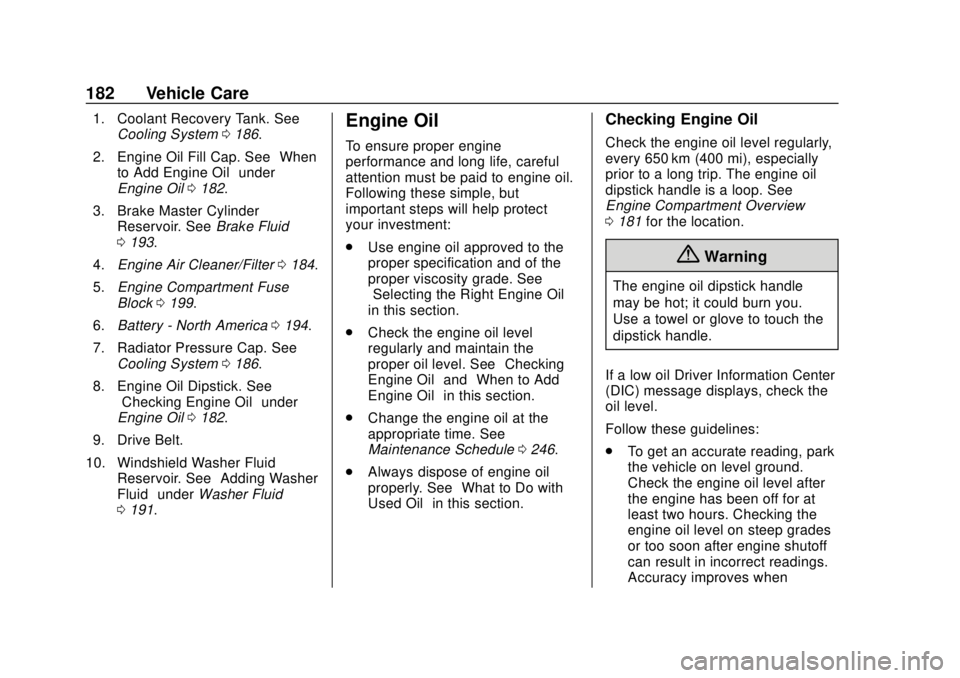
1. Coolant Recovery Tank. SeeCooling System 0186.
2. Engine Oil Fill Cap. See “When
to Add Engine Oil” under
Engine Oil 0182.
3. Brake Master Cylinder Reservoir. See Brake Fluid
0 193.
4. Engine Air Cleaner/Filter 0184.
5. Engine Compartment Fuse
Block 0199.
6. Battery - North America 0194.
7. Radiator Pressure Cap. See Cooling System 0186.
8. Engine Oil Dipstick. See “Checking Engine Oil” under
Engine Oil 0182.
9. Drive Belt.
10. Windshield Washer Fluid Reservoir. See “Adding Washer
Fluid” under Washer Fluid
0 191.Engine Oil
To ensure proper engine
performance and long life, careful
attention must be paid to engine oil.
Following these simple, but
important steps will help protect
your investment:
.
Use engine oil approved to the
proper specification and of the
proper viscosity grade. See
“Selecting the Right Engine Oil”
in this section.
. Check the engine oil level
regularly and maintain the
proper oil level. See “Checking
Engine Oil” and“When to Add
Engine Oil” in this section.
. Change the engine oil at the
appropriate time. See
Maintenance Schedule 0246.
. Always dispose of engine oil
properly. See “What to Do with
Used Oil” in this section.
Checking Engine Oil
Check the engine oil level regularly,
every 650 km (400 mi), especially
prior to a long trip. The engine oil
dipstick handle is a loop. See
Engine Compartment Overview
0181 for the location.
{Warning
The engine oil dipstick handle
may be hot; it could burn you.
Use a towel or glove to touch the
dipstick handle.
If a low oil Driver Information Center
(DIC) message displays, check the
oil level.
Follow these guidelines:
. To get an accurate reading, park
the vehicle on level ground.
Check the engine oil level after
the engine has been off for at
least two hours. Checking the
engine oil level on steep grades
or too soon after engine shutoff
can result in incorrect readings.
Accuracy improves when
Page 212 of 287
Chevrolet City Express Owner Manual (GMNA-Localizing-U.S./Canada-
11683523) - 2018 - CRC - 7/10/17
Vehicle Care 211
Tire Pressure Monitor
Operation
This vehicle may have a Tire
Pressure Monitor System (TPMS).
The TPMS is designed to warn the
driver when a low tire pressure
condition exists. TPMS sensors are
mounted onto each tire and wheel
assembly, excluding the spare tire
and wheel assembly. The TPMS
sensors monitor the air pressure in
the tires and transmit the tire
pressure readings to a receiver
located in the vehicle.
When a low tire pressure condition
is detected, the TPMS illuminates
the low tire pressure warning light
located on the instrument cluster.
If the warning light comes on, stop
as soon as possible and inflate the
tires to the recommended pressureshown on the Tire and Loading
Information label. See
Vehicle Load
Limits 0140.
A message displays when the low
tire pressure warning light comes on
and low tire pressure is detected.
The message and low tire pressure
warning light come on at each
ignition cycle until the tires are
inflated to the correct inflation
pressure. The vehicle must be
driven at speeds above 25 km/h
(16 mph) to activate the TPMS and
turn off the low tire pressure
warning light.
The low tire pressure warning light
may come on in cool weather when
the vehicle is first started, and then
turn off as the vehicle is driven. This
could be an early indicator that the
air pressure is getting low and
needs to be inflated to the proper
pressure. A Tire and Loading Information label
shows the size of the original
equipment tires and the correct
inflation pressure for the tires when
they are cold. See
Vehicle Load
Limits 0140, for an example of the
Tire and Loading Information label
and its location. Also see Tire
Pressure 0208.
The TPMS can warn about a low
tire pressure condition but it does
not replace normal tire
maintenance. See Tire Inspection
0 213, Tire Rotation 0213 andTires
0 200.
Caution
Tire sealant materials are not all
the same. A non-approved tire
sealant could damage the TPMS
sensors. TPMS sensor damage
caused by using an incorrect tire
sealant is not covered by the
vehicle warranty. Always use only
the GM approved tire sealant
available through your dealer or
included in the vehicle.