ESP CHEVROLET CITY EXPRESS 2018 Owner's Manual
[x] Cancel search | Manufacturer: CHEVROLET, Model Year: 2018, Model line: CITY EXPRESS, Model: CHEVROLET CITY EXPRESS 2018Pages: 287, PDF Size: 4.19 MB
Page 26 of 287
Chevrolet City Express Owner Manual (GMNA-Localizing-U.S./Canada-
11683523) - 2018 - CRC - 7/10/17
Keys, Doors, and Windows 25
The RKE transmitter buttons will not
operate when the key is in the
ignition.
Programming Transmitters to
the Vehicle
Only RKE transmitters programmed
to the vehicle will work. If a
transmitter is lost or stolen, a
replacement can be purchased and
programmed through your dealer.
When the replacement transmitter is
programmed to the vehicle, all
remaining transmitters must also be
programmed. Any lost or stolen
transmitters no longer work once the
new transmitter is programmed.
Each vehicle can have up to
five transmitters programmed to it.
Battery ReplacementCaution
When replacing the battery, do
not touch any of the circuitry on
the transmitter. Static from your
body could damage the
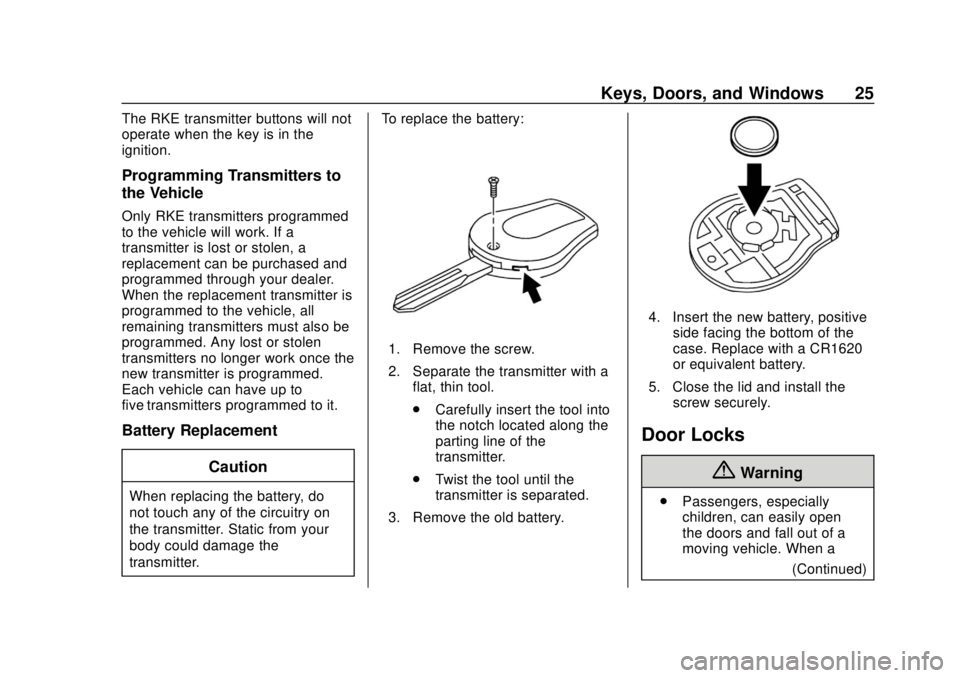
transmitter. To replace the battery:
1. Remove the screw.
2. Separate the transmitter with a
flat, thin tool.
.Carefully insert the tool into
the notch located along the
parting line of the
transmitter.
. Twist the tool until the
transmitter is separated.
3. Remove the old battery.
4. Insert the new battery, positive side facing the bottom of the
case. Replace with a CR1620
or equivalent battery.
5. Close the lid and install the screw securely.
Door Locks
{Warning
.Passengers, especially
children, can easily open
the doors and fall out of a
moving vehicle. When a
(Continued)
Page 29 of 287
Chevrolet City Express Owner Manual (GMNA-Localizing-U.S./Canada-
11683523) - 2018 - CRC - 7/10/17
28 Keys, Doors, and Windows
Doors
Sliding Door
From the outside:
To open, pull the handle and slide
the door toward the rear of the
vehicle until the door clicks into the
detent.
To close, pull the handle again. The
door will release from the open
position and slide closed.
From the inside:
To open, pull the handle toward the
rear of the vehicle and slide the
door until it clicks into the detent.
To close, pull the handle toward the
rear of the vehicle. The door will
release from the open position and
slide closed.
Make sure the door is completely
closed before driving away.
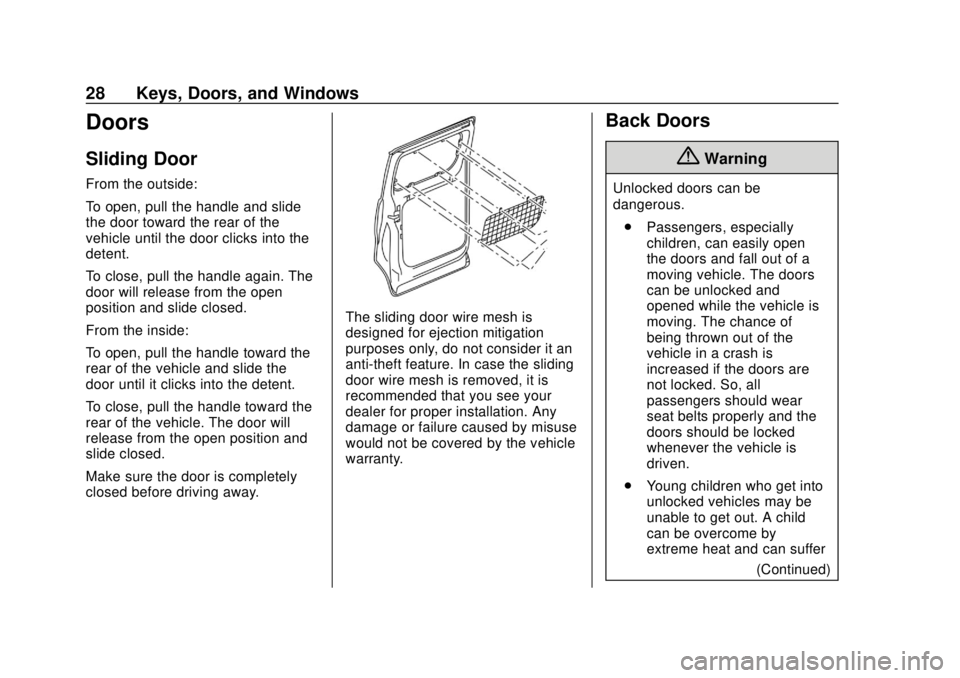
The sliding door wire mesh is
designed for ejection mitigation
purposes only, do not consider it an
anti-theft feature. In case the sliding
door wire mesh is removed, it is
recommended that you see your
dealer for proper installation. Any
damage or failure caused by misuse
would not be covered by the vehicle
warranty.
Back Doors
{Warning
Unlocked doors can be
dangerous.. Passengers, especially
children, can easily open
the doors and fall out of a
moving vehicle. The doors
can be unlocked and
opened while the vehicle is
moving. The chance of
being thrown out of the
vehicle in a crash is
increased if the doors are
not locked. So, all
passengers should wear
seat belts properly and the
doors should be locked
whenever the vehicle is
driven.
. Young children who get into
unlocked vehicles may be
unable to get out. A child
can be overcome by
extreme heat and can suffer
(Continued)
Page 35 of 287
Chevrolet City Express Owner Manual (GMNA-Localizing-U.S./Canada-
11683523) - 2018 - CRC - 7/10/17
34 Keys, Doors, and Windows
Folding Mirrors
Manual Folding Mirrors
The mirrors can be folded inward
toward the vehicle to prevent
damage when going through an
automatic car wash. Push the mirror
outward to return it to the original
position.
Heated Mirrors
For vehicles with heated mirrors:
1:Press to heat the mirrors.
An indicator light in the button lights
when the outside heated mirrors are
activated.
See “Rear Window Defogger” under
Climate Control Systems 0129.
Interior Mirrors
Interior Rearview Mirrors
Adjust the rearview mirror for a clear
view of the area behind the vehicle.
Do not spray glass cleaner directly
on the mirror. Use a soft towel
dampened with water.
Manual Rearview Mirror
If equipped, push the tab forward for
daytime use and pull it rearward for
nighttime use to avoid glare of the
headlamps from behind.
Windows
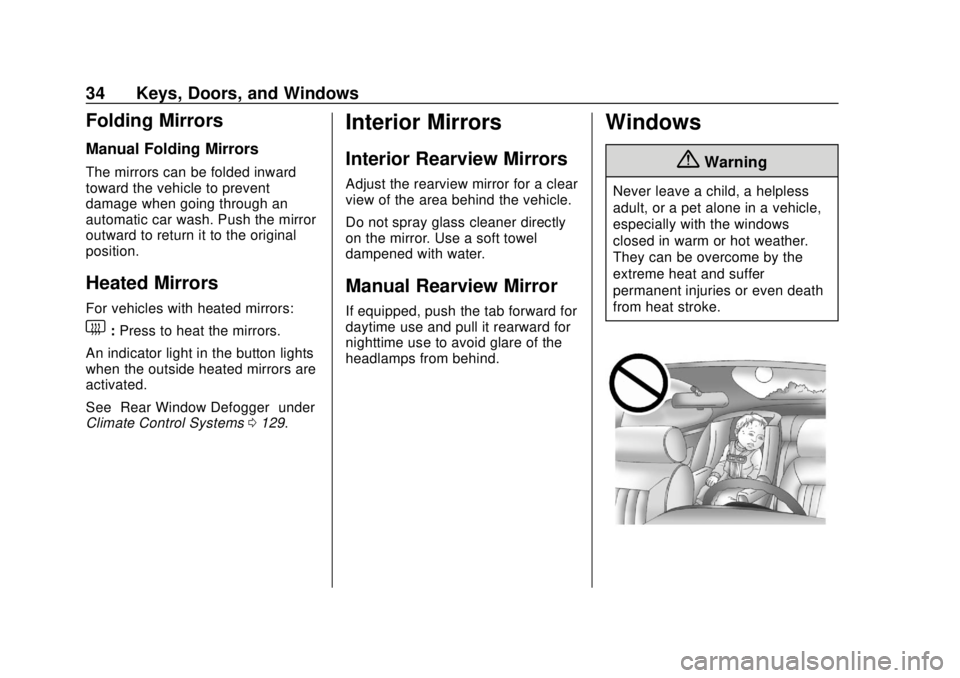
{Warning
Never leave a child, a helpless
adult, or a pet alone in a vehicle,
especially with the windows
closed in warm or hot weather.
They can be overcome by the
extreme heat and suffer
permanent injuries or even death
from heat stroke.
Page 96 of 287
Chevrolet City Express Owner Manual (GMNA-Localizing-U.S./Canada-
11683523) - 2018 - CRC - 7/10/17
Instruments and Controls 95
Power Steering Warning
Light
If equipped, this light comes on
briefly when the ignition is turned to
ON as a check to show it is working.
If it does not come on have the
vehicle serviced by your dealer.
{Warning
.If the engine is not running
or is turned off while driving,
the power assist for the
steering will not work.
Steering will be harder to
operate.
. When the power steering
warning light illuminates
with the engine running,
(Continued)
Warning (Continued)
there will be no power assist
for the steering. You will still
have control of the vehicle
but the steering will be
harder to operate. Have the
power steering system
checked by your dealer.
When the power steering warning
light illuminates with the engine
running, there will be no power
assist for the steering but you will
still have control of the vehicle. At
this time, greater steering effort is
required to operate the steering
wheel, especially in sharp turns and
at low speeds.
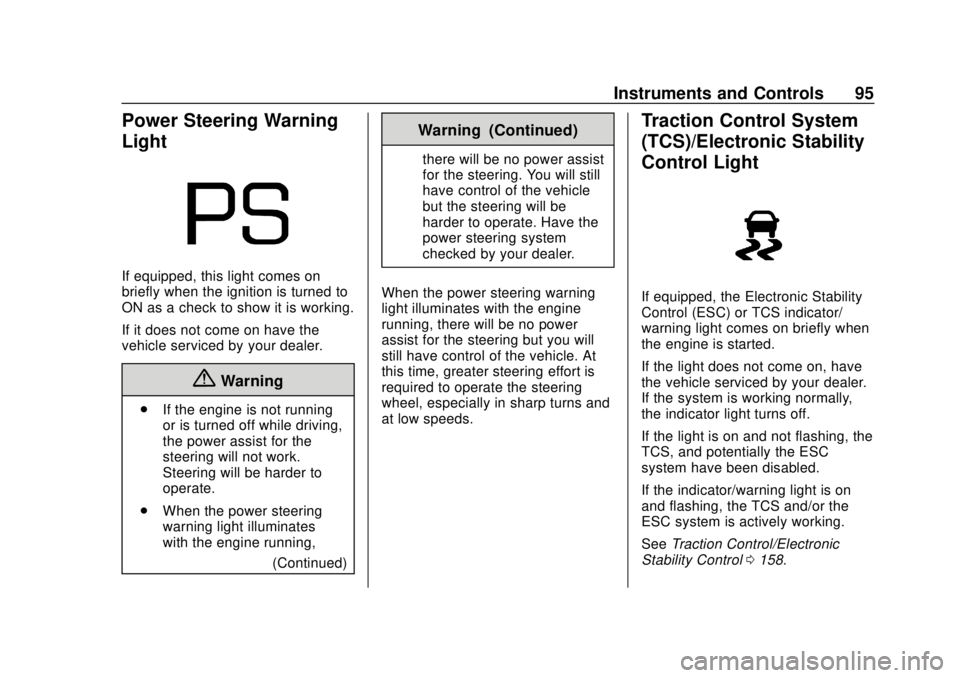
Traction Control System
(TCS)/Electronic Stability
Control Light
If equipped, the Electronic Stability
Control (ESC) or TCS indicator/
warning light comes on briefly when
the engine is started.
If the light does not come on, have
the vehicle serviced by your dealer.
If the system is working normally,
the indicator light turns off.
If the light is on and not flashing, the
TCS, and potentially the ESC
system have been disabled.
If the indicator/warning light is on
and flashing, the TCS and/or the
ESC system is actively working.
See Traction Control/Electronic
Stability Control 0158.
Page 113 of 287
Chevrolet City Express Owner Manual (GMNA-Localizing-U.S./Canada-
11683523) - 2018 - CRC - 7/10/17
112 Infotainment System
Radio
AM-FM Radio
Finding a Station
Manual Tuning
Turn the TUNE/FOLDER knob to
the left or right for manual tuning.
Seek Tuning
Press
gSEEK or TRACKdto
tune the radio stations and to stop
at the next broadcasting station.
Scan Tuning
Press SCAN to stop at each
broadcasting station for
five seconds. SCAN will appear on
the display while the radio is scan
tuning.
Pressing SCAN again during this
five second period will stop scan
tuning and the radio will remain
tuned to that station. If SCAN is not
pressed within five seconds, scan
tuning moves to the next station.
Storing a Favorite Station
Set up radio station favorites while
the vehicle is parked.
Up to 18 stations (six FM1, six FM2,
and six AM), can be programmed on
the six numbered presets.
To store a station as a favorite:
1. Select the desired radio band AM, FM1, or FM2.
2. Tune to the desired radio station.
3. Press and hold any of the preset numbers (1 –6) until the
preset is updated on the
infotainment display and the
sound is briefly muted.
4. The station indicator will then come on and the sound will
resume. Programming is now
complete.
5. Other controls can be set in the same manner.
Radio Reception
Frequency interference and static
can occur during normal radio
reception if items such as cell phone
chargers, vehicle convenience
accessories, and external electronic
devices are plugged into the
accessory power outlet. If there is
interference or static, unplug the
item from the accessory power
outlet.
AM
The range for most AM stations is
greater than for FM, especially at
night. The longer range can cause
station frequencies to interfere with
each other. For better radio
reception, most AM radio stations
boost the power levels during the
day, and then reduce these levels
during the night. Static can also
occur when things like storms and
power lines interfere with radio
reception. When this happens, try
reducing the treble on the radio.
Page 122 of 287

Chevrolet City Express Owner Manual (GMNA-Localizing-U.S./Canada-
11683523) - 2018 - CRC - 7/10/17
Infotainment System 121
Choosing a Language
The available languages are
English, Spanish, and French.
To change the language:1. Press and hold
g Vfor more
than five seconds.
2. The system responds with, “Press the PHONE/SEND
(
gV) control for the
hands-free phone system to
enter the voice adaptation
mode or press the PHONE/
END (
V) control to select a
different language.”
3. Press
V.
4. The system responds with the current language and gives the
option to change to another
language. Do nothing and the
session will end after
five seconds and the current
language will remain.
5. To select a different language, press
gordon the steering
wheel. 6. To select the language, press
g
Vwithin five seconds.
Voice Recognition
The Bluetooth system uses voice
recognition to interpret voice
commands to dial phone numbers
and name tags.
For available commands for the
current menu again, say “Help”and
the system will repeat them.
Noise : Keep interior noise levels to
a minimum. The system may not
recognize voice commands if there
is too much background noise.
When to Speak : A tone sounds
after the system responds indicating
when it is waiting for a voice
command. Wait until the tone and
then speak. Start speaking a
command within five seconds after
the tone sounds.
How to Speak : Speak clearly in a
calm and natural voice without
pausing between words.
Mute : Say to mute the call. Say
mute again to unmute the call.
Audio System
When using the in-vehicle Bluetooth
system, sound comes through the
vehicle's audio system speakers
and overrides the audio system.
Use the audio system volume knob
or press
x− orx+ on the steering
wheel, during a call, to change the
volume level.
Pairing
A Bluetooth-enabled cell phone
must be paired to the Bluetooth
system and then connected to the
vehicle before it can be used. See
the cell phone manufacturer's user
guide for Bluetooth functions before
pairing the cell phone.
Pairing Information
. A Bluetooth phone with MP3
capability cannot be paired to
the vehicle as a phone and an
MP3 player at the same time.
. Up to five cell phones can be
paired to the Bluetooth system.
. The pairing process is disabled
when the vehicle is moving.
Page 123 of 287
Chevrolet City Express Owner Manual (GMNA-Localizing-U.S./Canada-
11683523) - 2018 - CRC - 7/10/17
122 Infotainment System
.Pairing only needs to be
completed once, unless the
pairing information on the cell
phone changes or the cell phone
is deleted from the system.
. Only one paired cell phone can
be connected to the Bluetooth
system at a time.
. If multiple paired cell phones are
within range of the system, the
system connects to the first
available paired cell phone in the
order that they were first paired
to the system. To connect to a
different paired phone, see
“Listing All Paired and
Connected Phones” later in this
section.
Pairing a Phone
1. Press
g V.
2. Say “Connect Phone.” The
system acknowledges the
command and announces the
next set of available
commands. 3. Say
“Add Phone.” The system
acknowledges the command
and asks you to initiate
connecting from the phone
handset.
The connecting procedure of
the cell phone varies according
to each cell phone model. See
the cell phone Owner ’s Manual
for details.
When prompted for a Passkey
code, enter “1234”from the
handset.
4. The system asks you to say a name for the phone.
If the name is too long or too
short, the system tells you,
then prompts you for a name
again.
If more than one phone is
connected and the name
sounds too much like a name
already used, the system tells
you, then prompts you for a
name again. Listing All Paired and Connected
Phones
The system can list all cell phones
paired to it. If a paired cell phone is
also connected to the vehicle, the
system responds with
“is connected”
after that phone name:
1. Press
g V.
2. Say “Select Phone.”
Deleting a Paired Phone
The system will list the names
assigned to each phone and then
prompt you for the phone you wish
to delete. Deleting a phone from the
vehicle will also delete the phone
book for that phone:
1. Press
g V.
2. Say “Delete Phone.”
Replace Phone
The system will replace an existing
phone pairing with a new phone.
The system will keep all voice tags
assigned to your phone book.
1. Press
g V.
Page 126 of 287
Chevrolet City Express Owner Manual (GMNA-Localizing-U.S./Canada-
11683523) - 2018 - CRC - 7/10/17
Infotainment System 125
4. The system will ask you totransfer a phone number stored
in the cell phone’s memory.
5. Enter a phone number by voice command.
6. Say “Transfer Entry.” The
system acknowledges the
command and asks you to start
the transfer from the phone
handset.
7. The system repeats the number and prompts you for
the next command. When you
have finished entering numbers
or transferring an entry, say
“Store.”
8. The system confirms the name, location, and number.
Using the “Delete Entry”
Command
1. Press
g V.
2. Say “Delete Entry.”
3. Speak the name to delete or say “List Names” to choose an
entry. Using the
“List Names” Command
1. Press
g V.
2. Say “List Names.”
3. The system responds with a list of names from the phone book.
To stop the playback of the list
at any time press
V.
With Automatic Download
For phones that support automatic
download of the phone book the
“Phone book” command is used to
manage phone book entries.
The phone book stores up to
1,000 names for each phone
connected to the system.
When a phone is connected to the
system, the phone book is
automatically downloaded to the
vehicle. This feature allows access
to the phone book from the
Bluetooth system and calls contacts
by name. You can record a custom
voice tag for contact names that the
system has difficulty recognizing.
See “Record name” in this section. List Names :
This command will list
all the names and locations in the
phone book.
Record Name : This command will
record custom voice tags for contact
names in the phone book that the
vehicle has difficulty recognizing.
Using the “List Names” Command
1. Press
g V.
2. Say “List Names.”
3. The system responds with a list of names and locations in the
phone book. To stop the
playback of the list at any time
press
V.
Using the “Record Name”
Command
1. Press
g V.
2. Say “Record Name.”
This feature can also be used to
record voice tags to directly dial an
entry with multiple numbers. Up to
40 voice tags can be recorded to
the system.
Page 128 of 287
Chevrolet City Express Owner Manual (GMNA-Localizing-U.S./Canada-
11683523) - 2018 - CRC - 7/10/17
Infotainment System 127
Training
To train a voice:1. Park the vehicle in a reasonably quiet outdoor
location.
2. Sit in the driver seat with the engine running and the parking
brake on.
3. Press and hold
g Vfor more
than five seconds.
4. The system responds with, “Press the PHONE/SEND
(
gV) for the hands-free
phone system to enter the
voice adaptation mode or press
the PHONE/END (
V) to select
a different language.” See
“Language” previously in this
section.
5. Voice memory A or B is automatically selected. If both
memory locations are already
used, the system will prompt
you to overwrite one. Follow
the instructions provided by the
system. 6. When the preparation is
complete and you are ready to
begin, press
gV.
7. The VA mode will be explained. Follow the instructions
provided by the system.
8. When the training is finished, the system will tell you that an
adequate number of phrases
have been recorded.
9. The system will announce that VA has been completed and
the system is ready.
The VA mode will stop if:
. The
gVcontrol is pressed for
more than five seconds in
VA mode.
. The vehicle begins moving
during VA mode.
. The ignition switch is placed in
the OFF or LOCK position.
Manual Control
While using the voice recognition
system, it is possible to select menu
options to use the steering wheel
controls instead of speaking voice
commands. This can be especially
helpful if the noise of driving makes
it difficult for the voice recognition
system to accurately interpret
commands. The manual control
mode does not allow dialing a
phone number by digits. The user
may select an entry from the
Phonebook or Recent Calls lists. To
re-activate voice recognition, exit
the manual control mode by
pressing and holding
V, then press
gVto start the Hands Free Phone
System.
To start Manual Control Mode:
1. From an active Phone book or Recent Call list, press
Q
TUNE/FF-REW FOLDERRup
or down.
2. The system responds with “Showing Manual Options.”
Page 129 of 287
Chevrolet City Express Owner Manual (GMNA-Localizing-U.S./Canada-
11683523) - 2018 - CRC - 7/10/17
128 Infotainment System
3. Browse the menu bypressing
QTUNE/FF-REW
FOLDER
Rup or down. The
system will speak the current
menu option. Depending on the
audio display, it will also show
the current menu option.
4. Press
g Vto select the menu
option.
5. Press
Vto go back to the
previous menu.
6. Press and hold
Vfor
five seconds to exit.
Trademarks and
License Agreements
FCC Information
See Radio Frequency Statement
0 273.
“Made for iPod” and“Made for
iPhone” mean that an electronic
accessory has been designed to
connect specifically to iPod or
iPhone and has been certified by
the developer to meet Apple
performance standards. iPod and iPhone are trademarks of
Apple Computer, Inc., registered in
the U.S. and other countries.
Bluetooth
The Bluetooth word mark and logos
are owned by the Bluetooth SIG,
Inc. and any use of such marks by
General Motors is under license.
Other trademarks and trade names
are those of their respective owners.