ignition CHEVROLET COLORADO 2007 1.G Service Manual
[x] Cancel search | Manufacturer: CHEVROLET, Model Year: 2007, Model line: COLORADO, Model: CHEVROLET COLORADO 2007 1.GPages: 496, PDF Size: 2.7 MB
Page 198 of 496
Driver Information Center (DIC)
The Driver Information Center (DIC) displays
information such as the trip odometer,
personalization features, and warning messages.
The DIC display is located on the instrument
panel cluster.
DIC Controls and Displays
The Driver Information Center (DIC) comes on
when the ignition is on.
If a problem is detected, a warning message
appears on the display. Pressing and releasing
the trip odometer reset stem on the DIC
acknowledges some current warnings or service
messages. Some messages only clear after
the required action has been taken.
The DIC has different modes which can be
accessed by pressing the trip odometer reset stem
on the DIC. These modes are explained in the
following section. The DIC trip odometer reset stem
is located on the instrument panel cluster next to
the DIC display. To scroll through the available
functions, press and release the reset stem.
Trip Information
Odometer
The odometer is automatically displayed on the
DIC when you start the vehicle. The odometer
shows the total distance the vehicle has
been driven in either miles for the United States
or kilometers for Canada.
Trip Odometer
Press and release the reset stem until TRIP
appears on the DIC display. The trip odometer
shows the current distance traveled since the last
reset of the trip odometer in either miles for the
United States or kilometers for Canada.
To reset the trip odometer, press and hold the
reset stem until the display returns to zero.
198
Page 200 of 496
Automatic Door Locks
This feature allows you to program your door
locks to a preferred setting.
To set your choice for this feature, perform the
following steps:
1. With the engine off, turn the key to LOCK.
Do not remove the key from the ignition.
2. Press and hold the power door lock button
until the DIC display shows the current
door lock mode.
3. To view the next available mode, press and
hold the reset stem until the mode appears.
Release the reset stem and press and
hold again to view the next mode.
4. Once the desired mode is shown on the DIC
display, briey press the reset stem to set
your choice. The DIC display then clears.
The following are the available modes:
Lock 1 (default):On vehicles with an automatic
transmission, this mode locks all of the doors
when the vehicle is shifted out of PARK (P) and
unlocks all of the doors when the vehicle is shifted
into PARK (P).On vehicles with a manual transmission, this
mode locks all of the doors when the vehicle
speed is greater than 15 mph (24 km/h) and
unlocks all of the doors when the key is removed
from the ignition.
Lock 2:On vehicles with an automatic
transmission, this mode locks all of the doors
when the vehicle is shifted out of PARK (P) and
unlocks the driver’s door when the vehicle is
shifted into PARK (P).
On vehicles with a manual transmission, this
mode locks all of the doors when the vehicle
speed is greater than 15 mph (24 km/h) and
unlocks the driver’s door when the key is removed
from the ignition.
Lock 3:On vehicles with an automatic
transmission, this mode locks all of the doors
when the vehicle is shifted out of PARK (P).
The doors will not automatically unlock.
On vehicles with a manual transmission, this
mode locks all of the doors when the vehicle
speed is greater than 15 mph (24 km/h).
The doors will not automatically unlock.
200
Page 201 of 496
Remote Keyless Entry (RKE)
Feedback
This feature allows you to program your
Remote Keyless Entry (RKE) feedback to
a preferred setting.
To set your choice for this feature, perform
the following steps:
1. With the engine off, turn the key to LOCK.
Do not remove the key from the ignition.
2. Press and hold the lock and unlock buttons
on the RKE transmitter at the same time.
Hold both buttons until the DIC display
shows the current RKE feedback mode.
3. To view the next available mode, press and
hold the reset stem until the mode appears.
Release the reset stem and press and
hold again to view the next mode.
4. Once the desired mode is shown on the DIC
display, briey press the reset stem to set
your choice. The DIC display then clears.The following are the available modes:
RFA 1 (default):This mode ashes the parking
lamps when you press the lock or unlock
buttons on the RKE transmitter.
RFA 2:This mode ashes the parking lamps and
sounds the horn when you press the lock button
on the RKE transmitter. This mode also ashes the
parking lamps when you press the unlock button
on the RKE transmitter.
RFA 3:This mode ashes the parking lamps
and sounds the horn when you press the lock or
unlock buttons on the RKE transmitter.
RFA 4:This mode disables RKE feedback.
There will be no feedback when you press the
lock or unlock buttons on the RKE transmitter.
201
Page 204 of 496
LOW FUEL
This message displays if the level of fuel in
the vehicle is low. Also check the fuel gage.
SeeFuel Gage on page 197for more information.
Rell the fuel tank as soon as possible.
LOW TIRE
This message displays if a low tire pressure is
detected in any of the vehicle’s tires. Press and
release the reset stem to acknowledge the message
and clear it from the display. The message appears
at each ignition cycle until the tires are inated to the
correct ination pressure. SeeTires on page 377
andInation - Tire Pressure on page 384for more
information on tires and the correct ination
pressures.
LOW TRAC (Traction)
If your vehicle has the Traction Control
System (TCS), this message displays when a
low traction condition is detected. SeeTraction
Control System (TCS) on page 253for more
information. Press and release the reset stem
to acknowledge the message and clear it from
the display.
OIL
This message displays when the oil pressure is
low. SeeOil Pressure Light on page 195and
Engine Oil on page 333for more information.
PARK BRK (Brake)
This message displays when the parking brake
is set. SeeParking Brake on page 133and
Brake System Warning Light on page 189for
more information. The message clears from the
display after the parking brake is released or
by pressing and releasing the reset stem.
REDUCED POWER
This message displays when the vehicle’s
engine power is reduced. Reduced engine power
can affect the vehicle’s ability to accelerate.
If this message is on, but there is no reduction
in performance, proceed to your destination.
The performance may be reduced the next time
the vehicle is driven. The vehicle may be driven
at a reduced speed while this message is on,
but acceleration and speed may be reduced.
204
Page 205 of 496
Anytime this message stays on, the vehicle
should be taken to your dealer for service as
soon as possible. Press and release the reset
stem to acknowledge the message and clear
it from the display.
SERV (Service) 4WD
(Four-Wheel Drive)
This message displays when there is a problem
with the transfer case control system. Check the
transfer case on your vehicle and have it serviced
by your dealer. SeeFour-Wheel Drive on page 129
for more information about the transfer case. Press
and release the reset stem to acknowledge the
message and clear it from the display.
SERV (Service) TPM
(Tire Pressure Monitor)
This message displays if any of the tire monitor
sensors have malfunctioned, if the tire monitor
sensors have not been programmed, or if
the recommended tire pressures are not
programmed. The tire pressure light also ashes
for one minute and then turns on solid until
the condition goes away or the system is serviced.SeeTire Pressure Light on page 191. Press and
release the reset stem to acknowledge the
message and clear it from the display. This
message appears at each ignition cycle until the
system is serviced. See your dealer for service.
SeeTire Pressure Monitor System on page 385for
more information.
SERV (Service) VEH (Vehicle)
This message displays if your vehicle needs
service. Have your vehicle serviced by your
dealer as soon as possible.
SERVICE CHARG (Charge)
SYS (System)
This message displays if there is a problem with
the battery charging system. Under certain
conditions, the battery warning light may also turn
on in the instrument panel cluster. SeeBattery
Warning Light on page 188. The battery will not be
charging at an optimal rate and the vehicle will
lose the ability to enter the fuel economy mode.
The vehicle is safe to drive, however have
the electrical system checked by your dealer.
Press and release the reset stem to acknowledge
the message and clear it from the display.
205
Page 208 of 496
Setting the Time
Radios without Radio Data
Systems (RDS)
Press and hold HR (hour) until the correct
hour displays. Press and hold MIN (minute)
until the correct minute displays. There is an
initial two-second delay before the clock goes
into time-set mode. Display the time with the
ignition off, by pressing RCL (recall), HR,
or MIN.
Radios with Radio Data
Systems (RDS)
The radio could have a button marked
with an H or HR to represent hours and
an M or MN to represent minutes.Press and hold the hour button until the
correct hour displays. Press and hold the
minute button until the correct minute displays.
The time can be set with the ignition on or off.
To synchronize the time with an FM station
broadcasting Radio Data System (RDS)
information, press and hold the hour and minute
buttons at the same time until RDS TIME displays.
To accept this time, press and hold the hour
and minute buttons, at the same time, for another
two seconds. If the time is not available from
the station, NO UPDAT (update) displays.
RDS time is broadcast once a minute. After
tuning to an RDS broadcast station, it could take
a few minutes for the time to update.
208
Page 209 of 496
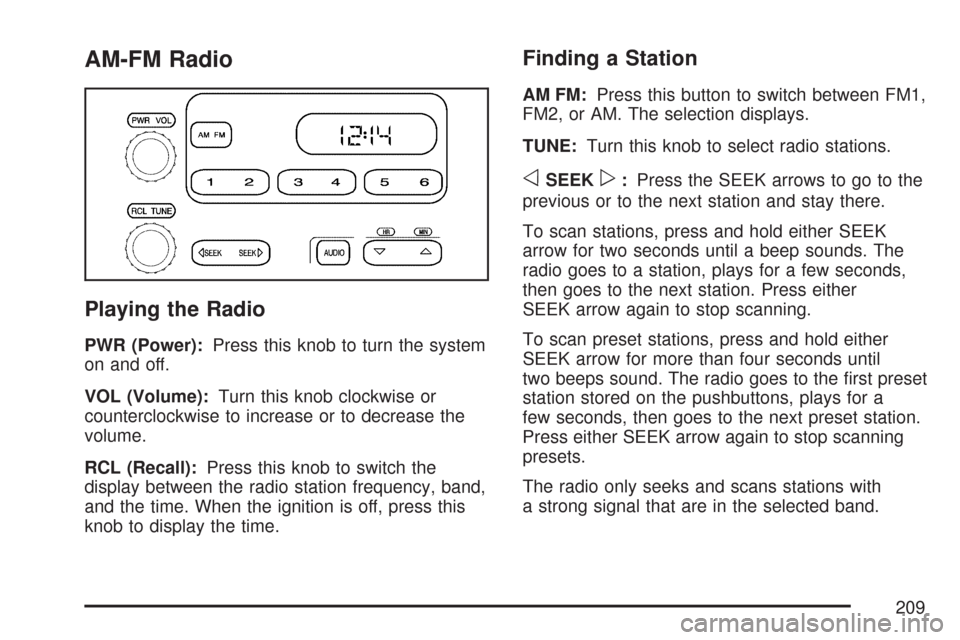
AM-FM Radio
Playing the Radio
PWR (Power):Press this knob to turn the system
on and off.
VOL (Volume):Turn this knob clockwise or
counterclockwise to increase or to decrease the
volume.
RCL (Recall):Press this knob to switch the
display between the radio station frequency, band,
and the time. When the ignition is off, press this
knob to display the time.
Finding a Station
AM FM:Press this button to switch between FM1,
FM2, or AM. The selection displays.
TUNE:Turn this knob to select radio stations.
oSEEKp:Press the SEEK arrows to go to the
previous or to the next station and stay there.
To scan stations, press and hold either SEEK
arrow for two seconds until a beep sounds. The
radio goes to a station, plays for a few seconds,
then goes to the next station. Press either
SEEK arrow again to stop scanning.
To scan preset stations, press and hold either
SEEK arrow for more than four seconds until
two beeps sound. The radio goes to the rst preset
station stored on the pushbuttons, plays for a
few seconds, then goes to the next preset station.
Press either SEEK arrow again to stop scanning
presets.
The radio only seeks and scans stations with
a strong signal that are in the selected band.
209
Page 213 of 496
XM™ Satellite Radio Service
XM™ is a satellite radio service that is based in
the 48 contiguous United States and Canada.
XM™ offers a large variety of coast-to-coast
channels including music, news, sports, talk,
traffic/weather (U.S. subscribers), and children’s
programming. XM™ provides digital quality
audio and text information that includes song
title and artist name. A service fee is required
in order to receive the XM™ service. For more
information, contact XM™; In the U.S. at
www.xmradio.com or call 1-800-852-XMXM (9696)
or in Canada at www.xmradio.ca or call
1-877-GET-XMSR (438-9677).
Playing the Radio
PWR (Power):Press this knob to turn the system
on and off.
oVOLp(Volume):Turn this knob to increase
or to decrease the volume.DISPL (Display):When the ignition is turned off,
press this knob to display the time.
For RDS, press the DISPL knob to change what
displays while using RDS. The display options
are station name, RDS station frequency,
PTY (program type), and the name of the
program (if available).
For XM™ (if equipped), press the DISPL knob
while in XM™ mode to retrieve four different
categories of information related to the current
song or channel: Artist, Song Title, Category
or PTY, Channel Number/Channel Name.
To change the default on the display, press the
DISPL knob until you see the desired display,
then press and hold this knob for two seconds.
The radio produces one beep. The selected
display is now the default.
213
Page 218 of 496
TRAF (Traffic):If TRAF displays, the tuned
station broadcasts traffic announcements.
When a traffic announcement is broadcast on
this station you will hear it.
If the station does not broadcast traffic
announcements, press the TRAF button and
the radio seeks to a station that does. When a
station that broadcasts traffic announcements
is found, the radio stops seeking and TRAF
displays. If no station is found that broadcasts
traffic announcements, NO TRAF displays.
If TRAF displays, press the TRAF button to
turn off the traffic announcements.
The radio plays the traffic announcement if the
volume is low. The radio interrupts the play
of a CD if the last tuned station broadcasts
traffic announcements.
This function does not apply to XM™ Satellite
Radio Service.Radio Messages
CAL ERR (Calibration Error):The audio system
has been calibrated for your vehicle from the
factory. If CAL ERR displays it means that
the radio has not been congured properly for
your vehicle and it must be returned to your
dealer/retailer for service.
LOCKED:This message displays when the
THEFTLOCK
®system has locked up. Take
your vehicle to your dealer/retailer for service.
If any error occurs repeatedly or if an error
cannot be corrected, contact your dealer/retailer.
Radio Messages for XM™ Only
SeeXM Radio Messages on page 240later in
this section for further detail.
Playing a CD
Insert a CD partway into the slot, label side up.
The player pulls it in, and READING displays.
The CD should begin playing. If you want to
insert a CD with the ignition off, rst press
the
Z(eject) button or the DISPL knob.
218
Page 219 of 496
If the ignition or radio is turned off with a CD in
the player it stays in the player. When the ignition
or radio is turned on, the CD starts to play
where it stopped, if it was the last selected
audio source.
When the CD is inserted, the CD symbol displays.
As each new track starts to play, the track
number displays.
The CD player can play the smaller 3 inch (8 cm)
single CDs with an adapter ring. Full-size CDs
and the smaller CDs are loaded in the same
manner.
If playing a CD-R, the sound quality can be
reduced due to CD-R quality, the method of
recording, the quality of the music that has
been recorded, and the way the CD-R has been
handled. There can be an increase in skipping,
difficulty in nding tracks, and/or difficulty in loading
and ejecting. If these problems occur, check
the bottom surface of the CD. If the surface of
the CD is damaged, such as cracked, broken,
or scratched, the CD does not play properly.
If the surface of the CD is soiled, seeCare of
Your CDs on page 243for more information.If there is no apparent damage, try a known
good CD.
Do not add any label to a CD, it could get
caught in the CD player. If a CD is recorded
on a personal computer and a description label
is needed, try labeling the top of the recorded
CD with a marking pen.
Notice:If a label is added to a CD, or more
than one CD is inserted into the slot at a
time, or an attempt is made to play scratched
or damaged CDs, the CD player could be
damaged. While using the CD player, use
only CDs in good condition without any
label, load one CD at a time, and keep the
CD player and the loading slot free of foreign
materials, liquids, and debris.
If an error displays, see “CD Messages” later
in this section.
1 FLD
x(Previous):This button is inactive
when playing a CD.
2 FLD
w(Next):This button is inactive when
playing a CD.
219