display CHEVROLET COLORADO 2011 1.G Owner's Manual
[x] Cancel search | Manufacturer: CHEVROLET, Model Year: 2011, Model line: COLORADO, Model: CHEVROLET COLORADO 2011 1.GPages: 392, PDF Size: 6.37 MB
Page 136 of 392
Black plate (24,1)Chevrolet Colorado Owner Manual - 2011
5-24 Instruments and Controls
Door Ajar Messages
DOORS
This message displays when one or
more of the doors is ajar. Check all
the doors on your vehicle to make
sure they are closed. The message
clears from the display after all of
the doors are closed.
Engine Cooling System
Messages
AC (Air Conditioning) OFF
This message displays when the
engine coolant temperature is too
high and the air conditioning in your
vehicle needs to be turned off. See
Engine Overheating on page 10‑23
andClimate Control Systems on
page 8‑1 for more information. This
message displays along with the
ENG HOT message.
ENG (Engine) HOT
This message displays when the
engine coolant temperature is hot.
Check the engine coolant
temperature gauge. See Engine
Coolant Temperature Gauge on
page 5‑9. Have your vehicle
serviced by your dealer as soon as
possible if you suspect the engine is
overheating. See Engine
Overheating on page 10‑23 for more
information.
Engine Oil Messages
CHANGE OIL
This message displays when the oil
needs to be changed. Check the oil
in your vehicle as soon as possible
and have your vehicle serviced by
your dealer. See Engine Oil on
page 10‑9 andScheduled
Maintenance on page 11‑2 for more
information. Press and release the
reset stem to acknowledge the
message and clear it from the
display.
OIL
This message displays when the oil
pressure is low. See Engine Oil
Pressure Light on page 5‑18 and
Engine Oil on page 10‑9 for more
information.
Engine Power Messages
REDUCED POWER
This message displays when the
vehicle's engine power is reduced.
Reduced engine power can affect
the vehicle's ability to accelerate.
If this message is on, but there
is no reduction in performance,
proceed to your destination. The
performance may be reduced the
next time the vehicle is driven. The
vehicle may be driven at a reduced
speed while this message is on, but
acceleration and speed may be
reduced. Anytime this message
stays on, the vehicle should be
taken to your dealer for service as
soon as possible. Press and release
Page 137 of 392
Black plate (25,1)Chevrolet Colorado Owner Manual - 2011
Instruments and Controls 5-25
the reset stem to acknowledge the
message and clear it from the
display.
Fuel System Messages
FUEL CAP
This message displays if the
vehicle's fuel cap is either off or
loose. Pull over as soon as possible
and check to see if the fuel cap is
secure. You may also see the check
engine light on the instrument panel
cluster. If the check engine light
does come on when the fuel cap
was loose, it may take a few driving
trips before the light turns off. See
Malfunction Indicator Lamp on
page 5‑12for more information if the
light still remains on. Press and
release the reset stem to
acknowledge the message and
clear it from the display.
LOW FUEL
This message displays if the level of
fuel in the vehicle is low. Also check
the fuel gauge. See Fuel Gauge on
page 5‑8 for more information. Refill
the fuel tank as soon as possible.
Lamp Messages
TURN SIGNAL
This message displays when the
turn signal is on for about 1.2 km
(0.75 miles) of travel. Press and
release the reset stem to
acknowledge the message and
clear it from the display.
Ride Control System
Messages
SERVICE STAB (Stability) SYS
(System)
This message displays if there is a
problem with the StabiliTrak system.
Have your vehicle serviced by your
dealer. See StabiliTrak
®System on
page 9‑47 for more information.
STAB (Stability) SYS
(System) OFF
This message displays when the
StabiliTrak system is turned off. See
StabiliTrak
®System on page 9‑47
for more information.
TRAC (Traction) OFF
This message displays when the
Traction Control System (TCS) is
turned off by pressing the
StabiliTrak button. See StabiliTrak
®
System on page 9‑47for more
information.
TRACTION FAULT
This message will display if there is
a problem with the TCS. Have your
vehicle serviced by your dealer. See
StabiliTrak
®System on page 9‑47
for more information. Press and
release the reset stem to
acknowledge the message and
clear it from the display.
Page 138 of 392
Black plate (26,1)Chevrolet Colorado Owner Manual - 2011
5-26 Instruments and Controls
Service Vehicle Messages
SERV (Service) VEH (Vehicle)
This message displays if your
vehicle needs service. Have your
vehicle serviced by your dealer as
soon as possible.
Tire Messages
LOW TIRE
This message displays if a low tire
pressure is detected in any of the
vehicle's tires. Press and release
the reset stem to acknowledge the
message and clear it from the
display. The message appears at
each ignition cycle until the tires are
inflated to the correct inflation
pressure. SeeTires on page 10‑46
and Tire Pressure on page 10‑53 for
more information on tires and the
correct inflation pressures.
SERV (Service) TPM (Tire
Pressure Monitor)
This message displays if a part on
the Tire Pressure Monitor System
(TPMS) is not working properly. The
tire pressure light also flashes and
then remains on during the same
ignition cycle. See Tire Pressure
Light on page 5‑17. Several
conditions may cause this message
to appear. See Tire Pressure
Monitor Operation on page 10‑56 for
more information. If the warning
comes on and stays on, there may
be a problem with the TPMS. See
your dealer.
Transmission Messages
SERV (Service) 4WD
(Four-Wheel Drive)
This message displays when there
is a problem with the transfer case
control system. Check the transfer
case on your vehicle and have it
serviced by your dealer. See
Four-Wheel Drive on page 9‑39 for
more information about the transfer
case. Press and release the reset
stem to acknowledge the message
and clear it from the display.
Page 143 of 392
Black plate (5,1)Chevrolet Colorado Owner Manual - 2011
Lighting 6-5
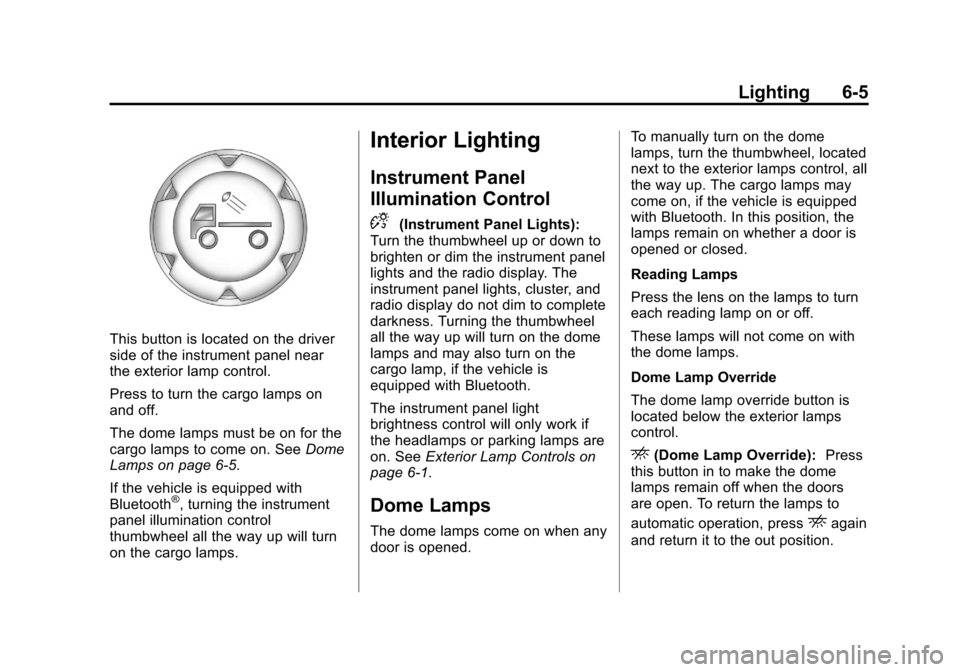
This button is located on the driver
side of the instrument panel near
the exterior lamp control.
Press to turn the cargo lamps on
and off.
The dome lamps must be on for the
cargo lamps to come on. SeeDome
Lamps on page 6‑5.
If the vehicle is equipped with
Bluetooth
®, turning the instrument
panel illumination control
thumbwheel all the way up will turn
on the cargo lamps.
Interior Lighting
Instrument Panel
Illumination Control
D
(Instrument Panel Lights):
Turn the thumbwheel up or down to
brighten or dim the instrument panel
lights and the radio display. The
instrument panel lights, cluster, and
radio display do not dim to complete
darkness. Turning the thumbwheel
all the way up will turn on the dome
lamps and may also turn on the
cargo lamp, if the vehicle is
equipped with Bluetooth.
The instrument panel light
brightness control will only work if
the headlamps or parking lamps are
on. See Exterior Lamp Controls on
page 6‑1.
Dome Lamps
The dome lamps come on when any
door is opened. To manually turn on the dome
lamps, turn the thumbwheel, located
next to the exterior lamps control, all
the way up. The cargo lamps may
come on, if the vehicle is equipped
with Bluetooth. In this position, the
lamps remain on whether a door is
opened or closed.
Reading Lamps
Press the lens on the lamps to turn
each reading lamp on or off.
These lamps will not come on with
the dome lamps.
Dome Lamp Override
The dome lamp override button is
located below the exterior lamps
control.
E(Dome Lamp Override):
Press
this button in to make the dome
lamps remain off when the doors
are open. To return the lamps to
automatic operation, press
Eagain
and return it to the out position.
Page 144 of 392
Black plate (6,1)Chevrolet Colorado Owner Manual - 2011
6-6 Lighting
Lighting Features
Exit Lighting
The interior lamps will come on
when the key is removed from the
ignition. The lamps will not come on
if the dome override button is
pressed in.
Battery Load
Management
The vehicle has Electric Power
Management (EPM) that estimates
the battery's temperature and state
of charge. It then adjusts the voltage
for best performance and extended
life of the battery.
When the battery's state of charge
is low, the voltage is raised slightly
to quickly bring the charge back up.
When the state of charge is high,
the voltage is lowered slightly to
prevent overcharging. If the vehicle
has a voltmeter gauge or a voltage
display on the Driver Information
Center (DIC), you may see thevoltage move up or down. This is
normal. If there is a problem, an
alert will be displayed.
The battery can be discharged at
idle if the electrical loads are very
high. This is true for all vehicles.
This is because the generator
(alternator) may not be spinning fast
enough at idle to produce all the
power that is needed for very high
electrical loads.
A high electrical load occurs when
several of the following are on, such
as: headlamps, high beams, fog
lamps, rear window defogger,
climate control fan at high speed,
heated seats, engine cooling fans,
trailer loads, and loads plugged into
accessory power outlets.
EPM works to prevent excessive
discharge of the battery. It does this
by balancing the generator's output
and the vehicle's electrical needs.
It can increase engine idle speed to
generate more power, whenever
needed. It can temporarily reduce
the power demands of some
accessories.
Normally, these actions occur in
steps or levels, without being
noticeable. In rare cases at the
highest levels of corrective action,
this action may be noticeable to the
driver. If so, a Driver Information
Center (DIC) message might be
displayed, such as BATTERY
SAVER ACTIVE, BATTERY
VOLTAGE LOW, or LOW BATTERY.
If one of these messages displays, it
is recommended that the driver
reduce the electrical loads as much
as possible. See
Driver Information
Center (DIC) on page 5‑19.
Battery Power Protection
This feature shuts off the dome
lamp if it is left on for more than
20 minutes when the ignition is in
LOCK/OFF. This helps to prevent
the battery from running down.
Page 146 of 392
Black plate (2,1)Chevrolet Colorado Owner Manual - 2011
7-2 Infotainment System
Notice:Contact your dealer
before adding any equipment.
Adding audio or communication
equipment could interfere with
the operation of the vehicle's
engine, radio, or other systems,
and could damage them. Follow
federal rules covering mobile
radio and telephone equipment.
Notice: The chime signals related
to safety belts, parking brake, and
other functions of your vehicle
operate through the radio/
entertainment system. If that
equipment is replaced or
additional equipment is added to
your vehicle, the chimes may not
work. Make sure that replacement
or additional equipment is
compatible with your vehicle
before installing it. See
Accessories and Modifications on
page 10‑4. The vehicle has Retained
Accessory Power (RAP). With RAP,
the audio system can be played
even after the ignition is turned off.
See
Retained Accessory Power
(RAP) on page 9‑30 for more
information.
Theft-Deterrent Feature
Non-RDS Radios
TheftLock®is designed to
discourage theft of your vehicle's
radio. The feature works
automatically by learning a portion
of the Vehicle Identification
Number (VIN). If the radio is moved
to a different vehicle, it does not
operate and LOC displays.
With TheftLock activated, the radio
does not operate if stolen.
RDS Radios
TheftLock is designed to discourage
theft of your vehicle's radio. The
feature works automatically by
learning a portion of the Vehicle
Identification Number (VIN). If the
radio is moved to a different vehicle,
it does not operate and LOCKED
displays.
When the radio and vehicle are
turned off, the blinking red light
indicates that TheftLock is armed.
With TheftLock activated, the radio
does not operate if stolen.
Page 148 of 392
Black plate (4,1)Chevrolet Colorado Owner Manual - 2011
7-4 Infotainment System
Radio with CD (MP3/WMA)
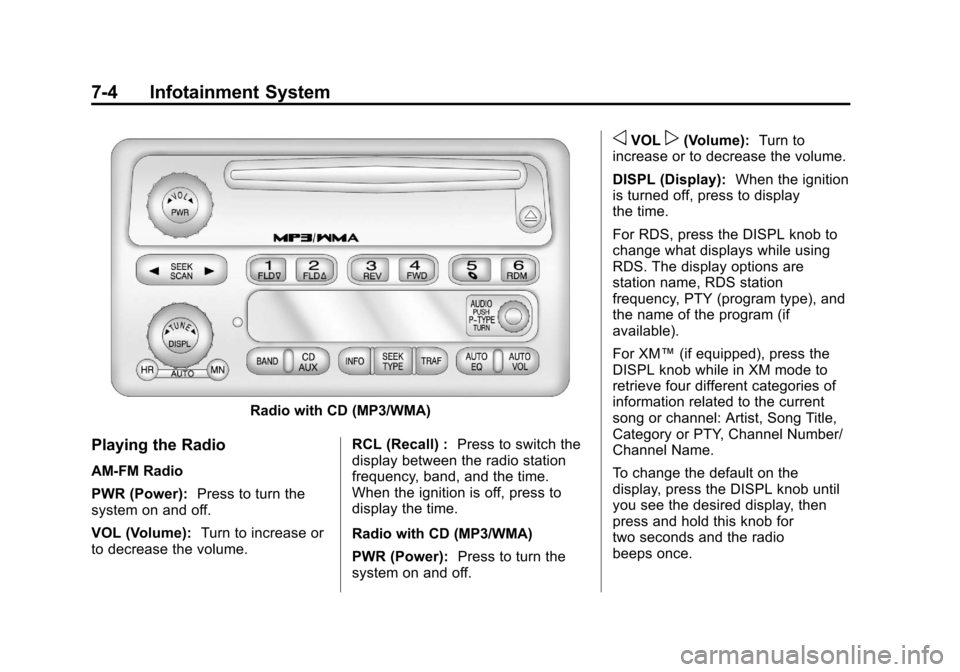
Playing the Radio
AM-FM Radio
PWR (Power):Press to turn the
system on and off.
VOL (Volume): Turn to increase or
to decrease the volume. RCL (Recall) :
Press to switch the
display between the radio station
frequency, band, and the time.
When the ignition is off, press to
display the time.
Radio with CD (MP3/WMA)
PWR (Power): Press to turn the
system on and off.
oVOLp(Volume): Turn to
increase or to decrease the volume.
DISPL (Display): When the ignition
is turned off, press to display
the time.
For RDS, press the DISPL knob to
change what displays while using
RDS. The display options are
station name, RDS station
frequency, PTY (program type), and
the name of the program (if
available).
For XM™ (if equipped), press the
DISPL knob while in XM mode to
retrieve four different categories of
information related to the current
song or channel: Artist, Song Title,
Category or PTY, Channel Number/
Channel Name.
To change the default on the
display, press the DISPL knob until
you see the desired display, then
press and hold this knob for
two seconds and the radio
beeps once.
Page 149 of 392
Black plate (5,1)Chevrolet Colorado Owner Manual - 2011
Infotainment System 7-5
AUTO VOL (Automatic Volume):
Automatic volume automatically
adjusts the audio system to make
up for road and wind noise while
driving. The volume level should
always sound the same while
driving.
Set the volume at the desired level.
Press to select LOW, MEDIUM, and
HIGH. AVOL displays. Each higher
setting allows for higher volume
compensation at faster vehicle
speeds.
NONE displays if the radio cannot
determine the vehicle speed. To turn
automatic volume off, press until
OFF displays.
Setting the Tone (Bass/Treble)
AM-FM Radio
To adjust the bass or treble:
1. Press and release the AUDIObutton until BAS (bass) or TRE
(treble) displays. 2. Press and hold the
worx
button to increase or to
decrease the tone.
To adjust the bass or treble to the
center position:
1. Press and release the AUDIO button until BAS (bass) or TRE
(treble) displays.
2. Press and hold the AUDIO button for more than
two seconds until a beep
sounds.
To adjust both tone controls and
both speaker controls to the middle
position:
1. Exit out of audio mode by pressing another button, causing
the radio to perform that function
or wait five seconds for the
display to return to time of day.
2. Press and hold AUDIO for more than two seconds until a beep
sounds. CEN (center) displays. Radio with CD (MP3/WMA)
To adjust the bass or treble:
1. Press and release the AUDIO
knob until BASS (bass) or TREB
(treble) displays.
2. Turn the AUDIO knob to increase or to decrease
the tone.
To adjust the bass/treble to the
middle position, press and hold the
AUDIO knob. The radio produces
one beep and adjusts the display
level to the middle position.
To adjust all tone and speaker
controls to the middle position, push
and hold the AUDIO knob when no
tone or speaker control displays.
ALL CENTERED displays and a
beep sounds.
AUTO EQ (Automatic
Equalization): Press to select
customized equalization settings
designed for country/western, jazz,
talk, pop, rock, and classical.
Page 150 of 392
Black plate (6,1)Chevrolet Colorado Owner Manual - 2011
7-6 Infotainment System
To return to the manual mode, press
the AUTO EQ button until CUSTOM
displays. Then manually adjust the
bass/treble, using the AUDIO knob.
Adjusting the Speakers
(Balance/Fade)
Fade may not be available if the
vehicle is a regular cab model.
AM-FM Radio
To adjust balance or fade:
1. Press and release the AUDIObutton until BAL (balance) or
FAD (fade) displays.
2. Press and hold the
worx
button to increase or to
decrease the level.
To adjust the balance or fade to the
center position:
1. Press and release the AUDIO button until BAL (balance) or
FAD (fade) displays. 2. Press and hold the AUDIO
button for more than
two seconds until a beep
sounds.
To adjust both speaker controls and
both tone controls to the middle
position:
1. Exit out of audio mode by pressing another button, causing
the radio to perform that function
or wait five seconds for the
display to return to time of day.
2. Press and hold AUDIO for more than two seconds until a beep
sounds. CEN (center) displays.
Radio with CD (MP3/WMA)
To adjust the balance or fade:
1. Press and release the AUDIO knob until BAL (balance) or
FADE (fade) displays.
2. Turn the AUDIO knob to increase or to decrease the
level. To adjust the balance or fade to the
middle position:
1. Press and release the AUDIO
knob until BAL (balance) or
FADE (fade) displays.
2. Press and hold the AUDIO knob until one beep sounds.
To adjust all tone and speaker
controls to the middle position, push
and hold the AUDIO knob when no
tone or speaker control displays.
ALL CENTERED displays and a
beep sounds.
Radio Messages
AM-FM Radio
CAL (Calibration Error): The
audio system has been calibrated
for the vehicle from the factory.
If CAL displays it means that the
radio has not been configured
properly for the vehicle and it must
be returned to your dealer for
service.
Page 151 of 392
Black plate (7,1)Chevrolet Colorado Owner Manual - 2011
Infotainment System 7-7
LOC (Locked):This message
displays when the THEFTLOCK®
system has locked up. Take the
vehicle to your dealer for service.
If any error occurs repeatedly or if
an error cannot be corrected,
contact your dealer.
Radio with CD (MP3/WMA)
CAL ERR (Calibration Error): The
audio system has been calibrated
for the vehicle from the factory.
If CAL ERR displays it means that
the radio has not been configured
properly for the vehicle and it must
be returned to your dealer for
service.
LOCKED: This message displays
when the THEFTLOCK
®system has
locked up. Take the vehicle to your
dealer for service.
If any error occurs repeatedly or if
an error cannot be corrected,
contact your dealer.
Radio
AM-FM Radio
Finding a Station
AM-FM Radio
AM FM: Press to switch between
FM1, FM2, or AM.
TUNE : Turn to select radio
stations.
oSEEK: Press to go to the
previous station and stay there.
To scan stations, press and hold
o
SEEK for two seconds until a beep
sounds. The radio goes to a station,
plays for a few seconds, then goes
to the next station. Press
oSEEK
again to stop scanning.
To scan preset stations, press
and hold
oSEEK for more than
four seconds until two beeps sound. The radio goes to the first preset
station, plays for a few seconds,
then goes to the next preset station.
Press
oSEEK again to stop
scanning presets.
SEEK
p: Press to go to the next
station and stay there.
To scan stations, press and hold
SEEK
pfor two seconds until a
beep sounds. The radio goes to a
station, plays for a few seconds,
then goes to the next station. Press
SEEK
pagain to stop scanning.
To scan preset stations, press
and hold SEEK
pfor more than
four seconds until two beeps sound.
The radio goes to the first preset
station stored on the pushbuttons,
plays for a few seconds, then goes
to the next preset station. Press
SEEK
pagain to stop scanning
presets.