cluster CHEVROLET COLORADO 2017 2.G Owner's Guide
[x] Cancel search | Manufacturer: CHEVROLET, Model Year: 2017, Model line: COLORADO, Model: CHEVROLET COLORADO 2017 2.GPages: 419, PDF Size: 7.38 MB
Page 259 of 419
Chevrolet Colorado Owner Manual (GMNA-Localizing-U.S./Canada/Mexico-10122675) - 2017 - crc - 8/22/16
258 Driving and Operating
StabiliTrak will automatically turn onif the vehicle exceeds 56 km/h(35 mph). Traction control will
remain off until the driver pressesg
or the ignition is cycled Off then On.
Adding accessories can affect thevehicle performance. SeeAccessories andModifications0281.
Hill Descent
Control (HDC)
If equipped, HDC can be used whendriving downhill. It sets andmaintains vehicle speed whiledescending a very steep incline in aforward or reverse gear.
The HDC switch is on the centerstack, below the climate controls.
Press5to enable or disable HDC.
Vehicle speed must be below60 km/h (37 mph).
The HDC light displays on theinstrument cluster when enabled.
HDC can maintain vehicle speedsbetween 4 and 30 km/h (3 and19 mph) on an incline greater thanor equal to a 10% grade. A blinkingHDC light indicates that the systemis actively applying the brakes tomaintain vehicle speed.
When HDC is set, that is the initialset speed. It can be increased ordecreased by applying theaccelerator or brake pedal. SmallerHDC speed control adjustments areaccomplished using the cruise up ordown buttons. Each tap of the+RES will increase the set speed by0.8 km/h (0.5 mph), while each tapof the SET–will decrease the setspeed by 0.8 km/h (0.5 mph). Thisadjusted speed becomes the newset speed.
HDC will remain enabled between30 and 60 km/h (19 and 37 mph),however vehicle speed cannot beset or maintained in this range.It will automatically disable if thevehicle speed is above 80 km/h(50 mph) or above 60 km/h
(37 mph) for at least 30 seconds.5
must be pressed again tore-enable HDC.
When enabled, if the vehicle is at aspeed above 30 km/h (19 mph) andless than 60 km/h (37 mph), a DICmessage will display instructing thedriver to reduce speed for HDCoperation.
Cruise control will not function whileHDC is enabled and vehicle speedis below 40 km/h (25 mph).
Page 260 of 419
Chevrolet Colorado Owner Manual (GMNA-Localizing-U.S./Canada/Mexico-10122675) - 2017 - crc - 8/22/16
Driving and Operating 259
Cruise Control
With cruise control a speed of about40 km/h (25 mph) or more can bemaintained without keeping yourfoot on the accelerator. Cruisecontrol does not work at speedsbelow about 40 km/h (25 mph).
{Warning
Cruise control can be dangerous
where you cannot drive safely at
asteadyspeed.Donotuse
cruise control on winding roads or
in heavy traffic.
Cruise control can be dangerous
on slippery roads. On such roads,
fast changes in tire traction can
cause excessive wheel slip, and
you could lose control. Do not use
cruise control on slippery roads.
If equipped with a manualtransmission, the cruise control willremain active when the gears areshifted. The cruise is deactivated ifthe clutch is pressed for severalseconds. If the cruise control is
being used and the Traction Control(TCS) system or StabiliTrak beginsto limit wheel spin, the cruise controlwill automatically disengage. SeeTr a c t i o n C o n t r o l / E l e c t r o n i c S t a b i l i t yControl0256.Ifacollisionalertoccurs when cruise control isactivated, cruise control isdisengaged. SeeForward CollisionAlert (FCA) System0263.Whenroad conditions allow you to safelyuse it again, cruise control can beturned back on.
If the brakes are applied, the cruisecontrol disengages.
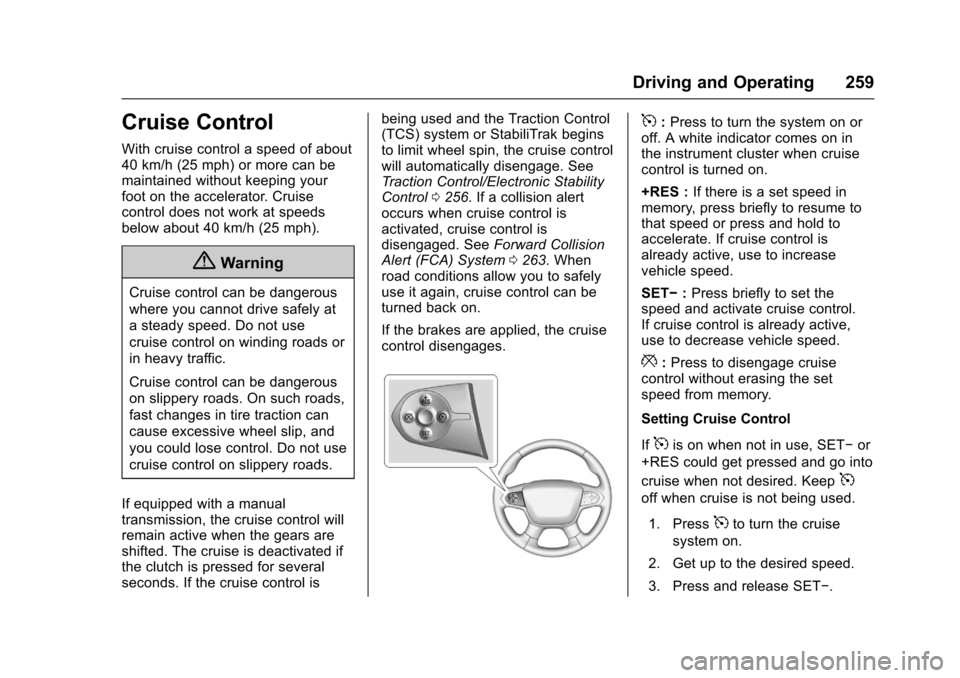
5:Press to turn the system on oroff. A white indicator comes on inthe instrument cluster when cruisecontrol is turned on.
+RES :If there is a set speed inmemory, press briefly to resume tothat speed or press and hold toaccelerate. If cruise control isalready active, use to increasevehicle speed.
SET✓:Press briefly to set thespeed and activate cruise control.If cruise control is already active,use to decrease vehicle speed.
*:Press to disengage cruisecontrol without erasing the setspeed from memory.
Setting Cruise Control
If5is on when not in use, SET✓or
+RES could get pressed and go into
cruise when not desired. Keep5
off when cruise is not being used.
1. Press5to turn the cruise
system on.
2. Get up to the desired speed.
3. Press and release SET✓.
Page 261 of 419
Chevrolet Colorado Owner Manual (GMNA-Localizing-U.S./Canada/Mexico-10122675) - 2017 - crc - 8/22/16
260 Driving and Operating
4. Remove foot from theaccelerator.
The cruise control indicator on theinstrument cluster turns green aftercruise control has been set to thedesired speed. SeeInstrumentCluster (Base Level)011 0orInstrument Cluster (Uplevel)011 2.
Resuming a Set Speed
If the cruise control is set at adesired speed and then the brakes
are applied or*is pressed, the
cruise control is disengaged withouterasing the set speed from memory.
Once the vehicle speed reachesabout 40 km/h (25 mph) or more,press +RES briefly. The vehiclereturns to the previous set speed.
Increasing Speed While UsingCruise Control
If the cruise control system isalready activated:
.Press and hold +RES until thedesired speed is reached, thenrelease it.
.To i n c r e a s e v e h i c l e s p e e d i nsmall increments, briefly press+RES. For each press, thevehicle goes about 1.6 km/h(1 mph) faster.
The speedometer reading can bedisplayed in either English or metricunits. SeeDriver Information Center(DIC) (Base Level)0126orDriverInformation Center (DIC) (Uplevel)0129.Theincrementvalueuseddepends on the units displayed.
Reducing Speed While UsingCruise Control
If the cruise control system isalready activated:
.Press and hold SET–until thedesired lower speed is reached,then release it.
.To s l o w d o w n i n s m a l lincrements, briefly press SET–.For each press, the vehicle goesabout 1.6 km/h (1 mph) slower.
The speedometer reading can bedisplayed in either English or metricunits. SeeDriver Information Center(DIC) (Base Level)0126orDriver
Information Center (DIC) (Uplevel)0129.Theincrementvalueuseddepends on the units displayed.
Passing Another Vehicle WhileUsing Cruise Control
Use the accelerator pedal toincrease the vehicle speed. Whenyou take your foot off the pedal, thevehicle will slow down to theprevious set cruise speed. Whilepressing the accelerator pedal orshortly following the release tooverride cruise control, brieflypressing SET–will result in cruisecontrol set to the current vehiclespeed.
Using Cruise Control on Hills
How well the cruise control will workon hills depends on the vehiclespeed, load, and the steepness ofthe hills. When going up steep hills,you might have to step on theaccelerator pedal to maintain yourspeed. When going downhill, youmight have to brake or shift to alower gear to keep your speeddown. If the brake pedal is applied,cruise control will disengage.
Page 272 of 419
Chevrolet Colorado Owner Manual (GMNA-Localizing-U.S./Canada/Mexico-10122675) - 2017 - crc - 8/22/16
Driving and Operating 271
electric brakes, start thecombination moving and then applythe trailer brake controller by handto be sure the brakes work.
During the trip, check occasionallyto be sure that the load is secureand the lamps and any trailerbrakes still work.
Following Distance
Stay at least twice as far behind thevehicle ahead as you would whendriving the vehicle without a trailer.This can help to avoid heavybraking and sudden turns.
Passing
More passing distance is neededwhen towing a trailer. Thecombination will not accelerate asquickly and is longer so it isnecessary to go much fartherbeyond the passed vehicle beforereturning to the lane.
Backing Up
Hold the bottom of the steeringwheel with one hand. To move thetrailer to the left, move that hand tothe left. To move the trailer to the
right, move your hand to the right.Always back up slowly and,if possible, have someoneguide you.
Making Turns
Caution
Making very sharp turns while
trailering could cause the trailer to
come in contact with the vehicle.
The vehicle could be damaged.
Avoid making very sharp turns
while trailering.
When turning with a trailer, makewider turns than normal. Do this sothe trailer will not strike softshoulders, curbs, road signs, trees,or other objects. Avoid jerky orsudden maneuvers. Signal well inadvance.
If the trailer turn signal bulbs burnout, the arrows on the instrumentcluster will still flash for turns. It isimportant to check occasionally tobe sure the trailer bulbs are stillworking.
Driving on Grades
Reduce speed and shift to a lowergearbeforestarting down a long orsteep downgrade. If thetransmission is not shifted down, thebrakes might get hot and no longerwork well.
Vehicles can tow in D (Drive). Shiftthe transmission to a lower gear ifthe transmission shifts too oftenunder heavy loads and/or hillyconditions.
The Tow/Haul Mode may be used ifthe transmission shifts too often.SeeTo w / H a u l M o d e0245.
When towing at high altitude onsteep uphill grades, consider thefollowing: Engine coolant will boil atalowertemperaturethanatnormalaltitudes. If the engine is turned offimmediately after towing at highaltitude on steep uphill grades, thevehicle may show signs similar toengine overheating. To avoid this,let the engine run while parked,preferably on level ground, with thetransmission in P (Park) for a few
Page 278 of 419
Chevrolet Colorado Owner Manual (GMNA-Localizing-U.S./Canada/Mexico-10122675) - 2017 - crc - 8/22/16
Driving and Operating 277
Press this button on the centerstack to turn on and off the Tow/Haul Mode.
This indicator light on the instrumentcluster comes on when the Tow/Haul Mode is on.
To w / H a u l i s a f e a t u r e t h a t a s s i s t swhen pulling a heavy trailer or alarge or heavy load. SeeTo w / H a u lMode0245.
To w / H a u l i s d e s i g n e d t o b e m o s teffective when the vehicle andtrailer combined weight is at least75 percent of the vehicle's GrossCombined Weight Rating (GCWR).See“Weight of the Trailer”underTr a i l e r To w i n g0272.Tow/Haulismost useful under the followingdriving conditions:
.When pulling a heavy trailer or alarge or heavy load throughrolling terrain.
.When pulling a heavy trailer or alarge or heavy load instop-and-go traffic.
.When pulling a heavy trailer or alarge or heavy load in busyparking lots where improved lowspeed control of the vehicle isdesired.
Operating the vehicle in Tow/Haulwhen lightly loaded or with no trailerat all will not cause damage.However, there is no benefit to theselection of Tow/Haul when thevehicle is unloaded. Such aselection when unloaded may resultin unpleasant engine andtransmission driving characteristicsand reduced fuel economy. Tow/Haul is recommended only whenpulling a heavy trailer or a large orheavy load.
If the vehicle has a diesel engine,the Tow/Haul button activates theexhaust brake systemsimultaneously. See“ExhaustBrake”in the Duramax dieselsupplement.
Trailer Sway
Control (TSC)
Vehicles with StabiliTrak have aTrailer Sway Control (TSC) feature.Trailer sway is unintendedside-to-side motion of a trailer whilebeing towed. If the vehicle is towingatrailerandtheTSCdetectsthatsway is increasing, the vehiclebrakes are selectively applied ateach wheel, to help reduceexcessive trailer sway. If the vehicleis equipped with the IntegratedTrailer Brake Control (ITBC) system,and the trailer has the electricactuated brake system, StabiliTrakmay also apply the trailer brakes.
If TSC is enabled, the TractionControl System (TCS)/StabiliTrakwarning light will flash on theinstrument cluster. Vehicle speedmust be reduced. If trailer swaycontinues, StabiliTrak can reduceengine torque to help slow thevehicle. SeeTr a c t i o n C o n t r o l /Electronic Stability Control0256.
Page 297 of 419
Chevrolet Colorado Owner Manual (GMNA-Localizing-U.S./Canada/Mexico-10122675) - 2017 - crc - 8/22/16
296 Vehicle Care
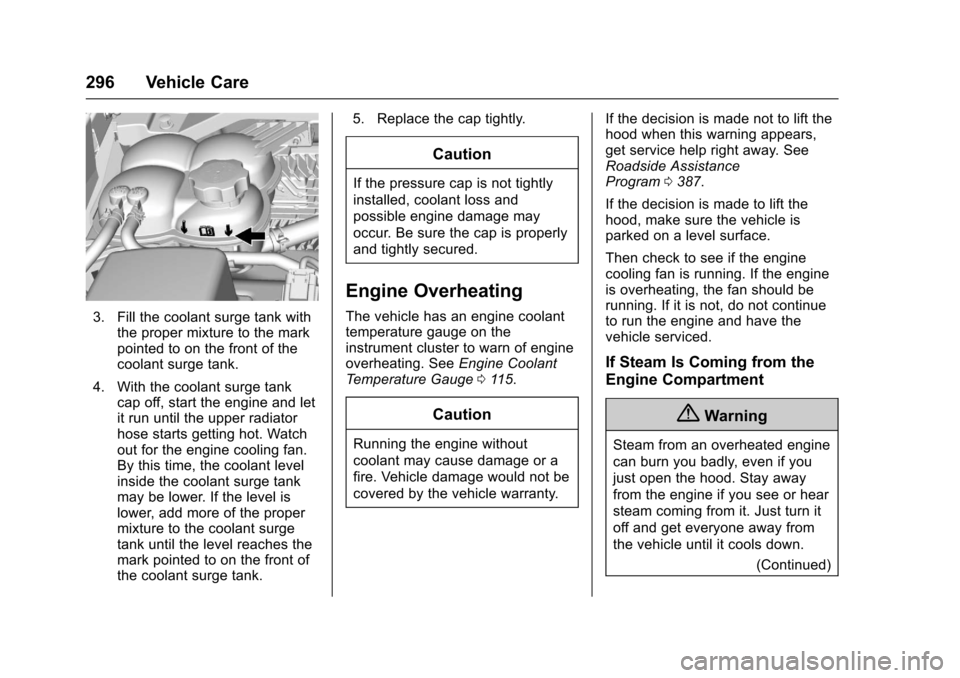
3. Fill the coolant surge tank withthe proper mixture to the markpointed to on the front of thecoolant surge tank.
4. With the coolant surge tankcap off, start the engine and letit run until the upper radiatorhose starts getting hot. Watchout for the engine cooling fan.By this time, the coolant levelinside the coolant surge tankmay be lower. If the level islower, add more of the propermixture to the coolant surgetank until the level reaches themark pointed to on the front ofthe coolant surge tank.
5. Replace the cap tightly.
Caution
If the pressure cap is not tightly
installed, coolant loss and
possible engine damage may
occur. Be sure the cap is properly
and tightly secured.
Engine Overheating
The vehicle has an engine coolanttemperature gauge on theinstrument cluster to warn of engineoverheating. SeeEngine CoolantTe m p e r a t u r e G a u g e011 5.
Caution
Running the engine without
coolant may cause damage or a
fire. Vehicle damage would not be
covered by the vehicle warranty.
If the decision is made not to lift thehood when this warning appears,get service help right away. SeeRoadside AssistanceProgram0387.
If the decision is made to lift thehood, make sure the vehicle isparked on a level surface.
Then check to see if the enginecooling fan is running. If the engineis overheating, the fan should berunning. If it is not, do not continueto run the engine and have thevehicle serviced.
If Steam Is Coming from the
Engine Compartment
{Warning
Steam from an overheated engine
can burn you badly, even if you
just open the hood. Stay away
from the engine if you see or hear
steam coming from it. Just turn it
off and get everyone away from
the vehicle until it cools down.
(Continued)
Page 316 of 419
Chevrolet Colorado Owner Manual (GMNA-Localizing-U.S./Canada/Mexico-10122675) - 2017 - crc - 8/22/16
Vehicle Care 315
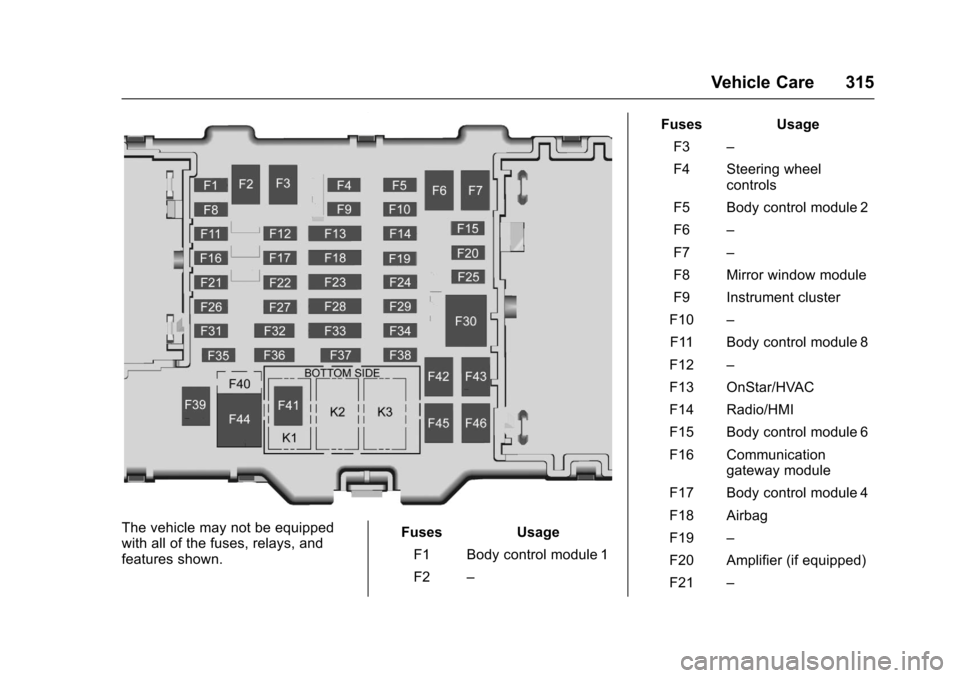
The vehicle may not be equippedwith all of the fuses, relays, andfeatures shown.
Fuses Usage
F1 Body control module 1
F2–
Fuses Usage
F3–
F4 Steering wheelcontrols
F5 Body control module 2
F6–
F7–
F8 Mirror window module
F9 Instrument cluster
F10–
F11 Body control module 8
F12–
F13 OnStar/HVAC
F14 Radio/HMI
F15 Body control module 6
F16 Communicationgateway module
F17 Body control module 4
F18 Airbag
F19–
F20 Amplifier (if equipped)
F21–
Page 327 of 419
Chevrolet Colorado Owner Manual (GMNA-Localizing-U.S./Canada/Mexico-10122675) - 2017 - crc - 8/22/16
326 Vehicle Care
Tire Pressure Monitor
Operation
This vehicle may have a TirePressure Monitor System (TPMS).The TPMS is designed to warn thedriver when a low tire pressurecondition exists. TPMS sensors aremounted onto each tire and wheelassembly, excluding the spare tireand wheel assembly. The TPMSsensors monitor the air pressure inthe tires and transmit the tirepressure readings to a receiverlocated in the vehicle.
When a low tire pressure conditionis detected, the TPMS illuminatesthe low tire pressure warning lightlocated on the instrument cluster.If the warning light comes on, stopas soon as possible and inflate thetires to the recommended pressure
shown on the Tire and LoadingInformation label. SeeVehicle LoadLimits0226.
AmessagetocheckthepressureinaspecifictiredisplaysintheDriverInformation Center (DIC). The lowtire pressure warning light and theDIC warning message come on ateach ignition cycle until the tires areinflated to the correct inflationpressure. Using the DIC, tirepressure levels can be viewed. Foradditional information and detailsabout the DIC operation anddisplays, seeDriver InformationCenter (DIC) (Base Level)0126orDriver Information Center (DIC)(Uplevel)0129andTire Messages0137.
The low tire pressure warning lightmay come on in cool weather whenthe vehicle is first started, and thenturn off as the vehicle is driven. Thiscould be an early indicator that theair pressure is getting low andneeds to be inflated to the properpressure.
ATire and Loading Information labelshows the size of the originalequipment tires and the correctinflation pressure for the tires whenthey are cold. SeeVehicle LoadLimits0226,foranexampleoftheTire and Loading Information labeland its location. Also seeTirePressure0323.
The TPMS can warn about a lowtire pressure condition but it doesnot replace normal tiremaintenance. SeeTire Inspection0329,Tire Rotation0329,andTires0316.
Caution
Tire sealant materials are not all
the same. A non-approved tire
sealant could damage the TPMS
sensors. TPMS sensor damage
caused by using an incorrect tire
sealant is not covered by the
vehicle warranty. Always use only
the GM approved tire sealant
available through your dealer or
included in the vehicle.
Page 362 of 419
Chevrolet Colorado Owner Manual (GMNA-Localizing-U.S./Canada/Mexico-10122675) - 2017 - crc - 8/22/16
Vehicle Care 361
Original manufacturer replacementparts will provide the corrosionprotection while maintaining thevehicle warranty.
Finish Damage
Quickly repair minor chips andscratches with touch-up materialsavailable from your dealer to avoidcorrosion. Larger areas of finishdamage can be corrected in yourdealer's body and paint shop.
Chemical Paint Spotting
Airborne pollutants can fall uponand attack painted vehicle surfacescausing blotchy, ring-shapeddiscolorations, and small, irregulardark spots etched into the paintsurface. Refer to“Finish Care”previously in this section.
Interior Care
To p r e v e n t d i r t p a r t i c l e a b r a s i o n s ,regularly clean the vehicle's interior.Immediately remove any soils.Newspapers or dark garments cantransfer color to the vehicle’sinterior.
Use a soft bristle brush to removedust from knobs and crevices on theinstrument cluster. Using a mildsoap solution, immediately removehand lotions, sunscreen, and insectrepellent from all interior surfaces orpermanent damage may result.
Use cleaners specifically designedfor the surfaces being cleaned toprevent permanent damage. Applycleaners directly to the cleaningcloth. Do not spray cleaners on anyswitches or controls. Removecleaners quickly.
Before using cleaners, read andfollow to all safety instructions onthe label. While cleaning the interior,open the doors and windows to getproper ventilation.
To p r e v e n t d a m a g e , d o n o t c l e a nthe interior using the followingcleaners or techniques:
.Never use a razor or any othersharp object to remove a soilfrom any interior surface.
.Never use a brush with stiffbristles.
.Never rub any surfaceaggressively or with too muchpressure.
.Do not use laundry detergents ordishwashing soaps withdegreasers. For liquid cleaners,use approximately 20 drops per3.8 L (1 gal) of water.Aconcentratedsoapsolutionwillcreate streaks and attract dirt.Do not use solutions that containstrong or caustic soap.
.Do not heavily saturate theupholstery when cleaning.
.Do not use solvents or cleanerscontaining solvents.
Interior Glass
To c l e a n , u s e a t e r r y c l o t h f a b r i cdampened with water. Wipe dropletsleft behind with a clean dry cloth.If necessary, use a commercialglass cleaner after cleaning withplain water.
Page 374 of 419
Chevrolet Colorado Owner Manual (GMNA-Localizing-U.S./Canada/Mexico-10122675) - 2017 - crc - 8/22/16
Service and Maintenance 373
.To a v o i d b r e a k - d o w n o r f a i l u r e t ostart the vehicle, maintain abattery with full cranking power.
.Trained dealer technicians havethe diagnostic equipment to testthe battery and ensure that theconnections and cables arecorrosion-free.
Belts
.Belts may need replacing if theysqueak or show signs ofcracking or splitting.
.Trained dealer technicians haveaccess to tools and equipmentto inspect the belts andrecommend adjustment orreplacement when necessary.
Brakes
Brakes stop the vehicle and arecrucial to safe driving.
.Signs of brake wear may includechirping, grinding, or squealingnoises, or difficulty stopping.
.Trained dealer technicians haveaccess to tools and equipmentto inspect the brakes andrecommend quality partsengineered for the vehicle.
Fluids
Proper fluid levels and approvedfluids protect the vehicle’ssystemsand components. SeeRecommended Fluids andLubricants0375for GM approvedfluids.
.Engine oil and windshieldwasher fluid levels should bechecked at every fuel fill.
.Instrument cluster lights maycome on to indicate that fluidsmay be low and need to befilled.
Hoses
Hoses transport fluids and shouldbe regularly inspected to ensurethat there are no cracks or leaks.With a multi-point inspection, yourdealer can inspect the hoses andadvise if replacement is needed.
Lamps
Properly working headlamps,taillamps, and brake lamps areimportant to see and be seen onthe road.
.Signs that the headlamps needattention include dimming, failureto light, cracking, or damage.The brake lamps need to bechecked periodically to ensurethat they light when braking.
.With a multi-point inspection,your dealer can check the lampsand note any concerns.
Shocks and Struts
Shocks and struts help aid in controlfor a smoother ride.
.Signs of wear may includesteering wheel vibration, bounce/sway while braking, longerstopping distance, or uneventire wear.
.As part of the multi-pointinspection, trained dealertechnicians can visually inspectthe shocks and struts for signs