ignition CHEVROLET COLORADO 2017 2.G Repair Manual
[x] Cancel search | Manufacturer: CHEVROLET, Model Year: 2017, Model line: COLORADO, Model: CHEVROLET COLORADO 2017 2.GPages: 419, PDF Size: 7.38 MB
Page 328 of 419
Chevrolet Colorado Owner Manual (GMNA-Localizing-U.S./Canada/Mexico-10122675) - 2017 - crc - 8/22/16
Vehicle Care 327
TPMS Malfunction Light and
Message
The TPMS will not function properlyif one or more of the TPMS sensorsare missing or inoperable. When thesystem detects a malfunction, thelow tire pressure warning lightflashes for about one minute andthen stays on for the remainder ofthe ignition cycle. A DIC warningmessage also displays. Themalfunction light and DIC warningmessage come on at each ignitioncycle until the problem is corrected.Some of the conditions that cancause these to come on are:
.One of the road tires has beenreplaced with the spare tire. Thespare tire does not have aTPMS sensor. The malfunctionlight and the DIC messageshould go off after the road tireis replaced and the sensormatching process is performedsuccessfully. See“TPMS SensorMatching Process”later in thissection.
.The TPMS sensor matchingprocess was not done or notcompleted successfully afterrotating the tires. Themalfunction light and the DICmessage should go off aftersuccessfully completing thesensor matching process. See“TPMS Sensor MatchingProcess”later in this section.
.One or more TPMS sensors aremissing or damaged. Themalfunction light and the DICmessage should go off when theTPMS sensors are installed andthe sensor matching process isperformed successfully. Seeyour dealer for service.
.Replacement tires or wheels donot match the original equipmenttires or wheels. Tires and wheelsother than those recommendedcould prevent the TPMS fromfunctioning properly. SeeBuyingNew Tires0331.
.Operating electronic devices orbeing near facilities using radiowave frequencies similar to theTPMS could cause the TPMSsensors to malfunction.
If the TPMS is not functioningproperly, it cannot detect or signal alow tire condition. See your dealerfor service if the TPMS malfunctionlight and DIC message come onand stay on.
TPMS Sensor Matching
Process
Each TPMS sensor has a uniqueidentification code. The identificationcode needs to be matched to a newtire/wheel position after rotating thevehicle’stiresorreplacingoneormore of the TPMS sensors. Also,the TPMS sensor matching processshould be performed after replacingasparetirewitharoadtirecontaining the TPMS sensor. Themalfunction light and the DICmessage should go off at the nextignition cycle. The sensors arematched to the tire/wheel positions,using a TPMS relearn tool, in thefollowing order: driver side front tire,
Page 329 of 419
Chevrolet Colorado Owner Manual (GMNA-Localizing-U.S./Canada/Mexico-10122675) - 2017 - crc - 8/22/16
328 Vehicle Care
passenger side front tire, passengerside rear tire, and driver side rear.See your dealer for service or topurchase a relearn tool. A TPMSrelearn tool can also be purchased.See Tire Pressure Monitor SensorActivation Tool atwww.gmtoolsandequipment.com orcall 1-800-GM TOOLS(1-800-468-6657).
There are two minutes to match thefirst tire/wheel position, andfive minutes overall to match all fourtire/wheel positions. If it takeslonger, the matching process stopsand must be restarted.
The TPMS sensor matchingprocess is:
1. Set the parking brake.
2. Turn the ignition to ON/RUNwith the engine off.
3. If the vehicle has an uplevelDIC, make sure the TirePressure info page option isturned on. The info pages onthe DIC can be turned on andoff through the Settings menu.
SeeDriver Information Center(DIC) (Base Level)0126orDriver Information Center (DIC)(Uplevel)0129.
4. If the vehicle has an uplevelDIC, use the DIC controls onthe right side of the steeringwheel to scroll to the TirePressure screen under the DICinfo page.
If the vehicle has a base levelDIC, use the MENU button toselect the Vehicle Informationmenu in the DIC. Use thethumbwheel to scroll to the TirePressure Menu item screen.
5. If the vehicle has an uplevel
DIC, press and holdVin the
center of the DIC controls.
If the vehicle has a base levelDIC, press SET/CLR on theturn signal lever to begin thesensor matching process.
Amessageaskingiftheprocess should begin shouldappear. Press SET/CLR againto confirm the selection.
The horn sounds twice tosignal the receiver is in relearnmode and the TIRELEARNING ACTIVE messagedisplays on the DIC screen.
6. Start with the driver sidefront tire.
7. Place the relearn tool againstthe tire sidewall, near the valvestem. Then press the button toactivate the TPMS sensor.Ahornchirpconfirmsthatthesensor identification code hasbeen matched to this tire andwheel position.
8. Proceed to the passenger sidefront tire, and repeat theprocedure in Step 7.
9. Proceed to the passenger siderear tire, and repeat theprocedure in Step 7.
10. Proceed to the driver side reartire, and repeat the procedurein Step 7. The horn sounds twotimes to indicate the sensoridentification code has beenmatched to the driver side reartire, and the TPMS sensor
Page 340 of 419
Chevrolet Colorado Owner Manual (GMNA-Localizing-U.S./Canada/Mexico-10122675) - 2017 - crc - 8/22/16
Vehicle Care 339
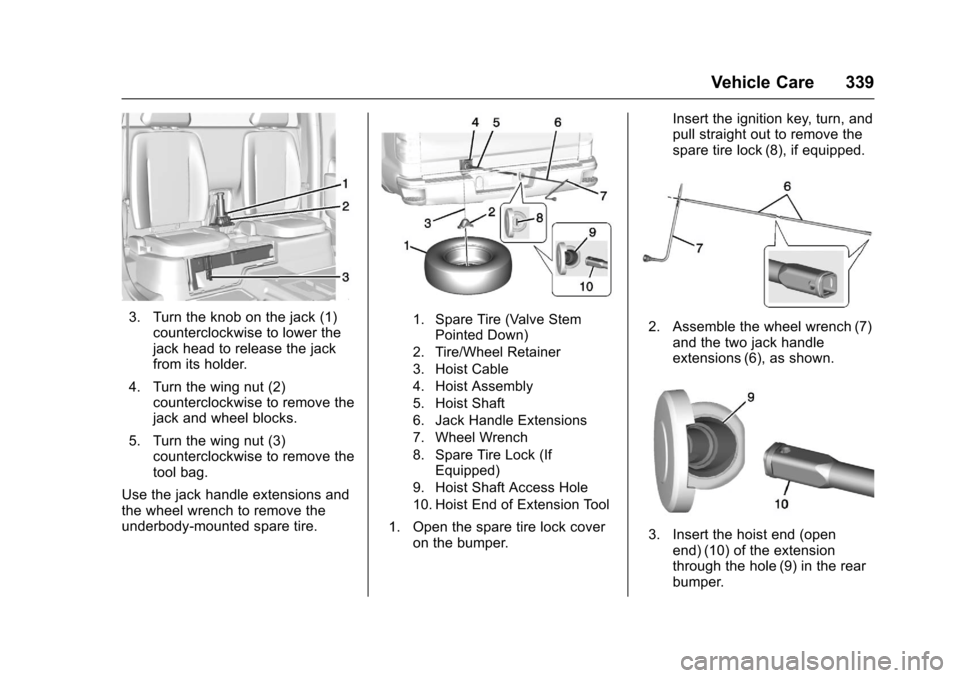
3. Turn the knob on the jack (1)counterclockwise to lower thejack head to release the jackfrom its holder.
4. Turn the wing nut (2)counterclockwise to remove thejack and wheel blocks.
5. Turn the wing nut (3)counterclockwise to remove thetool bag.
Use the jack handle extensions andthe wheel wrench to remove theunderbody-mounted spare tire.
1. Spare Tire (Valve StemPointed Down)
2. Tire/Wheel Retainer
3. Hoist Cable
4. Hoist Assembly
5. Hoist Shaft
6. Jack Handle Extensions
7. Wheel Wrench
8. Spare Tire Lock (IfEquipped)
9. Hoist Shaft Access Hole
10. Hoist End of Extension Tool
1. Open the spare tire lock coveron the bumper.
Insert the ignition key, turn, andpull straight out to remove thespare tire lock (8), if equipped.
2. Assemble the wheel wrench (7)and the two jack handleextensions (6), as shown.
3. Insert the hoist end (openend) (10) of the extensionthrough the hole (9) in the rearbumper.
Page 351 of 419
Chevrolet Colorado Owner Manual (GMNA-Localizing-U.S./Canada/Mexico-10122675) - 2017 - crc - 8/22/16
350 Vehicle Care
4. Turn the ignition to LOCK/OFF.Turn off all lights andaccessories in both vehicles,except the hazard warningflashers if needed.
{Warning
An electric fan can start up even
when the engine is not running
and can injure you. Keep hands,
clothing, and tools away from any
underhood electric fan.
{Warning
Using a match near a battery can
cause battery gas to explode.
People have been hurt doing this,
and some have been blinded.
Use a flashlight if you need more
light.
Battery fluid contains acid that
can burn you. Do not get it on
you. If you accidentally get it in
(Continued)
Warning (Continued)
your eyes or on your skin, flush
the place with water and get
medical help immediately.
{Warning
Fans or other moving engine
parts can injure you badly. Keep
your hands away from moving
parts once the engine is running.
5. Connect one end of the redpositive (+) cable to thepositive (+) terminal on thedischarged battery.
6. Connect the other end of thered positive (+) cable to thepositive (+) terminal of the goodbattery.
7. Connect one end of the blacknegative (–)cabletothenegative (–)terminalofthegood battery.
8. Connect the other end of theblack negative (–)cabletothenegative (–)groundingstudforthe discharged battery.
9. Start the engine in the vehiclewith the good battery and runthe engine at idle speed for atleast four minutes.
10. Try to start the vehicle that hadthe dead battery. If it will notstart after a few tries, itprobably needs service.
Caution
If the jumper cables are
connected or removed in the
wrong order, electrical shorting
may occur and damage the
vehicle. The repairs would not be
covered by the vehicle warranty.
Always connect and remove the
jumper cables in the correct order,
making sure that the cables do
not touch each other or other
metal.
Page 354 of 419
Chevrolet Colorado Owner Manual (GMNA-Localizing-U.S./Canada/Mexico-10122675) - 2017 - crc - 8/22/16
Vehicle Care 353
(Drive). There should be nomovement of the vehicle whileshifting.
5. Shift the transmission into D(Drive). Turn the engine off.Then shift the transmission intoP(Park).
6. Wait for at least 10 seconds,then restart the engine.
7. Shift the transmission to D(Drive), then turn the engine offagain.
Caution
Failure to disconnect the negative
battery cable or to have it contact
the terminals can cause damage
to the vehicle.
8. Disconnect the negativebattery cable at the battery andsecure the nut and bolt. Coverthe negative battery post with anon-conductive material toprevent any contact with thenegative battery terminal.
9. Shift the transmission toP(Park).
Caution
If the steering column is locked,
vehicle damage may occur.
10. Move the steering wheel tomake sure the steering columnis unlocked.
11 . W i t h a f o o t o n t h e b r a k e p e d a l ,release the parking brake.Keep the ignition key in thetowed vehicle in ACC/ACCESSORY to prevent thesteering column from locking.
Disconnecting the Towed Vehicle
Before disconnecting the towedvehicle:
1. Park on a level surface.
2. Set the parking brake, thenshift the transmission toP(Park),andmovetheignitionkey to OFF.
3. Connect the battery.
4. Apply the brake pedal.
5. Shift the transfer case out ofN(Neutral) to Two-Wheel DriveHigh. See“Shifting out ofN(Neutral)”underFour-WheelDrive0247.Seeyourdealerifthe transfer case cannot beshifted out of N (Neutral).
6. Check that the vehicle is inTw o - W h e e l D r i v e H i g h b yshifting the transmission toR(Reverse)andthentoD(Drive). There should bemovement of the vehicle whileshifting.
7. Shift the transmission toP(Park)andturnofftheignition.
8. Disconnect the vehicle from thetow vehicle.
9. Release the parking brake.
10. Reset any lost presets.
The outside temperaturedisplay will default to 0 °C(32 °F) but will reset withnormal usage.
Page 356 of 419
Chevrolet Colorado Owner Manual (GMNA-Localizing-U.S./Canada/Mexico-10122675) - 2017 - crc - 8/22/16
Vehicle Care 355
6. Secure the vehicle to the dollyfollowing the manufacturer'sinstructions.
7. Shift the transfer case toN(Neutral). See“Shifting intoN(Neutral)”underFour-WheelDrive0247for the properprocedure.
8. Release the parking brake onlyafter the vehicle being towed isfirmly attached to the towvehicle.
9. Turn the ignition to LOCK/OFF.
Rear Towing (Rear Wheels Off
the Ground)
Two-Wheel-Drive Vehicles
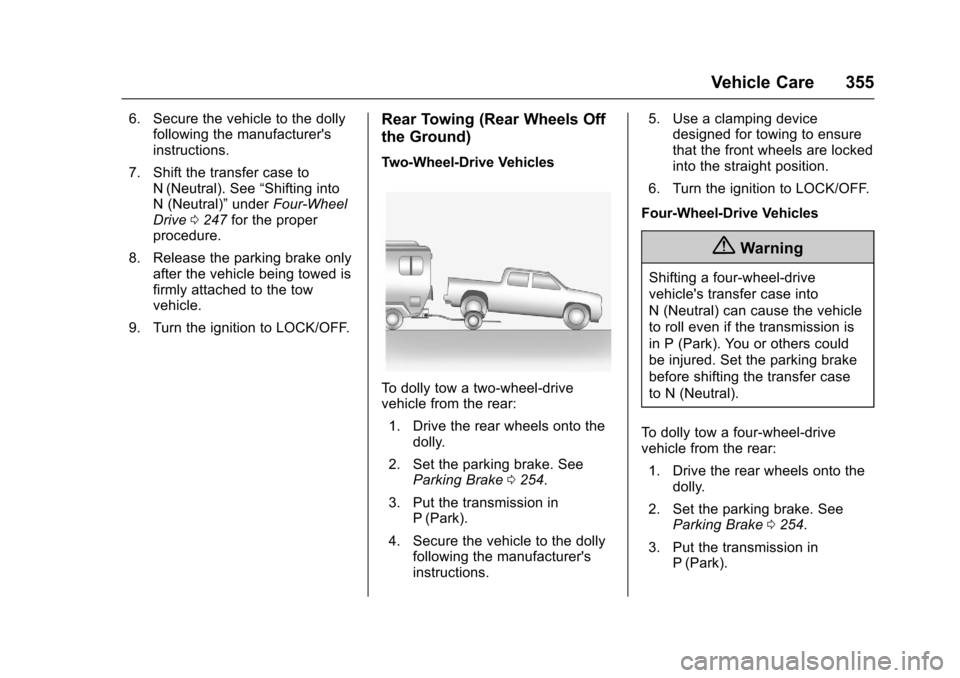
To d o l l y t o w a t w o - w h e e l - d r i v evehicle from the rear:
1. Drive the rear wheels onto thedolly.
2. Set the parking brake. SeeParking Brake0254.
3. Put the transmission inP(Park).
4. Secure the vehicle to the dollyfollowing the manufacturer'sinstructions.
5. Use a clamping devicedesigned for towing to ensurethat the front wheels are lockedinto the straight position.
6. Turn the ignition to LOCK/OFF.
Four-Wheel-Drive Vehicles
{Warning
Shifting a four-wheel-drive
vehicle's transfer case into
N(Neutral)cancausethevehicle
to roll even if the transmission is
in P (Park). You or others could
be injured. Set the parking brake
before shifting the transfer case
to N (Neutral).
To d o l l y t o w a f o u r - w h e e l - d r i v evehicle from the rear:
1. Drive the rear wheels onto thedolly.
2. Set the parking brake. SeeParking Brake0254.
3. Put the transmission inP(Park).
Page 357 of 419
Chevrolet Colorado Owner Manual (GMNA-Localizing-U.S./Canada/Mexico-10122675) - 2017 - crc - 8/22/16
356 Vehicle Care
4. Secure the vehicle to the dollyfollowing the manufacturer'sinstructions.
5. Use a clamping devicedesigned for towing to ensurethat the front wheels are lockedinto the straight position.
6. Shift the transfer case toN(Neutral). See“Shifting intoN(Neutral)”underFour-WheelDrive0247for the properprocedure.
7. Turn the ignition to LOCK/OFF.
Appearance Care
Exterior Care
Locks
Locks are lubricated at the factory.Use a de-icing agent only whenabsolutely necessary, and have thelocks greased after using. SeeRecommended Fluids andLubricants0375.
Washing the Vehicle
To p r e s e r v e t h e v e h i c l e ' s f i n i s h ,wash it often and out of directsunlight.
Caution
Do not use petroleum-based,
acidic, or abrasive cleaning
agents as they can damage the
vehicle's paint, metal, or plastic
parts. If damage occurs, it would
not be covered by the vehicle
warranty. Approved cleaning
products can be obtained from
(Continued)
Caution (Continued)
your dealer. Follow all
manufacturer directions regarding
correct product usage, necessary
safety precautions, and
appropriate disposal of any
vehicle care product.
Caution
Avoid using high-pressure
washes closer than 30 cm (12 in)
to the surface of the vehicle. Use
of power washers exceeding
8,274 kPa (1,200 psi) can result
in damage or removal of paint
and decals.
Page 369 of 419

Chevrolet Colorado Owner Manual (GMNA-Localizing-U.S./Canada/Mexico-10122675) - 2017 - crc - 8/22/16
368 Service and Maintenance
.Check automatic transmissionshift lock control function. SeeAutomatic Transmission ShiftLock Control FunctionCheck0304.
.Check ignition transmission lock.SeeIgnition Transmission LockCheck0304.
.Check parking brake andautomatic transmission parkmechanism. SeePark Brake andP(Park)MechanismCheck0305.
.Check accelerator pedal fordamage, high effort, or binding.Replace if needed.
.Visually inspect gas strut forsigns of wear, cracks, or otherdamage. Check the hold openability of the strut. See yourdealer if service is required.
.Verify spare tire key lockoperation and lubricate asneeded. SeeTireChanging0338.
Page 399 of 419
Chevrolet Colorado Owner Manual (GMNA-Localizing-U.S./Canada/Mexico-10122675) - 2017 - crc - 8/22/16
398 OnStar
.Obtain and customize the Wi-Fi®
hotspot name or SSID andpassword, if equipped.
PressQto connect to an
Advisor to:
.Verify account information orupdate contact information.
.Get driving directions.
.Receive a Diagnostic check ofthe vehicle's key operatingsystems.
.Receive Roadside Assistance.
.Manage Wi-Fi Settings,if equipped.
Press>to get a priority connection
to an OnStar Advisor available24/7 to:
.Get help for an emergency.
.Be a Good Samaritan orrespond to an AMBER Alert.
.Get assistance in severeweather or other crisis situationsand find evacuation routes.
OnStar Services
Emergency
Emergency Services require anactive, OnStar service plan(excludes Basic Plan). WithAutomatic Crash Response, built-insensors can automatically alert aspecially trained OnStar Advisorwho is immediately connected in tothe vehicle to help.
Press>for a priority connection to
an OnStar Advisor who can contactemergency service providers, directthem to your exact location, andrelay important information.
With OnStar Crisis Assist, speciallytrained Advisors are available24 hours a day, 7 days a week, toprovide a central point of contact,assistance, and information during acrisis.
With Roadside Assistance, Advisorscan locate a nearby service providerto help with a flat tire, a batteryjump, or an empty gas tank.
Security
If equipped, OnStar provides theseservices:
.With Stolen Vehicle Assistance,OnStar Advisors can use GPS topinpoint the vehicle and helpauthorities quickly recover it.
.With Remote Ignition Block™,if equipped, OnStar can blockthe engine from being restarted.
.With Stolen Vehicle Slowdown®,if equipped, OnStar can workwith law enforcement togradually slow the vehicle down.
Theft Alarm Notification
If equipped, if the doors are lockedand the vehicle alarm sounds, anotification by text, e-mail, or phonecall will be sent. If the vehicle isstolen, an OnStar Advisor can workwith authorities to recover thevehicle.
Page 404 of 419
Chevrolet Colorado Owner Manual (GMNA-Localizing-U.S./Canada/Mexico-10122675) - 2017 - crc - 8/22/16
OnStar 403
to the vehicle in a crash, or wirelessphone network congestion orjamming—may prevent service.
SeeRadio FrequencyStatement0393.
Services for People with
Disabilities
Advisors provide services to helpSubscribers with physical disabilitiesand medical conditions.
PressQto help:
.Locate a gas station with anattendant to pump gas.
.Find a hotel, restaurant, etc.,that meets accessibility needs.
.Provide directions to the closesthospital or pharmacy in urgentsituations.
TTY Users
OnStar has the ability tocommunicate to deaf,hard-of-hearing, or speech-impairedcustomers while in the vehicle. Theavailable dealer-installed TTYsystem can provide in-vehicle
access to all OnStar services,except Virtual Advisor and OnStarTurn-by-Turn Navigation.
OnStar Personal Identification
Number (PIN)
APINisneededtoaccesssomeOnStar services. The PIN will needto be changed the first time whenspeaking with an Advisor. Tochange the OnStar PIN, contact an
OnStar Advisor by pressingQor
calling 1-888-4ONSTAR.
Warranty
OnStar equipment may bewarranted as part of the vehiclewarranty.
Languages
The vehicle can be programmed torespond in multiple languages.
PressQand ask for an Advisor.
Advisors are available in English,Spanish, and French. Availablelanguages may vary by country.
Potential Issues
OnStar cannot perform RemoteDoor Unlock or Stolen VehicleAssistance after the vehicle hasbeen off continuously for 10 dayswithout an ignition cycle. If thevehicle has not been started forfive days, OnStar can contactRoadside Assistance or a locksmithto help gain access to the vehicle.
Global Positioning
System (GPS)
.Obstruction of the GPS canoccur in a large city with tallbuildings; in parking garages;around airports; in tunnels andunderpasses; or in an area withvery dense trees. If GPS signalsare not available, the OnStarsystem should still operate tocall OnStar. However, OnStarcould have difficulty identifyingthe exact location.
.In emergency situations, OnStarcan use the last stored GPSlocation to send to emergencyresponders.