display CHEVROLET COLORADO 2017 2.G Manual Online
[x] Cancel search | Manufacturer: CHEVROLET, Model Year: 2017, Model line: COLORADO, Model: CHEVROLET COLORADO 2017 2.GPages: 419, PDF Size: 7.38 MB
Page 258 of 419
Chevrolet Colorado Owner Manual (GMNA-Localizing-U.S./Canada/Mexico-10122675) - 2017 - crc - 8/22/16
Driving and Operating 257
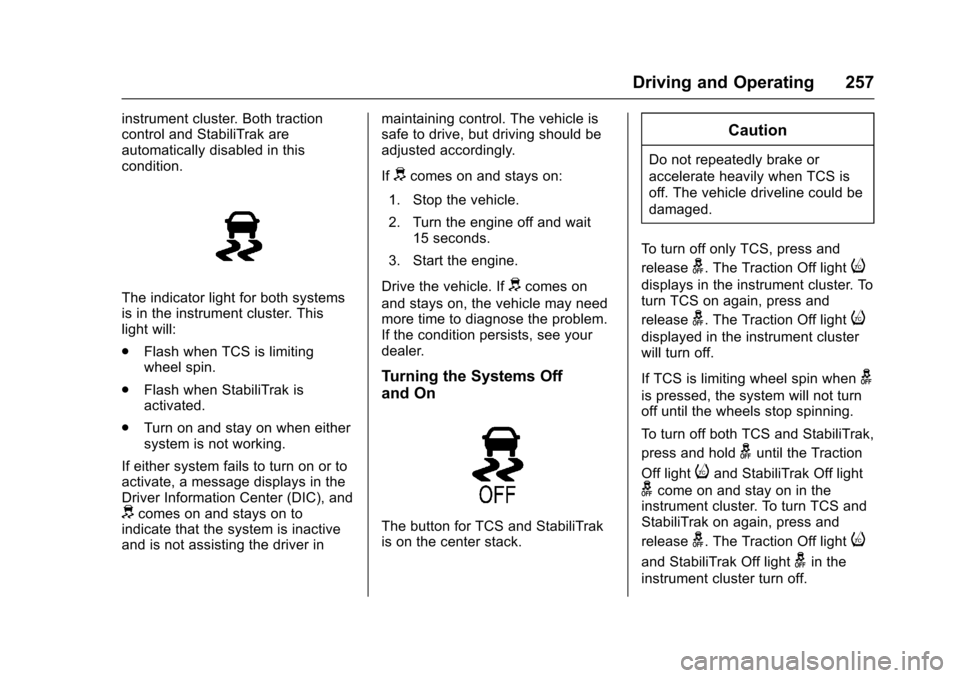
instrument cluster. Both tractioncontrol and StabiliTrak areautomatically disabled in thiscondition.
The indicator light for both systemsis in the instrument cluster. Thislight will:
.Flash when TCS is limitingwheel spin.
.Flash when StabiliTrak isactivated.
.Turn on and stay on when eithersystem is not working.
If either system fails to turn on or toactivate, a message displays in theDriver Information Center (DIC), anddcomes on and stays on toindicate that the system is inactiveand is not assisting the driver in
maintaining control. The vehicle issafe to drive, but driving should beadjusted accordingly.
Ifdcomes on and stays on:
1. Stop the vehicle.
2. Turn the engine off and wait15 seconds.
3. Start the engine.
Drive the vehicle. Ifdcomes on
and stays on, the vehicle may needmore time to diagnose the problem.If the condition persists, see yourdealer.
Turning the Systems Off
and On
The button for TCS and StabiliTrakis on the center stack.
Caution
Do not repeatedly brake or
accelerate heavily when TCS is
off. The vehicle driveline could be
damaged.
To t u r n o f f o n l y T C S , p r e s s a n d
releaseg.TheTractionOfflighti
displays in the instrument cluster. Toturn TCS on again, press and
releaseg.TheTractionOfflighti
displayed in the instrument clusterwill turn off.
If TCS is limiting wheel spin wheng
is pressed, the system will not turnoff until the wheels stop spinning.
To t u r n o f f b o t h T C S a n d S t a b i l i T r a k ,
press and holdguntil the Traction
Off lightiand StabiliTrak Off light
gcome on and stay on in theinstrument cluster. To turn TCS andStabiliTrak on again, press and
releaseg.TheTractionOfflighti
and StabiliTrak Off lightgin the
instrument cluster turn off.
Page 259 of 419
Chevrolet Colorado Owner Manual (GMNA-Localizing-U.S./Canada/Mexico-10122675) - 2017 - crc - 8/22/16
258 Driving and Operating
StabiliTrak will automatically turn onif the vehicle exceeds 56 km/h(35 mph). Traction control will
remain off until the driver pressesg
or the ignition is cycled Off then On.
Adding accessories can affect thevehicle performance. SeeAccessories andModifications0281.
Hill Descent
Control (HDC)
If equipped, HDC can be used whendriving downhill. It sets andmaintains vehicle speed whiledescending a very steep incline in aforward or reverse gear.
The HDC switch is on the centerstack, below the climate controls.
Press5to enable or disable HDC.
Vehicle speed must be below60 km/h (37 mph).
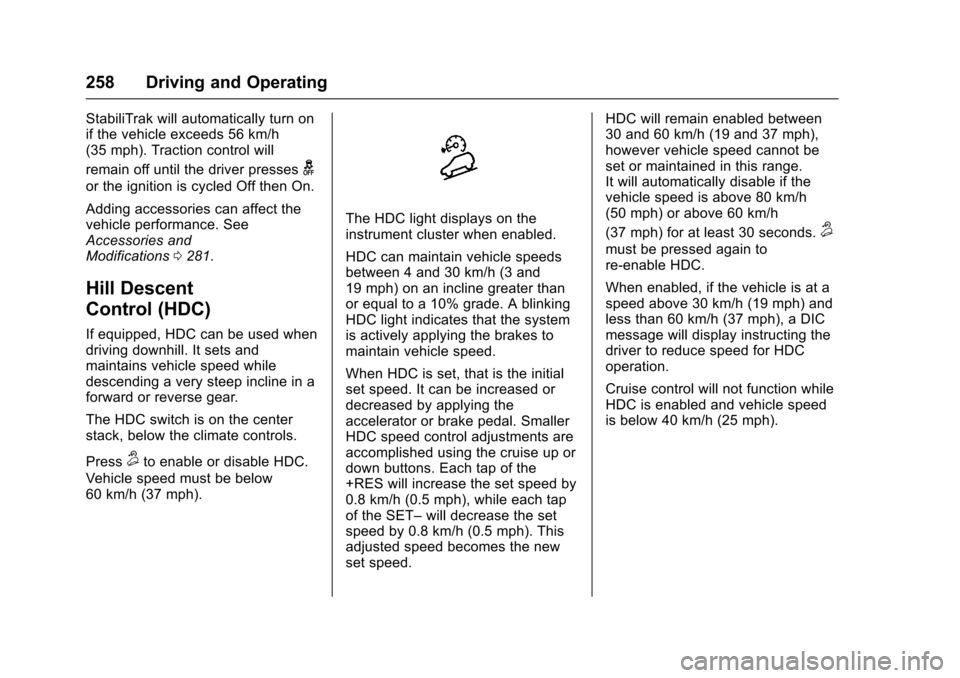
The HDC light displays on theinstrument cluster when enabled.
HDC can maintain vehicle speedsbetween 4 and 30 km/h (3 and19 mph) on an incline greater thanor equal to a 10% grade. A blinkingHDC light indicates that the systemis actively applying the brakes tomaintain vehicle speed.
When HDC is set, that is the initialset speed. It can be increased ordecreased by applying theaccelerator or brake pedal. SmallerHDC speed control adjustments areaccomplished using the cruise up ordown buttons. Each tap of the+RES will increase the set speed by0.8 km/h (0.5 mph), while each tapof the SET–will decrease the setspeed by 0.8 km/h (0.5 mph). Thisadjusted speed becomes the newset speed.
HDC will remain enabled between30 and 60 km/h (19 and 37 mph),however vehicle speed cannot beset or maintained in this range.It will automatically disable if thevehicle speed is above 80 km/h(50 mph) or above 60 km/h
(37 mph) for at least 30 seconds.5
must be pressed again tore-enable HDC.
When enabled, if the vehicle is at aspeed above 30 km/h (19 mph) andless than 60 km/h (37 mph), a DICmessage will display instructing thedriver to reduce speed for HDCoperation.
Cruise control will not function whileHDC is enabled and vehicle speedis below 40 km/h (25 mph).
Page 261 of 419
Chevrolet Colorado Owner Manual (GMNA-Localizing-U.S./Canada/Mexico-10122675) - 2017 - crc - 8/22/16
260 Driving and Operating
4. Remove foot from theaccelerator.
The cruise control indicator on theinstrument cluster turns green aftercruise control has been set to thedesired speed. SeeInstrumentCluster (Base Level)011 0orInstrument Cluster (Uplevel)011 2.
Resuming a Set Speed
If the cruise control is set at adesired speed and then the brakes
are applied or*is pressed, the
cruise control is disengaged withouterasing the set speed from memory.
Once the vehicle speed reachesabout 40 km/h (25 mph) or more,press +RES briefly. The vehiclereturns to the previous set speed.
Increasing Speed While UsingCruise Control
If the cruise control system isalready activated:
.Press and hold +RES until thedesired speed is reached, thenrelease it.
.To i n c r e a s e v e h i c l e s p e e d i nsmall increments, briefly press+RES. For each press, thevehicle goes about 1.6 km/h(1 mph) faster.
The speedometer reading can bedisplayed in either English or metricunits. SeeDriver Information Center(DIC) (Base Level)0126orDriverInformation Center (DIC) (Uplevel)0129.Theincrementvalueuseddepends on the units displayed.
Reducing Speed While UsingCruise Control
If the cruise control system isalready activated:
.Press and hold SET–until thedesired lower speed is reached,then release it.
.To s l o w d o w n i n s m a l lincrements, briefly press SET–.For each press, the vehicle goesabout 1.6 km/h (1 mph) slower.
The speedometer reading can bedisplayed in either English or metricunits. SeeDriver Information Center(DIC) (Base Level)0126orDriver
Information Center (DIC) (Uplevel)0129.Theincrementvalueuseddepends on the units displayed.
Passing Another Vehicle WhileUsing Cruise Control
Use the accelerator pedal toincrease the vehicle speed. Whenyou take your foot off the pedal, thevehicle will slow down to theprevious set cruise speed. Whilepressing the accelerator pedal orshortly following the release tooverride cruise control, brieflypressing SET–will result in cruisecontrol set to the current vehiclespeed.
Using Cruise Control on Hills
How well the cruise control will workon hills depends on the vehiclespeed, load, and the steepness ofthe hills. When going up steep hills,you might have to step on theaccelerator pedal to maintain yourspeed. When going downhill, youmight have to brake or shift to alower gear to keep your speeddown. If the brake pedal is applied,cruise control will disengage.
Page 262 of 419
Chevrolet Colorado Owner Manual (GMNA-Localizing-U.S./Canada/Mexico-10122675) - 2017 - crc - 8/22/16
Driving and Operating 261
Ending Cruise Control
There are four ways to end cruisecontrol:
.Step lightly on the brake pedal.
.Press*.
.Press the clutch pedal forseveral seconds or shift thetransmission to N (Neutral).
.To t u r n o f f c r u i s e c o n t r o l ,
press5.
Erasing Speed Memory
The cruise control set speed is
erased from memory if5is pressed
or if the ignition is turned off.
Driver Assistance
Systems
Rear Vision
Camera (RVC)
{Warning
The camera(s) do not display
children, pedestrians, bicyclists,
crossing traffic, animals, or any
other object outside of the
cameras’field of view, below the
bumper, or under the vehicle.
Shown distances may be different
from actual distances. Do not
drive or park the vehicle using
only these camera(s). Always
check behind and around the
vehicle before driving. Failure to
use proper care may result in
injury, death, or vehicle damage.
If equipped, the RVC system isdesigned to help the driver whenbacking up by displaying a view ofthe area behind the vehicle. Whenthe key is in ON/RUN and the driver
shifts the vehicle into R (Reverse),the video image automaticallyappears on the infotainment screen.The infotainment screen goes to theprevious screen after approximatelyfour seconds once the vehicle isshifted out of R (Reverse).
To s e e t h e p r e v i o u s s c r e e n s o o n e r,do one of the following:
.Press a hard key on theinfotainment system.
.Shift into P (Park).
The RVC will not work properly ifthe tailgate is down. If the tailgate isdown, do not use this system.
Guidelines
The RVC system may have aguideline overlay that can help thedriver align the vehicle whenbacking into a parking spot.
To t u r n t h e g u i d e l i n e s o n o r o f f :
1. Shift into P (Park).
2. Press SETTINGS on the homescreen of the infotainmentsystem.
3. Select Rear Camera.
Page 263 of 419
Chevrolet Colorado Owner Manual (GMNA-Localizing-U.S./Canada/Mexico-10122675) - 2017 - crc - 8/22/16
262 Driving and Operating
4. Select Guidance Lines, thenselect Off or On.
Rear Vision Camera ErrorMessages
SERVICE REAR VISION CAMERASYSTEM :This message candisplay on the infotainment screenwhen the system is not workingproperly.
If any other problem occurs or if aproblem persists, see your dealer.
Rear Vision Camera Location
The camera is under the tailgatehandle.
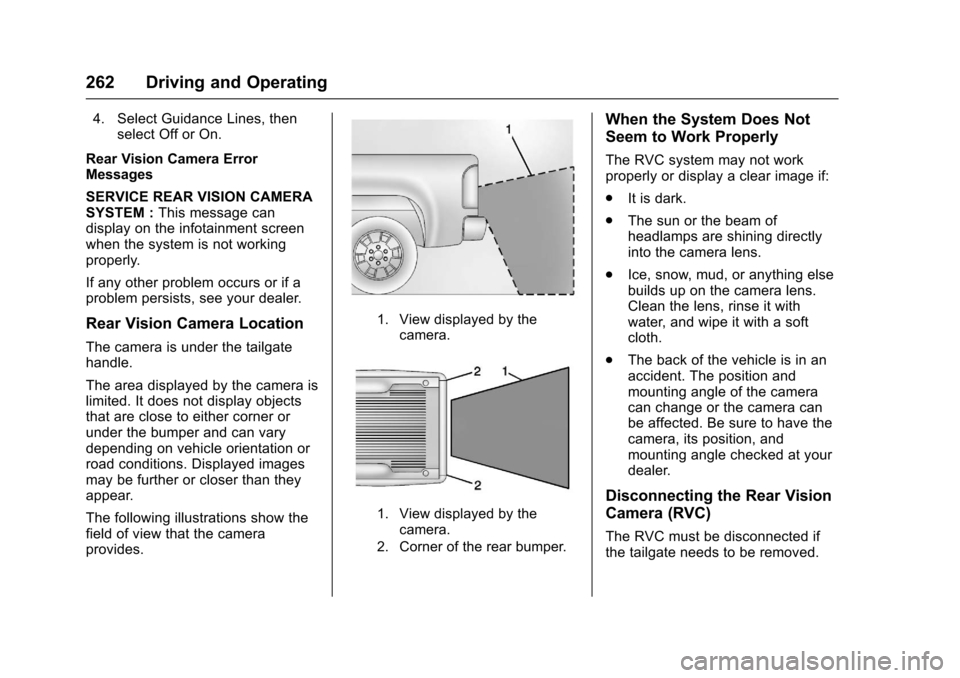
The area displayed by the camera islimited. It does not display objectsthat are close to either corner orunder the bumper and can varydepending on vehicle orientation orroad conditions. Displayed imagesmay be further or closer than theyappear.
The following illustrations show thefield of view that the cameraprovides.
1. View displayed by thecamera.
1. View displayed by thecamera.
2. Corner of the rear bumper.
When the System Does Not
Seem to Work Properly
The RVC system may not workproperly or display a clear image if:
.It is dark.
.The sun or the beam ofheadlamps are shining directlyinto the camera lens.
.Ice, snow, mud, or anything elsebuilds up on the camera lens.Clean the lens, rinse it withwater, and wipe it with a softcloth.
.The back of the vehicle is in anaccident. The position andmounting angle of the cameracan change or the camera canbe affected. Be sure to have thecamera, its position, andmounting angle checked at yourdealer.
Disconnecting the Rear Vision
Camera (RVC)
The RVC must be disconnected ifthe tailgate needs to be removed.
Page 264 of 419
Chevrolet Colorado Owner Manual (GMNA-Localizing-U.S./Canada/Mexico-10122675) - 2017 - crc - 8/22/16
Driving and Operating 263
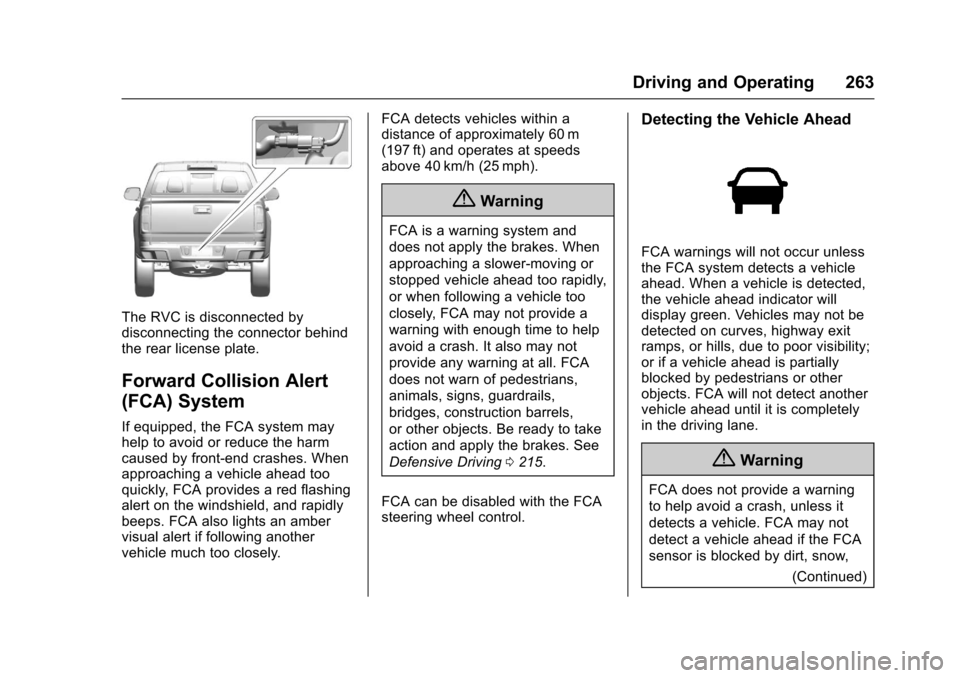
The RVC is disconnected bydisconnecting the connector behindthe rear license plate.
Forward Collision Alert
(FCA) System
If equipped, the FCA system mayhelp to avoid or reduce the harmcaused by front-end crashes. Whenapproaching a vehicle ahead tooquickly, FCA provides a red flashingalert on the windshield, and rapidlybeeps. FCA also lights an ambervisual alert if following anothervehicle much too closely.
FCA detects vehicles within adistance of approximately 60 m(197 ft) and operates at speedsabove 40 km/h (25 mph).
{Warning
FCA is a warning system and
does not apply the brakes. When
approaching a slower-moving or
stopped vehicle ahead too rapidly,
or when following a vehicle too
closely, FCA may not provide a
warning with enough time to help
avoid a crash. It also may not
provide any warning at all. FCA
does not warn of pedestrians,
animals, signs, guardrails,
bridges, construction barrels,
or other objects. Be ready to take
action and apply the brakes. See
Defensive Driving0215.
FCA can be disabled with the FCAsteering wheel control.
Detecting the Vehicle Ahead
FCA warnings will not occur unlessthe FCA system detects a vehicleahead. When a vehicle is detected,the vehicle ahead indicator willdisplay green. Vehicles may not bedetected on curves, highway exitramps, or hills, due to poor visibility;or if a vehicle ahead is partiallyblocked by pedestrians or otherobjects. FCA will not detect anothervehicle ahead until it is completelyin the driving lane.
{Warning
FCA does not provide a warning
to help avoid a crash, unless it
detects a vehicle. FCA may not
detect a vehicle ahead if the FCA
sensor is blocked by dirt, snow,
(Continued)
Page 265 of 419
Chevrolet Colorado Owner Manual (GMNA-Localizing-U.S./Canada/Mexico-10122675) - 2017 - crc - 8/22/16
264 Driving and Operating
Warning (Continued)
or ice, or if the windshield is
damaged. It may also not detect a
vehicle on winding or hilly roads,
or in conditions that can limit
visibility such as fog, rain,
or snow, or if the headlamps or
windshield are not cleaned or in
proper condition. Keep the
windshield, headlamps, and FCA
sensors clean and in good repair.
Collision Alert
When your vehicle approachesanother detected vehicle too rapidly,the red lights will flash on thewindshield. Also, eight rapidhigh-pitched beeps will sound fromthe front. When this Collision Alertoccurs, the brake system mayprepare for driver braking to occur
more rapidly which can cause abrief, mild deceleration. Continue toapply the brake pedal as needed.Cruise control may be disengagedwhen the Collision Alert occurs.
Tailgating Alert
The vehicle ahead indicator willdisplay amber when you arefollowing a detected vehicle aheadmuch too closely.
Selecting the Alert Timing
The Collision Alert control is on the
steering wheel. Press[to set the
FCA timing to Far, Medium, Near,or Off. The first button press showsthe current setting on the DIC.Additional button presses willchange this setting. The chosensetting will remain until it is changedand will affect the timing of both theCollision Alert and the TailgatingAlert features. The timing of both
alerts will vary based on vehiclespeed. The faster the vehicle speed,the farther away the alert will occur.Consider traffic and weatherconditions when selecting the alerttiming. The range of selectable alerttiming may not be appropriate for alldrivers and driving conditions.
Unnecessary Alerts
FCA may provide unnecessaryalerts for turning vehicles, vehiclesin other lanes, objects that are notvehicles, or shadows. These alertsare normal operation and thevehicle does not need service.
Cleaning the System
If the FCA system does not seem tooperate properly, cleaning theoutside of the windshield in front ofthe rearview mirror, and cleaning theheadlamps, may correct the issue.
Lane Departure
Warning (LDW)
If equipped, LDW may help avoidcrashes due to unintentional lanedepartures. It may provide an alert if
Page 287 of 419
Chevrolet Colorado Owner Manual (GMNA-Localizing-U.S./Canada/Mexico-10122675) - 2017 - crc - 8/22/16
286 Vehicle Care
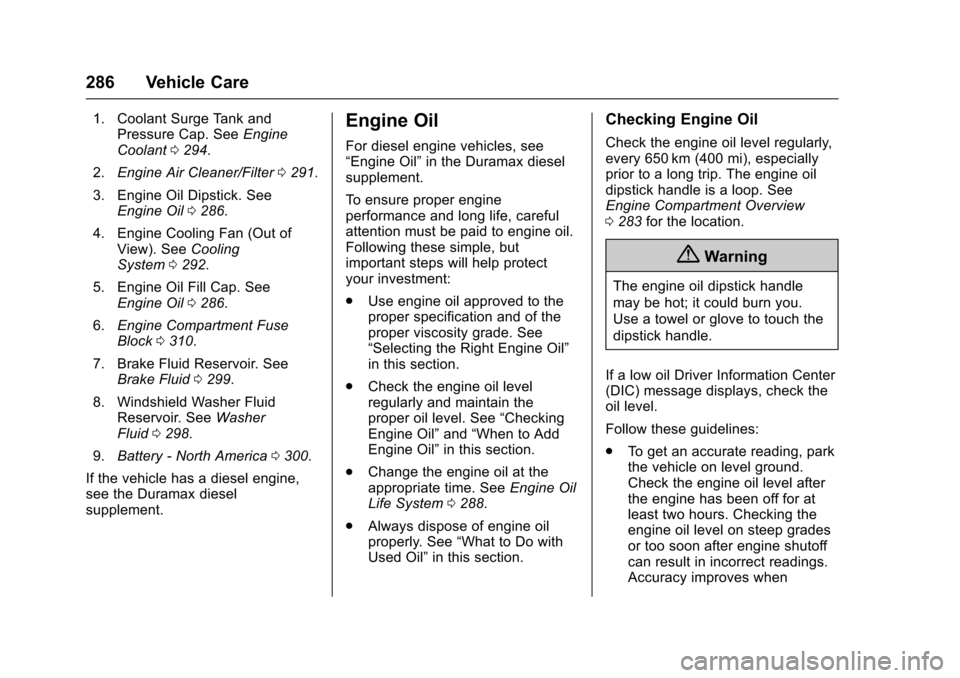
1. Coolant Surge Tank andPressure Cap. SeeEngineCoolant0294.
2.Engine Air Cleaner/Filter0291.
3. Engine Oil Dipstick. SeeEngine Oil0286.
4. Engine Cooling Fan (Out ofView). SeeCoolingSystem0292.
5. Engine Oil Fill Cap. SeeEngine Oil0286.
6.Engine Compartment FuseBlock0310.
7. Brake Fluid Reservoir. SeeBrake Fluid0299.
8. Windshield Washer FluidReservoir. SeeWasherFluid0298.
9.Battery - North America0300.
If the vehicle has a diesel engine,see the Duramax dieselsupplement.
Engine Oil
For diesel engine vehicles, see“Engine Oil”in the Duramax dieselsupplement.
To e n s u r e p r o p e r e n g i n eperformance and long life, carefulattention must be paid to engine oil.Following these simple, butimportant steps will help protectyour investment:
.Use engine oil approved to theproper specification and of theproper viscosity grade. See“Selecting the Right Engine Oil”in this section.
.Check the engine oil levelregularly and maintain theproper oil level. See“CheckingEngine Oil”and“When to AddEngine Oil”in this section.
.Change the engine oil at theappropriate time. SeeEngine OilLife System0288.
.Always dispose of engine oilproperly. See“What to Do withUsed Oil”in this section.
Checking Engine Oil
Check the engine oil level regularly,every 650 km (400 mi), especiallyprior to a long trip. The engine oildipstick handle is a loop. SeeEngine Compartment Overview0283for the location.
{Warning
The engine oil dipstick handle
may be hot; it could burn you.
Use a towel or glove to touch the
dipstick handle.
If a low oil Driver Information Center(DIC) message displays, check theoil level.
Follow these guidelines:
.To g e t a n a c c u r a t e r e a d i n g , p a r kthe vehicle on level ground.Check the engine oil level afterthe engine has been off for atleast two hours. Checking theengine oil level on steep gradesor too soon after engine shutoffcan result in incorrect readings.Accuracy improves when
Page 290 of 419
Chevrolet Colorado Owner Manual (GMNA-Localizing-U.S./Canada/Mexico-10122675) - 2017 - crc - 8/22/16
Vehicle Care 289
include engine revolutions, enginetemperature, and miles driven.Based on driving conditions, themileage at which an oil change isindicated can vary considerably. Forthe oil life system to work properly,the system must be reset every timethe oil is changed.
On some vehicles, when the systemhas calculated that oil life has beendiminished, a CHANGE ENGINEOIL SOON message comes on toindicate that an oil change isnecessary. SeeEngine OilMessages0134.Changetheoilassoon as possible within the next1000km (600mi). It is possible that,if driving under the best conditions,the oil life system might indicate thatan oil change is not necessary forup to a year. The engine oil andfilter must be changed at least onceayearand,atthistime,thesystemmust be reset. For vehicles withoutthe CHANGE ENGINE OIL SOONmessage, an oil change is neededwhen the OIL LIFE REMAININGpercentage is near 0%. Your dealerhas trained service people who willperform this work and reset the
system. It is also important to checkthe oil regularly over the course ofan oil drain interval and keep it atthe proper level.
If the system is ever resetaccidentally, the oil must bechanged at 5 000 km (3,000 mi)since the last oil change.Remember to reset the oil lifesystem whenever the oil is changed.
How to Reset the Engine Oil
Life System
Reset the system whenever theengine oil is changed so that thesystem can calculate the nextengine oil change. Always reset theengine oil life to 100% after every oilchange. It will not reset itself. Toreset the engine oil life system:
1. Display OIL LIFE REMAININGon the DIC. SeeDriverInformation Center (DIC) (BaseLevel)0126orDriverInformation Center (DIC)(Uplevel)0129.Ifthevehicledoes not have DIC buttons, thevehicle must be in P (Park) toaccess this display.
2. Press and holdVon the DIC,
or SET/CLR on the turn signallever if the vehicle does nothave DIC buttons, for severalseconds. The oil life willchange to 100%.
The oil life system can also be resetas follows:
1. Display OIL LIFE REMAININGon the DIC. SeeDriverInformation Center (DIC) (BaseLevel)0126orDriverInformation Center (DIC)(Uplevel)0129.
2. Fully press the acceleratorpedal slowly three times withinfive seconds.
If the display shows 100%, thesystem is reset.
If the vehicle has a CHANGEENGINE OIL SOON message and itcomes back on when the vehicle isstarted and/or the OIL LIFEREMAINING is near 0%, the engineoil life system has not been reset.Repeat the procedure.
Page 298 of 419
Chevrolet Colorado Owner Manual (GMNA-Localizing-U.S./Canada/Mexico-10122675) - 2017 - crc - 8/22/16
Vehicle Care 297
Warning (Continued)
Wait until there is no sign of
steam or coolant before you open
the hood.
If you keep driving when the
engine is overheated, the liquids
in it can catch fire. You or others
could be badly burned. Stop the
engine if it overheats, and get out
of the vehicle until the engine
is cool.
If No Steam Is Coming from
the Engine Compartment
If an engine overheat warning isdisplayed but no steam can be seenor heard, the problem may not betoo serious. Sometimes the enginecan get a little too hot when thevehicle:
.Climbs a long hill on a hot day.
.Stops after high-speed driving.
.Idles for long periods in traffic.
If the overheat warning is displayedwith no sign of steam:
1. Turn the air conditioning off.
2. Turn the heater on to thehighest temperature and to thehighest fan speed. Open thewindows as necessary.
3. When it is safe to do so, pull offthe road, shift to P (Park) orN(Neutral),andlettheengine idle.
If the engine coolant temperaturegauge is no longer in the overheatzone, the vehicle can be driven.Continue to drive the vehicle slowlyfor about 10 minutes. Keep a safedistance from the vehicle in front.If the warning does not come backon, continue to drive normally andhave the cooling system checkedfor proper fill and function.
If the warning continues, pull over,stop, and park the vehicleright away.
If there is no sign of steam, idle theengine for three minutes whileparked. If the warning is stilldisplayed, turn off the engine until itcools down.
Engine Fan
If the vehicle has a clutched enginecooling fan, when the clutch isengaged, the fan spins faster toprovide more air to cool the engine.In most everyday driving conditions,the fan is spinning slower and theclutch is not fully engaged. Thisimproves fuel economy and reducesfan noise. Under heavy vehicleloading, trailer towing, and/or highoutside temperatures, the fan speedincreases as the clutch more fullyengages, so an increase in fannoise may be heard. This is normaland should not be mistaken as thetransmission slipping or makingextra shifts. It is merely the coolingsystem functioning properly. The fanwill slow down when additionalcooling is not required and theclutch disengages.
This fan noise may also be heardwhen starting the engine. It will goaway as the fan clutch partiallydisengages.
If the vehicle has electric coolingfan(s), the fans may be heardspinning at low speed during most