ignition CHEVROLET COLORADO 2021 Service Manual
[x] Cancel search | Manufacturer: CHEVROLET, Model Year: 2021, Model line: COLORADO, Model: CHEVROLET COLORADO 2021Pages: 359, PDF Size: 8.03 MB
Page 189 of 359
Chevrolet Colorado Owner Manual (GMNA-Localizing-U.S./Canada/Mexico-
14430421) - 2021 - CRC - 2/10/20
188 Driving and Operating
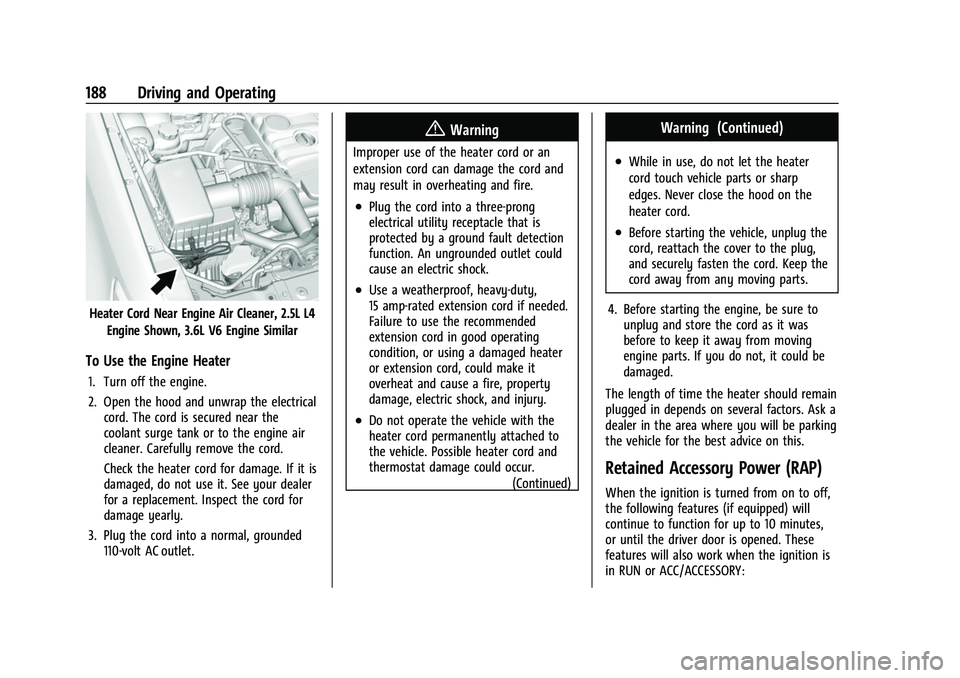
Heater Cord Near Engine Air Cleaner, 2.5L L4Engine Shown, 3.6L V6 Engine Similar
To Use the Engine Heater
1. Turn off the engine.
2. Open the hood and unwrap the electricalcord. The cord is secured near the
coolant surge tank or to the engine air
cleaner. Carefully remove the cord.
Check the heater cord for damage. If it is
damaged, do not use it. See your dealer
for a replacement. Inspect the cord for
damage yearly.
3. Plug the cord into a normal, grounded 110-volt AC outlet.
{Warning
Improper use of the heater cord or an
extension cord can damage the cord and
may result in overheating and fire.
.Plug the cord into a three-prong
electrical utility receptacle that is
protected by a ground fault detection
function. An ungrounded outlet could
cause an electric shock.
.Use a weatherproof, heavy-duty,
15 amp-rated extension cord if needed.
Failure to use the recommended
extension cord in good operating
condition, or using a damaged heater
or extension cord, could make it
overheat and cause a fire, property
damage, electric shock, and injury.
.Do not operate the vehicle with the
heater cord permanently attached to
the vehicle. Possible heater cord and
thermostat damage could occur.
(Continued)
Warning (Continued)
.While in use, do not let the heater
cord touch vehicle parts or sharp
edges. Never close the hood on the
heater cord.
.Before starting the vehicle, unplug the
cord, reattach the cover to the plug,
and securely fasten the cord. Keep the
cord away from any moving parts.
4. Before starting the engine, be sure to unplug and store the cord as it was
before to keep it away from moving
engine parts. If you do not, it could be
damaged.
The length of time the heater should remain
plugged in depends on several factors. Ask a
dealer in the area where you will be parking
the vehicle for the best advice on this.
Retained Accessory Power (RAP)
When the ignition is turned from on to off,
the following features (if equipped) will
continue to function for up to 10 minutes,
or until the driver door is opened. These
features will also work when the ignition is
in RUN or ACC/ACCESSORY:
Page 190 of 359
Chevrolet Colorado Owner Manual (GMNA-Localizing-U.S./Canada/Mexico-
14430421) - 2021 - CRC - 2/10/20
Driving and Operating 189
.Infotainment System
.Power Windows (during RAP this
functionality will be lost when any door
is opened)
.Sunroof (during RAP this functionality will
be lost when any door is opened)
.Auxiliary Power Outlet
.Audio System
.OnStar System
Shifting Into Park
{Warning
It can be dangerous to get out of the
vehicle if the shift lever is not fully in
P (Park) with the parking brake firmly set.
The vehicle can roll. If you have left the
engine running, the vehicle can move
suddenly. You or others could be injured.
To be sure the vehicle will not move,
even when you are on fairly level ground,
use the steps that follow. With
four-wheel drive, if the transfer case is in
N (Neutral), the vehicle will be free to
roll, even if the shift lever is in P (Park).
Be sure the transfer case is in a drive
gear. If towing a trailer, seeDriving
Characteristics and Towing Tips 0219. 1. Hold the brake pedal down, then set the
parking brake.
See Parking Brake 0201.
2. Hold the button on the shift lever and push the lever toward the front of the
vehicle into P (Park).
3. Be sure the transfer case (if equipped) is in a drive gear —not in N (Neutral).
4. Push the ignition key in, towards the steering column and then turn the
ignition off.
5. Remove the key and take it with you. If you can leave the vehicle with the
ignition key in your hand, the vehicle is
in P (Park).
Leaving the Vehicle with the Engine
Running
{Warning
It can be dangerous to leave the vehicle
with the engine running. The vehicle
could move suddenly if the shift lever is
not fully in P (Park) with the parking
brake firmly set.
(Continued)
Warning (Continued)
If you have four-wheel drive and the
transfer case is in N (Neutral), the vehicle
will be free to roll, even if the shift lever
is in P (Park). So be sure the transfer case
is in a drive gear–not in N (Neutral).
And, if you leave the vehicle with the
engine running, it could overheat and
even catch fire. You or others could be
injured. Do not leave the vehicle with the
engine running unless you have to.
If you have to leave the vehicle with the
engine running, be sure the vehicle is in
P (Park) and the parking brake is firmly set
before you leave it. After you move the
shift lever into P (Park), hold the regular
brake pedal down. Then, see if you can
move the shift lever away from P (Park)
without pressing the button on the shift
lever. If you can, it means that the shift
lever was not fully locked into P (Park).
Torque Lock
If you are parking on a hill and you do not
shift the transmission into P (Park) properly,
the weight of the vehicle may put too much
force on the parking pawl in the
Page 191 of 359
Chevrolet Colorado Owner Manual (GMNA-Localizing-U.S./Canada/Mexico-
14430421) - 2021 - CRC - 2/10/20
190 Driving and Operating
transmission. You may find it difficult to pull
the shift lever out of P (Park). This is called
torque lock. To prevent torque lock, set the
parking brake and then shift into P (Park)
properly before you leave the driver seat. To
find out how, seeShifting Into Park0189.
When you are ready to drive, move the
shift lever out of P (Park) before you release
the parking brake.
If torque lock does occur, you may need to
have another vehicle push yours a little
uphill to take some of the pressure from the
parking pawl in the transmission. You will
then be able to pull the shift lever out of
P (Park).
Shifting out of Park
This vehicle is equipped with an electronic
shift lock release system. The shift lock
release is designed to:
.Prevent ignition key removal unless the
shift lever is in P (Park).
.Prevent movement of the shift lever out
of P (Park), unless the ignition is on and
the regular brake pedal is applied.
To shift out of P (Park): 1. Apply the brake pedal.
2. Press the button on the shift lever. 3. Move the shift lever to the desired
position.
If you still are unable to shift out of
P (Park): 1. Ease the pressure on the shift lever.
2. While holding down the brake pedal and pressing the shift lever button, move the
shift lever all the way into P (Park).
3. While holding the shift lever button, move the shift lever to the desired
position.
If you are still having a problem shifting,
then have the vehicle serviced soon.
This vehicle may have the Seat Belt
Assurance System, which may prevent the
vehicle from shifting out of P (Park). See
Seat Belts 027.
Parking over Things That Burn
{Warning
Things that can burn could touch hot
exhaust parts under the vehicle and
ignite. Do not park over papers, leaves,
dry grass, or other things that can burn.
Active Fuel Management
This vehicle's engine may be equipped with
Active Fuel Management, which allows the
engine to operate on either all of its
cylinders, or in reduced cylinder operation
mode, depending on the driving conditions.
When less power is required, such as
cruising at a constant vehicle speed, the
system will operate in reduced cylinder
operation mode, allowing the vehicle to
achieve better fuel economy. When greater
power demands are required, such as
accelerating from a stop, passing,
or merging onto a freeway, the system will
maintain full-cylinder operation. If the
vehicle has an Active Fuel Management
indicator, see Driver Information Center (DIC)
for more information on using this display.
Engine Exhaust
{
Warning
Engine exhaust contains carbon monoxide
(CO), which cannot be seen or smelled.
Exposure to CO can cause
unconsciousness and even death.
Exhaust may enter the vehicle if: (Continued)
Page 192 of 359
Chevrolet Colorado Owner Manual (GMNA-Localizing-U.S./Canada/Mexico-
14430421) - 2021 - CRC - 2/10/20
Driving and Operating 191
Warning (Continued)
.The vehicle idles in areas with poor
ventilation (parking garages, tunnels,
deep snow that may block underbody
airflow or tail pipes).
.The exhaust smells or sounds strange
or different.
.The exhaust system leaks due to
corrosion or damage.
.The vehicle exhaust system has been
modified, damaged, or improperly
repaired.
.There are holes or openings in the
vehicle body from damage or
aftermarket modifications that are not
completely sealed.
If unusual fumes are detected or if it is
suspected that exhaust is coming into the
vehicle:
.Drive it only with the windows
completely down.
.Have the vehicle repaired immediately. (Continued)
Warning (Continued)
Never park the vehicle with the engine
running in an enclosed area such as a
garage or a building that has no fresh air
ventilation.
Running the Vehicle While Parked
It is better not to park with the engine
running.
If the vehicle is left with the engine running,
follow the proper steps to be sure the
vehicle will not move. SeeShifting Into Park
0 189 and
Engine Exhaust 0190.
If parking on a hill and pulling a trailer, see
Driving Characteristics and Towing Tips
0 219.
Automatic Transmission
If equipped, there is an electronic shift lever
position indicator within the instrument
cluster. This display comes on when the
ignition key is in ACC/ACCESSORY or
ON/RUN.
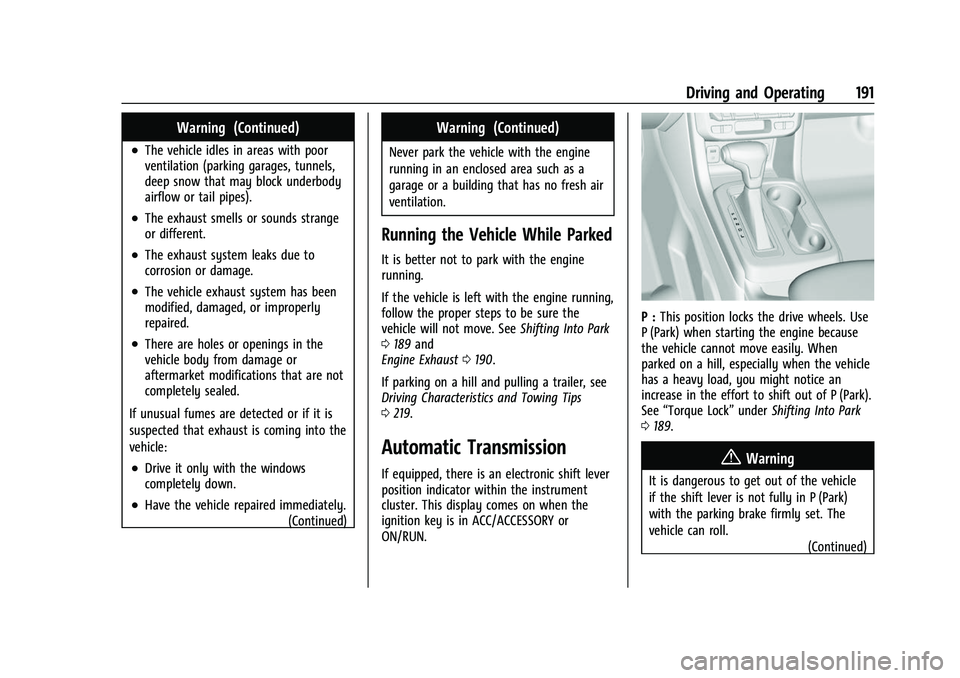
P : This position locks the drive wheels. Use
P (Park) when starting the engine because
the vehicle cannot move easily. When
parked on a hill, especially when the vehicle
has a heavy load, you might notice an
increase in the effort to shift out of P (Park).
See “Torque Lock” underShifting Into Park
0 189.
{Warning
It is dangerous to get out of the vehicle
if the shift lever is not fully in P (Park)
with the parking brake firmly set. The
vehicle can roll.
(Continued)
Page 197 of 359
Chevrolet Colorado Owner Manual (GMNA-Localizing-U.S./Canada/Mexico-
14430421) - 2021 - CRC - 2/10/20
196 Driving and Operating
Warning (Continued)
or 4n—or set the parking brake before
placing the transfer case in N (Neutral).
See Shifting Into Park 0189.
Caution
Extended high-speed operation in 4n
may damage or shorten the life of the
drivetrain.
Engagement noise and bump when shifting
between 4
nand 4mor from N (Neutral),
with the engine running, is normal.
Shifting into 4
nwill turn Traction Control
and StabiliTrak/Electronic Stability Control
(ESC) off. See Traction Control/Electronic
Stability Control 0202.
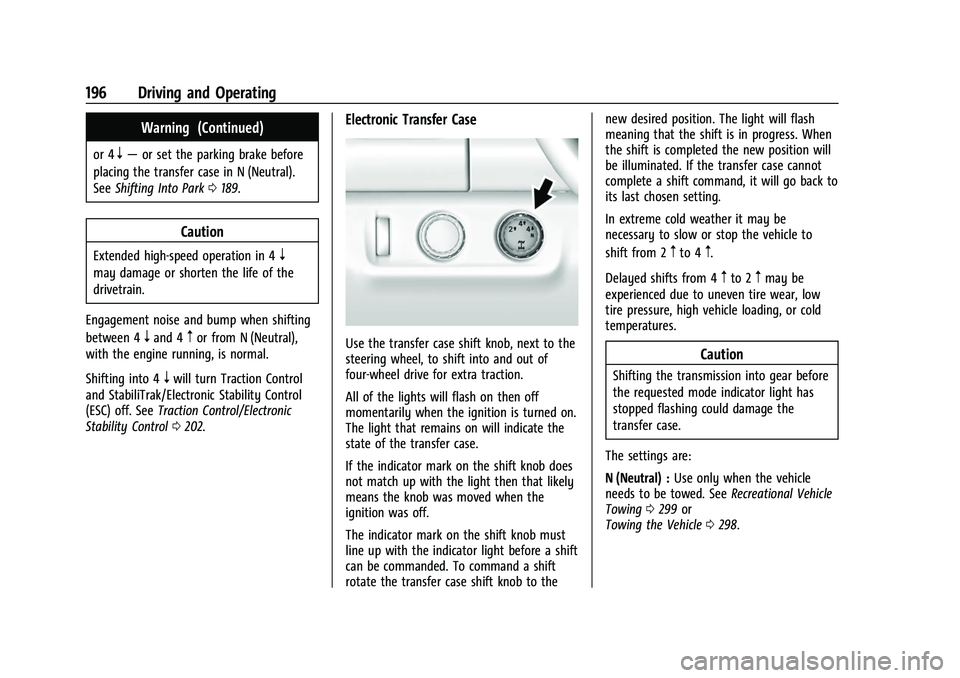
Electronic Transfer Case
Use the transfer case shift knob, next to the
steering wheel, to shift into and out of
four-wheel drive for extra traction.
All of the lights will flash on then off
momentarily when the ignition is turned on.
The light that remains on will indicate the
state of the transfer case.
If the indicator mark on the shift knob does
not match up with the light then that likely
means the knob was moved when the
ignition was off.
The indicator mark on the shift knob must
line up with the indicator light before a shift
can be commanded. To command a shift
rotate the transfer case shift knob to the new desired position. The light will flash
meaning that the shift is in progress. When
the shift is completed the new position will
be illuminated. If the transfer case cannot
complete a shift command, it will go back to
its last chosen setting.
In extreme cold weather it may be
necessary to slow or stop the vehicle to
shift from 2
mto 4m.
Delayed shifts from 4
mto 2mmay be
experienced due to uneven tire wear, low
tire pressure, high vehicle loading, or cold
temperatures.
Caution
Shifting the transmission into gear before
the requested mode indicator light has
stopped flashing could damage the
transfer case.
The settings are:
N (Neutral) : Use only when the vehicle
needs to be towed. See Recreational Vehicle
Towing 0299 or
Towing the Vehicle 0298.
Page 198 of 359
Chevrolet Colorado Owner Manual (GMNA-Localizing-U.S./Canada/Mexico-
14430421) - 2021 - CRC - 2/10/20
Driving and Operating 197
2m(Two-Wheel Drive High) :Use for driving
on most streets and highways. The front
axle is not engaged. This setting provides
the best fuel economy.
4
n(Four-Wheel Drive Low) : This setting
engages the front axle and delivers extra
torque. Choose 4
nif driving off-road in deep
sand, deep mud, or deep snow, and while
climbing or descending steep hills. When
engaged, keep vehicle speed below 72 km/h
(45 mph).
Shifting into 4
nwill turn Traction Control
and StabiliTrak/ESC off. See Traction Control/
Electronic Stability Control 0202.
4
m(Four-Wheel Drive High) : Use when
extra traction is needed. The front axle
engages and helps when driving on snowy
or icy roads, and when off-roading. The
vehicle can be shifted from 2
mto 4mwhile
the vehicle is moving.
Shifting Into 4
m
Turn the knob to 4mat any speed up to
121 km/h (75 mph), except from 4
n. The
indicator light will flash while shifting and
will remain on the selected setting. Shifting Into 2
m
Turn the knob to 2mat any speed, except
when shifting from 4
n.
Shifting Into 4
n
When 4nis engaged, vehicle speed should
be kept below 72 km/h (45 mph).
1. The ignition must be on and the vehicle must be stopped or moving less than
5 km/h (3 mph) with the transmission in
N (Neutral). It is best for the vehicle to
be moving 1.6 to 3.2 km/h (1 to 2 mph).
2. Turn the knob to 4
n. Wait for the 4n
indicator light to stop flashing before
shifting the transmission into gear.
If the transmission is in gear and/or moving
more than 5 km/h (3 mph), the 4
nindicator
light will flash for 30 seconds, but will not
complete the shift. After 30 seconds the
transfer case will shift to 4
m. Turn the knob
to 4
mto see the indicator. With the vehicle
moving less than 5 km/h (3 mph), and the
transmission in N (Neutral), attempt the shift
again. Shifting Out of 4
n
1. To shift out of 4nthe vehicle must be
stopped or moving less than 5 km/h
(3 mph) with the transmission in
N (Neutral) and the ignition on. It is best
for the vehicle to be moving
1.6 to 3.2 km/h (1 to 2 mph).
2. Turn the knob to 4
mor 2m. Wait for the
4
mor 2mindicator light to stop flashing
before shifting the transmission
into gear.
If the transmission is in gear and/or moving
more than 5 km/h (3 mph), the 4
mor 2m
indicator light will flash for 30 seconds, but
will not complete the shift. With the vehicle
moving less than 5 km/h (3 mph), and the
transmission in N (Neutral), attempt the shift
again.
Shifting Into N (Neutral)
To shift: 1. Park the vehicle on a level surface.
2. Set the parking brake and press and hold the brake pedal. See Parking Brake
0 201.
3. Start the vehicle or turn the ignition on.
4. Shift the transmission to N (Neutral).
Page 199 of 359
Chevrolet Colorado Owner Manual (GMNA-Localizing-U.S./Canada/Mexico-
14430421) - 2021 - CRC - 2/10/20
198 Driving and Operating
5. Shift the transfer case to 2m.
6. Turn the transfer case knob clockwise past the 4
ndetent to N (Neutral) until it
stops and hold it there until the
N (Neutral) light starts flashing. This will
take at least 10 seconds. Then slowly
release the knob to the 4
nposition. The
N (Neutral) light will come on when the
transfer case shift to N (Neutral) is
complete.
7. With the engine running, verify that the transfer case is in N (Neutral) by shifting
the transmission to R (Reverse), then to
D (Drive). There should be no movement
of the vehicle while shifting the
transmission.
8. Turn the engine off, and the ignition to ACC/ACCESSORY.
9. Place the transmission shift lever in P (Park). See Recreational Vehicle Towing
0 299.
Shifting Out of N (Neutral)
To shift: 1. Set the parking brake.
2. Turn the ignition on with the engine off.
3. Shift the transmission to N (Neutral). 4. Turn the transfer case shift knob to 2
m.
After the transfer case has shifted out of
N (Neutral), the N (Neutral) light will
go out.
5. Shift to P (Park).
Caution
Shifting the transmission into gear before
the requested mode indicator light has
stopped flashing could damage the
transfer case.
6. Release the parking brake.
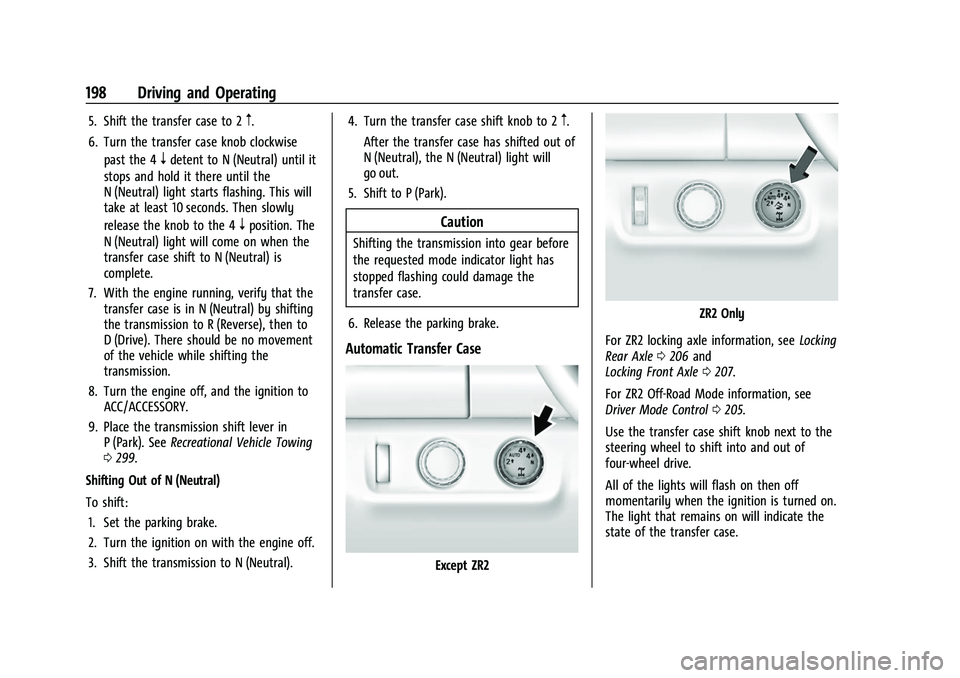
Automatic Transfer Case
Except ZR2
ZR2 Only
For ZR2 locking axle information, see Locking
Rear Axle 0206 and
Locking Front Axle 0207.
For ZR2 Off-Road Mode information, see
Driver Mode Control 0205.
Use the transfer case shift knob next to the
steering wheel to shift into and out of
four-wheel drive.
All of the lights will flash on then off
momentarily when the ignition is turned on.
The light that remains on will indicate the
state of the transfer case.
Page 200 of 359
Chevrolet Colorado Owner Manual (GMNA-Localizing-U.S./Canada/Mexico-
14430421) - 2021 - CRC - 2/10/20
Driving and Operating 199
If the indicator mark on the knob does not
match up with the light then that likely
means the knob was moved when the
ignition was off.
The indicator mark on the knob must line
up with the indicator light before a shift can
be commanded. To command a shift rotate
the transfer case shift knob to the new
desired position. The light will flash meaning
that the shift is in progress. When the shift
is completed the new position will be
illuminated. If the transfer case cannot
complete a shift command, it will go back to
its last chosen setting.
The settings are:
N (Neutral) :Use only when the vehicle
needs to be towed. See Recreational Vehicle
Towing 0299 or
Towing the Vehicle 0298.
2
m(Two-Wheel Drive High) : Use for driving
on most streets and highways. The front
axle is not engaged. This setting provides
the best fuel economy.
AUTO (Automatic Four-Wheel Drive) : Use
when road surface conditions are variable.
When driving in AUTO, the front axle is
engaged, and the vehicle's power is sent to
the front and rear wheels automatically based on driving conditions. This setting
provides slightly lower fuel economy than
2
m.
Do not use AUTO mode, if equipped, to park
on a steep grade with poor traction such as
ice, snow, mud, or gravel. In AUTO mode
only the rear wheels will hold the vehicle
from sliding when parked. If parking on a
steep grade, use 4
mto keep all four wheels
engaged.
4
m(Four-Wheel Drive High) : This setting
engages the front axle. Use this position
when extra traction is needed, such as when
driving on snowy or icy roads, or when
off-roading.
4
n(Four-Wheel Drive Low) : This setting
engages the front axle and delivers extra
torque. Choose 4
nwhen driving off-road in
deep sand, deep mud, or deep snow, and
while climbing or descending steep hills.
Shifting into 4
nwill turn Traction Control
and StabiliTrak/ESC off. See Traction Control/
Electronic Stability Control 0202. Shifting Into 4
mor AUTO
Turn the knob to the 4
mor AUTO position
at any speed, except from 4
n. The indicator
light will flash while shifting and will remain
on when the shift is completed.
Shifting Into 2
m
Turn the knob to 2mat any speed, except
when shifting from 4
n. The indicator light
will flash while shifting and will remain on
when the shift is completed.
Shifting Into 4
n
When 4nis engaged, keep vehicle speed
below 72 km/h (45 mph).
To shift into 4
n:
1. The ignition must be on and the vehicle must be stopped or moving less than
5 km/h (3 mph) with the transmission in
N (Neutral). It is best for the vehicle to
be moving 1.6 to 3.2 km/h (1 to 2 mph).
2. Turn the knob to 4
n. Wait for the 4n
indicator light to stop flashing before
shifting the transmission into gear.
Page 201 of 359
Chevrolet Colorado Owner Manual (GMNA-Localizing-U.S./Canada/Mexico-
14430421) - 2021 - CRC - 2/10/20
200 Driving and Operating
Caution
Shifting the transmission into gear before
the requested mode indicator light has
stopped flashing could damage the
transfer case.
If the transmission is in gear and/or moving
more than 5 km/h (3 mph), the 4
nindicator
light will flash for 30 seconds, but will not
complete the shift. After 30 seconds the
transfer case will shift to 4
m. Turn the knob
to 4
mto display the indicator. With the
vehicle moving less than 5 km/h (3 mph),
and the transmission in N (Neutral), attempt
the shift again.
Shifting Out of 4
n
To shift:
1. The vehicle must be stopped or moving less than 5 km/h (3 mph) with the
transmission in N (Neutral) and the
ignition on. It is best for the vehicle to
be moving 1.6 to 3.2 km/h (1 to 2 mph).
2. Turn the knob to 4
m, AUTO, or 2m. Wait
for the 4
m, AUTO, or 2mindicator light
to stop flashing before shifting the
transmission into gear.
Caution
Shifting the transmission into gear before
the requested mode indicator light has
stopped flashing could damage the
transfer case.
If the transmission is in gear and/or moving
more than 5 km/h (3 mph), the 4
m, AUTO,
or 2
mindicator light will flash for
30 seconds but will not complete the shift.
With the vehicle moving less than 5 km/h
(3 mph), and the transmission in N (Neutral),
attempt the shift again.
Shifting Into N (Neutral)
To shift:
1. Park the vehicle on a level surface.
2. Set the parking brake and press and hold the brake pedal. See Parking Brake
0 201.
3. Start the vehicle or turn the ignition on.
4. Shift the transmission to N (Neutral).
5. Shift the transfer case to 2
m.
6. Turn the transfer case shift knob clockwise past the 4
ndetent to
N (Neutral) until it stops and hold it
there until the N (Neutral) light starts flashing. This will take at least
10 seconds. Then slowly release the knob
to the 4
nposition. The N (Neutral) light
will come on when the transfer case
shift to N (Neutral) is complete.
7. With the engine running, verify that the transfer case is in N (Neutral) by shifting
the transmission to R (Reverse), then
shift the transmission to D (Drive). There
should be no movement of the vehicle
while shifting the transmission.
8. Turn the engine off, and the ignition to ACC/ACCESSORY.
9. Place the transmission shift lever in P (Park).
Shifting Out of N (Neutral)
To shift: 1. Set the parking brake.
2. Turn the ignition on with the engine off.
3. Shift the transmission to N (Neutral).
4. Turn the transfer case shift knob to 2
m.
After the transfer case has shifted out of
N (Neutral), the N (Neutral) light will
go out and the new 2
mstate will be
displayed.
Page 202 of 359
Chevrolet Colorado Owner Manual (GMNA-Localizing-U.S./Canada/Mexico-
14430421) - 2021 - CRC - 2/10/20
Driving and Operating 201
5. Place the transmission shift lever inP (Park).
6. Release the parking brake.
Brakes
Antilock Brake System (ABS)
The Antilock Brake System (ABS) helps
prevent a braking skid and maintain steering
while braking hard.
ABS performs a system check when the
vehicle is first driven. A momentary motor
or clicking noise may be heard while this
test is going on, and the brake pedal may
move slightly. This is normal.
If there is a problem with ABS, this warning
light stays on. See Antilock Brake System
(ABS) Warning Light 088.
ABS does not change the time needed to
get a foot on the brake pedal and does not
always decrease stopping distance. If you get too close to the vehicle ahead, there will
not be enough time to apply the brakes if
that vehicle suddenly slows or stops. Always
leave enough room ahead to stop, even
with ABS.
Using ABS
Do not pump the brakes. Just hold the brake
pedal down firmly. Hearing or feeling ABS
operate is normal.
Braking in Emergencies
ABS allows steering and braking at the same
time. In many emergencies, steering can
help even more than braking.
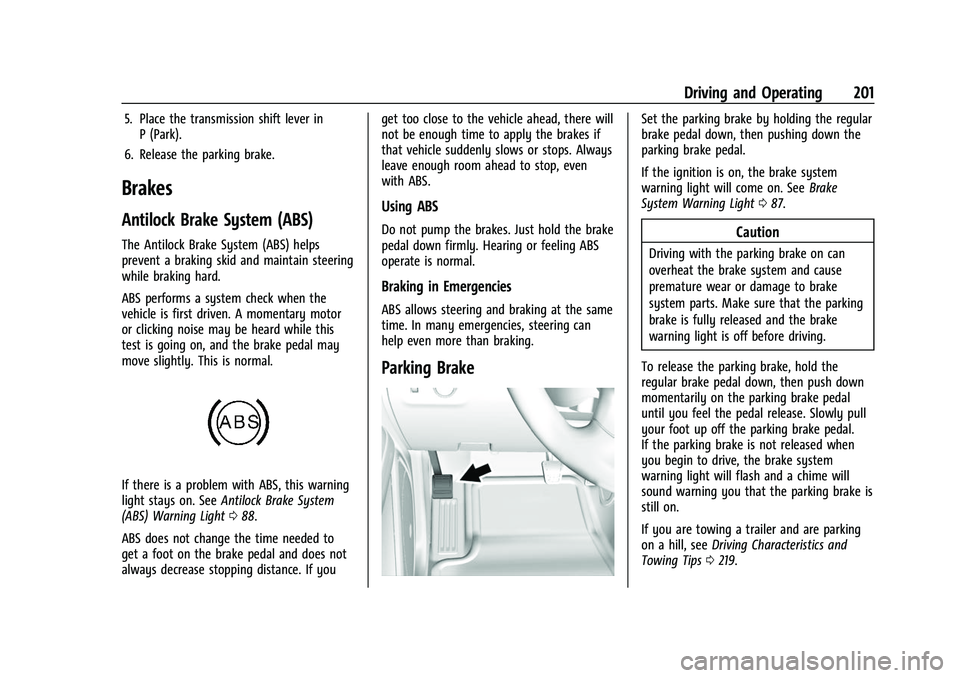
Parking Brake
Set the parking brake by holding the regular
brake pedal down, then pushing down the
parking brake pedal.
If the ignition is on, the brake system
warning light will come on. See
Brake
System Warning Light 087.
Caution
Driving with the parking brake on can
overheat the brake system and cause
premature wear or damage to brake
system parts. Make sure that the parking
brake is fully released and the brake
warning light is off before driving.
To release the parking brake, hold the
regular brake pedal down, then push down
momentarily on the parking brake pedal
until you feel the pedal release. Slowly pull
your foot up off the parking brake pedal.
If the parking brake is not released when
you begin to drive, the brake system
warning light will flash and a chime will
sound warning you that the parking brake is
still on.
If you are towing a trailer and are parking
on a hill, see Driving Characteristics and
Towing Tips 0219.