display CHEVROLET CORVETTE 1998 5.G Owner's Guide
[x] Cancel search | Manufacturer: CHEVROLET, Model Year: 1998, Model line: CORVETTE, Model: CHEVROLET CORVETTE 1998 5.GPages: 378, PDF Size: 19.91 MB
Page 154 of 378
Downloaded from www.Manualslib.com manuals search engine SERVICE RIDE CONTROL: This message is used to
indicate to the driver that the Selective Real Time
Damping (SRTD) system has detected a malfunction
and that the system must be serviced. The SERVICE
RIDE CONTROL message will always come on when a
failure is detected by the Selective Real Time Damping
system. If
a fault is present in the SRTD which causes
the shocks to be in their full soft condition, the
SERVICE RIDE CONTROL, SHOCKS
INOPERATIVE and MAXIMUM
80 MPH (129 km/h)
will display together. You will never get a SHOCKS
INOPERATIVE and MAXIMUM SPEED
80 MPH
(129
km/h) message without a SERVICE RIDE
CONTROLmessage.
SHOCKS INOPERATIVE: You will hear four chimes
when this message is displayed. To acknowledge that
you have read the message and to remove it from the
display, press RESET. The message will reappear every
10 minutes until this condition changes.
This message indicates that a malfunction is present in
the Selective Real Time Damping system which is
causing the shocks to be in their full soft mode. This is a
warning to the driver that the vehicle handling may be
affected. Have your vehicle serviced as soon as possible.
MAXIMUM SPEED 80 MPH (129 km/h): You will
hear four chimes when this message is displayed.
To
acknowledge the warning, press RESET. After you press
RESET, a message will reappear every
10 minutes until
this condition changes.
This message indicates that the vehicle speed will be limited to
80 mph (129 km/h) when the shock absorber
system has failed and the shocks are in their full
soft
mode. Have your vehicle serviced as soon as possible.
LOW COOLANT You will hear two chimes when this
message is displayed. To acknowledge the warning,
press RESET. After you press RESET, a message will
reappear and you will hear a chime every
10 minutes
until this condition changes.
This message indicates that the coolant in the system is
low. You may need to add coolant. See “Engine
Overheating” in the Index.
COOLANT OVER TEMP: You will hear four chimes
and the CHECK GAGES telltale
will come on when this
message is displayed. To acknowledge the warning,
press the RESET button. After you press the RESET
button, a message will be displayed and you will hear a chime every minute until this condition changes. If you
do not press RESET, the message will remain on the
digital display until the condition changes.
2-101
Page 155 of 378
Downloaded from www.Manualslib.com manuals search engine If the engine coolant exceeds 255 “F (124”C), this
message is displayed. If you have been operating your
vehicle under normal driving conditions, you should
pull off from
the road, stop your vehicle and turn off the
engine as soon as possible. You can monitor the coolant
temperature with the GAGES button on the DIC or the
engine coolant gage on the instrument panel cluster. See
“Engine Overheating” in the Index.
HIGH OIL TEMPERATURE REDUCE ENGINE
RPM: You will hear four chimes when this message is
displayed. To acknowledge the warning, press the
RESET button. After you press the RESET button, a
message will be displayed and you will hear a chime
every minute until this condition changes. If you do not
press RESET, the message will remain on the digital
display until the condition changes.
If the engine oil temperature exceeds
320°F (1 60” C),
this message is displayed. You should check the engine
coolant temperature and engine oil level. If your engine
is too hot, see “Engine Overheating’’ in the Index. Your
vehicle may need service,
so see your dealer. You can
monitor the oil temperature with the GAGES button on
the DIC.
HIGH TRANS TEMP: You will hear four chimes
when this message is displayed. To acknowledge this
warning, press the RESET button. After you press the
RESET button, the message will be displayed every
10 minutes until the condition changes. If you do not
press RESET, the message remains on the display until
the condition changes.
If the transmission fluid temperature rises above 263°F
(128°C) or rises rapidly, this message is displayed. The
transmission may shift gears or apply the torque
converter clutch to reduce the fluid temperature. Driving
aggressively or driving on long hills can cause the
transmission fluid temperature to be higher than normal.
If this message appears, you may continue to drive at a
slower speed. You should also monitor the transmission
fluid temperature and allow it to cool to at least 230°F
(1 10°C). The transmission fluid temperature can be
monitored with the GAGES button on the DIC. See
“Automatic Transmission Fluid” in the Index. You
should also check the engine coolant temperature.
If it is
also hot, see “Engine Overheating” in the Index.
If the HIGH TRANS TEMP message is displayed
during normal vehicle operation on flat roads, your
vehicle may need service. See your dealer for an
inspection.
2-102
Page 156 of 378
Downloaded from www.Manualslib.com manuals search engine LOW TIRE PRESSURE - (LF, LR, RF, RR): YOU
will hear two chimes when this message is displayed. To
acknowledge the warning, press RESET. After you press
RESET, a message will reappear and you will hear a
chime every
10 minutes until this condition changes.
This message indicates that the pressure in one of your
tires is less than
25 psi (172 Ea). Next to the LOW
TIRE PRESSURE message, you can see either
LF (left
front), LR (left rear),
RF (right front) or RR (right rear)
to indicate to you which tire is low on pressure.
You can
receive more than one tire pressure message at a time.
To read other messages that may have been sent at the
same time, press RESET. If a tire pressure message
appears on the
DIC, stop as soon as you can. Have the
tire pressures checked and set to those shown on your
Tire Loading Information Label. See “Extended
Mobility Tires” in the Index.
When the LOW TIRE PRESSURE or FLAT
TIRE message is displayed on the Driver
Information Center, your vehicle’s handling
capabilities will be reduced during severe
maneuvers.
If you drive too fast, you could lose
control of your vehicle.
You or others could be
injured. Don’t drive over
55 mph (90 km/h) when
the LOW TIRE PRESSURE or FLAT TIRE
message is displayed. Drive cautiously, and check
your tire pressures as
soon as you can.
2-103
Page 157 of 378
Downloaded from www.Manualslib.com manuals search engine FLAT TIRE - (LF, LR, RF, RR): You will hear two
chimes when this message is displayed followed by the
message MAX SPEED
55 MPH (90 km/h). If this
message appears, do not drive your vehicle above these
limits. The next message to appear is REDUCED
HANDLING. Adjust your driving accordingly. To acknowledge these warnings, press RESET. After you
press RESET, a message will reappear and you will hear
a chime every
10 minutes until this condition changes.
This message indicates that the pressure in one
of your
tires is lower than
5 psi (34 Wa). Next to the FLAT
TIRE message, you can see either LF (left front),
LR
(left rear), RF (right front) or RR (right rear) to indicate
to you which tire is flat. You can receive more than one
tire pressure message at a time. To read other messages
that may have been sent at the same time, press RESET.
If a tire pressure message appears on the
DIC, stop as
soon as you can. Have the tire pressures checked and set
to those shown on your Tire Loading Information Label.
See “Extended Mobility Tires” and “Tire Inflation” in
the Index.
When the LOW TIRE PRESSURE or FLAT
TIRE message
is displayed on the Driver
Information Center, your vehicle’s handling
capabilities will be reduced during severe
maneuvers.
If you drive too fast, you could lose
control of your vehicle. You or others could be
injured. Don’t drive over
55 mph (90 kmh) when
the
LOW TIRE PRESSURE or FLAT TIRE
message
is displayed. Drive cautiously, and check
your tire pressures as soon as you can.
Page 158 of 378
Downloaded from www.Manualslib.com manuals search engine HIGH TIRE PRESSURE - (LF, LR, RF, RR): YOU
will hear two chimes when this message is displayed. To
acknowledge the warning, press RESET. After you press
RESET, a message
will reappear and you will hear a
chime every
10 minutes until this condition changes. This
message indicates that the pressure in one of your tires is higher than
42 psi (290 Pa). Next to the HIGH TIRE
PRESSURE message,
you can see either LF (left front),
LR (left rear), RF (right front) or RR (right rear) to
indicate to you which tire is higher than
42 psi (290 Wa).
You can receive more than one tire pressure message at a
time. To read other messages that may have been sent at
the same time, press RESET.
If a tire pressure message
appears
on the DX, stop as soon as you can. Have the tire
pressures checked and set to those shown on your Tire
Loading Information Label. See “Extended
Mobility
Tires” and “Tire Inflation” in the Index.
SERVICE TIRE MON SYS: If this message comes on,
a part on the Tire Pressure Monitor (TPM) is not
working properly. If you drive your vehicle while any of
the four sensors are missing or hoperable, the warning
will come on in approximately
10 minutes. If all four
sensors are missing, the warning will come on in
approximately
15 to 20 minutes. (All the sensors would
be missing, for example, if you put different wheels on
your vehicle without transferring the sensors.) If the
warning comes
on and stays on, there may be a problem
with the TPM. See your dealer.
2-105
Page 163 of 378
Downloaded from www.Manualslib.com manuals search engine Automatic Electronic Dual Climate Control System
(If Equipped)
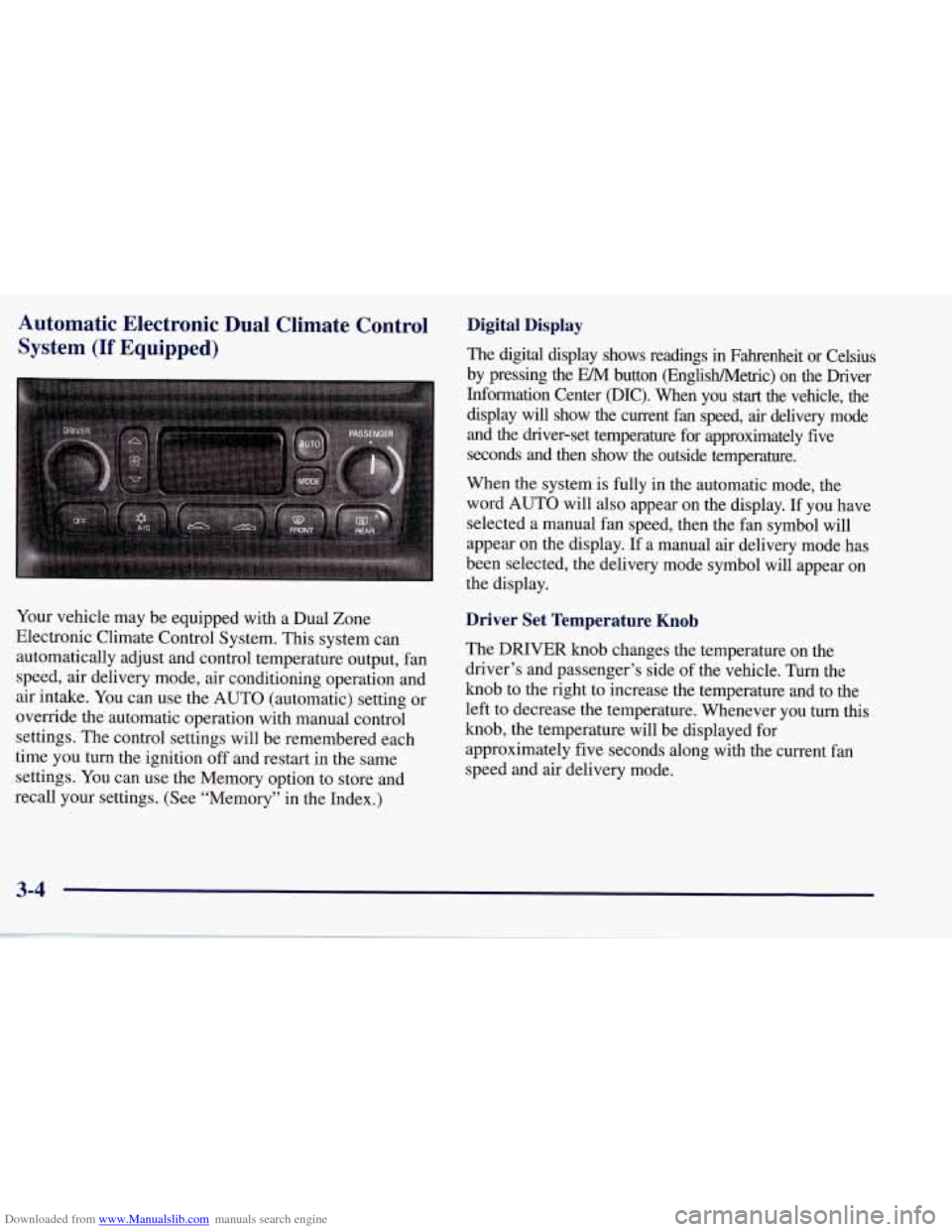
Your vehicle may be equipped with a Dual Zone
Electronic Climate Control System. This system can
automatically adjust and control temperature output, fan
speed, air delivery mode, air conditioning operation and
air intake. You can use the AUTO (automatic) setting or
override the automatic operation with manual control
settings. The control settings will be remembered each
time you turn the ignition
off and restart in the same
settings. You can use the Memory option to store and
recall your settings. (See “Memory” in the Index.)
Digital Display
The digital display shows readings in Fahrenheit or Celsius
by pressing the EM button (EnglisWMetric) on the Driver
Information Center @IC). When you
start the vehicle, the
display will show the current fan speed, air delivery mode
and the driver-set temperature for approximately five
seconds and then show the outside temperature.
When the system is fully in the automatic mode, the
word AUTO will also appear on the display. If you have
selected a manual fan speed, then the fan symbol will
appear on the display.
If a manual air delivery mode has
been selected, the delivery mode symbol will appear on
the display.
Driver Set Temperature Knob
The DRIVER knob changes the temperature on the
driver’s and passenger’s side of the vehicle. Turn the
knob to the right to increase the temperature and to the
left to decrease the temperature. Whenever you turn this
knob, the temperature will be displayed for
approximately five seconds along with the current fan
speed and air delivery mode.
3-4
Page 164 of 378
Downloaded from www.Manualslib.com manuals search engine When adjusting the temperature, start with a driver-set
temperature of
73°F (23 "C) until you determine your
comfort zone. If you choose
60°F (16"C), the system
will remain at maximum cooling and will not
automatically adjust fan speed or air delivery. If you
choose
90°F (32"C), the system will remain at
maximum heating and will not automatically adjust fan
speed or air delivery. Choosing either maximum setting
will not cause the system to heat or cool any faster.
Turning the knob past either maximum setting has no
effect on the operation of the system.
Passenger Temperature Offset
The PASSENGER knob changes the temperature on the
passenger's side of the vehicle. When the knob is in the
12 o'clock position, the passenger's temperature is the
same as the driver's. Turn the knob to the right for
warmer air
on the passenger's side, to the left for cooler
air. If the driver-set temperature is set at
60°F (1 6 " C) or
90 OF (32 " C), turning the passenger knob has no effect
because the system is locked at a maximum setting.
Automatic Operation
Press the AUTO button to place the entire system in the
automatic mode. After a five second display of the current settings, only the word
AUTO and the outside
temperature will be shown on the digital display. The
system will operate to achieve your comfort set
temperature as quickly as possible. If you have set the
driver temperature at
60°F (16°C) or 90°F (32"C), the
system will not operate automatically until a different
temperature is selected. The AUTO control system
works best with the windows up and the removable roof
installed or the convertible top up.
A Typical Cold Weather Example:
Your vehicle has been parked outside overnight in cold
weather (below
32 OF/ 0 " C) and you have set the driver
temperature at
73°F (23°C) and have selected the AUTO
mode. The system will automatically adjust the
temperature output to maximum heating. The fan will start
at a low speed. This is to avoid blowing cold
air into the
vehicle. The length of the delay depends on the amount of
time since the engine was last started, the outside
temperature and the engine coolant temperature. As the
coolant warms up, the fan speed will gradually increase.
Air will flow to the floor with some air to the windshield
to prevent fogging under most normal conditions.
3-5
Page 165 of 378
Downloaded from www.Manualslib.com manuals search engine As the interior of the vehicle warms up to your comfort
set temperature, the fan speed will decrease and the
temperature output may become cooler.
If the interior
temperature continues to warm up due to heating from
the sun or outside temperature increases, the system
may switch to other air delivery modes (typically
DEFOG or BI-LEVEL).
A ljpical Hot Weather Example:
Your vehicle has been parked outside all day in hot
weather (above
7OoF/ 21 O C) and you have set the driver
temperature at
73 OF (23 "C) and have selected the
AUTO mode. The system will automatically adjust the
temperature output to maximum cooling. The blower
will start at a low speed momentarily to push the hot air
to the floor of the vehicle and then go to a higher blower
speed with cold airflow out of the instrument panel
outlets.
A small amount of airflow will continue through
the lower ducts to cool the
floor area.
The air intake may start in the recirculated mode for
maximum cooling performance.
As the interior of the
vehicle cools down to your comfort set temperature, the
fan speed will decrease and the temperature output may
become warmer. The air intake may shift from
recirculation to fresh air mode.
If the interior continues to
cool due to a decrease,,,in the amount of heat the
vehicle is absorbing from the sun or a decrease
in the
outside temperature, the system could switch to other air
delivery modes (typically BI-LEVEL or DEFOG).
Manual Settings
With the Dual Zone Electronic Climate Control, there
are several manual settings you can use to control the
system and override the
AUTO operation. You can
program the fan speed,
air delivery mode, air intake
mode and control the air conditioning operation using
these settings. The system will still determine the
temperature output level based on the driver-set
temperature and the passenger temperature offset.
% FAN SPEED: Press the button with the fan switch
on it to manually lock
in the current fan speed and to
stop the automatic fan speed control. Pressing the
arrows will delete
AUTO from the digital display. The
fan graphics with the fan speed bars will be shown.
To
increase the fan speed so that more air flows into the
vehicle, press the
UP arrow on the fan switch. To
decrease the fan speed and airflow, press the DOWN
arrow. The
AUTO button must be pressed to return to
the automatic fan control.
Page 166 of 378
Downloaded from www.Manualslib.com manuals search engine MODE: Press the MODE button to manually lock in the
current air delivery setting and to stop the automatic
mode control. Pressing the MODE button will delete
AUTO from the digital display and the mode graphics
will be shown. To change the setting, press the MODE
button again. The AUTO button must be pressed to
return to the automatic mode selection.
-bo
UPPER: This setting directs most of the air
through the instrument panel outlets and a very small amount to the lower outlets.
+# BI-LEVEL: This setting directs air into your
vehicle in two ways. Cooler air is directed toward your upper body through the instrument panel outlets, while
warmer air is directed through the lower outlets.
+# LOWER: This setting directs most of the air to
the floor area and some of it toward the windshield and
side window vents.
+’, DEFOG: This setting divides the air between
the windshield and lower outlets and a small amount
toward the side window vents. This is useful when fog
appears
on the windshield or side glass due to rain or
snowy conditions.
+e
e
w.
Mode Buttons
These buttons control climate control OWOFF, air
intake, front defrost, rear defrost and the air
conditioning operation.
OFF: Press the OFF button to turn off the climate
control system.
This is the only setting that fully shuts
off the fan. The digital display will show only the
outside temperature. You can still adjust the driver set
temperature, the passenger temperature offset and the
air
intake mode while in OFF.
a A/C: This button turns the air conditioning
compressor on or
off, except in the FRONT defrost
mode. The light on the
A/C button will come on when
the compressor is operating in either the automatic or
manual mode. The air conditioning may also be forced
off at high engine speeds. The light on the A/C button
will flash
if pressed when air conditioning operation is
not allowed.
3-7
Page 167 of 378
Downloaded from www.Manualslib.com manuals search engine FRESH AIR: Press this button to provide fresh
air from the outside. The light on this air intake button
will come on to show when it is operating. When in the
AUTO mode, the system automatically selects FRESH
AIR instead of RECIRCULATE, as required, to control
the temperature in the vehicle. By pressing FRESH
AIR, the system
will lock into the fresh air mode. Any
adjustment to the air intake must then be made
manually.
FRESH AIR should be used when trying to
defrost or defog windows to help reduce moisture inside
the vehicle.
RECIRCULATE: Press this button to limit the
amount
of fresh air entering the vehicle. The light on
this air intake button will come on to show when it is
operating. RECIRCULATE is helpful when you are
trying to cool the air quickly or trying to limit odors and
dust from entering the vehicle. When in the AUTO
mode, the system automatically selects RECIRCULATE
to cool the vehicle’s temperature. By pressing this
button, the system will lock into the recirculated air
mode. Any adjustment to the air intake must then be
made manually. The recirculated air mode is not allowed
in the front defrost or defog modes as fresh air helps
reduce moisture inside the vehicle.
FRONT: Press the FRONT defrost button to
quickly remove fog or frost from the windshield. This
setting directs most of the airflow to the windshield and
a small amount toward the lower and side window
outlets. The light on the button will come
on and the
digital display will show the defrost mode symbol and
fan speed when the front defrost mode is being used.
Pressing FRONT defrost again will return the system to
the last operating mode.
If the system is
in FRONT defrost when you shut the
engine
off, it will restart in FRONT defrost unless the
engine is off for longer than
40 minutes. If the engine is
off longer than 40 minutes, the system will restart in the
operating mode you had set prior to FRONT defrost.
The air conditioning cools and dehumidifies air coming
into the vehicle. It also operates in defrost to help
remove moisture from the vehicle. The air conditioning
does not operate at temperatures below approximately 35°F to
40°F (2°C to 4°C). If the system is operating in
the AUTO mode, turning the air conditioning
off will
delete AUTO from the digital display and show current
mode and fan settings. The AUTO button must be
pressed to return to the automatic mode operation.
3-8