battery CHEVROLET CORVETTE 2010 6.G Owner's Guide
[x] Cancel search | Manufacturer: CHEVROLET, Model Year: 2010, Model line: CORVETTE, Model: CHEVROLET CORVETTE 2010 6.GPages: 472, PDF Size: 11.44 MB
Page 217 of 472
Press the fuel button to display average fuel economy,
such as:
.AVERAGE FUEL ECONOMY 11.7 L/100 km or
.AVERAGE FUEL ECONOMY 20.1 MPG
Instantaneous Fuel Economy : Instantaneous fuel
economy reflects only the fuel economy that the vehicle
has right now and will change frequently as driving
conditions change. Unlike average fuel economy, this
menu item cannot be reset.
Press the fuel button again to display instantaneous fuel
economy, such as:
.INSTANT FUEL ECONOMY 11.7 L/100 km or
.INSTANT FUEL ECONOMY 20.1 MPG
Fuel Range : The range calculates the remaining
distance you can drive without refueling. It is based
on fuel economy and the fuel remaining in the tank.
Press the fuel button again to display the range,
such as:
.RANGE 48 km or
.RANGE 30 MI
If the LOW FUEL warning is displayed or if RANGE is
less than 64 km (40 miles), the display will read
RANGE LOW. The fuel economy data used to determine fuel range is
an average of recent driving conditions. As your driving
conditions change, this data is gradually updated
automatically.
If the vehicle has been idling for a long time, the
range displayed on the DIC could be abnormally low.
The vehicle must be driven 8–16 km (5–10 miles) to
get an accurate reading.
GAGES Button
The gauges button displays oil pressure, oil
temperature, coolant temperature, transmission fluid
temperature for automatic transmission vehicles only,
battery voltage, and tire pressure information.
Oil Pressure :
This display shows the oil pressure.
Press the gauges button to display the oil pressure,
such as:
.OIL PRESSURE 276 kPa or
.OIL PRESSURE 40 PSI
Oil Temperature : This display shows the oil
temperature.
Press the gauges button again to display the oil
temperature, such as:
.OIL TEMPERATURE 112°C or
.OIL TEMPERATURE 234°F
4-49
Page 218 of 472
If the oil temperature is low, the display will show OIL
TEMPERATURE LOW. If the oil temperature is high, the
display will show OIL TEMPERATURE HIGH.
Coolant Temperature : This display shows the engine
coolant temperature.
Press the gauges button again to display the coolant
temperature, such as:
.COOLANT TEMPERATURE 51°C or
.COOLANT TEMPERATURE 123°F
If the coolant temperature is low, the display will show
COOLANT TEMPERATURE LOW. If the coolant
temperature is high, the display will show COOLANT
TEMPERATURE HIGH.
Transmission Fluid Temperature : If you have an
automatic transmission vehicle, this display shows the
automatic transmission fluid temperature.
Press the gauges button again to display the automatic
transmission fluid temperature, such as:
.TRANS FLUID TEMP 51°C or
.TRANS FLUID TEMP 123°F If the transmission fluid temperature is low, the
display will show TRANS FLUID TEMP LOW. If the
transmission fluid temperature is high, the display
will show TRANS FLUID TEMP HIGH.
Battery Voltage :
This display shows the current
battery voltage.
Press the gauges button again to display the battery
voltage, such as:
.BATTERY VOLTAGE 13.5 VOLTS
Tire Pressure : This display shows the tire pressure for
each tire.
Press the gauges button again to display the tire
pressure for the front tires, such as:
.FRONT TIRE PRESSURES L 234 kPa
R 228 kPa or
.FRONT TIRE PRESSURES L 34 PSI R 33 PSI
Press the gauges button again to display the tire
pressure for the rear tires, such as:
.REAR TIRE PRESSURES L 234 kPa R 228 kPa or
.REAR TIRE PRESSURES L 34 PSI R 33 PSI
4-50
Page 221 of 472
ABS (Antilock Brake System) ACTIVE
This message displays when the Antilock Brake System
(ABS) is adjusting brake pressure to help avoid a
braking skid.
Slippery road conditions may exist if this message
is displayed, so adjust your driving accordingly. The
message stays on for a few seconds after the system
stops adjusting brake pressure. See Antilock Brake
System (ABS)
on page 5‑5for more information.
ACTIVE HANDLING
This message displays when the Active Handling
System is operating. The Active Handling System is a
computer controlled system that assists the driver in
controlling the vehicle in difficult driving conditions.
You may feel or hear the system working and see the
ACTIVE HANDLING message displayed in the DIC.
This message stays on for a few seconds following the
active handling event. This is normal when the system
is operating. See Active Handling System
on page 5‑8andBraking on page 5‑4.
ACTIVE HANDLING READY
This message displays when the functional check
of the Active Handling System has been completed.
See Active Handling System
on page 5‑8for more
information.
ATTACH TRUNK PARTITION
If the vehicle has a power convertible top, this message
displays and a sound will be heard if the trunk partition
is not in place. Open the hatch/trunk and make sure the
trunk partition is secure and no objects are on the trunk
partition. See Rear Storage Area
on page 3‑51for
more information.
BATTERY SAVER ACTIVE
This message displays when the vehicle has
detected that the battery voltage is dropping beyond
a reasonable point. The battery saver system starts
reducing certain features of the vehicle that you may
be able to notice. At the point that features are disabled,
this message is displayed. It means that the vehicle
is trying to save the charge in the battery. Turn off
unnecessary accessories to allow the battery to
recharge.
4-53
Page 227 of 472
MAXIMUM SPEED 129 km/h (80 MPH)
This message displays when a malfunction is present in
the Selective Ride Control system. The vehicle speed
will be limited to a value determined by the vehicle
when the shock absorber system has failed and the
shocks are in their full soft mode. Have the vehicle
serviced by your dealer/retailer as soon as possible.
To acknowledge the message, press the RESET button.
The message reappears every 10 minutes until this
condition changes.
NO FOBS DETECTED
This message displays if the vehicle does not detect the
presence of a keyless access transmitter when you
have attempted to start the vehicle or a vehicle door
has just closed. The following conditions may cause this
message to appear:
.Driver-added equipment plugged into the
accessory power outlet on the center console
is causing interference. Examples of these
devices are cell phones and cell phone chargers,
two-way radios, power inverters, or similar items.
Try moving the keyless access transmitter away
from these devices when starting the vehicle.
In addition, PDA devices and remote garage and
gate openers may also generate Electromagnetic
Interference (EMI) that may interfere with the keyless access transmitter. Do not carry the
keyless access transmitter in the same pocket or
bag as these devices.
.The vehicle is experiencing Electromagnetic
Interference (EMI). Some locations, such as
airports, automatic toll booths, and some gas
stations have EMI fields which may interfere
with the keyless access transmitter.
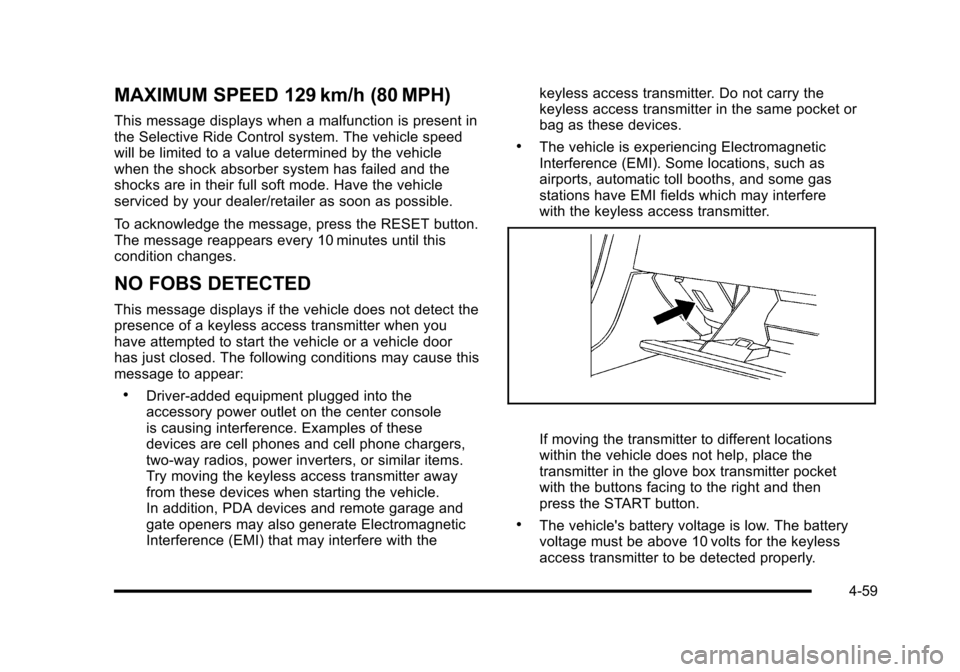
If moving the transmitter to different locations
within the vehicle does not help, place the
transmitter in the glove box transmitter pocket
with the buttons facing to the right and then
press the START button.
.The vehicle's battery voltage is low. The battery
voltage must be above 10 volts for the keyless
access transmitter to be detected properly.
4-59
Page 232 of 472
SERVICE CHARGING SYSTEM
If this message displays while you are driving, there
may be a problem with the electrical charging system.
It could mean that there is a loose or broken drive belt
or that there is another electrical problem. Have the
vehicle checked right away by your dealer/retailer.
Driving while this message is on could drain the battery.
If you must drive a short distance with the message on,
be certain to turn off the vehicle's accessories, such as
the radio and air conditioner.
Multiple chimes sound when this message is displayed.
To acknowledge the message, press the RESET button.
The message reappears every 10 minutes until this
condition changes.
SERVICE ELECTRICAL SYSTEM
This message displays if an electrical problem has
occurred within the Powertrain Control Module (PCM).
Have the vehicle serviced by your dealer/retailer.
SERVICE FUEL SYSTEM
This message displays if the Powertrain Control Module
(PCM) has detected a problem within the fuel system.
Have the vehicle serviced by your dealer/retailer. This
message also displays when the cluster is not getting
fuel information from the PCM.
SERVICE RIDE CONTROL
This message displays when the Selective Ride Control
system has detected a malfunction and the system
must be serviced. See your dealer/retailer. If a fault is
present in the Selective Ride Control system which
causes the shocks to be in their full soft condition, the
messages SERVICE RIDE CONTROL, SHOCKS
INOPERATIVE, and MAXIMUM SPEED 129 km/h
(80 MPH) will display together. See Selective Ride
Control
on page 5‑14for more information.
SERVICE TIRE MONITOR
This message displays if a part on the Tire Pressure
Monitor System (TPMS) is not working properly. The tire
pressure light also flashes and then remains on during
the same ignition cycle. See Tire Pressure Light
on
page 4‑40. Several conditions may cause this message
to appear. See Tire Pressure Monitor Operationon
page 6‑74for more information. If the warning comes
on and stays on, there may be a problem with the
TPMS. See your dealer/retailer.
4-64
Page 238 of 472
Other Messages
Here are more messages that you can receive on your
Driver Information Center (DIC). To acknowledge a
message and read another message that may have
come on at the same time, press the RESET button.
.ACCESSORY MODE ON
.BATTERY VOLTAGE HIGH
See Voltmeter Gauge on page 4‑35.
.BATTERY VOLTAGE LOW
See Voltmeter Gauge on page 4‑35.
.CHECK WASHER FLUID
See Windshield Washer Fluid on page 6‑42.
.CRUISE SET TO XXX MPH (XXX km/h)
See Cruise Control on page 4‑7.
.DRIVER DOOR AJAR
.FOB AUTOLEARN WAIT XX MINUTES
See “Matching Transmitter(s) to Your Vehicle”
under Keyless Access System Operation
on
page 3‑5.
.FOB BATTERY LOW
See “Battery Replacement” underKeyless Access
System Operation on page 3‑5.
.HATCH AJAR (Coupe)
.INTRUSION SENSOR OFF, if your vehicle has this
feature
.INTRUSION SENSOR ON, if your vehicle has this
feature
.KNOWN FOB
See “Matching Transmitter(s) to Your Vehicle”
under Keyless Access System Operation
on
page 3‑5.
.MAXIMUM NUMBER OF FOBS LEARNED
See “Matching Transmitter(s) to Your Vehicle”
under Keyless Access System Operation
on
page 3‑5.
.OFF–ACCESSORY TO LEARN
See “Matching Transmitter(s) to Your Vehicle”
under Keyless Access System Operation
on
page 3‑5.
.PASSENGER DOOR AJAR
.READY FOR FOB #X
See “Matching Transmitter(s) to Your Vehicle”
under Keyless Access System Operation
on
page 3‑5.
.TONNEAU AJAR (Convertible)
.TRUNK AJAR (Convertible)
.UPSHIFT NOW
See Manual Transmission Operation on page 3‑32.
4-70
Page 240 of 472
Entering the Personal Options Menu
To enter the personal options menu, use the following
steps: 1. If you have an automatic transmission vehicle, turn the vehicle on with the shift lever in P (Park).
If you have a manual transmission vehicle, turn the
vehicle on with the parking brake set.
To avoid excessive drain on the battery, it is
recommended that the headlamps are turned off.
2. Press the OPTION button and you will enter the PERSONAL OPTIONS menu.
The DIC will display the current driver
number (1 or 2) for a few seconds and then will
display instructions on which buttons to use for
setting the personalizations. The RESET button
is used to select a setting for a particular feature.
The OPTION button is used to move to the next
feature.
3. Press the OPTION button while the instruction screen is displayed to enter the first
personalization menu item.
4. Once you have cycled through all of the personal options, pressing the OPTION button a final time
exits the personal options menu. In addition, if no
button is pressed within 45 seconds, the DIC will
exit the personal options menu.
Personal Options
The following options are available for programming:
Display Units : This option allows you to choose the
measurement units.
Press the OPTION button until DISPLAY UNITS
appears on the display, then press the RESET button
to scroll through the following modes:
.ENGLISH (default)
.METRIC
If you choose ENGLISH, all information will be
displayed in English units.
If you choose METRIC, all information will be displayed
in metric units.
When the mode you want is selected, press the
OPTION button to set your choice and advance to the
next personal option.
Auto Memory Recall (Automatic Transmission
only) : If your automatic transmission vehicle has the
memory package, you may have this option. This option
allows the driver's seat, the telescopic steering column,
if your vehicle has this feature, and the outside rearview
mirrors to automatically move to the current driver's set
position when the engine starts.
4-72
Page 277 of 472
XM™Satellite Radio Service
XM Satellite Radio Service gives digital radio reception
from coast-to-coast in the 48 contiguous United States,
and in Canada. Just as with FM, tall buildings or hills
can interfere with satellite radio signals, causing the
sound to fade in and out. In addition, traveling or
standing under heavy foliage, bridges, garages,
or tunnels may cause loss of the XM signal for a
period of time.
Cellular Phone Usage
Cellular phone usage may cause interference
with the vehicle's radio. This interference may occur
when making or receiving phone calls, charging the
phone's battery, or simply having the phone on. This
interference causes an increased level of static while
listening to the radio. If static is received while listening
to the radio, unplug the cellular phone and turn it off.
Diversity Antenna System
The AM-FM antenna is a hidden self tuning system.
It optimizes the AM and FM signals relative to
the vehicle's position and radio station source.
No maintenance or adjustments are needed.
XM™ Satellite Radio Antenna
System
For vehicles with XM Satellite Radio Service, the
antenna is located on the roof or on the trunk lid of the
vehicle. Keep the antenna clear of obstructions for clear
radio reception.
4-109
Page 305 of 472
WARNING: (Continued)
For more information about carbon monoxide, see
Engine Exhaust on page 3‑37.
Snow can trap exhaust gases under your vehicle.
This can cause deadly CO (carbon monoxide) gas
to get inside. CO could overcome you and kill you.
You cannot see it or smell it, so you might not
know it is in your vehicle. Clear away snow from
around the base of your vehicle, especially any
that is blocking the exhaust.
Run the engine for short periods only as needed to
keep warm, but be careful.
To save fuel, run the engine for only short periods as
needed to warm the vehicle and then shut the engine
off and close the window most of the way to save heat.
Repeat this until help arrives but only when you feel
really uncomfortable from the cold. Moving about to
keep warm also helps.
If it takes some time for help to arrive, now and then
when you run the engine, push the accelerator pedal
slightly so the engine runs faster than the idle speed.
This keeps the battery charged to restart the vehicle
and to signal for help with the headlamps. Do this as
little as possible to save fuel.
If Your Vehicle is Stuck in Sand,
Mud, Ice, or Snow
Slowly and cautiously spin the wheels to free the
vehicle when stuck in sand, mud, ice, or snow.
See Rocking Your Vehicle to Get It Out on page 5‑28.
If the vehicle has a traction system, it can often help
to free a stuck vehicle. Refer to the vehicle's traction
system in the Index. If stuck too severely for the traction
system to free the vehicle, turn the traction system off
and use the rocking method.
{WARNING:
If the vehicle's tires spin at high speed, they
can explode, and you or others could be injured.
The vehicle can overheat, causing an engine
compartment fire or other damage. Spin the
wheels as little as possible and avoid going above
55 km/h (35 mph) as shown on the speedometer.
For information about using tire chains on the vehicle,
see Tire Chains on page 6‑84.
5-27
Page 313 of 472
Section 6 Service and Appearance Care
Service. . . . . . . . . . . . . . . . . . . . . . . . . . . . . . . . . . . . . . . . . . . . . 6-3
Accessories and Modifications . . . . . . . . . . . . . . . . . . 6-3
California Proposition 65 Warning . . . . . . . . . . . . . . . 6-4
California Perchlorate Materials Requirements . . . . . . . . . . . . . . . . . . . . . . . . . . . . . . . . . 6-4
Doing Your Own Service Work . . . . . . . . . . . . . . . . . . 6-5
Adding Equipment to the Outside of the Vehicle . . . . . . . . . . . . . . . . . . . . . . . . . . . . . . . . . . . . . . . . 6-5
Fuel . . . . . . . . . . . . . . . . . . . . . . . . . . . . . . . . . . . . . . . . . . . . . . . . . 6-6
Gasoline Octane . . . . . . . . . . . . . . . . . . . . . . . . . . . . . . . . 6-7
Gasoline Specifications . . . . . . . . . . . . . . . . . . . . . . . . . 6-7
California Fuel . . . . . . . . . . . . . . . . . . . . . . . . . . . . . . . . . . 6-7
Additives . . . . . . . . . . . . . . . . . . . . . . . . . . . . . . . . . . . . . . . . 6-8
Fuels in Foreign Countries . . . . . . . . . . . . . . . . . . . . . . 6-9
Filling the Tank . . . . . . . . . . . . . . . . . . . . . . . . . . . . . . . . . . 6-9
Filling a Portable Fuel Container . . . . . . . . . . . . . . . 6-12
Checking Things Under the Hood . . . . . . . . . . . . . . . 6-12
Hood Release . . . . . . . . . . . . . . . . . . . . . . . . . . . . . . . . . 6-13
Engine Compartment Overview . . . . . . . . . . . . . . . . 6-14
Engine Oil . . . . . . . . . . . . . . . . . . . . . . . . . . . . . . . . . . . . . 6-19
Engine Oil Life System . . . . . . . . . . . . . . . . . . . . . . . . 6-25
Engine Air Cleaner/Filter . . . . . . . . . . . . . . . . . . . . . . . 6-27
Automatic Transmission Fluid . . . . . . . . . . . . . . . . . . 6-31
Manual Transmission Fluid . . . . . . . . . . . . . . . . . . . . 6-31
Hydraulic Clutch . . . . . . . . . . . . . . . . . . . . . . . . . . . . . . . 6-31
Cooling System (Engine) . . . . . . . . . . . . . . . . . . . . . . 6-32 Cooling System (Intercooler) . . . . . . . . . . . . . . . . . . . 6-33
Engine Coolant . . . . . . . . . . . . . . . . . . . . . . . . . . . . . . . . 6-34
Engine Overheating . . . . . . . . . . . . . . . . . . . . . . . . . . . 6-38
Overheated Engine Protection
Operating Mode . . . . . . . . . . . . . . . . . . . . . . . . . . . . . 6-41
Power Steering Fluid . . . . . . . . . . . . . . . . . . . . . . . . . . 6-41
Windshield Washer Fluid . . . . . . . . . . . . . . . . . . . . . . 6-42
Brakes . . . . . . . . . . . . . . . . . . . . . . . . . . . . . . . . . . . . . . . . . 6-43
Battery . . . . . . . . . . . . . . . . . . . . . . . . . . . . . . . . . . . . . . . . . 6-49
Jump Starting . . . . . . . . . . . . . . . . . . . . . . . . . . . . . . . . . . 6-50
Rear Axle . . . . . . . . . . . . . . . . . . . . . . . . . . . . . . . . . . . . . . . . . 6-55
Headlamp Aiming . . . . . . . . . . . . . . . . . . . . . . . . . . . . . . . . 6-55
Bulb Replacement . . . . . . . . . . . . . . . . . . . . . . . . . . . . . . . . 6-56
High Intensity Discharge (HID) Lighting . . . . . . . . 6-56
Halogen Bulbs . . . . . . . . . . . . . . . . . . . . . . . . . . . . . . . . . 6-56
Headlamps, Front Turn Signal, and Parking Lamps . . . . . . . . . . . . . . . . . . . . . . . . . . . . . . . . . . . . . . . 6-56
Taillamps, Turn Signal, and Stoplamps . . . . . . . . 6-58
Replacement Bulbs . . . . . . . . . . . . . . . . . . . . . . . . . . . . 6-58
Windshield Replacement . . . . . . . . . . . . . . . . . . . . . . . . . 6-59
Windshield Wiper Blade Replacement . . . . . . . . . . . 6-59
Tires . . . . . . . . . . . . . . . . . . . . . . . . . . . . . . . . . . . . . . . . . . . . . . . 6-62
Winter Tires . . . . . . . . . . . . . . . . . . . . . . . . . . . . . . . . . . . . 6-63
Tire Sidewall Labeling . . . . . . . . . . . . . . . . . . . . . . . . . 6-64
Tire Terminology and Definitions . . . . . . . . . . . . . . . 6-66
6-1