ignition CHEVROLET CORVETTE 2010 6.G Workshop Manual
[x] Cancel search | Manufacturer: CHEVROLET, Model Year: 2010, Model line: CORVETTE, Model: CHEVROLET CORVETTE 2010 6.GPages: 472, PDF Size: 11.44 MB
Page 244 of 472
FOB Reminder :This option sounds the horn three
times when the driver's door is closed and there is a
keyless access transmitter inside the interior of the
vehicle. This will only occur when the vehicle is off.
Press the OPTION button until FOB REMINDER
appears on the display, then press the RESET button to
scroll through the following modes:
.YES
.NO (default)
If you choose YES, the horn will sound three times
when a keyless access transmitter is inside of the
vehicle while the ignition is turned off and the driver's
door is closed.
If you choose NO, this option will turn off.
When the mode you want is selected, press the
OPTION button to set your choice and advance to the
next personal option.
Passive Door Locking : This option allows you to
select whether the doors automatically lock during
normal vehicle exit. When the ignition is turned off and
all doors become closed, the vehicle will determine how
many keyless access transmitters remain in the vehicle
interior. If at least one keyless access transmitter has
been removed from the interior of the vehicle, the doors
will lock after a short delay. For example, if there are two keyless access
transmitters in the vehicle and one is removed, the
other will be locked in. The keyless access transmitter
locked in the vehicle can still be used to start the
vehicle or unlock the doors, if needed. A person
approaching the outside of the locked vehicle without
an authorized keyless access transmitter, however, will
not be able to open the door, even with a transmitter in
the vehicle.
You may temporarily disable the passive door locking
feature by pressing the door unlock switch for
three seconds on an open door. Passive door locking
will then remain disabled until a door lock switch is
pressed or until the power mode transitions from the
off power mode.
Press the OPTION button until PASSIVE DOOR
LOCKING appears on the display, then press the
RESET button to scroll through the following modes:
.OFF (default)
.SILENT
.HORN
If you choose OFF, this option will turn off.
If you choose SILENT, the doors will automatically
lock a short time after you remove a keyless access
transmitter from the interior of the vehicle and close
both doors.
4-76
Page 245 of 472
If you choose HORN, the doors will automatically lock
and the horn will sound a short time after you remove a
keyless access transmitter from the interior of the
vehicle and close both doors.
If you are parking in a quiet area and do not want the
horn to sound when the doors lock, press the lock
button on the keyless access transmitter immediately
after removing it from the interior and closing the doors.
This will lock the doors and cancel the passive locking
for this ignition cycle.
When the mode you want is selected, press the
OPTION button to set your choice and advance to the
next personal option.
Passive Door Unlock : This option allows you to
select which doors will automatically unlock when you
approach and open the driver's door with the keyless
access transmitter. See Door Locks
on page 3‑10for
more information.
Press the OPTION button until PASSIVE DOOR
UNLOCK appears on the display, then press the
RESET button to scroll through the following modes:
.DRIVER
.BOTH (default)
If you choose DRIVER, only the driver's door will
automatically unlock when you approach and open
the driver's door with the keyless access transmitter. If you choose BOTH, both doors will automatically
unlock when you approach and open the driver's door
with the keyless access transmitter.
Auto Unlock :
This option allows you to select
whether the driver's door, both doors or neither door
automatically unlocks when the shift lever is moved into
P (Park) for automatic transmission vehicles or when
the ignition is turned off or is in RAP for manual
transmission vehicles.
Press the OPTION button until AUTO UNLOCK appears
on the display, then press the RESET button to scroll
through the following modes:
.OFF
.DRIVER
.BOTH (default)
If you choose OFF, this option will turn off.
If you choose DRIVER, on automatic transmission
vehicles, the driver's door will automatically unlock
when the shift lever is moved into P (Park). On
manual transmission vehicles, the driver's door will
automatically unlock when the ignition is turned
off or is in RAP.
If you choose BOTH, on automatic transmission
vehicles, both doors will automatically unlock when
the shift lever is moved into P (Park). On manual
transmission vehicles, both doors will automatically
unlock when the ignition is turned off or is in RAP.
4-77
Page 248 of 472
Audio System(s)
Determine which radio the vehicle has and read the
following pages to become familiar with its features.
{WARNING:
Taking your eyes off the road for extended periods
could cause a crash resulting in injury or death to
you or others. Do not give extended attention to
entertainment tasks while driving.
This system provides access to many audio and non
audio listings.
To minimize taking your eyes off the road while driving,
do the following while the vehicle is parked:
.Become familiar with the operation and controls of
the audio system.
.Set up the tone, speaker adjustments, and preset
radio stations.
For more information, see Defensive Driving
on
page 5‑2. Notice:
Contact your dealer/retailer before adding
any equipment.
Adding audio or communication equipment could
interfere with the operation of the vehicle's engine,
radio, or other systems, and could damage them.
Follow federal rules covering mobile radio and
telephone equipment.
The vehicle has Retained Accessory Power (RAP). With
RAP, the audio system can be played even after the
ignition is turned off. See Retained Accessory Power
(RAP)
on page 3‑24for more information.
Setting the Clock
To set the clock:
1. Press and hold H until the correct hour displays.
2. Press and hold M until the correct minute displays.
The clock mode automatically times out with the
changed display format set as the current default
setting.
4-80
Page 249 of 472
Radio(s)
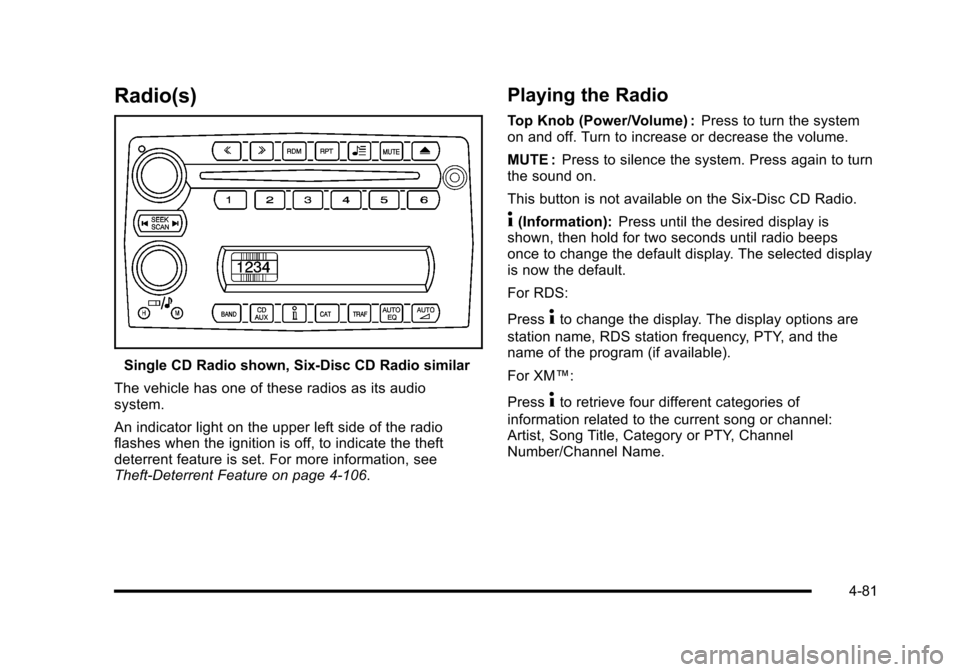
Single CD Radio shown, Six-Disc CD Radio similar
The vehicle has one of these radios as its audio
system.
An indicator light on the upper left side of the radio
flashes when the ignition is off, to indicate the theft
deterrent feature is set. For more information, see
Theft-Deterrent Feature on page 4‑106.
Playing the Radio
Top Knob (Power/Volume) : Press to turn the system
on and off. Turn to increase or decrease the volume.
MUTE : Press to silence the system. Press again to turn
the sound on.
This button is not available on the Six-Disc CD Radio.
4(Information): Press until the desired display is
shown, then hold for two seconds until radio beeps
once to change the default display. The selected display
is now the default.
For RDS:
Press
4to change the display. The display options are
station name, RDS station frequency, PTY, and the
name of the program (if available).
For XM™:
Press
4to retrieve four different categories of
information related to the current song or channel:
Artist, Song Title, Category or PTY, Channel
Number/Channel Name.
4-81
Page 255 of 472
TRAF (Traffic) :TA (traffic) displays when the station
broadcasts traffic announcements, the announcement
will be played.
Press TRAF and the radio seeks to a station that
broadcasts traffic announcements. When a station
is found, the radio stops seeking and TA displays.
NO TRAFFIC INFO displays if a station that broadcasts
traffic announcements can not be found.
Press TRAF to turn off the traffic announcements if TA
is on the display.
The radio plays the traffic announcement even if the
volume is low. The radio interrupts the play of a CD if
the last tuned station broadcasts traffic announcements.
This function does not apply to XM Satellite Radio
Service.
Radio Messages for XM Only
See XM Radio Messageson page 4‑95XM Radio
Messages later in this section for further detail.
Using the CD Player
The CD player can play smaller 3 inch (8 cm) single
CDs with an adapter ring.
A CD in the player it stays in the player when the
ignition is turned off. When the ignition or radio is turned
on, the CD starts to play where it stopped, if it was the
last selected audio source.
Loading a CD
Single CD Radio:
Insert the CD partway into the slot, label side up, until
the player pulls the CD in. The CD begins playing
automatically.
The CD symbol displays when a CD is inserted, and
the track number displays when each new track starts
to play.
Six-Disc CD Radio:
If more than one CD has been loaded, a number for
each CD displays.
M(Load): Press to load CDs into the CD player.
To insert one CD:
1. Press
M.
2. Load a CD and insert the CD partway into the slot, label side up when INSERT CD # displays.
The player pulls the CD in.
4-87
Page 261 of 472
Supported Bit Rates
The following bit rates are supported: 32 kbps,
40 kbps, 56 kbps, 64 kbps, 80 kbps, 96 kbps, 112 kbps,
128 kbps, 160 kbps, 192 kbps, 224 kbps, 256 kbps,
and 320 kbps or a variable bit rate.
File Naming
ID3v1 and ID3v2 tags are supported. The track name
contained in the ID3 tag is shown on the display. The
display only shows up to 32 characters for track and file
names.
If the track name is not contained in the ID3 tag, the
display shows the file name without the file extension.
Playlists
Playlists that do not have a .m3u or .wpl extension may
not work.
Preprogrammed playlists created by WinAmp™,
MusicMatch™, or Real Jukebox™ software are
supported and they cannot be edited using the radio.
Playing an MP3
Insert a CD partway into the slot, label side up.
The player pulls it in, and READING displays. The CD
should begin playing and the CD symbol displays.
If the ignition or radio is turned off with a CD-R in the
player, it stays in the player. When the ignition or radio
is turned on, the CD-R starts to play where it stopped,
if it was the last selected audio source.
As each new track starts to play, the track number
displays.
Order of Play
Tracks are played sequentially in the following order:
1. Playlists.
2. Files contained in the root directory.
3. Files contained in folders.
O/e(Tune): Turn to go to the next or previous track.
{(Previous Folder): Press to go to the first track in
the previous folder. Press and hold to reverse through
the current track.
4-93
Page 274 of 472
Sending a Stored Name Tag During a Call
1. Pressbg. The system responds with “Ready”
followed by a tone.
2. Say “Send name tag.” The system responds with
“Say a name tag to send tones” followed by a tone.
3. Say the name tag to send.
.If the system clearly recognizes the name tag it
responds with “OK, Sending
the dial tones are sent and the call continues.
.If the system is not sure it recognized the name
tag properly, it responds “Dial
Please say yes or no?” followed by a tone.
If the name tag is correct, say “Yes”. The
system responds with “OK, Sending
continues.
Clearing the System
Unless information is deleted out of the in‐vehicle
Bluetooth system, it will be retained indefinitely. This
includes all saved name tags in the phonebook and
phone pairing information. For information on how to
delete this information, see the above sections on
Deleting a Paired Phone and Deleting Name Tags.
Other Information
The Bluetooth®word mark and logos are owned by the
Bluetooth®SIG, Inc. and any use of such marks by
General Motors is under license. Other trademarks and
trade names are those of their respective owners.
See Bluetooth
®on page 4‑96for FCC information.
Theft-Deterrent Feature
THEFTLOCK®is designed to discourage theft of the
vehicle's radio by learning a portion of the Vehicle
Identification Number (VIN). The radio does not operate
and LOCKED displays if the radio is stolen or moved to
a different vehicle.
When the when the ignition is in the off position, a
blinking red light on the upper left side of the radio
indicates that THEFTLOCK
®is armed.
4-106
Page 303 of 472
{WARNING:
Coasting downhill in N (Neutral) or with the
ignition off is dangerous. The brakes will have to
do all the work of slowing down and they could
get so hot that they would not work well. You
would then have poor braking or even none going
down a hill. You could crash. Always have the
engine running and the vehicle in gear when
going downhill.
.Stay in your own lane. Do not swing wide or cut
across the center of the road. Drive at speeds that
let you stay in your own lane.
.Top of hills: Be alert —something could be in your
lane (stalled car, accident).
.Pay attention to special road signs (falling rocks
area, winding roads, long grades, passing or
no-passing zones) and take appropriate action.
Winter Driving
Driving on Snow or Ice
Drive carefully when there is snow or ice between the
tires and the road, creating less traction or grip. Wet ice
can occur at about 0°C (32°F) when freezing rain
begins to fall, resulting in even less traction. Avoid
driving on wet ice or in freezing rain until roads can be
treated with salt or sand.
Drive with caution, whatever the condition. Accelerate
gently so traction is not lost. Accelerating too quickly
causes the wheels to spin and makes the surface under
the tires slick, so there is even less traction.
Try not to break the fragile traction. If you accelerate too
fast, the drive wheels will spin and polish the surface
under the tires even more.
The Traction Control System (TCS)
on page 5‑6improves the ability to accelerate on slippery roads,
but slow down and adjust your driving to the road
conditions. The Active Handling System
on page 5‑8might also activate. When driving through deep snow,
turn off the traction control system to help maintain
vehicle motion at lower speeds.
5-25
Page 354 of 472
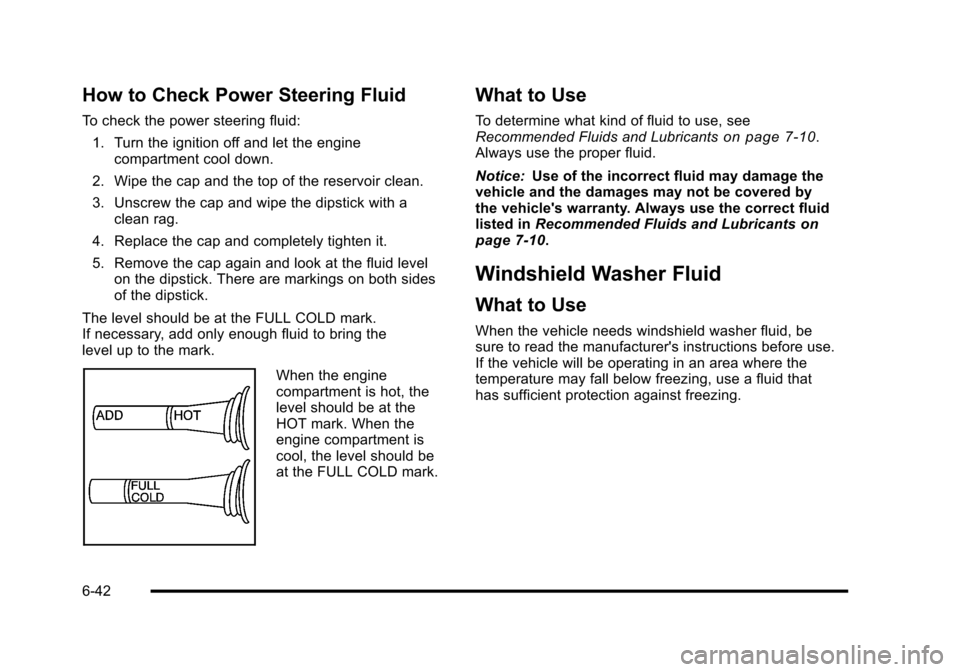
How to Check Power Steering Fluid
To check the power steering fluid: 1. Turn the ignition off and let the engine compartment cool down.
2. Wipe the cap and the top of the reservoir clean.
3. Unscrew the cap and wipe the dipstick with a clean rag.
4. Replace the cap and completely tighten it.
5. Remove the cap again and look at the fluid level on the dipstick. There are markings on both sides
of the dipstick.
The level should be at the FULL COLD mark.
If necessary, add only enough fluid to bring the
level up to the mark.
When the engine
compartment is hot, the
level should be at the
HOT mark. When the
engine compartment is
cool, the level should be
at the FULL COLD mark.
What to Use
To determine what kind of fluid to use, see
Recommended Fluids and Lubricantson page 7‑10.
Always use the proper fluid.
Notice: Use of the incorrect fluid may damage the
vehicle and the damages may not be covered by
the vehicle's warranty. Always use the correct fluid
listed in Recommended Fluids and Lubricants
on
page 7‑10.
Windshield Washer Fluid
What to Use
When the vehicle needs windshield washer fluid, be
sure to read the manufacturer's instructions before use.
If the vehicle will be operating in an area where the
temperature may fall below freezing, use a fluid that
has sufficient protection against freezing.
6-42
Page 362 of 472
Jump Starting
If your battery has run down, you may want to use
another vehicle and some jumper cables to start your
vehicle. Be sure to use the following steps to do it
safely.
{WARNING:
Batteries can hurt you. They can be dangerous
because:
.They contain acid that can burn you.
.They contain gas that can explode or ignite.
.They contain enough electricity to burn you.
If you do not follow these steps exactly, some or
all of these things can hurt you.
Notice: If you try to start your vehicle by pushing or
pulling it, you could damage your vehicle. Do not
push or pull your vehicle to start it; instead, use the
jump starting procedure in this manual to start your
vehicle when the battery has run down.
1. Check the other vehicle. It must have a 12-volt battery with a negative ground system. Notice:
If the other vehicle's system is not a 12-volt
system with a negative ground, both vehicles can
be damaged. Only use vehicles with 12-volt systems
with negative grounds to jump start your vehicle.
2. Get the vehicles close enough so the jumper cables can reach, but be sure the vehicles are not
touching each other. If they are, it could cause a
ground connection you do not want. You would
not be able to start your vehicle, and the bad
grounding could damage the electrical systems.
To avoid the possibility of the vehicles rolling, set
the parking brake firmly on both vehicles involved
in the jump start procedure. Put an automatic
transmission in P (Park) or a manual transmission
in Neutral before setting the parking brakes.
Notice: If you leave the radio or other accessories
on during the jump starting procedure, they could
be damaged. The repairs would not be covered by
the warranty. Always turn off the radio and other
accessories when jump starting the vehicle.
3. Turn off the ignition on both vehicles. Unplug unnecessary accessories plugged into the
cigarette lighter or the accessory power outlet.
Turn off the radio and all lamps that are not
needed. This will avoid sparks and help save
both batteries. And it could save the radio!
6-50