display CHEVROLET CORVETTE 2010 6.G Manual Online
[x] Cancel search | Manufacturer: CHEVROLET, Model Year: 2010, Model line: CORVETTE, Model: CHEVROLET CORVETTE 2010 6.GPages: 472, PDF Size: 11.44 MB
Page 256 of 472
To insert multiple CDs: 1. Press and hold
Mfor two seconds. Two beeps
sound and LOAD ALL DISCS displays.
2. Load a CD and insert the CD partway into the slot, label side up when INSERT CD # displays.
The player pulls the CD in.
3. Wait for INSERT CD # to display after the previous CD is loaded, then load the next CD.
The CD player takes up to six CDs.
To load more than one CD but less than six, complete
Steps 1 through 3. When finished loading CDs, press
the
Mbutton to cancel the loading function. The radio
begins to play the last CD loaded.
Playing a CD
O e(Tune): Turn to go to the next or previous track.
{(Reverse): Press and hold to reverse within the
current track.
|(Fast Forward): Press and hold to fast forward
through the current track.
tSEEKu: Press the left arrow to go to the start of
the current track if more than eight seconds have
played. Press the right arrow to go to the start of the
next track. If either arrow is held or pressed more than
once, the player continues moving backward or forward
through the CD.
tSCANu: To scan one CD, press and hold either
arrow for more than two seconds until SCAN displays
and a beep sounds. The radio goes to the next track,
plays for 10 seconds, then goes to the next track.
Press either arrow again, to stop scanning.
To scan all loaded CDs, press and hold either arrow
for more than four seconds until SCAN displays and a
beep sounds. Use this feature to listen to 10 seconds of
the first track of each loaded CD. Press either arrow
again, to stop scanning.
AUTO EQ (Automatic Equalization) : Press to
select the equalization setting while playing a CD.
The equalization is stored when a CD is played. For
more information on AUTO EQ, see “AUTO EQ”listed
previously in this section.
BAND : Press to listen to the radio when a CD is
playing. The inactive CD(s) remains inside the radio for
future listening.
CD AUX (Auxiliary) : Press to play a CD when listening
to the radio. CD displays when a CD is in the player.
If your system has a remote playback device, pressing
this button a second time allows the remote device
to play.
X(Eject): Press to eject a CD from the Single CD
Radio and the Six‐Disc CD Radio.
Single CD Radio: PressXto eject a CD.
4-88
Page 257 of 472
Six-Disc CD Radio:
Press Xto eject the CD that is currently playing.
To eject multiple CDs: 1. Press and hold Xfor two seconds. A beep sounds
and EJECT ALL displays.
2. The ejected CD can be removed when REMOVE DISC displays.
To stop ejecting the CDs, press the
MorX.
The CD is automatically pulled back into the player if
the CD is not removed after 25 seconds. Pushing a CD
back into the player, before the 25 second time period is
complete causes the player to sense an error and the
CD player tries to eject the CD several times before
stopping.
Wait for the timer to expire before pressing
Xagain.
Pressing
Xrepeatedly after trying to push a CD in
manually causes the CD players 25-second eject timer
to reset.
RPT (Repeat) : Press to hear a track or an entire CD
over again.
Single CD Radio:
Press RPT to hear a track over again, REPEAT
displays. Press again to turn off repeat, REPEAT OFF
displays. Six-Disc CD Radio:
.Press RPT until REPEAT displays to repeat a
track.
.Press RPT until REPEAT ONE DISC displays to
repeat an entire CD
.Press RPT until REPEAT OFF displays to turn off
repeat.
RDM (Random) : Press to hear the tracks in random,
rather than sequential order, on one CD or all of the
loaded CDs.
Single CD Radio:
Press and release RDM, until RANDOM DISC PLAY
displays. Press and release the RDM until RANDOM
OFF displays to turn off random play.
Six-Disc CD Radio:
.Press and release RDM until RANDOM DISC
PLAY displays to play the tracks on one CD in
random order. Once all tracks on this disc have
played, RANDOM DISC PLAY will repeat.
.Press and release RDM until RANDOM ALL
DISCS displays to play the tracks on all of the CDs
that are loaded in random order.
.Press and release RDM until RANDOM OFF
displays to turn off random play.
4-89
Page 258 of 472
R(Song List):The Song List feature can save
20 track selections.
To save tracks:
1. If S-LIST is displayed, press
Rto turn it off.
2. Select the desired CD by pressing the numbered pushbutton and then use
uorO eknob to
select the track to be saved.
3. Press and hold
Runtil a beep sounds and
ADDED SONG displays.
4. Repeat Steps 2 and 3 to save other selections.
SONGLIST FULL displays if more than 20 selections
are stored.
To play tracks:
1. Press
R. One beep sounds and S-LIST displays.
The recorded tracks begin to play in the order they
were saved
2. Press
toruto go back or forward within the
saved tracks. To delete tracks:
1. Press
Rto turn song list on. S-LIST displays.
2. Press
toru, use theO eknob to select the
desired track to be deleted.
3. Press and hold
Runtil SONG REMOVED
displays.
After a track has been deleted, the remaining tracks are
moved up the list. When another track is added to the
song list, the track is added to the end of the list.
To delete the entire song list:
1. Press
Rto turn song list on. S-LIST displays.
2. Press and hold
Rfor more than four seconds.
One beep sounds and SONGLIST EMPTY
displays to confirm that the song list has been
deleted.
If a CD is ejected, and the song list contains saved
tracks from that CD, those tracks are automatically
deleted from the song list. Any tracks saved to the song
list again are added to the bottom of the list.
To end song list mode, press
R. One beep sounds
and S-LIST is removed from the display.
4-90
Page 259 of 472
Care of CDs and the CD Player
Care of CDs
Store CD(s) in their original cases or other protective
cases and away from direct sunlight and dust. The CD
player scans the bottom of the disc. If the bottom of a
CD is damaged it may not play properly or at all. Do not
touch the bottom of a CD while handling it. Pick up CDs
by grasping the outer edges or the edge of the hole and
the outer edge.
If the surface of a CD is dirty, take a soft, lint free
cloth or dampen a clean, soft cloth in a mild, neutral
detergent solution mixed with water, and clean it. Make
sure the wiping process starts from the center to
the edge.
Care of the CD Player
Do not add labels to a CD, it could get caught in the
CD player. Use a marking pen to write on the top of the
CD if a description is needed.
Do not use CD lens cleaners, they could damage the
CD player. Notice:
If a label is added to a CD, or more than one
CD is inserted into the slot at a time, or an attempt
is made to play scratched or damaged CDs, the CD
player could be damaged. While using the CD
player, use only CDs in good condition without any
label, load one CD at a time, and keep the CD player
and the loading slot free of foreign materials,
liquids, and debris.
If an error displays, see “CD Messages”later in this
section.
Using the Auxiliary Input Jack
The radio system has an auxiliary input jack located on
the right side of the faceplate. This is not an audio
output; do not plug the headphone set into the front
auxiliary input jack. An external audio device can be
connected to the auxiliary input jack for use as another
source for audio listening.
Drivers are encouraged to set up any auxiliary device
while the vehicle is in P (Park). See Defensive Driving
on page 5‑2.
4-91
Page 260 of 472
Connect a 3.5 mm (1/8 in.) cable to the radio’s front
auxiliary input jack to use a portable audio player.
The radio displays AUX INPUT DEVICE when a device
is connected and begins playing audio from that device.
Top Knob (Power/Volume) : Turn to increase or
decrease the volume of the portable player. Additional
volume adjustments can be made from the portable
device.
BAND : Press to listen to the radio while a portable
audio device is playing. The portable audio device
continues playing.
CD/AUX (CD/Auxiliary) : Press to play a CD while a
portable audio device is playing. Press again and the
system begins playing audio from the connected
portable audio player. If a portable audio player is
connected, AUX INPUT DEVICE displays. If a portable
audio player is not connected, AUX INPUT DEVICE
does not display.Using an MP3
MP3 Format
Radios with the MP3 feature can only play CD-R discs.
Do not mix standard audio and MP3 files on the
same disc.
Supported File Structure
Radios with the MP3 feature support up to:
.50 folders.
.11 folders in depth.
.50 playlists.
.255 files.
.10 sessions.
Root Directory:
The root directory is treated as a folder. Files are stored
in the root directory when the disc or storage device
does not contain folders. Files accessed from the root
directory display as F1 ROOT.
Empty Folder:
Folders that do not contain files are skipped, and the
player advances to the next folder that contains files.
4-92
Page 261 of 472
Supported Bit Rates
The following bit rates are supported: 32 kbps,
40 kbps, 56 kbps, 64 kbps, 80 kbps, 96 kbps, 112 kbps,
128 kbps, 160 kbps, 192 kbps, 224 kbps, 256 kbps,
and 320 kbps or a variable bit rate.
File Naming
ID3v1 and ID3v2 tags are supported. The track name
contained in the ID3 tag is shown on the display. The
display only shows up to 32 characters for track and file
names.
If the track name is not contained in the ID3 tag, the
display shows the file name without the file extension.
Playlists
Playlists that do not have a .m3u or .wpl extension may
not work.
Preprogrammed playlists created by WinAmp™,
MusicMatch™, or Real Jukebox™ software are
supported and they cannot be edited using the radio.
Playing an MP3
Insert a CD partway into the slot, label side up.
The player pulls it in, and READING displays. The CD
should begin playing and the CD symbol displays.
If the ignition or radio is turned off with a CD-R in the
player, it stays in the player. When the ignition or radio
is turned on, the CD-R starts to play where it stopped,
if it was the last selected audio source.
As each new track starts to play, the track number
displays.
Order of Play
Tracks are played sequentially in the following order:
1. Playlists.
2. Files contained in the root directory.
3. Files contained in folders.
O/e(Tune): Turn to go to the next or previous track.
{(Previous Folder): Press to go to the first track in
the previous folder. Press and hold to reverse through
the current track.
4-93
Page 262 of 472

|(Next Folder):Press to go to the first track in the
next folder. Press and hold to fast forward the current
track.
RDM (Random) : Press to hear the tracks in random,
rather than sequential order, on one CD, one folder,
or all of the loaded CDs.
Press and release RDM until:
.RANDOM DISC PLAY displays to play the tracks
on the CD in random order.
.RANDOM FOLDER displays to play the tracks in
the folder in random order.
.RANDOM ALL DISCS displays to play the tracks
on all of the CDs that are loaded in random order.
.RANDOM OFF displays to turn off random play. RPT (Repeat) :
Press to hear a track, CD, or a folder
over again.
Press and release RPT until:
.REPEAT displays to repeat a track.
.REPEAT ONE DISC displays to repeat a CD.
.REPEAT FOLDER displays to repeat a folder.
.REPEAT OFF displays to turn off repeated play.
tSEEKu: Presstto go to the start of the current
track, if more than eight seconds have played.
Press
uto go to the next track. Presstorumore
than once to continue moving backward or forward
through the CD.
4(Information): Press to display the artist name and
album contained in the ID3 tag.
BAND : Press to listen to the radio when a CD is
playing. The inactive CD remains inside the radio for
future listening.
CD AUX (Auxiliary) : Press to play a CD when listening
to the radio. The CD symbol displays when a CD is
loaded.
4-94
Page 274 of 472
Sending a Stored Name Tag During a Call
1. Pressbg. The system responds with “Ready”
followed by a tone.
2. Say “Send name tag.” The system responds with
“Say a name tag to send tones” followed by a tone.
3. Say the name tag to send.
.If the system clearly recognizes the name tag it
responds with “OK, Sending
the dial tones are sent and the call continues.
.If the system is not sure it recognized the name
tag properly, it responds “Dial
Please say yes or no?” followed by a tone.
If the name tag is correct, say “Yes”. The
system responds with “OK, Sending
continues.
Clearing the System
Unless information is deleted out of the in‐vehicle
Bluetooth system, it will be retained indefinitely. This
includes all saved name tags in the phonebook and
phone pairing information. For information on how to
delete this information, see the above sections on
Deleting a Paired Phone and Deleting Name Tags.
Other Information
The Bluetooth®word mark and logos are owned by the
Bluetooth®SIG, Inc. and any use of such marks by
General Motors is under license. Other trademarks and
trade names are those of their respective owners.
See Bluetooth
®on page 4‑96for FCC information.
Theft-Deterrent Feature
THEFTLOCK®is designed to discourage theft of the
vehicle's radio by learning a portion of the Vehicle
Identification Number (VIN). The radio does not operate
and LOCKED displays if the radio is stolen or moved to
a different vehicle.
When the when the ignition is in the off position, a
blinking red light on the upper left side of the radio
indicates that THEFTLOCK
®is armed.
4-106
Page 275 of 472
Audio Steering Wheel Controls
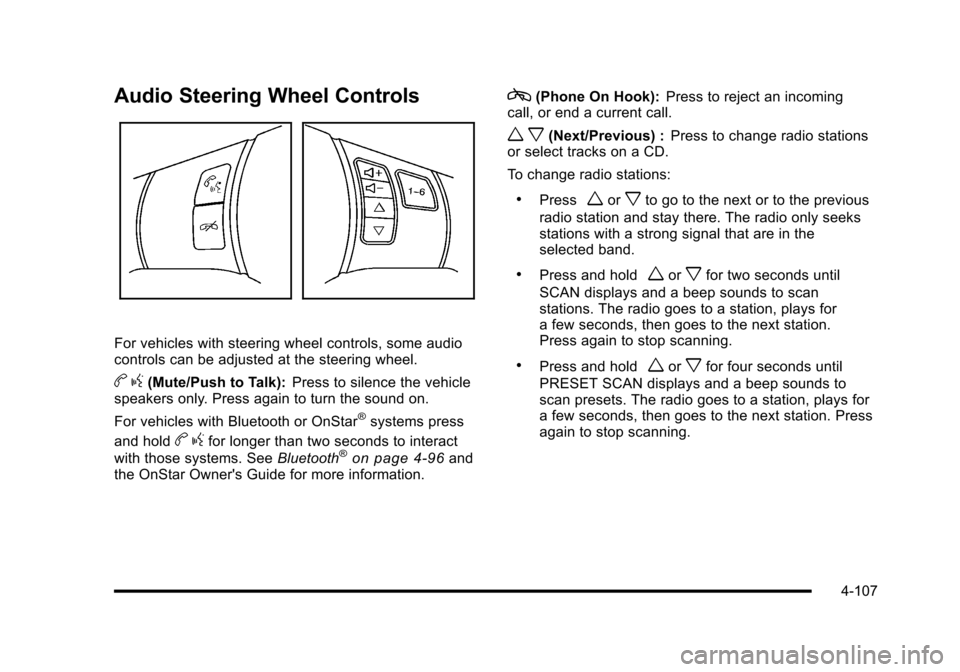
For vehicles with steering wheel controls, some audio
controls can be adjusted at the steering wheel.
b g(Mute/Push to Talk): Press to silence the vehicle
speakers only. Press again to turn the sound on.
For vehicles with Bluetooth or OnStar
®systems press
and hold
b gfor longer than two seconds to interact
with those systems. See Bluetooth®on page 4‑96and
the OnStar Owner's Guide for more information.
c(Phone On Hook): Press to reject an incoming
call, or end a current call.
w x(Next/Previous) : Press to change radio stations
or select tracks on a CD.
To change radio stations:
.Pressworxto go to the next or to the previous
radio station and stay there. The radio only seeks
stations with a strong signal that are in the
selected band.
.Press and holdworxfor two seconds until
SCAN displays and a beep sounds to scan
stations. The radio goes to a station, plays for
a few seconds, then goes to the next station.
Press again to stop scanning.
.Press and holdworxfor four seconds until
PRESET SCAN displays and a beep sounds to
scan presets. The radio goes to a station, plays for
a few seconds, then goes to the next station. Press
again to stop scanning.
4-107
Page 284 of 472
Braking in Emergencies
ABS allows the driver to steer and brake at the same
time. In many emergencies, steering can help more
than even the very best braking.
Brake Assist
This vehicle has a brake assist feature that responds to
emergency braking by generating additional pressure
and engaging the ABS. When this happens, the brake
pedal will feel easier to push. Just hold the brake pedal
down firmly and let the system work for you. You might
feel the brakes vibrate or notice some noise, but this is
normal. The brakes will return to normal operation after
the brake pedal is released.
Brake assist cannot compensate for unsafe driving
practices and braking effectiveness, itself, depends on
the condition of the road, tires, and brakes and
vehicle mass.
Traction Control System (TCS)
The vehicle has a Traction Control System (TCS) that
limits wheel spin. This is especially useful in slippery
road conditions. The system operates only if it senses
that the rear wheels are spinning too much or are
beginning to lose traction. When this happens, the
system works the rear brakes and reduces engine
power (by closing the throttle and managing engine
spark) to limit wheel spin.
The TRACTION SYSTEM ACTIVE message displays
on the Driver Information Center (DIC) when TCS is
limiting wheel spin. See DIC Warnings and Messages
on page 4‑52. The system may be heard or felt while it
is working, but this is normal.
If cruise control is being used when TCS begins to limit
wheel spin, the cruise control will automatically
disengage. Cruise control may be reengaged when
road conditions allow. See Cruise Control on page 4‑7.
5-6