automatic transmission CHEVROLET CORVETTE 2011 6.G User Guide
[x] Cancel search | Manufacturer: CHEVROLET, Model Year: 2011, Model line: CORVETTE, Model: CHEVROLET CORVETTE 2011 6.GPages: 428, PDF Size: 6.63 MB
Page 51 of 428
Black plate (19,1)Chevrolet Corvette Owner Manual - 2011
Keys, Doors and Windows 2-19
Until you are sure you can remove
the panel alone, have someone
help you.
Notice:If you drop or rest a roof
panel on its edges, the roof panel,
paint and/or weatherstripping
may be damaged. Always place
the roof panel in the stowage
receivers after removing it from
the vehicle.
1. Park on a level surface and set the parking brake. Shift an
automatic transmission into
P (Park). Shift a manual
transmission into N (Neutral).
2. Make sure the ignition is off.
3. Lower both sun visors.
4. Open the rear hatch and remove any items that may interfere with
proper storage of the roof panel. 5. Lower the windows.
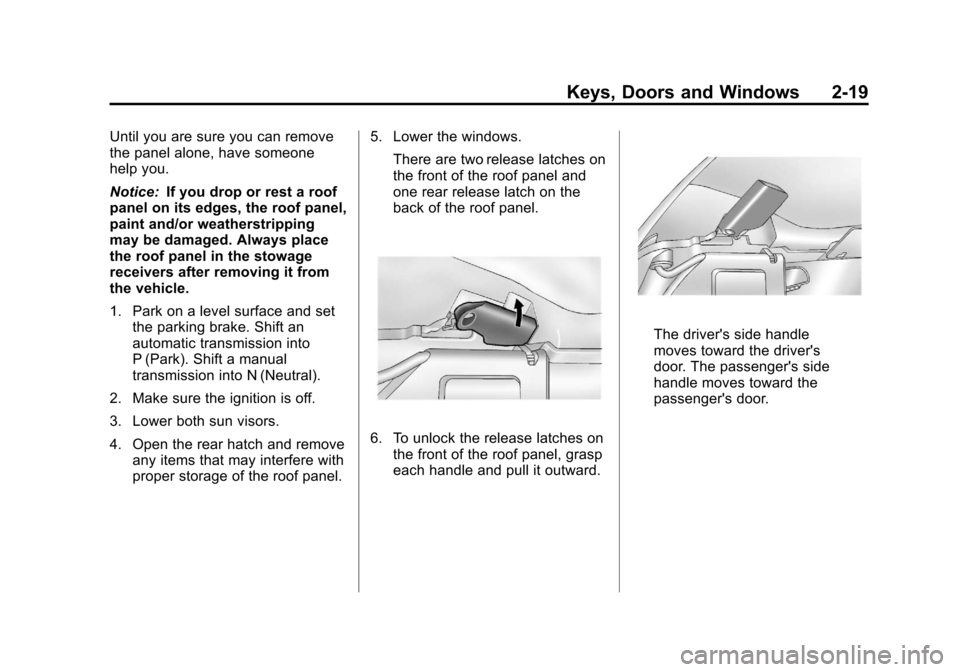
There are two release latches on
the front of the roof panel and
one rear release latch on the
back of the roof panel.
6. To unlock the release latches onthe front of the roof panel, grasp
each handle and pull it outward.
The driver's side handle
moves toward the driver's
door. The passenger's side
handle moves toward the
passenger's door.
Page 53 of 428
Black plate (21,1)Chevrolet Corvette Owner Manual - 2011
Keys, Doors and Windows 2-21
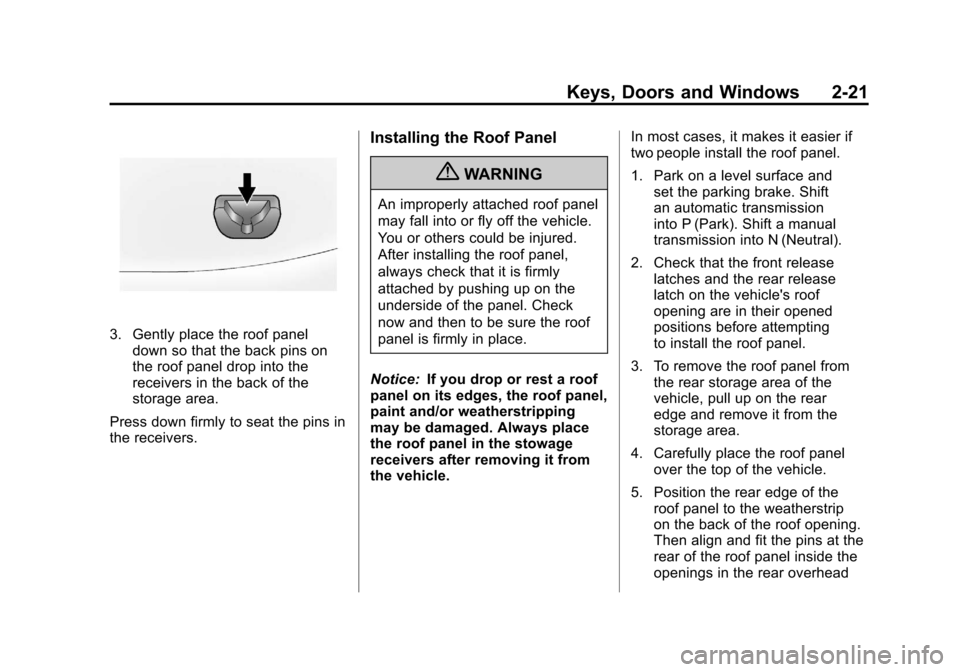
3. Gently place the roof paneldown so that the back pins on
the roof panel drop into the
receivers in the back of the
storage area.
Press down firmly to seat the pins in
the receivers.
Installing the Roof Panel
{WARNING
An improperly attached roof panel
may fall into or fly off the vehicle.
You or others could be injured.
After installing the roof panel,
always check that it is firmly
attached by pushing up on the
underside of the panel. Check
now and then to be sure the roof
panel is firmly in place.
Notice: If you drop or rest a roof
panel on its edges, the roof panel,
paint and/or weatherstripping
may be damaged. Always place
the roof panel in the stowage
receivers after removing it from
the vehicle. In most cases, it makes it easier if
two people install the roof panel.
1. Park on a level surface and
set the parking brake. Shift
an automatic transmission
into P (Park). Shift a manual
transmission into N (Neutral).
2. Check that the front release latches and the rear release
latch on the vehicle's roof
opening are in their opened
positions before attempting
to install the roof panel.
3. To remove the roof panel from the rear storage area of the
vehicle, pull up on the rear
edge and remove it from the
storage area.
4. Carefully place the roof panel over the top of the vehicle.
5. Position the rear edge of the roof panel to the weatherstrip
on the back of the roof opening.
Then align and fit the pins at the
rear of the roof panel inside the
openings in the rear overhead
Page 55 of 428
Black plate (23,1)Chevrolet Corvette Owner Manual - 2011
Keys, Doors and Windows 2-23
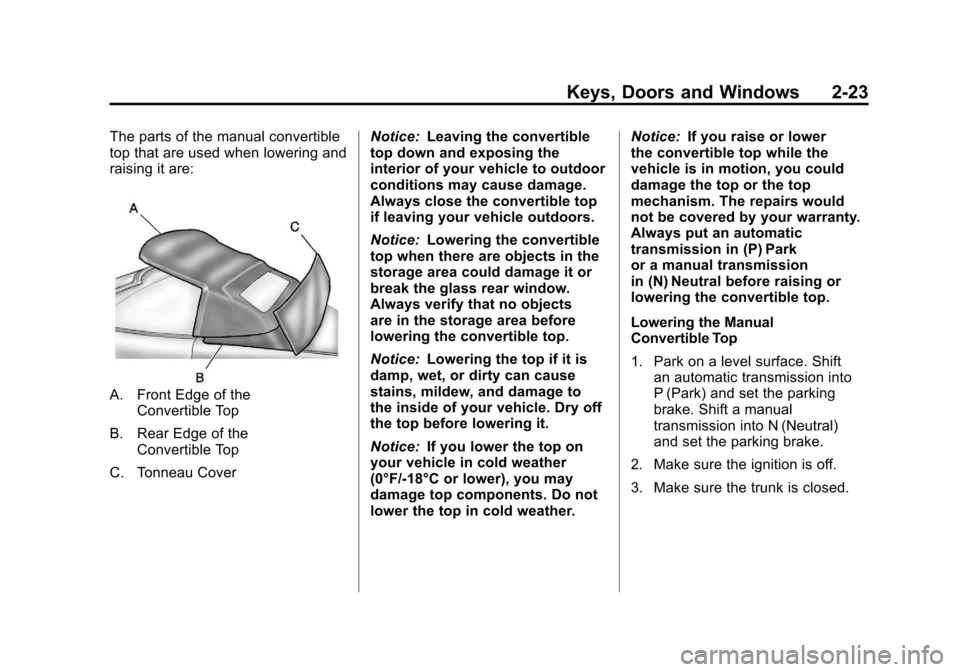
The parts of the manual convertible
top that are used when lowering and
raising it are:
A. Front Edge of theConvertible Top
B. Rear Edge of the Convertible Top
C. Tonneau Cover Notice:
Leaving the convertible
top down and exposing the
interior of your vehicle to outdoor
conditions may cause damage.
Always close the convertible top
if leaving your vehicle outdoors.
Notice: Lowering the convertible
top when there are objects in the
storage area could damage it or
break the glass rear window.
Always verify that no objects
are in the storage area before
lowering the convertible top.
Notice: Lowering the top if it is
damp, wet, or dirty can cause
stains, mildew, and damage to
the inside of your vehicle. Dry off
the top before lowering it.
Notice: If you lower the top on
your vehicle in cold weather
(0°F/-18°C or lower), you may
damage top components. Do not
lower the top in cold weather. Notice:
If you raise or lower
the convertible top while the
vehicle is in motion, you could
damage the top or the top
mechanism. The repairs would
not be covered by your warranty.
Always put an automatic
transmission in (P) Park
or a manual transmission
in (N) Neutral before raising or
lowering the convertible top.
Lowering the Manual
Convertible Top
1. Park on a level surface. Shift an automatic transmission into
P (Park) and set the parking
brake. Shift a manual
transmission into N (Neutral)
and set the parking brake.
2. Make sure the ignition is off.
3. Make sure the trunk is closed.
Page 58 of 428
Black plate (26,1)Chevrolet Corvette Owner Manual - 2011
2-26 Keys, Doors and Windows
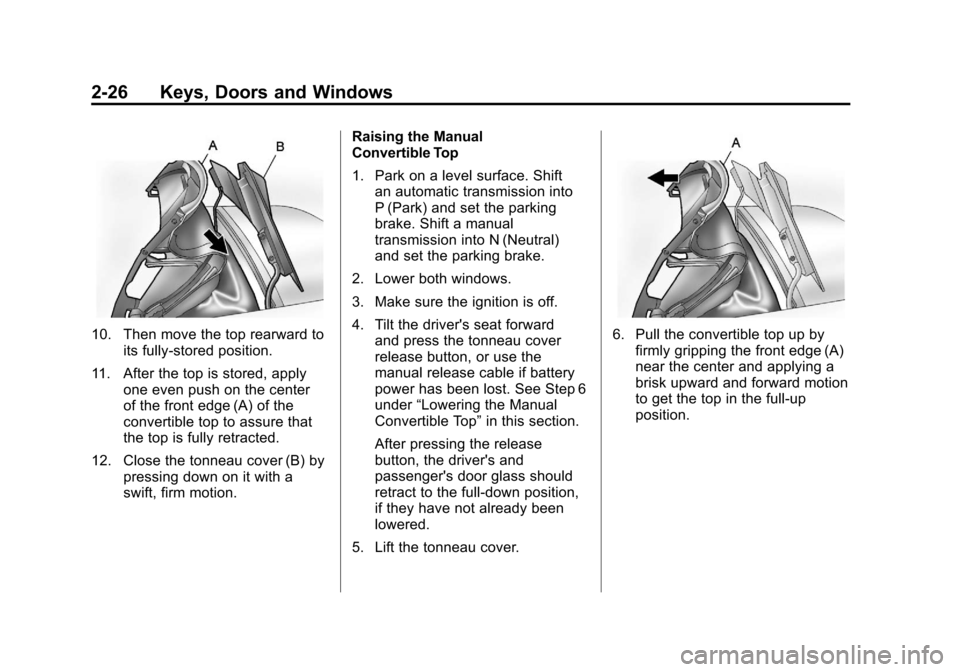
10. Then move the top rearward toits fully-stored position.
11. After the top is stored, apply one even push on the center
of the front edge (A) of the
convertible top to assure that
the top is fully retracted.
12. Close the tonneau cover (B) by pressing down on it with a
swift, firm motion. Raising the Manual
Convertible Top
1. Park on a level surface. Shift
an automatic transmission into
P (Park) and set the parking
brake. Shift a manual
transmission into N (Neutral)
and set the parking brake.
2. Lower both windows.
3. Make sure the ignition is off.
4. Tilt the driver's seat forward and press the tonneau cover
release button, or use the
manual release cable if battery
power has been lost. See Step 6
under “Lowering the Manual
Convertible Top” in this section.
After pressing the release
button, the driver's and
passenger's door glass should
retract to the full-down position,
if they have not already been
lowered.
5. Lift the tonneau cover.6. Pull the convertible top up by firmly gripping the front edge (A)
near the center and applying a
brisk upward and forward motion
to get the top in the full-up
position.
Page 60 of 428
Black plate (28,1)Chevrolet Corvette Owner Manual - 2011
2-28 Keys, Doors and Windows
Power Operation
For care and cleaning of the
convertible top see“Cleaning the
Convertible Top” in this section.
High pressure car washes may
cause water to enter the vehicle.
To operate the power convertible
top use the following steps.
Notice: Leaving the convertible
top down and exposing the
interior of your vehicle to outdoor
conditions may cause damage.
Always close the convertible top
if leaving your vehicle outdoors.
Notice: Lowering the convertible
top when there are objects in the
storage area could damage it or
break the glass rear window.
Always verify that no objects
are in the storage area before
lowering the convertible top.
Notice: Lowering the top if it is
damp, wet, or dirty can cause
stains, mildew, and damage to the
inside of your vehicle. Dry off the
top before lowering it. Notice:
If you lower the top on
your vehicle in cold weather
(0°F/-18°C or lower), you may
damage top components. Do not
lower the top in cold weather.
Notice: If you raise or lower the
convertible top while the vehicle
is in motion, you could damage
the top or the top mechanism.
The repairs would not be covered
by your warranty. Always put
an automatic transmission
in (P) Park or a manual
transmission in (N) Neutral
before raising or lowering the
convertible top.
Lowering the Power
Convertible Top
1. Park on a level surface. Start the engine. Shift an automatic
transmission into P (Park) and
set the parking brake. Shift
a manual transmission into
N (Neutral), and set the parking
brake. 2. Make sure the trunk is closed
and the rear trunk partition in
the rear storage area is in the
fastened upright position, and
that no objects are forward of
the divider. See “Rear Trunk
Partition” underRear Storage on
page 4‑1.
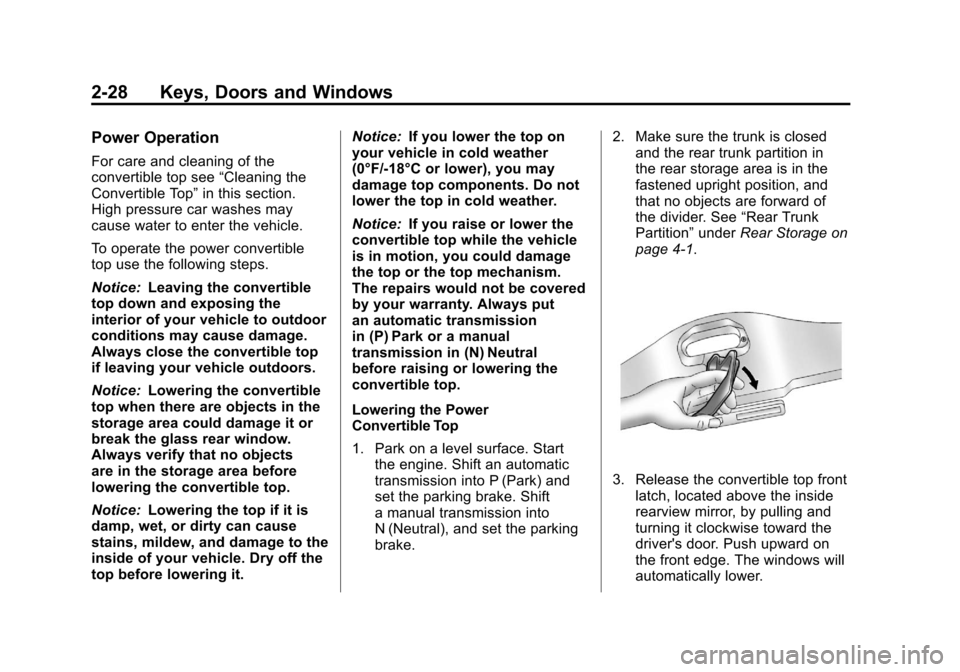
3. Release the convertible top front latch, located above the inside
rearview mirror, by pulling and
turning it clockwise toward the
driver's door. Push upward on
the front edge. The windows will
automatically lower.
Page 61 of 428
Black plate (29,1)Chevrolet Corvette Owner Manual - 2011
Keys, Doors and Windows 2-29
4. Return the convertible top frontlatch to the closed position.
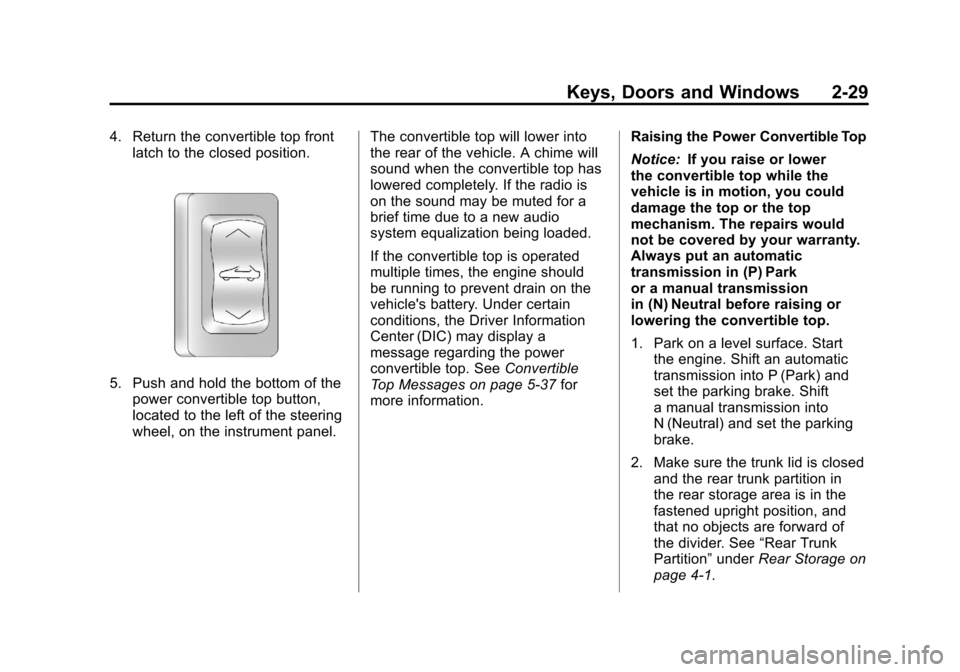
5. Push and hold the bottom of thepower convertible top button,
located to the left of the steering
wheel, on the instrument panel. The convertible top will lower into
the rear of the vehicle. A chime will
sound when the convertible top has
lowered completely. If the radio is
on the sound may be muted for a
brief time due to a new audio
system equalization being loaded.
If the convertible top is operated
multiple times, the engine should
be running to prevent drain on the
vehicle's battery. Under certain
conditions, the Driver Information
Center (DIC) may display a
message regarding the power
convertible top. See
Convertible
Top Messages on page 5‑37 for
more information. Raising the Power Convertible Top
Notice:
If you raise or lower
the convertible top while the
vehicle is in motion, you could
damage the top or the top
mechanism. The repairs would
not be covered by your warranty.
Always put an automatic
transmission in (P) Park
or a manual transmission
in (N) Neutral before raising or
lowering the convertible top.
1. Park on a level surface. Start the engine. Shift an automatic
transmission into P (Park) and
set the parking brake. Shift
a manual transmission into
N (Neutral) and set the parking
brake.
2. Make sure the trunk lid is closed and the rear trunk partition in
the rear storage area is in the
fastened upright position, and
that no objects are forward of
the divider. See “Rear Trunk
Partition” underRear Storage on
page 4‑1.
Page 68 of 428
Black plate (4,1)Chevrolet Corvette Owner Manual - 2011
3-4 Seats and Restraints
Storing Memory Positions
To save into memory:
1. Adjust the driver seat, bothoutside mirrors, and the
telescopic steering column,
if equipped.
2. Press and hold “1”until
two beeps sound.
3. Repeat for a second driver position using “2.”
To recall a memory position:
.On vehicles with an automatic
transmission, press and release
“1” or“2.”
If the vehicle is in P (Park), a
single beep sounds and the
memory position is recalled
after a brief delay.
If the vehicle is not in P (Park),
three beeps sound and the
memory position is not recalled.
.On vehicles with a manual
transmission, when the vehicle
is on, the parking brake must be
set to recall a memory position.
Press and release “1”or“2.”
A single beep sounds and the
memory position is recalled after
a brief delay.
If the vehicle is on and the
parking brake is not set,
three beeps sound and the
memory position is not recalled.
Memory Remote Recall
(Automatic Transmission)
The memory feature can recall
the driver seat, outside mirrors,
and telescopic steering column,
if equipped, to stored positions
when entering the vehicle.
To activate memory remote recall,
enter the vehicle and start the
engine. The driver seat, outside
mirrors, and telescopic steering
column will move to the memory
position associated with the
transmitter used to unlock the
vehicle. The automatic recall feature can be
turned on or off using the vehicle
personalization menu. See
“Auto
Memory Recall” underVehicle
Personalization on page 5‑55 for
more information.
To stop recall movement, press one
of the power seat controls, power
mirror or memory buttons, or the
telescopic steering column switch.
If something has blocked the driver
seat while recalling a memory
position, the recall may stop.
Remove the obstruction; then
press and hold the appropriate
manual control for the memory item
that is not recalling for two seconds.
Try recalling the memory position
again by pressing the appropriate
memory button. If the memory
position is still not recalling,
see your dealer for service.
Page 69 of 428
Black plate (5,1)Chevrolet Corvette Owner Manual - 2011
Seats and Restraints 3-5
Easy Exit Driver Seat
The easy exit driver seat feature
can move the seat rearward and
the telescopic steering column,
if equipped, out of the way to allow
extra room to exit the vehicle.
B(Easy Exit Driver Seat):Press
to save and recall the easy exit seat
position.
To save into memory:
1. Recall the desired driving
position by pressing “1.”
2. Adjust the seat and the telescopic steering column
to the desired exit position.
3. Press and hold Buntil
two beeps sound.
4. Repeat for a second driver position using “2.” To recall an exit position, press
and release
B. The vehicle must
be in P (Park) for an automatic
transmission or the parking
brake must be set for a manual
transmission. A single beep sounds.
The seat and telescopic steering
column will move to the position
previously stored for the identified
driver.
If the easy exit seat feature is
programmed on in the vehicle
personalization menu, automatic
recall occurs when one of the
following conditions is met:
.The vehicle is turned off,
in Retained Accessory
Power (RAP) or accessory
mode, and the driver door is
opened.
.The vehicle is turned off, or in
RAP, and the unlock button on
the keyless access transmitter
is pressed. If something has blocked the driver
seat while recalling the exit position,
the recall may stop. Remove the
obstruction; then press and hold
the power seat control rearward for
two seconds. Try recalling the exit
position again. If the exit position is
still not recalling, see your dealer for
service.
See
“Auto Exit Recall” underVehicle
Personalization on page 5‑55 for
more information.
Page 146 of 428
Black plate (26,1)Chevrolet Corvette Owner Manual - 2011
5-26 Instruments and Controls
DIC Operation and Displays
Depending on the features on the
vehicle, the drive gear may display
on the DIC. See“Manual Paddle
Shift” under Automatic Transmission
on page 9‑28 and“Head-Up
Display (HUD)” in the index of
the Navigation system manual
for more information.
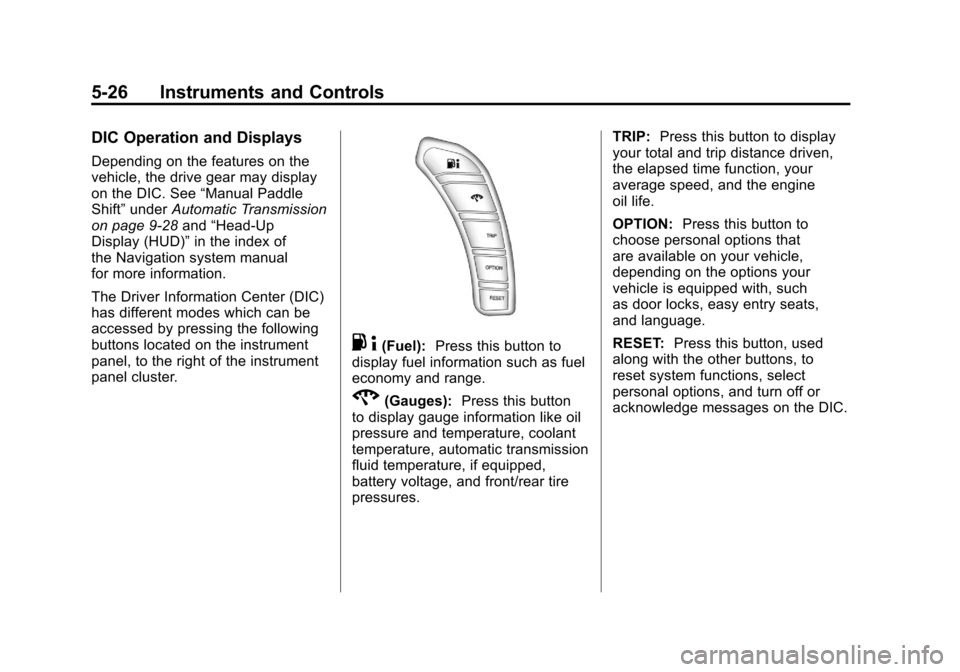
The Driver Information Center (DIC)
has different modes which can be
accessed by pressing the following
buttons located on the instrument
panel, to the right of the instrument
panel cluster.
. 4(Fuel): Press this button to
display fuel information such as fuel
economy and range.
2(Gauges): Press this button
to display gauge information like oil
pressure and temperature, coolant
temperature, automatic transmission
fluid temperature, if equipped,
battery voltage, and front/rear tire
pressures. TRIP:
Press this button to display
your total and trip distance driven,
the elapsed time function, your
average speed, and the engine
oil life.
OPTION: Press this button to
choose personal options that
are available on your vehicle,
depending on the options your
vehicle is equipped with, such
as door locks, easy entry seats,
and language.
RESET: Press this button, used
along with the other buttons, to
reset system functions, select
personal options, and turn off or
acknowledge messages on the DIC.
Page 148 of 428
Black plate (28,1)Chevrolet Corvette Owner Manual - 2011
5-28 Instruments and Controls
GAGES Button
The gauges button displays
oil pressure, oil temperature,
coolant temperature, transmission
fluid temperature for automatic
transmission vehicles only, battery
voltage, and tire pressure
information.
Oil Pressure:This display shows
the oil pressure.
Press the gauges button to display
the oil pressure, such as:
.OIL PRESSURE 276 kPa or
.OIL PRESSURE 40 PSI
Oil Temperature: This display
shows the oil temperature.
Press the gauges button again to
display the oil temperature, such as:
.OIL TEMPERATURE 112°C or
.OIL TEMPERATURE 234°F If the oil temperature is low,
the display will show OIL
TEMPERATURE LOW. If the oil
temperature is high, the display will
show OIL TEMPERATURE HIGH.
Coolant Temperature:
This
display shows the engine coolant
temperature.
Press the gauges button again to
display the coolant temperature,
such as:
.COOLANT
TEMPERATURE 51°C or
.COOLANT
TEMPERATURE 123°F
If the coolant temperature is low,
the display will show COOLANT
TEMPERATURE LOW. If the
coolant temperature is high, the
display will show COOLANT
TEMPERATURE HIGH. Transmission Fluid
Temperature:
If you have an
automatic transmission vehicle,
this display shows the automatic
transmission fluid temperature.
Press the gauges button again to
display the automatic transmission
fluid temperature, such as:
.TRANS FLUID TEMP 51°C or
.TRANS FLUID TEMP 123°F
If the transmission fluid temperature
is low, the display will show
TRANS FLUID TEMP LOW. If the
transmission fluid temperature is
high, the display will show TRANS
FLUID TEMP HIGH.