ignition CHEVROLET CORVETTE 2011 6.G Owner's Manual
[x] Cancel search | Manufacturer: CHEVROLET, Model Year: 2011, Model line: CORVETTE, Model: CHEVROLET CORVETTE 2011 6.GPages: 428, PDF Size: 6.63 MB
Page 145 of 428
Black plate (25,1)Chevrolet Corvette Owner Manual - 2011
Instruments and Controls 5-25
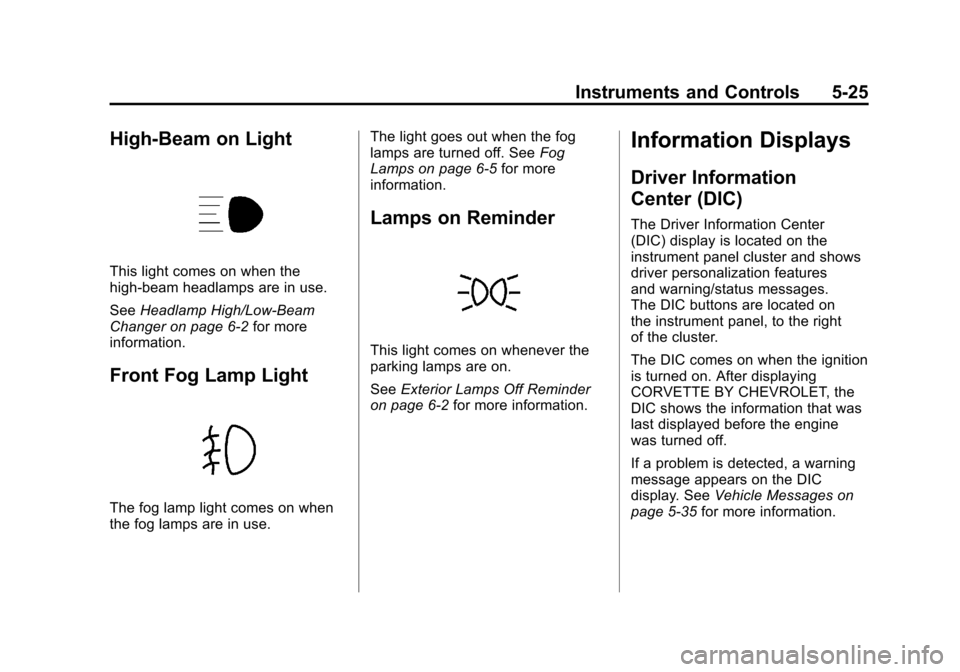
High-Beam on Light
This light comes on when the
high-beam headlamps are in use.
SeeHeadlamp High/Low-Beam
Changer on page 6‑2 for more
information.
Front Fog Lamp Light
The fog lamp light comes on when
the fog lamps are in use. The light goes out when the fog
lamps are turned off. See
Fog
Lamps on page 6‑5 for more
information.
Lamps on Reminder
This light comes on whenever the
parking lamps are on.
See Exterior Lamps Off Reminder
on page 6‑2 for more information.
Information Displays
Driver Information
Center (DIC)
The Driver Information Center
(DIC) display is located on the
instrument panel cluster and shows
driver personalization features
and warning/status messages.
The DIC buttons are located on
the instrument panel, to the right
of the cluster.
The DIC comes on when the ignition
is turned on. After displaying
CORVETTE BY CHEVROLET, the
DIC shows the information that was
last displayed before the engine
was turned off.
If a problem is detected, a warning
message appears on the DIC
display. See Vehicle Messages on
page 5‑35 for more information.
Page 149 of 428
Black plate (29,1)Chevrolet Corvette Owner Manual - 2011
Instruments and Controls 5-29
Battery Voltage:This display
shows the current battery voltage.
Press the gauges button again to
display the battery voltage, such as:
.BATTERY VOLTAGE
13.5 VOLTS
Tire Pressure: This display shows
the tire pressure for each tire.
Press the gauges button again to
display the tire pressure for the front
tires, such as:
.FRONT TIRE PRESSURES
L 234 kPa R 228 kPa or
.FRONT TIRE PRESSURES
L 34 PSI R 33 PSI
Press the gauges button again to
display the tire pressure for the rear
tires, such as:
.REAR TIRE PRESSURES
L 234 kPa R 228 kPa or
.REAR TIRE PRESSURES
L 34 PSI R 33 PSI
TRIP Button
The TRIP button displays the
odometer, trip distance, elapsed
time, average speed, and oil life
remaining information.
Odometer: The odometer shows
how far your vehicle has been
driven in either kilometers or miles.
Press the TRIP button to display
odometer readings, such as:
.ODOMETER 20008 km or
.ODOMETER 12345 MI
You can also display the odometer
by turning on the parking lamps.
Trip Odometers: There are two trip
odometers. Press the TRIP button
to display TRIP ODOMETER A
readings and press the button again
to display TRIP ODOMETER B
readings, such as:
.TRIP ODOMETER A 209.9 km or
.TRIP ODOMETER A 130.5 MI
.TRIP ODOMETER B 483.5 km or
.TRIP ODOMETER B 300.5 MI Both of the trip odometers can
be used simultaneously. The trip
odometers can be reset by pressing
the RESET button on the DIC.
There is also a miles since last
ignition feature that displays the
number of kilometers (miles) driven
since you last started the vehicle.
Press and hold the RESET button
for three seconds, then release it.
The kilometers (miles) since the last
ignition cycle will be set into the trip
odometer.
Elapsed Timer:
Press the
TRIP button until ELAPSED
TIMER is displayed, such as
ELAPSED TIMER .00.
When the ignition is in on, the
DIC can be used as a stopwatch.
The display can show hours,
minutes and seconds. The elapsed
time indicator will record up to
23 hours, 59 minutes and
59 seconds, then it will reset to zero
and continue counting. The display
appears as ELAPSED TIMER .00
in the elapsed time function.
Page 150 of 428
Black plate (30,1)Chevrolet Corvette Owner Manual - 2011
5-30 Instruments and Controls
You can start or stop the elapsed
time by pressing the RESET button.
To reset the elapsed time to zero,
press the RESET button for
three seconds while the timer
is displayed.
Pressing and holding the RESET
button for at least 10 seconds will
reset the timer display to the time
since last ignition cycle.
Average Speed:Press the TRIP
button until the average speed is
displayed, such as:
.AVERAGE SPEED 100 km/h or
.AVERAGE SPEED 62 MPH
Press and hold the RESET button to
reset to 0.0 km/h (mph). Engine Oil Life:
Press the TRIP
button until the engine oil life is
displayed, such as OIL LIFE
REMAINING 89%.
This is an estimate of the engine
oil's remaining useful life. It will
show 100% when the system is
reset after an oil change. It will
alert you to change the oil on a
schedule consistent with your
driving conditions.
When the remaining oil life is low,
the system will alert you with the
message CHANGE ENGINE OIL.
Remember, you must reset the
engine oil life system yourself
after each oil change. It will not
reset itself. To reset the system,
see Engine Oil Life System on
page 10‑22. Be careful not to
reset the engine oil life system accidentally at any time other than
when the oil has just been changed.
It cannot be reset accurately until
the next oil change.
See
Scheduled Maintenance on
page 11‑2 andEngine Oil on
page 10‑15 for more information.
OPTION Button
The OPTION button allows you
to access the PERSONAL
OPTIONS menu and customize
the personalization settings on your
vehicle. See Vehicle Personalization
on page 5‑55 for more information.
RESET Button
The RESET button, used along
with other buttons, will reset
system functions and turn off or
acknowledge messages on the DIC.
Page 153 of 428
Black plate (33,1)Chevrolet Corvette Owner Manual - 2011
Instruments and Controls 5-33
Within each mode, the display, can
be further customized by pressing
the PAGE button. Pressing this
button in each mode will turn off
and on the following:
.Street Mode—No tachometer,
circular tachometer, and linear
tachometer.
.Track Modes 1 and 2 —No
minor gauge, coolant
temperature, transmission
oil temperature, engine oil
temperature, engine oil
pressure, and boost gauge.
While in Track Mode 1 or 2, the
maximum G value achieved
during the current ignition cycle
can be displayed by pressing
and holding the PAGE button.
The maximum G display will be
shown until the PAGE button is
released. The maximum G value
display will be identical to the
normal G value display, except
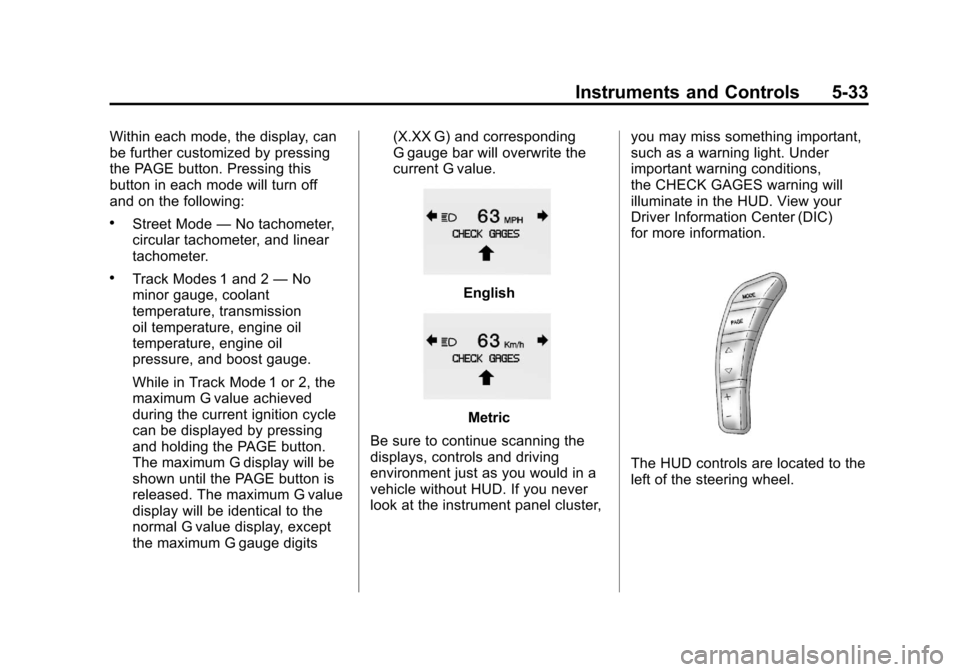
the maximum G gauge digits (X.XX G) and corresponding
G gauge bar will overwrite the
current G value.English
Metric
Be sure to continue scanning the
displays, controls and driving
environment just as you would in a
vehicle without HUD. If you never
look at the instrument panel cluster, you may miss something important,
such as a warning light. Under
important warning conditions,
the CHECK GAGES warning will
illuminate in the HUD. View your
Driver Information Center (DIC)
for more information.
The HUD controls are located to the
left of the steering wheel.
Page 155 of 428
Black plate (35,1)Chevrolet Corvette Owner Manual - 2011
Instruments and Controls 5-35
If the ignition is on and the HUD
image cannot be seen, check to
see if:
.Something is covering the
HUD unit.
.The HUD dimmer control is
adjusted properly.
.The HUD image is adjusted to
the proper height.
.Ambient light is low, in the
direction the vehicle is facing.
.A fuse is blown. SeeFuses and
Circuit Breakers on page 10‑51.
Keep in mind that the windshield
is part of the HUD system.
See Windshield Replacement on
page 10‑47.
Vehicle Messages
Messages displayed on the DIC
indicate the status of the vehicle
or some action may be needed
to correct a condition. Multiple
messages may appear one after
another.
The messages that do not
require immediate action can be
acknowledged and cleared by
pressing the RESET button.
The messages that require
immediate action cannot be
cleared until that action is
performed. All messages should
be taken seriously and clearing
the messages does not correct
the problem.
Battery Voltage and
Charging Messages
BATTERY SAVER ACTIVE
This message displays when the
vehicle has detected that the battery
voltage is dropping beyond a
reasonable point. The battery saver
system starts reducing certain
features of the vehicle that you may
be able to notice. At the point that
features are disabled, this message
is displayed. It means that the
vehicle is trying to save the charge
in the battery. Turn off unnecessary
accessories to allow the battery to
recharge.
BATTERY VOLTAGE HIGH
See Voltmeter Gauge on page 5‑15.
BATTERY VOLTAGE LOW
SeeVoltmeter Gauge on page 5‑15.
Page 156 of 428
Black plate (36,1)Chevrolet Corvette Owner Manual - 2011
5-36 Instruments and Controls
SERVICE CHARGING SYSTEM
If this message displays while you
are driving, there may be a problem
with the electrical charging system.
It could mean that there is a loose
or broken drive belt or that there is
another electrical problem. Have the
vehicle checked right away by your
dealer. Driving while this message is
on could drain the battery.
If you must drive a short distance
with the message on, be certain to
turn off the vehicle's accessories,
such as the radio and air
conditioner.
Multiple chimes sound when this
message is displayed.
To acknowledge the message, press
the RESET button. The message
reappears every 10 minutes until
this condition changes.
Brake System Messages
ABS (Antilock Brake System)
ACTIVE
This message displays when the
Antilock Brake System (ABS) is
adjusting brake pressure to help
avoid a braking skid.
Slippery road conditions may exist
if this message is displayed, so
adjust your driving accordingly.
The message stays on for a few
seconds after the system stops
adjusting brake pressure. See
Antilock Brake System (ABS) on
page 9‑34for more information.
CHANGE BRAKE PADS
On vehicles with electronic brake
pad wear sensors, this message will
be displayed when the pads are
worn. See your dealer for service.
CHECK BRAKE FLUID
This message displays, a sound
will be heard, and the brake
system warning light on the
instrument panel cluster turns
on if the ignition is on to inform the
driver that the brake fluid level is
low. SeeBrake System Warning
Light on page 5‑21. Have the brake
system serviced by your dealer as
soon as possible. See Brakes on
page 10‑38.
SERVICE ANTILOCK BRAKES
If this message displays while
you are driving, stop as soon as
possible and turn the ignition off.
Then start the engine again to reset
the system. If the message stays
on, or comes back on again while
you are driving, the vehicle is in
need of service. See your dealer.
If the antilock brake system (ABS)
warning light is on and the regular
brake system warning light
is not on, you still have brakes,
but do not have ABS.
Page 163 of 428
Black plate (43,1)Chevrolet Corvette Owner Manual - 2011
Instruments and Controls 5-43
.The vehicle is experiencing
Electromagnetic
Interference (EMI). Some
locations, such as airports,
automatic toll booths, and some
gas stations have EMI fields
which may interfere with the
keyless access transmitter.
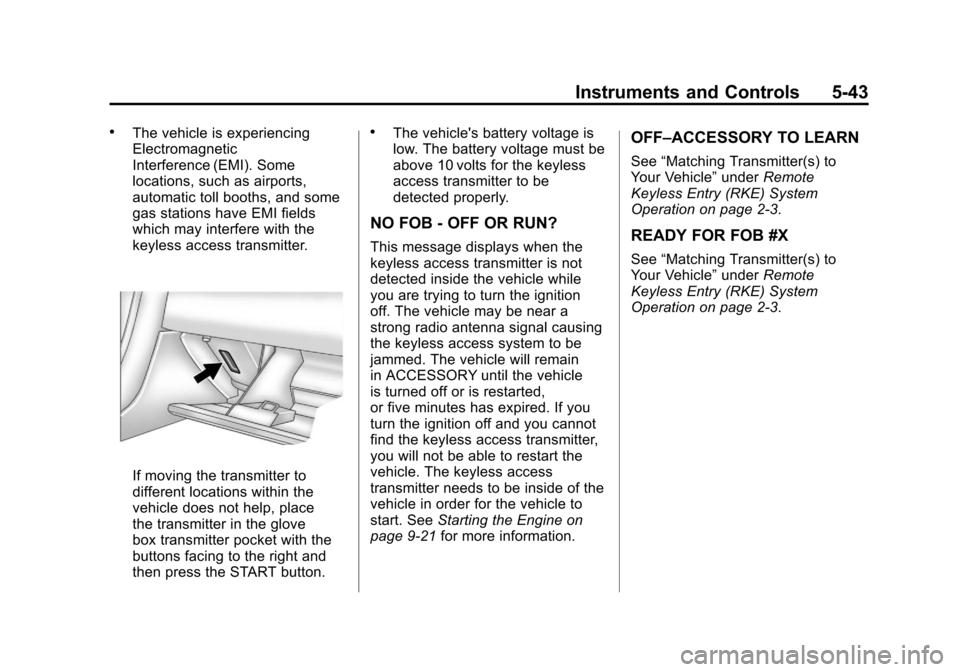
If moving the transmitter to
different locations within the
vehicle does not help, place
the transmitter in the glove
box transmitter pocket with the
buttons facing to the right and
then press the START button.
.The vehicle's battery voltage is
low. The battery voltage must be
above 10 volts for the keyless
access transmitter to be
detected properly.
NO FOB - OFF OR RUN?
This message displays when the
keyless access transmitter is not
detected inside the vehicle while
you are trying to turn the ignition
off. The vehicle may be near a
strong radio antenna signal causing
the keyless access system to be
jammed. The vehicle will remain
in ACCESSORY until the vehicle
is turned off or is restarted,
or five minutes has expired. If you
turn the ignition off and you cannot
find the keyless access transmitter,
you will not be able to restart the
vehicle. The keyless access
transmitter needs to be inside of the
vehicle in order for the vehicle to
start. SeeStarting the Engine on
page 9‑21 for more information.
OFF–ACCESSORY TO LEARN
See“Matching Transmitter(s) to
Your Vehicle” underRemote
Keyless Entry (RKE) System
Operation on page 2‑3.
READY FOR FOB #X
See “Matching Transmitter(s) to
Your Vehicle” underRemote
Keyless Entry (RKE) System
Operation on page 2‑3.
Page 169 of 428
Black plate (49,1)Chevrolet Corvette Owner Manual - 2011
Instruments and Controls 5-49
TRACTION SYSTEM–OFF
This message displays and stays
on, a sound will be heard, and
the traction control system (TCS)
warning light on the instrument
panel cluster turns on when the
TCS is turned off by pressing the
Active Handling System button on
the console. See Traction Control
System (TCS) Warning Light on
page 5‑23. See Traction Control
System (TCS) on page 9‑36 for
more information.
To acknowledge the message, press
the RESET button.
TRACTION SYSTEM –ON
This message displays and a sound
will be heard when the Traction
Control System (TCS) is turned on
by pressing the Active Handling
System button on the console.
This message automatically clears
from the DIC display on its own.
See Traction Control System (TCS)
on page 9‑36 for more information.
Safety Belt Messages
BUCKLE PASSENGER
This message reminds you to
buckle the passenger's safety belt.
This message displays and a sound
will be heard when the ignition is on,
the driver's safety belt is buckled,
the passenger's safety belt is
unbuckled with the passenger
airbag enabled, and the vehicle
is in motion. You should have the
passenger buckle their safety belt.
The reminder will be repeated if
the ignition is on, the vehicle is in
motion, the driver is buckled and the
passenger is still unbuckled, and the
passenger airbag is enabled. If the
passenger's safety belt is already
buckled, this message will not
come on.
BUCKLE SEATBELT
This message reminds you to
buckle the driver's safety belt.
This message displays and a sound
will be heard when the ignition is on,
the driver's safety belt is unbuckled,
and the vehicle is in motion. You
should buckle your safety belt.
If the driver remains unbuckled
when the ignition is on and the
vehicle is in motion, the reminder
will be repeated. If the driver's
safety belt is already buckled, this
message will not come on.
This message is an additional
reminder to the safety belt reminder
light in the instrument panel cluster.
SeeSafety Belt Reminders on
page 5‑16 for more information.
Page 170 of 428
Black plate (50,1)Chevrolet Corvette Owner Manual - 2011
5-50 Instruments and Controls
Anti-Theft Alarm System
Messages
INTRUSION SENSOR OFF
This message may display when the
anti-theft alarm has been disarmed.
INTRUSION SENSOR ON
This message may display when the
anti-theft alarm has been armed.
Service Vehicle Messages
SERVICE AIR CONDITIONING
This message displays when the
electronic sensors that control
the air conditioning and heating
systems are no longer working.
Have the climate control system
serviced by your dealer if you
notice a drop in heating and air
conditioning efficiency.
SERVICE ELECTRICAL
SYSTEM
This message displays if an
electrical problem has occurred
within the Powertrain Control
Module (PCM). Have the vehicle
serviced by your dealer.
SERVICE VEHICLE SOON
This message displays and a sound
will be heard when there may be an
electrical or another system problem
with the vehicle. Have your vehicle
checked by your dealer if this
message keeps appearing.
Starting the Vehicle
Messages
PRESS BRAKE TO START
ENGINE (Automatic
Transmission Only)
This message displays if you
try to start the engine by pressing
the keyless ignition start button
without having the brake pressed.
The brake needs to be pressed
when starting the engine. See
Ignition Positions on page 9‑20for
more information.
Page 172 of 428
Black plate (52,1)Chevrolet Corvette Owner Manual - 2011
5-52 Instruments and Controls
SeeRun-Flat Tires on page 10‑59,
Vehicle Load Limits on page 9‑14,
Tire Pressure on page 10‑66, and
Tire Pressure Monitor System on
page 10‑68. The DIC also shows
the tire pressure values. See Driver
Information Center (DIC) on
page 5‑25.
To acknowledge the message, press
the RESET button. A message
reappears every 10 minutes until the
condition is corrected.
SERVICE TIRE MONITOR
This message displays if a part
on the Tire Pressure Monitor
System (TPMS) is not working
properly. The tire pressure light
also flashes and then remains
on during the same ignition cycle.
See Tire Pressure Light on
page 5‑24. Several conditions may
cause this message to appear. See
Tire Pressure Monitor Operation on
page 10‑69 for more information.
If the warning comes on and stays
on, there may be a problem with the
TPMS. See your dealer.
TIRE FLAT
{WARNING
When the LOW TIRE
PRESSURE or TIRE FLAT
message is displayed on the
Driver Information Center, your
vehicle's handling capabilities
will be reduced during severe
maneuvers. If you drive too fast,
you could lose control of your
vehicle. You or others could be
injured. Do not drive over 55 mph
(90 km/h) when the LOW TIRE
PRESSURE or TIRE FLAT
message is displayed. Drive
cautiously and check your tire
pressures as soon as you can. This message displays when
one or more of the tires is flat.
This message also displays LEFT
FRONT, RIGHT FRONT, LEFT
REAR, or RIGHT REAR to indicate
which tire is affected. Multiple
chimes sound and the tire pressure
light on the instrument panel cluster
comes on when this message is
displayed. See
Tire Pressure Light
on page 5‑24.
This message is followed by
the MAXIMUM SPEED 90 km/h
(55 MPH) message, and then by the
REDUCED HANDLING message.
The Active Handling System will
intervene more quickly when a flat
tire has been detected. Adjust your
driving accordingly.