lock CHEVROLET CORVETTE 2011 6.G Workshop Manual
[x] Cancel search | Manufacturer: CHEVROLET, Model Year: 2011, Model line: CORVETTE, Model: CHEVROLET CORVETTE 2011 6.GPages: 428, PDF Size: 6.63 MB
Page 126 of 428
Black plate (6,1)Chevrolet Corvette Owner Manual - 2011
5-6 Instruments and Controls
Depending on the mirror, in order
to calibrate, CAL must be displayed
in the mirror compass windows.
If CAL is not displayed, press
Pfor
several seconds or until CAL is
displayed.
If the compass has map lamps, it
can be placed in calibration mode
by pressing and holding the left map
light button until a C appears on the
compass display.
The mirror compass can be
calibrated by driving the vehicle
in circles at 8 km/h (5 mph) or less
until the display reads a direction.
Compass Variance
The mirror is set to zone eight.
If you do not live in zone eight or
drive out of the area, the compass
variance needs to be changed to
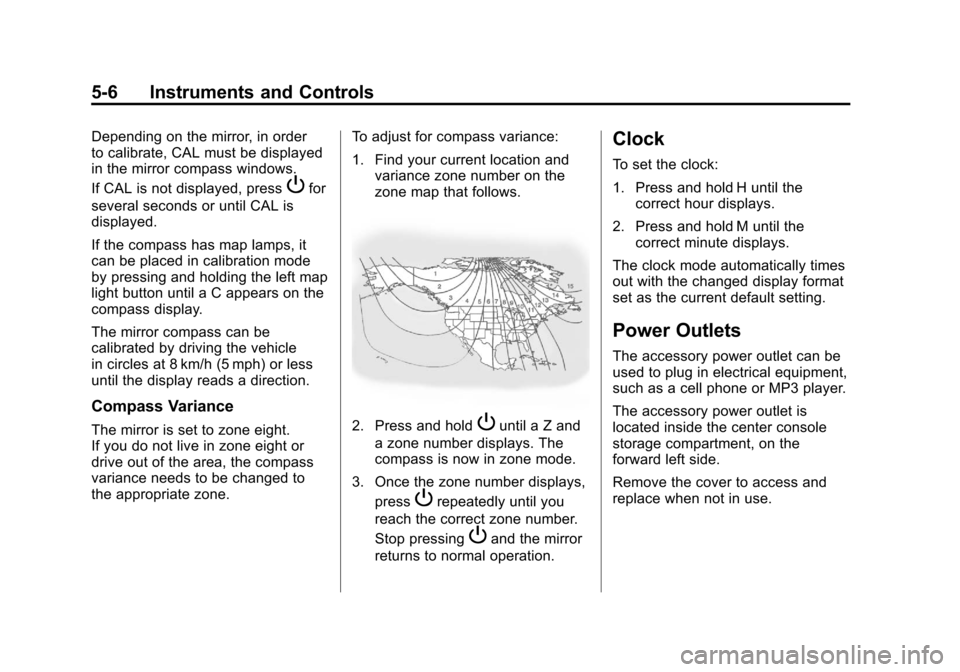
the appropriate zone. To adjust for compass variance:
1. Find your current location and
variance zone number on the
zone map that follows.2. Press and holdPuntil a Z and
a zone number displays. The
compass is now in zone mode.
3. Once the zone number displays, press
Prepeatedly until you
reach the correct zone number.
Stop pressing
Pand the mirror
returns to normal operation.
Clock
To set the clock:
1. Press and hold H until the correct hour displays.
2. Press and hold M until the correct minute displays.
The clock mode automatically times
out with the changed display format
set as the current default setting.
Power Outlets
The accessory power outlet can be
used to plug in electrical equipment,
such as a cell phone or MP3 player.
The accessory power outlet is
located inside the center console
storage compartment, on the
forward left side.
Remove the cover to access and
replace when not in use.
Page 142 of 428
Black plate (22,1)Chevrolet Corvette Owner Manual - 2011
5-22 Instruments and Controls
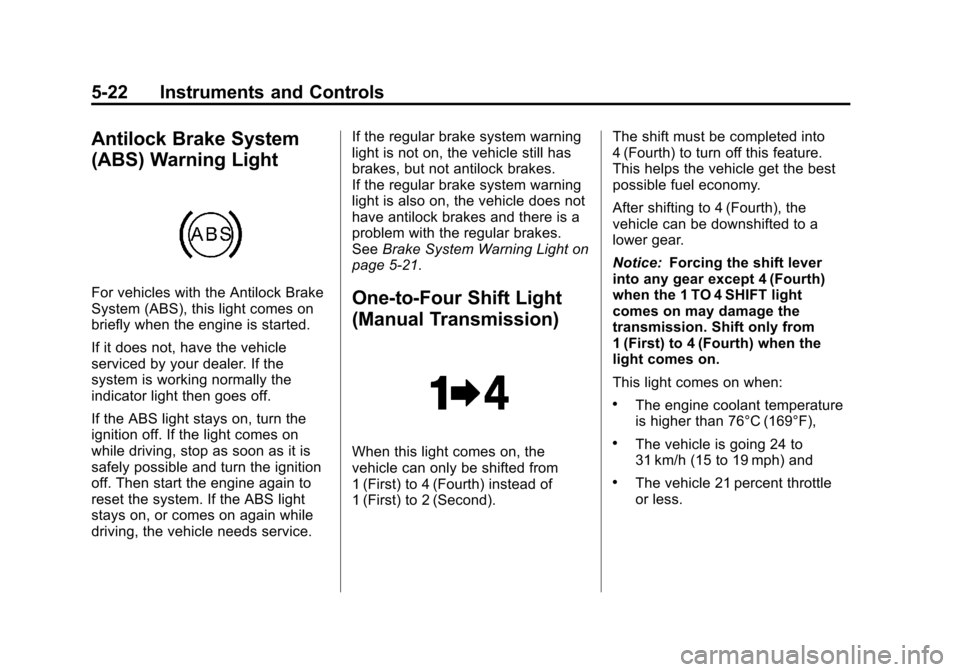
Antilock Brake System
(ABS) Warning Light
For vehicles with the Antilock Brake
System (ABS), this light comes on
briefly when the engine is started.
If it does not, have the vehicle
serviced by your dealer. If the
system is working normally the
indicator light then goes off.
If the ABS light stays on, turn the
ignition off. If the light comes on
while driving, stop as soon as it is
safely possible and turn the ignition
off. Then start the engine again to
reset the system. If the ABS light
stays on, or comes on again while
driving, the vehicle needs service.If the regular brake system warning
light is not on, the vehicle still has
brakes, but not antilock brakes.
If the regular brake system warning
light is also on, the vehicle does not
have antilock brakes and there is a
problem with the regular brakes.
See
Brake System Warning Light on
page 5‑21.One-to-Four Shift Light
(Manual Transmission)
When this light comes on, the
vehicle can only be shifted from
1 (First) to 4 (Fourth) instead of
1 (First) to 2 (Second). The shift must be completed into
4 (Fourth) to turn off this feature.
This helps the vehicle get the best
possible fuel economy.
After shifting to 4 (Fourth), the
vehicle can be downshifted to a
lower gear.
Notice:
Forcing the shift lever
into any gear except 4 (Fourth)
when the 1 TO 4 SHIFT light
comes on may damage the
transmission. Shift only from
1 (First) to 4 (Fourth) when the
light comes on.
This light comes on when:
.The engine coolant temperature
is higher than 76°C (169°F),
.The vehicle is going 24 to
31 km/h (15 to 19 mph) and
.The vehicle 21 percent throttle
or less.
Page 146 of 428
Black plate (26,1)Chevrolet Corvette Owner Manual - 2011
5-26 Instruments and Controls
DIC Operation and Displays
Depending on the features on the
vehicle, the drive gear may display
on the DIC. See“Manual Paddle
Shift” under Automatic Transmission
on page 9‑28 and“Head-Up
Display (HUD)” in the index of
the Navigation system manual
for more information.
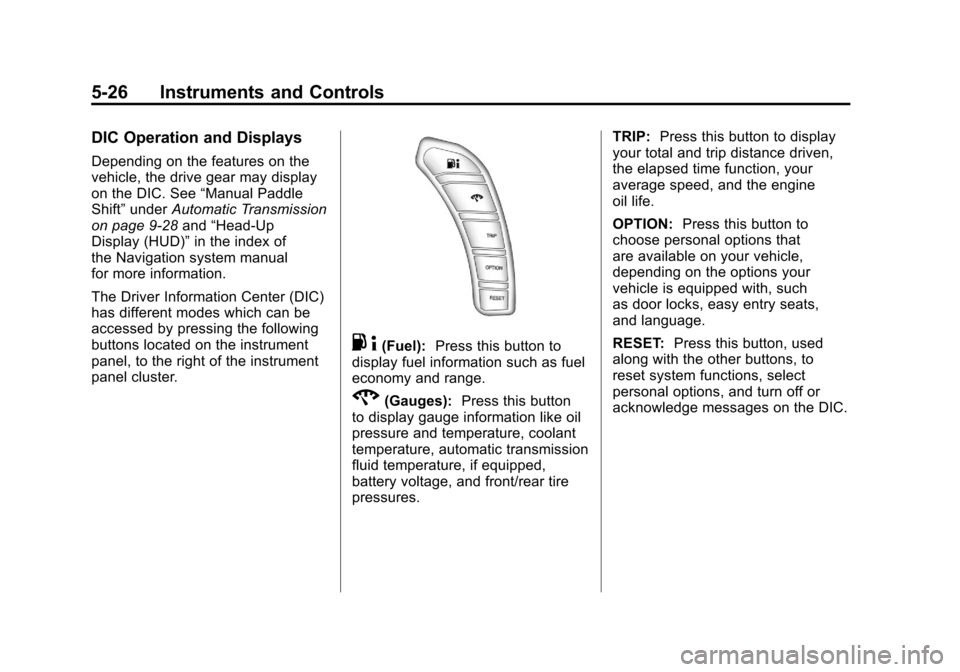
The Driver Information Center (DIC)
has different modes which can be
accessed by pressing the following
buttons located on the instrument
panel, to the right of the instrument
panel cluster.
. 4(Fuel): Press this button to
display fuel information such as fuel
economy and range.
2(Gauges): Press this button
to display gauge information like oil
pressure and temperature, coolant
temperature, automatic transmission
fluid temperature, if equipped,
battery voltage, and front/rear tire
pressures. TRIP:
Press this button to display
your total and trip distance driven,
the elapsed time function, your
average speed, and the engine
oil life.
OPTION: Press this button to
choose personal options that
are available on your vehicle,
depending on the options your
vehicle is equipped with, such
as door locks, easy entry seats,
and language.
RESET: Press this button, used
along with the other buttons, to
reset system functions, select
personal options, and turn off or
acknowledge messages on the DIC.
Page 156 of 428
Black plate (36,1)Chevrolet Corvette Owner Manual - 2011
5-36 Instruments and Controls
SERVICE CHARGING SYSTEM
If this message displays while you
are driving, there may be a problem
with the electrical charging system.
It could mean that there is a loose
or broken drive belt or that there is
another electrical problem. Have the
vehicle checked right away by your
dealer. Driving while this message is
on could drain the battery.
If you must drive a short distance
with the message on, be certain to
turn off the vehicle's accessories,
such as the radio and air
conditioner.
Multiple chimes sound when this
message is displayed.
To acknowledge the message, press
the RESET button. The message
reappears every 10 minutes until
this condition changes.
Brake System Messages
ABS (Antilock Brake System)
ACTIVE
This message displays when the
Antilock Brake System (ABS) is
adjusting brake pressure to help
avoid a braking skid.
Slippery road conditions may exist
if this message is displayed, so
adjust your driving accordingly.
The message stays on for a few
seconds after the system stops
adjusting brake pressure. See
Antilock Brake System (ABS) on
page 9‑34for more information.
CHANGE BRAKE PADS
On vehicles with electronic brake
pad wear sensors, this message will
be displayed when the pads are
worn. See your dealer for service.
CHECK BRAKE FLUID
This message displays, a sound
will be heard, and the brake
system warning light on the
instrument panel cluster turns
on if the ignition is on to inform the
driver that the brake fluid level is
low. SeeBrake System Warning
Light on page 5‑21. Have the brake
system serviced by your dealer as
soon as possible. See Brakes on
page 10‑38.
SERVICE ANTILOCK BRAKES
If this message displays while
you are driving, stop as soon as
possible and turn the ignition off.
Then start the engine again to reset
the system. If the message stays
on, or comes back on again while
you are driving, the vehicle is in
need of service. See your dealer.
If the antilock brake system (ABS)
warning light is on and the regular
brake system warning light
is not on, you still have brakes,
but do not have ABS.
Page 157 of 428
Black plate (37,1)Chevrolet Corvette Owner Manual - 2011
Instruments and Controls 5-37
If the regular brake system warning
light is also on, you do not have
ABS and there is a problem with the
brakes. SeeAntilock Brake System
(ABS) Warning Light on page 5‑22
and Brake System Warning Light on
page 5‑21.
If this message is displayed, the
Traction Control System (TCS)
and the Active Handling System
will also be disabled. The DIC will
scroll three messages: SERVICE
ANTILOCK BRAKES, SERVICE
TRACTION SYSTEM, and
SERVICE ACTIVE HANDLING,
and the instrument panel cluster
lights will come on along with a
sound. When the service message
is displayed, the computer
controlled systems will not assist the
driver. Have the system repaired by
your dealer as soon as possible.
Adjust your driving accordingly.
To acknowledge these messages,
press the RESET button.Convertible Top
Messages
ATTACH TRUNK PARTITION
If the vehicle has a power
convertible top, this message
displays and a sound will be heard
if the trunk partition is not in place.
Open the hatch/trunk and make
sure the trunk partition is secure
and no objects are on the trunk
partition. See Rear Storage on
page 4‑1 for more information.
CLOSE TRUNK TO MOVE TOP
This message displays and a sound
will be heard if the trunk is open
while you are trying to operate
the convertible top. Make sure
the trunk is closed before operating
the convertible top. See Convertible
Top on page 2‑22.
SET PARK BRAKE TO
MOVE TOP
If the vehicle has a manual
transmission, this message displays
and a sound will be heard if you
try to operate the power convertible
top without first setting the parking
brake. Set the parking brake
before trying to operate the power
convertible top. See Convertible Top
on page 2‑22 for more information.
SHIFT TO PARK OR SET PARK
BRAKE FOR TOP
If the vehicle has an automatic
transmission, this message displays
and a sound will be heard if you try
to operate the power convertible top
without first shifting into P (Park) or
setting the parking brake. Either
shift the vehicle into P (Park) or set
the parking brake before trying to
operate the power convertible top.
SeeConvertible Top on page 2‑22
for more information.
Page 158 of 428
Black plate (38,1)Chevrolet Corvette Owner Manual - 2011
5-38 Instruments and Controls
TOO COLD TO MOVE TOP
This message displays and a
sound will be heard when the
power convertible top button is
pressed and the power convertible
top pump motor temperature is
below−20°C (−4°F). Wait for the
power convertible top pump motor
to warm up before using the power
convertible top.
TOP MOTOR OVER
TEMPERATURE
This message displays and a
sound will be heard when the
power convertible top button is
pressed and the power convertible
top pump motor temperature is over
105°C (221°F). Wait for the power
convertible top pump motor to cool
down before using the power
convertible top.
TOP NOT SECURE
This message displays and a
sound will be heard when the
power convertible top button is
released before the top open or
close operation is complete or if the
top is closed without the header
latch engaged. Press and hold the
convertible top button to fully open
or close the top, and make sure that
the header latch is engaged after
the top is closed.
UNLATCH HEADER TO
MOVE TOP
This message displays and a
sound will be heard if you try to
lower the convertible top without
first unlocking the top. Move
the latch handle to unlock the
convertible top. See Convertible
Top on page 2‑22.
Cruise Control Messages
CRUISE DISENGAGED
This message displays briefly when
you disengage the cruise control
system by stepping on the brake on
an automatic transmission vehicle or
the clutch on a manual transmission
vehicle, or by turning off the cruise
control switch. See Cruise Control
on page 9‑44 for more information.
CRUISE SET TO XXX MPH
(XXX km/h)
SeeCruise Control on page 9‑44.
Page 162 of 428
Black plate (42,1)Chevrolet Corvette Owner Manual - 2011
5-42 Instruments and Controls
LOW FUEL
This message displays when the
fuel tank is less than 10 percent
full and the display is turned off.
A sound will be heard when this
message is displayed. Refill the fuel
tank as soon as possible. SeeFuel
Gauge on page 5‑11.
SERVICE FUEL SYSTEM
This message displays if the
Powertrain Control Module (PCM)
has detected a problem within
the fuel system. Have the vehicle
serviced by your dealer. This
message also displays when the
cluster is not getting fuel information
from the PCM.
Key and Lock Messages
FOB AUTOLEARN WAIT
XX MINUTES
See “Matching Transmitter(s) to
Your Vehicle” underRemote
Keyless Entry (RKE) System
Operation on page 2‑3.
FOB BATTERY LOW
See “Battery Replacement” under
Remote Keyless Entry (RKE)
System Operation on page 2‑3.
KNOWN FOB
See “Matching Transmitter(s) to
Your Vehicle” underRemote
Keyless Entry (RKE) System
Operation on page 2‑3.
MAXIMUM NUMBER OF FOBS
LEARNED
See “Matching Transmitter(s) to
Your Vehicle” underRemote
Keyless Entry (RKE) System
Operation on page 2‑3.
NO FOBS DETECTED
This message displays if the vehicle
does not detect the presence of a
keyless access transmitter when
you have attempted to start the
vehicle or a vehicle door has just
closed. The following conditions
may cause this message to appear:
.Driver-added equipment plugged
into the accessory power outlet
on the center console is causing
interference. Examples of these
devices are cell phones and cell
phone chargers, two-way radios,
power inverters, or similar items.
Try moving the keyless access
transmitter away from these
devices when starting the
vehicle. In addition, PDA devices
and remote garage and gate
openers may also generate
Electromagnetic Interference
(EMI) that may interfere with
the keyless access transmitter.
Do not carry the keyless access
transmitter in the same pocket or
bag as these devices.
Page 168 of 428
Black plate (48,1)Chevrolet Corvette Owner Manual - 2011
5-48 Instruments and Controls
SHOCKS INOPERATIVE
This message displays when a
malfunction is present in the
Selective Ride Control system
which is causing the shocks to
be in their full soft mode. This is a
warning to the driver that the vehicle
handling may be affected. Have the
vehicle serviced by your dealer as
soon as possible.
To acknowledge the message, press
the RESET button. The message
reappears every 10 minutes until
this condition changes.
TRACTION SYSTEM ACTIVE
This message displays when the
Traction Control System (TCS) is
limiting wheel spin. Slippery road
conditions may exist if this message
is displayed, so adjust your driving
accordingly. The message stays
on for a few seconds after the
TCS stops limiting wheel spin.
SeeTraction Control System (TCS)
on page 9‑36 for more information.
TRACTION SYSTEM AND
ACTIVE HANDLING –OFF
This message displays, the
instrument panel cluster light
turns on, and a sound will be
heard when the Traction Control
System (TCS) and Active Handling
System are turned off by pressing
the Active Handling System button
on the console for five seconds.
The Antilock Brake System (ABS)
remains on with the TCS and Active
Handling System off. Adjust your
driving accordingly. See Traction
Control System (TCS) on page 9‑36
and Active Handling System on
page 9‑37 for more information.
To acknowledge this message,
press the RESET button.
TRACTION SYSTEM AND
ACTIVE HANDLING –ON
If the Traction Control System (TCS)
and Active Handling System are
off, this message displays briefly,
the instrument panel cluster light
turns off, and a sound will be heard
when the TCS and Active Handling
System are turned on by briefly
pressing the Active Handling
System button on the console.
See Traction Control System (TCS)
on page 9‑36 andActive Handling
System on page 9‑37 for more
information.
Page 175 of 428
Black plate (55,1)Chevrolet Corvette Owner Manual - 2011
Instruments and Controls 5-55
Vehicle
Personalization
Many features on your vehicle can
be personalized. This means that
the operation of these features
can be set to operate differently
depending on who is driving the
vehicle. See“Personal Options”
later in this section for the features
that you can personalize.
The personalization settings for
other features are automatically
updated and saved as the driver
adjusts them. These include the
following settings and presets:
.The radio presets, tone, volume,
fade, balance, equalization (EQ)
settings and source (radio
or CD)
.The last climate control setting
.The Head-Up Display (HUD)
position and dimming level,
if your vehicle has this feature
.The instrument panel cluster
dimming level and last selected
DIC display
Separate personalization settings
are saved for two different drivers.
One of the keyless access
transmitters is assigned to driver 1.
The other is assigned to driver 2.
The back of the keyless access
transmitters are labelled 1 or 2 to
correspond to each driver.
The current driver's preferences are
recalled when one of the following
occurs:
.The lock or unlock button on the
keyless access transmitter,
labelled 1 or 2, is pressed.
.The appropriate memory
button, 1 or 2, located on
the driver's door is pressed.
See “Memory Seat, Mirrors and
Steering Wheel” underPower
Seat Adjustment on page 3‑3
for more information.
.A valid keyless access
transmitter is detected upon
opening the driver's door.
If more than one valid keyless
access transmitter is detected upon
opening the driver's door, the driver
preferences for the lowest driver
number will be recalled.
If a keyless access transmitter
that is not labelled 1 or 2 is used,
the personalization system will not
recognize the transmitter. The Driver
Information Center (DIC) will not
display a current driver number
and the features that are normally
programmed through the DIC will be
set to the default states. Also, if the
OPTION button is pressed, the DIC
does not display the menus used to
set personalizations, but instead
displays OPTIONS UNAVAILABLE
for a few seconds.
Page 177 of 428
Black plate (57,1)Chevrolet Corvette Owner Manual - 2011
Instruments and Controls 5-57
Auto Memory Recall (Automatic
Transmission only):If your
automatic transmission vehicle
has the memory package, you may
have this option. This option allows
the driver's seat, the telescopic
steering column, if your vehicle
has this feature, and the outside
rearview mirrors to automatically
move to the current driver's set
position when the engine starts.
Press the OPTION button until
AUTO MEMORY RECALL appears
on the display, then press the
RESET button to scroll through the
following modes:
.YES
.NO (default)
If you choose YES, the driver's seat,
the outside rearview mirrors and the
telescopic steering column, if your
vehicle has this feature, positions
are recalled when you turn the
ignition on.
If you choose NO, this option will
turn off. When the mode you want is
selected, press the OPTION button
to set your choice and advance to
the next personal option.
Auto Exit Recall:
If your vehicle
has the memory package, you may
have this option. This option allows
the driver's seat and telescopic
steering column, if your vehicle has
this feature, to automatically move
to the current driver's exit position
when one of the following occurs:
.The vehicle is turned off or in
Retained Accessory Power
(RAP) or accessory mode and
the driver's door is opened.
.The vehicle is turned off or in
RAP and the unlock button on
the keyless access transmitter is
pressed.
In order for the Auto Exit Recall
feature to work on an automatic
transmission vehicle, the vehicle
must be in P (Park). On a manual
transmission vehicle, the parking
brake must be set. Press the OPTION button until
AUTO EXIT RECALL appears on
the display, then press the RESET
button to scroll through the following
modes:
.YES
.NO (default)
If you choose YES, when you turn
the ignition off and open the driver's
door or press the unlock button
on the keyless access transmitter,
the seat and the telescopic steering
wheel, if your vehicle has this
feature, will return to their stored
exit positions for an easy exit or an
easy entrance when returning to the
vehicle.
The seat and steering wheel will
only return to the stored driving
position if you press the appropriate
memory button or activate the auto
memory recall feature.
If you choose NO, this option will
turn off.