lock CHEVROLET CORVETTE 2011 6.G Repair Manual
[x] Cancel search | Manufacturer: CHEVROLET, Model Year: 2011, Model line: CORVETTE, Model: CHEVROLET CORVETTE 2011 6.GPages: 428, PDF Size: 6.63 MB
Page 178 of 428
Black plate (58,1)Chevrolet Corvette Owner Manual - 2011
5-58 Instruments and Controls
When the mode you want is
selected, press the OPTION button
to set your choice and advance to
the next personal option.
Approach Lights:This option
briefly turns on the parking lamps,
the high-beam headlamps and the
back-up lamps during low light
periods when the keyless access
transmitter is used to unlock the
vehicle.
Press the OPTION button until
APPROACH LIGHTS appears on
the display, then press the RESET
button to scroll through the following
modes:
.OFF
.ON (default)
If you choose OFF, this option will
turn off. If you choose ON, the parking
lamps, the high-beam headlamps,
and the back-up lamps will come
on for 20 seconds during low light
periods when all of the following
occurs:
.You press the unlock button on
the keyless access transmitter.
.Both of the doors are closed.
.The vehicle is off or in RAP.
The lamps remain on for 20 seconds
or until a door is opened, the lock
button on the keyless access
transmitter is pressed or the vehicle
is no longer off or in RAP.
See Remote Keyless Entry (RKE)
System on page 2‑3 for more
information. When the mode you want is
selected, press the OPTION button
to set your choice and advance to
the next personal option.
Twilight Delay:
This option allows
you to set the amount of time
you want the parking lamps and
high-beam headlamps to remain on
after you exit the vehicle. This will
occur when the vehicle is off or in
RAP and the headlamps are on due
to the automatic headlamp system.
The parking lamps and high-beam
headlamps will remain on until the
driver selected time expires, the
exterior lamp control is activated
or the vehicle is no longer off or
in RAP.
Page 179 of 428
Black plate (59,1)Chevrolet Corvette Owner Manual - 2011
Instruments and Controls 5-59
Press the OPTION button until
TWILIGHT DELAY appears on the
display, then press the RESET
button to scroll through the following
modes:
.OFF
.15 S
.30 S (default)
.90 S
If you choose OFF, this option will
turn off.
If you choose 15 S, the twilight
delay time will be set to 15 seconds.
If you choose 30 S, the twilight
delay time will be set to 30 seconds.
If you choose 90 S, the twilight
delay time will be set to 90 seconds.
When the mode you want is
selected, press the OPTION button
to set your choice and advance to
the next personal option. Flash at Unlock:
This option
activates the front and rear turn
signals for two short flashes when
the unlock or hatch/trunk button on
the keyless access transmitter is
pressed. This will only occur when
the vehicle is off.
Press the OPTION button until
FLASH AT UNLOCK appears on
the display, then press the RESET
button to scroll through the following
modes:
.YES (default)
.NO
If you choose YES, the front and
rear turn signals will flash twice
when you press the unlock button
or the hatch/trunk button on the
keyless access transmitter.
If you choose NO, this option will
turn off.
When the mode you want is
selected, press the OPTION button
to set your choice and advance to
the next personal option. Flash at Lock:
This option
activates the front and rear turn
signals for one long flash when the
lock button on the keyless access
transmitter is pressed. This will only
occur when the vehicle is off. If the
lock button on the keyless access
transmitter is pressed again within
five seconds, the horn will sound
regardless of which setting you
have selected.
Press the OPTION button until
FLASH AT LOCK appears on the
display, then press the RESET
button to scroll through the following
modes:
.YES (default)
.NO
If you choose YES, the front and
rear turn signals will flash once
when you press the lock button on
the keyless access transmitter.
If you choose NO, this option will
turn off.
Page 180 of 428
Black plate (60,1)Chevrolet Corvette Owner Manual - 2011
5-60 Instruments and Controls
When the mode you want is
selected, press the OPTION button
to set your choice and advance to
the next personal option.
FOB Reminder:This option
sounds the horn three times when
the driver's door is closed and there
is a keyless access transmitter
inside the interior of the vehicle.
This will only occur when the
vehicle is off.
Press the OPTION button until FOB
REMINDER appears on the display,
then press the RESET button to
scroll through the following modes:
.YES
.NO (default)
If you choose YES, the horn will
sound three times when a keyless
access transmitter is inside of the
vehicle while the ignition is turned
off and the driver's door is closed.
If you choose NO, this option will
turn off. When the mode you want is
selected, press the OPTION button
to set your choice and advance to
the next personal option.
Passive Door Locking:
This
option allows you to select whether
the doors automatically lock during
normal vehicle exit. When the
ignition is turned off and all doors
become closed, the vehicle will
determine how many keyless
access transmitters remain in
the vehicle interior. If at least one
keyless access transmitter has
been removed from the interior
of the vehicle, the doors will lock
after a short delay.
For example, if there are two
keyless access transmitters in
the vehicle and one is removed,
the other will be locked in. The
keyless access transmitter locked
in the vehicle can still be used to
start the vehicle or unlock the doors,
if needed. A person approaching the
outside of the locked vehicle without an authorized keyless access
transmitter, however, will not be
able to open the door, even with a
transmitter in the vehicle.
You may temporarily disable the
passive door locking feature by
pressing the door unlock switch for
three seconds on an open door.
Passive door locking will then
remain disabled until a door lock
switch is pressed or until the power
mode transitions from the off
power mode.
Press the OPTION button until
PASSIVE DOOR LOCKING appears
on the display, then press the
RESET button to scroll through the
following modes:
.OFF (default)
.SILENT
.HORN
If you choose OFF, this option will
turn off.
Page 181 of 428
Black plate (61,1)Chevrolet Corvette Owner Manual - 2011
Instruments and Controls 5-61
If you choose SILENT, the doors
will automatically lock a short time
after you remove a keyless access
transmitter from the interior of the
vehicle and close both doors.
If you choose HORN, the doors will
automatically lock and the horn will
sound a short time after you remove
a keyless access transmitter from
the interior of the vehicle and close
both doors.
If you are parking in a quiet area
and do not want the horn to sound
when the doors lock, press the
lock button on the keyless access
transmitter immediately after
removing it from the interior and
closing the doors. This will lock
the doors and cancel the passive
locking for this ignition cycle.
When the mode you want is
selected, press the OPTION button
to set your choice and advance to
the next personal option.Passive Door Unlock:
This option
allows you to select which doors
will automatically unlock when you
approach and open the driver's door
with the keyless access transmitter.
See Door Locks on page 2‑8 for
more information.
Press the OPTION button until
PASSIVE DOOR UNLOCK appears
on the display, then press the
RESET button to scroll through
the following modes:
.DRIVER
.BOTH (default)
If you choose DRIVER, only the
driver's door will automatically
unlock when you approach and
open the driver's door with the
keyless access transmitter.
If you choose BOTH, both doors
will automatically unlock when you
approach and open the driver's door
with the keyless access transmitter. Auto Unlock:
This option allows
you to select whether the driver's
door, both doors or neither door
automatically unlocks when the
shift lever is moved into P (Park) for
automatic transmission vehicles or
when the ignition is turned off or is
in RAP for manual transmission
vehicles.
Press the OPTION button until
AUTO UNLOCK appears on the
display, then press the RESET
button to scroll through the following
modes:.OFF
.DRIVER
.BOTH (default)
If you choose OFF, this option will
turn off.
Page 182 of 428
Black plate (62,1)Chevrolet Corvette Owner Manual - 2011
5-62 Instruments and Controls
If you choose DRIVER, on
automatic transmission vehicles,
the driver's door will automatically
unlock when the shift lever is
moved into P (Park). On manual
transmission vehicles, the driver's
door will automatically unlock when
the ignition is turned off or is in RAP.
If you choose BOTH, on automatic
transmission vehicles, both doors
will automatically unlock when the
shift lever is moved into P (Park).
On manual transmission vehicles,
both doors will automatically unlock
when the ignition is turned off or is
in RAP.
When the mode you want is
selected, press the OPTION button
to set your choice and advance to
the next personal option.
Language:This option allows you
to select the language the DIC, the
Head-Up Display (HUD), if your
vehicle has this feature, and the
radio uses to display messages.
Each language mode will be
displayed in its own language. For example, English will be
displayed as ENGLISH, Spanish as
ESPANOL, etc. If your vehicle has
the navigation system, you will not
have the Japanese language mode.
Press the OPTION button until
LANGUAGE appears on the display,
then press the RESET button to
scroll through the following modes:
.ENGLISH (default)
.DEUTSCH (German)
.FRANCAIS (French)
.ITALIANO (Italian)
.ESPANOL (Spanish)
If you choose a language that you
do not understand, press the
OPTION and RESET buttons
for five seconds. The DIC will
begin displaying all of the various
languages one by one for as long
as the buttons are pressed. When
the desired language is displayed,
release the buttons and the DIC
will set to this language. When the mode you want is
selected, press the OPTION button
to set your choice and advance to
the next personal option.
Personalize Name:
This option
allows you to type in a name or
greeting that will appear on the DIC
display whenever the corresponding
keyless access transmitter (1 or 2)
is used or one of the memory
buttons (1 or 2) located on the
driver's door is pressed.
Press the OPTION button until
PERSONALIZE NAME appears on
the display, then press the RESET
button to scroll through the following
modes:
.YES
.NO (default)
If you choose YES, you can type in
a name that will appear on the DIC
display.
Page 196 of 428
Black plate (6,1)Chevrolet Corvette Owner Manual - 2011
6-6 Lighting
Turn and hold the knob
clockwise to brighten the lights
or counterclockwise to dim them.
During the day, this knob will adjust
the instrument panel brightness
and at night will adjust all interior
lighting.
Be sure not to have this knob turned
all the way down with the lamps
on during the day. Your Driver
Information Center (DIC) may
not be visible.Courtesy Lamps
When any door or the hatch/trunk lid
is opened, the interior lamps will go
on unless it is bright outside.
You can also turn the courtesy
lamps on and off by pressing the
instrument panel brightness knob.
Reading Lamps
The inside rearview mirror includes
two reading lamps. The lamps
will go on when a door is opened.
When the doors are closed, press
each lamp switch to turn them on
individually.
Lighting Features
Entry/Exit Lighting
With entry lighting, the interior
lamps will come on when entering
the vehicle. To illuminate your exit,
the interior lamps come on for about
20 seconds when the engine is
turned off.
To turn the entry and exit lighting off,
quickly turn the courtesy lamps on
and off by pressing the instrument
panel brightness knob.
Page 200 of 428
Black plate (2,1)Chevrolet Corvette Owner Manual - 2011
7-2 Infotainment System
Theft-Deterrent Feature
THEFTLOCK®is designed to
discourage theft of the vehicle's
radio by learning a portion of the
Vehicle Identification Number (VIN).
The radio does not operate and
LOCKED displays if the radio is
stolen or moved to a different
vehicle.
When the when the ignition is in the
off position, a blinking red light on
the upper left side of the radio
indicates that THEFTLOCK
®is
armed.
Operation
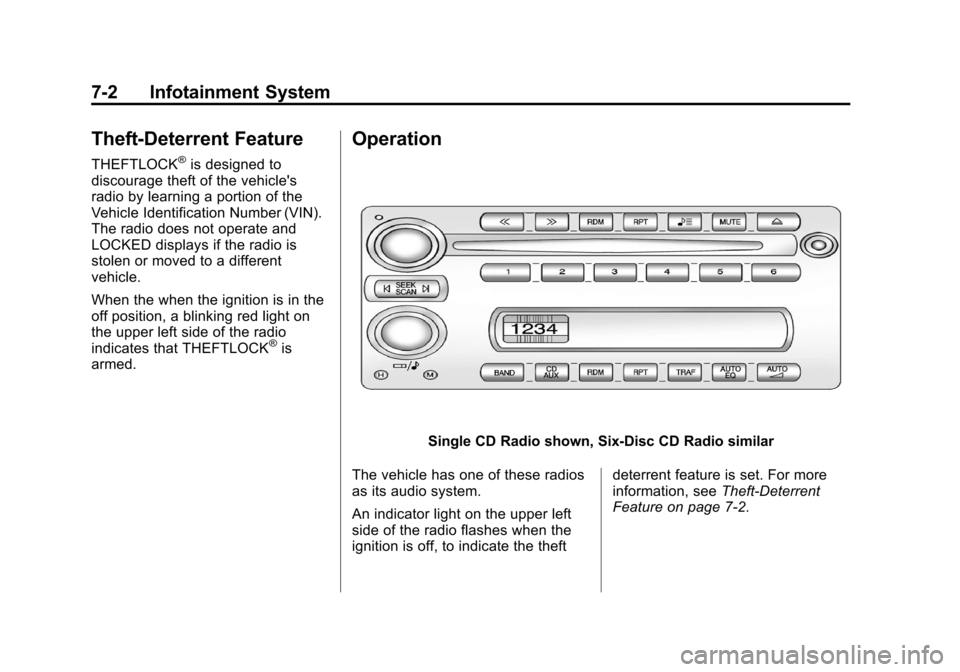
Single CD Radio shown, Six-Disc CD Radio similar
The vehicle has one of these radios
as its audio system.
An indicator light on the upper left
side of the radio flashes when the
ignition is off, to indicate the theft deterrent feature is set. For more
information, see
Theft-Deterrent
Feature on page 7‑2.
Page 203 of 428
Black plate (5,1)Chevrolet Corvette Owner Manual - 2011
Infotainment System 7-5
Radio Messages
CAL ERR (Calibration Error):
Displays if the radio is no longer
configured properly for the vehicle.
The vehicle must be returned to
your dealer for service.
LOC (Locked):Displays when the
THEFTLOCK
®system has locked
up. The vehicle must be returned to
your dealer for service.
If any error occurs repeatedly or
cannot be corrected, contact your
dealer.
Radio
AM-FM Radio
Radio Data System (RDS)
RDS features are available for use
only on FM stations that broadcast
RDS information. The station name
or call letters display while the radio
is tuned to an RDS station.
This system relies upon receiving
specific information from these
stations and works only when the
information is available. In rare
cases, a radio station can broadcast
incorrect information that causes the
radio features to work improperly.
If this happens, contact the radio
station. With RDS, the radio can:
.Seek to stations broadcasting
the selected type of
programming.
.Receive announcements
concerning local and national
emergencies.
.Display messages from radio
stations.
.Seek to stations with traffic
announcements.
.Provide the time of day.
.Provide a program type (PTY)
for current programming.
.Provide the name of the program
being broadcast.
Page 207 of 428
Black plate (9,1)Chevrolet Corvette Owner Manual - 2011
Infotainment System 7-9
SCAN:To scan the stations within
a category:
1. Press CAT. The last selected
category displays.
2. Turn the
O eknob to select a
category.
3. Press and hold
toruuntil
a beep sounds and SCAN
CATEGORY displays. The radio
begins scanning the stations in
the category.
4. Press
toruto stop scanning.
Storing XM Channels
Drivers are encouraged to store
XM channels while the vehicle is
parked, see Defensive Driving on
page 9‑2. Tune to stored radio
stations using the presets, favorites
button, and steering wheel controls,
if the vehicle has this feature.
Up to 30 stations (6 FM1, 6 FM2,
and 6 AM, 6 XM1 and 6 XM2),
and equalization settings for each
station can be programmed on the
six numbered pushbuttons.
To set presets:
1. Tune to a channel.
2. Press AUTO EQ to select the equalization.
3. Press and hold one of the six numbered pushbuttons until the
radio beeps once.
4. Repeat the steps for each pushbutton.
XM Radio Messages
XL (Explicit Language
Channels): These channels,
or any others, can be blocked by
calling 1-800-929-2100 in the U.S.
and 1-877-438-9677 in Canada.
Updating: The encryption code in
the receiver is being updated, and
no action is required. This process
should take no longer than
30 seconds.
No Signal: The system is
functioning correctly, but the
vehicle is in a location that is
blocking the XM signal. When
the vehicle is moved into an open
area, the signal should return.
Loading XM: The audio system
is acquiring and processing audio
and text data. No action is needed.
This message should disappear
shortly.
CH Off Air: This channel is not
currently in service. Tune in to
another channel.
Page 208 of 428
Black plate (10,1)Chevrolet Corvette Owner Manual - 2011
7-10 Infotainment System
CH Unauth:This channel is
blocked or cannot be received with
your XM Subscription package.
CH Unavail: This previously
assigned channel is no longer
assigned. Tune to another station.
If this station was one of the
presets, choose another station
for that preset button.
No Info: No artist, song title,
category, or text information is
available at this time on this
channel. The system is working
properly.
Not Found: There are no channels
available for the selected category.
The system is working properly.
XM Locked: The XM receiver in
the vehicle may have previously
been in another vehicle. For security
purposes, XM receivers cannot be
swapped between vehicles. If this
message is received after having
the vehicle serviced, check with
your dealer. Radio ID:
If tuned to channel 0,
this message will alternate with
the XM Radio 8 digit radio ID label.
This label is needed to activate the
service.
Unknown: If this message is
received when tuned to channel 0,
there may be a receiver fault.
Consult with your dealer.
Chk XMRcvr: If this message does
not clear within a short period of
time, the receiver may have a fault.
Consult with your dealer.
Radio Reception
Frequency interference and static
can occur during normal radio
reception if items such as cell phone
chargers, vehicle convenience
accessories, and external electronic
devices are plugged into the
accessory power outlet. If there is
interference or static, unplug the
item from the accessory power
outlet.
AM
The range for most AM stations is
greater than for FM, especially at
night. The longer range can cause
station frequencies to interfere
with each other. For better radio
reception, most AM radio stations
boost the power levels during the
day, and then reduce these levels
during the night. Static can also
occur when things like storms and
power lines interfere with radio
reception. When this happens, try
reducing the treble on the radio.
FM Stereo
FM signals only reach about
16 to 65 km (10 to 40 miles).
Although the radio has a built-in
electronic circuit that automatically
works to reduce interference, some
static can occur, especially around
tall buildings or hills, causing the
sound to fade in and out.