lock CHEVROLET CORVETTE 2011 6.G Manual PDF
[x] Cancel search | Manufacturer: CHEVROLET, Model Year: 2011, Model line: CORVETTE, Model: CHEVROLET CORVETTE 2011 6.GPages: 428, PDF Size: 6.63 MB
Page 225 of 428

Black plate (3,1)Chevrolet Corvette Owner Manual - 2011
Climate Controls 8-3
Manual Operation
Driver Power/Temperature:Press
the driver temperature knob to
turn the climate control system
off. This is the only setting that
completely shuts off the fan.
The digital display shows only
the outside temperature. The driver
and the passenger set temperature
and the air intake mode can still be
adjusted when the climate control
is off.
Passenger Power/Temperature:
Press the passenger temperature
knob to turn the passenger's climate
control system on or off. Turn the
knob to increase or decrease the
temperature for the passenger. If the
passenger's climate control system
is off, the driver's temperature knob
will control the temperature for the
entire vehicle.
x 9 w(Fan): Press to increase
or decrease the fan speed. The fan
speed setting will appear in the
display. Pressing the arrows will delete
AUTO from the digital display.
The fan graphics with the fan speed
bars will be shown. The AUTO
button must be pressed to return
to the automatic fan control.
If the airflow seems low when the
fan speed is at the highest setting,
the passenger compartment air
filter may need to be replaced. For
more information, see
Passenger
Compartment Air Filter on page 8‑7.
N(Air Delivery Mode Control):
Press this button to manually lock in
the current air delivery setting and
to stop the automatic mode control.
Pressing
Ndeletes AUTO from
the digital display and the mode
graphics will be shown. To change
the setting, press
Nagain. The
AUTO button must be pressed to
return to the automatic mode
selection. To change the current mode, select
one of the following:
H(Vent):
Air is directed to the
instrument panel outlets, with some
air directed to the floor outlets.
%(Bi-Level): Air is divided
between the instrument panel and
floor outlets.
6(Floor): Air is directed to the
floor outlets, with some air directed
to the windshield and side window
defogger outlets.
-(Floor/Defog): This mode clears
the windows of fog or moisture.
Air is directed to the windshield
and the floor outlets, with a
small amount to the side window
outlets. In this mode, the system
automatically turns off the
recirculation and runs the
air-conditioning compressor
unless the outside temperature
is at or below freezing. The
recirculation mode cannot be
selected while in the defog mode.
Page 227 of 428
Black plate (5,1)Chevrolet Corvette Owner Manual - 2011
Climate Controls 8-5
Using these settings together for
long periods of time may cause
the air inside of your vehicle to
become too dry. To prevent this
from happening, after the air in
the vehicle has cooled, turn the
recirculation mode off.
The air conditioning system
removes moisture from the air,
so a small amount of water might
drip under the vehicle while idling
or after turning off the engine.
This is normal.
?(Recirculation):Press to
turn the recirculation mode on or off.
An indicator light comes on to show
that recirculation is on. This mode
prevents outside air from entering
your vehicle. It can be used to
prevent outside air and odors from
entering your vehicle and to help
cool the air inside your vehicle more
quickly. Recirculation mode is not
available in defrost or defog mode.
Sensors
The solar sensor on the vehicle
monitors the solar heat and
uses the information to maintain
the selected temperature when
operating in AUTO mode by
automatically adjusting the
temperature, fan speed and air
delivery system. The system
may also supply cooler air to the
side of the vehicle facing the sun.
The recirculation mode will also
be activated, as necessary. Do not
cover the solar sensor located on
the top of the instrument panel near
the windshield or the system will
not work properly.
There is also a sensor located
behind the front bumper.
This sensor reads the outside
air temperature and helps to
maintain the temperature inside
the vehicle. Any cover on the front
of the vehicle could give a false
reading in the temperature. If the outside temperature goes up,
the displayed temperature will not
change until:
.The vehicle's speed is above
19 km/h (12 mph) for 5 minutes.
.The vehicle's speed is above
52 km/h (32 mph) for
2.5 minutes.
These delays prevent false
readings. If the temperature goes
down, the outside temperature
will be shown when you start the
vehicle. If it has been turned off
for less than three hours, the
temperature will be recalled from
the previous vehicle operation.
There is also an inside temperature
sensor located to the left of the
ignition switch. The automatic
climate control system uses this
sensor to receive information, so
if you block or cover it, the system
will not function properly.
Page 228 of 428
Black plate (6,1)Chevrolet Corvette Owner Manual - 2011
8-6 Climate Controls
Rear Window Defogger
The rear window defogger uses a
warming grid to remove fog or frost
from the rear window.
The rear window defogger only
works when the engine is running.
=(Rear Window Defogger):
Press to turn the rear window
defogger on or off. Be sure to clear
as much snow from the rear window
as possible. An indicator light
comes on to show that the rear
window defogger is on.
The rear window defogger turns off
about 10 minutes after the button
is pressed when traveling less than
48 km/h (30 mph). If turned on
again, the defogger only runs for
about five minutes before turning
off. The defogger can also be turned
off by turning off the engine. The vehicle has heated outside
rearview mirrors. The mirrors will
heat to help clear fog or frost from
the surface of the mirrors when the
rear window defogger button is
pressed.
For vehicles with a power
convertible top, the rear window
defogger and heated mirrors are
automatically disabled when the
power convertible top is moving
or down.
Notice:
Do not use anything
sharp on the inside of the rear
window. If you do, you could cut
or damage the warming grid, and
the repairs would not be covered
by the vehicle warranty. Do not
attach a temporary vehicle
license, tape, a decal or anything
similar to the defogger grid.
Air Vents
Use the tab located on the air
outlets to change the direction
of the airflow.
Operation Tips
.Clear away any ice, snow or
leaves from the air inlets at the
base of the windshield that may
block the flow of air into your
vehicle.
.Use of non-GM approved hood
deflectors may adversely affect
the performance of the system.
.Keep the area around the base
of the instrument panel console
and air path under the seats
clear of objects to help circulate
the air inside of your vehicle
more effectively.
Page 231 of 428
Black plate (1,1)Chevrolet Corvette Owner Manual - 2011
Driving and Operating 9-1
Driving and
Operating
Driving Information
Defensive Driving . . . . . . . . . . . . . 9-2
Drunk Driving . . . . . . . . . . . . . . . . . 9-2
Control of a Vehicle . . . . . . . . . . . 9-3
Braking . . . . . . . . . . . . . . . . . . . . . . . 9-3
Steering . . . . . . . . . . . . . . . . . . . . . . . 9-4
Off-Road Recovery . . . . . . . . . . . . 9-5
Loss of Control . . . . . . . . . . . . . . . . 9-6
Racing or Other CompetitiveDriving . . . . . . . . . . . . . . . . . . . . . . . 9-7
Driving on Wet Roads . . . . . . . . . 9-9
Highway Hypnosis . . . . . . . . . . . 9-10
Hill and Mountain Roads . . . . . 9-10
Winter Driving . . . . . . . . . . . . . . . . 9-11
If the Vehicle is Stuck . . . . . . . . 9-13
Vehicle Load Limits . . . . . . . . . . 9-14
Starting and Operating
New Vehicle Break-In . . . . . . . . 9-18
Front Air Dam . . . . . . . . . . . . . . . 9-19
Ignition Positions . . . . . . . . . . . . 9-20 Retained Accessory
Power (RAP) . . . . . . . . . . . . . . . 9-21
Starting the Engine . . . . . . . . . . 9-21
Shifting Into Park (Automatic Transmission) . . . . . . . . . . . . . . 9-24
Shifting Out of Park . . . . . . . . . . 9-25
Parking (Manual Transmission) . . . . . . . . . . . . . . 9-26
Parking Over Things That Burn . . . . . . . . . . . . . . . . . . 9-26
Engine Exhaust
Engine Exhaust . . . . . . . . . . . . . . 9-26
Running the Vehicle WhileParked . . . . . . . . . . . . . . . . . . . . . 9-27
Automatic Transmission
Automatic Transmission . . . . . 9-28
Manual Mode . . . . . . . . . . . . . . . . 9-29
Manual Transmission
Manual Transmission . . . . . . . . 9-32
Brakes
Antilock BrakeSystem (ABS) . . . . . . . . . . . . . . 9-34
Parking Brake . . . . . . . . . . . . . . . 9-35
Brake Assist . . . . . . . . . . . . . . . . . 9-36
Ride Control Systems
Traction Control System (TCS) . . . . . . . . . . . . . . 9-36
Active Handling System . . . . . 9-37
Competitive Driving Mode . . . 9-38
Limited-Slip Rear Axle . . . . . . . 9-42
Selective Ride Control . . . . . . . 9-42
Cruise Control
Cruise Control . . . . . . . . . . . . . . . 9-44
Fuel
Fuel . . . . . . . . . . . . . . . . . . . . . . . . . 9-48
Recommended Fuel . . . . . . . . . 9-48
Gasoline Specifications . . . . . . 9-49
California Fuel Requirements . . . . . . . . . . . . . . 9-49
Fuels in Foreign Countries . . . 9-49
Fuel Additives . . . . . . . . . . . . . . . 9-50
Filling the Tank . . . . . . . . . . . . . . 9-51
Filling a Portable Fuel Container . . . . . . . . . . . . . . . . . . . 9-53
Towing
General TowingInformation . . . . . . . . . . . . . . . . . 9-54
Conversions and Add-Ons
Add-On ElectricalEquipment . . . . . . . . . . . . . . . . . 9-54
Page 235 of 428
Black plate (5,1)Chevrolet Corvette Owner Manual - 2011
Driving and Operating 9-5
Steering in Emergencies
There are times when steering
can be more effective than braking.
For example, you come over a hill
and find a truck stopped in your
lane, or a car suddenly pulls out
from nowhere, or a child darts out
from between parked cars and stops
right in front of you. These problems
can be avoided by braking—if you
can stop in time. But sometimes you
cannot stop in time because there
is no room. That is the time for
evasive action —steering around
the problem.
The vehicle can perform very well
in emergencies like these. First
apply the brakes. See Braking on
page 9‑3. It is better to remove
as much speed as possible from
a collision. Then steer around
the problem, to the left or right
depending on the space available.
An emergency like this requires
close attention and a quick decision.
If holding the steering wheel at
the recommended 9 and 3 o'clock
positions, it can be turned a full
180 degrees very quickly without
removing either hand. But you have
to act fast, steer quickly, and just as
quickly straighten the wheel once
you have avoided the object.
The fact that such emergency
situations are always possible is a
good reason to practice defensive
driving at all times and wear safety
belts properly.
Off-Road Recovery
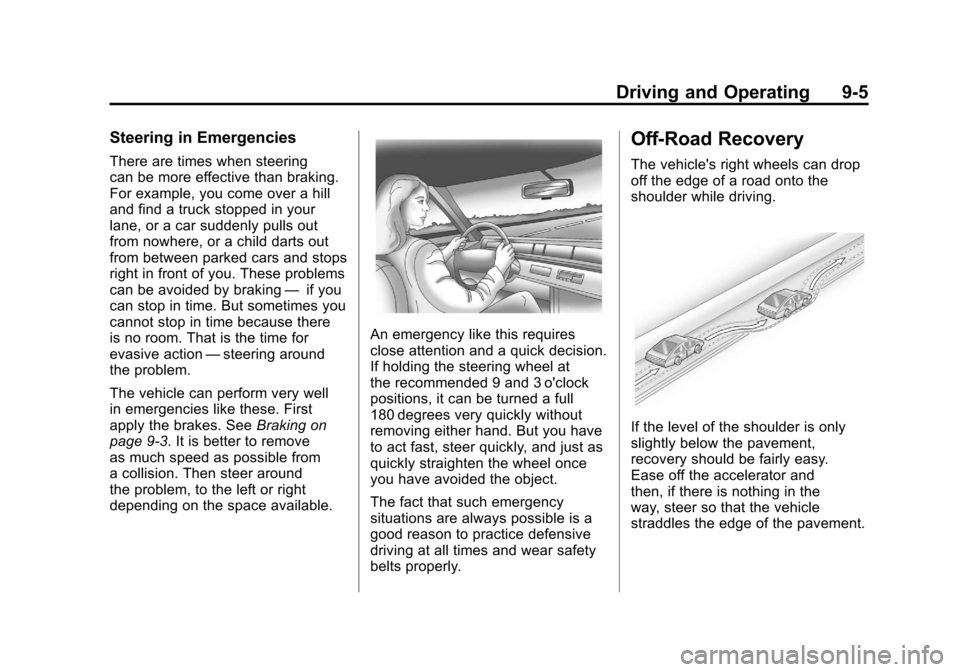
The vehicle's right wheels can drop
off the edge of a road onto the
shoulder while driving.
If the level of the shoulder is only
slightly below the pavement,
recovery should be fairly easy.
Ease off the accelerator and
then, if there is nothing in the
way, steer so that the vehicle
straddles the edge of the pavement.
Page 236 of 428
Black plate (6,1)Chevrolet Corvette Owner Manual - 2011
9-6 Driving and Operating
Turn the steering wheel 8 to 13 cm
(3 to 5 inches), about one-eighth
turn, until the right front tire contacts
the pavement edge. Then turn the
steering wheel to go straight down
the roadway.
Loss of Control
Let us review what driving experts
say about what happens when the
three control systems—brakes,
steering, and acceleration —do not
have enough friction where the tires
meet the road to do what the driver
has asked.
In any emergency, do not give up.
Keep trying to steer and constantly
seek an escape route or area of
less danger.
Skidding
In a skid, a driver can lose control of
the vehicle. Defensive drivers avoid
most skids by taking reasonable
care suited to existing conditions,
and by not overdriving those
conditions. But skids are always
possible.
The three types of skids correspond
to the vehicle's three control
systems. In the braking skid,
the wheels are not rolling. In the
steering or cornering skid, too much
speed or steering in a curve causes
tires to slip and lose cornering force.
And in the acceleration skid, too
much throttle causes the driving
wheels to spin.
If the vehicle starts to slide, ease
your foot off the accelerator pedal
and quickly steer the way you
want the vehicle to go. If you start
steering quickly enough, the vehicle
may straighten out. Always be ready
for a second skid if it occurs. Of course, traction is reduced when
water, snow, ice, gravel, or other
material is on the road. For safety,
slow down and adjust your driving to
these conditions. It is important to
slow down on slippery surfaces
because stopping distance is longer
and vehicle control more limited.
While driving on a surface with
reduced traction, try to avoid
sudden steering, acceleration,
or braking, including reducing
vehicle speed by shifting to a lower
gear. Any sudden changes could
cause the tires to slide. You might
not realize the surface is slippery
until the vehicle is skidding. Learn
to recognize warning clues
—such
as enough water, ice, or packed
snow on the road to make a
mirrored surface —and slow
down when you have any doubt.
Remember: Antilock brakes help
avoid only the braking skid.
Page 241 of 428
Black plate (11,1)Chevrolet Corvette Owner Manual - 2011
Driving and Operating 9-11
.Stay in your own lane. Do not
swing wide or cut across the
center of the road. Drive at
speeds that let you stay in
your own lane.
.Top of hills: Be
alert—something
could be in your lane
(stalled car, accident).
.Pay attention to special road
signs (falling rocks area, winding
roads, long grades, passing or
no-passing zones) and take
appropriate action.
Winter Driving
Driving on Snow or Ice
Drive carefully when there is snow
or ice between the tires and the
road, creating less traction or grip.
Wet ice can occur at about 0°C
(32°F) when freezing rain begins to
fall, resulting in even less traction.
Avoid driving on wet ice or in
freezing rain until roads can be
treated with salt or sand.
Drive with caution, whatever the
condition. Accelerate gently so
traction is not lost. Accelerating too
quickly causes the wheels to spin
and makes the surface under the
tires slick, so there is even less
traction. Try not to break the fragile traction.
If you accelerate too fast, the drive
wheels will spin and polish the
surface under the tires even more.
The
Antilock Brake System (ABS)
on page 9‑34 improves vehicle
stability during hard stops on
slippery roads, but apply the brakes
sooner than when on dry pavement.
Allow greater following distance on
any slippery road and watch for
slippery spots. Icy patches can
occur on otherwise clear roads in
shaded areas. The surface of a
curve or an overpass can remain
icy when the surrounding roads
are clear. Avoid sudden steering
maneuvers and braking while
on ice.
Turn off cruise control on slippery
surfaces.
Page 242 of 428
Black plate (12,1)Chevrolet Corvette Owner Manual - 2011
9-12 Driving and Operating
Blizzard Conditions
Being stuck in snow can be in a
serious situation. Stay with the
vehicle unless there is help nearby.
If possible, use theRoadside
Assistance Program (United States
and Canada) on page 13‑8 or
Roadside Assistance Program
(Mexico) on page 13‑10. To get
help and keep everyone in the
vehicle safe:
.Turn on the hazard warning
flashers.
.Tie a red cloth to an outside
mirror.
{WARNING
Snow can trap engine exhaust
under the vehicle. This may
cause exhaust gases to get
inside. Engine exhaust contains
Carbon Monoxide (CO) which
(Continued)
WARNING (Continued)
cannot be seen or smelled. It can
cause unconsciousness and even
death.
If the vehicle is stuck in the snow:
.Clear away snow from around
the base of your vehicle,
especially any that is blocking
the exhaust pipe.
.Check again from time to
time to be sure snow does
not collect there.
.Open a window about 5 cm
(2 in) on the side of the
vehicle that is away from the
wind to bring in fresh air.
.Fully open the air outlets
on or under the instrument
panel.(Continued)
WARNING (Continued)
.Adjust the climate control
system to a setting that
circulates the air inside
the vehicle and set the fan
speed to the highest setting.
See Climate Control System
in the Index.
For more information about
carbon monoxide, see Engine
Exhaust on page 9‑26.
Snow can trap exhaust gases
under your vehicle. This can
cause deadly CO (Carbon
Monoxide) gas to get inside.
CO could overcome you and kill
you. You cannot see it or smell it,
so you might not know it is in your
vehicle. Clear away snow from
around the base of your vehicle,
especially any that is blocking the
exhaust.
Page 250 of 428
Black plate (20,1)Chevrolet Corvette Owner Manual - 2011
9-20 Driving and Operating
Ignition Positions
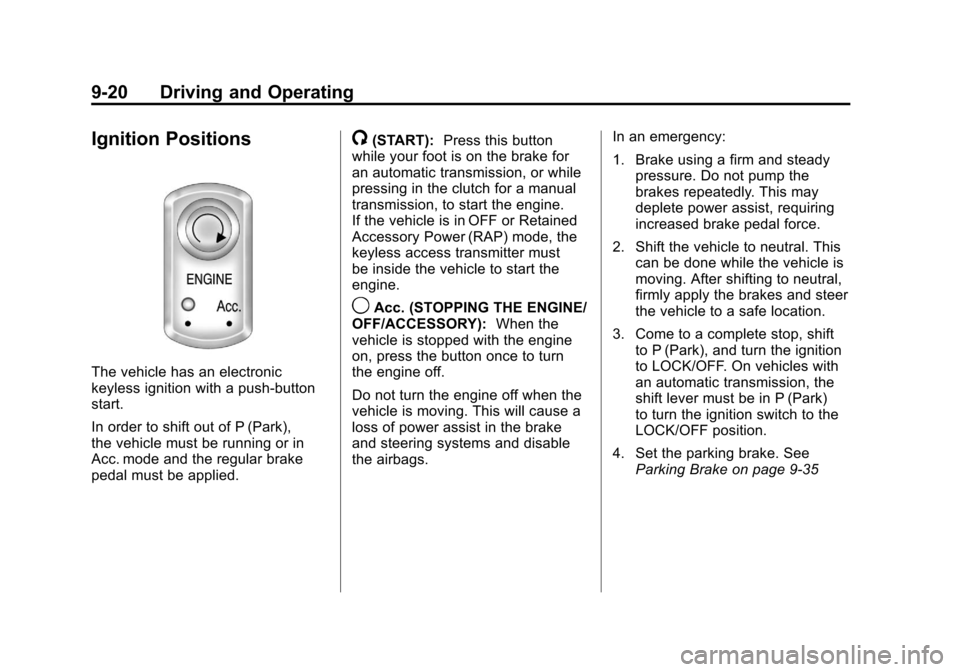
The vehicle has an electronic
keyless ignition with a push-button
start.
In order to shift out of P (Park),
the vehicle must be running or in
Acc. mode and the regular brake
pedal must be applied.
/(START):Press this button
while your foot is on the brake for
an automatic transmission, or while
pressing in the clutch for a manual
transmission, to start the engine.
If the vehicle is in OFF or Retained
Accessory Power (RAP) mode, the
keyless access transmitter must
be inside the vehicle to start the
engine.
9Acc. (STOPPING THE ENGINE/
OFF/ACCESSORY): When the
vehicle is stopped with the engine
on, press the button once to turn
the engine off.
Do not turn the engine off when the
vehicle is moving. This will cause a
loss of power assist in the brake
and steering systems and disable
the airbags. In an emergency:
1. Brake using a firm and steady
pressure. Do not pump the
brakes repeatedly. This may
deplete power assist, requiring
increased brake pedal force.
2. Shift the vehicle to neutral. This can be done while the vehicle is
moving. After shifting to neutral,
firmly apply the brakes and steer
the vehicle to a safe location.
3. Come to a complete stop, shift to P (Park), and turn the ignition
to LOCK/OFF. On vehicles with
an automatic transmission, the
shift lever must be in P (Park)
to turn the ignition switch to the
LOCK/OFF position.
4. Set the parking brake. See Parking Brake on page 9‑35
Page 252 of 428

Black plate (22,1)Chevrolet Corvette Owner Manual - 2011
9-22 Driving and Operating
Cell phone chargers can interfere
with the operation of the Keyless
Access System. Battery chargers
should not be plugged in when
starting or turning off the engine.
To start the vehicle, do the following:
1. For vehicles with an automatictransmission, with your foot
on the brake pedal, press the
START button located on the
instrument panel. For vehicles
with a manual transmission, you
must also press in the clutch
pedal while pressing the START
button.
If there is not a keyless access
transmitter in the vehicle or if
there is something causing
interference with it, the DIC will
display NO FOBS DETECTED.
See Key and Lock Messages on
page 5‑42 for more information. 2. When the engine begins
cranking, let go of the button and
the engine cranks automatically
until it starts. If the battery in the
keyless access transmitter is
weak, the DIC displays FOB
BATTERY LOW. You can still
drive the vehicle.
See “Battery Replacement”
under Remote Keyless Entry
(RKE) System Operation on
page 2‑3 for more information.
If the fob battery is dead, you
need to insert the fob into
the fob slot to enable engine
starting. See “NO FOBS
DETECTED” underKey and
Lock Messages on page 5‑42.
3. Do not race the engine immediately after starting it.
Operate the engine and
transmission gently until the
oil warms up and lubricates
all moving parts. 4. If the engine does not start and
no DIC message is displayed,
wait 15 seconds before trying
again to let the cranking motor
cool down.
If the engine does not start after
5-10 seconds, especially in very
cold weather (below −18°C
or 0°F), it could be flooded with
too much gasoline. Try pushing
the accelerator pedal all the way
to the floor while cranking for up
to 15 seconds maximum. Wait at
least 15 seconds between each
try, to allow the cranking motor
to cool down. When the engine
starts, let go of the accelerator.
If the vehicle starts briefly but
then stops again, repeat these
steps. This clears the extra
gasoline from the engine.