phone CHEVROLET CORVETTE 2011 6.G Owners Manual
[x] Cancel search | Manufacturer: CHEVROLET, Model Year: 2011, Model line: CORVETTE, Model: CHEVROLET CORVETTE 2011 6.GPages: 428, PDF Size: 6.63 MB
Page 1 of 428

Black plate (1,1)Chevrolet Corvette Owner Manual - 2011
2011 Chevrolet Corvette Owner ManualM
In Brief. . . . . . . . . . . . . . . . . . . . . . . . 1-1
Instrument Panel . . . . . . . . . . . . . . 1-2
Initial Drive Information . . . . . . . . 1-4
Vehicle Features . . . . . . . . . . . . . 1-16
Performance and Maintenance . . . . . . . . . . . . . . . . 1-21
Keys, Doors and Windows . . . 2-1
Keys and Locks . . . . . . . . . . . . . . . 2-2
Doors . . . . . . . . . . . . . . . . . . . . . . . . 2-10
Vehicle Security . . . . . . . . . . . . . . 2-12
Exterior Mirrors . . . . . . . . . . . . . . . 2-15
Interior Mirrors . . . . . . . . . . . . . . . . 2-16
Windows . . . . . . . . . . . . . . . . . . . . . 2-17
Roof . . . . . . . . . . . . . . . . . . . . . . . . . . 2-18
Seats and Restraints . . . . . . . . . 3-1
Head Restraints . . . . . . . . . . . . . . . 3-2
Front Seats . . . . . . . . . . . . . . . . . . . . 3-2
Safety Belts . . . . . . . . . . . . . . . . . . . . 3-9
Airbag System . . . . . . . . . . . . . . . . 3-22
Child Restraints . . . . . . . . . . . . . . 3-37
Storage . . . . . . . . . . . . . . . . . . . . . . . 4-1
Storage Compartments . . . . . . . . 4-1
Additional Storage Features . . . 4-2 Instruments and Controls
. . . . 5-1
Controls . . . . . . . . . . . . . . . . . . . . . . . 5-2
Warning Lights, Gauges, and Indicators . . . . . . . . . . . . . . . . . . . . 5-8
Information Displays . . . . . . . . . . 5-25
Vehicle Messages . . . . . . . . . . . . 5-35
Vehicle Personalization . . . . . . . 5-55
Universal Remote System . . . . 5-64
Lighting . . . . . . . . . . . . . . . . . . . . . . . 6-1
Exterior Lighting . . . . . . . . . . . . . . . 6-1
Interior Lighting . . . . . . . . . . . . . . . . 6-5
Lighting Features . . . . . . . . . . . . . . 6-6
Infotainment System . . . . . . . . . 7-1
Introduction . . . . . . . . . . . . . . . . . . . . 7-1
Radio . . . . . . . . . . . . . . . . . . . . . . . . . . 7-5
Audio Players . . . . . . . . . . . . . . . . 7-11
Phone . . . . . . . . . . . . . . . . . . . . . . . . 7-18
Climate Controls . . . . . . . . . . . . . 8-1
Climate Control Systems . . . . . . 8-1
Air Vents . . . . . . . . . . . . . . . . . . . . . . . 8-6
Maintenance . . . . . . . . . . . . . . . . . . . 8-7 Driving and Operating
. . . . . . . . 9-1
Driving Information . . . . . . . . . . . . . 9-2
Starting and Operating . . . . . . . 9-18
Engine Exhaust . . . . . . . . . . . . . . 9-26
Automatic Transmission . . . . . . 9-28
Manual Transmission . . . . . . . . . 9-32
Brakes . . . . . . . . . . . . . . . . . . . . . . . 9-34
Ride Control Systems . . . . . . . . 9-36
Cruise Control . . . . . . . . . . . . . . . . 9-44
Fuel . . . . . . . . . . . . . . . . . . . . . . . . . . 9-48
Towing . . . . . . . . . . . . . . . . . . . . . . . 9-54
Conversions and Add-Ons . . . 9-54
Vehicle Care . . . . . . . . . . . . . . . . . 10-1
General Information . . . . . . . . . . 10-3
Vehicle Checks . . . . . . . . . . . . . . . 10-8
Headlamp Aiming . . . . . . . . . . . 10-48
Bulb Replacement . . . . . . . . . . 10-48
Electrical System . . . . . . . . . . . . 10-50
Wheels and Tires . . . . . . . . . . . 10-58
Jump Starting . . . . . . . . . . . . . . . 10-82
Towing . . . . . . . . . . . . . . . . . . . . . . 10-86
Appearance Care . . . . . . . . . . . 10-86
Page 24 of 428
Black plate (18,1)Chevrolet Corvette Owner Manual - 2011
1-18 In Brief
Bluetooth®
For vehicles with a Bluetooth
system, it allows users with a
Bluetooth‐enabled cell phone
to make and receive hands-free
calls using the vehicle’s audio
system and controls.
The Bluetooth‐enabled cell phone
must be paired with the Bluetooth
system before it can be used in the
vehicle. Not all phones will support
all functions. For more information,
visit www.gm.com/bluetooth.
For more information, seeBluetooth
on page 7‑18.
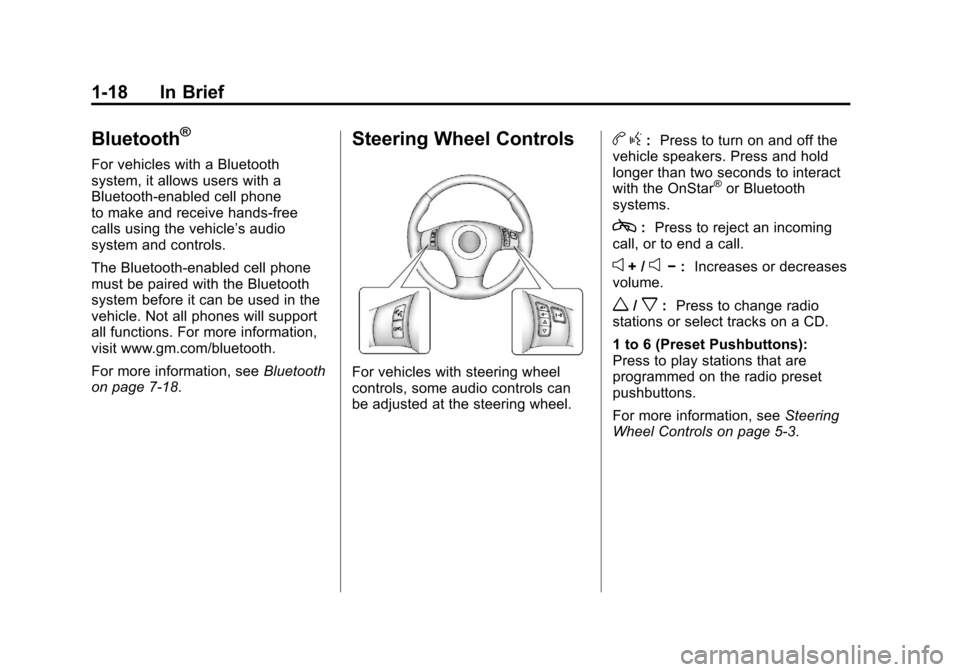
Steering Wheel Controls
For vehicles with steering wheel
controls, some audio controls can
be adjusted at the steering wheel.
b g: Press to turn on and off the
vehicle speakers. Press and hold
longer than two seconds to interact
with the OnStar
®or Bluetooth
systems.
c: Press to reject an incoming
call, or to end a call.
e+ /e− : Increases or decreases
volume.
w/x: Press to change radio
stations or select tracks on a CD.
1 to 6 (Preset Pushbuttons):
Press to play stations that are
programmed on the radio preset
pushbuttons.
For more information, see Steering
Wheel Controls on page 5‑3.
Page 26 of 428
Black plate (20,1)Chevrolet Corvette Owner Manual - 2011
1-20 In Brief
TRIP:Press to display your total
and trip distance driven, the elapsed
time function, your average speed,
and the engine oil life.
OPTION: Press to choose personal
options that are available on your
vehicle, depending on the options
your vehicle is equipped with, such
as door locks, easy entry seats, and
language.
RESET: Press, along with the other
buttons, to reset system functions,
select personal options, and turn
off or acknowledge messages on
the DIC.
For more information, see Driver
Information Center (DIC) on
page 5‑25.Vehicle Personalization
Some vehicle features can be
programmed by using the DIC
buttons on the left side of the
steering wheel. The features that
can be programmed include:
.Units
.Memory Features
.Lighting Features
.Lock and Unlock Feedback
.Door Lock and Unlock Settings
.Language
.Personalization Name
See Vehicle Personalization on
page 5‑55.
Power Outlets
The accessory power outlet can be
used to plug in electrical equipment,
such as a cell phone or MP3 player.
The accessory power outlet is
located inside the center console
storage compartment, on the
forward left side.
Remove the cover to access and
replace when not in use.
See Power Outlets on page 5‑6.
Roof Panel
On vehicles with a removable
roof panel, there are three release
latches. Two are located on the front
of the roof panel and the other is
located on the back of the roof
panel. See “Removing the Roof
Panel” underRoof Panel on
page 2‑18.
Page 32 of 428
Black plate (26,1)Chevrolet Corvette Owner Manual - 2011
1-26 In Brief
The OnStar system can record
and transmit vehicle information.
This information is automatically
sent to an OnStar call center when
Qis pressed,]is pressed, or if
the airbags or ACR system deploy.
This information usually includes
the vehicle's GPS location and,
in the event of a crash, additional
information regarding the crash that
the vehicle was involved in (e.g. the
direction from which the vehicle was
hit). When the virtual advisor feature
of OnStar hands-free calling is
used, the vehicle also sends OnStar
the vehicle's GPS location so they
can provide services where it is
located.
Location information about the
vehicle is only available if the GPS
satellite signals are unobstructed
and available. The vehicle must have a working
electrical system, including
adequate battery power, for the
OnStar equipment to operate.
There are other problems OnStar
cannot control that may prevent
OnStar from providing OnStar
service at any particular time or
place. Some examples are damage
to important parts of the vehicle in
a crash, hills, tall buildings, tunnels,
weather or wireless phone network
congestion.
OnStar Steering Wheel
Controls
This vehicle may have a Talk/Mute
button that can be used to interact
with OnStar hands-free calling.
See
Steering Wheel Controls on
page 5‑3 for more information. On some vehicles, the mute button
can be used to dial numbers into
voice mail systems, or to dial phone
extensions. See the OnStar Owner's
Guide for more information.
Your Responsibility
Increase the volume of the radio if
the OnStar advisor cannot be heard.
If the light next to the OnStar
buttons is red, the system may
not be functioning properly.
Press
Qand request a vehicle
diagnostic. If the light appears clear
(no light is appearing), your OnStar
subscription has expired and all
services have been deactivated.
Press
Qto confirm that the OnStar
equipment is active.
Page 99 of 428

Black plate (35,1)Chevrolet Corvette Owner Manual - 2011
Seats and Restraints 3-35
Adding Equipment to the
Airbag-Equipped Vehicle
Q: Is there anything I might addto or change about the vehicle
that could keep the airbags
from working properly?
A: Yes. If you add things that
change the vehicle's frame,
bumper system, height, front
end or side sheet metal, they
may keep the airbag system
from working properly. Changing
or moving any parts of the front
seats, safety belts, the airbag
sensing and diagnostic module,
steering wheel, instrument
panel, the inside rear mirror,
front sensors, or airbag wiring
can affect the operation of the
airbag system.
In addition, the vehicle has
a passenger sensing system
for the right front passenger
position, which includes sensors
that are part of the passenger seat. The passenger sensing
system may not operate properly
if the original seat trim is
replaced with non-GM covers,
upholstery or trim, or with
GM covers, upholstery or
trim designed for a different
vehicle. Any object, such as
an aftermarket seat heater or
a comfort enhancing pad or
device, installed under or on
top of the seat fabric, could
also interfere with the operation
of the passenger sensing
system. This could either
prevent proper deployment
of the passenger airbag(s) or
prevent the passenger sensing
system from properly turning
off the passenger airbag(s).
See
Passenger Sensing System
on page 3‑30.
If you have any questions
about this, you should contact
Customer Assistance before you
modify your vehicle. The phone
numbers and addresses for
Customer Assistance are in Step Two of the Customer
Satisfaction Procedure in
this manual. See
Customer
Satisfaction Procedure
(United States and Canada) on
page 13‑1 orCustomer
Satisfaction Procedure (Mexico)
on page 13‑3.
Q: Because I have a disability, I have to get my vehicle
modified. How can I find out
whether this will affect my
airbag system?
A: If you have questions,
call Customer Assistance.
The phone numbers and
addresses for Customer
Assistance are in Step Two
of the Customer Satisfaction
Procedure in this manual.
See Customer Satisfaction
Procedure (United States and
Canada) on page 13‑1 or
Customer Satisfaction
Procedure (Mexico) on
page 13‑3.
Page 123 of 428
Black plate (3,1)Chevrolet Corvette Owner Manual - 2011
Instruments and Controls 5-3
The telescopic steering column
position can be stored with your
memory settings. See“Memory
Seat, Mirrors and Steering Wheel”
under Power Seat Adjustment on
page 3‑3 for more information.
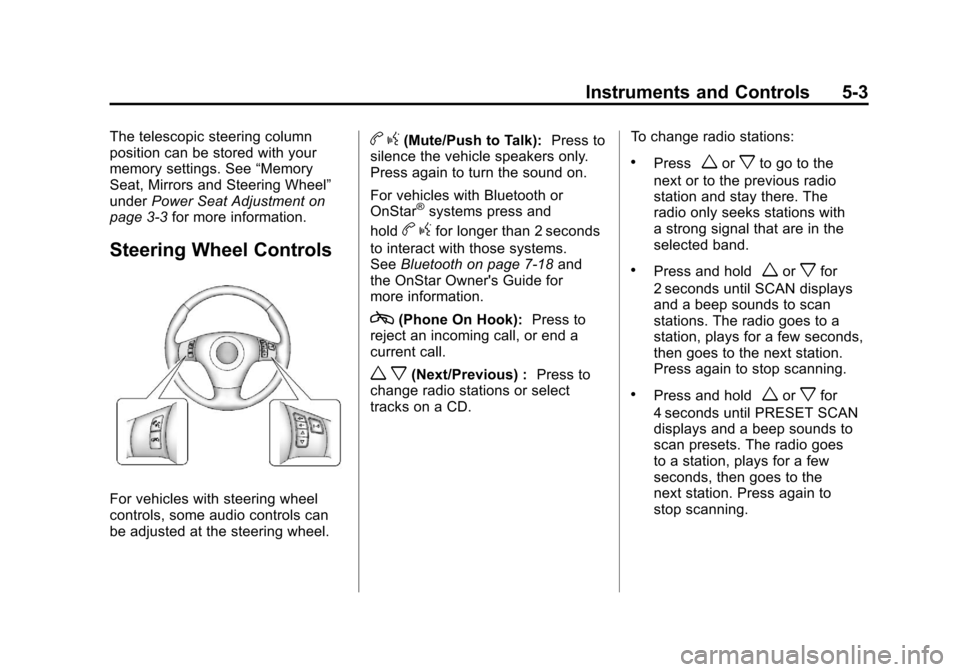
Steering Wheel Controls
For vehicles with steering wheel
controls, some audio controls can
be adjusted at the steering wheel.
bg(Mute/Push to Talk): Press to
silence the vehicle speakers only.
Press again to turn the sound on.
For vehicles with Bluetooth or
OnStar
®systems press and
hold
b gfor longer than 2 seconds
to interact with those systems.
See Bluetooth on page 7‑18 and
the OnStar Owner's Guide for
more information.
c(Phone On Hook): Press to
reject an incoming call, or end a
current call.
w x(Next/Previous) : Press to
change radio stations or select
tracks on a CD. To change radio stations:
.Pressworxto go to the
next or to the previous radio
station and stay there. The
radio only seeks stations with
a strong signal that are in the
selected band.
.Press and holdworxfor
2 seconds until SCAN displays
and a beep sounds to scan
stations. The radio goes to a
station, plays for a few seconds,
then goes to the next station.
Press again to stop scanning.
.Press and holdworxfor
4 seconds until PRESET SCAN
displays and a beep sounds to
scan presets. The radio goes
to a station, plays for a few
seconds, then goes to the
next station. Press again to
stop scanning.
Page 126 of 428
Black plate (6,1)Chevrolet Corvette Owner Manual - 2011
5-6 Instruments and Controls
Depending on the mirror, in order
to calibrate, CAL must be displayed
in the mirror compass windows.
If CAL is not displayed, press
Pfor
several seconds or until CAL is
displayed.
If the compass has map lamps, it
can be placed in calibration mode
by pressing and holding the left map
light button until a C appears on the
compass display.
The mirror compass can be
calibrated by driving the vehicle
in circles at 8 km/h (5 mph) or less
until the display reads a direction.
Compass Variance
The mirror is set to zone eight.
If you do not live in zone eight or
drive out of the area, the compass
variance needs to be changed to
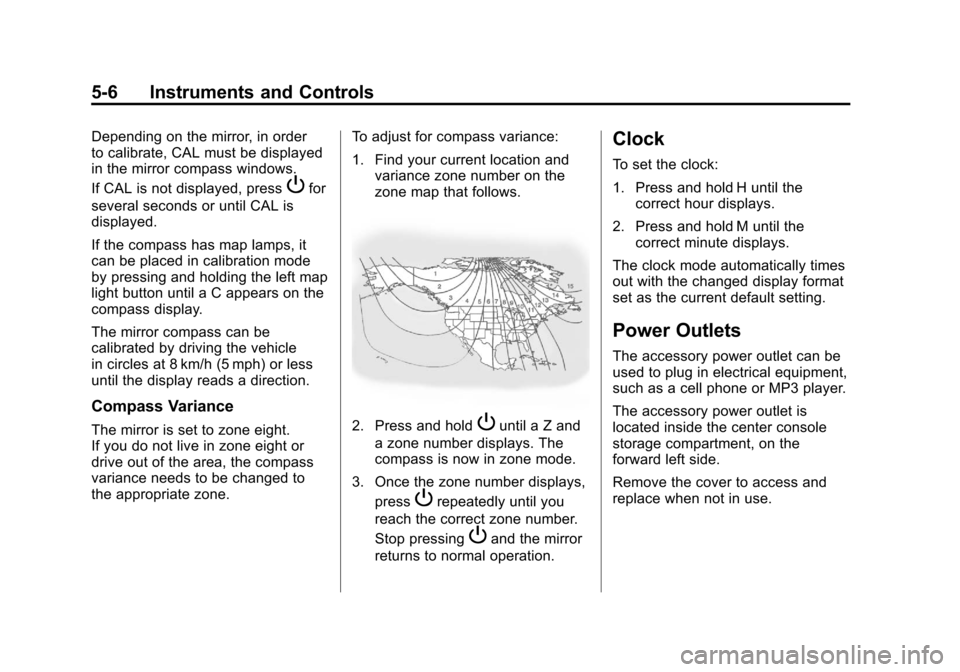
the appropriate zone. To adjust for compass variance:
1. Find your current location and
variance zone number on the
zone map that follows.2. Press and holdPuntil a Z and
a zone number displays. The
compass is now in zone mode.
3. Once the zone number displays, press
Prepeatedly until you
reach the correct zone number.
Stop pressing
Pand the mirror
returns to normal operation.
Clock
To set the clock:
1. Press and hold H until the correct hour displays.
2. Press and hold M until the correct minute displays.
The clock mode automatically times
out with the changed display format
set as the current default setting.
Power Outlets
The accessory power outlet can be
used to plug in electrical equipment,
such as a cell phone or MP3 player.
The accessory power outlet is
located inside the center console
storage compartment, on the
forward left side.
Remove the cover to access and
replace when not in use.
Page 127 of 428
Black plate (7,1)Chevrolet Corvette Owner Manual - 2011
Instruments and Controls 5-7
{WARNING
Power is always supplied to the
outlets. Do not leave electrical
equipment plugged in when the
vehicle is not in use because the
vehicle could catch fire and cause
injury or death.
Notice: Leaving electrical
equipment plugged in for an
extended period of time while
the vehicle is off will drain the
battery. Always unplug electrical
equipment when not in use and
do not plug in equipment that
exceeds the maximum 20 ampere
rating. Certain electrical accessories
may not be compatible with the
accessory power outlet and could
overload vehicle or adapter fuses.
If a problem is experienced, see
your dealer.
When adding electrical equipment,
be sure to follow the proper
installation instructions included
with the equipment. See
Add-On
Electrical Equipment on page 9‑54.
It is recommended that a qualified
technician or dealer be seen for
the proper installation of your
equipment.
Notice: Hanging heavy
equipment from the power
outlet can cause damage not
covered by the vehicle warranty.
The power outlets are designed
for accessory power plugs only,
such as cell phone charge cords.
Cigarette Lighter
To use the cigarette lighter, push it
in all the way and let go. When it is
ready, it will pop back out by itself.
Notice: Holding a cigarette lighter
in while it is heating does not let
the lighter back away from the
heating element when it is hot.
Damage from overheating can
occur to the lighter or heating
element, or a fuse could be
blown. Do not hold a cigarette
lighter in while it is heating.
Page 162 of 428
Black plate (42,1)Chevrolet Corvette Owner Manual - 2011
5-42 Instruments and Controls
LOW FUEL
This message displays when the
fuel tank is less than 10 percent
full and the display is turned off.
A sound will be heard when this
message is displayed. Refill the fuel
tank as soon as possible. SeeFuel
Gauge on page 5‑11.
SERVICE FUEL SYSTEM
This message displays if the
Powertrain Control Module (PCM)
has detected a problem within
the fuel system. Have the vehicle
serviced by your dealer. This
message also displays when the
cluster is not getting fuel information
from the PCM.
Key and Lock Messages
FOB AUTOLEARN WAIT
XX MINUTES
See “Matching Transmitter(s) to
Your Vehicle” underRemote
Keyless Entry (RKE) System
Operation on page 2‑3.
FOB BATTERY LOW
See “Battery Replacement” under
Remote Keyless Entry (RKE)
System Operation on page 2‑3.
KNOWN FOB
See “Matching Transmitter(s) to
Your Vehicle” underRemote
Keyless Entry (RKE) System
Operation on page 2‑3.
MAXIMUM NUMBER OF FOBS
LEARNED
See “Matching Transmitter(s) to
Your Vehicle” underRemote
Keyless Entry (RKE) System
Operation on page 2‑3.
NO FOBS DETECTED
This message displays if the vehicle
does not detect the presence of a
keyless access transmitter when
you have attempted to start the
vehicle or a vehicle door has just
closed. The following conditions
may cause this message to appear:
.Driver-added equipment plugged
into the accessory power outlet
on the center console is causing
interference. Examples of these
devices are cell phones and cell
phone chargers, two-way radios,
power inverters, or similar items.
Try moving the keyless access
transmitter away from these
devices when starting the
vehicle. In addition, PDA devices
and remote garage and gate
openers may also generate
Electromagnetic Interference
(EMI) that may interfere with
the keyless access transmitter.
Do not carry the keyless access
transmitter in the same pocket or
bag as these devices.
Page 190 of 428
Black plate (70,1)Chevrolet Corvette Owner Manual - 2011
5-70 Instruments and Controls
Reprogramming Universal
Home Remote Buttons
Any of the three buttons can be
reprogrammed by repeating the
instructions.
Erasing Universal Home
Remote Buttons
The programmed buttons should be
erased when the vehicle is sold or
the lease ends.
To erase either Rolling Code or
Fixed Code on the Universal Home
Remote device:
1. Press and hold the two outsidebuttons at the same time for
approximately 20 seconds,
until the indicator lights, located
directly above the buttons, begin
to blink rapidly. 2. Once the indicator lights begin
to blink, release both buttons.
The codes from all buttons are
erased.
For help or information on the
Universal Home Remote System,
call the customer assistance phone
number under Customer Assistance
Offices (United States and Canada)
on page 13‑5 orCustomer
Assistance Offices (Mexico) on
page 13‑5.